
PowerColor Radeon HD 5770 PCS+ Video Card
PowerColor Radeon HD 5770 PCS+ Review
A little over a year after the initial introduction of the Radeon HD 5770, PowerColor is still tweaking their take on what was then a revolutionary card for the mid-range price segment. Benchmark Reviews has the PowerColor AX5770 1GBD5-PPGV2 and has tested it's performance against the mid-range offering from NVIDIA, the GeForce GTS 450. The PowerColor Radeon HD 5770 is a PCS+ video card. These are video cards that PowerColor has factory overclocked to improve performance. With a clock speed of 875MHz and memory overclocked to 1225MHz, the PowerColor Radeon HD 5770 PCS+ is ready to game, and the 2nd-edition version we've received comes packaged with a coupon for Call of Duty: Modern Warfare 2. Follow along as Benchmark Reviews disassembles and tests the PowerColor Radeon HD 5770 PCS+ video card.
The Radeon HD 5770 is a well known card by now. It is built around the "Juniper" GPU which is roughly half that of a "Cypress" GPU that the Radeon HD 5800 series is built on. The ATI Radeon HD 5000 series revolutionized the graphics world by becoming the first readily available GPUs with DirectX-11 functionality. While this put AMD one step ahead of NVIDIA in capability, not many DX11 titles were available when the Radeon HD 5000 series debuted. Now, however, DX11 is a standard name, and with the prices of the HD 5000 series falling due to competition from NVIDIA's Fermi GPUs, it's unlikely that users will be looking much at older DX10 video cards when considering an upgrade or the purchase of a new computer.
The PowerColor Radeon HD 5770 PCS+ video is the latest in a long line of PowerColor Radeon HD 5770 cards. In the PPGV2 edition, PowerColor has made some improvements by factory overclocking the GPU to 875MHz and the memory to 1225MHz. These overclocks are relatively light, and I am sure that we will be able to pull some more performance out of the HD 5770 PCS+ when we overclock it ourselves.
PowerColor also improved the on the standard Radeon HD 5770 by adapting it with a new cooling system. According to PowerColor, this brings down the operating temperature of the Radeon HD 5770 by 10 degrees Celsius. The "Juniper" based video cards run relatively cool as it is, even with a reference style fan and heatsink. But less heat is always better, and at the very least might help us to overclock the PowerColor Radeon HD 5770 even more.
The version 2 release of the PowerColor AX5770 1GBD5-PPGV2 comes with a new bios installed that is supposed to bring down fan noise without compromising cooling. At full load, the original PPG was apparently a little too loud. If you have an original AX5770 1GBD5-PPG you can download the new bios from PowerColor's website. The video memory, however, will still be different.
Now that we have learned a little about the PowerColor AX5770 1GBD5-PPGV2, let's dig in for a look at the features and specifications of this video card.
Manufacturer: PowerColor (A division of TUL Corporation)
Product Name: Radeon HD 5770 PCS+
Model Number: AX5770 1GBD5-PPGV2V2
Price As Tested:$134.99 at NewEgg
Full Disclosure: The product sample used in this article has been provided by PowerColor.
Closer Look: PowerColor Radeon HD 5770
PowerColor seems to enjoy bundling their Radeon HD 5000 series cards with games and the AX5770 PCS+ is no different. Version 1 of the AX5770 PCS+ was called the "Dirt 2 Edition" and came bundled with Colin McRae Dirt 2. The AX5770 PCS+ v2 comes bundled with a coupon for the download of Call of Duty: Modern Warfare 2. It's a nice touch that a lot of manufacturers are moving to and including a game lets consumers jump right into the action after buying a new video card.
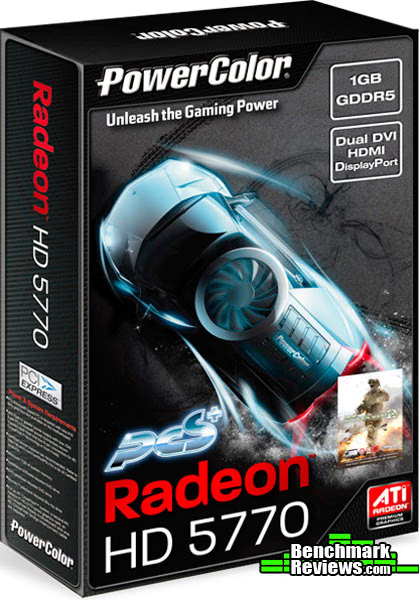
Another standard PowerColor norm can be seen on the box design of the AX5770 PCS+. A sporty car equipped with a cooling fan is spinning out across the top of the box. It's visually appealing and is accompanied by the words "Unleash the Gaming Power" and the PCS+ symbol, letting us know that this card is factory overclocked by PowerColor.
The PowerColor Radeon HD 5770 PPG comes bundled with the normal accessories. There is a DVA to VGA Dongle, which I hope is slowly going the way of the dinosaur. If you are still using a monitor that requires a VGA input, please consider an upgrade. The digital video era has been around for a long time now and you are wasting precious video potential by limiting yourself to an analog input. The AX5770 PCS+ also comes with a crossfire bridge. It is interesting to note here that the Radeon HD 5770 will connect in crossfire to its cousin, the Radeon HD5750. The two cards are nearly identical, with the latter having a few less stream processors and lower clock speeds. Also bundled with the AX5770 PCS+ are the driver CD, a user's manual, and a code for Call of Duty: Modern Warfare 2.
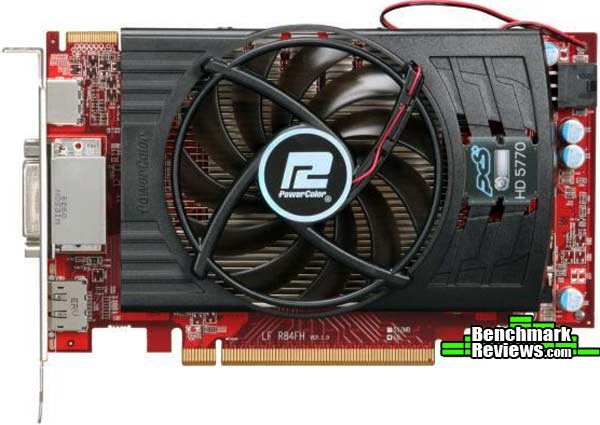
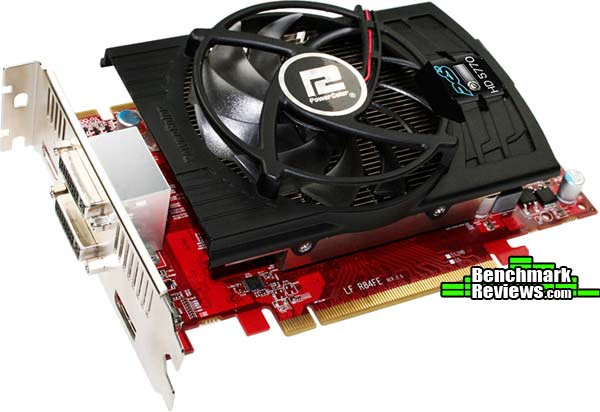
The PowerColor Radeon HD 5770 moves away from the reference design of the Radeon HD 5770 by quite a bit. The PCB itself is completely overhauled and is actually about an inch shorter than the reference design. Additionally, PowerColor has opted away from the full body cooler design for the AX5770 PCS+. This means the heat from the card won't be directed out of the partially ventilated I/O panel and will instead need to be taken care of through other means of case ventilation. This shouldn't be too worrisome, as the Radeon HD 5770 series hasn't had problems with generating too much heat.
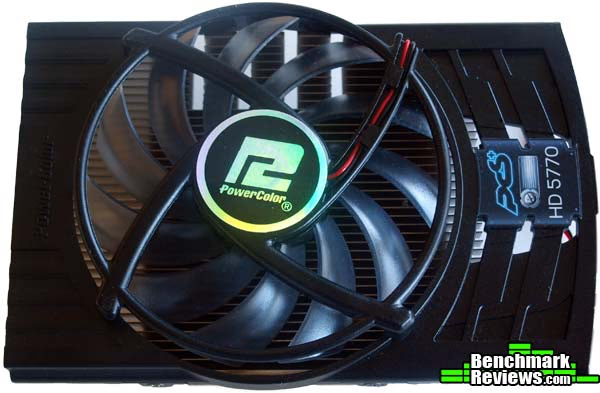
The 80mm fan on the AX5770 PCS+ is a staple of PowerColor, appearing on other video cards as well. The vanes of the fan are sharply angled in order to push as much air as possible down onto the heatsink. The heatsink itself consists of aluminum heat fins on top of a copper base-plate. The base-plate is pretty large on the AX5770 PCS+ and covers both the GPU and the memory. During normal operation, the fan of the AX5770 PCS+ is nearly silent, as far as my ears can tell. Even with the video card running at full-throttle, the fan is pretty quiet. This is likely due in part to the BIOS changes PowerColor has made to the original version of the AX5770 PCS+. When I manually turned the fan up to 100% to overclock the video card, it got a little noisy, however.

The PowerColor Radeon HD 5770 PPG has the now normal array of I/O ports covering its dual-width rear panel. The same ports can be found on nearly all HD 5000 series cards. There are two DVI ports placed back-to-back with an HDMI port above and a DisplayPort below. Above and below the farthest right DVI port are exhaust vents which seem to be reminiscent of the reference design. On the AX5770 PCS+, these exhaust vents will do very little due to the configuration of the GPU cooler. Any excess heat will be blown into the case rather than out of the back of the card, so these vents really only help increase your case ventilation.

The PowerColor Radeon HD 5770 PPG has a single 6-pin input from the PSU. This will allow users with lower-end power supplies to still enjoy the graphics of the Radeon HD5700 series. PowerColor recommends using a 450W power supply for a system equipped with the AX5770.
AX5770 1GBD5-PPGV2 Detailed Features
The fan and heatsink for the PowerColor AX5770 PCS+ is easily removed by taking out the four screws surrounding the GPU. The whole mount then comes off rather easily so we can take a look at what lies beneath. As is common with many video card manufacturers, it appears as though PowerColor hasn't read our Executive Editors advice on applying thermal interface material. There is far too much on the AX5770 PCS+ GPU.

The backside of the AX5770 PCS+ is a little crowded, but PowerColor has made good use of the space. By rearranging the PCB layout, PowerColor was able to cut off about an inch in the length of the AX5770 PCS+ compared to the ATI reference model.

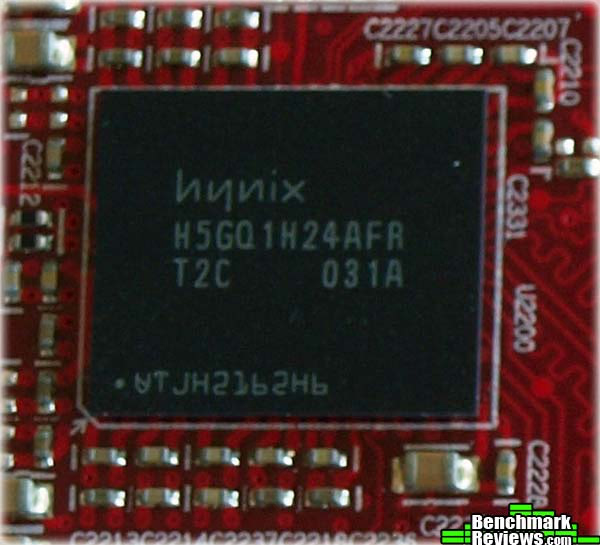
It seems like PowerColor made another little change to the AX5770 PCS+ v2 as well. The first version of the AX5770 PCS+ came with Samsung memory modules. As you can see here, the AX5770 PCS+ v2 clearly had Hynix memory modules.

The Hynix memory modules on the AX5770 PCS+ v2 are numbered H5GQ1H24AFR. These modules, while "overclocked" on the PowerColor AX5770 PCS+ to 1225 MHz are actually rated to run at 5 Gbps effective speed or 1250 MHz. This is the same as the Samsung modules found on the AX5770 PCS+ v1. So while most Radeon HD 5770 cards have memory clocked at 1200 MHz, and the AX5770 PCS+ has memory clocked at 1225 MHz, we should have no problems pushing the memory to 1250 MHz without adding additional voltage.
Below you can see a close-up of probably the most crowded section of the PCB, just behind the GPU. It is clear that PowerColor has taken care with during engineering to avoid over-soldering or splash amongst the components. Even with such tightly spaced parts (and it has to be that way when you cut an inch off the reference design) they all fit nicely within their designated locations.

Now that we have taken a close and detailed look at the PowerColor Radeon HD 5770 AX5770 PCS+ v2, lets explore the features and specifications that PowerColor has released for the card.
PowerColor Radeon HD 5770 Features
The ATI Radeon HD5700 series of video cards is built on the "Juniper" GPU core, which is basically half of the "Cypress" core that powers the HD5800 series. This doesn't mean that performance is cut in half, but the decreased cost of making the HD5700 series of cards puts them in a much more affordable price range.
The PowerColor Radeon HD 5770 AX5770 PCS+ graphics cards come with ATI Eyefinity Technology, which can instantly triple your visual real estate, up to three displays for the ultimate in innovative "wrap around" capabilities, all with crisp, sharp picture quality. ATI Eyefinity technology engages your peripheral vision and puts you right in the game. At the office, you can multi-task without needing to flip between windows. Ideal for multi-media applications, keep as many palettes or panels open as you would like, while you edit images or videos.
ATI Stream Technology unleashes the massive parallel processing power of your GPU to help speed up demanding every-day applications. Experience fast video encoding and transcoding, so that video playback, editing and transferring content to your iPod or other portable media players is quick and easy.
The HD5700 Series were the first fully Microsoft DirectX 11-compatible GPUs in their class and delivered unrivaled visual quality and intense gaming performance. Enjoy in-your-face 3D visual effects and dynamic interactivity, with features like HDR Texture Compression, DirectCompute 11 and Tessellation.
The 5700 Series is further supersized with GDDR5 memory, 1.8X of graphics performance boost with ATI CrossFireX technology in dual mode, and unparalleled anti-aliasing and enhanced anisotropic filtering for slick graphics and supreme realism.
ATI Radeon HD 5770 GPU Feature Summary
- 1.04 billion 40nm transistors
- TeraScale 2 Unified Processing Architecture
- 800 Stream Processing Units
- 40 Texture Units
- 64 Z/Stencil ROP Units
- 16 Color ROP Units
- GDDR5 memory interface
- PCI Express 2.1 x16 bus interface
- DirectX 11 support
- Shader Model 5.0
- DirectCompute11
- Programmable hardware tessellation unit
- Accelerated multi-threading
- HDR texture compression
- Order-independent transparency
- OpenGL 3.2 support1
- Image quality enhancement technology
- Up to 24x multi-sample and super-sample anti-aliasing modes
- Adaptive anti-aliasing
- 16x angle independent anisotropic texture filtering
- 128-bit floating point HDR rendering
- ATI Eyefinity multi-display technology2,3
- Three independent display controllers - Drive three displays simultaneously with independent resolutions, refresh rates, color controls, and video overlays
- Display grouping - Combine multiple displays to behave like a single large display
- ATI Stream acceleration technology
- OpenCL 1.0 compliant
- DirectCompute11
- Accelerated video encoding, transcoding, and upscaling4,5
- Native support for common video encoding instructions
- ATI CrossFireX multi-GPU technology6
- Dual GPU scaling
- ATI Avivo HD Video & Display technology7
- UVD 2 dedicated video playback accelerator
- Advanced post-processing and scaling8
- Dynamic contrast enhancement and color correction
- Brighter whites processing (blue stretch)
- Independent video gamma control
- Dynamic video range control
- Support for H.264, VC-1, and MPEG-2
- Dual-stream 1080p playback support9,10
- DXVA 1.0 & 2.0 support
- Integrated dual-link DVI output with HDCP11
- Max resolution: 2560x160012
- Integrated DisplayPort output
- Max resolution: 2560x160012
- Integrated HDMI 1.3 output with Deep Color, xvYCC wide gamut support, and high bit-rate audio
- Max resolution: 1920x120012
- Integrated VGA output
- Max resolution: 2048x153612
- 3D stereoscopic display/glasses support13
- Integrated HD audio controller
- Output protected high bit rate 7.1 channel surround sound over HDMI with no additional cables required
- Supports AC-3, AAC, Dolby TrueHD and DTS Master Audio formats
- ATI PowerPlay power management technology7
- Dynamic power management with low power idle state
- Ultra-low power state support for multi-GPU configurations
- Certified drivers for Windows 7, Windows Vista, and Windows XP
- Driver support scheduled for release in 2010
- Driver version 8.66 (Catalyst 9.10) or above is required to support ATI Eyefinity technology and to enable a third display you require one panel with a DisplayPort connector
- ATI Eyefinity technology works with games that support non-standard aspect ratios which is required for panning across three displays
- Requires application support for ATI Stream technology
- Digital rights management restrictions may apply
- ATI CrossFireX technology requires an ATI CrossFireX Ready motherboard, an ATI CrossFireX Bridge Interconnect for each additional graphics card) and may require a specialized power supply
- ATI PowerPlay, ATI Avivo and ATI Stream are technology platforms that include a broad set of capabilities offered by certain ATI Radeon HD GPUs. Not all products have all features and full enablement of some capabilities and may require complementary products
- Upscaling subject to available monitor resolution
- Blu-ray or HD DVD drive and HD monitor required
- Requires Blu-ray movie disc supporting dual 1080p streams
- Playing HDCP content requires additional HDCP ready components, including but not limited to an HDCP ready monitor, Blu-ray or HD DVD disc drive, multimedia application and computer operating system.
- Some custom resolutions require user configuration
- Requires 3D Stereo drivers, glasses, and display
PowerColor AX5770 PCS+ Specifications
- Engine clock speed: 850 MHz
- Processing power (single precision): 1.36 TeraFLOPS
- Polygon throughput: 850M polygons/sec
- Data fetch rate (32-bit): 136 billion fetches/sec
- Texel fill rate (bilinear filtered): 34 Gigatexels/sec
- Pixel fill rate: 13.6 Gigapixels/sec
- Anti-aliased pixel fill rate: 54.4 Gigasamples/sec
- Memory clock speed: 1.2 GHz
- Memory data rate: 4.8 Gbps
- Memory bandwidth: 76.8 GB/sec
- Maximum board power: 108 Watts
- Idle board power: 18 Watts
VGA Testing Methodology
The Microsoft DirectX-11 graphics API is native to the Microsoft Windows 7 Operating System, which is the primary O/S for our test platform. DX11 is also available as a Microsoft Update for the Windows Vista O/S, so our test results apply to both versions of the Operating System. Many of benchmark tests used in this article are comparative to DX11 performance, however some high-demand DX10 tests have also been included.According to the Steam Hardware Survey published for the month ending September 2010, the most popular gaming resolution is 1680x1050 (22-24" widescreen LCD) with 1280x1024 (17-19" standard LCD monitors) close behind. Here at Benchmark Reviews, we like to push things a little further, so our tests will be conducted at 1920x1080. Most of the tests will also include results at 1680x1050. Our site polls and statistics indicate that the over 90% of our visitors use their PC for playing video games, and practically every one of you are using a screen resolutions mentioned above. Since all of the benchmarks we use for testing represent different game engine technology and graphic rendering processes, this battery of tests will provide a diverse range of results for you to gauge performance on your own computer system.
A combination of synthetic and video game benchmark tests have been used in this article to illustrate relative performance among graphics solutions. Our benchmark frame rate results are not intended to represent real-world graphics performance, as this experience would change based on supporting hardware and the perception of individuals playing the video game.
At the start of all tests, the previous display adapter driver is uninstalled and trace components are removed using Driver Cleaner Pro. We then restart the computer system to establish our display settings and define the monitor. Once the hardware is prepared, we begin our testing. In each benchmark test there is one 'cache run' that is conducted, followed by five recorded test runs. Results are collected at each setting with the highest and lowest results discarded. The remaining three results are averaged, and displayed in the performance charts on the following pages.
DX11 Cost to Performance Ratio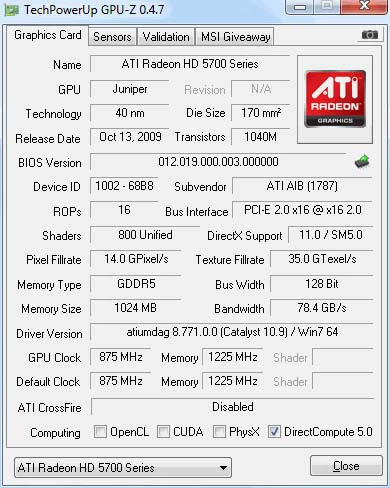
For this article Benchmark Reviews has included cost per FPS for graphics performance results. Only the least expensive product price is calculated, and does not consider tax, freight, promotional offers, or rebates into the cost. All prices reflect product series components, and do not represent any specific manufacturer, model, or brand. These retail prices for each product were obtained from NewEgg.com on 01-November-2010:
- $115 GeForce GTS 250 512MB (9800GTX+)
- $140 GeForce GTS450 1GB (MSI GTS450 Cyclone)
- $145 Radeon HD 5770 1GB (PowerColor 1GBD5-PPG)
- $260 GeForce GTX 285 1GB
Test System
- Motherboard: Biostar TA890GXB-HD (890GX/SB850)
- Processor: AMD Athlon-II X4-645 3.1GHz (ADX645WFGMBOX)
- CPU Cooler: Scythe Mugen II
- System Memory: 2x2GB Patriot Gamer Series DDR3 (1333MHz@7-7-7-21)
- Primary Drive: Filemate Solid GO 60GB SSD
- Power Supply Unit: OCZ Z-Series Gold 850W OCZZ850 Corsair CMPSU-850TX 850W
- Monitor: 23-Inch Widescreen LCD (up to 1920x1080@60Hz)Motherboard: Gigabyte GA-EP45-UD3P Rev 1.1 (F7c BIOS)
- Operating System: Windows 7 Professional
DirectX-10 Benchmark Applications
- 3DMark Vantage v1.02 (High Quality, 8x Anti Aliasing, 16x Anisotropic Filtering, 1:2 Scale)
- BattleField: Bad Company 2 (High Quality, 4x Anti-Aliasing, 16x Anisotropic Filtering, Single-Player Intro Scene)
- Far Cry 2 v1.03 (DX10, Ultra High Performance, Ultra High Quality, 8x Anti-Aliasing, HDR + Bloom)
- Resident Evil 5 Benchmark (DX10, High Quality, 8x MSAA)
- Street Fighter IV Benchmark (High Quality, 8x AA, 16x AF, Parrallel Rendering)
DirectX-11 Benchmark Applications
- Aliens vs Predator (High Quality, 8x AA, 16x AF, SSAO, Tessellation, Advanced Shadows)
- Lost Planet 2 (High Quality, AAA, 16x AF, Benchmark Tool)
- Unigine Heaven Benchmark 2.2 (DX11, High Tessellation, 8x AF, 16x AA)
- BitSquid Stone Giant (DX11, High Quality, High Tesselation)
Video Card Test Products
|
Graphics Card |
GeForce 9800 GTX+ |
GeForce GTX285 |
GeForce GTS450 |
PowerColor
Radeon HD 5770 PPG
|
|---|---|---|---|---|
|
GPU Cores |
128 |
240 |
192 |
800 |
|
Core Clock (MHz) |
740 |
670 |
850 |
875 |
|
Shader Clock (MHz) |
1836 |
1550 |
1700 |
N/A |
|
Memory Clock (MHz) |
1100 |
1300 |
1000 |
1225 |
|
Memory Amount |
512 MB GDDR3 |
1024MB GDDR3 |
1024MB GDDR3 |
1024MB GDDR5 |
|
Memory Interface |
256-bit |
512-bit |
128-bit |
128-bit |
-
MSI GeForce 9800 GTX+ / GTS 250 (740 MHz GPU/1836 MHz Shader/1100 MHz vRAM - Forceware 260.63)
-
MSI GeForce GTX 285 (670 MHz GPU/1550 MHz Shader/1330 MHz vRAM - Forceware 260.63)
-
PowerColor Radeon HD 5770 1GBD5-PPVG2 (875MHz GPU/1225 MHz vRAM - ATI Catalyst Driver 10.9)
-
MSI N450GTS GTS450 Cyclone 1GB (850 MHz GPU/1700 MHz Shader/1000 MHz vRAM - Forceware 260.63)
DX10: 3DMark Vantage
3DMark Vantage is a PC benchmark suite designed to test the DirectX10 graphics card performance. FutureMark 3DMark Vantage is the latest addition the 3DMark benchmark series built by FutureMark corporation. Although 3DMark Vantage requires NVIDIA PhysX to be installed for program operation, only the CPU/Physics test relies on this technology.
3DMark Vantage offers benchmark tests focusing on GPU, CPU, and Physics performance. Benchmark Reviews uses the two GPU-specific tests for grading video card performance: Jane Nash and New Calico. These tests isolate graphical performance, and remove processor dependence from the benchmark results.
3DMark Vantage GPU Test: Jane Nash
Of the two GPU tests 3DMark Vantage offers, the Jane Nash performance benchmark is slightly less demanding. In a short video scene the special agent escapes a secret lair by water, nearly losing her shirt in the process. Benchmark Reviews tests this DirectX-10 scene at 1920x1080 and 1680x1050 resolutions, and uses high quality settings with 8x anti-aliasing and 16x anisotropic filtering. The 1:2 scale is utilized, and is the highest this test allows. These settings allow for the GPUs in the test to be stressed sufficiently.

Cost Analysis: Jane Nash (1920x1080)
- $115 GeForce GTS 250 512MB (9800GTX+) = $11.48 per FPS
- $140 GeForce GTS 450 1GB (MSI Cyclone) = $8.97 per FPS
- $145 Radeon HD 5770 1GB (PowerColor 1GBD5-PPVG2) = $8.90 per FPS
- $260 GeForce GTX 285 1GB = $13.42 per FPS
3DMark Vantage GPU Test: New Calico
New Calico is the second GPU test in the 3DMark Vantage test suite. Of the two GPU tests, New Calico is the most demanding. In a short video scene featuring a galactic battleground, there is a massive display of busy objects across the screen. Benchmark Reviews tests this DirectX-10 scene at 1920x1080 and 1680x1050 resolutions, and uses high quality settings with 8x anti-aliasing and 16x anisotropic filtering. The 1:2 scale is utilized, and is the highest this test allows.
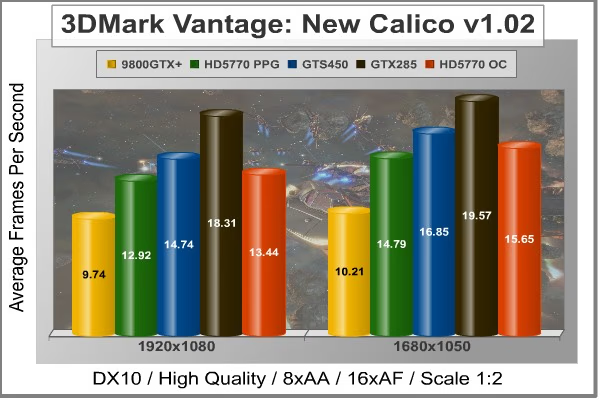
Cost Analysis: New Calico (1920x1080)
- $115 GeForce GTS 250 512MB (9800GTX+) = $11.81 per FPS
- $140 GeForce GTS 450 1GB (MSI Cyclone) = $9.50 per FPS
- $145 Radeon HD 5770 1GB (PowerColor 1GBD5-PPVG2) = $11.22 per FPS
- $260 GeForce GTX 285 1GB = $13.42 per FPS
Test Summary: The 3DMark Vantage tests thoroughly stress even the strongest GPUs, as can be witnessed by the less than stellar 19.37 FPS in the Jane Nash test achieved by our strongest GPU in the testbed, the GTX 285. The two GPU tests in the 3DMark Vantage suite seem torn when it comes to deciding a winner between the similarly priced AX5770 PCS+ and the GTS450. In the Jane Nash test, the AX5770 PCS+ ekes out slight gains over the GTS450, but in amounts of less than 1 FPS. Still, at these low frames, the AX5770 PCS+ is more than 4% faster than the GTS450, putting it outside of the margin of error. In the Calico tests, the GTS450 outperforms the AX5770 PCS+ by an even larger margin. Through the 3DMark Vantage tests, it's difficult to decide a winner, but the slightly lower price of the GTS450 and its performance in the Calico test give it a better cost per FPS ration.
|
Graphics Card |
GeForce 9800 GTX+ |
GeForce GTX285 |
GeForce GTS450 |
PowerColor
Radeon HD 5770 PPG
|
|---|---|---|---|---|
|
GPU Cores |
128 |
240 |
192 |
800 |
|
Core Clock (MHz) |
740 |
670 |
850 |
875 |
|
Shader Clock (MHz) |
1836 |
1550 |
1700 |
N/A |
|
Memory Clock (MHz) |
1100 |
1300 |
1000 |
1225 |
|
Memory Amount |
512 MB GDDR3 |
1024MB GDDR3 |
1024MB GDDR3 |
1024MB GDDR5 |
|
Memory Interface |
256-bit |
512-bit |
128-bit |
128-bit |
DX10: Street Fighter IV
Capcom's Street Fighter IV is part of the now-famous Street Fighter series that began in 1987. The 2D Street Fighter II was one of the most popular fighting games of the 1990s, and now gets a 3D face-lift to become Street Fighter 4. The Street Fighter 4 benchmark utility was released as a novel way to test your system's ability to run the game. It uses a few dressed-up fight scenes where combatants fight against each other using various martial arts disciplines. Feet, fists and magic fill the screen with a flurry of activity. Due to the rapid pace, varied lighting and the use of music this is one of the more enjoyable benchmarks.
Street Fighter IV uses a proprietary Capcom SF4 game engine, which is enhanced over previous versions of the game. In terms of 3D graphical demand, Street Fighter IV is considered very low-end for most desktop GPUs. While modern desktop computers with discrete graphics have no problem playing Street Fighter IV at its highest graphical settings, integrated and mobile GPUs have a difficult time producing playable frame rates with the lowest settings configured.
- Street Figher IV Benchmark (High Quality, 8x AA, 16x AF, Parallel Rendering)
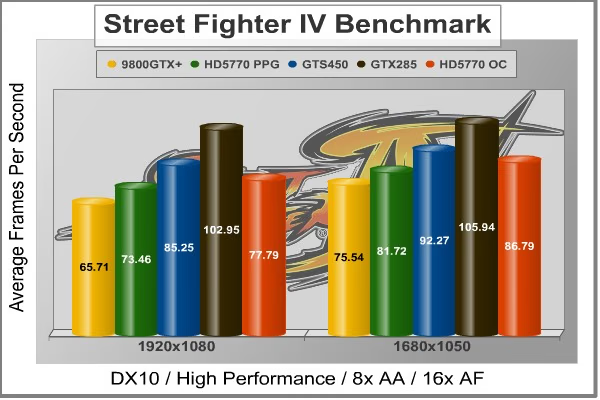
Cost Analysis: Street Fighter IV (1920x1080)
- $115 GeForce GTS 250 512MB (9800GTX+) = $1.75 per FPS
- $140 GeForce GTS 450 1GB (MSI Cyclone) = $1.64 per FPS
- $145 Radeon HD 5770 1GB (PowerColor 1GBD5-PPVG2) = $1.97 per FPS
- $260 GeForce GTX 285 1GB = $2.53 per FPS
Test Summary: The Capcom title Street Fighter IV isn't very demanding on the AX5770 PCS+, but it can give us a good idea of what most games will probably play like using this hardware. We like to push our hardware to the limit with some of the most demanding titles, but the truth is most games don't require nearly as much from your hardware. In the Street Fighter IV benchmark, the GTS450 once again outperforms the AX5770 PCS+ and this time at a much higher amount, over 16%.
|
Graphics Card |
GeForce 9800 GTX+ |
GeForce GTX285 |
GeForce GTS450 |
PowerColor
Radeon HD 5770 PPG
|
|---|---|---|---|---|
|
GPU Cores |
128 |
240 |
192 |
800 |
|
Core Clock (MHz) |
740 |
670 |
850 |
875 |
|
Shader Clock (MHz) |
1836 |
1550 |
1700 |
N/A |
|
Memory Clock (MHz) |
1100 |
1300 |
1000 |
1225 |
|
Memory Amount |
512 MB GDDR3 |
1024MB GDDR3 |
1024MB GDDR3 |
1024MB GDDR5 |
|
Memory Interface |
256-bit |
512-bit |
128-bit |
128-bit |
Far Cry 2 Benchmark Results
Ubisoft has developed Far Cry 2 as a sequel to the original, but with a very different approach to game play and story line. Far Cry 2 features a vast world built on Ubisoft's new game engine called Dunia, meaning "world", "earth" or "living" in Farci. The setting in Far Cry 2 takes place on a fictional Central African landscape, set to a modern day timeline.
The Dunia engine was built specifically for Far Cry 2, by Ubisoft Montreal development team. It delivers realistic semi-destructible environments, special effects such as dynamic fire propagation and storms, real-time night-and-day sun light and moon light cycles, dynamic music system, and non-scripted enemy A.I actions.
The Dunia game engine takes advantage of multi-core processors as well as multiple processors and supports DirectX 9 as well as DirectX 10. Only 2 or 3 percent of the original CryEngine code is re-used, according to Michiel Verheijdt, Senior Product Manager for Ubisoft Netherlands. Additionally, the engine is less hardware-demanding than CryEngine 2, the engine used in Crysis. However, it should be noted that Crysis delivers greater character and object texture detail, as well as more destructible elements within the environment. For example; trees breaking into many smaller pieces and buildings breaking down to their component panels. Far Cry 2 also supports the amBX technology from Philips. With the proper hardware, this adds effects like vibrations, ambient colored lights, and fans that generate wind effects.
There is a benchmark tool in the PC version of Far Cry 2, which offers an excellent array of settings for performance testing. Benchmark Reviews used the maximum settings allowed for our tests, with the resolution set to 1920x1080 and 1680x1050. The performance settings were all set to 'Very High', Render Quality was set to 'Ultra High' overall quality level, 8x anti-aliasing was applied, and HDR and Bloom were enabled. Of course DX10 was used exclusively for this series of tests.

Cost Analysis: Far Cry 2 (1920x1080)
- $115 GeForce GTS 250 512MB (9800GTX+) = $4.80 per FPS
- $140 GeForce GTS 450 1GB (MSI Cyclone) = $3.35 per FPS
- $145 Radeon HD 5770 1GB (PowerColor 1GBD5-PPVG2) = $4.69 per FPS
- $260 GeForce GTX 285 1GB = $3.98 per FPS
Test Summary: Far Cry 2 may use the same Dunia engine that Crysis uses, but the benchmark is generally less taxing than the Crysis benchmark. It is still pretty demanding at ultra high performance settings for our AX5770 PCS+. The PowerColor Radeon HD 5770 only gets frame rates slightly above what is considered playable. The GTS450, on the other hand, beats the AX5770 PCS+ by more than 10 FPS in both at 1920x1080 and 1680x1050. So far the DX10 tests are favoring the Fermi card over the Radeon HD 5770, even when overclocked.
|
Graphics Card |
GeForce 9800 GTX+ |
GeForce GTX285 |
GeForce GTS450 |
PowerColor
Radeon HD 5770 PPG
|
|---|---|---|---|---|
|
GPU Cores |
128 |
240 |
192 |
800 |
|
Core Clock (MHz) |
740 |
670 |
850 |
875 |
|
Shader Clock (MHz) |
1836 |
1550 |
1700 |
N/A |
|
Memory Clock (MHz) |
1100 |
1300 |
1000 |
1225 |
|
Memory Amount |
512 MB GDDR3 |
1024MB GDDR3 |
1024MB GDDR3 |
1024MB GDDR5 |
|
Memory Interface |
256-bit |
512-bit |
128-bit |
128-bit |
Resident Evil 5 Benchmark Results
Built upon an advanced version of Capcom's proprietary MT Framework game engine to deliver DirectX-10 graphic detail, Resident Evil 5 offers gamers non-stop action similar to Devil May Cry 4, Lost Planet, and Dead Rising. The MT Framework is an exclusive seventh generation game engine built to be used with games developed for the PlayStation 3 and Xbox 360, and PC ports. MT stands for "Multi-Thread", "Meta Tools" and "Multi-Target". Games using the MT Framework are originally developed on the PC and then ported to the other two console platforms.
On the PC version of Resident Evil 5, both DirectX 9 and DirectX-10 modes are available for Microsoft Windows XP and Vista Operating Systems. Microsoft Windows 7 will play Resident Evil with backwards compatible Direct3D APIs. Resident Evil 5 is branded with the NVIDIA The Way It's Meant to be Played (TWIMTBP) logo, and receives NVIDIA GeForce 3D Vision functionality enhancements.
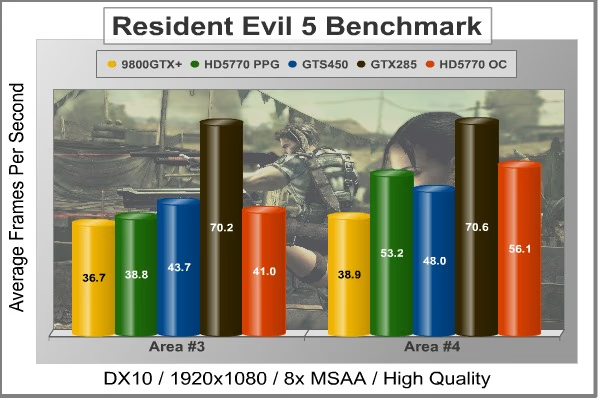
NVIDIA and Capcom offer the Resident Evil 5 benchmark demo for free download from their website, and Benchmark Reviews encourages visitors to compare their own results to ours. Because the Capcom MT Framework game engine is very well optimized and produces high frame rates, Benchmark Reviews uses the DirectX-10 version of the test at 1920x1080 resolution. High quality settings are configured, with 8x MSAA post processing effects for high demand on the GPU. Test scenes from Area #3 and Area #4 require the most graphics processing power, and the results are collected for the chart illustrated below.
Cost Analysis: Resident Evil 5 (Area 4)
- $115 GeForce GTS 250 512MB (9800GTX+) = $3.13 per FPS
- $140 GeForce GTS 450 1GB (MSI Cyclone) = $3.20 per FPS
- $145 Radeon HD 5770 1GB (PowerColor 1GBD5-PPVG2) = $3.74 per FPS
- $260 GeForce GTX 285 1GB = $3.70 per FPS
Test Summary: The Resident Evil 5 benchmark, though also a CAPCOM title, appears to be a little tougher on the GPUs than the Street Fighter IV benchmark. Areas #3 and #4 are the most graphically demanding in this benchmark, so we have charted those two scenes. Area #3 gives us similary results to many of the other DX10 titles, but the less demanding area #4 shows the AX5770 PCS+ with the advantage, and by a sizeable margin. So the PowerColor Radeon HD 5770 is still competing with the GTS450, even with the slight setbacks from the other tests. Let's take a look at some DX11 titles before we make a final decision on the matter.
|
Graphics Card |
GeForce 9800 GTX+ |
GeForce GTX285 |
GeForce GTS450 |
PowerColor
Radeon HD 5770 PPG
|
|---|---|---|---|---|
|
GPU Cores |
128 |
240 |
192 |
800 |
|
Core Clock (MHz) |
740 |
670 |
850 |
875 |
|
Shader Clock (MHz) |
1836 |
1550 |
1700 |
N/A |
|
Memory Clock (MHz) |
1100 |
1300 |
1000 |
1225 |
|
Memory Amount |
512 MB GDDR3 |
1024MB GDDR3 |
1024MB GDDR3 |
1024MB GDDR5 |
|
Memory Interface |
256-bit |
512-bit |
128-bit |
128-bit |
DX11: Aliens vs Predator
Aliens vs. Predator is a science fiction first-person shooter video game, developed by Rebellion, and published by Sega for Microsoft Windows, Sony PlayStation 3, and Microsoft Xbox 360. Aliens vs. Predator utilizes Rebellion's proprietary Asura game engine, which had previously found its way into Call of Duty: World at War and Rogue Warrior. The self-contained benchmark tool is used for our DirectX-11 tests, which push the Asura game engine to its limit.
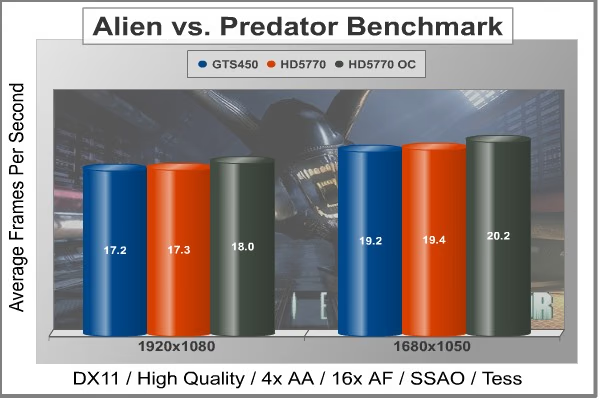
In our benchmark tests, Aliens vs. Predator was configured to use the medium quality settings with 4x AA and 16x AF. DirectX-11 features such as Screen Space Ambient Occlusion (SSAO) and tessellation have also been included.
Cost Analysis: Aliens vs Predator (1920x1080)
- $140 GeForce GTS 450 1GB (MSI Cyclone) = $8.14 per FPS
- $145 Radeon HD 5770 1GB (PowerColor 1GBD5-PPVG2) = $8.38 per FPS
Test Summary: In our first DX11 title, our two DX11 cards are running neck and neck. This time the results are well within the margin of error and it seems that both cards are equal. It is only after overclocked the AX5770 PCS+ even more than it was already that the PowerColor Radeon HD 5770 manages to pull ahead. This is a pretty good sign, however, considering the AX5770 PCS+ lagged behind somewhat in most of the DX10 benchmarks.
|
Graphics Card |
GeForce 9800 GTX+ |
GeForce GTX285 |
GeForce GTS450 |
PowerColor
Radeon HD 5770 PPG
|
|---|---|---|---|---|
|
GPU Cores |
128 |
240 |
192 |
800 |
|
Core Clock (MHz) |
740 |
670 |
850 |
875 |
|
Shader Clock (MHz) |
1836 |
1550 |
1700 |
N/A |
|
Memory Clock (MHz) |
1100 |
1300 |
1000 |
1225 |
|
Memory Amount |
512 MB GDDR3 |
1024MB GDDR3 |
1024MB GDDR3 |
1024MB GDDR5 |
|
Memory Interface |
256-bit |
512-bit |
128-bit |
128-bit |
DX11: Battlefield Bad Company 2
The Battlefield franchise has been known to demand a lot from PC graphics hardware. DICE (Digital Illusions CE) has incorporated their Frostbite-1.5 game engine with Destruction-2.0 feature set with Battlefield: Bad Company 2. Battlefield: Bad Company 2 features destructible environments using Frostbit Destruction-2.0, and adds gravitational bullet drop effects for projectiles shot from weapons at a long distance. The Frostbite-1.5 game engine used on Battlefield: Bad Company 2 consists of DirectX-10 primary graphics, with improved performance and softened dynamic shadows added for DirectX-11 users.
At the time Battlefield: Bad Company 2 was published, DICE was also working on the Frostbite-2.0 game engine. This upcoming engine will include native support for DirectX-10.1 and DirectX-11, as well as parallelized processing support for 2-8 parallel threads. This will improve performance for users with an Intel Core-i7 processor. Unfortunately, the Extreme Edition Intel Core i7-980X six-core CPU with twelve threads will not see full utilization.
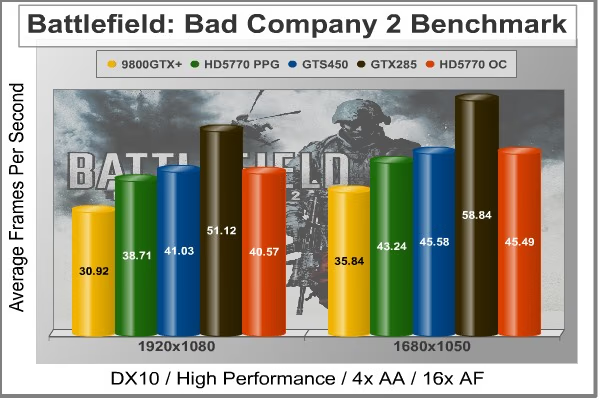
In our benchmark tests of Battlefield: Bad Company 2, the first three minutes of action in the single-player raft night scene are captured with FRAPS. Relative to the online multiplayer action, these frame rate results are nearly identical to daytime maps with the same video settings.
Cost Analysis: Battlefield: Bad Company 2 (1920x1080)
- $115 GeForce GTS 250 512MB (9800GTX+) = $3.71 per FPS
- $140 GeForce GTS 450 1GB (MSI Cyclone) = $3.41 per FPS
- $145 Radeon HD 5770 1GB (PowerColor 1GBD5-PPVG2) = $3.74 per FPS
- $260 GeForce GTX 285 1GB = $5.07 per FPS
Test Summary: Even with these high settings, Battlefield: Bad Company 2 is playable with all the video cards in our test bed. Before the Fermi series was released, the GTS250 was one of the most comparable cards to the Radeon HD 5770. Here you can see that the improvement over the standing competition at the time is quite significant. The release of the GTS450 has changed things a little, and a slightly less expensive card is now outperforming, even if only by a few FPS, the PowerColor AX5770 PCS+ in the Battlefield benchmark test. It appears as though this test agrees with the Calico test.
|
Graphics Card |
GeForce 9800 GTX+ |
GeForce GTX285 |
GeForce GTS450 |
PowerColorRadeon HD 5770 PPG |
|---|---|---|---|---|
|
GPU Cores |
128 |
240 |
192 |
800 |
|
Core Clock (MHz) |
740 |
670 |
850 |
875 |
|
Shader Clock (MHz) |
1836 |
1550 |
1700 |
N/A |
|
Memory Clock (MHz) |
1100 |
1300 |
1000 |
1225 |
|
Memory Amount |
512 MB GDDR3 |
1024MB GDDR3 |
1024MB GDDR3 |
1024MB GDDR5 |
|
Memory Interface |
256-bit |
512-bit |
128-bit |
128-bit |
DX11: Lost Planet 2
A decade has passed since the first game, and the face of E.D.N. III has changed dramatically. Terra forming efforts have been successful and the ice has begun to melt, giving way to lush tropical jungles and harsh unforgiving deserts. Players will enter this new environment and follow the exploits of their own customized snow pirate on their quest to seize control of the changing planet.
Test A
The primary purpose of Test A is to give an indication of typical game play performance of the PC running Lost Planet 2. (i.e. if you can run Mode A smoothly, the game will be playable at a similar condition). In this test, the character's motion is randomized to give a slightly different outcome each time.
Test B
The primary purpose of Test B is to push the PC to its limits and to evaluate the maximum performance of the PC. It utilizes many functions of Direct X11 resulting in a very performance-orientated, very demanding benchmark mode. (Information obtained from the Lost Planet 2 website)

Cost Analysis: Lost Planet 2 (1920x1080)
- $140 GeForce GTS 450 1GB (MSI Cyclone) = $6.06 per FPS
- $145 Radeon HD 5770 1GB (PowerColor 1GBD5-PPVG2) = $5.54 per FPS
Test Summary: The Lost Planet 2 results give us reason to take another look at the AX5770 PCS+. It seems the CAPCOM titles are pretty much split down the middle between the GTS450 and the Radeon HD 5770 in our test bed. The AX5770 PCS+ outpaces the GTS450 at both resolutions and by a few FPS. When overclocked, the gains are advanced slightly more. The Lost Planet 2 test gives us some good room for improvement in the future as well. At these settings and with the DX11 features at high, both the Radeon HD 5770 and the GTS450 come in with below playable FPS. This test should give us good growing room in the future.
|
Graphics Card |
GeForce 9800 GTX+ |
GeForce GTX285 |
GeForce GTS450 |
PowerColor
Radeon HD 5770 PPG
|
|---|---|---|---|---|
|
GPU Cores |
128 |
240 |
192 |
800 |
|
Core Clock (MHz) |
740 |
670 |
850 |
875 |
|
Shader Clock (MHz) |
1836 |
1550 |
1700 |
N/A |
|
Memory Clock (MHz) |
1100 |
1300 |
1000 |
1225 |
|
Memory Amount |
512 MB GDDR3 |
1024MB GDDR3 |
1024MB GDDR3 |
1024MB GDDR5 |
|
Memory Interface |
256-bit |
512-bit |
128-bit |
128-bit |
DX11: Unigine Heaven 2.2
The Unigine "Heaven 2.1" benchmark is a free publicly available tool that grants the power to unleash the graphics capabilities in DirectX-11 for Windows 7 or updated Vista Operating Systems. It reveals the enchanting magic of floating islands with a tiny village hidden in the cloudy skies. With the interactive mode, emerging experience of exploring the intricate world is within reach. Through its advanced renderer, Unigine is one of the first to set precedence in showcasing the art assets with tessellation, bringing compelling visual finesse, utilizing the technology to the full extend and exhibiting the possibilities of enriching 3D gaming.
The distinguishing feature in the Unigine Heaven benchmark is a hardware tessellation that is a scalable technology aimed for automatic subdivision of polygons into smaller and finer pieces, so that developers can gain a more detailed look of their games almost free of charge in terms of performance. Thanks to this procedure, the elaboration of the rendered image finally approaches the boundary of veridical visual perception: the virtual reality transcends conjured by your hand. The "Heaven" benchmark excels at providing the following key features:
- Native support of OpenGL, DirectX 9, DirectX-10 and DirectX-11
- Comprehensive use of tessellation technology
- Advanced SSAO (screen-space ambient occlusion)
- Volumetric cumulonimbus clouds generated by a physically accurate algorithm
- Dynamic simulation of changing environment with high physical fidelity
- Interactive experience with fly/walk-through modes
- ATI Eyefinity support

Cost Analysis: Unigine Heaven DX11 (1920x1080)
- $140 GeForce GTS 450 1GB (MSI Cyclone) = $9.15 per FPS
- $145 Radeon HD 5770 1GB (PowerColor 1GBD5-PPVG2) = $10.74 per FPS
Test Summary: The DX11 Unigine Heaven benchmark strays from the results of the other two DX11 titles. The AX5770 PCS+ falls back behind the GTS450 by a couple of FPS and can't manage to make up the difference, even when overclocked. At the prices at which both of these GPUs are set right now, the GTS450 seems to be a more valuable GPU. The prices of the Radeon HD 5770 cards have already fallen since the release of the GTS450, but they will have to come down a little more in order to make it a more competitive opponent.
|
Graphics Card |
GeForce 9800 GTX+ |
GeForce GTX285 |
GeForce GTS450 |
PowerColor
Radeon HD 5770 PPG
|
|---|---|---|---|---|
|
GPU Cores |
128 |
240 |
192 |
800 |
|
Core Clock (MHz) |
740 |
670 |
850 |
875 |
|
Shader Clock (MHz) |
1836 |
1550 |
1700 |
N/A |
|
Memory Clock (MHz) |
1100 |
1300 |
1000 |
1225 |
|
Memory Amount |
512 MB GDDR3 |
1024MB GDDR3 |
1024MB GDDR3 |
1024MB GDDR5 |
|
Memory Interface |
256-bit |
512-bit |
128-bit |
128-bit |
Overclocking the Radeon HD 5770
It took a long time for video cards to really enter into the overclocking world. Sure, you could overclock your GPU, but it took a lot of work. Then one day 3rd party software groups started releasing software utilities specifically for overclocking your video card. At first, many of these utilities were pretty ugly and difficult to use themselves. Soon after, video card manufacturers themselves joined the fray and started releasing their own overclocking software. Now many hardware manufacturers have released a utility and they are much easier to use and look a lot better. In fact, both ATI and NVIDIA have even released their own versions of overclock utilities that are available with their complete driver packages.
With the AX5770 PCS+, PowerColor overclocked the card before even sending it to the shelves. In reality, this is a testament to the durability of the Radeon HD 5770 and the Juniper core. Now, it's my personal belief that if the manufacturer can overclock a video card, even slightly, there has to be more headroom in there for me to play around with.
PowerColor doesn't offer its own overclocking utility, so I decided to stick with ATI Overdrive. There are other options out there, like ASUS iTracker, Systool, and Riva-Tuner, but for this article the ATI utility fits our needs best. The Overdrive utility lets you overclock the GPU core, the memory, and it lets you manually adjust the fan speed. Just to be safe, I cranked the fan speed up to 100%. This caused the fan on the AX5770 PCS+ to be considerably louder in our open air test bed. You would likely hear the fan pretty well even housed within a case. The maximum overclock that the ATI Overdrive utility will allow for the AX5770 PCS+ is 960MHz for the core clock and 1400MHz for the memory clock. As for now, there is no way to increase the voltage through Overdrive.

The Samsung memory modules that are found on the AX5770 PCS+ are rated at 1250MHz. On stock Radeon HD 5770 cards, they are set to 1200MHz. On the pre-overclocked AX5770 PCS+, they are set to 1225MHz. Without wanting to overdo it on the memory, I set the memory to its rated 1250MHz. My real goal here is to overclock the GPU, the memory is just a bonus.
I wanted to push the AX5770, but not overdo it right from the start, so I moved the GPU clock slider up to 900MHz to begin with. The ATI Overdrive utility has a function to test the overclock right there within the utility. Be warned, however, that the video card might pass the test in Overdrive, but still not be stable enough for some high video content. I also used to test overclocked video cards for stability using FurMark's stress test for a few hours. In the past, this was enough to weed out any instability. Unfortunately, FurMark lacks DX11 capabilities and the tessellation and other DX11 features are much more taxing on a GPU. For the time being, I am running the Unigine Heaven Benchmark at full throttle to ensure GPU stability.
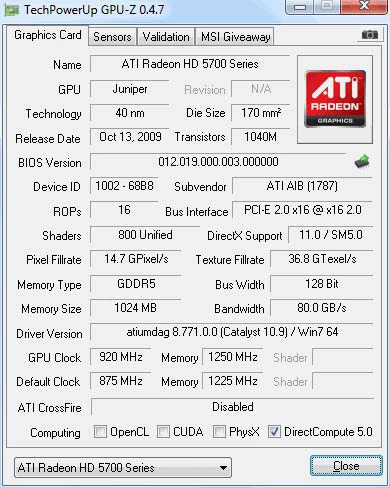
At 900MHz, the PowerColor AX5770 PCS+ was rock solid, but I knew I could push it more. There was still some headroom left. In the end, 920MHz was the highest overclock we were able to achieve for the PowerColor Radeon HD 5770 PPG. This overclock represents just over an 8% increase in clock speed from a stock 850MHz Radeon HD 5770 and about a 5% increase over the already overclocked 875MHz AX5770 PCS+. While I would have liked to see a little more headroom, every video card is different. Even if you were to go out and get a PowerColor Radeon HD 5770 AX5770 PCS+ today, you would experience a different overclock-ability in it. So, you get what you get, and in reality, 920MHz isn't bad at all. Let's get into the testing now, and see how it affected our results.
PowerColor AX5770 PCS+ Temperatures
The FurMark application has the ability to push a graphics processor to higher strains than any video game can. Doing so generates maximum thermal load for a GPU. This makes FurMark an excellent program to use to find out just how hot a video card has the potential to get inside of your computer. Now, the fact that FurMark pushes a GPU to extreme highs means that the likelihood of a video card reaching the temperatures that we are representing as the high here is very unlikely. The numbers we put here are a representation of the maximum thermal output of a video card and don't reflect normal, real-world performance.
To measure the temperatures of a video card, I first measure the idle temperature using GPU-Z. Then I use FurMark to push the GPU temperature to the very limit. The ambient temperature of test environment stays at a stable 20°C. After I am certain that the video card has reached its thermal potential, I close FurMark and measure the highest temperature recorded by GPU-Z during the process. I do this because it has often been speculated that FurMark records higher-than-actual temperatures. Both programs, however, came up with the same numbers for the temperatures of the PowerColor Radeon HD 5770 AX5770 PCS+.
The Radeon HD 5000 series of video cards has a good reputation where temperatures are concerned. The Radeon HD 5770 has never had any problems here and we don't expect the AX5770 PCS+ to either. In fact, PowerColor claims that the changes they have made to the PCB and the reference cooling design helps to keep the AX5770 PCS+ 10 degrees cooler than the reference Radeon HD 5770.
Our open air test bench is great for getting the temperatures of the actual card, but it doesn't help to show what those temperatures might do inside a closed computer case. With the design of the fan shroud on the AX5770 PCS+, more of the excess heat will be left inside of the case and not out the vents on the I/O panel. For this reason, it is even more important that the claims of lower temperatures be true.

PowerColor AX5770 PCS+ Temperatures
The PowerColor AX5770 PCS+ stood idle at a temperature of 30°C with the ambient room temperature at 20°C. After measuring this, I overclocked the AX5770 PCS+ to the stable 920 MHz with the memory at 1250 MHz and ran the FurMark stress test at high about 10 minutes before recording the high temperature. As opposed to the overclocking methodology, I left the fan speed regulated by the GPU rather than setting it to 100%. This kept the noise level down significantly. In fact, if the AX5770 PCS+ were in a case, I doubt highly that I would have been able to hear the card at all. It seems like the BIOS changes made for version 2 of the AX5770 PCS+ probably worked as they were supposed to. After stressing the GPU for about 10 minutes, the temperatures maxed out at 66°C. This is quite cold indeed. In fact, this is only 1°C warmer than our GT 430 got at full load, a significantly less powerful card.
VGA Power Consumption
Life is not as affordable as it used to be, and items such as gasoline, natural gas, and electricity all top the list of resources which have exploded in price over the past few years. Add to this the limit of non-renewable resources compared to current demands, and you can see that the prices are only going to get worse. Planet Earth is needs our help, and needs it badly. With forests becoming barren of vegetation and snow capped poles quickly turning brown, the technology industry has a new attitude towards turning "green". I'll spare you the powerful marketing hype that gets sent from various manufacturers every day, and get right to the point: your computer hasn't been doing much to help save energy... at least up until now.
For power consumption tests, Benchmark Reviews utilizes the 80-PLUS GOLD certified Corsair 850W PSU, model TX850W. According to Corsair, this PSU provides 80% efficiency, however our results are not adjusted for consistency. To measure video card power consumption, Benchmark Reviews uses the Kill-A-Watt EZ (model P4460) power meter made by P3 International.
Normally, we would like to take a baseline test without a video card installed in the test system. However, in this test system, the on-board Radeon HD 4290 will auto-enable, even if previously disabled, if there is no other video card present. This poses a problem to getting a baseline for power consumption, so for this article, we will only be showing the power consumption of the system with the video card at idle, and at load. This should let us know how much power the video card can consume. Remember that this test is relative, since more power is consumed by other system components during the FurMark stress test as well. It should show us, however, a good idea of how much total power could be consumed in a media style PC under the harshest of circumstances.
The idle test results are taken while the system rests idle at the Windows 7 login screen. Then we load up FurMark and run the stress test and record the load power consumption after the test has been running for about 10 minutes.
PowerColor AX5770 PCS+ Power Consumption
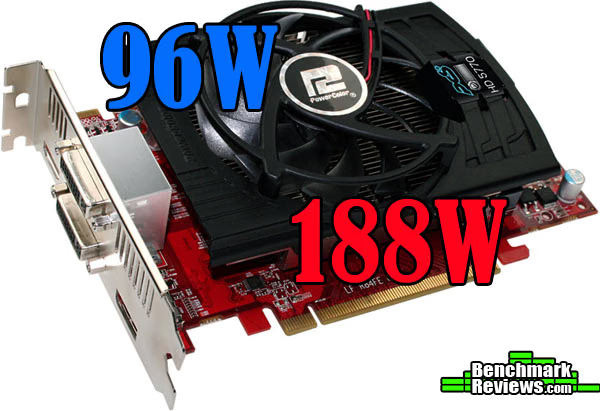
The factory settings for the Radeon HD 5770 say that there is about a 90W difference between idle and load power consumption. We measured a 92W difference, but remember that some of the other components of the system might account for a few watts of the power increase at load as well. Either way, that's pretty close to how ATI called it. The 40nm process that is now pretty standard across video cards has helped to bring power consumption down considerably. This will put your mind at ease if you intend on leaving your computer on a lot.
PowerColor AX5770 PCS+ Final Thoughts
The Radeon HD 5000 series revolutionized the GPU market by making DX11 graphics commonplace. The Radeon HD 5770 offered a solidly mid-ranged video card for quite competitive pricing. Compared to NVIDIA competing cards at the time, the Radeon HD 5770 had the same affect that all the HD 5000 series cards had on the competition. The Radeon HD 5770 outperformed the GTS250 and you have seen those results in our tests.
That was over year ago and the Radeon HD 5770 has performed solidly ever since. But a lot has changed in the world of DirectX-11 video cards. NVIDIA released their Fermi series cards as a response to the HD 5000 series, albeit a few months late. NVIDIAs response to the Radeon HD 5770 and the mid-range market was the GTS450. As we were able to see through our tests, the GTS450 does compete right alongside the Radeon HD 5770. In fact, under normal circumstances, I would say the GTS450 likely beats the Radeon HD 5770 in most cases because the AX5770 PCS+ is actually a factory overclocked card. The two video cards are very comparable in price and competed honorably throughout the testing. The DX11 testing proved inconclusive at best to determine a winner between the two cards.
Now AMD has come out with the 6800 series of video cards. A lot of people are comparing the HD6870 series to the Radeon HD 5770 series, but the cards cost quite a bit more. Granted, the release of the GTS450 and the HD6870 both had the effect of bringing down the price of the Radeon HD 5770, but I'm still not convinced that it can be compared to the HD6870 as easily as the GTS450. Either way, the Radeon HD 5770 seems to be moving out as new technology threatens to send it to the "outdated" section of the hardware market. I would argue that the Radeon HD 5770 is still a very viable card and that the recent drop in prices has made it even more competitive.
At this juncture, I would like to submit some other compelling evidence as to why the Radeon HD 5770 is still a very good card to buy. The factory overclocked AX5770 PCS+ costs $144.99 on Newegg.com, but it also comes with a $20 mail-in-rebate. That brings the total price down to $124.99. Granted, the MSI Cyclone GTS450 that we used to test against the AX5770 PCS+ has a $15 dollar rebate, bringing the two to the exact same price. However, through November 10, 2010, the AX5770 has a $15 promotional code (YEGKFH53) on Newegg.com, bringing the price to $110. At $110, the factory overclocked AX5770 PCS+ actually costs less than the GTS250. It also brings down the cost per FPS to a very competitive line. At $145, the AX5770 PCS+ is a pretty good deal. At $110 it's smokin'.
AX5770 1GBD5-PPGV2 Conclusion
While the PowerColor AX5770 1GBD5-PPGV2 performed well enough to play in almost all of our game titles (you might need to lower the settings a little on the DX11 titles), it only just kept up with its competition, the GTS450. We have seen the AX5770 PCS+V2 outperform its previous competition, the GTS250, but times are different now. To remain competitive, the Radeon HD 5770 series cards need compete against the other DX11 cards, not just the DX10 cards. When considering the performance value of the AX5770 PCS+, we have to keep in mind that it is a mid-range card and only packs half the punch (GPU-wise) of a "Cypress"-based card. Considering the playability of games with the AX5770 PCS+, the card has to receive decent marks. Besides just gaming performance, the PowerColor Radeon HD 5770 AX5770 PCS+ also offers the incredible ATI EyeFinity experience support as well. With the latest drivers from AMD, it also has 3D capabilities, though we have yet to really see how they compare to NVIDIA's offering in 3D. Also lumped into performance, we have to consider the extra 5% overclock we were able to pull out of the AX5770 PCS+, bringing its gaming power up slightly.
The PowerColor AX5770 PCS+ is a good looking card. The shorter PCB and redesigned fan and heatsink make it look nice and the red PCB is pretty appealing. While the partial fan shroud doesn't leave as much room for fancy graphics designs on the card, it also makes the AX5770 PCS+ look more like the mid-range offering that it is. The full shroud is something that you come to expect on the higher range cards.
As we were able to see in the close-up pictures of parts of the AX5770 PCS+, the video card is exceptionally well-constructed. This type of engineering is to be expected from all would-be top-end video card manufacturers and PowerColor isn't any different. All the parts on the AX5770 PCS+ are high quality and the PCB was well laid out, especially considering the lost space from the shorter board.
While the AX5770 PCS+ may not offer PhysX or CUDA support, ATI Radeon HD 5000 series cards offer their own capabilities like Stream Technology Support and ATI EyeFinity. Additionally, the AX5770 PCS+ provides support for DirectCompute 11, OpenCL, and HDMI 1.3 with Dolby True HD and DTS Master Audio. Also, the AX5770 PCS+ v2 provides a coupon for the download of Call of Duty: Modern Warfare 2.
The overclocking ability of the AX5770 PCS+ was pretty good. The memory, rated at 1250 MHz, was easily able to perform at that level. That's only a 2% increase over the already overclocked AX5770 PCS+, but 4% over a stock Radeon HD 5770. The memory may have been able to get close to about 1300 MHz without any extra voltage, but I was more interested in GPU clock. The GPU clock made it up to 920 MHz. That's about a 5% increase over the 875 MHz that the AX5770 PCS+ comes clocked at. While that's not a bad overclock, we have had better success here at Benchmark Reviews with other Radeon HD 5770 video cards.
As of November 3, 2010, the PowerColor AX5770 PCS+ was selling at Newegg.com for $134.99. This is a significant drop from the nearly $170 dollars that the card started at about a year ago. Also, as we have discussed, there are mail-in-rebates and promotional codes available to bring the price down somewhat. Still, for the purposes of rating here, I have to focus on the price before shipping or any of those discounts. At $145, the AX5770 PCS+ is an ok deal, but the performance of the GTS450 for $5 less shows that it's not a great deal. $110 would be a pretty great deal.
Pros:
+ Lots of great features
+ Extremely low power consumption
+ 1GB of GDDR5 memory
+ Easy to overclock and CrossfireX
+ Lots of cooling headroom
+ Requires only one 6-pin power connector
+ HDMI and DisplayPort native interfaces
+ Great price with rebates and promos
Cons:
- No voltage control in ATI Overdrive, no PowerColor tool available
- Somewhat expensive compared to current Radeon lineup
Ratings:
- Performance: 8.00
- Appearance: 9.00
- Construction: 9.00
- Functionality: 8.50
- Value: 7.00
Reader comments from the original article
1 comment were posted before commenting closed. They are preserved as written. Original avatars no longer resolve and are shown as a placeholder.
RE: PowerColor Radeon AX5770 1GBD5-PPG Athlonite Permalink:
That is a great little card and you can make it greater by pairing it with another to get just on 5870 speeds and some better visual quality settings for less money than one HD5870