
Pivos XIOS DS Media Player PTGMCXDALU
NOTICE: This article was originally written on 10 March 2013, and subsequently halted due to concerns with the product. It has been more than sixty days since the manufacturer was notified, however a firmware update has not been released that corrects or concerns. We have decided to publish our completed work, and will update this review if necessary.
Pivos XIOS DS Media Player Preview
Manufacturer: Pivos Technology Group, Inc.
Product Name: XIOS DS Media Play!
Model Number: PTGMCXDALU-US (M3 Version)
UPC: 855710003021
Price As Tested: $109.99 (Amazon|Newegg)
Full Disclosure: The product sample used in this article has been provided by Pivos.
Streaming and digital products are quickly replacing their physical counterparts, allowing personal entertainment to reach a new level of convenience. Music, photos, movies... they're all just a small part of the multimedia library that we collect and save to disk. Most of us have been downloading files onto our computer for as long as we've had Internet access, and any CD/DVD discs we purchase are promptly converted into digitally-stored backup copies. Watching streaming content or downloaded multimedia files have almost completely replaced television broadcasts and movies on disc, especially for viewers with a portable multimedia device. Unfortunately, the drawback to watching anything on an smartphone or tablet device is that the screen is often too small for full-resolution detail and audio quality falls flat.
Pivos Technology Group observed the shift to digital content, and produced the Pivos XIOS DS Media Play! embedded system (model PTGMCXDALU-US) for multimedia enthusiasts. Capable of playing nearly every modern video format across HDMI onto a HDTV or monitor at high-definition 1080p using the familiar Google Android interface. Powered by an ARM Cortex A9 processor and Mali-400 3D graphics, the Pivos XIOS DS is built on Google's Android 4.0 (Ice Cream Sandwich) platform which allows this media player to natively support HTML5, Chrome, Flash, and even the installation of Google Play apps. In this article Benchmark Reviews tests the Pivos XIOS DS Media Play! system, and rates how well it performs against the leading competition.

Supported File Types
-
AVI/ MKV/ TS/ TP/ TRP/ M2TS/ MPG/ MP4/ MOV/ M4V/ VOB/ IFO/ DAT/ WMV/ ASF/ RM/ RMVB/ FLV/ XVID/ DIVX 3,4,5 for up to 1080p resolution
-
MP3/ OGG/ WMA/ WAV/ AAC/ FLAC
-
HD JPEG/ BMP/ GIF/ TIF/ PNG
Supported Video Codecs
- MPEG 1/ 2/ 4, H.264, VC-1, WMV, M2TS, TS, RMVB, AVI, MKV, MOV, TS, MPEG, FLV, DivX, Xvid
Supported Audio Codecs
- MP2/ 3, OGG Vorbis, WMA, WAV, WMA PRO, PCM LPCM, MS-ADPCM, LC-AAC, HE-AAC, COOK, RA-Lossless, RM/ RMVB 8/ 9/ 10.
Supported Connections
- 1x HDMI 1.3 output
- 1x 10/100 Ethernet
- 1x 802.11 b/g/n built in wireless
- 3x USB 2.0 ports
- 1x MicroSD/SDHC Memory Slot (up to 32GB)
Supported Audio Output
- MP2/ 3, OGG Vorbis, WMA, WAV, WMA PRO, PCM LPCM, MS-ADPCM, LC-AAC, HE-AAC, COOK, RA-Lossless, RM/ RMVB 8/ 9/ 10.
Supported Languages
Arabic, Bulgarian, Catalan, Czech, Danish, German, Greek, English, Spanish, Finnish, French, Hebrew, Hindi, Croatian, Hungarian, Indonesian, Italian, Japanese, Korean, Lithuanian, Latvian, Norwegian-Bokmol, Dutch, Polish, Portuguese, Romanian, Russian, Slovak, Slovenian, Serbian, Swedish, Thai, Tagalog, Turkish, Ukrainian, Vietnamese, Simplified & Traditional Chinese
Supported Subtitle Types
SRT, SMI, SSA, ASS, IDX/SUB, SUB
Requirements
REQUIRED: High Definition Display device with HDMI input (up to 1080p resolution for best results).
* Recommended: Wired or Wireless network connection is required for network or internet content. Audio amplifier is required for digital surround sound.
Package Contents
- XIOS DS Media Play!
- Remote Control (battery included)
- HDMI 1.3 digital A/V cable
- A/C Power Adapter
- Quick-Start guide
Closer Look: XIOS DS
If you're like me, over the years you've collected a huge digital library full of music, pictures, and movies onto your computer. Occasionally, I might watch a video from off my laptop or listen to a song while working at the desktop, but high-definition movies and music are really best enjoyed on a home theater system with larger screen and powerful speakers.
Until recently digital multimedia could only be enjoyed on the computer, and with some extra effort it could be shared onto a portable electronic device. But high-definition movies and music are really best enjoyed on a home theater system, with larger screen and powerful speakers. Now that HDTVs and wireless networking are commonplace an era of attached digital media players has begun, and the Pivos XIOS DS helps make the transition easy.
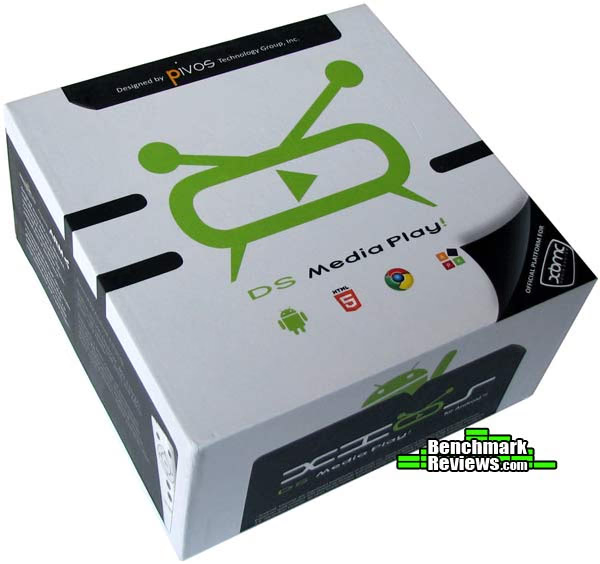
The Pivos XIOS DS Media Play! is a compact embedded system that sells for $109.99 (Amazon|Newegg). Pronounced Sy-oos, the DS represents the AnDroid System. This digital media player is designed to play high-definition video at up to 1080p (1920x1080) resolution, as well as Dolby Digital and DTS surround sound audio. Pivos Technology Group includes the following items inside the PTGMCXDALU-US kit: XIOS DS Media Play, IR remote control (battery included), HDMI 1.3 digital A/V cable, A/C power adapter, and quick-start instruction guide.
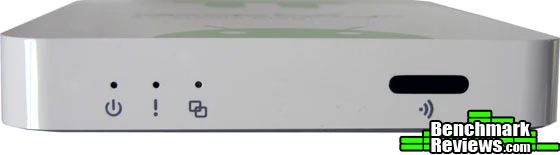
XIOS DS measures only 3.93" (D) x 3.93" (W) x 0.66" (H), and weighs only 6 OZ - making it small and light enough to be mounted beside a monitor/HDTV or nearby wall. Pivos XIOS DS does not feature any integrated function buttons on the device and is controlled entirely through the remote (shown below), which receives signal through the tinted IR window located at the front of XIOS DS. Included with the kit is an ergonomic infrared (IR) remote control. Operation requires relative line of sight between the media player and remote, and can reach the device even when positioned at extreme angles while still offering plenty of range.
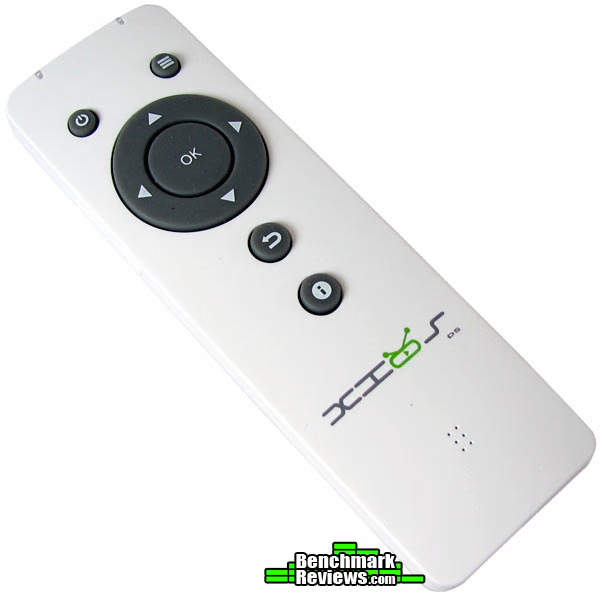
XIOS DS' ultra-slim remote fits nicely into the palm of your hand, and operates on a single CR2025 3V lithium coin-cell battery (included). The remote features all the basic buttons needed to control a media center, with labels similar to Android smartphone devices. Soft silicon-rubber buttons require average pressure to make selections, but do not offer any backlighting.
At the heart of Pivos' XIOS DS embedded system is an ARM Cortex A9 processor, which serves as the device CPU. To produce powerful 2D and 3D graphics, the XIOS DS system utilizes an ARM Mali-400 MP multi-core GPU. Scalable from 1 to 4 cores, the Mali-400 GPU supports 2D vector graphics through OpenVG 1.1 and 3D graphics through OpenGL ES 1.1 and 2.0. Pivos embeds 512 MB of DDR2 system memory, and 2 GB of NAND Flash storage space. Built-in wired and wireless networking is available to Wi-Fi B/G/N and 10/100 Ethernet connections.
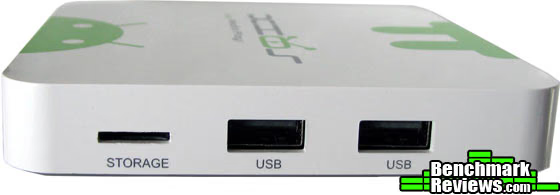
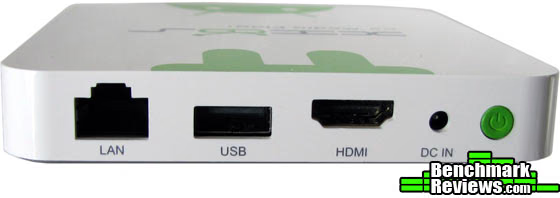
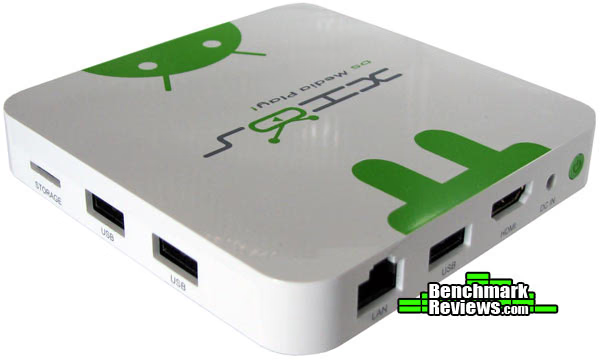
The Pivos XIOS DS media player offers several external storage interface options: three High-Speed USB 2.0 ports located at the side and back, combined with a MicroSD/SDHC memory port. You'll also fine find the power adapter input, RJ-45 Ethernet port, HDMI 1.3 digital A/V output, and power button located at the back of the unit. The Pivos XIOS DS uses HDMI as the primary audio output, so users wanting to connect an optical SPDIF digital audio TosLink cable to their receiver or home theater may be disappointed.
XIOS DS Test Results
Like most discerning home theater enthusiasts, I'm critical of digital media player devices. Benchmark Reviews has tested several products designed for the Home Theater segment, from fancy HTPC enclosures to efficient compact computer systems. But of them all, very few have ever offered the level of multimedia performance found on desktop computer systems. My criteria for the "perfect" digital media player has never been terribly strict, but a man's home theater is a trophy onto itself. The ideal system needs to offer wireless Internet access, comfortable web browsing, fast file transfers, and display multimedia content over HDMI without frame loss or stutter. This section discusses how well the Pivos XIOS DS digital media player performs, and the various features it offers.
My first impressions of the XIOS DS was not positive. I began by connecting this device to my brand new Samsung HDTV, and while the XIOS DS started up very quickly, the screen was overdrawn past the HDTV's panel boarders. This was solved by going to Settings → Display → Output Mode and adjusting the "display position" to fit your HDTV. Next, I wanted to connect the XIOS DS to my wireless network and give it the system update recommended by an alert that came in the package. Familiar with Android, I went into the settings and turned on Wi-Fi support, but it was not possible to enter my security password because the included IR remote was not configured to support Android's on-screen keypad. To enter this information, I needed to visit Settings → Personal → Language & Input and then go to Keyboard & Input Methods to change the default device to Remote Controller Input Method. If you plan to use a wired/wireless USB mouse or keyboard, this step is not required. Finally connected to my wireless-N network, I was ready to download the latest firmware.
Finding and downloading the most recent firmware build (XIOS_DS-M3-ICS-010813) required a visit to the Pivos product website, as there is no built-in function for updating XIOS DS presently available. The website can be accessed from personal computer or media player, but system firmware and Google application files (such as the popular media player solution 'xbmc-XIOS-Android-012913') are available for download as ZIP archives which require a separate program for extracting them. These steps are easy to accomplish on a computer, but not so simple on the device itself. Firmware must be extracted onto a MicroSD (mSD) memory card, since USB storage is not a supported interface for updates, so an additional adapter may be needed for computer users. The User Guide that came with this sample claims it should possible via USB, but this only applies to the older M1 version of this product. Yet more hurdles, but once these steps were finally complete I was ready to begin testing.
Frustrated with the initial hurdles to make this product usable, I pushed myself to begin testing XIOS DS. The first thing I do when testing all media players is attempt to play a large collection of files that contain the most popular audio and video CODECs, contained on a SuperSpeed USB 3.0 flash drive and USB 3.0 portable hard drive. On Pivos' XIOS DS the media player of choice is XBMC, a Linux-based hardware decoder that offers a myriad of features beyond playback. Unfortunately, the software is at beta test level for the XIOS DS, so there are some additional hurdles to overcome. After almost an hour of research on the Pivos forums, where page after page of guides exist for setup and configuration, I was no closer to playing a multimedia file. Tired from wasting so much time, I decided to contact Pivos and explain my concerns. It was decided to wait until the next firmware release before resuming this project.
Skip ahead two months, and Pivos debuts that awaited firmware update: XIOS_DS-M3-ICS-050713. Quite a few of my initial complaints were remedied by the update, most notably was setting the default input device to remote control along with fixing Netflix and a full screen issue with Android player. These were all good things, along with several other improvements Pivos made to XIOS DS, and certainly helped others who own this device. Pivos has registered XIOS DS on the Google Play store, so there's a small selection of applications available for the device that are confirmed compatible. Still, I was stuck at the test phase of this project, and my results weren't very impressive thus far. So while I was thankful that Pivos included a few other compatible media players with their latest firmware, XBMC was still the centerpiece.
XBMC is a finicky software, and although I followed instructions using the required FAT-formatted memory card the file explorer still did not display any of the items contained. The same would be true for a NTFS-formatted external drive loaded with files: nothing detected. So I moved on, thoroughly dissatisfied with XBMC as a consumer media player. Fortunately, three other media players I tested with Pivos played back the video perfectly fine... save for one major exception: AC-3 sound is not supported. All of the files encoded with the AC-3/A52 audio CODEC, which is a very popular with movies and HD television shows, would produce normal sound with high-frequency hissing every few seconds.
XIOS DS automatically recognized flash memory devices formatted with FAT or NTFS file systems (exFAT drive partitions were not detected), which were automatically mounted on the device. External storage devices such as a hard disk enclosure or compatible SmartPhone device could also be connected to XIOS DS through the media player's USB interface, which mounts any available partitions. Additionally, network storage devices and multimedia servers can be mapped and configured as storage sources.
Up to this point I had practiced extreme patience for a media player. In almost a dozen media players I've tested, never once have I been required to spend so many hours just to simply get started. Once the system was functional, I was disappointed with poor compatibility and lacking functionality. Files that would play back without issue caused the device to heat-up and become hot to the touch - not something I would consider favorable for longevity. Suffice it to say, the Pivos XIOS DS (M3 version) did not win me over.
Media Player Final Thoughts
Long ago, it was HTPCs that enthusiasts looked to for their digital entertainment centers, but now that very same level of functionality (or better) is available from portable computing devices. Advanced modern mobile processors have allowed portable devices to enjoy concentrated performance focused on the functions they're designed for, while newcomers are changing the landscape and closing the gap. Yet, somehow, there's still a void in the fully-functional media player market.
The Pivos XIOS DS Media Play! certainly tries to stand on its own, but it's not a complete solution. Once the industry can produce an affordable media player with the ability to play games and browse the web, we'll see a change in the way consumers value computers. I've spent a bit of time ranting about foretelling the end of desktop computers as we know them, and its media playback devices such as these that are helping to sway users away from buying a new computer system.
As manufacturers are able to add more features and functionality to their products, we as consumers will see our platform choices begin to narrow. My search will end when there's a powerful wireless device that exists on the market, capable of playing high-performance video games, high-definition multimedia playback, delivers speedy web browsing, and boasts a large application library. Essentially, one day I would like to replace my large, powerful, desktop PC with an ultra-compact device that holds all of the same potential functionality.
Pivos XIOS DS Conclusion
IMPORTANT: Although the rating and final score mentioned in this conclusion are made to be as objective as possible, please be advised that every author perceives these factors differently at various points in time. While we each do our best to ensure that all aspects of the product are considered, there are often times unforeseen market conditions and manufacturer changes which occur after publication that could render our rating obsolete. Please do not base any purchase solely on our conclusion, as it represents our product rating specifically for the product tested which may differ from future versions. Benchmark Reviews begins our conclusion with a short summary for each of the areas that we rate.
Beginning with our performance rating, the Pivos XIOS DS Media Play! (M3 version PTGMCXDALU-US) is compared against similarly-priced devices such as: ASUS CUBE with Google TV, WD TV Live, ASUS O!Play LIVE, and Patriot Memory PBO Alpine. Unfortunately, I do not feel that Pivos XIOS DS performs well enough to be fairly considered as competition to any of these media players. Since the AC-3/A52 audio CODEC does not function correctly on XIOS DS, a large selection of our test files failed to play back properly. Furthermore, the numerous delays with configuration and setup make it extremely difficult for users to even begin to enjoy their media with this player. Ultimately, XIOS DS fails to tap the potential inside the ARM Mali-400 MP multi-core GPU.
In terms of appearance, the Pivos XIOS DS does rather well. It's small, sleek, and stylish, all at once. The device is compact and lightweight, making it possible to mount in places that would be impossible for larger/heavier players. The white finish with green Android accents help give the XIOS DS a trendy look without becoming to over-the-top.
Construction is solid, with a few minor concerns. Pivos includes 512 MB of DDR2 system memory on XIOS DS, along with 2 GB of NAND Flash storage space. A built-in wired 10/100 Ethernet connection joins Wi-Fi B/G/N wireless networking, so connectivity is covered. However, the device lacks ventilation for the onboard ARM Cortex A9 processor and ARM Mali-400 MP multi-core GPU to exhaust from, which causes the media player to really build-up heat inside the unit. This could cause premature component break-down over time.
With regard to functionality, I did not have a positive experience with the Pivos XIOS DS Media Play! device and consider it to be a poor choice for novice users. As I explained in the test results section (previous page), XIOS DS did not come ready to work out of the box - at least not until several firmware updates via MicroSD card later into retail production. Pivos eventually released a firmware update that made the bundled remote control into the default device, making it possible to properly navigate screens, enter account passwords, and configure a wireless network. There are still concerns with XBMC being supported by XIOS DS, however the more advanced crowd seems to appreciate its inclusion on the device.
As of June 2013 the Pivos XIOS DS Media Play! (M3 version PTGMCXDALU-US) is available online for $109.99 (Amazon|Newegg). The hardware alone could justify this price, if only there were fewer hurdles in the software and setup. However, if you're one of the more experienced Android users who doesn't mind investing time into this device, there are plenty of features and functionality yet to be unlocked.
My summary: Pivos XIOS DS Media Play! is not for everyone. The menagerie of unrefined software apps relegates this device to those with more experience, and much more patience. For users merely wanting a device that plays all their digital multimedia files right out of the box, I still recommend the WD TV Live as my top choice ($89.99 from Newegg or Amazon). Although it doesn't offer the Google Android OS like XIOS DS does, it will play back every file type and CODEC without compatibility problems. If you know your Android apps and multimedia CODECs better than you know sunshine, then Pivos has designed the XIOS DS just for you.
Pros:
+ Built on the Google Android OS
+ Registered on Google Play app store
+ ARM Cortex A9 processor
+ ARM Mali-400 MP multi-core GPU
Cons:
- Not compatible with AC-3/A52 audio CODEC
- Firmware updates require MicroSD memory card
- Bare minimum features on remote control
- XBMC is for advanced users
- Difficult setup and device configuration
- Lacks optical TosLink digital audio output
Ratings:
-
Performance: 6.75
-
Appearance: 9.00
-
Construction: 7.75
-
Functionality: 7.25
-
Value: 7.00
Final Score: 7.55 out of 10.
COMMENT QUESTION: If you already own the Pivos XIOS DS, how does it perform for you?