
Patriot Viper 6GB 1600MHz DDR3 Memory Kit
Patriot Viper 6GB 1600MHz DDR3 Kit
When most shoppers compare system memory kits, they often look for the highest speeds for the best price. Everyone is different, but overclockers and performance enthusiasts generally aim for the best combination of low-latency high-speed RAM they can get find. In this article, Benchmark Reviews tests the performance of a top-speed triple-channel product for the Intel Core i7 platform. The Patriot Viper 6GB 1600MHz DDR3 memory kit PVT36G1600ELK will be compared against several other products and benchmarked for bandwidth and gaming performance. Are the higher speeds worth the money, or can this memory kit overclock to their level? By the end of this article, you'll have your answer.
System memory is one of the most over-looked hardware components in computer systems. When it comes to 32-bit Operating Systems like Windows XP and Vista, only 4GB of memory can be mapped and utilized. However with 64-bit version of the Windows Operating System becoming gaining popularity, only the physical limitations of the motherboard can restrict the user-mode virtual address space. So with applications demanding greater memory overhead, once again it has better to use as much memory as can be installed into the system.
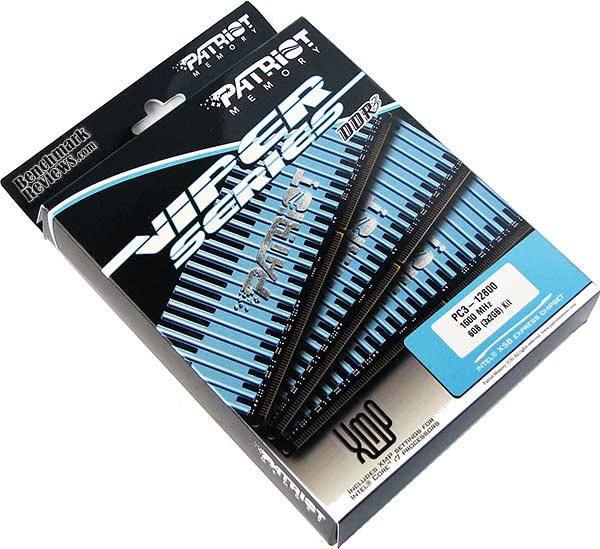
But not all memory is made the same; and even memory of the same speed can have different consumer targets. Patriot offers something for everyone, and there isn't a desktop computer made that they don't offer an upgrade for. Casual users can take advantage of their warranty and support, as well as getting tips from their support forum for better performance. Enthusiasts and overclockers can match the memory kit that best suits their needs. Even gamers are given special attention, even though system memory has very little impact on a games performance.
About Patriot Memory (PDP Systems, Inc.)
Established in 1985, Patriot Memory builds a full range of memory module and flash memory products, offering a perfect blend of quality and value. Patriot products include Extreme Performance (EP), Signature Lines (SL) and Flash Memory solutions (FM).
Patriot has sales offices located throughout the U.S. and Asia. Patriot sells through the distribution channels throughout North America, Europe, Asia Pacific, Middle East, Africa, and Latin America.
Patriot's development and manufacturing facility are located in Fremont, California USA. Our manufacturing segment is composed of a highly skilled production staff and multiple production lines optimized for modules, giving Patriot the ability and resources necessary to provide a full line of memory module solutions. Patriot Memory is a trademark of PDP Systems, Inc.
Patriot Warp DDR3 Features
Patriot Extreme Performance (EP) Enhanced Latency line is engineered to expand your gaming options. These modules are designed to operate at 1600MHz at 9-9-9-24 timings and is available in 3GB and 6GB kit capacities. Equipped with Patriot ACC (Aluminum Copper Composite) technology, these modules are designed for maximum performance and stability under extreme overclocking conditions. Engineered with quality and Performance in mind, Patriot Extreme Performance line is the ultimate solution for extreme overclockers, gamers, and PC enthusiasts.
PVT36G1600ELK Specifications
-
Extreme Performance PC3-12800 (1600MHz)
-
Enhanced Latency (9-9-9-24)
-
Voltage Setting: 1.65V
-
Equipped Patriot Viper Heat Shields with integrated ACC (Aluminum Copper Composite) technology
-
100% Tested and Verified
-
Lifetime Warranty
-
RoHS Compliant
-
XMP Ready for Core?i7 Processors
-
Tested and compatible with Intel? X58 Express Chipsets
Part Numbers:
-
3GB (3x1024MB) SKU PVT33G1600ELK
-
6GB (3x2048MB) SKU PVT36G1600ELK
Closer Look: Patriot Viper
For anyone not familiar, DDR3 RAM uses a unique 240-pin DIMM (Dual Inline Memory Module) architecture. This new design does not allow for backwards compatibility, and it offers many design differences from the DDR2 predecessor it replaces. First revealed in dual-channel kits for the Intel P35-Express platform, the latest iteration is offered in triple-channel kits for Intel's Core i7 / X58 Platform.
DDR3 isn't much to look at. Sure, you can dress it up with shiny metal heat-spreaders, but it's still just a small printed circuit board with DRAM ICs soldiered to it. But I must admit, Patriot adds an attractive coat of colorful paint to help make their modules stand out as unique and appealing.
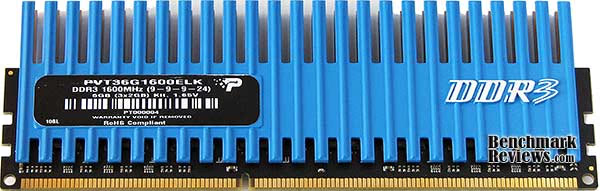
Because of the odd number of modules included in a triple-channel DDR3 memory kit, Patriot has decided to package the Viper kit into separate containers. This isn't the most economical packaging system, nor is it very 'green' by today's standards.
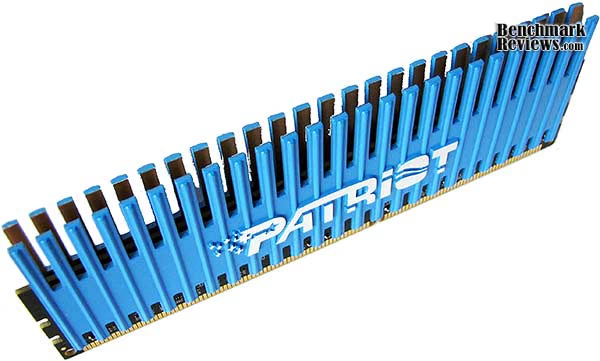
Similar to the other Viper-series memory kits they produce, the 6GB Patriot PVT36G1600ELK kit re-uses the baby-blue colored heat-spreader familiar to their dual-channel series. Unlike some of those dual-channel kits, the newer triple-channel kits are much slower in speed and use lower voltage. Patriot most likely selects kits from their inventory that can achieve decent operating speeds with acceptable latency, and adhere to the low-voltage requirements of the Core i7 platform.
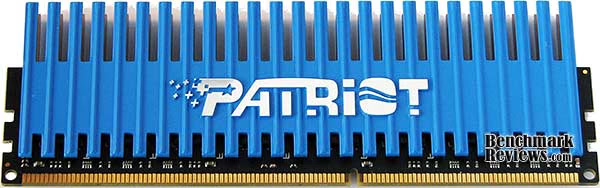
Because triple-channel kits use a much lower maximum voltage (to avoid Core i7 processor damage), extreme cooling is unnecessary for these modules. Under stress, the Patriot Viper 6GB 1600MHz Triple-Channel DDR3 was barely warm to the touch. In the next sections, we see if it really makes much difference how fast a triple-channel kit operates... as we compare the PVT36G1600ELK memory kit to several others.
Introduction to DDR3
This section offers a very brief overview of DDR3 technology, however Benchmark Reviews also offers the comprehensive article: DDR3 RAM - System Memory Technology Explained. The new generation of DDR3 is meant to avoid a bottleneck between the CPU and the system memory; especially in highly overclocked scenarios. With the high-speed variety of DDR3, which presently includes everything beyond the highest 1600MHz JEDEC standard, you increase the Front Side Bus (FSB) and CPU clock speed without being forced to slow the system memory to remain stable. Here are a the primary benefits of DDR3 SDRAM:
Features:
-
Now supports a system level flight time compensation
-
Mirror-friendly DRAM pin out are now contained on-DIMM
-
CAS Write latency are now issued to each speed bin
-
Asynchronous reset function is available for the first time in SDRAM
-
I/O calibration engine monitors flight time and correction levels
-
Automatic data bus line read and write calibration
Improvements:
-
Higher bandwidth performance increase, up to 1600 MHz per spec
-
DIMM-terminated 'fly-by' command bus
-
Constructed with high-precision load line calibration resistors
-
Performance increase at low power input
-
Enhanced low power features conserve energy
-
Improved thermal design now operates DIMM cooler
Each generation of DDR is more than just an update to the memory speed, it is also a more technologically advanced production process and a lower operating voltage and better heat dissipation. The previous generation of DDR2 is manufactured on a 110nm node, whereas the new DDR3 has receives a fab process shrink down to a 90nm node (although some use 80nm) with either 55/45nm prepared for later into 2008. Together, this all helps the hardware enthusiast reach higher clock speeds at the expense of higher latencies. This is why the new DDR3 generation of memory needs a significantly higher clock speed deliver better performance than the preceding generation of DDR2 technology.
In additional to the logically progressive changes, there are also improvements made to the architectural design of the memory. One particularly important change introduced with DDR3 is in the prefetch buffer: up from DDR2's four bits to an astounding eight bits per cycle. This translates to a full 100% increase in the prefetch payload; not just a small incremental improvement as there have been in the other area's.
DDR2-400 Memory is equal in performance to DDR-400, which is why it must operate at DDR2-667 speed to carry incentive. The same scenario is generally true with DDR3 when compared to DDR2. While in theory DDR2-1066 offers the same performance as DDR3-1066, this generally means that DDR3 requires a DDR3-1333 speed to show any benefit over DDR2-800. Memories within the same generation (DDR/DDR2/DDR3) are downwards compatible, meaning that if you have DDR3-1600 RAM, you can configure it to operate at 1066 and 1333 MHz speeds.
Testing Methodology: DDR3 RAM
Before the testing really begins, there are several settings to be adjusted in the BIOS. Many combinations of the CPU base clock and multiplier are paired to the memory multiplier, giving us the desired RAM (and CPU) operating speed. In all tests, the processor was intentionally reduced to keep nearest to the original default clock speed. When I first begin this process and start benchmarking for a baseline, the memory voltage and timing are always left at the manufacturer's default values.
After each and every change to the BIOS, the system is restarted and all RAM modules are automatically tested with MemTest86+ for one full pass. Since the modules are not yet overclocked, one pass is usually sufficient to determine if a bad part exists. Later, once I begin to overclock the memory, these tests are a good way of quickly pre-screening stable configurations. Once the test pass is complete, I move onto the synthetic benchmark tests. Here at Benchmark Reviews we use the following test suites and applications:
-
Passmark PerformanceTest v6.1.1018
-
Lavalys EVEREST Ultimate Edition v5.00.1650
-
SiSoftware Sandra Lite v2009.1.15.60
-
Far Cry 2 v1.02
After all of the tests have been performed at the default memory clock speed (or highest JEDEC standard), which establishes the baseline reading for our comparisons, I then increase the front side bus to overclock the RAM without adding any additional voltage. My theory is this: a module that overclocks without additional voltage is going to perform better than a module which requires you to potentially damage it or void the warranty. Another way of looking at this is that if a module overclocks well without added voltage, it is likely that there will be more headroom if addition voltage is applied.
Test System
-
Motherboard: Gigabyte GA-EX58-UD4P (Intel X58/ICH10R Chipset) with version F6e BIOS
-
Processor: Intel Core i7-920 BX80601920 2.667 GHz
-
Operating System: Windows XP Professional SP-3 (optimized to 16 processes at idle)
Memory Tested
I am fully aware that many sites turn up the voltage and apply dangerous amounts of power to the modules so that they can unlock that last megahertz; but if I begin down that road where will it end? Do I then start writing reviews where I apply liquid nitrogen cooling to the RAM? Do I volt-mod the motherboard and apply so much power I ruin expensive parts and equipment? In the end, I decided that overclocking will be done at the stock voltage for benchmarks, because I believe most enthusiasts are going to aim for the same goal. If on some rare occasion I determine that adding voltage would potentially return large performance gains, then I will add up to 0.2V to the default volt rating.
In each synthetic benchmark test Windows XP was booted fresh and the application was opened. Task manager was then utilized to end the explorer.exe (Windows) process so that only the most essential services were running and a trim 16 processes total were consuming system memory. This procedure allowed the RAM to be as isolated as possible for our testing. Once the system was ready, I perform a single test-run of the benchmark, followed by three recorded tests. At the end of the series, I average the three results for the final score.
Sometimes it is very difficult to get broad results between the memory modules tested, so we use several different speeds of memory from participating manufacturers. Benchmark Reviews is very serious about performance, which is why we test the products against as many benchmarks as reasonably possible. Not every test suite is effective in these reviews, and some often calculate processor and other system components into the score. This is what makes a RAM review difficult: unless all of the modules compared have the exact same rating and the CPU operates at the exact same speed for each and every test, the comparison is always going to be subjective.
Performance Test Results
Testing system memory (RAM) is a subject which requires a bit of technical knowledge. I have recently found a few other sites using nothing except video games to benchmark the RAM product they are reviewing, and this whole practice made no sense to me at all. Video games are GPU dependant when they have a decent processor behind them, and RAM has a very small impact on frame rate performance - as I will prove to you in my own tests. So keeping all of this in mind, I use the tools that belong in a system memory review; I use system memory benchmarking applications. Additionally, I won't spend three pages discussing how I overclocked or how I made it to tighter timings. Every memory module comes with its very own limit, so one size doesn't fit all and this kit may not be the same as the next.
As it turned out, the Patriot Viper 6GB 1600MHz Triple-Channel DDR3 PVT36G1600ELK memory kit offered an excellent overclock - and all without adding any additional voltage. After some trial testing, this 1600MHz CL9-9-9-24 kit ultimately pushed out a decent 164 MHz overclock to 1764 MHz, and default clock latency values of were improved to CL8-8-8-24. Keep in mind that the default memory voltage is set to Intel's recommended maximum of 1.65V, which means that there isn't much room for stretching it.
First up was the PassMark Performance Test benchmark which runs several different system memory tests in a row. Although some of the tests are specific to the performance of the RAM, others take the CPU clock speed and front side bus into account when developing a score. Most important are the memory read and write tests, and the score based tests are bias towards CPU speed and other hardware factors.

Passmark's Performance Test offers the most consistent memory test results of the entire group, with each of the test runs resulting in a score nearly identical to the previous test run. Ideally, all of these programs should be this consistent, but until they are I would consider Performance Test to be the best tool available for testing system memory bandwidth. Oddly enough though, there's very little performance difference between the kits we've benchmarked. As an example, the 1066MHz CL6 kit performs actually performs better than the Patriot Viper 1764MHz CL8 overclocked kit but the 1333MHz CL7 kit outperforms them all. Memory, similar to processors, is going to benefit most by an efficient transport architecture. When it comes to triple-channel configuration, and specifically using DDR3, there's a penalty for higher latency cycles.
Our next results were recorded from Lavalys EVEREST using the Cache and Memory Benchmark tool. The results shown below represent the average measurement obtained from the 6GB Triple-Channel 1600 MHz Patriot Viper DDR3 kit. The results for the average read, write, and copy bandwidth from EVEREST are displayed below using several different kits for comparison. Overall, the overclocked Patriot Viper kit performed ahead of lower-speed and latency kits.

Everest is among my most trusted benchmark programs, and the Cache and Benchmark tool is one of the more reliable in terms of consistent results. The chart above shows that the difference betwen 1333 and 1600 MHz amounted to a sizable increase in added bandwidth while keeping the same latency timings. EVEREST makes it appear as though there could be a significant difference in the performance between the various kits we used for testing, but the real question is whether this difference will translate into a notable real-world experience.
SiSoftware Sandra Lite offered results nearly the same as EVEREST in regards to increased performance; according to the chart above. Although the bandwidth tests are of a different nature, the Patriot Viper performed in the same fashion here as it did in the EVEREST tests.

Sandra, similar to EVEREST, prefers a high memory clock speed and then later factors-in latency. Because of this, the 1066MHz CL6 kit scores lowest, with the 1764MHz (overclocked) CL8 Patriot Viper kit scoring highest in the Internal Buffered test. The Float Buffered tests actually put the 1764MHz CL8 nearly equal to the 1600MHz CL7 kit. Once again, the synthetic benchmarks indicate that the faster (clock speed) kits are considerably better than the slower kits. However, it has been my experience that lower latency is better suited for real-world performance, not overall clock speed.
Finally, I tested the Patriot Viper 6GB Triple-Channel 1600 MHz DDR3 kit in the game Far Cry 2. Realizing that games can be either CPU or GPU bound, this made it difficult for me to compare all of the memory sets since the clock speed of the processor would change as I adjust the BIOS settings for the desired RAM speed. So by testing with a more-than-capable GeForce GTX 285 video card with moderate game settings, the system becomes more CPU/RAM dependant.

Even despite the CPU/RAM dependence created, less than 2 FPS in average frame rate separate 1066MHz memory from 1764MHz kits. Making my argument more pointed is the microscopic difference of 0.4 FPS between 1333MHz and 1600MHz memory, both running at the same CL7 latency. This mediocre improvement is evidence of how insignificant the system memory speed is in relation to video game performance. It also proves that the marketing campaigns meant to focus on ‘gaming memory' are a complete joke... unless you're the punch line buying into it. But don't misunderstand me, because system memory could have a much larger impact on game performance... if you use it to overclock the processor.
Obviously, if you're using an X58-based computer system, you probably aren't going to keep the CPU at the stock speed anyway; and you probably also use a video card that more than makes up for the very small gains of overclocked system memory. This means that faster RAM allows for a faster CPU, and in turn produces a faster frame rate. But in the world of system memory benchmarks, comparing the different sets of RAM using video games is pointless.
Triple-Channel DDR3 Final Thoughts
Unlike DDR2 memory kits, which generally have a dependency on speed as well as latency, DDR3 reserves itself to performing better with lower latency kits than those of higher speed. The architecture between the two standards is quite different, as we've detailed in our DDR3 RAM: System Memory Technology Explained article. On top of these differences, DDR2 memory kits never made it out of dual-channel configurations and are not ready for triple-channel sets.
The new tri-channel configuration for the Intel Core i7 CPU & DX58SO X58 Platform certainly has its benefits, but some of the old traditions are lost in the new standard. Because of the high penalty for round trip cycles, latency offers a bigger performance incentive than clock speed. Sure, it's nice to reach 1800MHz or faster, but if it takes one or two extra cycles to generate that speed the benefits are lost. This essentially divides triple-channel memory kits into the following preference order:
-
Low Latency (CL6) / High Speed (1600MHz+) = Most Preferred
-
Low Latency (CL6) / Normal Speed (1333MHz) = More Preferred
-
Normal Latency (CL7) / High Speed (1600MHz+) = Preferred
-
Normal Latency (CL7) / Normal Speed (1333MHz) = Acceptable
-
High Latency (CL8+) / High Speed (1600MHz+) = Less Preferred
-
High Latency (CL8+) / Low Speed (1066MHz) = Least Preferred
Some of the faster kits we reviewed are not going to be something system builders and casual users should purchase for vanilla systems, since triple-channel clock speed will not impact real-world performance. Where you'll see high-speed kits come in handy is for overclocking, because they offer plenty of headroom for hardware enthusiasts and overclockers to take advantage of as they increase the processors speed. Of course, low latency memory kits offer the best all-around performance and can have more direct real-world benefits than higher clock speed.
As the Far Cry 2 benchmark tests have shown, in a popular game with realistic settings and hardware, the difference in low-speed triple-channel DDR3 and high-speed kits is barely more than 1 FPS. If you're a gamer looking for faster graphics, my advice is to invest in a better video card. If you're running an audio or video editing system, go for low-latency memory with faster storage drives. Ultimately, there just isn't an argument for faster RAM unless you need the headroom for overclocking.
And as for the decision between 3GB triple-channel DDR3 kits, and those of 6- or 12GB, the answer is much simpler. If you use a 32-bit Operating System such as Windows XP or Vista, you're limited to 4GB total. You might think that there's a 1GB gap between the 3GB supplied and the 4GB limit, but if you're using a video card with a large frame buffer, this amount gets added into the limit and fills the gap. If you're using a 64-bit Operating System, such as 64-bit Windows Vista, my advice is to use as much RAM as allowed by the motherboard.
PVT36G1600ELK Memory Kit Conclusion
I like to begin memory kit conclusions with a summary of performance to help explain my rating for the product. The Patriot Viper 6GB DDR3 1600MHz memory kit may not seem all that great when you hear so much about dual-channel kits reaching 2000MHz, but triple-channel architecture is a different platform altogether. The CL9 latency for the PVT36G1600ELK kit is somewhat high, but the Gigabyte X58 motherboards all have a BIOS that refuses to drop below CL6 anyway. The Patriot Viper 6GB DDR3 1600MHz memory kit worked very well at CL8, and lower latency was available when the memory multiplier was reduced. In the other direction, overclocking this triple-channel DDR3 kit pushed the clock speed from 1600MHz to 1764 while operating at the lower-than-spec latency. Overclocking at the already-maxed 1.65V power rating offered an additional 164 MHz with loose timing, making the Patriot Viper kit the one you'll want for tweaking past the factory specs.
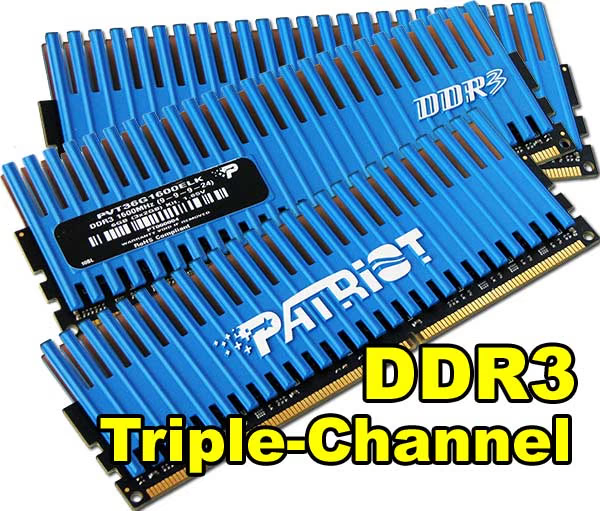
The baby-blue colored Patriot Viper DDR3 kits are eye-catching, and help an otherwise mundane hardware component stand-out in your system. Since 1.65V causes very little heat on the module, excessive cooling measures are pointless and even heat-spreaders become unnecessary. Considering this, I personally think that Patriot has combined equal parts function and fashion, and deliver an appealing product with no sacrifice in performance.
Construction is one key asset Patriot has in their favor. With a Patriot 'Lifetime Warranty' behind all of their Viper-series Triple-Channel memory kits, you can't really go wrong. The permanently secured tall-fin heat-spreader helps protect the DRAM IC modules, so all that remains for concern is static discharge damage. Even then, the warranty has you covered. Patriot Memory also offers live tech support, and a support forum for answers to common questions.
Benchmark Reviews has tested the 6GB Viper-series 1600 MHz Triple-Channel memory kit (PVT36G1600ELK), but Patriot also offers a three-piece 3GB kit (PVT33G1600ELK) kit that is perfect for 32-bit Operating Systems. The higher CL9-9-9-24 (CAS-TRCD-TRP-TRAS) latency is going to offer some of the best overclocking headroom available from any Triple-Channel X58-based kit, so this could yield better performance than a lower-speed lower-latency kit if the overclock is modest enough.
As of March 2009, DDR3 prices have collapsed faster than the American economy. The results are great for consumers, who can pick-up the 6GB Patriot Viper Triple-Channel 1600 MHz DDR3 memory kit for the price of last years DDR2. At the time of this writing, NewEgg sold the PVT36G1600ELK memory kit for $134.99, which was further reduced by Patriot's $25 mail-in rebate (making the price $109.99). Getting 6GB of DDR3 or $109.99 is great, and you can't beat this price! It's an even better price when you consider the flexibility of this memory kit.
Without knowing any better, most enthusiasts would overlook a 1600MHz DDR3 memory kit because of all the marketing hype given to 2000MHz+ kits; but doing so would be at their own loss. Triple-channel X58 motherboards favor low-latency DDR3 memory, and although this Viper DDR3 kit offers higher latency, there's tremendous headroom for overclocking this PC3-12800 kit. Selling the PVT36G1600ELK DDR3 memory kit at a price closer to DDR2 helps make the new platform more affordable, and the extra overclocking headroom improves the overclock for enthusiasts. Gamers need not worry about the clock speed, since latency is going to be the biggest concern of the two variable, and the Patriot Viper DDR3 memory kit did perform well with ample amounts of both. I recommend the Patriot Viper 6GB Triple-Channel 1600 MHz DDR3 as an all-around excellent memory kit to tackle every task it faces, from casual computing to highly-tweaked overclocks. For the price, the Viper 1600MHz kit offers excellent value.
Pros:
+ Overclocks 164 MHz and drops to CL8 latency
+ Offers 1764 MHz bandwidth
+ Lifetime warranty and support
+ Very good for overclocking high-end CPUs
+ 6GB High-density Triple-Channel memory kit
Cons:
- No additional voltage headroom
- High CL9 default latency
- Tall module profile reduces multi-platform compatibility
Ratings:
-
Performance: 9.00
-
Appearance: 9.00
-
Construction: 9.25
-
Functionality: 9.00
-
Value: 8.50
Final Score: 8.95 out of 10.
Quality Recognition: Benchmark Reviews Silver Tachometer Award.
Questions? Comments? Benchmark Reviews really wants your feedback. We invite you to leave your remarks in our Discussion Forum.