
Microsoft Arc Touch Mouse RVF-00001
Microsoft Arc Touch Mouse Review
Believe it or not, Microsoft has been creating hardware devices for over 25 years. They are no stranger to devices with both form and function. Very recently, Microsoft Hardware Division has created the new Arc Touch wireless mouse that falls in line with such products as the previously reviewed Arc Keyboard. Benchmark Reviews has been given the opportunity to check out Microsoft's Arc Touch Wireless Mouse. With such features as a scroll-wheel replacing touch-strip, 2.4ghz wireless technology, and an ambidextrous design, this looks to be a very promising device. There are plenty of wireless mice out on the market already, does Microsoft have what it takes to be competitive in this saturated market? Read the full review of the Microsoft Arch Touch on Benchmark Reviews to find out.
Wireless mice are nothing new to the world, nor are they new to Microsoft. For as long as I can remember, Microsoft have been making wireless mice and trying to improve on functionality, performance, and design. With the Arc Touch, Microsoft strives to take good technology and make it look good. Some of my biggest pet peeves with wireless mice are battery life and range. Often you get a mouse with incredible battery life, but you can't be more than 5 feet away from the receiver, or you get a mouse that will reach to the other side of your house, but find yourself replacing the batteries every two days. Microsoft has stated that this gets up to 6 months of battery life, and uses 2.4GHz wireless technology, so hopefully it will resolve both of those issues.
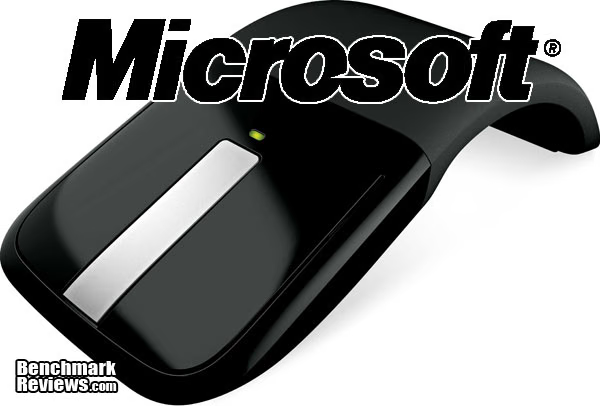
As with the Microsoft Arc keyboard, the Arc Touch Mouse is as much about design as it is about performance. I think at first glance, you notice the effort that went into making the mouse look good. In the next few pages, Benchmark Reviews will test this mouse in a variety of scenarios to find out if it can both look and perform good. The Microsoft Arc Touch Mouse will be evaluated using five categories of interest: Performance, Functionality, Construction, Value, and Appearance. Some of these categories have the tendency to be more subjective than others, but here at Benchmark Reviews, we strive to provide the most professional and unbiased reviews as possible.
Manufacturer: Microsoft Corporation
Product Name: Arc Touch Mouse
Model Number: RVF-00001
Price As Tested:$67.95 Amazon pre-order (other sources)
Full Disclosure: The product sample used in this article has been kindly provided by Microsoft, Inc. Hardware Group.
Microsoft Arc Touch Features
- Unique Design pops up for comfort and folds flat for portability.
- Touch Strip offers flick scrolling and customizable touch buttons.
- BlueTrack Technology allows people to ditch their mouse pads and use their mice on virtually any surface, including granite, marble, carpet and wood.
- Snap-in Nano Transceiver gives consumers the option to leave the transceiver plugged into the computer or conveniently store it magnetically under the mouse.
- 2.4GHz Wireless Technology gives consumers a confident wireless connection.
- Two-color Battery Light Indicator warns consumers when it's time to replace the battery.
- Ambidextrous Design and Rubber Side Grips give consumers comfort and durability.
Arc Touch Mouse Specifications
Physical Characteristics:
- 2.28"(58mm) width at its largest end
- 5.14"(130.6mm) tall
- Less than .59"(15mm) thick at its widest point
- Weighs less than one pound
System Requirements:
-
Windows 7, Windows Vista or Windows XP operating system
-
An available USB port
-
Internet Access required for certain features (software installation)
Closer Look: Microsoft Arc Touch
In this section, Benchmark Reviews will take a look at the basic features of the Microsoft Arc Touch. The name implies what the Mouse has to offer. The Arc is from the shape the mouse is in when you are using it. The Touch comes from the Touch-strip used for various gestures. Read on to find out more about these and the other features of the Arc Touch.
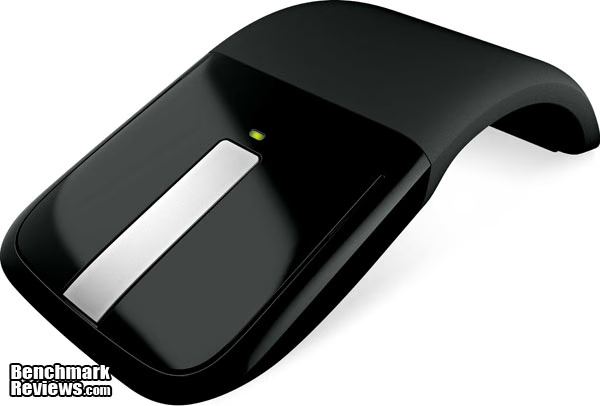
The above picture is of the Arc Touch from a front view while it would be in use. You can see the touch-strip in the front, and the green LED above it that indicates the power, and flashes when the battery is getting low. The front strip replaces the traditional click/scroll wheel you find on most every modern mouse. It is a strip of brushed aluminum with a small horizontal groove in the center. By flicking your finger up or down, it mimics the action of scrolling a mouse wheel, and scrolls up or down on your applications. What is nice is that there is a physical and audible feedback accompanied by this. There seems to be a small motor inside the Arc Touch that clicks and vibrates just like a scroll wheel would do. By tapping either top or bottom end, it provides page-up and page-down functionality. Double-clicking on the middle of the strip provides a middle-mouse button for opening new tabs, or double-click-and-holding in the middle allows for middle-mouse button drag-scrolling. It takes a small amount of time to get used to not having something physically moving where a mouse-wheel normally is, but the ability to flick and have it accelerate is pretty nice for long pages and documents. Many of these functions and options can be changed with the Touch Point software.

Here is an image of the Arc Touch from the side. You can really see the Arc shape in this photograph. Notice how there are only two small areas where the Arc Touch will actually come in contact with the surface of your desk, chair, etc. This will allow for easy movement across most all surfaces.
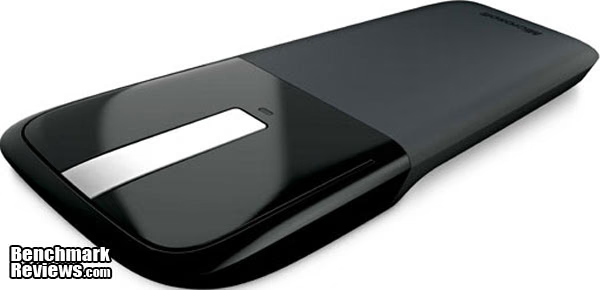
When flattened by bending the tail end of the Arc Touch, the power is turned off. This allows you to conserve battery, and it also allows for easy storage in a laptop bag, backpack, etc. Personally, I like this because you can tell in an instant that the mouse is powered off instead of having to pick it up, and see if the laser is still on underneath (and likely turning it back on in the process.) Another way to tell if the Arc Touch is off is that there no longer is an LED lit up above the touch-strip.
Microsoft Arc Touch Detailed Features
In this section, we will take a look at some of the features of the Arc Touch Mouse in more detail.

Here is a side shot of the Arc Touch in the off position. Being that the thickest part of the Arc Touch is just barely over .5", this can be easily stashed somewhere safe. The back end of the mouse is coated in a tacky rubber which allows for the flexibility to bend the Arc Touch. This rubber also provides excellent grip when using the mouse, as it is very light, and otherwise could be prone to frequent slips, tosses, and drops if the back end of it were not covered in this rubber.
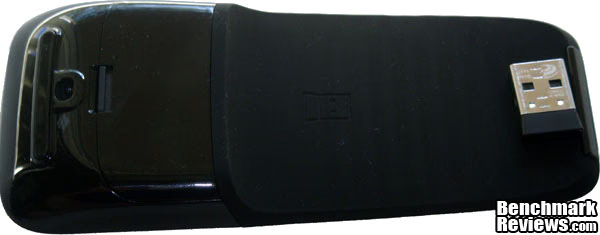
This is an image of the Arc Touch from underneath. This is where the 2 AAA batteries go. Microsoft has stated that the Arc Touch can get up to 6 months of use before needing a battery replacement. Also, this is where the transceiver's magnetic holder is located. You can see an imprint of the transceiver where the magnetic part is, but I also noticed that it is magnetic at the very tip of the mouse as well (where the transceiver is currently pictured). The transceiver is very conveniently sized. It barely sticks out when plugged in, so it is great for use on the front of a HTPC case, or on the side of a laptop without fear of bumping it and doing damage to either the receiver or the USB port. The receiver uses 2.4GHz Wireless technology, so the range and connectivity is great. I sat at my computer desk which is located about 15 feet away from my TV behind my couch, and is where my wireless router is located, and did not have any trouble using the mouse. The circular opening on the left side of the Arc Touch is where the BlueTrack laser works it magic. The BlueTrack laser allows the Arc Touch to work on practically any surface. I used it on my wooden desk, my carpeted floor, my fuzzy couch, and on top of my nMedia 1080p HTPC case, and they all provided no trouble to the BlueTrack laser.
Testing & Results
Testing Methodology
The Microsoft Arc Touch mouse was tested under a variety of conditions. I used the mouse as a supplement to my HTPC in my living room to test out the range and accuracy of the 2.4Ghz wireless from about 10-15ft away. This setting also provided a good way to test out the BlueTrack laser on surfaces such as carpet, fabric, wood, and metal. The second test setting was using my work laptop. Using the Arc Touch in a work environment allows for a good indication of comfort and reliability. On both systems, various basic tasks were performed such as: dragging, dropping, scrolling, navigating, and etc.Test System 1
-
Motherboard: Gigabyte M61SME-S2
-
Processor: AMD Athlon X2
-
Memory: 2GB DDR2
-
Operating System: Microsoft Windows 7 Professional 64bit
Test System 2
-
System: Dell Latitude E6510
-
Processor: Intel Core i5
-
Memory: 4GB DDR3
-
Operating System: Microsoft Windows 7 Professional 64bit
Results
The results for the Microsoft Arc Touch mouse are very favorable. The Microsoft Arc touch performed very well in almost all situations. I found that using the mouse either from a distance, or on surfaces that would make many mice fall flat, such as carpet or couch fabric, posed no threat to the accuracy of the Arc Touch. Even from a distance of close to 15 feet behind obstacles, the Arc Touch performed admirably. While at work, the Arc Touch gave me no indication that using it 8+ hours a day would be a burden. The mouse is light and nimble. One small bit of trouble I did run into was when using the touch-strip. I found that every once in a while it would not fully recognize what I was trying to do, whether it be scroll or middle-click. After using it a few days, I got better with it, but I could see a combination of maybe a little better firmware/software support as well as simply getting used to it. This is not a show stopper, as it only happens very occasionally. I had absolutely no trouble getting the Arc Touch to work in Windows 7. It is exactly what you would call plug-and-play. As soon as you plug in the transceiver, it recognizes it, installs the drivers, and then proceeds to sync up with the Arc Touch. Once it finds the Arc Touch, it then downloads and installs the Intellipoint software, and you are good to go.
Arc Touch Final Thoughts
I was very excited when Microsoft announced the Arc Touch, and I was even more excited to have the opportunity to do this review. I think Microsoft has been making quality peripherals for a long time, and continues to do so. Their Arc series provides a great balance of good looks and usefulness, and the Arc Touch falls right in line with that. The mouse looks great and performs very well. The bendable back of the Arc Touch gives it a great "cool" factor, as does the touch-strip in place of a scroll-wheel. I think that the Arc Touch will find a home in users that want a good wireless mouse, and are not afraid to spend money on something that looks good, too.
Microsoft RVF-00001 Conclusion
The Performance of the Arc Touch was very good. The range of the 2.4Ghz allows for use with HTPC systems, or systems that you may have tucked out of site. The BlueTrack laser provides great cursor accuracy, even on non-traditional surfaces such as carpet or couches.
The Appearance of the Arc Touch is one of its biggest attributes. The Arc in its name implies its shape. The sleek black color and silver touch-strip give the mouse a very professional look, and fall in line with the other Arc products from Microsoft. Even when it is in the flat/off position, the Arc Touch still looks good.
Despite being very lightweight, the Construction quality of the Arc Touch seems very good. I don't have the feeling that by bending it on and off too many times, it will break, or cease to function properly. The only part that may give users trouble is the battery door (my many remotes wrapped in tape would agree), but with a touted 6 month batter life, I don't see this being a problem at all.
The Functionality of the Arc Touch is right on track. The accuracy of the BlueTrack and the reliability of the 2.4Ghz allows the mouse to function like it should. I had a little trouble with the touch-strip not always recognizing what I was trying to do. With a little practice and some software adjustments, I believe that it is a problem that can be easily corrected, as it is not that large of a problem to begin with.
Value of this mouse can be a bit subjective. If you simply want a wireless mouse and do not care about looks, then this may not be your best choice. At a price point of $67.95 at Amazon, the Microsoft Arc Mouse (model RVF-00001) may seem a bit steep. You'll also want to check the other online sources for this product, and compare prices. If you are interested in a great looking mouse that performs just as well as it looks, then the price seems pretty fair for what you are getting.
It is truly difficult to find a reason to not recommend this product. The Arc Touch is a great combination of design, features, performance, and functionality. If you are at all in the market for your next great wireless mouse, then you should definitely give the Arc Touch a closer look.
Pros:
+ Very Attractive Design
+ BlueTrak Laser Technology
+ 2.4Ghz Wireless Technology
+ Good Battery Life (6 months)
+ Touch-strip is a fun replacement of the scroll-wheel
+ Ambidexterous Design
+ Bendable On/Off Feature and Indicator
+ Very lightweight and portable
Cons:
- Expensive price
- Touch-Strip can be a bit finicky
Ratings:
-
Performance: 9.50
-
Appearance: 9.50
-
Construction: 9.50
-
Functionality: 9.00
-
Value: 8.50
Final Score: 9.2 out of 10.
Excellence Achievement: Benchmark Reviews Golden Tachometer Award.
Questions? Comments? Benchmark Reviews really wants your feedback. We invite you to leave your remarks in our Discussion Forum.
Reader comments from the original article
7 comments were posted before commenting closed. They are preserved as written. Original avatars no longer resolve and are shown as a placeholder.
time, on our side,.... RealNeil Permalink:
Funny,....I didn't even know that I want one of these things until I read this review! But I'll wait to see what the price does in the next 6 months before I buy one of them. It's not that I don't think that it's worth what they want for them, it's just that I can't afford to be spending 70 bucks on a mouse. Over time, these things usually go way down in price and if it turns out that repeated use by many people exposes some kind of design flaw or weakness, then I'll know about it before I buy. Thanks for the review.
RE: time, on our side,.... Nate Permalink:
RealNeil, I am glad that you liked the review. I agree that the $70 for it may seem a bit steep. Think of it as an early-adopter tax. I think that you are right, in that people will become more and more interested in this, and prices will slowly drop to a certain point, and people will jump all over it. I think the mouse is great, and I hope that if you decide to get one, you think so too. Thanks for the comment!
Nice, but not out yet. Marc schlenker Permalink:
Pre-order only, I read somewhere it won't be out till Dec. Nice Xmas gift to myself.
Does it have side buttons? Tim Permalink:
I'm interested in this mouse but used to mice with additional buttons on the side (these are often linked up to 'back' in your browser). Also, did you have any problems using the scroll panel for zooming in applications that use it for zooming? I've found weird compatibility problems with other 'more advanced' mice scroll wheels, including my current MS mouse. I'm interested in buying this mouse now though as it's pretty cheap. Thanks, Tim
RE: Does it have side buttons? Nate Permalink:
Thanks for the questions. When you talk about using the scroll panel for zooming, do you mean for example, holding control and scrolling the wheel to zoom in on a webpage? Are there any particular applications that I could try and use this feature on to let you know the results? It acts like a typical scroll wheel, so I don't anticipate there being much of any trouble, but I would be glad to test it out for you. Also, I felt the same way about the side buttons, as I use them on my current mouse all the time. You do get used to not having them, though. I primarily use the Arc Touch with my HTPC, so I mainly do light web browsing. I don't find it enough of a drawback to take away from the mouse, however. I have been using it since I got it, and I still very much recommend it. Thanks, -Nate
RE: RE: Does it have side buttons? Tim Permalink:
Thanks so much for your reply Nate, much appreciated. Yes, that is correct - zooming like in a web page. Although in my specific example I was meaning more like in CorelDRAW - but I don't expect you to have these sort of apps installed :) I might get myself one - they are so cheap at the moment here in Aust.
Poor battery life Al Permalink:
I've found battery life to be shocking. I get 2-3 weeks from new non-rechargeable batteries. I turn it off when not in use. I don't know about "Two-color Battery Light Indicator". It stops working when the battery is dead, that's the warning. I don't think it is particularly light either sadly as I bought it to travel with but decided to leave it at home because of it's weight. It seemed to ultra sensitive when I first bought it but I've adapted and it's quite good to use. It's annoying that you have to unfold to turn it off rather than having a battery saving mode. I'd give it a 4/10.