
Lucid Virtu Graphics Virtualization Technology
Lucid Virtu Graphics Technology
Lucid (formerly LucidLogix) appeared on the enthusiast horizon with their "Hydra" technology, which purported to enable vendor-agnostic multi-GPU systems. Users would be able to combine the performance of different video cards from different vendors, rather than being constrained to the cards required by ATI CrossFireX or NVIDIA SLI. Hydra didn't work as well as had been hoped, but the introduction of Intel's new Z68 chipset came with an announcement that Intel had licensed Lucid's "Virtu" GPU virtualization technology. This brings significant new features to Z68 motherboards, and Benchmark Reviews will examine them in this article.
One of the first Z68 Express-based motherboards available is ASUS' P8Z68-V Pro, which is the motherboard I'll be using to examine Virtu. While the Z68 Express chipset enables the simultaneous use of both the integrated GPU (iGPU) of Sandy Bridge processors as well as a separate graphics card or cards, all you can do with this capability is run multiple monitors; Virtu gives you more options. Specifically, Virtu supports two different modes:
- Virtu i-Mode allows seamless switching between integrated Intel HD graphics and a separate graphics card, resulting in significant power savings when the power of the graphics card isn't required. In this mode the monitor is plugged into one of the motherboard's video ports.
- Virtu d-Mode enables the use of a separate graphics card while allowing the use of Intel's "Quick Sync" video transcoding technology, which runs on the iGPU. In this mode the monitor must be plugged into the graphics card.
Virtu's basic "trick" is to keep active a video source- the motherboard video or video card- that would normally be disabled since no monitor is connected to it. Once this is done, Virtu can do things like selectively power down video sources that aren't being used, copy the frame buffer contents from a video card to the iGPU's video buffer, and enable the use of iGPU computation.

Virtu's i-Mode supports only a single, single-GPU graphics card, while d-Mode supports multi-GPU graphics cards as well as CrossFireX and NVIDIA SLI configurations. Lucid claims the Virtu technology will work equally well with video cards from NVIDIA or AMD. NVIDIA's forthcoming Synergy technology, which ASUS will supply via an update to P8Z68 motherboard owners, will only work with NVIDIA graphics cards.
If you plan to use a video card with your Z68-based computer, there are three possible ways you can configure your system:
- Native video card only, with iGPU multi-monitor support disabled. The iGPU is inactive just as it would be in a P67-based motherboard.
- Virtu i-Mode, with your monitor plugged into a motherboard video port.
- Virtu d-Mode, with your monitor plugged into the video card.
For Virtu to work, you must enable the "iGPU Multi-Monitor" setting in the P8Z68's UEFI BIOS, even if you're going to use only one monitor. For i-Mode, the "Initiate Graphic Adapter" selection must be set to "iGPU"; for d-Mode, it must be set to "PCIE/PCI". Note that if you decide to switch from one mode to the other, you must change the setting in the UEFI before switching the video cable to the other connector; otherwise, you'll get a black screen when you boot. The image below shows the correct UEFI BIOS settings for i-Mode (top) and d-Mode (bottom). In both cases, iGPU Multi Monitor must be enabled; for i-Mode, the iGPU must be set to initialize first, whereas for d-Mode, PCIE/PCI must be set to initialize first. While these settings are specific to the ASUS P8Z68-V Pro motherboard I used for this article, they should be similar on other Z68 Express-based motherboards.

Lucid supplies a simple control panel application for Windows, shown below. The large green button at the upper left lets you disable iGPU graphics in d-Mode, and discrete GPU graphics in i-Mode; you can also choose to have a "Virtu" label appear either permanently or for a few seconds in a designated screen corner to let you know that Virtu is active in the running application.

Unlike NVIDIA's Synergy technology, which will switch between integrated and discrete graphics automatically depending on the load, Virtu must be told which applications you want it to be enabled for. You do this in the "Games" tab in the Virtu control panel, which comes pre-populated with a list of games. To add a new game, simply click the "Add" button and browse to the location of the game's executable file. This worked well to add games, but I couldn't get it to work for adding some benchmark programs. Adding the Street Fighter IV benchmark was easy, but although I added the executables for the SPECViewPerf and SPECapc Lightwave benchmarks I used in my review of the ASUS P8Z68-V Pro motherboard, Virtu would not "engage" for these benchmarks, relegating them to running under Intel HD Graphics. This may have something to do with the modular nature of these benchmarks, but be aware that it's possible some of your games might not be able to take advantage of Virtu. It's a good idea to enable the on-screen "Virtu" label when you're adding applications to this list so you'll know if it's working when you try the app for the first time.
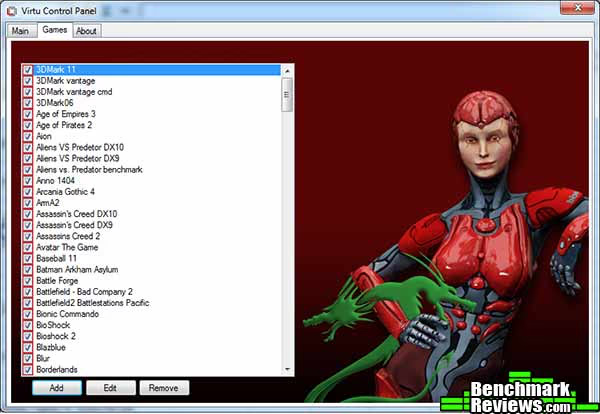
When running in i-Mode, your monitor's video cable is connected to the motherboard video port rather than the video card. While Virtu manages to enable the video card's driver anyway, the NVIDIA and AMD control panels won't be available in this mode (in fact, you'll get an error message from these control panels every time you boot Windows, which is annoying), limiting you to in-game graphics settings.
Virtu Test Methodology
To discern the performance and power characteristics of each Virtu mode as compared to a "native" graphics card, I chose an AMD Radeon 6850 as the graphics card and tested the following applications:
-
Unigine Heaven 2.1 Benchmark
-
Street Fighter IV Benchmark
-
Crysis Warhead
-
Battlefield: Bad Company 2
I ran each test against the native Radeon 6850, Virtu i-Mode (which should use the Radeon 6850 automatically, since each game was in the Virtu Games list), and Virtu d-Mode. Each test was run at 1680x1050 as well as 1920x1200 resolutions. Virtu i-Mode is the most interesting case since it must somehow copy the frame buffer contents from the Radeon 6850 to the iGPU's frame buffer, which I would expect to incur a performance penalty...but we'll see.
Lucid Virtu Test Results
Unigine Heaven 2.1
The Unigine Heaven 2.1 benchmark is a free publicly available tool that grants the power to unleash the graphics capabilities in DirectX-11 for Windows 7 or updated Vista operating systems. It reveals the enchanting magic of floating islands with a tiny village hidden in the cloudy skies. With the interactive mode, you can explore the intricate world presented. Through its advanced renderer, Unigine is one of the first applications to showcase the tessellation features of DX11-capable graphics cards, exhibiting the possibilities of enriching 3D gaming.
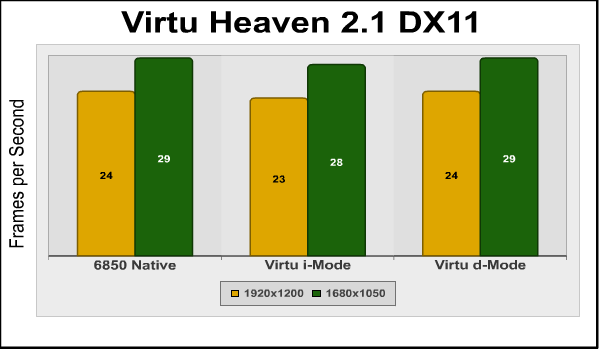
Here we see a pattern that will be repeated throughout our tests: the performance of Virtu d-Mode matches that of the native 6850, and there's a small (1fps in this case) penalty for running with Virtu i-Mode.
Street Fighter IV Benchmark
Street Fighter IV uses a new, built-from-scratch graphics engine that enables CAPCOM to tune the visuals and performance to fit the needs of the game, as well as run well on lower-end hardware. Although the engine is based on DX9 capabilities, it does add soft shadows, High Dynamic Range lighting, depth of field effects, and motion blur to enhance the game experience.
The game is multi-threaded, with rendering, audio, and file I/O all running in different threads. The development team has also worked to maintain a relatively constant CPU load in all parts of the game so that on-screen performance does not change dramatically in different game scenarios.
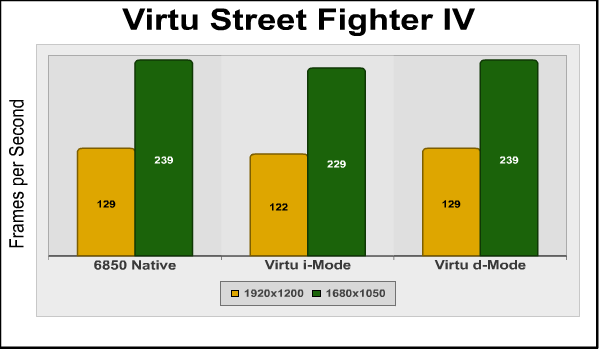
Again we see no penalty for using Virtu d-Mode, although there's a 7fps and 10fps penalty at the test resolutions for running in Virtu i-Mode.
Crysis Warhead
Crysis Warhead is an expansion pack based on the original Crysis video game. Crysis Warhead is based in the future, where an ancient alien spacecraft has been discovered beneath the Earth on an island east of the Philippines. The game uses a refined version of the CryENGINE2 graphics engine. Like the original Crysis, Warhead uses the Microsoft Direct3D 10 (DirectX-10) API for graphics rendering.
Benchmark Reviews uses the HOC Crysis Warhead benchmark tool to test and measure graphic performance using the Airfield 1 demo scene. This short test places a high amount of stress on a graphics card because of detailed terrain and textures, but also for the test settings used. Using the DirectX-10 test with Very High Quality settings, the Airfield 1 demo scene is configured with 4x anti-aliasing and 16x anisotropic filtering to create maximum graphic load.
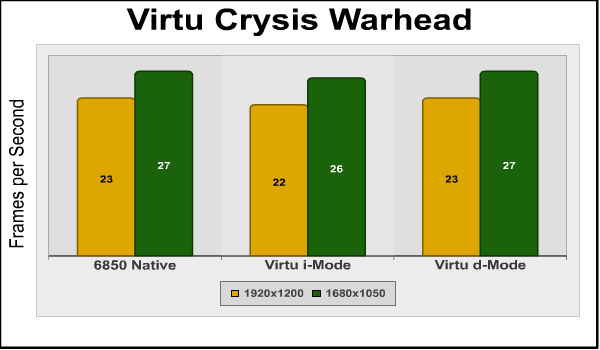
Although introduced in 2008, Crysis Warhead still serves as a test of the most powerful graphics cards. It's impressive to see that d-Mode is as fast as the native 6850, and that i-Mode has only a small 1fps penalty.
Battlefield: Bad Company 2
The Battlefield franchise has been known to demand a lot from PC graphics hardware. DICE (Digital Illusions CE) has incorporated their Frostbite-1.5 game engine with Destruction-2.0 feature set, which allows destructible environments, with Battlefield: Bad Company 2, and adds gravitational bullet drop effects for projectiles shot from weapons at a long distance. The Frostbite-1.5 game engine used on Battlefield: Bad Company 2 consists of DirectX-10 primary graphics, with improved performance and softened dynamic shadows added for DirectX-11 users.
In our benchmark tests of Battlefield: Bad Company 2, the first three minutes of action in the single-player raft night scene are captured with FRAPS.
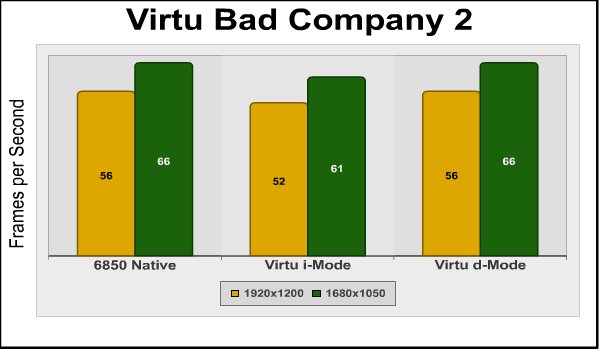
And again, d-Mode equals native performance, and i-Mode takes a small hit.
Virtu Performance Penalty
In my testing, Virtu's d-Mode imposes no performance penalty, while i-Mode generally had a minimal performance penalty. This is impressive since in i-Mode, Virtu's driver must be copying each frame from the frame buffer on the Radeon 6850 video card to the frame buffer used by the iGPU. Here are the statistics for i-Mode performance penalties for these tests at 1920x1200:
| Game | Native FPS | i-Mode FPS | % drop |
|---|---|---|---|
| Heaven | 29 | 28 | -3.45 |
| Street Fighter IV | 239 | 229 | -4.18 |
| Crysis Warhead | 23 | 22 | -4.35 |
| Bad Company 2 | 56 | 52 | -7.14 |
| Average percentage FPS drop | -4.78 | ||
As you can see the performance penalty for using Virtu's i-Mode is quite small, certainly smaller than I would have expected. In the low-frame-rate cases where the performance difference is most important (Heaven and Crysis Warhead), there's only a 1FPS penalty, which won't be noticeable. This makes sense when you think about it: Virtu's driver can obviously handle some hundreds of 1920x1200 frames every second (as indicated by the Street Fighter IV results), so low-frame rate games won't be constrained by this mechanism, and thus exhibit minimal performance differences.
Virtu Power Saving
The point behind Virtu's i-Mode is to save power by using the integrated GPU when the performance of a discrete graphics card is not required. To test this, I measured system power consumption (not including the monitor) at the Windows login screen, playing back a full-screen MP4 file, and running the Street Fighter IV benchmark.
| Windows Login | Full screen MP4 | SF IV Benchmark | |
|---|---|---|---|
| Native iGPU | 51 watts | 56 watts | 57 watts |
| Native 6850 | 71 watts | 97 watts | 186 watts |
| Virtu i-Mode | 72 watts | 76 watts | 187 watts |
| Virtu d-Mode | 71 watts | 97 watts | 184 watts |
This is a classic case of "Your mileage may vary." Obviously, the power savings of Virtu will depend largely on the video card you have. As expected, using the native Sandy Bridge GPU is the lowest power option. Virtu d-Mode saves no power at all over the native 6850, while we see a significant 21-watt savings using Virtu i-Mode when playing the full-screen MP4, since Virtu doesn't fire up the Radeon 6850 to do this, and the card stays in idle mode, using only about 20 watts of power, which is the idle power Benchmark Reviews has measured for Radeon 6850s in separate reviews. The power savings with larger, more power-hungry graphics cards would be even larger.
It's a little disappointing to see that Virtu d-Mode saves no power (the 2 watt difference between d-Mode and the native 6850 in MP4 playback is within the margin of error for these measurements), but that's not what it's designed for. Given that the performance penalty for using i-Mode is quite small at only about 5%, using i-Mode is the obvious choice if you're using a single, single-GPU graphics card. The only reason to use Virtu d-Mode is if you want to use Intel's Quick Sync iGPU transcoding, or have a multi-GPU card or multiple graphics cards that require d-Mode.
Virtu Final Thoughts and Conclusion
Virtu isn't perfect: you must manually designate the programs you want it to work with, and as I discovered, not all programs will work (there's probably a reason that program listing tab in the Virtu control applications is labeled "Games").
The architecture of the system also makes switching between i-Mode and d-Mode clumsy: you must reboot your system and change the "Initiate Graphics Adapter" setting in the EUFI BIOS to select either "iGPU" (for i-Mode) or "PCIE/PCI" for d-Mode. You then reboot again and switch the video cable to the appropriate output: if you forget to switch the video cable, or switch it without making the change in the BIOS, all you'll see is a black screen. Still, most people will pick a mode and stick to it, so this probably won't be a problem in the real world.
While Lucid Virtu technology still has a few rough edges, it has the advantage of working with both AMD and NVIDIA video cards, while NVIDIA Synergy will be functional only with NVIDIA video cards. But based on the way NVIDIA Optimus technology works on existing laptop computers, it may well be easier to use, without the application problems I saw with Virtu. ASUS says they'll supply Synergy as a free update for Z68 Express motherboard owners when it's available. Still, since Synergy's not available yet, it may have other issues and limitations that Virtu doesn't, and we don't yet know how its performance and power savings will compare.
For now, Virtu's the only game in town, and within its few limitations it works very well. Virtu is a compelling reason to prefer Z68 Express motherboard over a P67 Express motherboard.
Questions? Comments? Benchmark Reviews really wants your feedback. We invite you to leave your remarks in our Discussion Forum.
Reader comments from the original article
29 comments were posted before commenting closed. They are preserved as written. Original avatars no longer resolve and are shown as a placeholder.
Quick Synk tests? Olle P Permalink:
To me it seems like d-mode is the way to go. The big question is how well QS perform in that mode.
RE: Lucid Virtu Graphics Virtualization Technology David Ramsey Permalink:
We don't have any Quick Sync transcoding utilities in house yet, but we should in the future.
Quick Sync Tests??? Lord Odin Permalink:
Where are the Quick Sync tests? One of the major benefits of switching to Z68 is the ability to use Quick Sync. To pass judgment on the software without having tested those apps that utilize QS is premature.
RE: Lucid Virtu Graphics Virtualization Technology Computer Ed Permalink:
Looking at your power results I would say that at the end of the day it is possible that the imode, uses more power not less overall. On a typical PC most of the time is spent in an idle or very low use mode. Accroding to your numbers the imode when in that state is using more power than the single card system. Also it would appear in gaming it uses additional power. I understand where the extra power is coming from but my point is this means that with only a small percentage of computer usage time there is no power savings at all.
RE: Lucid Virtu Graphics Virtualization Technology David Ramsey Permalink:
It's possible, I suppose, that for some people i-Mode will use more power on the average than a disabled iGPU and a single graphics card. It would depend on the specific graphics card in use as well as the user's usage patterns. Note, for example, the power savings when doing something as simple as playing an MP4 video...something that's very common these days.
Multiple monitors Krenn Permalink:
One feature that hasn't gotten much press is the ability to connect monitors to both the integrated and discrete outputs at the same time; almost every board before this disabled the on-board video once you connect a video card. Can you save power when connecting a second monitor to the integrated video vs. connecting that monitor to the video card? I usually play games on one screen and have a browser/email/etc open in the second, so that monitor doesn't need any kind of high-end processing, which should be perfect for the integrated video. This could also improve performance for the video card, since it only has to drive one monitor.
RE: Multiple monitors David Ramsey Permalink:
I did specifically mention the ability to connect monitors to the motherboard and a graphics card in my associated review of the ASUS P8Z68 motherboard. I didn't run power test scenarios like the one you suggested, and agree that it's an interesting question. I suspect the power difference would be minimal, but it would depend on the card.
d-Mode- any value? william Permalink:
I am having a hard time seeing any value to either from your results. If d-mode with the separate g-card matches the performance of the discrete g-card performance without d-mode....what is point? Sounds more like a brief headache to setup with small to no benefit. Further, doesn't d-Mode pull processing power away from other core cpu/mobo processes? Wouldn't that ultimately equate to a deduction in purpose compared to a discrete sli or single g-card? I recognize that conceptually the Q-syc sounds great, but reality... I may be missing something, but these are my observations.
RE: d-Mode- any value? David Ramsey Permalink:
Remember that the use of the discrete video card in d-mode is automatic: the advantage comes from power savings when you're not running a 3D game and the system automagically switches back to the iGPU. The power savings can be significant. The overhead to implement d-mode is trivial and you'll never notice a performance hit. I didn't test QuickSync video transcoding, but reports from other sites are that it's much faster than even GPU transcoding, so that's a win if you use this feature.
QuickSync is for video transcoding James Permalink:
From what I've read on other reviews, the major gain from Quick Sync is not for gaming but for video transcoding.
hoopdloop James Permalink:
Very helpful article. Will older applications such as Adobe CS2 (Premiere Pro, After Effects, Photoshop, Illustrator, etc...) be able to take advantage of QuickSync and Virtu optimizations, or would I be just as well off with a P67 for these older applications?
RE: hoopdloop David Ramsey Permalink:
Remember that QuickSync is just Intel's name for their video transcoding technology as implemented on the iGPU of a Sandy Bridge processor. As far as I know, the only things that use it right now are various third party video transcoders. I imagine other apps will come to use it, but now just yet, and older apps certainly won't make any use of it. So a P67 system will work just as well for the apps you list as a Z68 system, although the latter will give you more options down the road.
half-life crashing... gaijinboy Permalink:
I have a asus z68 Mobo running Lucid Virtu to dynamically switch between integrated and discreet GPUs. This works for all of my other games (although I often do have to add the names of the .exe files to the white list manually). However, with HL2 and all of the games based on its engine, my computer refuses to utilize the discrete GPU. when I open the game, a warning will appear explaining that my integrated GPU is not recognized by steam. Then after the valve intro, the game will stall and crash. I have added the HL2.exe and the steam.exe to the white list in the Virtu software... Any advice?
RE: half-life crashing... David Ramsey Permalink:
Um...no. I see you've already posted on the Steam forums. Hopefully someone there can help.
RE: RE: half-life crashing... gaijinboy Permalink:
Thanks anyway :) and thanks for your great post!
powering off PCI-E sholimar Permalink:
Hello! Thanks for the great review - I've been looking for a comparison of i and d modes and yours hit the spot! :) Now... I do have a question though. I remember that some time ago LucidLogix promised that Virtu would even power off the PCI-E port when the integrated chip was used ("go green" all the way). Any news on this? Is it even possible?
RE: powering off PCI-E David Ramsey Permalink:
Good question. You can get the latest Virtu driver here: #lucidlogix.com/product-virtu.html ...but the release notes don't mention anything about this. I'm not sure it's even possible.
RE: RE: powering off PCI-E sholimar Permalink:
Wow! Thank you for the very speedy reply! I think that they stated it in a conference in Jan or Feb (so it could be a sales pitch), but I delved a bit into the matter and I think Nvidia's Optimus does this on notebooks. Even so, completely powering off the GPU (or PCI-E port) isn't explicitly mentioned... rather, Optimus is "waking the GPU from sleep", or "from idle" which is something different. If this could be possible, LucidLox may have a very interesting ace up its sleeve. I'm going to ask them directly and post whatever answer I receive here. Keep up the great work! :)
No "Games"-Tab Jonny Permalink:
Hi there! I have a problem with my Lucid Virtue Green GV v. 1.2.112: in the MSI user manual it says that I should see a "Games"-Tab in the Control Center. Instead, I have a tab called "Applications", but I cannot add, edit or remove anything by any means. I'm running a MSI Z68A-G45 (G3) with a Gainward Geforce GTX560 Ti 448 Cores Limited Edition, if that should be of any significance. Lucid Virtu is running in d-Mode by BIOS configuration. Does anyone know what I'm doing wrong? Thanks!
RE: No "Games"-Tab David Ramsey Permalink:
If your version of the Virtu control panel doesn't have an "Add" button under the list of games like the version in my review, I don't have ny suggestions. I think you can download the latest version of the software here: ##lucidlogix.com/product-virtu.html
RE: RE: No "Games"-Tab Jonny Permalink:
Thanks for the quick answer. It does have those three buttons, but i cannot use them. They are grey, if you know what I mean :) I gave up on it now. No need to waste time on it any longer, since it doesn't really do much. But thanks anyway!
RE: RE: RE: No "Games"-Tab David Ramsey Permalink:
I did a Google search and Lucid says the "Add" and editing features are disabled on evaluation versions of the product. You should probably contact MSI if this software was delivered with the computer, since other X68 boards give you the real thing.
RE: No "Games"-Tab MyBrains Permalink:
You need to update the BIOS for the full Lucid software,i used the Live Update 5 to get the newer BIOS (Version N.40) and now i have full control of the Lucid Software :)
RE: RE: No "Games"-Tab MyBrains Permalink:
Forgot to say i have the MSI Z68A GD55 (G3) Board.
RE: Lucid Virtu Graphics Virtualization Technology Jonny Permalink:
Hi David, yeah, I just read that as well. Don't know if it's worth it, but I'll give it a shot and let you know how they handled my request. Thanks!
ambigous... hmm Permalink:
so, i going for d-mode, but when enabled the IGD Multi-monitor is greyed out and vice versa...from what u wrote it must be enabled... how should i set this up? should enabled the IGD Multi Monitor, then enabled d-mode. Furthermore, there are 2 more settings came up when d-mode is enabled: integrated graphics shared memo : 32, 64, 128, 256? 256? which one? DVTM : 128mb, 256mb, max ? max? ty in adv..
RE: ambigous... David Ramsey Permalink:
Are you using the same motherboard I was? (Asus P8Z68-V Pro) To use D-mode, you set the "Initiate Graphic Adapter" setting to use a card in a PCI/PCI-E slot, and then make sure "iGPU Multi Monitor" is enabled. I have no suggestion if you can't enable that setting, sorry. I've never seen that happen. The amount of memory you dedicate to "iGPU Memory" is up to you. In general, more memory will increase performance of the iGPU graphics, but since you're using D-mode, your primary graphics device will be your discrete video cards anyway, so I don't see any reason to set more than the minimum. I don't know what you mean by "DVTM"
broke 8800gtx steve andersn Permalink:
I have this board and discovered that my broken 8800gtx ( monitors plugged into it display no blue gamma/ hue if It works at all) was able to be used again through i-mode. I'm poor so can't really buy a new one. It is the greatest thing for me since I now am able to use that card through the HD 3000 and still get dgpu speed from it
dramsey@mac.com David Ramsey Permalink:
You know, that's really quite clever: using Virtu to bypass a video card's failed signal generation, but using its rendering horsepower. Kudos to you...