
Cooler Master Elite 430 Case RC-430-KWN1
Cooler Master Elite 430 Case Review
Usually high-end cases are the ones that attract all the excitement, but the majority of people will be looking for a well-priced mid tower case like the Cooler Master Elite 430. Cooler Master's newest addition to the Elite series retains an identical interior build existing since the Elite 370, but gave it a unified paint job and new exterior shell on the RC-430-KWN1 model. The Elite 430 is small and light, yet maximizes interior space to fit even the longest graphic cards. This new release is aimed to be competitive among the mid tower market, Benchmark Reviews investigates whether the Cooler Master 430 succeeds or not.
The CM Elite 430 can be purchased for $54.99, a very competitive price for features listed on its spec sheet. Up to six fans, seven expansion slots, three 5.25" drives and seven 3.25" drives can be installed in this compact but space-efficient case. The Elite 430 only comes with one blue LED fan, as additional fans are bound to drive up the price. The size of the case is close to bare minimum for a full ATX motherboard with room to install an 11" graphics card.

The Cooler Master Elite 430 targets budget-oriented buyers looking for the basic functionality of a mid-tower computer case. It offers plenty of space by slimming down components such as the drive bays. Cooler Master made a bold statement and declared that the Elite 430 can house even two HD 5970s in crossfire. Putting aside the question of whether or not the owner of two HD 5970s will buy this case, the Elite 430 would need some serious cooling and space management to make such a build actually viable. But for this price and size, simply having this capability is amazing.
Manufacturer: Cooler Master
Product Name: Elite 430
Manufacturer: RC-430-KWN1
Price As Tested:$54.99
Full Disclosure: The product sample used in this article has been provided by Cooler Master.
 Cooler Master Elite 430 Features
- Interior black coating makes stylish inside looks.
- Front 120mm fan with brilliant Blue LED provides the best airflow to HDDs.
- Rear 120mm fan for high-efficiency ventilation.
- Tool-Free mechanical design for quick assembly and maintenance.
- Side ventilation holes for better cooling performance.
- Large transparent side window included.
- Supports long graphics cards including Radeon HD 5970.
RC-430-KWN1 Specifications
|
Available Color |
Black |
|---|---|
|
Material |
Steel Body ; ABS Plastic |
|
Dimension (W / H / D) |
190 x 424 x 490 mm / 7.5 x 16.7 x 19.3 inch |
|
Weight |
Net Weight: 4.7 kg / 10.3 lbs |
|
M/B Type |
ATX/Micro-ATX |
|
5.25" Drive Bay |
3 Exposed |
|
3.5" Drive Bay |
2 Exposed |
|
I/O Panel |
USB 2.0 x2, Mic x1, Audio x1, 1394a x 1,(optional) |
|
Expansion Slots |
7 |
|
Cooling System |
Top: 120 mm fan x 2 (optional) |
|
Power Supply |
Standard ATX PS2(optional) |
Elite 430 Closer Look: Exterior
The Cooler Master Elite 430 came in pretty standard packaging, shipped with an abundance of screws but minimal instructions (screw diagrams were impossible to distinguish). Only the front fan was included, 120mm blue LED fan.

Out of the box the Elite 430 looked pretty plain, but visibly a step up from the past Elite series. Mesh has pretty much became an industry standard to place everywhere. It increases airflow, traps dust, and allows internal lighting to fully decorate the case. While currently a little dull, once the blue LED fans start turning the Cooler Master Elite 430 looks pretty awesome.

Most people would prefer if their computer case had a positive visual effect on their room. To do that, cases now either need a wicked exterior design, or a see-through panel for showing off the components with lighting. The Cooler Master Elite 430 comes with a plastic window with ventilation built in, allowing the attachment of a 120mm fan should additional cooling be required.

The Elite 430's rare end has seven expansion slots, a place to install an optional fan of 80mm/90mm/120mm, and even two ports for liquid cooling. In order to use one of the expansion slots or ports, the metal plate would need to be physically twisted and yanked off with the help of a screw driver. Accidently yanking out the wrong one will cause a permanent mesh-less hole. Many cases have replaceable plates but the Elite 430's design offers simplicity and possibly a bit of savings.

The back uses thumb screws compatible with a screw drivers. The unified paint job goes with the market trend. Numerous vents and meshed surfaces should give the Cooler Master Elite 430 great cooling. This is a pretty good update so far and many of the exterior changes work well.
Elite 430 Detailed Exterior Features
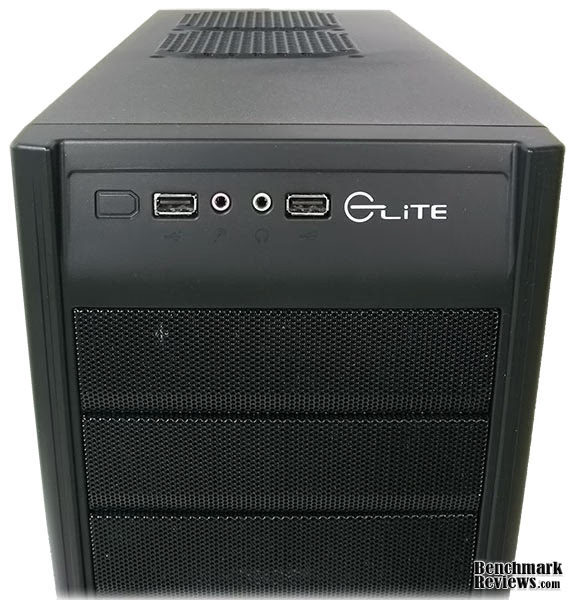
Looking more closely, the Cooler Master Elite 430 has two USB2.0 ports and audio/mic jacks. They also offer an optional 1394a port, presumably on the left side where the shape has been carved out. The three 5.25" drive bays are covered with replaceable mesh that can be easily be removed with the front cover taken off.
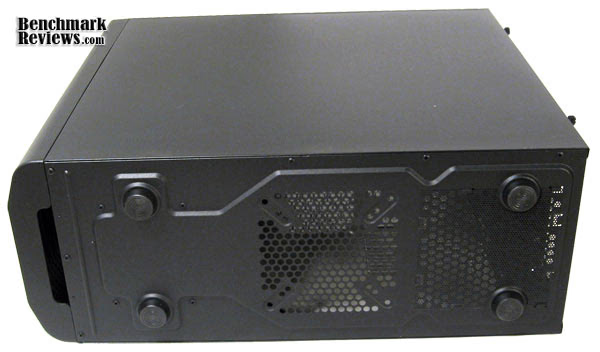
The Elite 430 has plastic feet on the bottom, and a easy hand grip for tearing off the front cover. Two vents are located at the rear, one for the PSU and one for an optional fan. To install a bottom fan would require routing cables along the sides of the case as all the wires stick out of the PSU right next to it.
The top allows two more spots for installing fans. While this seems to give the impression that this case can install up to six fans, it is only possible with great cable management and a relatively conservative system. While the case has no problems installing a large CPU fan, it immediately becomes a trade off because many large CPU fans will take up too much space and make it impossible to install any top fans.

Next Benchmark Reviews will be looking into the interior of the Elite 430, which houses some of the simplest and best tool-less designs.
Elite 430 Closer Look: Interior
After taking off four thumbscrews, both the front and back panels come loose after a tug giving us full access to the interior of the Cooler Master Elite 430. The build for the panels is a little flimsy and "bendy", and always takes several attempts to place back the panels.

The Elite 430's interior is fairly spacious thanks to the narrow drive bays. A mini cheat-sheet for screw arrangement for ATX and micro-ATX motherboards is engraved into the center of the motherboard tray. However there's no cable management features noticeable anywhere. Cooler Master provides a bunch of easy-to-use cable ties that can help, but there's a lack of places to tie cables to. With a packed system and a couple fans installed things could get pretty messy.

The back reveals a cut-out for the CPU to offer additional cooling. To lock a 3.5" drive in place both sides need to be clipped on with the tool-less lock design. The large vertical gap between the drive bays and the motherboard tray is essentially the only route available for twisting and turning wires. The Elite 430 is fairly compact so very little can fit between the back of the motherboard tray and the exterior panel.
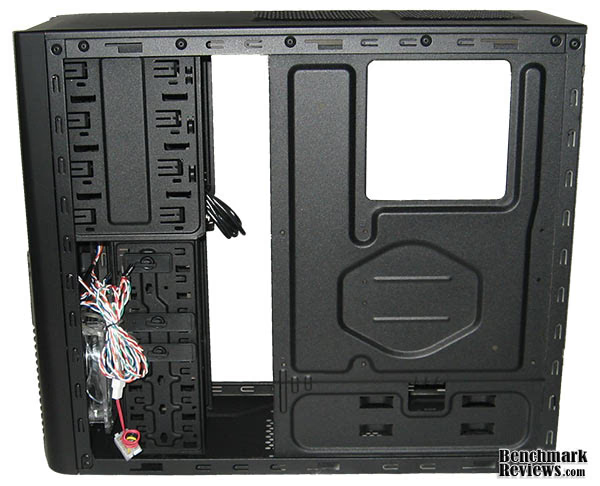
The Cooler Master Elite 430's front 5.25" drive bays are the easiest to access and install. The metal pieces need to be torn out before any drive can be inserted. Less consideration is needed for these slots as the front cover's mesh helps trap most of the dust, unlike the PCI-slots in the back. Taking off the front cover also reveals the only fan that came with the case. The 120mm blue LED fan blows cool wind right onto the internal drives to keep them cool.

The Cooler Master Elite 430 retains most of its ancestor's interior features, but made modifications to allow graphic cards larger than 11" to fit. One of the biggest concerns here is cooling and cable management. Benchmark Reviews takes closer look at the Elite 430's interior in the next section, installing in components to see how well this case works.
Elite 430 Detailed Interior Features
The Cooler Master Elite 430's top 5.25" drive locks are completely tool-less and locks are not removable. They simply flip left and right for locking and opening. It works extremely well. However Cooler Master only provides two locks so a third drive will have to be installed the old fashioned way using screws.

The locks for the Elite 430's 3.5" drives also work great. Cooler Master provides three locks for seven drive bays. Installing 3.5" drives on the lower five slots however will leave half the drive to sticking out. Cooler Master managed to minimize the container's size by using only two screw to lock the drive in place. Smart positioning of drives will allow easy installation for long graphics card like the HD 5970.

At the bottom of the Elite 430 the PSU spot sits right above a meshed vent. Metal bumpers stick out to ensure the PSU sits at the right place, and a flap helps to keep the PSU in place. It holds the PSU nicely, helping to avoid movement caused by any loose screws.

Installation for the Cooler Master Elite 430 was a little tricky due to wiring choices and limited space. I only had enough room to install two additional 120mm fans, at the rear and on the side window. There was no space at the top or bottom for additional fans. The top was due not so much to the overall size of the CPU cooler, more so because the general size for a heatsink covering a i7-920 CPU is just too wide.
Installation of the 5.25" and 3.5" drives was the easiest part as the tool-less design worked flawlessly. The 3.5" drive however was half sticking out. To install large graphic cards the PCI-slot would need to alternate rows with the 3.5" drives. Once the GTX285 was installed there was very little additional space to move things around.

The completed system looks pretty compact with most of the cables tucked at the bottom, pretty much the only place available. Unfortunately trying to add another 3.5" drive later proved to be extremely difficult. The drive had to be inserted horizontally from the left, where either the graphics card was blocking or cables were in the way. A total of three blue LED fans were installed, and with them, the case gives off a nice glow all around thanks to numerous meshed surfaces.

In the end the Cooler Master Elite 430 did what it set out to do, allowing the installation of huge graphic cards in a pretty small case. There are many options for additional fans and drive bays, but these options are only available when installing a moderate system, as space is the biggest limiting factor. While the spec sheet claims up to six fans can be installed most systems would only be able to install three. Poor cable management features didn't help the situation either. However in most cases this case would be suitable. Without a large graphics card eating away at all the space and without a CPU cooler blocking the top, the Cooler Master Elite 430 gets the job done well.
CM Elite 430 Final Thoughts
The Cooler Master Elite 430 is a great case. I'm a little disappointed on certain aspects mainly because for this case is a pretty small playing field once I had the GTX285 and large CPU cooler installed. The lack of decent cable management features made routing cables very annoying. Also, more fans can be installed if the case is housing smaller components, but less fans if larger components that require more cooling are installed, which kind of defeats the purpose for having the ability to attach six fans. For enthusiast systems, which technically is this case's speciality, the Elite 430 has a lot of drawbacks.
On the other hand for less ambitious systems this case does just fine. Without a large graphics card blocking the way, installation of additional 3.5" drives become a lot easier. Many full tower cases have only as many fans as the Elite 430 does, so as long as there's space to install additional fans, cooling shouldn't be an issue.

RC-430-KWN1 Conclusion
The Cooler Master Elite 430 is one of the smallest cases that can fit a full ATX system with the latest graphic cards on the market. The single 120mm fan that comes with the case is sufficient for the average user, but a little disappointing otherwise. Unfortunately due to the lack of fans and space, temperatures for CPU and GPU are several degrees higher than my original six-fan mid tower. The Elite 430 is actually a considerable amount smaller than many mid towers.The unified paint job and exterior updates make the Cooler Master Elite 430 fairly modern case. There's not much to hate about the appearance and plenty to like with lighting. The exterior isn't extravagant or particularly notable in any way but for a budget case it works well.
The overal construction and quality of the Elite 430 is decent. The interior is great but the removable side panels feel flimsy. Giving the window light pressure can bend the entire panel inwards easily. Other than that, edges that should be rounded are rounded, and locks that should work do work. Some parts of the Elite 430 really focused on simplicity and used cut-out designs to minimize cost. For example the PCI expansion slots have metal plates that need to be ripped off to be used, and cannot be replaced.
The Cooler Master Elite 430 offers a good number of features and functionality for a budget case. Installation is easy and straightforward. The tool-less locks for the drive bays work as they are designed with little effort required to get the job done. One of the most unfortunate drawbacks of the Elite 430 however is cable management. Most of the cables are left to be tugged under at the bottom of the case. The best cable ties can do is to ensure the cables stick together. Also a lot of the Elite 430's functionality is self conflicting. Installing large graphic cards blocks off many of the 3.5" drive bays. Having a large CPU fan blocks off the top two vents. It does sound pretty grim if you happen to be interested in putting a high-end configuration in this case, however it's important to note that the Elite 430 is one of the only cases this small that can do it. For users that are using something similar to Core 2 Duo CPUs, two 3.5" hard drives, and low profile CPU cooler, none of this will be any issue, except cable management of course.
The RC-430-KWN1 model is currently priced at $54.99, the Cooler Master Elite 430 is a very affordable computer case. While the enclosure may not excel at anything in particular, it gives you more options than you have with many other similar cases. It is always good to know you have the option to install the any large component without problem, even if performance and cooling isn't comparable to larger models.
Overall the Cooler Master Elite 430 is a good product more keen on delivering options than performance. However it really seems to fit a specific scenario for optimizing it's features. If you're the type that saves on all other components but splurges on graphic cards, then this could be exactly what you need: affordable, small, but can fit any high-end GPU.
Pros:
+ Spacious for a mid-tower case of this size, supports the newest graphic cards.
+ Tool-less drive bay works very well
+ Small, light-weight, and quiet
+ Good visual update from previous versions
+ Good value
Cons:
- Poor cable management features
- Limited fan installation with larger systems (limited cooling effectiveness)
- Difficult to add drives after completed installation
- Exterior panels a little flimsy
- Only comes with one fan
Ratings:
- Performance: 8.50
- Appearance: 8.50
- Construction: 8.25
- Functionality: 8.00
- Value: 9.25
Final Score: 8.5 out of 10.
Recommended: Benchmark Reviews Seal of Approval.
Questions? Comments? Benchmark Reviews really wants your feedback. We invite you to leave your remarks in our Discussion Forum.
Reader comments from the original article
3 comments were posted before commenting closed. They are preserved as written. Original avatars no longer resolve and are shown as a placeholder.
Nice New Version Enigma8750 Permalink:
This new CoolerMaster Elite 430 is a great Budget Buy for a gamer. I noticed that it has a lot of thing in common with the CM Storm Scout. I am very impressed with the new upgrades.. Good work CoolerMaster.
RE: Cooler Master Elite 430 Case RC-430-KWN1 socrates key Permalink:
just purchased it from newegg for $40.00!
CPU fan/top fans Shaun Permalink:
I'm using both top fans with a CM V6 GT, which is one of the largest CPU coolers I've ever seen, and it clears without issue. On that note, I've read many reviews that said the V6 GT wouldn't fit. It does, with room to spare between the top of the cooler and the side glass. I've owned this case now for a little over 8 months and I've built 2 rigs in it. I'd build a 3rd in this case in a heartbeat. I'm honestly awe-struck at the value.