
ProlimaTech MK-13 Heat-Pipe VGA Cooler
ProlimaTech MK-13 Video Card Cooler
ProlimaTech holds the crown for best CPU cooler here at Benchmark Reviews with the Megahalems. They have also surprised a lot of review websites with their PK1 thermal compound. All of these things are a massive feat for a company that was founded just 2 years ago. It comes as no surprise that ProlimaTech have now ventured into another field within the PC enthusiast market: VGA cooling. Introducing the MK-13 VGA cooler, ProlimaTech's first entry into what is a steadily growing market, Weighing in at 555g it's no baby, and has six heatpipes to transfer heat to the uniquely designed heatsink fins. The ProlimaTech MK-13 comes with nearly universal compatibility and future proofing for video cards. Many consider Thermalright to hold the crown here, but I get the feeling that ProlimaTech won't settle for second best. Join me as Benchmark Reviews examines and tests the ProlimaTech MK-13.
We are getting to a point now where some GPU's are producing more heat than CPU's, The market is awash with CPU coolers, yet there are only so many VGA coolers that actually deserve any sort of a mention. Stock VGA coolers don't usually give much head room for overclocking, and with their fan at 100% the noise can be unbearable, most will just put up with that, but the wise will buy an aftermarket cooling solution.
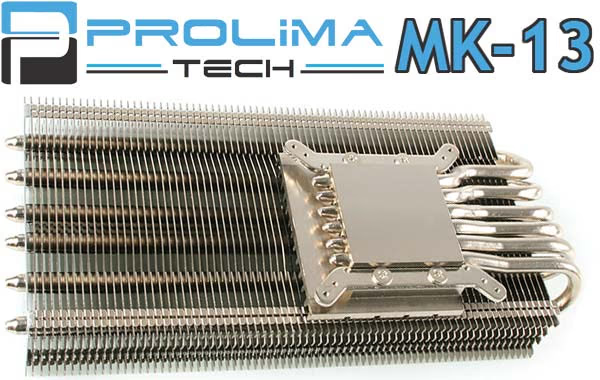
This is where the ProlimaTech MK-13 VGA cooler steps in. It comes without fans to let the cooling enthusiast choose their own favorite fans, and it will support a max of four 120mm fans! ProlimaTech state that in an SLI or Crossfire setup then one silent 140mm fan will cool both effectively. In this review the MK-13 VGA cooler will be tested using two Xigmatek XLF-F1253 120mm LED cooling fans and also without fans to see if its any good as a silent/passive solution.
About ProlimaTech Inc
Inc
ProlimaTech, founded in 2008 is headquartered in Taiwan, led by a team of dedicated experts with 22 years of accumulated experience in the field of computer thermal solutions. ProlimaTech stands for Professionalism exceeding beyond all Limits. We are here to challenge any limits that stand in our way to achieve what was thought to be impossible. ProlimaTech incorporates integration of the aerospace resource-saving technology and advanced heat conduction technology to create the best heat absorption and dissipation solutions while pertaining to the science of aesthetics. Our never-ending quest is to satisfy every computer overclocker's and every enthusiast's needs for high quality and performance oriented thermal solutions for their high-end computer components.
ProlimaTech VGA Cooler Features
-
Compatible with 92mm, 120mm, and 140mm fans for a maximum installation of four fans in a one-card configuration under the right conditions (all with RPM set at 1000 rpm for silent operation)
-
Installation of one silent 140mm fan (at 1000-1200 rpm) can effectively cool two VGA cards
-
Decreases temperatures tremendously on both the GPU and VGA card surrounding, particularly the VGA VRM and MOSFET area
-
Top performer for most high end VGA cards
-
Interchangeable Mounting hardware for installation on future released VGA cards
-
Fan Secure System to allow creative fan configuration/setup
-
Premium soldering on all contact points for maximum heat conduction
-
Six high quality nickel-plated copper heatpipes
-
A true DIY device that lets enthusiasts be innovative
-
Leading-edge heatsink design allowing best heat absorption and dissipation ratio
*For a more secured installation, a chassis with 20cm of width is strongly recommended.
*When installing four 120mm fans, RPM of less than 1000 is recommended.
*When installing two 120mm fans, RPM of 1000 is recommended.
ProlimaTech MK-13 Specifications
| Dimensions | 205 x 43.5 x 99.87 mm (WxHxD) |
|---|---|
| Material | Nickel plated copper (base and heatpipes) aluminum (blades/fins) |
| Heatpipes | 6 x 6mm diameter |
| Weight | 555g |
| Fans | (not included) Max of Four x 120mm fans or One x 140mm fan with V-profile bar |
VGA Cooler Compatability*
ATI Radeon
X1600 / X1650 Series
X1800 Series
X1900 / X1950 Series
HD 2400 Series
HD 2600 Series
HD 2900 series
HD 3650
HD 3850 Series
HD 3870 series (except X2)
HD 4650 Series
HD 4670 Series
HD 4770 Series
HD 4830 Series
HD 4850 Series
HD 4870 series (except X2)
HD 4890 Series
HD 5750
HD 5770
HD 5850
HD 5870
NVIDIA GeForce
6800 GS / GT / Ultra (PCIe)
7300 Series
7600 Series
7800 Series
7900 Series
7950 GT
8500 GT
8600 GT / GTS
8800 GT / GTS / GTX / Ultra (G80 / G92)
9400 GT
9500 GT
9600 GT / GSO (G92 / G94)
9800 GT / GTX / GTX +
GTS 250
GTX 260 (55nm / 65nm)
GTX 275
GTX 280
GTX 285
Quadro FX1400 / 1500
Quadro FX3400 / 3450 / 3500 / 3700
Quadro FX4000 / 4500 / 4600
Quadro FX5500 / 5600
* EDITOR'S NOTE: Immediately after this article was published, ProlimaTech contacted us with a new list of compatible video cards. The list is tentative as they confirm fit and compatibility first-hand, and is likely to change. The following models are confirmed compatible:
-
NVIDIA GeForce 7900 GTX
-
NVIDIA GeForce 9800 GT
-
NVIDIA GeForce GTX 260
-
NVIDIA GeForce GTX 275
-
NVIDIA GeForce GTX 280
-
NVIDIA GeForce GTX 285
-
ATI Radeon HD 5850
-
ATI Radeon HD 5870
Closer Look: ProlimaTech MK-13
For those amongst us who caught a sneak preview of the MK-13 back in early December, anticipation has been high for the release date of this cooler. The first thing that caught my attention was the sheer weight of it, 555g naked!! I must say though, attention to detail and build quality were high on the list when the MK-13 was made and there was a little design Easter egg too, which I will share with you later.
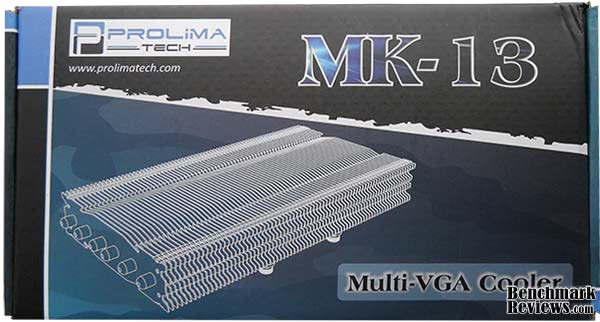
The box doesn't really draw attention to itself. There's no fancy window showing what's inside, all you get is a sketch and basic info on the front. Unless you already know what this cooler is capable of then human nature will kick in and you'll more than likely choose a package that looks nice rather than something that performs well. Most of us know that looks and performance don't always come together as one package. Once you look around the box on the back is a compatibility list and some features and specifications. What the packaging does do right though is protect the product. The MK-13 was encased in polyurethane foam which in my opinion is better than Styrofoam in both looks and properties. Under that was a cardboard shelf that separated the accessories, more on those later.
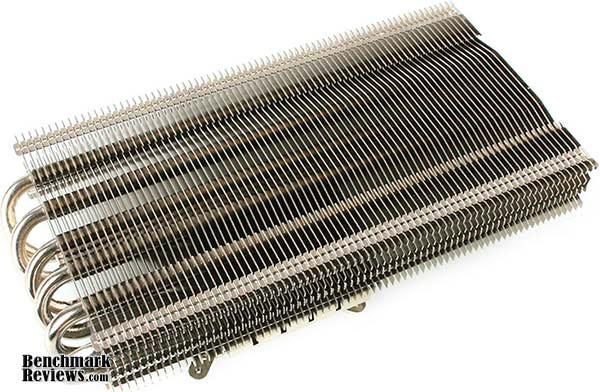
Once out of the box its a different story altogether, the shiny silver nickel paint job that the MK-13 has is following the trend of today's CPU coolers, naked copper is yesterdays fad, Also nickel coating will prolong the life of your cooler reducing the potential oxidation of the raw copper used in coolers these days. The MK-13 measures around 8" x 4" altogether so it won't dwarf your card but it will certainly make it more attractive and heavier.
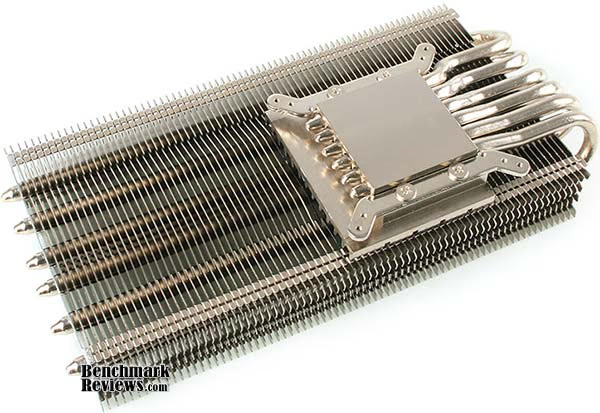
Once flipped over we get a good look at how the ProlimaTech MK-13 VGA cooler works. The nickel plated copper base takes the heat of the GPU, transfers it to the six 6mm copper heatpipes, which in turn deliver it to into the 151 aluminum heatsink fins where the heat will dissipate in the airflow of the fans you choose to accompany this cooler.

Looking at the side you can see a divide where the heatpipes go through the heatsink fins. At first count I had come to the conclusion that there were 76 fins but upon closer inspection I noticed that the top and bottom fins are separate from each other, Now you might question my math as 76 x 2 = 152 not 151, but the very end piece is full size not two pieces.
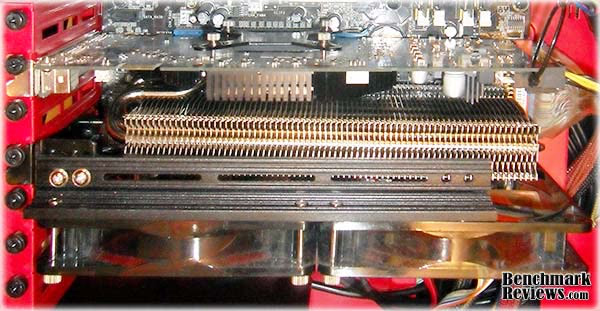
The MK-13 VGA cooler wasn't difficult to install although it was a little time consuming. As you can see here the MK-13 takes up the space of the next PCI slot and then the fan setup takes care of the rest of the slots. If you were to use two MK-13's in an SLI or Crossfire setup then the V-profile bar would be able to hold a fan above both coolers / cards (more on that later). Another point to note here is the weight of the MK-13 (555g) which is enough to pull the graphics card down a little so you may want to devise something to support your VGA card. I used cable tie and a small length of wire to support mine. Best thing of all is that there is no warping whatsoever where the cooler is attached to the card.
ProlimaTech MK-13 Detailed Features
To really appreciate the design and aesthetics of a product a little closer inspection is required. This is my favorite part of handling aftermarket products as the design is usually so much more involved and less 'square' than OEM products. The pictures you see on the net don't compare to actually handling the product, and you can get a few surprises.
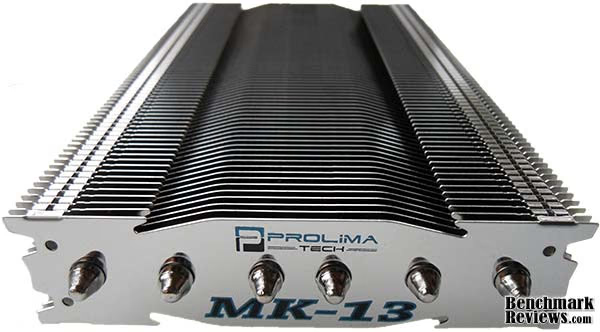
This is the little Easter egg I was referring to earlier, maybe you were hoping for something more?? Well none the less it was a pleasant surprise for me when I was having a good look at this cooler. At first I assumed it was a sticker but now I see that it is actually printed on, while this may not seem like much it is actually another step in the manufacturing process, these pieces would need to be done separately before construction. This was possibly the hardest shot to take as this end piece is also extremely reflective. Also note the extreme similarity in design to the Megahalems, The MK-13 is basically a flattened elongated version.
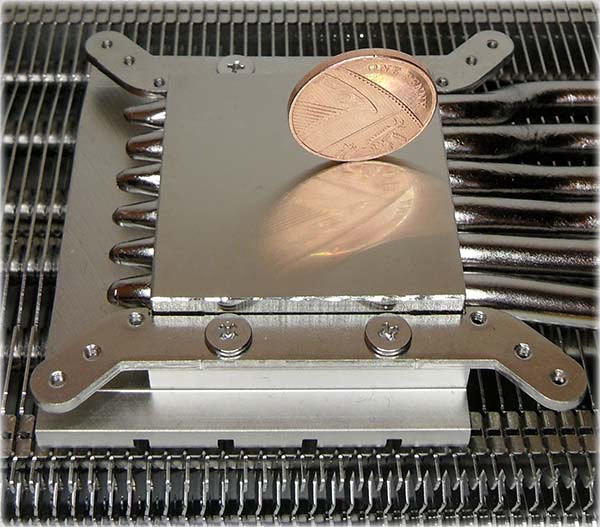
The GPU base is nickel coated but it isn't a perfect mirror shine, This however is not a down side. ProlimaTech are very scientific in the way that they design their products, and if a mirror shine was better, then I'm pretty sure the MK-13 would have had that feature.
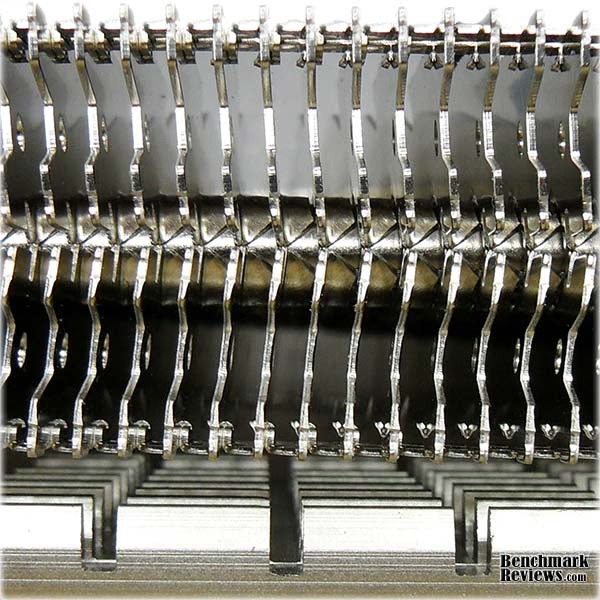
Talking about science, when we look closer at the fin array used in the ProlimaTech MK-13 you notice what I pointed out earlier. The top and bottom of each line is not only a separate piece but also installed at a slight angle. This should guarantee that the airflow will make maximum contact with the heatsink fins and therefore increase performance.
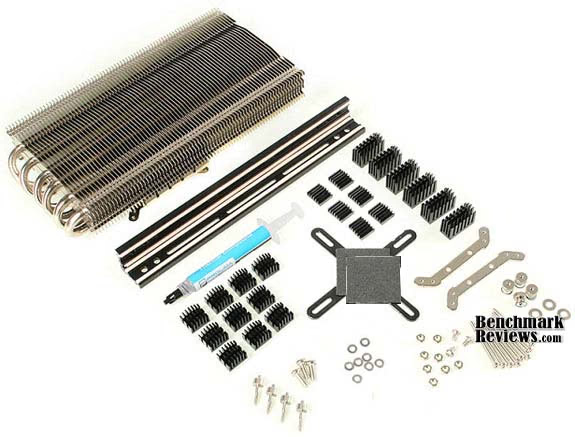
In order to make the MK-13 compatible with such a wide range of VGA cards ProlimaTech have devised the omni-mount retention system, this means it can be future proofed by ProlimaTech designing a new fastening kit when new cards hit the market, much like the kits developed for compatibility with LGA1366 and LGA 1156 CPU sockets, for CPU coolers of course. ProlimaTech recommend that you should use the largest ramsinks where you have clearance to do so as these should perform better.
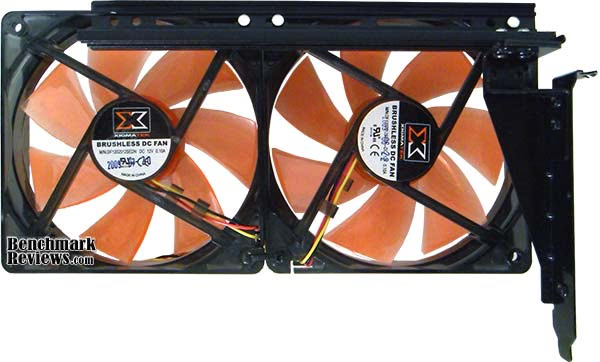
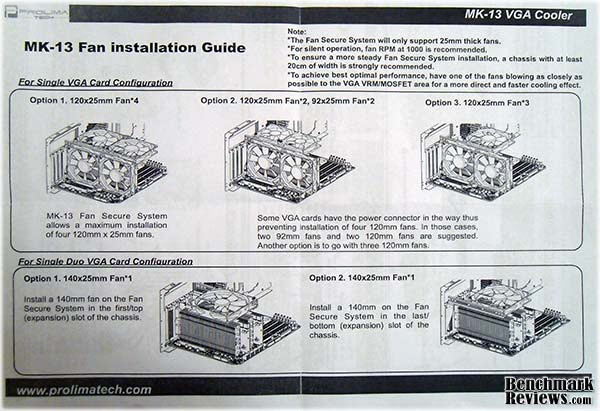
It did feel rather strange installing the fans in this manner (using the v-profile bar) rather than attaching them to the cooler itself and I have to admit it looks rather strange in the case too. The bracket on the right is secured to the v-profile bar with 2 screws and then secured into your chassis like an expansion card. ProlimaTech also include a back-plate that is secured externally to the expansion slot bracket should you use more than two or more fans. It does work really well and if you had an SLI or Crossfire setup then it is possible to mount one large 140mm fan blowing air equally onto both coolers rather than having fans for each cooler. ProlimaTech included a fan installation guide on the instruction leaflet (below).
Testing & Results
Testing Methodology
The following programs were used during testing;
-
FurMark build 1.6.0 - For monitoring temperatures under load.
-
ATI Tool v0.26 - For attaining max stable O/C data.
-
RivaTuner V2.24- For driver level overclocking.
-
CoD-4 Modern Warfare - For real world stability testing.
Ambient case temperatures were measured using a relatively cheap digital case temperature monitor and were consistently 23°C / 24°C. 30 minutes were allowed for the temperatures to stabilize before starting each test, idle temperatures were then recorded. After that FurMark was allowed to run for 10 minutes to load the GPU and find maximum temperatures. Each test was conducted 3 times and an average was taken from the 3.
The tests were conducted under the following conditions.
-
9800GT with stock cooler attached
-
9800GT with ProlimaTech MK-13 attached - No fans - passive / silent operation
-
Max O/C on 9800GT with ProlimaTech MK-13 attached - ATI Tool / Riva Tuner (Core 720MHz / Memory 1140MHz / Shader 1800MHz)
-
Max stable O/C without instability during gaming on 9800GT with ProlimaTech MK-13 attached - CoD4 (Core 675MHz / Memory 1080MHz / Shader 1687MHz)
The MK-13 VGA cooler will be tested with two Xigmatek XLF-F1253 120mm LED cooling fans. Many other fans are available that may give better performance and/or airflow, but where silence is concerned these fans sit up there with the best of them, they are the only identical set of two 120mm fans I have to hand. Fan speed will consistently be at 100% during testing as I know my fans run nice and quiet at full speed.
Test System Hardware
- Video: PNY GeForce 9800 GT 512MB (G92 65nm)
-
Motherboard: ASUS P5B-Deluxe Wi-Fi/AP
-
System Memory: 2GB PC2-6400 OCZ Platinum Rev-2
-
Processor: Intel Core 2 Duo E6600 2.4GHz @ 3.60GHz
-
Disk Drive: Western Digital SE Caviar 200GB SATA 7200RPM
-
Optical Drive: LITE-ON DVD-RW LDW-411S
-
PSU: OCZ StealthXStream 500W
-
Operating System: Windows XP Pro SP3 32-bit
VGA Cooler Results
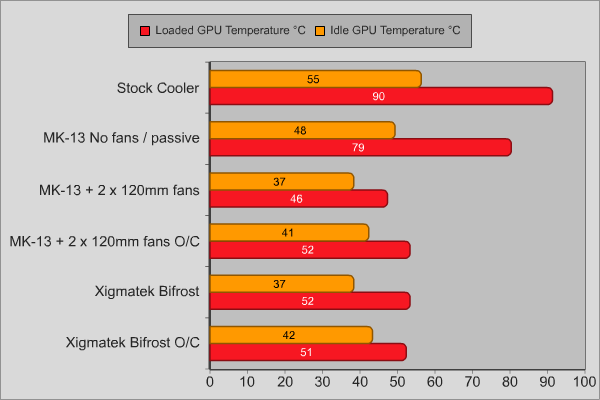
As you can see from the results the ProlimaTech MK-13 VGA cooler is a great performer with a very respectable idle temperature of 37ºC, even with no fans it easily out performs the stock cooler on the 9800GT. The ProlimaTech MK-13 VGA cooler beats the Xigmatek Bifrost by 6ºC under load with stock clocks and performs the same as the Bifrost when it the 9800GT is overclocked. No matter how far I pushed the overclocks the temperature wouldn't go above 52ºC, and I'm sure that with higher airflow the temps could have possibly fallen by a few degrees.
VGA Cooler Final Thoughts
So there we have it, the results are in and the MK-13 is the top performer. I knew even before I began the tests that the MK-13 was going to perform well, but that is what you expect when you get 555g of beautifully crafted nickel plated copper and aluminum from a company that rocked the show with its high end CPU cooler. The review nearly didn't happen though as there was an issue with the MK-13 when it was received. The problem was that where ProlimaTech had based compatibility on distance between mounting holes they had not taken into consideration the thickness of the actual GPU and therefore there wasn't sufficient contact between the GPU and the MK-13 on the 9800 GT. Thanks to Benchmark Reviews' findings with the 9800 GT, an extra padding will be added to each package of the MK-13 to overcome the issue, with instructions on when and how to use it. If you want to get your hands on one of these you might have to wait a while as it isn't widely available yet. Frozen CPU will stock it for $59.99 or you can find it over at Caseking (German) for 49,90 EUR.
ProlimaTech MK-13 Conclusion
The ProlimaTech MK-13 VGA cooler performed very well no matter what was thrown at it, it gave me the headroom I needed to push my VGA card to its limit and proved itself capable of working in passive mode should you be looking for the ultimate silent solution. Once again we have a product before us that performs as good as it looks, the pictures speak for themselves, nickel plated looks so much better than bare copper and aluminum and I think this is what we will definitely be seeing more of in the future - until the next fad comes out of course.
So we have a stunning looking VGA cooler that really performs well but that isn't all. The ProlimaTech MK-13 is a real tough cookie, a lot of aftermarket coolers have flimsy fins but that isn't the case here, you would actually have to put some effort in to bend the fins on this bad boy - not that you would want to of course, but you have the reassurance that you can handle it knowing that you won't damage it easily.
The MK-13 does what its designed to do and does it very well, the installation was simple if not just a little time consuming, its not the same as installing a CPU cooler, but if you have a little hardware knowledge it really isn't a difficult task, and ProlimaTech Included clear instructions on how to install this to your card, and the omni-mount securing system ensures that upgrading your card doesn't mean you need a new cooler - you can just switch this to your new card. (good reason to keep your stock cooler).
I must say though, for a VGA cooler that doesn't come with any fans $59.99 can seem a little bit much to pay. If like me you live in Europe then you can pick one up for 49.90 EUR over at Caseking.
Before you dismiss this as over expensive, please consider that this is likely to outlast your graphics card, unlike many VGA coolers that have been and gone, this is one that should stick with you. It truly unlocks the potential of your GPU without being a obtrusively big. Add to that the fact that you personally get to choose what will be cooling it down rather than what the manufacturer decides to include - this is a truly universal cooler that you can personalize any way that you like.
* EDITOR'S NOTE: Immediately after this article was published, ProlimaTech contacted us with a new list of compatible video cards. The list is tentative as they confirm fit and compatibility first-hand, and is likely to change. Please see the MK-13 specifications section for more detail.
Pros:
+ Universal installation*
+ Supports for up to four fans
+ SLI and CrossFire compatible
+ Visually appealing
+ Excellent cooling performance
+ Quality construction
+ Future proof compatability*
Cons:
- Heavy-weight cooling product
- High price tag
- Limited availability
Ratings:
-
Performance: 9.75
-
Appearance: 9.50
-
Construction: 9.50
-
Functionality: 9.00
-
Value: 8.00
Questions? Comments? Benchmark Reviews really wants your feedback. We invite you to leave your remarks in our Discussion Forum.
Reader comments from the original article
6 comments were posted before commenting closed. They are preserved as written. Original avatars no longer resolve and are shown as a placeholder.
RE: ProlimaTech MK-13 Heat-Pipe VGA Cooler Noli Permalink:
Hi there, a big downer as far as I'm concerned that you barely mention is how much space a cooler (+fans) takes up. It looks from your pic of it installed that it takes up at least 3, possibly 4 slots!! That's a big deal. Also, although you test the MK13 passive, you don't test the Xigmatek passive. Even though the MK13 beats it with active cooling, you shouldn't assume it will passive. And even if it does, would be interesting to know if Xigmatek can effectively passive cool too.
They can keep it for themselves ermanno Permalink:
All right lets see first 2 slots the 3 now 4 ? whats next ? 7 slots ? hahahhahahahaah as long as i m concerned they can keep it for themselves they didn't understand we need a better cooling solution with no more than 2 slots like the original . Almost all peple r not willing to sacrifice a whole pc for a vga heatsink . I surely am not !
can i use this to my MSI 470gtx fen Permalink:
Hmm..can i have a questions? can i use this MK-13 to my MSI 470gtx i worried it's not gonna compatible
RE: can i use this to my MSI 470gtx Olin Coles Permalink:
You should visit the ProlimaTech website, and contact them regarding this question. They would be the best person to ask.
disappointed scolex Permalink:
The performance increase over what I have doesn't merit the extra $28 (best price) IMHO. With 2 120mm fans it has a delta of about 17-18 and 28-29° respectively based on your reported case temp of 23-24° FurMark 1.6 (same procedure) BFG 8800GT OC2 675 975 1674 (effectively identical card) Arctic Cooling Accelero S1 rev2 (best price $22) 1x 120mm 1200rpm 40cfm fan case temp 28-29° (calibrated thermocouple) Idle 51° (22-23° ) Load 66° (37-38° ) Maybe if it was tested on something more powerful than a 9800GT to better reflect it potential I might feel differently. I am a fan of their CPU coolers though I have the Prolimatech Megahalem and it is awesome
RE: ProlimaTech MK-13 Heat-Pipe VGA Cooler Ruzveh Permalink:
True and i agree i myself won't scarify more than one slot for fitting the vga onto it and another slots for VGA cooling.. thts it. Boss i even have to fit in other pc components onto it like sound card, tv tunercard and other future cards that will b made available along with my old pci cards. Don't forget we have only 7 slots. i really wish if mother board manufactures give us more room for those additional slots possibly upto 10 with 2-3pci, 4 pci-e x1 & rest x16 slots