
MSI Wind-Top AE2220 1080p All-In-One PC
MSI Wind-Top AE2220 All-In-One PC Review
Computer users are usually divided between the eager to learn youth and older users who are resistant to change. Until the last few years, desktop computers were the standard in personal computing. Whenever someone needed to buy a computer, they didn't compare prices on notebook or netbook devices; they simply bought a heavy mid-tower computer system with a detached monitor and lots of cables in-between. A younger more flexible consumer base eventually allowed notebook computers to creep into the desktop space, and today we see a sophisticated array of smart phones and portable mobile devices replacing the languished desktop system. Fortunately for us, being defined as a desktop computer doesn't mean that you'll be forced to surrender a large portion of work area real estate.

Although you won't seen them labeled as 'desktop computer systems', the platform is making a resurgence by exploiting the compact nature of newer technology and providing the best of both worlds. Compact Netbook devices are popular among travelers, but they don't get the job done for full time workers and students. Notebook systems meet halfway, but have their own limits too and lack the size necessary for prolonged use. Behold the MSI Wind Top, an all-in-one computer system that blends the best features from each category. The Wind Top is a compact desktop computer with a monitor's profile and notebook architecture. In this article, Benchmark Reviews tests the MSI Wind Top AE2220-25SUS All-In-One PC with 1080p LCD touch screen against an Intel Atom-equipped ASUS Eee PC netbook, Core 2 Duo notebooks, and NVIDIA ION desktop systems.
MSI has taken their portable Wind-series all-in-one computer system and combined it with the functionality of a full-featured desktop computer system. The result is a stylish and compact NVIDIA ION-based all-in-one (AIO) PC personal computer system that fits in the same space as a 21.5-inch widescreen monitor. The small 21.8"-wide footprint doesn't just shelter a 1080p HDTV LCD display, it also incorporates touch-screen functionality along with an integrated HD web cam and high-fidelity 5.1-channel SRS Premium Sound. Blu-ray Discs can be played back from the MSI Wind Top AE2220, and a digital tuner is also built-in for receiving over-the-air HD broadcasts allowing the DVR functionality within Microsoft Windows 7. Even with all this, there are still several more perks to be discovered on the MSI WindTop All-In-One desktop system.
Ideal for every workspace conceivable, the dual-core 2.2GHz Intel Core 2 Duo T6600 processor handles every compute task a user might have... from web browsing to CAD/CAM applications. Lightweight video games are played at high-resolution using the NVIDIA GeForce 9300M integrated graphics solution, and offers more than enough power for multimedia applications. 4GB of DDR2 system memory ensure there's no delay in program responsiveness, and a 500GB hard drive offers high-capacity storage space for saved data and recorded audio or video multimedia. Both 802.11b/g/n Wi-Fi and 10/100/1000 Gigabit Ethernet give users the flexibility to connect the MSI AE2220 to a LAN or wireless network. If you're interested in full-size computing using pint-size technology, Benchmark Reviews examines the MSI Wind Top AE2220-25SUS 1080p AIO computer system.
About MSI Desktop
Founded in 1986, MSI strives to design and manufacture superior technology and innovative products, while offering outstanding customer service. MSI has continued to uphold a business philosophy that stresses "Award-winning product quality and outstanding customer service." MSI specializes in the design and manufacture of mainboards, graphics cards, desktop PCs, all-in-one PCs, wireless communication products, and Notebook PCs. To learn more about MSI's complete product lines, please visit: us.msi.com
MSI Wind Top Features
Featuring a 21.5-inch screen with 16:9 widescreen display, full HD (1080p) resolution and high-fidelity 5.1-channel SRS Premium Sound, the Wind Top AE2220 is designed to provide home users with theater-like multimedia entertainment. Powered by NVIDIA ION graphics and the latest Intel Core 2 Duo/Pentium Dual Core processors, it can effortlessly run HD movies, resource-hungry applications and sophisticated 3D games. The AE2220 also includes VGA and HDMI input ports, enabling the device to serve as the primary home computer, television or a widescreen display device for game consoles and other video-capable devices in the home.
The AE2220 incorporates MSI's exclusive graphic interface, enabling users to take advantage of "One Touch" convenience to browse the Web, instant message, use VOIP software, play music, and much more. With native support for multi-touch capabilities in the new Windows 7 operating system, the Wind Top AE2220 dramatically improves the multi-touch experience by making it more intuitive, precise and easy to use for simple tasks, such as enlarging photographs and writing text in different languages, as well as for more complex applications, including professional photography editing.
Like other Wind Top products, the AE2220 is designed to meet all computing performance needs while reducing energy consumption. Meeting the latest efficiency requirements of ENERGY STAR Version 5.0 Specification for Computers, it and can reduce
electricity costs by approximately 30 percent compared to conventional PCs.

AE2220-25SUS Specifications
|
MODEL |
AE2220-25SUS |
|---|---|
|
COLOR |
Black Bezel |
|
TOUCH SCREEN |
Multi-Touch LCD |
|
OPERATING SYSTEM |
Microsoft Windows 7 Home Premium |
|
PROCESSOR |
2.2 GHz Intel Core 2 Duo T6600 (800MHz Bus Speed) |
|
CHIPSET |
NVIDIA ION (MCP79/7A) |
|
GRAPHICS |
NVIDIA GeForce 9300 Integrated Graphics with 256MB VRAM
|
|
SYSTEM MEMORY |
4GB DDR2-800MHz SDRAM on board |
|
STORAGE DRIVE |
500GB Western Digital WD5000AVVS-63M8B0 SATA-II Hard Disk Drive |
|
OPTICAL DRIVE |
Blu-Ray Disc playback, CD/DVD playback/burning |
|
NETWORK |
802.11b/g/n Wi-Fi (Wireless) |
|
DISPLAY |
21.5" Multi-Touch Widescreen (16:9), 1920 x 1080
Optional Digital TV Tuner with Media Center Remote Control
|
|
AUDIO |
HD Audio, 2.0 Speakers with SRS Premium Sound |
|
WEBCAM |
1.3MP Webcam with Microphone |
|
SIDE PANEL I/O |
4-in-1 Card Reader (support SD/MMC/MS/XD)
2 x USB 2.0
|
|
REAR PANEL I/O |
1 x DC-in jack
4 x USB 2.0
1 x Microphone-in
1 x Headphone-out
1 x VGA-in
1 x HDMI-in
1 x SPDIF-out
1 x LAN jack (RJ45)
|
|
KEYBOARD/MOUSE |
|
|
POWER SUPPLY |
200W Power Supply |
|
DIMENSIONS |
21.81" x 15.89" x 2.42" |
|
WARRANTY PERIOD |
1 Year product warranty |
|
GREEN CERTIFICATION |
Energy Star Green Certified |
|
Chart Courtesy of Benchmark Reviews |
An extended high-detail Lavalys EVEREST hardware specification report is also available here.
Closer Look: MSI Wind Top
If you're familiar with the MSI Wind Top AE2010 we tested several months back, the new MSI Wind Top AE2220-25SUS 1080p AIO PC will be an updated addition to the family. Both are part of MSI's Wind-Top E-Series of desktop all-in-one PC products, and both share similar primary features. But the differences outnumber the similarities, and the changes are evident both inside and out. MSI has taken their portable Wind-series all-in-one computer system and combined it with the functionality of a full-featured desktop computer system to create a stylish and compact NVIDIA ION-based Wind Top AE2220-25SUS computer system that fits in the same space as a 21.5-inch widescreen monitor.
The LCD monitor used on the MSI Wind Top AE2220-25SUS is reported by Everest as a "MSI Wind-Net MSI6637", and offers a 1920x1080 (1080p) full-HD resolution with TFT touch-screen capability. The maximum visible display size is 47cm x 26cm (21.1"), and maintains a 16:9 picture aspect ratio with a maximum pixel clock of 750 MHz.

A transparent frame wraps around the edges of the MSI Wind Top AE2220-25SUS, and a high-gloss piano-black bezel surrounds the LCD panel.

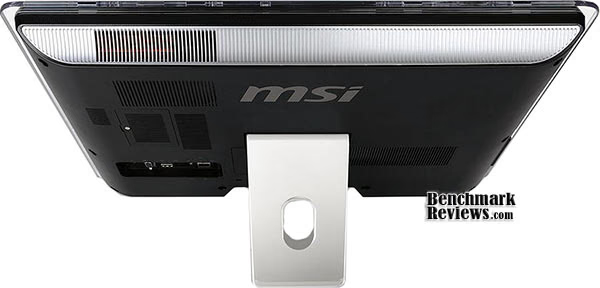
Along the right side of the MSI Wind Top AE2220 is a string of menu buttons: power, menu, left, right, auto-adjust, and a unique LCD power button that can shut down the display panel without turning off the entire system. A sturdy spring-loaded stand can be pulled back to adjust the monitors viewing angle from 10° (shown above) up to 20°.

At the left side of the AE2220-25SUS is a compact media-card reader and slim optical Blu-ray Disc (BD) drive by Hitachi-LG (model HL-DT-ST BDDVDRW CT10N). The BD/DVD Super-Multi drive can read and write to both CD and DVD media, and offers Blu-ray Disc playback (BD:4.8x, DVD+RW:8x/8x, DVD-RW:8x/6x, DVD-ROM:8x BD-ROM/DVD+RW/DVD-RW).
The built-in card reader supports various types of memory cards, such as XD (eXtreme Digital), SD (Secure Digital), SDHC (SD High Capacity), MS (Memory Stick), MS Pro (Memory Stick Pro) or MMC (Multi-Media Card) cards. Two Hi-Speed USB 2.0 ports are available for flash drives and digital media devices or charging connected cellular phones.
Although the MSI Wind Top AE2220 all-in-one PC features a dual-core 2.2GHz Intel Core 2 Duo T6600 mobile processor (Penryn-2M) supplied with 1.1500 volts, the fan noise is considerably low on this system and temperatures are amazingly low.

In a room with 20°C ambient temperatures, the MSI Wind Top AE2220 idled at 48°C. With full load applied to both CPU cores, the Intel Core 2 Duo T6600 reaches 65°C after twenty minutes. The NVIDIA ION GPU runs considerably hotter, and generates 60°C at idle and 70°C under full load.
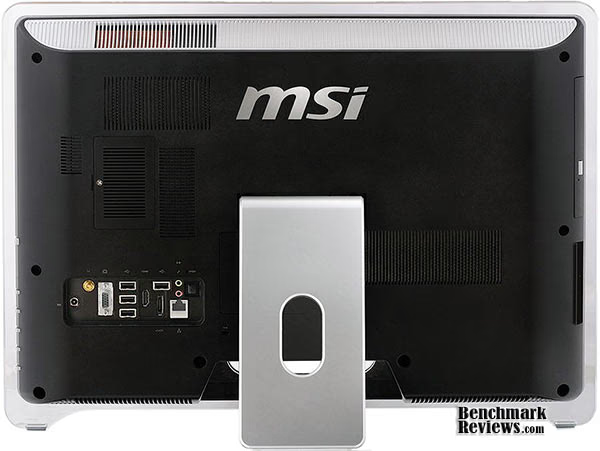
Although subdued, the back side of the MSI Wind Top AE2220-25SUS All-In-One Desktop System is bustling with features. The NVIDIA ION motherboard uses a Realtek RTL8168D/8111D PCI-E Gigabit Ethernet (GBE) adapter for RJ-54 LAN connections, and a Realtek RTL8191SE Wireless-LAN 802.11n PCI-E NIC for Wi-Fi networks.
The AE2220 also offers both D-Sub VGA and HDMI 1.3 input ports, which are examined and explained in better detail in the next section, so please continue on.
AE2220-25SUS Detailed Features
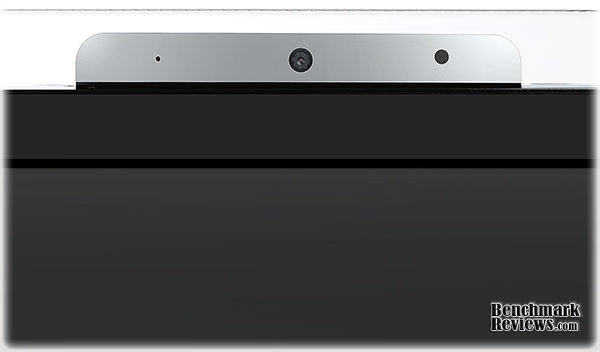
A built-in BisonCam HD webcam is build into the top bezel of the MSI Wind TopAE2220. A pinhole microphone to the left, and a IR infrared receiver is provided to the right side for an optional remote control. The webcam offers 1.3 megapixel high-definition resolution, with stereo audio speakers firing up from behind the Wind Top.
The back panel of the MSI Wind Top AE2220-25SUS offers two access points for optional hardware. The first is for system memory, which has been populated with two 2GB DDR2 800MHz SoDIMM modules. The parts MSI has used are Hyundai HYMP125S64CP8-S6 modules with memory timings of 6-6-6-18 (CL-RCD-RP-RAS) and a 2T command rate. An extended high-detail Lavalys EVEREST hardware specification report is also available here.
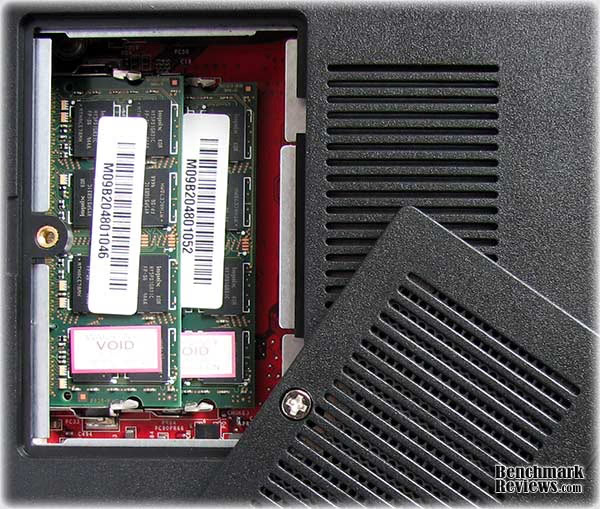
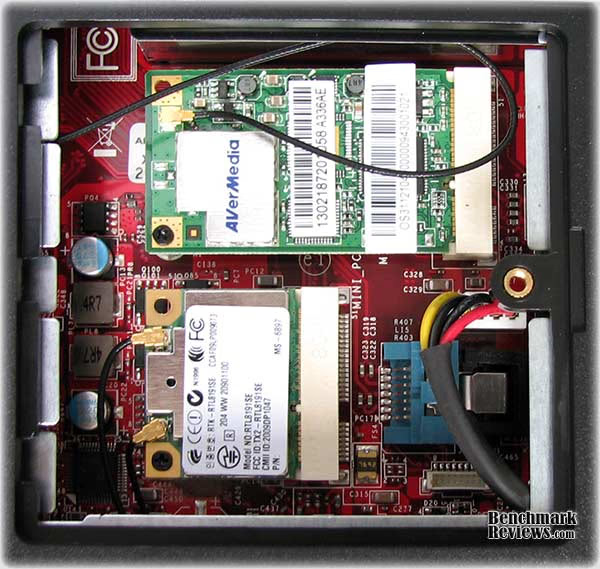
The second removable panel (shown below) on the AE2220 PC offers access to the two mini PCI-Express expansion slots. The first is populated with an AVerMedia A336 MiniCard Hybrid ATSC/QAM (with built-in AVerMedia A336 MiniCard Dummy IR Receiver). The AVerMedia A336 is a Media Center tuner card (with MCE remote) that integrates into Windows 7 with native driver and software support. In the second MiniCard port is a Realtek RTL8191SE Wireless-LAN 802.11n PCI-E NIC for connecting the Wind Top onto Wi-Fi-B, G, and N networks.
The AE2220 does not offer service access to the 500GB Western Digital WD5000AVVS-63M8B0 hard drive, and removing the rear cover requires accessing a screw beneath a tamper-proof warranty label. Removing the back bezel panel will void the one-year MSI service warranty. Unfortunately, high-performance enthusiasts will have very few options available to them if the HDD fails or they desire replacement with a much faster Solid State Drive (SSD) device.
The rear I/O panel offers numerous connectivity options for the MSI Wind Top AE2220-25SUS. Video input is accepted by either an analog D-Sub VGA or digital HDMI 1.3 port, while HD audio from the NVIDIA MCP79/7A High Definition Audio Controller streams from the SPDIF TosLink fiber-optic port. A gold-plated digital TV antenna receptacle is positioned beside the VGA port, and the included cable attaches to a 4" metal antenna. Next is an AC power adapter input, which accepts the external 120W power adapter included with this kit.
To switch between inputs, use the side buttons and press M for menu. Next press the > button twice, and choose your input (VGA in, PC, HDMI in).
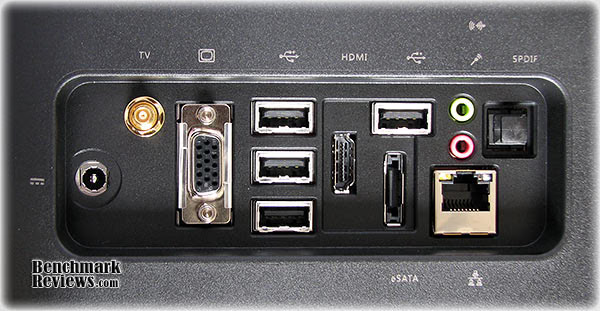
In addition to the two USB ports along the side of the AE2220, there are four more Hi-Speed USB 2.0 ports and an external SATA (eSATA) port available at the rear. Microphone and speaker ports are positioned above a Gigabit Ethernet port.
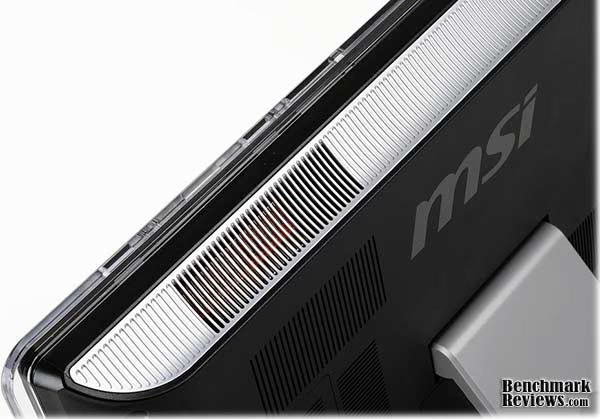
The MSI Wind Top AE2220-25SUS may be a compact all-in-one PC, but it still needs decent ventilation. Along the right-hand side of the Wind Top system there are vents for either cold-air intake (low, near the bottom of the panel) or heated-air exhaust (at the top of the bezel). It is recommended to give these vents sufficient space for circulation.
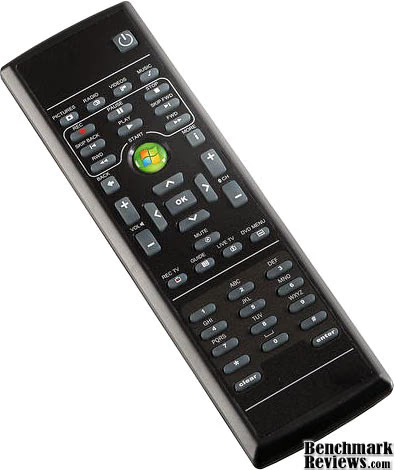
Besides a wireless optical mouse and media-center keyboard, the MSI Wind Top AE2220-25SUS also comes with a Windows 7 Media Center IR remote control. The remote offers users the ability to treat the Wind Top as a HDTV, Blu-ray Disc player, or HTPC.
In the following sections, the MSI Wind Top AE2220-25SUS 1080p AIO PC is compared against several other competing systems: an Intel Atom-equipped ASUS Eee PC netbook, Core 2 Duo notebooks, and NVIDIA ION desktop system.
Testing Methodology
Benchmark Reviews has used the following systems and test software for the benchmark performance results reported in this article. Each system was compared and tested using common software and Operating System variables to the best of our ability. However, not all aspects of hardware could be matched in each system.
The CPU Benchmarks were collected from PCMark Vantage, EVEREST Ultimate Edition, PerformanceTest, and CINEBENCH test suites, and all used common settings for each test. PCMark Vantage features test suits with static settings (pre-set resolutions), which include the TV/Movies and Gaming. PerformanceTest also conducts tests with static settings, such as the 2D and 3D graphics performance.

MSI Wind Top AE2220-25SUS AIO
-
Motherboard: MSI MS-7549 (AMD 780G)
-
System Memory: 4GB 800MHz DDR2 SoDIMM
-
Processor: 2.2GHz Intel Core 2 Duo T6600 (800MHz-bus Dual-Core)
-
Video: NVIDIA GeForce 9300 Integrated Graphics with 256MB VRAM
-
An extended high-detail Lavalys EVEREST hardware specification report is also available here.
Toshiba Satellite P105-S6177 Notebook
-
Mainboard Chipset: Intel 945GM Platform
-
System Memory: 2GB 533MHz DDR2 SoDIMM
-
Processor: 1.73GHz Intel Core Duo T2250 (533MHz-bus Dual-Core)
-
Video: Intel Graphics Media Accelerator 950 (GMA 950)
MSI Wind Top AE2010-02SUS AIO
-
Motherboard: MSI MS-7549 (AMD 780G)
-
System Memory: 4GB 800MHz DDR2 SoDIMM
-
Processor: 1.5GHz AMD Athlon X2 3250e (Dual-Core)
-
Video: Integrated ATI Radeon HD 3200 (RS780)
ASRock Nettop ION 330 Nettop
-
Motherboard: ASRock AMCP7A-ION
-
System Memory: 4GB OCZ Gold 800MHz DDR2
-
Processor: 1.6GHz Intel Atom N330 (Dual-Core)
-
Video: Integrated NVIDIA GeForce 9400 GPU (ION)
ASUS Eee PC 1000HE-BLK005X Netbook
-
Mainboard Chipset: Intel i945GSE Platform

-
System Memory: 2GB 667MHz DDR2 SoDIMM
-
Processor: 1.6GHz Intel Atom N280 (Single-Core)
-
Video: Intel Graphics Media Accelerator 950 (GMA 950)
Dell Inspiron 6400 Notebook
-
Mainboard Chipset: Intel i945GM (Calistoga)
-
System Memory: 2GB 533MHz DDR2 SoDIMM
-
Processor: 1.66GHz Intel Core T2300 (667MHz-bus Dual-Core)
-
Video: Intel Graphics Media Accelerator 950 (GMA 950)
Common Support Hardware
Test Software
-
Microsoft Windows 7 Home Premium 32-Bit Edition
-
Futuremark PCMark Vantage v1.0.2 System Test Suite
-
Lavalys EVEREST Ultimate Edition v5.30.1900
-
PassMark PerformanceTest v7.0 Build 1011
-
Maxon CINEBENCH Release 10
PCMark Vantage Results
PCMark Vantage is an objective hardware performance benchmark tool for PCs running 32- and 64-bit versions of Microsoft Windows Vista or Windows 7. PCMark Vantage is perfectly suited for benchmarking any type of Microsoft Windows Vista/7 PC from multimedia home entertainment systems and laptops to dedicated workstations and hi-end gaming rigs. Benchmark Reviews has decided to use a few select tests from this suite to compare the MSI Net Top AE2220 to other systems in this article. Our tests were conducted on Microsoft Windows 7 Home Premium 32-Bit Edition.
It's important to note that PCMark Vantage utilizes the primary drive (HDD/SSD) for all benchmarks regardless category tested (such as TV/Movies and Gaming). Benchmark Reviews used test categories with the least amount of unwanted hardware dependences, and a common primary drive (OCZ Vertex EX SLC SSD) for all test systems except for the MSI AE2220 which remained stock with a much lower-performing hard drive. The results of these tests should considered relative.
TV and Movies Suite
The tests in the TV and Movies Suite have been selected to represent the Windows Vista TV and Movies Consumer Scenario. The combination of test sets covers the common TV and Movies usage. The TV and Movies Suite gives a separate PCMark TV and Movies Score which does not affect the overall PCMark Score. TV and Movies Suite include the following tests:
-
Two simultaneous threads
-
Video transcoding: HD DVD to media server archive
-
Video playback: HD DVD w/ additional lower bitrate HD content from HDD, as downloaded from net
-
Two simultaneous threads
-
Video transcoding: HD DVD to media server archive
-
Video playback, HD MPEG-2: 19.39 Mbps terrestrial HDTV playback
-
HDD Media Center
-
Video transcoding: media server archive to portable device
-
Video playback, HD MPEG-2: 48 Mbps Blu-ray playback
Gaming Suite
The tests in the Gaming Suite have been selected to represent the Windows Vista Gaming Consumer Scenario. The combination of test sets covers the common Gaming usage. The Gaming Suite gives a separate PCMark Gaming Score which does not affect the overall PCMark Score. Gaming Suite includes the following tests:
-
GPU game test
-
HDD: game HDD
-
Two simultaneous threads
-
CPU game test
-
Data decompression: level loading
-
Three simultaneous threads
-
GPU game test
-
CPU game test
-
HDD: game HDD

It's unfortunate that PCMark Vantage factors hard drive performance into the score for all of the test categories, even the TV/Moves and Gaming test suites. If MSI's AE2220 offered a service entry for the removal of the included WD 500GB hard drive, we could have used the same SSD that was used in all of the other systems. Nevertheless, by analyzing the results above it doesn't appear that using a hard drive reduced performance.
In the PCMark Vantage TV and Movies benchmark tests, the MSI Wind Top AE2220 (2.2GHz Intel Core 2 Duo T6600 Dual-Core) performed at the very top of our results with 2640 points, outperforming a powerful Intel i945GM-based Toshiba Satellite P105 (1.73GHz Intel Core Duo T2250 Dual-Core) that scored 2076 and Dell Inspiron 6400 (1.66GHz Intel Core Duo T2300 Dual-Core) notebook with 2080 points. ASRock's NVIDIA ION nettop offered 1629 points while the ASUS Eee PC, which is also re-packaged and sold as the ASUS Eee Top, failed this test because it cannot display at the 1024x768 resolution required by PCMark Vantage (640x480 was the best it offered).
Gaming performance was a different story, and results swayed in favor of the MSI AE2010 which earned a score of 3223 by using the ATI Radeon HD 3200 GPU. Following closely behind was the NVIDIA ION system, which uses the GeForce 9400M (ION) GPU to score 2785 for second place. The MSI AE2220 shares the ION platform, but uses an NVIDIA GeForce 9300 good for 2609 points. A rather weak Intel Graphics Media Accelerator 950 (which is not a DirectX 10 compatible hardware component) reduced performance results on the Toshiba P105, Dell 6400, and ASUS Eee PC systems. The Toshiba P105 earned 1630 points while the Dell Inspiron 6400 scored 1666 points. Both notebooks earn credit for trying... since the ASUS Eee PC cannot run the test because of undersized screen resolution. Resolution not withstanding, an ASUS Eee Top 1000HE would perform similar to the Toshiba and Dell notebooks, as it is based on the same GMA-950 graphics accelerator.
While Benchmark Reviews recognizes that a D-Sub monitor capable of 1024x768 could have been attached to the ASUS Eee PC 1000HE, and the PCMark Vantage tests completed, we would no longer be testing the Eee PC Netbook. Even if a monitor was connected, we suspect that the ASUS Eee PC 1000HE would have produced a score similar (albeit lower) to the Toshiba P105/Dell Inspiron 6400 notebook computers.
PCMark Vantage Test Summary
While the MSI AE2220 brings an extremely-capable Intel T6600 processor to the table that dominates the entire portable computing segment, it forces MSI to use either an Intel GMA-950 or NVIDIA ION option for graphics. The NVIDIA GeForce 9300M GPU used in the AE2220 ranks behind the onboard ATI Radeon HD 3200 GPU that Benchmark Reviews tested in the older Wind-Top AE2010, and it performs just behind the 9400M that comes with ION-330 systems, but it's still far more than most users will need for light gaming and Blu-Ray Disc playback.
EVEREST CPU Benchmarks
Lavalys EVEREST Ultimate Edition is an industry leading system diagnostics and benchmarking solution for enthusiasts PC users, based on the award-winning EVEREST Technology. During system optimizations and tweaking it provides essential system and overclock information, advanced hardware monitoring and diagnostics capabilities to check the effects of the applied settings. CPU, FPU and memory benchmarks are available to measure the actual system performance and compare it to previous states or other systems. Furthermore, complete software, operating system and security information makes EVEREST Ultimate Edition a comprehensive system diagnostics tool that offers a total of 100 pages of information about your PC.
All of the benchmarks used in our test bed: Queen, Photoworxx, ZLib, and AES, all rely on basic x86 instructions, and consume very low system memory while also being aware of HyperThreading, multi-processors, and multi-core processors. While the EVEREST CPU tests really only compare the processor performance more than it measures platforms, it still offers a glimpse into what kind of power each platform possesses.
Queen and Photoworxx tests are synthetic benchmarks that operate the function many times over and over-exaggerate by several magnitudes what the real-world performance would be like. The Queen benchmark focuses on the branch prediction capabilities and misprediction penalties of the CPU. It does this by finding possible solutions to the classic queen problem on a chessboard. At the same clock speed theoretically the processor with the shorter pipeline and smaller misprediction penalties will attain higher benchmark scores.

Computers are often measured and compared by the processor more than any other component. MSI's Wind Top AE2220 offers a 2.2GHz Intel Core 2 Duo T6600 dual-core CPU that clearly swept the Queen and PhotoWorxx benchmarks. Next was the similarly-equipped Intel i945GM-based Toshiba Satellite P105 with a 1.73GHz Intel Core Duo T2250. Coming in for a close third is the Dell Inspiron 6400 with a 1.66GHz Intel Core Duo 2300, followed by the older MSI Wind Top AE2010 that kept pace with a 1.5GHz AMD Athlon X2 3250e processor. The ASRock ION-330 nettop (identical to Zotac N330 kits) uses a NVIDIA ION's 1.6 GHz Intel Atom N330 dual-core processor that earned high marks in Queen but lagged way behind in PhotoWorxx.
Like the Queen benchmark, the Photoworxx tests for penalties against pipeline architecture. The synthetic Photoworxx benchmark stresses the integer arithmetic and multiplication execution units of the CPU and also the memory subsystem. Due to the fact that this test performs high memory read/write traffic, it cannot effectively scale in situations where more than two processing threads are used. The EVEREST Photoworxx benchmark performs the following tasks on a very large RGB image:
-
Fill
-
Flip
-
Rotate90R (rotate 90 degrees CW)
-
Rotate90L (rotate 90 degrees CCW)
-
Random (fill the image with random colored pixels)
-
RGB2BW (color to black & white conversion)
-
Difference
-
Crop
The Zip Library test measures combined CPU and memory subsystem performance through the public ZLib compression library. ZLib is designed as a free lossless data compression library for use on virtually any computer hardware and operating system. The ZLib data format is itself portable across platforms and has a footprint independent of input data that can be reduced at some cost in compression. The Dell Inspiron's Intel Core Duo 2300 rendered a score of 19766 and performed 15% better than the MSI AE2010 which produced 17071, and 17% above the ION's N330 CPU with 16845. The Eee PC's Atom N280 scored only 8004 in the CPU Zip Library test to seat itself in last place.

The AES integer benchmark measures CPU performance using AES data encryption. It utilizes Vincent Rijmen, Antoon Bosselaers and Paulo Barreto's public domain C code in ECB mode and consumes 48 MB of memory.
The MSI Wind Top AE2220 offered the highest Zip Library and AES performance, and results for the other systems mirrored the previous tests. The Toshiba Satellite P105 and Dell Inspiron 6400 both scored high marks, followed by the AE2010 and NVIDIA ION-330. The Eee PC's N280 offered the lowest performance scores for a distant last place finish.
EVEREST Test Summary
MSI's Wind-Top AE2220 offers one of the most powerful mobile processor you'll find in a compact nettop or netbook system, and the 2.2GHz Intel Core 2 Duo T6600 CPU proves itself a top-contender against our comparison test computers. If the task is compute related, the Wind Top AE2220 has certainly bridged the gap between desktop processors and mobile expectations.
Passmark PerformanceTest
PassMark PerformanceTest is a PC hardware benchmark utility that allows a user to quickly assess the performance of their computer and compare it to a number of standard 'baseline' computer systems. The Passmark PerformanceTest CPU tests all benchmark the mathematical operations, compression, encryption, SSE, and 3DNow! instructions of modern processors. In our tests there were several area's of concentration for each benchmark, which are combined into one compound score. This score is referred to as the CPU Mark, and is a composite of the following tests:
-
Integer Math
-
Floating Point Math
-
Find Prime Numbers
-
SSE/3DNow!
-
Compression
-
Encryption
-
Image Rotation
-
String Sorting

The AE2220's Intel Core 2 Duo T6600 CPU is extremely powerful, and the eight separate CPU benchmark tests in PassMark PerformanceTest offer a realistic cross-section of what taxes the processor for most users. These tests may be grossly exaggerated synthetic benchmarks of a real-world task, but they help illustrate and amplify the differences between computer systems.
Collectively speaking, Passmark PerformanceTest has simply reinforced the scores we previously explained in the Lavalys EVEREST section: the Wind-Top AE2220's 2.2GHz T6600 is way ahead of everything else offered to the mobile market and nearly doubles the performance of the next best competitor (1.73GHz Intel Core Duo T2250). A single-core Atom N280 does half as well as the newer dual-core Atom 330, and the AMD Athlon X2 3250e and Intel Core Duo 2300 shows their desktop heritage by outperforming the Atom processors. In terms of CPU performance, the 1.66GHz Intel Core Duo 2300 dual core CPU inside the Dell Inspiron 6400 earned 835 CPU Marks. The MSI AE2010 Wind Tops 1.5GHz AMD Athlon X2 3250e processor trailed behind with 801 CPU Marks, while the NVIDIA ION's 1.6 GHz Intel Atom N330 dual-core processor scored only 638. The single-core ASUS Eee PC Atom N230 gathered only 323 CPU Marks.
The surprising element here is the 2D and 3D graphics tests, which have a heavy dependence on CPU processing power and system memory. This gives the GMA-950 inside the Toshiba and Dell notebooks (both with Intel Core 2 Duo mobile processors) a distinct advantage over the older MSI AE2010's Radeon HD 3200 (with 1.5GHz AMD Athlon 3350e) and also NVIDIA's ION GeForce 9400m GPU when paired to the Intel Atom N330. When given enough processing power, the less-powerful GeForce 9300m in the new AE2220 can perform to the same levels as the GMA-950. 3D Marks performance tests score a differently, however.
Since the Intel i945/GMA950 platform used in the Dell Inspiron 6400, Toshiba Satellite P105, and ASUS Eee PC 100HE are not DirectX 10 compatible, Passmark PerformanceTest did not complete the final (DX10) test and offered a short-score. Oddly enough, the Dell Inspiron's score of 105 3D Marks is still in the same realm as the MSI AE2010 (108) and NVIDIA ION330 (111) scores, but the GeForce 9300M received an extra push from the Intel Core 2 Duo T6600 processor to achieve 128 points for the lead.
PassMark PerformanceTest Summary:
Once again, the Intel T6600 mobile processor delivers the compute performance necessary to propel the MSI AE2220 beyond the competition. Even with a less impressive GPU, the CPU picks up the difference and edges out stronger mobile graphics solutions. While most desktop systems will utilize CPU-rendered 2D and 3D graphics, games will depend primarily on the GPU. PassMark's PerformanceTest benchmark suite has proven what most of us already know: an Intel Core 2 Duo T6600 Dual-Core operating at 2.2GHz on an 800MHz bus will easily outperform 1.73GHz on a 533MHz bus (T2250) or 1.66GHz on a 667MHz bus (T2300).
Maxon CINEBENCH OpenGL Results
Cinebench is a real-world test suite that assesses the computer's performance capabilities. Maxon Cinebench is based on Maxon's award-winning animation software, Cinema 4D, which is used extensively by studios and production houses worldwide for 3D content creation. Maxon software has been used in blockbuster movies such as Spider-Man, Star Wars, The Chronicles of Narnia and many more.
Maxon Cinebench runs several tests on your computer to measure the performance of the main processor and the graphics card under real world circumstances. The benchmark application makes use of up to 16 CPUs or CPU cores and is available for Windows (32-bit and 64-Bit) and Macintosh (PPC and Intel-based). The resulting values among different operating systems are 100% comparable and therefore very useful with regard to purchasing decision-making. It can also be used as a marketing tool for hardware vendors or simply to compare hardware among colleagues or friends.
The OpenGL test measures graphics card performance and is run inside the 3D editor window. The project file used can test all graphics cards that support the OpenGL standard. In this scene, only the camera was animated. This scene places medium to low demands on graphics cards and tests the maximum speed with which the scene can be properly displayed at the 800x580 resolution. Essentially, the Cinebench test removes the system hardware from the scoring influence, and centers the results around the GPU.

Knowing that Cinebench is a CPU-centric benchmark, I expected the MSI Wind-Top AE2220 will perform at the very top of our results - and I wasn't let down. Scoring 3048 points in the OpenGL graphics test, an Intel T6600 CPU powered the AE2220 to perform almost 70% better than the AMD Athlon 3250e processor embedded into the "Hammer" 780G chipset on the older MSI Wind-Top AE2010, and nearly 158% better than the NVIDIA ION/Intel Atom N330 system with 1184 points. The T2250 helped the Toshiba P105 laptop reach 608 points and the Dell 6400 scored 585, but the ASUS Eee PC fell flat on OpenGL graphics.
Results begin improve once CINEBENCH begins single-thread CPU testing, at which point the CPU-intensive image-rendering scenes dismiss the GPU entirely and train themselves on the platforms computing capability only. In the single CPU test, the Intel Core 2 Duo T6600 (AE2220) scores 2332 points and leads the next best processor by 50%. Next is the Core Duo T2250 (Satellite P105) with 1559 points, and then the T2300 (Inspiron 6400) scoring 1492. The AE2010 scored 1245 while the NVIDIA ION-330 and ASUS 1000HE score in the 500's.
In CPU tests with multi-processor (or HyperThreading) speedup enabled, the Intel T6600 scores 4488 for a 53% lead. A dual-core Intel T2250 earns 2933 points while the 1.66GHz Intel Core Duo 2300 dual core CPU inside the Dell Inspiron 6400 matches with 2796. Followed closely is the AMD Athlon X2 3250e of the MSI AE2010 for 2417 points. The 1.6 GHz Intel Atom N330 dual-core processor inside the ION scores 1534, while the single-core version inside the ASUS Eee PC produced only 874.
Maxon Cinebench Test Summary:
While Cinebench R10 strives to illustrate graphics performance, it relies heavily on CPU compute power. This is made especially clear in the OpenGL tests, but also critical to single- and multi-thread benchmarks. For all it's worth, the MSI Wind Top AE2220-25SUS has been out-performing the others in terms of CPU performance in every test, and Cinebench simply adds to the list of convincing examples.
Hands-On User Experience
Defining my own user experience requires that I explain my personal expectations. To begin with, computers are many things to different people: it all hinges on the task at hand. I usually spend the majority of my work day behind a keyboard and monitor, creating articles like this one. Depending on my mood or the concentration required, I might also have music playing from my media collection, or listening to an online webcast. While relaxing on a break, streaming video might be watched or I might finish a movie I've rented. My day-to-day needs are on par with the average computer user: document creation, web browsing, multimedia entertainment, and email messaging. To this extent, I don't need an expensive quad-core computer system with massive graphics power, I simply need comfort and convenience. To my pleasant surprise, the MSI Wind Top AE2220 delivered all of this, and even gave me back some of my desktop work area.
Testing computer hardware on a daily basis requires that I maintain several PCs for the purpose of benchmarking the various components for review articles. This creates a compromise, as I generally find it easier to use one of the test systems for personal computing just to save space. After careful deliberation, I finally decided it was time to shed my massive super-computer from the burden of these tasks. It's great for high-demand video games and encoding multimedia, but a large computer case is just too much for the top of my desk (and too tall to fit beneath it). So I went about setting up the 21.5" 1080p LCD touch screen MSI Wind Top AE2220-25SUS all-in-one PC in the same corner as my 26" monitor once resided, and the very first thing I realized was how much room this saved for the other important things on my desk (like paperwork and bills). I could still enjoy my favorite keyboard and mouse, or use the wired multimedia keyboard and optical USB 800dpi mouse that MSI provides with all Wind Top AIO kits, but it was the touch screen that I enjoyed most for its ease of use.

Microsoft Windows 7 offers improved Tablet PC performance, and also adds some new features to past favorites. New to Win7 is 'Tablet Math', which features a new Math Input Panel capable of recognizing handwritten formulas. Handwriting Personalization allows custom dictionaries to help with specialized vocabulary recognition (like medical and technical terms), and text prediction speeds increase as a result. Multi-touch capability frees you from using a stylus pen, letting you interact with the Wind-Top just by using your fingers. If Windows 7 doesn't feel right by you, the MSITouch3D software steps-in to simplify Tablet-PC functionality.
One particular area that the MSI Wind-Top AE2220 shines is multimedia entertainment. The 1920x1080 resolution LCD screen offers a true high-definition 1080p picture, which matches-up perfectly to the Blu-ray Disc player built into the AE2220. An integrated digital HDTV tuner and Windows Media Center remote control help turn the Wind-Top into a venerable entertainment system. Thanks to GPU-compute advances in the NVIDIA GeForce series, and new optimizations for Adobe Flash HD-Video GPU Acceleration, watching HD video from websites like Hulu or YouTube have become as entertaining as cable or satellite television. This features establishes the AE2220 as the perfect system for dorm rooms, or nestled into the corner of a cookbook table with an over-the-air culinary show while the remote control rests beside cooking ingredients on the counter.
Of course, there were a few features that didn't receive as much attention from me. Admittedly, I have never been a fan of webcams. But with a recent relocation of family members it wasn't much of a stretch to picture myself using a free video conferencing software or messaging program to connect with my distant relatives. Even if the webcam function was never utilized, I don't suffer the clutter of one more peripheral crowding my work space like it would with any other desktop computer. Also, in the absence of recovery media to reinstall the O/S, the MSI BurnRecovery software allows users to create an ISO drive image to use for burning onto a DVD and recovering the system with in the event of an emergency. Personally, I would have rather had the Windows 7 DVD so I could install the Operating System without the extra software MSI loads.
Probably the best treat of them all was the sound level, which I hope you'll notice was not labeled as noise. I can't speak for all other MSI Wind Top models, but the AE2220 was S-I-L-E-N-T, even when I was pressure-cooking the processor cores to find the maximum load temperatures. It helps that the Intel T6600 processor used in the AE2220 is a more-efficient 45nm unit that produces only 35W maximum TDP. Even with the fan cooling the CPU, the sound of a DVD movie spinning up or the plastic stylus pen tapping the LCD screen was more audible than the operation of this Wind Top.
AE2220 Gaming Performance
This may seem like an unnecessary statement, but all-in-one computer systems like the MSI Wind-Top should not be purchased on the merit of gaming performance. This section details my own experience playing various games on the MSI Wind Top AE2220-25SUS 1080p all-in-one PC, but it was done for the purpose of this article. Benchmark Reviews offers an entire section of desktop video card articles for the avid gamer who plays highly-demanding 3D video games. Without fail, someone will see the 21.5" LCD monitor featured on the MSI Wind Top and expect to make it into their next gaming system. Allow me to explain what you can expect.
Most readers understand that comparing integrated video performance to a discrete add-in NVIDIA GeForce or ATI Radeon graphics solution would be unfair, and at the same time it's also unfair to demonstrate the integrated GeForce 9300M to other integrated systems with different architecture because the results would not be apples-to-apples (several sections of this article have demonstrated how system memory and processor power will affect overall graphics performance). While discrete graphics have the advantage of large memory buffers and powerful dedicated graphics processors, they can never fit inside the micro-size package All-In-One (AIO) system can. On that same token, NVIDIA's ION platform is more than capable of rendering digital graphics at 1920x1080 resolution on the AE2220, while compact devices like the ASUS Eee PC has a miniature 10" LCD screen intended for WSVGA 1024x600 resolution. Compact computers built with the Mobile Radeon, NVIDIA ION, or Intel GMA platform are the bridge between impotent Netbook graphics and overactive desktop performance.

Benchmark Reviews has spent most of 2008-2009 proving that almost any product on the desktop graphics market will play the most popular video games with acceptable settings and frame rate performance, but we can't rightfully say the same for compact computer platforms. While I'm sure someone has found some level of satisfaction in playing video games on their ASUS Eee PC or MSI Wind at 1024x600, it's simply unrealistic to expect a user-experience equal to that of a desktop PC or even a gaming console. The MSI AE2220 features a GeForce 9300 mobile GPU, which does well enough with multimedia tasks but lacks enough power to convincingly handle demanding 3D video games.
For reference, Benchmark Reviews tested graphics frame rate performance of the MSI AE2220 using several video games displayed at 720p (0.92 MP @ 1080x720) and 1080p (2.07 MP @ 1920x1080) resolutions, and the Wind Top platform devoured every 2D application and multimedia video file we threw at it (including Adobe Flash movies in HD). When playing 3D games, such as Devil May Cry 4 or Call of Duty 4, the results were noticeably different. At 1080p these games were unplayable; but at 720p (1080x720) the performance perked up and frame rates were above FPS 30 when the quality was configured with the lowest settings available, and post-processing effects all turned off. Devil May Cry 4 managed frame rates in the low 30's with low-quality settings, while Street Fighter IV played well with medium quality. Batman: Arkham Asylum did not play well.
Since most first-person shooter and intense-action games are best experienced on high-precision high-resolutions monitors, I decided to change my format and play some of the more entertaining titles that depend less on graphical power. The first was Battlefield Heroes, an online-only first-person shooter that requires very little graphic processing but still offers outstanding game play and hours of fun. Comparing the desktop experience of playing Battlefield Heroes on high-resolution desktop monitors at 1920x1200 against the 1920x1080 resolution offered by the MSI Wind Top AE2220 actually rendered no perceivable difference, which is exactly what full-size desktop computers should begin to fear. When it came to games like World of Warcraft, Spore, The Sims, or any of the parlor-style games such as Mahjong, Solitaire, online Poker, or puzzles, the Wind-Top AE2220 really shined.
In reality, Wind Top AIO users shouldn't be loading games like Crysis or Far Cry 2 on their system in the first place (I hope not, at least). The AE2220 can push high frame rates in most low-demand games, but the higher-performance first person shooters are not possible on the Wind-Top and will be best experienced on a more dedicated platform such as a high-end PC with discrete graphics or gaming console. The day when mobile gaming performance competes with desktop graphics isn't far off, but we'll have to wait for the next Wind-Top innovation to see if MSI bridges the gap.
Wind Top Final Thoughts
There's a lot of potential packed into the MSI Wind Top series that might not meet the eye. I'm currently using the AE2220 as my primary desktop workstation, using the stylus to drag and sort the hundreds of email I receive every day across the LCD touch screen before I get started in the morning. I've also found a few remarkable improvements to the 'Ink Input" Tablet PC functionality built into the writing pad of Windows 7, which allow me to handwrite my message and have Windows recognize it to text. This works incredibly well on a 21.5" 1920x1080 high-resolution touch screen.
I'm not sure if I like the idea of wall-mounting the Wind Top, primarily because it would require a swivel mount in order for me to access the rear ports, but if I change my mind MSI has included a VESA stand-off that replaces the support leg. At roughly 26 pounds a standard 24-46" monitor VESA stand or wall mount could be used with no problems, so that's a plus. Native digital-audio TosLink output enables the AE2220 to connect into a compatible audio/video receiver for 5.1 surround sound, while the HDMI port allows any source (such as PlayStation 3 or XBox 360) to connect into the Wind-Top.

Compared against the cost of purchasing a comparable desktop computer system with BD drive and touch-screen LCD monitor, for $899 you're getting a lot more for your money out of the MSI AE2220. Purchasing a 21.5-inch LCD touch screen panel alone cost close to the price of an entire Wind Top system, never mind having money left over for the rest of the components. Calculate the cost of a 21.5" LCD monitor, Blu-ray Disc player/DVD-burner, 500GB hard drive, wireless multimedia keyboard and optical mouse, digital HDTV tuner, Wi-Fi-N adapter, HD webcam, AND Microsoft Windows 7 Home Premium, and at the value-packed MSI Wind Top transforms into more of a steal.
Gaming performance was actually very good with the Wind Top's GeForce 9300M (see the previous Gaming Performance section for more detail) . The AE2220 doesn't attempt to compete against game-focused desktop computers with high-power discrete graphics, especially at thsi price point. Demanding high-end games like Batman: Arkham Asylum or Call of Duty: Modern Warfare 2 aren't a consideration on the Wind Top system, but mid-level video games such as World of Warcraft, The Sims, Spore, and Empire: Total War are within reasonable reach.
MSI utilized the powerful Intel T6600 CPU and sufficient GeForce 9300M GPU for the system components inside the Wind-Top AE2220, but there were some tough decisions to be made during the design phase of this all-in-one PC. On one hand, they could have re-used the AMD RS780G/SB710 mainboard from the Wind Top AE2010 and offered powerful graphics from ATI's Radeon HD 3200 GPU, but this decision would have required that they also use a less-powerful AMD processor with higher heat output and power consumption. Instead, MSI decided to leverage NVIDIA's ION mainboard and combine a very powerful Intel Core 2 Duo processor along side NVIDIA's GeForce 9300M GPU for suitable graphics. Until a mobile graphics solution presents itself as a desktop challenger, the Wind-Top AE2220 uses the best combination of hardware for real-world tasks.
For casual computer users, which is the vast majority of the modern Internet-connected world, life with a PC doesn't revolve around video games... at least not those requiring anymore graphics than what we have available here in the AE2220. I really liked the power of my desktop, but enjoyed the power savings my laptop offered for all-day computing. Energy Star 5.0 approval has given the MSI Wind Top AE2220-25SUS 1080p all-in-one PC the ability to merge the best of the two platforms into one compact unit. At idle, the MSI Wind Top AE2220-25SUS consumed only 46W of power. Driven to 100% load on both cores of the Intel T6600 CPU, the power consumption grew to 71W. When the NVIDIA GeForce 9300M was pushed to maximum load the total power draw was 61W. Under full usage, with CPU and GPU both operating at maximum load, the total power consumption was 83W.
MSI AE2220 Conclusion
Although our rating and final score are made to be as objective as possible, please be advised that every author perceives these factors differently at different points in time. While we do our best to ensure that all aspects of the product are considered, there are often times unforeseen market conditions and manufacturer changes which occur after publication that would render our rating obsolete. Please do not base your purchases solely on our conclusion, as it represents our product rating at the time of publication. Benchmark Reviews begins our conclusion with a short summary for each of the areas that we rate.
Benchmark Reviews begins each conclusion with a short summary for each area that we rate. The first is performance, which considers how effective the MSI Wind Top AE2220-25SUS 1080p AIO PC performs in operation against competing products like nettop, notebook, and netbook systems. In each and every test performed, the 2.2GHz dual-core Intel Core 2 Duo T6600 processor earned the AE2220 a dramatic lead over the competition while creating very little heat (48°C idle/65°C full load). Graphics performance was flawless with Blu-ray Disc playback and streaming HD multimedia using Adobe Flash GPU Acceleration. Mid-level video games such as World of Warcraft, The Sims, Spore, and Empire: Total War performed well, as did Battlefield Heroes online.
Clear acrylics and piano-black bezel trim lend a very elegant appearance to the Wind Top AE2220. On the outside, this all-in-one system looks like a widescreen LCD monitor, and takes up only as much space thanks to a minuscule footprint. Alternatively, the Wind-Top AIO unit can be use a VESA stand or wall mount to further conserve desktop real estate.

Akin to notebook computer systems, the MSI Wind-Top has compact-computer construction to credit for its durability. Nearly every facet of design has the internal components keeping close attention to ergonomics, while optimizing the dense use of internal volume. The widescreen LCD touch panel is extremely durable and tough as nails but not bullet-proof, while the outer shell is hardened and long lasting. After some consideration there aren't any true 'weak' points in the Wind-Top's construction, although it would have been appreciated if MSI included a storage drive access panel like they did for memory and mini PCI-E components.
In terms of functionality, the MSI AE2220 sets new expectations for compact personal computers. In the space of a widescreen flat panel LCD monitor, MSI has managed to squeeze in a 1080p HD 21.5-inch touch screen, Blu-ray Disc player, digital television tuner, HD webcam, IR remote receiver, stereo SRS speakers, six High-Speed USB 2.0 ports, an eSATA port, 500GB hard drive, Gigabit Ethernet, Wireless N Wi-Fi adapter, 4-in-1 multi-card reader, microphone and headphone jacks, and an Intel Core 2 Duo processor. Compact mobile processors have redefined the Wind-Top's capabilities, and it's a short matter of time before the power of desktop graphics are available on mobile platforms to deliver a high-end 3D gaming experience.
As of January 2010, the MSI Wind Top AE2220-25SUS sells at NewEgg.com for $899. Using our price comparison tool, it appears other online retailer also offer discounted prices. Considering the long list of included hardware components and premium features this model delivers, there isn't a better value to be found in either desktop or notebook platforms.
In conclusion, the MSI Wind Top AE2220-25SUS 1080p all-in-one PC receives high praise for it's extremely versatile functionality and devotion to affordable computing. Anyone who has shopped the market for comparable features and functionality knows that you can't match the MSI Wind Top's list with its generous price. This article has spent many detailed pages exploring everything from touch screen and webcam to gaming frame rate and Wi-Fi N connectivity. While the MSI Wind Top shares the same desktop space as large full-size tower computers with discrete graphics, mid-level video games such as World of Warcraft, The Sims, Spore, Street Fighter IV, and even Devil May Cry 4 are within reasonable reach; but don't expect the NVIDIA ION/GeForce 9300M GPU inside the AE2220 to play high-end games like Batman: Arkham Asylum or Call of Duty: Modern Warfare 2. Thanks to a powerful Intel T6600 processor, the AE2220 even worked for 3D-intensive CAD/CAM applications like AutoCAD 2010. For casual PC users who want to save space and still enjoy graphic design, web browsing, document creation, and email, the MSI Wind Top AE2550 All-In-One is the best product I've recommending in a very long time.
Pros:
+ Blu-ray Disc playback/DVD Super-Multi Drive
+ Digital HDTV tuner with Windows Media Center remote
+ HDMI 1.3 digital audio/video input
+ High-power Intel Core 2 Dou T6600 processor
+ 21.5-Inch Touch-Screen 1080p LCD Panel
+ 4GB of DDR2 SoDIMM System Memory
+ Wireless-N and Gigabit Ethernet Connectivity
+ 500GB 7200RPM SATA Hard Disk Drive
+ Includes wireless multimedia keyboard and 800dpi optical mouse
+ Silent low-noise system under normal operation
+ Outstanding Value and Price Point
+ Integrated HD webcam and microphone
+ Built-In Stereo SRS speaker system with 5.1 output
+ eSATA / USB 2.0 / Multi-Card Reader
Cons:
- GeForce 9300M lacks decent 3D gaming performance
- Rear panel does not offer storage drive service access
- O/S system restore media not included
Ratings:
-
Performance: 8.75
-
Appearance: 9.25
-
Construction: 8.75
-
Functionality: 9.50
-
Value: 9.00
Final Score: 9.0 out of 10.
Excellence Achievement: Benchmark Reviews Golden Tachometer Award.
Questions? Comments? Benchmark Reviews really wants your feedback. We invite you to leave your remarks in our Discussion Forum.
Reader comments from the original article
47 comments were posted before commenting closed. They are preserved as written. Original avatars no longer resolve and are shown as a placeholder.
VGA-in? Chris Smith Permalink:
I see that this machine has a VGA-in port. I currently work from two PCs with a KVM switch. How difficult would it be to use the VGA-in port to connect a second PC and switch back and forth?
RE: MSI Wind-Top AE2220 1080p All-In-One PC Olin Coles Permalink:
Shouldn't be an issue... most notebooks require that you press a keyboard hotkey to switch output.
Switching input Chris Smith Permalink:
Yes, but how do you tell the MSI to use the VGA-in rather than it's native output?
RE: MSI Wind-Top AE2220 1080p All-In-One PC Olin Coles Permalink:
MSI notebooks have the same Function+LCD/CRT hotkey. You press and hold the Function key, and then press the LCD/CRT key until you're on the right output.
RE: MSI Wind-Top AE2220 1080p All-In-One PC sam Permalink:
Hi there!. I read the article,but there was one thing i didn't quite get. Im sorry if i have overlooked it :) Question is,as it has HDMI in,say i want to connect my ps3 to it,where is the button to switch between the pc and connected device/s??. I really want to buy one of these!!
RE: RE: MSI Wind-Top AE2220 1080p All-In-One PC Chris Smith Permalink:
That's essentially the same question I was trying to ask. I found a manual online and it looks to me like you have to use OSD (on-screen display) setting to do this. So you'd be using the buttons on the side of the display
Use the M button... Olin Coles Permalink:
All of the buttons are located along the right side of the unit, similar to some monitors and HDTVs. To switch between inputs, use the side buttons and press M for menu. Next press the > button twice, and choose your input (VGA in, PC, HDMI in).
RE: MSI Wind-Top AE2220 1080p All-In-One PC Denise Permalink:
I bought the AE2220 2 months ago and so far it has locked up on me twice (can not access anything). I have taken to a local computer store and had tests ran on it but they tell me that it is a hardware issue. Now I am told through MSI that I have to pay to have it shipped to CA so it can get diagnosed. I have never had such an awful experience with a computer or customer service. Now I am facing several weeks of no computer due to this issue. I am just very disappointed with the issue.
MSI Wind top Shuts off Michael Permalink:
Is anyone else having the same problem that all the sudden this computer looses power and shuts off? I have only had the computer for a couple weeks and it has done it to me many times. I bought the warranty from office depot and they just referred me to MSI support which by the way is horrible!!!! If anyone has any suggestion or help with this issue please pass it along! THanks, Frusterated computer user
Mr William Permalink:
Same problem here. windtop AE2220 25sus. It's actually overheating on you. Boot into your bios and watch the temp skyrocket to 103 degrees Celsius until it shuts off. I paid $1100 for this pile of # a year ago and conveniently it's out of warranty!!! Go figure.
RE: Mr Olin Coles Permalink:
I'm not sure if it will fix your problem, but you might consider updated to the latest available BIOS (2.60). ##msi.com/index.php?func=downloadfile&dno=11748&type=bios
MSI AE2200-14SUS All-in-One Desktop Sonya Permalink:
I've had this machine since January and this morning it will not turn back on. Period, no matter what I do. I get a message that says, No PC found. Online help, and the help in the manual is useless, completely useless. I have to call this morning. This is the same machine that I could not get the sound to work when I first turned it on. Not happy with this machine at the moment.
RE: MSI Wind-Top AE2220 1080p All-In-One PC alexoranjecafe Permalink:
l don't if anybody else have same problem but l cannot connect msi aio 2220 to my plasma tv.WITH hdmi or vga.l both tryed but doesn't work.FN+all F fonction and also display setting and even win+P.L TRY ALL OF IT.DOESN'T WORK.IS ANYBODY CAN HELP ABOUT THIS.THANKS.
BIOS Settings...? BruceBruce Permalink:
Does it have to be enabled in BIOS. 2nd thought is, do you have another monitor etc. connected to the DVI port. Some boards don't allow dual digital connections.
RE: RE: MSI Wind-Top AE2220 1080p All-In-One PC William Permalink:
connect to projector, worked for me
MSI question michael Permalink:
If anyone has this type of MSI all in one computer that knows I can utilize this computer using wireless internet please let me know Window Top AE2220 21.5" Intel Core 2 Duo T6600 2.2Ghz 640GB all-one-computer [X688P]
RE: MSI question William Permalink:
yes you can. that's what i use on this AE220 25SUS
antenna connection to DTH cable Kiran Kothari Permalink:
I am using DTH TV. How can I connect it to gold plated antenna connection. Will i be able to see TV programs by doing this on MSI AE2220 All-in-one PC?
RE: antenna connection to DTH cable Kiran Kothari Permalink:
A gold-plated digital TV antenna receptacle is located beside the AC power adapter input, which accepts an external 120W power adapter. What does the above statement mean? How can I see DTH TV on this all-in-one PC? Please help.
RE: RE: antenna connection to DTH cable Olin Coles Permalink:
You attach one end of the included antenna cable to the gold receptable, and the other end to the short antenna. Then you use Windows Media Center to tune digital channels. Please refer to the user manual or Windows Media Center guide/help files.
ANTENNA TV GEORGIOS Permalink:
HOW CAN I SEE TV IN THIS COMPUTER O TRY TO FIND THE RIGHT CABLE BUT I CAN'T FIND ANNUTHING HELPPP
So Pissed Paul Permalink:
So I have had this machine for two days and it has completely gone crazy, when i turn it on now it doesn't do anything, the lights come on and stay on like its in sleep mode, and then a few seconds later i get a message HDMI no signal, and then blank again. What can i do to fix this i just want to be able to take my data off before i take it back to the store. I tried to change the inpute but my keyboard isn't working and the on display button will not pull up the menues?
HDMI no signal Marek Permalink:
Hello, I'm experiencing same issues like Paul wrote. On the screen I see just message "HDMI no signal" then blank screen ... And it happened just today. I'm running AE2220 for about 7 months till now.
HDMI no signal Marek Permalink:
Hello, I unplugged AE2220 from power outlet, wait for some ~20 seconds, plugged it back and it is running again ...
RE: HDMI no signal Harold Permalink:
Hey thanks! I should've known to try this basic troubleshooting step :)
RE: HDMI no signal Marek Permalink:
Hello Harold, so did you encoutered same issues and solution was so simple as I used before ? If yes - then nice to hear ;-)
Instalar windows 7 Enterprise Valnir Permalink:
Estou com problemas em instalar o Windows 7 Enterprise no all in one PC MSI MS- 6657, alguem me ajuda? O sistema operativo para interrompe a instalacao solicitando a indicacao de drivers
RE: MSI Wind-Top AE2220 1080p All-In-One PC Hakeem Permalink:
pls my msi AE1900 has not been able to connect to the internet with wireles.Anyone in the should plz help.
Pc no signal Joel Permalink:
hi, i have a problem on my msi ae2220. i install miscrosoft office and it requires to reboot after installing. My computer did not function after i reboot it and it says that "PC no signal". Is there any one here can help me figure out what is the problem of my unit. thank!
Baller Troy Permalink:
i bought a msi all in one pc today and got it home and plugged it in and now it is saying pc no signal instead of running the start up for first time boot
RE: MSI Wind-Top AE2220 1080p All-In-One PC David T Permalink:
Any way to change the hard drive? Surely there must be a way...
RE: RE: MSI Wind-Top AE2220 1080p All-In-One PC Olin Coles Permalink:
Yes, you simply remove the back-panel screws and support stand, then remove the back panel to expose the drive carriage. I recommend replacing with a SSD for best results. :)
RE: RE: RE: MSI Wind-Top AE2220 1080p All-In-One PC David T Permalink:
Thanks so much! I was worried that it might be welded on, like some of the portable drives. Do I need an adapter or bracket for an SSD? That sounds like it would be faster and quieter. Thanks again.
RE: RE: RE: RE: MSI Wind-Top AE2220 1080p All-In-One PC Olin Coles Permalink:
It uses a 3.5" drive, so any notebook-sized SATA drive will work. I use an SSD for the added speed and response time, but also because it helps to reduce heat output on this system.
RE: RE: RE: MSI Wind-Top AE2220 1080p All-In-One PC JerryEl Permalink:
ON the MSI 6657 you don't have to remove the stand, just remove the screws, remove the front cover on the DVD player, and carefully pry the top off which is held on by clips along the top. Then you can replace the hard drive and/or replace/clean the CPU fan. Why they didn't put access panels for the fan and hard drive is beyond my comprehension. The Fan/Radiator assemblies are notorious for getting clogged with dust and lint and just trying to vacuum it all out through the vents is not very successful.
RE: MSI Wind-Top AE2220 1080p All-In-One PC Kyle Boudreau Permalink:
Was just wondering if i can swap graphics card in this machine ?? is there physically enough room
RE: RE: MSI Wind-Top AE2220 1080p All-In-One PC Olin Coles Permalink:
You would not be able to, since this system uses and integrated unit that cannot be replaced.
Can't CONNET TO TV Betty Permalink:
Hi I have the AE2220 for about a year how do i connet it to my HDTV I try the HDMI the VGA they don't work i'm i doing something wrong please help.
RE: MSI Wind-Top AE2220 1080p All-In-One PC Jeeves Permalink:
Hi. I have the MSI Windtop AE2220 and would like to know if there is any way to reset the motherboard (removing and re-inserting the battery). My Realtek NIC was working but after a few weeks it disappeared from Device Manager. When trying to load drivers it says "REALTEK CONTROLLER NOT FOUND , IF DEEP SLEEP MODE ENABLED PLEASE PLUG CABLE. Tried all that was possible but nothing worked. Thanks
RE: RE: MSI Wind-Top AE2220 1080p All-In-One PC Olin Coles Permalink:
If your NIC was indeed in a sleep mode, then turning the system off and restarting would fix it. The following network adapters are used with the AE2220: Realtek RTL8168D/8111D PCI-E Gigabit Ethernet Adapter Realtek RTL8191SE Wireless LAN 802.11n PCI-E Network Adapter Download drivers from: realtek.com.tw/downloads/
RE: RE: RE: MSI Wind-Top AE2220 1080p All-In-One PC Jeeves Permalink:
Thanks for the advice. I've tried that without success. Removed the power connector from the PC, and left it off overnight but the NIC was still missing. The wireless is perfect, it's the LAN NIC thats missing. I've even went as far as to format and reload the WIN7 OS, flashed and upgraded the BIOS to the latest version without success. The only option that I did not try was to reset the motherboard which, according to Google, worked for a few who experienced this problem. That seems the only option left. Is this at all possible ? Thanks
RE: RE: RE: RE: MSI Wind-Top AE2220 1080p All-In-One PC Olin Coles Permalink:
The only other advise I can give you is to check that the network controller is enabled within the BIOS, and contact MSI tech support. Thankfully there are enough USB ports on this system to add a network adapter.
RE: MSI Wind-Top AE2220 1080p All-In-One PC josh Permalink:
hi frnd, today i got permission for wind top do u have any ideas where can i get??? MSI windtop advance thanks ...
RE: RE: MSI Wind-Top AE2220 1080p All-In-One PC john Permalink:
i think you can search the shopprice web link. this link have 150 shopes.you can compare price also
RE: MSI Wind-Top AE2220 1080p All-In-One PC Ramesh Permalink:
I recently bought a used AE2220 (white color)and looking for the 1) Support Stand 2) Wireless Keyboard and Mouse. Where do I get it in the UAE. Thanks & regards, Ramesh
re Klemen Mlakar Permalink:
If your NIC was indeed in a sleep mode, then turning the system off and restarting would fix it. The following network adapters are used with the AE2220: Realtek RTL8168D/8111D PCI-E Gigabit Ethernet Adapter Realtek RTL8191SE Wireless LAN 802.11n PCI-E Network Adapter Klemen Mlakar
DONT BUY MSI Kissy Permalink:
MSI machines are pieces of crap -- they don't work -- will break down fast -- tech and customer support people are useless.. Ive experienced nothing but issues with mine and support was of no help, they want you to pay for shipping on a warranty for a machine that is basically worthless.. from day one Ive had on and off issues with my ae2220 and just a day after the warranty ended it died on me and won't boot -- go figure -- it over heats, the fan is not enough to keep it cool -- its just a crap PC