
ASUS EN9400GT GeForce 9400GT HDMI Video Card
ASUS EN9400GT HDMI
Home Theater Personal Computers have been on the rise in recent years but most HTPC cases have a major flaw that makes them inherently tricky to deal with, their size. Some say size doesn't matter, well that may be true for some things in life but when it comes to HTPC's, if it's small it means limited air flow and thus it's cooling capabilities are limited. It also means that you just can't fit a very powerful video card inside of it. Even if you could, a bigger video card means more heat and we all know that heat is the number one enemy of all your computer components. So what if there was such a video card that would not only fit inside of a small form factor HTPC case but one that can perform well enough to meet the demands an HTPC requires all the while keeping it's cool? Sounds impossible? Maybe or maybe not.
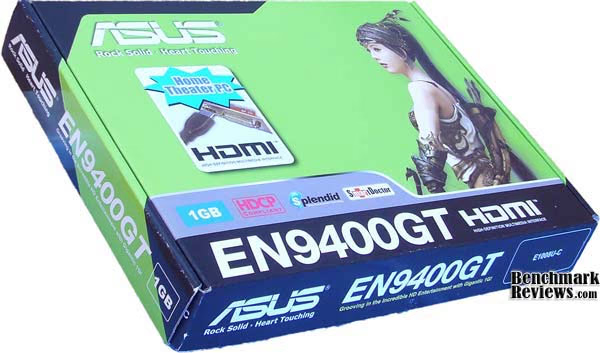
Here at Benchmark Reviews, you will find a lot of high end video card reviews just like many other review websites but not everyone is looking for a high end video card. Benchmark Reviews tests the ASUS EN9400GT GeForce 9400GT HDMI video card and puts it through a battery of frame rate tests to see just how well the 9400 GT performs and whether or not it can live up to the requirements of living inside of a HTPC case.
About ASUSTek Computer, Inc.
ASUS, a technology-oriented company blessed with one of the world's top R&D teams, is well known for high-quality and innovative technology. As a leading company in the new digital era, ASUS offers a complete product portfolio to compete in the new millennium. In 2007, one in three desktop PCs sold was powered by an ASUS motherboard; and the company's 2007 revenues reached US $6.9 billion.
ASUS products' top quality stems from product development. It's like learning Chinese Kung-Fu; one must begin withcultivating the "Chi" and inner strength. Besides innovating cutting-edge features, ASUS engineers also pay special attention to EMI (electromagnetic interference), thermal, acoustics and details that usually go unnoticed to achieve complete customer satisfaction. ASUS notebooks are the first TCO'99-certified notebooks worldwide. 
The requirements for this honor include radiation emission control, energy (battery consumption), ecology (environment friendly) and ergonomics. To succeed in this ultra-competitive industry, great products need to be complimented by speed-to-market, cost and service. That's why all 8,000 over employees of ASUS strive for the "ASUS Way of Total Quality Management" to offer the best quality without compromising cost and time-to-market while providing maximum value to all customers through world-class services.
With unyielding commitment to innovation and quality, ASUS won 2,568 awards in 2007, meaning on average, the company received over 7 awards every day last year. BusinessWeek has ranked ASUS amongst its InfoTech 100 for the 10thstraight year. ASUS has also achieved the number one title on the annual league table of Taiwan Top 10 Global Brands with a brand value of 11.96 billion US dollars.
Passion for Technology is the heart of ASUS. We continue to invest in our world-class Research and Development so that we are always able to provide leading-edge innovations to people and businesses. Quality is of utmost importance to ASUS. We continue to refine our quality management process to ensure customers receive quality solutions cost effectively. Long-term Relationships Whether they are our customers, media, shareholders or consumers, we believe in growing with our partners at all levels. Relationships with those key stakeholders are one of the most important factors of our continuing success. Perseverance All ASUS employees share the same sense of purpose. We thrive under pressure and we look forward to challenges. And all of us are working to accomplish the same mission, to empower people with innovative IT solutions.
ASUS EN9400GT Features
-
HTPC with Native HDMI support
-
Huge 1024MB memory on board
-
ASUS Splendid:
Watching movies on a PC is as good as on a top-of-the-line consumer television -
ASUS Gamer OSD:
Real-time overclocking, benchmarking and video capturing in any PC game! -
ASUS Smart Doctor:
Your intelligent hardware protection and overclocking tool -
ASUS Video Security Online:
Keep an eye on your home at all times no matter where you are
Graphics GPU Features
-
NVIDIA GeForce 9400GT
-
PCI Express & PCI Express 2.0 support
-
Microsoft DirectX 10 and Shader Model 4.0 support
-
OpenGL2.1support
-
HDCP compliant
-
NVIDIA PureVideo HD technology-Essential for the Ultimate HD Movie Experience on a PC
-
NVIDIA Quantum Technology- Advanced Shader Processors architected for physics computation
-
Hardware Decode Acceleration-Provides ultra-smooth playback of H.264, VC-1, WMV and MPEG-2 HD and SD movies
-
These features aren't exactly impressive but considering this is a budget based video card, they're still decent features to have on a video card of this type.
EN9400GT Specifications
|
Graphics Engine |
NVIDIA GeForce 9400GT |
|---|---|
|
Bus Standard |
PCI Express 2.0 |
|
Video Memory Type |
DDR2 |
|
Die Process |
65 nm |
|
Die Size |
144 mm2 |
|
Transistors |
314M |
|
ROPs |
8 |
|
Shaders |
16 Unified |
|
Pixel Fillrate |
4.4 GPixel/s |
|
Texture Fillrate |
4.4 GTexel/s |
|
Effective Memory Size |
1024 MB |
|
Effective Memory Bandwidth |
128-bit |
|
Engine Clock |
550 MHz |
|
Memory Clock |
800 MHz ( 400 MHz DDR2 ) |
|
Shader Clock |
1375 MHz |
|
CRT Max Resolution |
2048 x 1536 |
|
DVI Max Resolution |
2560 x 1600 |
|
D-Sub Output |
Yes x 1 |
|
DVI Output |
Yes x 1 (DVI-I) |
|
HDMI Output |
Yes x 1 |
|
HDCP Support |
Yes |
|
Adaptor/Cable bundled |
1 x S/PDIF cable |
|
Software Bundled |
ASUS Utilities & Driver |
|
Low Profile Bracket Bundled |
Yes ( 2 slots ) |
Closer Look: EN9400GT
Included inside the retail box for the 9400 GT, you'll find a driver disk, a disk with a users manual and a basic connection instruction manual, a low profile dual slot bracket, and even a S/PDIF cable for streaming audio out the HDMI port. No actual HDMI cable is included though but since HDMI cables can cost nearly as much as the video card itself, it's not surprising it wasn't included.

I was surprised to see that ASUS has included some neat software utilities such as Gamer OSD which allows you to overclock, benchmark, and capture video within a game. Video security software is also included to allow you to build and monitor a security camera system from anywhere with web access. Lastly, they've included ASUS SmartDoctor which monitors the video cards temperature and dynamically controls the fan for efficient cooling and allows you to overclock it as well. I was kind of expecting to find some kind of Blu-Ray or DVD viewing software such as Cyberlink's PowerDVD but I guess not. Oh well, not a show stopper but it would've been nice to have.

There is not really a whole lot to look at here. No fancy heat pipes or complex electronics, just a basic video card setup here with a rather small heatsink and fan, a few capacitors, resistors, and diodes. The fan power cable is way too long, it was actually interfering with my installation so I had to route it between a couple of capacitors to reduce the slack and hold it in place. The image above reveals that a much shorter cable would suffice.
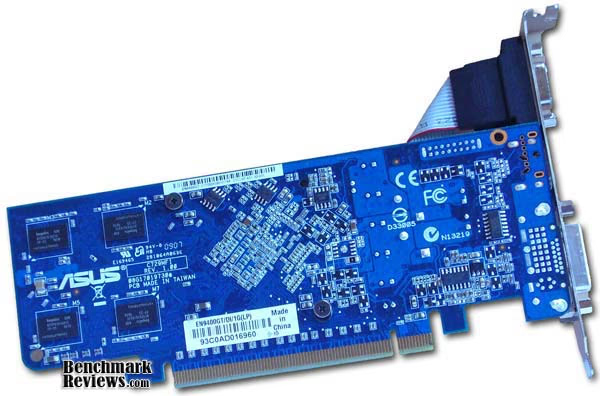
The backside of the video card reveals nothing extraordinary either unless the bright blue PCB gets you excited. Several resistors and diodes dot the landscape along with the four 256MB DDR2 RAM modules, none of which has or even probably needs any heatsinks. It also has just two retaining screws holding the fan and heatsink assembly on the front side.
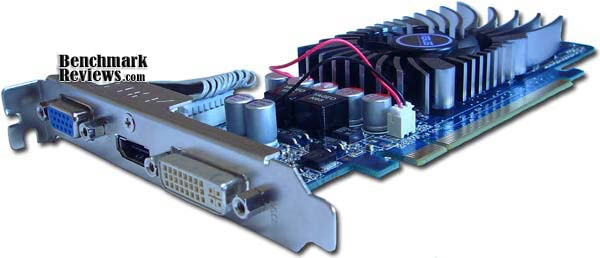
Here you can see that you have three choices for connectivity, an RGB jack, DVI, and HDMI. The fan also has a two pin connector on the front side just above the PCI Express connector pins.
EN9400GT Detailed Features
Since HTPC's are becoming more and more popular as a means to watch movies, television, and even Internet video content such as YouTube, it makes sense to produce video cards that will accommodate this growing market trend. The EN9400GT does just that and is small enough to fit into any case.
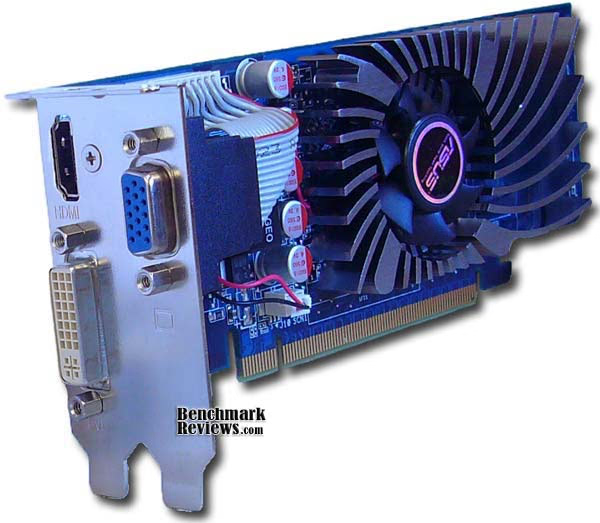
Using the supplied dual slot low bracket makes this card a perfect fit in small low profile HTPC cases. The 9400 GT comes installed with the standard taller bracket included but it's easy enough to remove and replace with the lower dual slot bracket if needed. The RGB port is simply relocated onto the secondary slot.
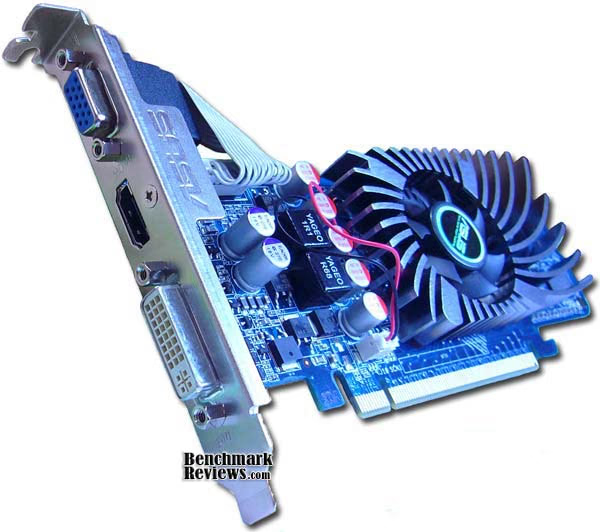
Having a true dedicated native HDMI port is a strong selling point and is much preferred than the standard S-Video port that requires a dongle to use and that is found on most other video cards. Connecting a high definition source via an S-Video adaptor cable is just not as good and pure as HDMI. HDMI is pure digital straight through and not converted to analog first plus you can pass true 7.1 channel audio over HDMI as long as you connect up the included internal S/PDIF cable.

The front side heatsink flares out to extend over the RAM modules. I think this design is more for the fan to direct air over them than to actually help absorb any heat given off by them since they don't actually make contact with the RAM modules.

Video Card Testing Methodology
VGA Testing Methodology
 At the start of all tests, the previous display adapter driver is uninstalled and trace components are removed using Driver Cleaner Pro. We then restart the computer system to establish our display settings and define the monitor. Once the hardware is prepared, we begin our testing. The synthetic benchmark tests in 3DMark06 will utilize shader models 2.0 and 3.0, while the video games will use their own proprietary game engine. For lower-end VGA products we test at 1024x768 (15-17" standard LCD), 1280x1024 (17-19" standard LCD), and 1680x1050 (22-24" widescreen LCD). In our higher-end VGA product tests we conduct add the 1920x1200 (24-28" widescreen LCD) resolution. In some tests we utilized widescreen monitor resolutions, since more users are beginning to feature these products for their own computing.
Each benchmark test program begins after a system restart, and the very first result for every test will be ignored since it often only caches the test. Each test is completed five times, with the average results displayed in our article.
In these tests I will utilize 1920x1080 (1080p) since that is the standard resolution for HDTV and since this video card is geared toward those with HTPC's and will most likely be viewed in that resolution. Some of the tests were also done at the lower high definition resolution of 1280x720 (720p) for comparison. Since most gamers and enthusiasts are still using Windows XP, it was decided that DirectX 9 would be used for all tests until Microsoft offers Windows 7 to replace the Vista.
Test System
-
Motherboard: EVGA 132-CK-NF79 (NVIDIA nForce 790i Ultra SLI SPP Chipset)
-
Processor: Intel Core 2 Duo E8400 Wolfdale Socket 775 LGA @ 3.00GHz (Overclocked @ 3.85GHz)
-
System Memory: OCZ 2GB DDR3 Dual Channel
-
Disk Drive: WD Caviar Black 640GB SATA with 32MB cache
-
Monitor: SOYO 24-Inch Widescreen LCD Monitor (1920x1200)
-
PSU: Thermaltake Toughpower W0155RU 1000W PSU
-
Operating System: Windows XP Service Pack 3
Benchmark Applications
-
3DMark06 v1.1.0
-
Passmark Performance Test v7.0
-
Crysis v1.21 Benchmark
-
Devil May Cry 4 Benchmark Demo
-
Lightsmark2008 v2.0 Video Card Test
| Product Series | PNY NVIDIA GeForce 8600 GT | ASUS NVIDIA GeForce 9400GT | EVGA NVIDIA GeForce GTX 260 |
|---|---|---|---|
| Stream Processors | 32 | 16 | 192 |
| Core Clock (MHz) | 540 | 550 | 602 |
| Shader Clock (MHz) | 1188 | 1375 | 1296 |
| Memory Clock (MHz) | 700 | 400 | 1026 |
| Memory Amount | 256 MB GDDR3 |
1024 MB GDDR2 |
896 MB GDDR3 |
| Memory Interface | 128-bit | 128-bit | 448-bit |
-
PNY NVIDIA GeForce 8600 GT (540 MHz GPU/950 MHz RAM/1188 MHz Shader - Forceware 182.50)
-
ASUS NVIDIA GeForce 9400GT (550 MHz GPU/400 MHz RAM/1375 MHz Shader - Forceware 182.50)
-
EVGA NVIDIA GeForce GTX 260 (602 MHz GPU/1026 MHz RAM/1296 MHz Shader - Forceware 182.50)
Now we're ready to begin testing video game performance with these video cards, so please continue to the next page as we start with the 3DMark06 results.
3DMark06 Benchmark Results
3DMark is a computer benchmark by Futuremark (formerly named Mad Onion) to determine the DirectX9 performance of 3D game performance with graphics cards. 3DMark06 uses advanced real-time 3D game workloads to measure PC performance using a suite of DirectX 9 3D graphics tests, CPU tests, and 3D feature tests.
3DMark06 tests include all new HDR/SM3.0 graphics tests, SM2.0 graphics tests, AI and physics driven single and multiple cores or processor CPU tests and a collection of comprehensive feature tests to reliably measure next generation gaming performance today. Some enthusiasts may note that Benchmark Reviews does not include CPU-bound tests in our benchmark battery, and that only graphic-bound tests are included.
Here at Benchmark Reviews, we believe that synthetic benchmark tools are just as valuable as video games, but only so long as you're comparing apples to apples. Since the same test is applied in the same controlled method with each test run, I believe 3DMark is a very reliable tool for comparing graphic cards against one-another.
Shader Model 2.0
Our first series of synthetic tests are performed at 1920x1080, and demands 2.073 megapixelsfrom the graphics card. Beginning with Shader Model 2.0 tests, Return to Proxycon and Firefly Forestare two fast-paced fast-moving scenes that put strain on the GPU's efficiency by calling for large amounts of low-demand graphics in need of high-speed output. Shader Model 2.0 tests have historically performed at slower frame rates when compared to ShaderModel 3.0; at least this is the case on newer, more complex, video cards with larger overhead.
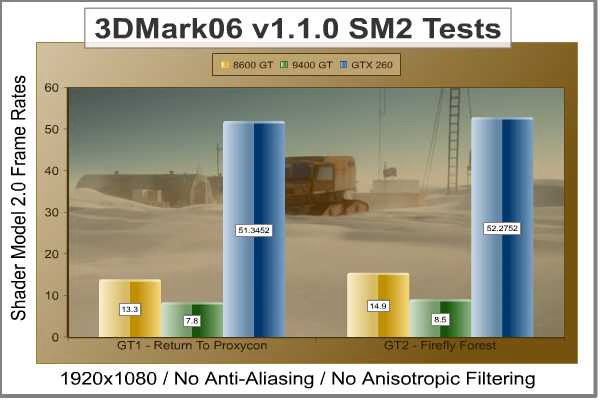
At first I didn't understand why the 8600 GT outperformed the 9400 GT but a quick look back at the GPU-Z screenshot on the Video Card Testing Methodology reveals why. The 9400 GT has only 16 shaders whereas the 8600 GT has 32. So far that means having 1GB of memory is pointless in this test because the 8600 GT has only 256 and it is of the DDR3 variety vs DDR2 for the 9400 GT.
Shader Model 3.0 / HDR
The Shader Model 3.0 and HDR (High Dynamic Range) test series in 3dMark06 includes the Canyon Flight and Deep Freeze. Both of these test scenes demand intense graphical computations from the GPU, and when paired with newer (AMD Phenom or Intel Nehalem) processors can actually produce better frame rates than ShaderModel 2.0 scenes with the same hardware (and overhead). This test is also done at 1920x1080.
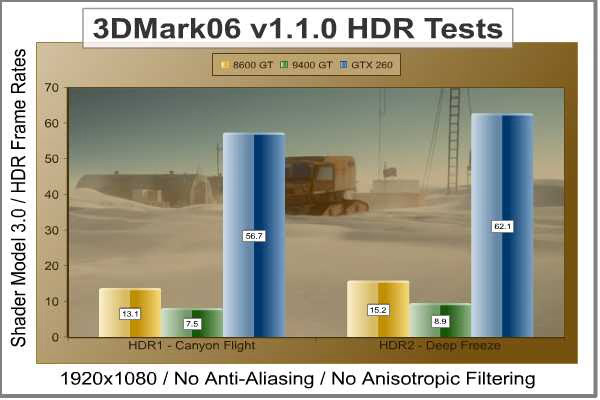
Obviously the GTX 260 is going to significantly outperform the 8600 GT and 9400 GT but these tests were done to illustrate the cards capabilities and not to show how one is better than the other.
| Product Series | PNY NVIDIA GeForce 8600 GT | ASUS NVIDIA GeForce 9400GT | EVGA NVIDIA GeForce GTX 260 |
|---|---|---|---|
| Stream Processors | 32 | 16 | 192 |
| Core Clock (MHz) | 540 | 550 | 602 |
| Shader Clock (MHz) | 1188 | 1375 | 1296 |
| Memory Clock (MHz) | 700 | 400 | 1026 |
| Memory Amount | 256 MB GDDR3 |
1024 MB GDDR2 |
896 MB GDDR3 |
| Memory Interface | 128-bit | 128-bit | 448-bit |
Take the 3DMark06 tests at face value (as you should any synthetic benchmark), because in later sections of this article we begin real-world testing on a cadre of popular video games known for taxing the graphics processor.
Passmark Performance Results
PassMark Performance Test is a PC hardware benchmark utility that allows a user to quickly assess the performance of their computer and compare it to a number of standard 'baseline' computer systems. The Passmark Performance Test 2D graphics tests all benchmark the drawing lines, bitmaps, fonts, text, and GUI elements while the 3D graphics tests all benchmark simple to complex Directx 3D graphics and animations.
In our tests there were several areas of concentration for each benchmark, which are combined into one compound score for each test. These scores are referred to as the 2D Graphics Mark and the 3D Graphics Mark, and is a composite of the following tests for the 2D Graphics Mark: solid vectors, transparent vectors, complex vectors, fonts and text, windows interface, image filters, and image rendering. For the 3D Graphics Mark, the composite score is based on these following tests: simple, medium, and complex 3D graphics.

This first test result produced some interesting test scores. For some reason I was expecting the GTX 260 to blow away the other two but instead they were all pretty much inline with each other. 2D performance is not all that demanding, so I guess it's really not all that surprising. I think that what this proves so far is that having any of these video cards for basic computing tasks will suffice. You just don't need a high end video card for simply checking email or surfing the Internet.

On the other hand, the 3D Graphics Mark Test obviously proves that higher end video cards are indeed needed for running any 3D intensive applications. In our next section, we shall see if the performance-demanding video game Crysis will help strengthen this position among our collection of video cards.
Crysis Benchmark Results
Crysis uses a new graphics engine: the CryENGINE2, which is the successor to Far Cry's CryENGINE. CryENGINE2 is among the first engines to use the Direct3D 10 (DirectX10) framework of Windows Vista, but can also run using DirectX9, both on Vista and Windows XP.
Roy Taylor, Vice President of Content Relations at NVIDIA, has spoken on the subject of the engine's complexity, stating that Crysis has over a million lines of code, 1GB of texture data, and 85,000 shaders. To get the most out of modern multicore processor architectures, CPU intensive subsystems of CryENGINE 2 such as physics, networking and sound, have been re-written to support multi-threading.
Crysis offers an in-game benchmark tool, which is similar to World in Conflict. This short test does place some high amounts of stress on a graphics card, since there are so many landscape features rendered. For benchmarking purposes, Crysis can mean trouble as it places a high demand on both GPU and CPU resources. Benchmark Reviews uses the Crysis Benchmark Tool by Mad Boris to test frame rates in batches, which allows the results of many tests to be averaged.
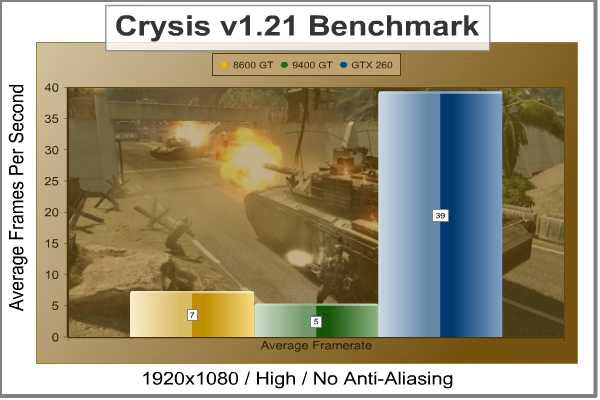
I'm really not too surprised at any of these video cards performance. The 9400GT and even the 8600GT were not built with gaming in mind and that is obvious from the initial round of tests here in 1920x1080 resolution. I didn't bother to even use any AA or AF because I figured it would choke anyways.
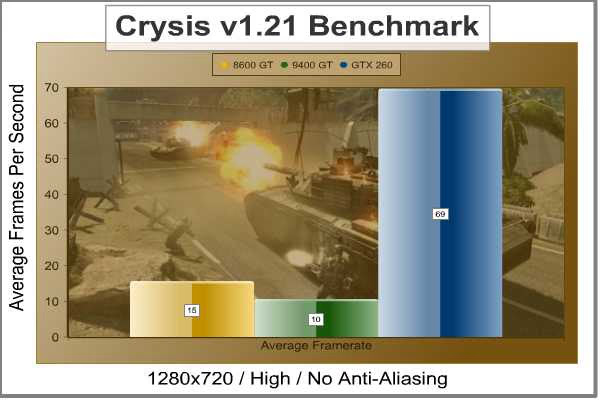
Dropping the resolution down to the lower of the high definition resolutions did produce a little better results but still far from the acceptable frame rates of at least 30 FPS. Now let's see what dropping the overall quality settings to low will do.
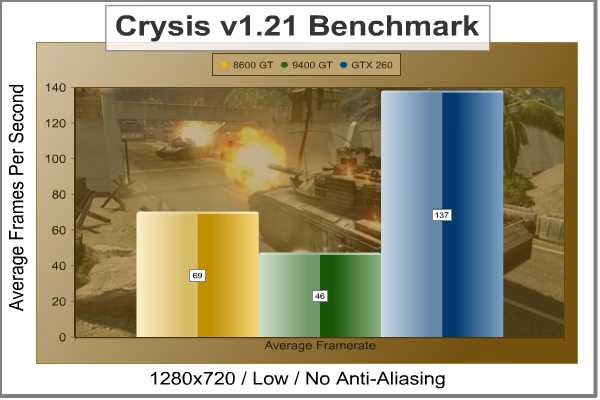
Viola! Dropping the overall quality down to low and setting the resolution rather low seems to be the only way to be able to play Crysis with the 9400 GT. Obviously this not acceptable to the hard core gamer but to the casual gamer it's perfectly acceptable and still looks good at this resolution. An interesting note here is that the GTX 260 video card only doubled in frame rates while the 8600 GT and 9400GT more than quadrupled their frame rates.
| Product Series | PNY NVIDIA GeForce 8600 GT | ASUS NVIDIA GeForce 9400GT | EVGA NVIDIA GeForce GTX 260 |
|---|---|---|---|
| Stream Processors | 32 | 16 | 192 |
| Core Clock (MHz) | 540 | 550 | 602 |
| Shader Clock (MHz) | 1188 | 1375 | 1296 |
| Memory Clock (MHz) | 700 | 400 | 1026 |
| Memory Amount | 256 MB GDDR3 |
1024 MB GDDR2 |
896 MB GDDR3 |
| Memory Interface | 128-bit | 128-bit | 448-bit |
In our next section, Benchmark Reviews tests with Devil May Cry 4 Benchmark. Read on to see how a blended high-demand GPU test with low video frame buffer demand will impact our test products.
Devil May Cry 4 Benchmark
Devil May Cry 4 was released on PC in early 2007 as the fourth installment to the Devil May Cry video game series. DMC4 is a direct port from the PC platform to console versions, which operate at the native 720P game resolution with no other platform restrictions. Devil May Cry 4 uses the refined MT Framework game engine, which has been used for many popular Capcom game titles over the past several years.
MT Framework is an exclusive seventh generation game engine built to be used with games developed for the PlayStation 3 and Xbox 360, and PC ports. MT stands for "Multi-Thread", "Meta Tools" and "Multi-Target". Originally meant to be an outside engine, but none matched their specific requirements in performance and flexibility. Games using the MT Framework are originally developed on the PC and then ported to the other two console platforms.
On the PC version a special bonus called Turbo Mode is featured, giving the game a slightly faster speed, and a new difficulty called Legendary Dark Knight Mode is implemented. The PC version also has both DirectX 9 and DirectX 10 mode for Microsoft Windows XP and Vista Operating Systems.
It's always nice to be able to compare the results we receive here at Benchmark Reviews with the results you test for on your own computer system. Usually this isn't possible, since settings and configurations make it nearly difficult to match one system to the next; plus you have to own the game or benchmark tool we used.
Devil May Cry 4 fixes this, and offers a free benchmark tool available for download. Because the DMC4 MT Framework game engine is rather low-demand for today's cutting edge multi-GPU video cards, Benchmark Reviews usually just uses the 1920x1200 resolution to test with 8x AA (highest AA setting available to Radeon HD video cards) and 16x AF but since this video card will primarily be used as an HTPC in 1920x1080 (1080p) resolution, I will use it instead. I've also included the lower high definition resolution 1280x720 (720p) for comparison.

Again, not too surprised that the GTX 260 cremated the 8600 GT and 9400 GT but I am a little surprised that the 8600 GT and 9400 GT can't even display at least 30 FPS since it is a relatively low demand game.

Well, at least now we know that Devil May Cry 4 can be played at 1280x720 without any lag issues since we're above the magical 30 FPS threshold but that of course is still without any AA and AF turned on.
| Product Series | PNY NVIDIA GeForce 8600 GT | ASUS NVIDIA GeForce 9400GT | EVGA NVIDIA GeForce GTX 260 |
|---|---|---|---|
| Stream Processors | 32 | 16 | 192 |
| Core Clock (MHz) | 540 | 550 | 602 |
| Shader Clock (MHz) | 1188 | 1375 | 1296 |
| Memory Clock (MHz) | 700 | 400 | 1026 |
| Memory Amount | 256 MB GDDR3 |
1024 MB GDDR2 |
896 MB GDDR3 |
| Memory Interface | 128-bit | 128-bit | 448-bit |
Our last benchmark is coming next, which measures the results obtained from the Lightsmark tests.
Lightsmark Benchmark Results
Stepan Hrbek is the mastermind behind Lightmark 2008, a program that allows you to benchmark real-time global illumination. Natural lighting makes artificial graphics life-like and real. Computers get faster, but rendering more polygons doesn't add value if lighting still looks faked, so insiders know that the next big thing is proper lighting; aka Realtime Global Illumination.
Typical workloads in real-time rendering will shift, and Lightsmark simulates it. Global Illumination renders often take hours, so is your computer fast enough for real-time?
Before Lightsmark, realtimeglobal illumination was limited to small scenes, small resolutions, small speeds, specially crafted scenes with handmade optimizations. Lightsmark breaks all limits at once, running in reasonably sized scene (220000 triangles) in high resolutions at excellent speed.

Lighting is computed fully automatically in an original unmodified scene from 2007 game World of Padman. This benchmark is not tweaked for Lightsmark, and contains all sorts of geometrical difficulties with extra rooms hidden below the floor.
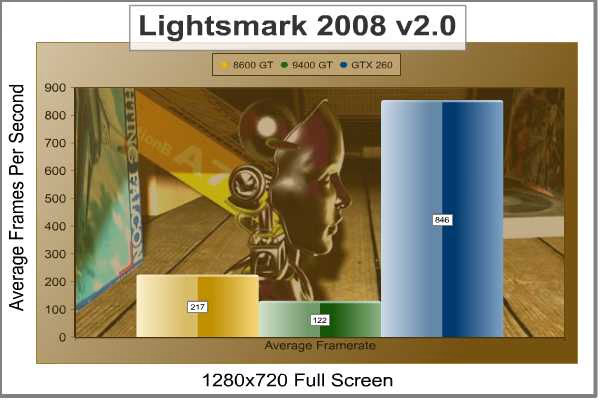
In Lightsmark, information is passed through the buffer and called on very quickly, and the only thing which was going to benefit this test was the appropriate ratio of Stream Processors to vRAM. In terms of performance, this test offers very short but taxing graphics, and only the most nimble products with capable muscle can take advantage. You will see this experience to be relative to 3D game titles using older engines such as COD4, Doom 3, or Quake 4.
| Product Series | PNY NVIDIA GeForce 8600 GT | ASUS NVIDIA GeForce 9400GT | EVGA NVIDIA GeForce GTX 260 |
|---|---|---|---|
| Stream Processors | 32 | 16 | 192 |
| Core Clock (MHz) | 540 | 550 | 602 |
| Shader Clock (MHz) | 1188 | 1375 | 1296 |
| Memory Clock (MHz) | 700 | 400 | 1026 |
| Memory Amount | 256 MB GDDR3 |
1024 MB GDDR2 |
896 MB GDDR3 |
| Memory Interface | 128-bit | 128-bit | 448-bit |
In our next section, we discuss operating temperatures and learn how well (or poorly) the 9400 GT will affect your internal case temperatures...
EN9400GT Temperatures
Benchmark Reviews has a very popular guide written on Overclocking the NVIDIA GeForce Video Card, which gives detailed instructions on how to tweak a GeForce graphics card for better performance. Of course, not every video card has the head room. Some products run so hot that they can't suffer any higher temperatures than they already do. This is why we measure the operating temperature of the video card products we test.
To begin my testing, I use GPU-Z to measure the temperature at idle as reported by the GPU. Next I use FurMark 1.6.0 to generate maximum thermal load and record GPU temperatures at high-power 3D mode. The ambient room temperature remained stable at 21C throughout testing. The ASUS EN9400GT video card recorded 43C in idle 2D mode, and increased to 54C after 20 minutes of stability testing in full 3D mode at 1920x1080 resolution. I was really impressed with how cool this card runs even under full load. I think it suffices to say that this card should have no heat related problems even inside of a small stuffy HTPC case.
FurMark is an OpenGLbenchmark that heavily stresses and overheats the graphics card with fur rendering. The benchmark offers several options allowing the user to tweak the rendering: fullscreen / windowed mode, MSAA selection, window size, duration. The benchmark also includes a GPU Burner mode (stability test). FurMark requires an OpenGL2.0 compliant graphics card with lot of GPU power! As an oZone3D.net partner, Benchmark Reviews offers a free download of FurMark to our visitors.

In our next section, we discuss electrical power consumption and learn how well (or poorly) each video card will impact your utility bill...
VGA Power Consumption
Life is not as affordable as it used to be, and items such as gasoline, natural gas, and electricity all top the list of resources which have exploded in price over the past few years. Add to this the limit of non-renewable resources compared to current demands, and you can see that the prices are only going to get worse. Planet Earth is needs our help, and needs it badly. With forests becoming barren of vegetation and snow capped poles quickly turning brown, the technology industry has a new attitude towards suddenly becoming "green". I'll spare you the powerful marketing hype that I get from various manufacturers every day, and get right to the point: your computer hasn't been doing much to help save energy... at least up until now.
To measure isolated video card power consumption, I simply used an APC UPS XS-1500. It has an LCD screen built into it and allows you to read voltage, wattage, and a few of other useful stats. The wattage reading is what I used and has proven to be quite accurate to within 1 watt. A baseline test is taken withouta video card installed inside our computer system, which is allowed to boot into Windows and rest idle at the login screen before power consumption is recorded. Once the baseline reading has been taken, the graphics card is installed and the system is again booted into Windows and left idle at the loginscreen. Our final loaded power consumption reading is taken with the video card running a stress test using FurMark. Below is a chart with the isolated video card power consumption (not system total) displayed in Watts for each specified test product:
VGA Product Description(sorted by combined total power) |
Idle Power |
Loaded Power |
|---|---|---|
NVIDIA GeForce GTX 480 SLI Set |
82 W |
655 W |
NVIDIA GeForce GTX 590 Reference Design |
53 W |
396 W |
ATI Radeon HD 4870 X2 Reference Design |
100 W |
320 W |
AMD Radeon HD 6990 Reference Design |
46 W |
350 W |
NVIDIA GeForce GTX 295 Reference Design |
74 W |
302 W |
ASUS GeForce GTX 480 Reference Design |
39 W |
315 W |
ATI Radeon HD 5970 Reference Design |
48 W |
299 W |
NVIDIA GeForce GTX 690 Reference Design |
25 W |
321 W |
ATI Radeon HD 4850 CrossFireX Set |
123 W |
210 W |
ATI Radeon HD 4890 Reference Design |
65 W |
268 W |
AMD Radeon HD 7970 Reference Design |
21 W |
311 W |
NVIDIA GeForce GTX 470 Reference Design |
42 W |
278 W |
NVIDIA GeForce GTX 580 Reference Design |
31 W |
246 W |
NVIDIA GeForce GTX 570 Reference Design |
31 W |
241 W |
ATI Radeon HD 5870 Reference Design |
25 W |
240 W |
ATI Radeon HD 6970 Reference Design |
24 W |
233 W |
NVIDIA GeForce GTX 465 Reference Design |
36 W |
219 W |
NVIDIA GeForce GTX 680 Reference Design |
14 W |
243 W |
Sapphire Radeon HD 4850 X2 11139-00-40R |
73 W |
180 W |
NVIDIA GeForce 9800 GX2 Reference Design |
85 W |
186 W |
NVIDIA GeForce GTX 780 Reference Design |
10 W |
275 W |
NVIDIA GeForce GTX 770 Reference Design |
9 W |
256 W |
NVIDIA GeForce GTX 280 Reference Design |
35 W |
225 W |
NVIDIA GeForce GTX 260 (216) Reference Design |
42 W |
203 W |
ATI Radeon HD 4870 Reference Design |
58 W |
166 W |
NVIDIA GeForce GTX 560 Ti Reference Design |
17 W |
199 W |
NVIDIA GeForce GTX 460 Reference Design |
18 W |
167 W |
AMD Radeon HD 6870 Reference Design |
20 W |
162 W |
NVIDIA GeForce GTX 670 Reference Design |
14 W |
167 W |
ATI Radeon HD 5850 Reference Design |
24 W |
157 W |
NVIDIA GeForce GTX 650 Ti BOOST Reference Design |
8 W |
164 W |
AMD Radeon HD 6850 Reference Design |
20 W |
139 W |
NVIDIA GeForce 8800 GT Reference Design |
31 W |
133 W |
ATI Radeon HD 4770 RV740 GDDR5 Reference Design |
37 W |
120 W |
ATI Radeon HD 5770 Reference Design |
16 W |
122 W |
NVIDIA GeForce GTS 450 Reference Design |
22 W |
115 W |
NVIDIA GeForce GTX 650 Ti Reference Design |
12 W |
112 W |
ATI Radeon HD 4670 Reference Design |
9 W |
70 W |
At idle, the ASUS EN9400GT drew only 13 watts of power while drawing 33 watts at full load. Talk about saving some green, literally and figuratively. No need to worry about what your next electric bill will look like, that is assuming you don't have another PC in the house with a triple SLI GTX 285 setup.
9400GT Final Thoughts
I have mixed feelings about the EN9400GT. On one hand I had higher expectations from this video card in terms of gaming performance but on the other hand I am quite pleased with it. I had expected this card to be able to outperform my old 8600GT but in reality the 8600GT outperformed it by a wide margin.
This just illustrates the importance of reading the specs on any video card before purchasing it. I mean if all you did was read the labeling on the box then you would be misled to believe that a 9400GT with 1GB of memory can outperform an 8600GT with only 256MB. The biggest factor contributing to the EN9400GT's performance is the number of shaders. It's limited to only 16 of them whereas my old 8600GT had 32. This is a key component for rendering 3D graphics.
As for 2D performance, it's great. It's also great at what it's supposed to do and that is live inside a small HTPC case that is used for watching movies and TV or any other small PC case where it's main function is anything other than gaming. That's not to say that gaming is not possible. It is possible, just not at high resolutions or with any eye candy turned on.
I'm also quite pleased with it's quietness. Since this card will be functioning as the video processor for my HTPC, it's important to me for it be quiet. It's also very important for it to run cool since the airflow inside of a small HTPC case is very limited. Run cool it does, at only 54C under full load, I was amazed at how cool it ran.
EN9400GT Conclusion
Every business knows how important effective marketing is for selling their products and with ASUS they know how to package it just right and make it appealing to the buyer. The retail box does a good job emphasizing the fact that this card is for an HTPC and that it features an HDCP HDMI port. However, I'm not so sure that having any sort of gaming graphics on the box is the best thing to do when it's clear that the EN9400GT is not intended to be a gamer's video card.
Even though this is a low end video card, everything about it seems to be of high quality from it's capacitors all lined up neatly to it's highly polished heatsink securely affixed to the PCB which itself is pleasing to look at with it's bright blue color. I'm not so sure why ASUS decided to add a full 1GB of memory, it had no effect on it's overall performance when compared to my 8600GT with only 256MB. I would've liked to see the number of shaders bumped up from it's 16 to something a little higher that can make games a little better to play but then again that would probably negatively affect it's temperature.
The EN9400GT is an excellent choice if your building a new or replacing a video card in an HTPC. Since this card runs exceptionally cool, it makes it a perfect candidate for a small cramped HTPC case. It's low power usage is also very important in small HTPC cases since their power supplies tend to be on the skimpy side. Of course, the best feature of all is it's native HDMI port that is also HDCP compliant. I'm a Blu-Ray movie fanatic so perfect picture quality is very important to me and HDMI is the only way to go. The HDMI port also passes through true 7.1 channel audio but only if you use the supplied S/PDIF cable, unlike ATI cards with HDMI ports that don't need that extra cable. Just make sure your motherboard or soundcard has the necessary S/PDIF header to connect to. It's low profile and standard sized brackets ensure this video card will fit in just about any style of case.
Newegg currently sells the ASUS EN9400GT for $54.99 (with additional $10 rebate available for a limited time), so I would say it's a decent value; but the same card with only 512MB can be had for $46.99 ($36.99 after rebate) at Newegg. However, I personally don't think the extra 512MB adds much performance value to it. If this were a video card capable of some competitive 3D performance then the extra RAM would certainly come into play but in a standard Windows environment or watching Blu-Ray or DVD movies, the extra RAM just doesn't provide any real benefit.
In conclusion, I would say that if you need a small low profile video card for an HTPC or any PC that is a small form factor, and one that has HDMI, runs cool, and uses very little power then this one is certainly recommended. Otherwise, if you want one that will be able to play games too, then you will want to shop for something else unless you're just a casual gamer who doesn't mind playing games at lower resolutions.
Pros:
+ Low profile, fits in any size case
+ HDCP compliant HDMI
+ Low temperature output
+ Very quiet fan
+ You don't need a high wattage PSU to power it
Cons:
- Sub-par 3D gaming capabilities
- 1GB RAM is overkill and almost pointless
Ratings:
-
Presentation: 8.75
-
Appearance: 8.50
-
Construction: 9.0
-
Functionality: 7.25
-
Value: 8.50
Final Score: 8.4 out of 10.
Questions? Comments? Benchmark Reviews really wants your feedback. We invite you to leave your remarks in our Discussion Forum.