
MSI GTX N650Ti Power Edition Video Card
Manufacturer: Micro-Star International (MSI)
Product Name: GeForce GTX 650Ti Power Edition
Model Number: N650Ti PE 1GD5/OC
UPC: 816909101843 EAN: 4719072277901
Price As Tested: $159.99 (Newegg)
Full Disclosure: MSI provided the product sample used in this article.
NVIDIA's Kepler GPUs have been a big hit ever since they were released. As is common the GPU market, NVIDIA has released their Kepler based GPUs incrementally, and now has a full complement of GPUs at its disposal. The GTX 680 and GTX 670 are at the top of the list, not only in performance, but also in price. The GTX 680 tops the charts at $500 and the GTX 670 clocks in just behind that at $400.
After the GTX 670, there is a big jump in price and performance to the GTX 660, which runs around $240 or so. Jumping down to the GTX 650, there is another large price jump all the way to about $120. The GT 640 and GT 630 round things out as the low-end and entry-level cards in the 600 series. Those price jumps between GTX 650, 660, and 670 are what we are looking at today. To bridge the gap between GTX 660 and GTX 670, NVIDIA released the GTX 660Ti, which will run you around $300. Interestingly enough, the GTX 660Ti was released nearly a month before the actual GTX 660 and GTX 650 releases.
The next gap has, as of yet, gone unfilled. Until now that is. NVIDIA has just released the answer to the gap between the GTX 650 and the GTX 660 in the form of the, you guessed it, GTX 650Ti. The GTX 660 and the GTX 650 were NVIDIAs vision of bringing Kepler to every gamer. The release of the GTX 650Ti completes the entire NVIDIA GTX 600 series lineup and gives an extra boost to the GTX 650 family of GPUs.
NVIDIAs theory behind the release of the GTX 650Ti is based on market research that shows that gamers don't upgrade their GPU all that often. According to NVIDIA, it's about every three years typically. That time period apparently increases when the gamer buys a lower priced video card. In fact, according to the latest Steam hardware survey, more than half of all gamers polled still haven't upgraded to a DX11 graphics card. NVIDIAs goal with the GTX 650Ti is to entice gamers to move up to DX11 graphics that will last them until their next upgrade and at an affordable price.

Enough with the talk. Benchmark Reviews has one of the new GTX 650Ti video cards on hand in the form of the MSI GEFORCE GTX N650Ti Power Edition Video Card. Of course, MSI couldn't just leave the N650Ti PE alone and release it just like the reference design. No, MSI has made plenty of changes and enhancements to the GTX 650Ti with their N650Ti Power Edition card. Let's find out more.
Closer Look: MSI N650Ti Power Edition
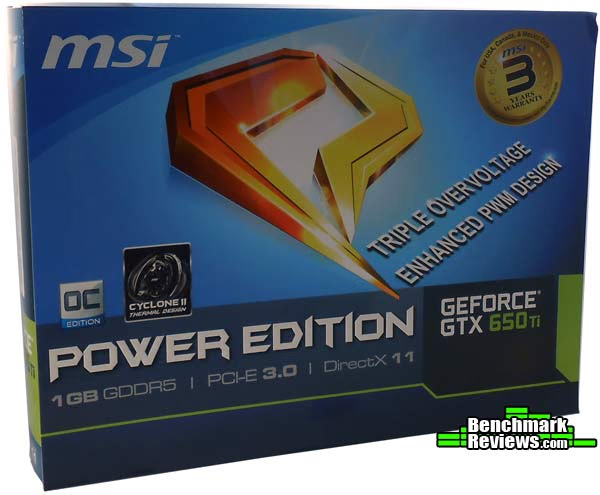
The box that the MSI N650Ti Power Edition video card came in looks nearly exactly the box of the MSI N660Ti Power Edition that Benchmark Reviews looked at back in August of 2012. The color scheme is the same, as are most of the details on the box. The differences are clear, however, the GTX 650Ti has only 1GB of GDDR5 RAM where the GTX 660Ti has 2GB. The GTX 650Ti also sports a different cooling method, touted on the box, with the Cyclone II thermal design. Other than that and the positioning of the warranty logo, the front of the two boxes is the same.
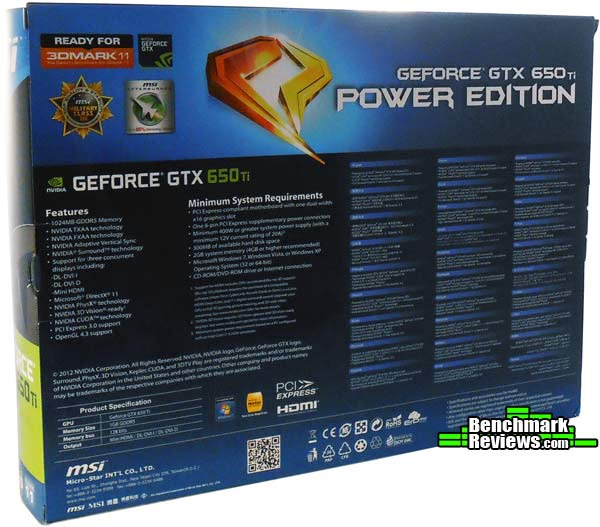
On the back of the box for the MSI N650Ti Power Edition video card are a couple of lists detailing the video card itself. The features are listed, most notably that three concurrent displays are supported through the two DVI and one mini HDMI ports. This is notable because NVIDIA has trailed behind AMD for quite some time with the multiple monitor support. Whereas AMD cards for a few generations now have support triple monitor setups, this is something new for NVIDIA. It's notable as well because most GPU setups have the HDMI port and one of the DVI ports running off the same connection. That means you can't use two different monitors for those ports. Such is not the case with the N65Ti Power Edition. Each of the ports is usable by a separate monitor.
Just like the N660Ti PE box, the box for the MSI N650Ti Power Edition video card has a Velcro connected flap that opens up on top. Opening the flap gives you windowed view of the graphics card inside and also bombards you with more information and advertisements about the card. Don't worry too much about those features now, we'll get into everything displayed on the box during this article.
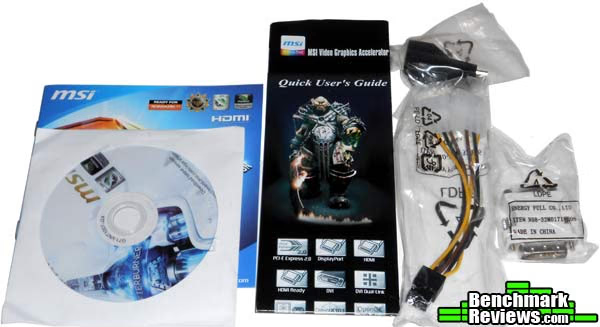
As for accessories, MSI sends the GTX 650Ti Power Edition with the basics and not a lot more. You have your quick user's guide, a tiny brochure, the installation disc, a single MOLEX to 6-Pin PCI-E power adapter, and an HMDI to mini HDMI converter.
The MSI N650Ti Power Edition graphics card uses the Cyclone II thermal design system. The design is based around a large 90mm fan right in the center of the PCB. This is no ordinary fan, however. The fan on the Cyclone II thermal design is a propeller blade fan. These fans are designed to focus the angle of the blades in order to produce more airflow over the heatsink and dissipate more heat.
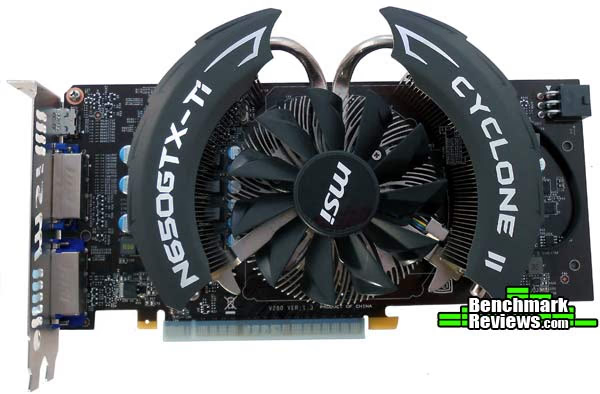
The Cyclone II thermal design is built with an ultra high density aluminum heatsink. The design is meant to whisk heat away from the GPU and distribute it evenly to each of the fins on the heatsink. The heatpipes that curve out in either direction from the main heatsink take heat from the GPU and distribute it to the two smaller, elongated heatsinks located under the large, bat-like, black plastic covers on the Cyclone II. These two heatsinks are also hit with the air blown by the propeller blade fan in the center.

When the Cyclone II thermal design is active, it pulls air in from the surrounding area and onto the heatsinks. If you live anyplace similar to where I live, in Southern Arizona, this can cause a lot of dust to build up on the fan and heatsinks. Because of this, MSI's Cyclone II thermal design has a method of removing the dust. This isn't new to MSI's thermal designs, they've been using it for a while, and I've notice that it does make a difference. I still need to have compressed air around to help out after a while, but it certainly lengthens the time between cleanings. Basically, the dust removal technology runs the fan in reverse for 30 seconds on startup. This pushes the dust away from the fan and heatsinks. Now, most of the dust will still be inside your case, so this isn't a save-all. It does help, though.
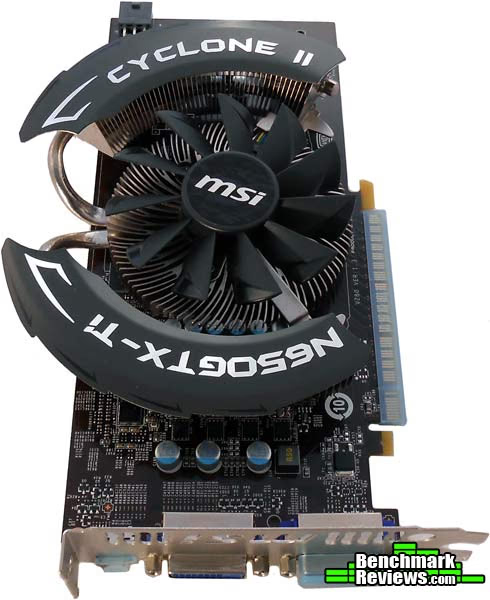
The Cyclone II thermal design covers most of the black PCB on the MSI N650Ti Power Edition graphics card. It also extends about half an inch above the actual PCB. Keep that in mind if you have a shallow case.
The MSI N650Ti Power Edition graphics card does require external power, but only in the form of a single 6-Pin PCI-E power plug. If your power supply doesn't have a 6-Pin PCI-E plug, then you can use two MOLEX plugs attached to the converter provided by MSI. Speaking of power, MSI recommends at least a 400W power supply. Moving on, let's take a look at some of the more detailed features of the MSI N650Ti Power Edition graphics card.N650Ti PE Detailed Features
Taking a look at the I/O panel on the MSI GTX N650Ti Power Edition graphics card, you can see that it's pretty sparse. There is a DVI-I, a DVI-D, and an HDMI port. According to MSI, they are all independently channeled and the video card can be used to power three monitors at once. I'm somewhat dubious of this claim, as the DVI-D port (the one that is closest to the HDMI port) is almost always paired with the HDMI port. Normally, if you are going to be able to have three monitors it takes another port, like a DisplayPort to support three monitors.

The DVI-I port is the port that is farthest from the HDMI port. This port carries an analog signal in addition to the digital signal. If you have an old analog monitor and need to use the DVI-VGA adapter, you will need to use this port.
MSI has a long history of using what they dub Military Class components. Those components have gone through various generations now and the components used in the MSI GTX N650Ti Power Edition video card are Military Class III. What that means is that the components have meet the MIL-STD-810G standard for quality and stability.

The components we are talking about include the MOSFETs, capacitors, and other components used on the PCB. The high-quality MOSFETs are called CopperMOS, the capacitors include Hi-c Capacitors and Dark Solid Capacitors. MSI also includes Golden Solid State Components, or Golden SSC.
I took off the Cyclone II cooler to take a look at PWM, MOSFETs, RAM, and other components. While I was hopeful that MSI hadn't overloaded on the thermal paste because of David Ramsey's look at the GTX 660Ti, I was unfortunately disappointed. There was so much thermal paste that it had bunched up on the sides of the GPU and fallen off the edges. You can see the extra thermal paste on the back of the heatsink as well.

The MSI GTX N650Ti Power Edition graphics card has just 1GB of DDR5 RAM. Undoubtedly, some GTX 650Ti video cards will come with 2GB. The RAM on the N650Ti Power Edition is clocked at 5400MHz, or 1350MHz x4. The memory bus on the N650Ti Power Edition is 128-bits. The GPU itself, built on the GK106 core, is overclocked at 993MHz from the factory 928MHz on the stock GTX 650Ti. That's faster than the 915MHz on the GTX 660Ti, although the memory on that card runs on a 192-bit bus and it has double the RAM. As for CUDA Cores, the GTX 650Ti has 768 of them.
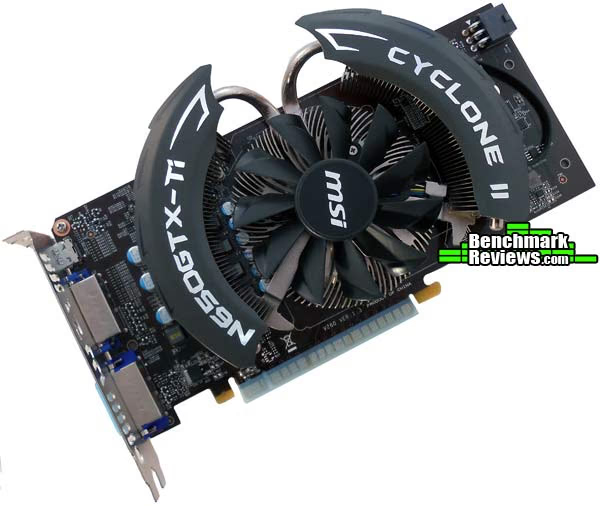
The GTX 650Ti background deserves some explaining here. The GeForce GTX 650Ti is built on the GK106. That's the same core as the GTX 660. The GTX 660Ti, 670, and 680 are all built on the GK104. The GTX 650 is actually built on the GK107. That explains a lot about the performance of the GTX 650Ti. Those 768 CUDA Cores are double the 384 CUDA Cores in the GTX 650. The RAM also runs 100MHz faster, at 1350MHz vice 1250MHz. In reality, the GTX 650Ti should be a match for the GTX 660 if you can overclock it to about 1GHz and the RAM up to 1500MHz. So that's what I set out to do.
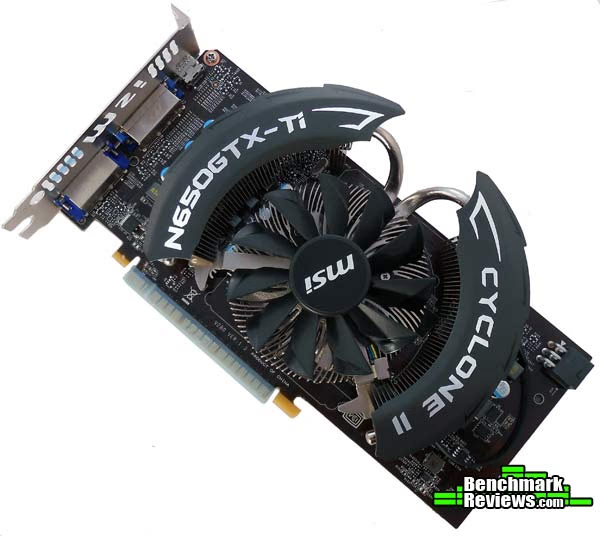
Using the bundled Afterburner software, I was able to easily overclock the GPU and the RAM. Afterburner uses what MSI calls Triple Overvoltage, allowing you to adjust the voltage on the GPU, the RAM, and the PLL, or auxiliary voltage. Afterburner also gives you advanced fan speed control, the ability to capture real-time video in games, and automatic overclock testing through the use of Kombustor. Kombustor is MSI's branded iteration of FurMark.
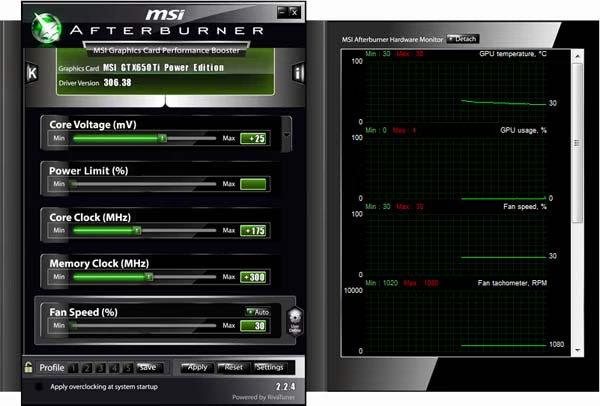
After a lot of trial and error, I was able to get the MSI GTX N650Ti Power Edition to 1168MHz on the GPU clock and to 1650MHz on the memory clock. To do this I had to increase the voltage slightly, by .25v on the GPU and .30v on the memory. The result was an almost 19% increase in GPU clock speed from the already overclocked 993MHz and a 22% increase in RAM clock speed. As for benchmark results, the nearly 20% overall increase netted me about 11.7% average performance increase in testing. That's not too bad, especially considering the GTX 650Ti has no GPU boost.
|
Stock |
Overclocked |
Delta % |
|
|---|---|---|---|
|
3DMark 11 GT1 |
4775 |
5205 |
+9.00 |
|
Alien vs. Predator |
26.5 |
30.6 |
+15.42 |
|
Lost Planet 2 A |
45.1 |
51.2 |
+11.21 |
|
Lost Planet 2 B |
38.0 |
42.2 |
+10.93 |
|
PLA |
38.6 |
44.8 |
+16.10 |
|
Unigine Heaven 3.0 |
20.8 |
22.4 |
+7.79 |
|
A New Dawn |
7.2 |
8.0 |
+11.44 |
|
Average increased FPS with overclocking |
+11.70 |
||

One other thing I ought to mention in the detail features section is actually about a feature that the GTX 650Ti is lacking. What I'm referring to is SLI. While NVIDIA's goal is to provide a cost effective solution for gamers on a budget, they also don't make it easy to double up when you get some more cash. If that's your plan, steer clear of the GTX 650Ti and shoot for an extra $60 or so for the GTX 660. That way, six months from now when you have the cash again, you can double up and increase your performance without breaking the bank.
For a complete detailed list of features and specifications, visit MSI's website www.msi.com.Testing & Results
Testing Methodology
The Microsoft DirectX-11 graphics API is native to the Microsoft Windows 7 Operating System, and will be the primary OS for our test platform. DX11 is also available as a Microsoft Update for the Windows Vista OS, so our test results apply to both versions of the operating system. All of the tests in this review were run with DX11 graphics.
According to the Steam hardware survey, as of December 2011 the most popular desktop resolution (for Steam users) is 1680x1050 pixels, with a 17.59% share, with 1920x1080 pixels coming in second with only 7.7%. I ran all of the tests except 3DMark 11 at 1920x1080 since that is the more demanding of the two preferred gaming resolutions. 3DMark 11 was used with the performance preset, which sets the resolution the 1280x720.
I used a combination of synthetic and video game benchmark tests in this article to illustrate relative performance among graphics solutions. Our benchmark frame rate results are not intended to represent real-world graphics performance, as this experience would change based on supporting hardware and the perception of individuals playing the video game.
Test System
- Motherboard: Biostar Hi-Fi Z77X Motherboard
- Processor: Intel Core i5-2500K Sandy Bridge CPU 3.3GHz
- System Memory: 16GB (4 4GB DIMMs) Corsair Vengeance DDR3-1600 (9-9-9-24)
- Disk Drive: OCZ Vertex4 128GB
- PSU: Corsair CMPSU-850TX 850W 80-Plus Certified
- Operating System: Windows 7 Professional 64-bit
DirectX-11 Benchmark Applications
- Aliens vs Predator
- Very high textures, high shadows, tesselation, SSAO, advanced shadow sampling, 4x AA, 16x AF
- 3DMark11
- "Performance" settings (1280x720)
- Lost Planet 2
- Tests A and B, 4xMSAA, all other settings "High"
- Passion Leads Army
- Performance Presets
- Unigine Heaven Benchmark 3.0
- Extreme tesselation, high shaders, 4xAF, 8xAA
- A New Dawn
- 1920x1080, Ultra On
Aliens vs Predator
Aliens vs. Predator is a science fiction first-person shooter video game, developed by Rebellion, and published by Sega for Microsoft Windows, Sony PlayStation 3, and Microsoft Xbox 360. Aliens vs. Predator utilizes Rebellion's proprietary Asura game engine, which had previously found its way into Call of Duty: World at War and Rogue Warrior. The self-contained benchmark tool is used for our DirectX-11 tests, which push the Asura game engine to its limit.
I configured Aliens vs. Predator to use the highest quality settings with 4x AA and 16x AF, as well as turning on DirectX-11 features such as Screen Space Ambient Occlusion (SSAO) and tessellation, along with advanced shadows.
- Aliens vs Predator
- Texture quality Very High, Shadow quality High, 4xAA, 16xAF, SSAO on, Hardware tessellation, Advanced Shadow Sampling

3DMark11
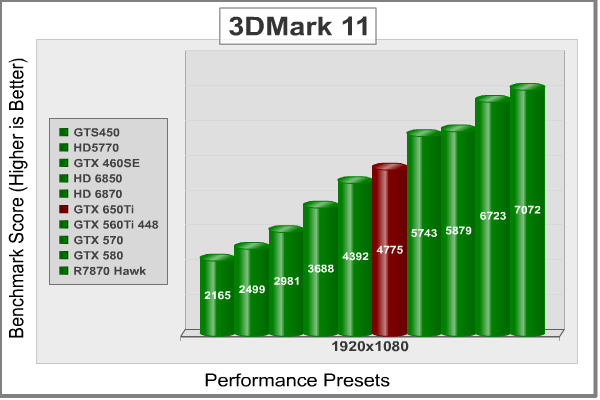
3DMark11 is Futuremark's latest iteration of the video card software benchmark suite, building on the features of 3DMark Vantage and 3DMark 06 as well as earlier version. It's optimized and intended for testing DirectX-11 capable hardware running under Windows Vista or Windows 7.

- 3DMark11
- "Performance" settings, 1280x720 resolution
3DMark Vantage offers benchmark tests focusing on GPU, CPU, and Physics performance. For this review I concentrated on the four GPU-specific tests. The first two tests take you through an undersea scene with small submarines exploring the sea floor and sunken ships. In the GT1 test, there's no tessellation, but there are extensive lighting and shadow effects. In the GT2 test, the same scene is repeated but with moderate tessellation and fewer lighting effects.
Lost Planet 2
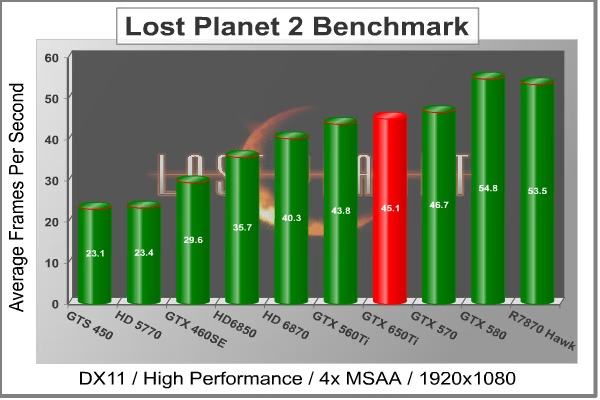
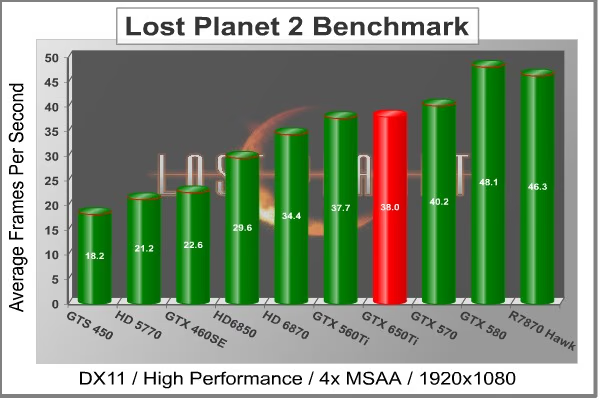
Capcom provides a stand-alone benchmark tool for Lost Planet 2. Reviewers love stand alone benchmarks, and users should, too, since they allow the evaluation of a system without the trouble and expense of purchasing and configuring the actual game. Lost Planet 2 takes place on E.D.N. III, the same planet in the original Lost Planet game, but ten years later. The snow has melted and somehow giant tropical jungles have grown to fill the landscape.
Lost Planet 2 takes advantage of DX11 features including tessellation and displacement mapping on water, level bosses, and player characters. In addition, soft body compute shaders are used on 'Boss' characters, and wave simulation is performed using DirectCompute. These cutting edge features make for an excellent benchmark for top-of-the-line consumer GPUs. There are two parts to the benchmark: Test A, which is a semi-random script that's a good example of normal game play, and Test B, which is a deterministic script that places a significantly heavier load on the card being tested.
- Lost Planet 2
- 4X AA, Motion Blur off, all other settings "High"
Test A
Test B
The next benchmark in our suite is the Passion Leads Army Benchmark.
Passion Leads Army
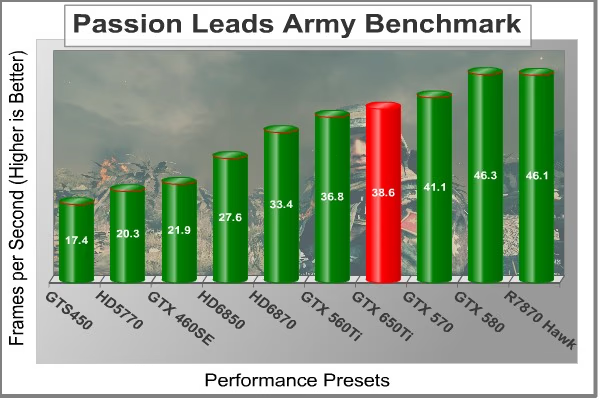
Passion Leads Army is a benchmark based on the multiplayer online shooter of the same name. Passion Leads Army is being developed by Giant Interactive in cooperation with the Chinese military. The benchmark application has recently been released world-wide to help bring about further awareness of the game. Passion Leads Army is the first Chinese game with full DX11 support. It also has some intense Physx effects.
The DX11 effects used in the benchmark include Tesselation, HBAO, and Bokeh-DOF. Because Physx is limited to only NVIDIA video cards, I turned it off for our tests here. Even without it, the PLA benchmark is able to stress all of our cards. With higher settings, it would be a good match for any video card available now.
- Passion Leads Army
- Performance Presets
Unigine Heaven 3.0 is the next benchmark.
Unigine Heaven 3.0
The Unigine Heaven 3.0 benchmark is a free publicly available tool that grants the power to unleash the graphics capabilities in DirectX-11 for Windows 7 or updated Vista Operating Systems. It reveals the enchanting magic of floating islands with a tiny village hidden in the cloudy skies. With the interactive mode, emerging experience of exploring the intricate world is within reach. Through its advanced renderer, Unigine is one of the first to set precedence in showcasing the art assets with tessellation, bringing compelling visual finesse, utilizing the technology to the full extend and exhibiting the possibilities of enriching 3D gaming.
The distinguishing feature in the Unigine Heaven benchmark is a hardware tessellation that is a scalable technology aimed for automatic subdivision of polygons into smaller and finer pieces, so that developers can gain a more detailed look of their games almost free of charge in terms of performance. Thanks to this procedure, the elaboration of the rendered image finally approaches the boundary of veridical visual perception: the virtual reality transcends conjured by your hand. The Heaven benchmark excels at providing the following key features:
- Native support of OpenGL, DirectX 9, DirectX-10 and DirectX-11
- Comprehensive use of tessellation technology
- Advanced SSAO (screen-space ambient occlusion)
- Volumetric cumulonimbus clouds generated by a physically accurate algorithm
- Dynamic simulation of changing environment with high physical fidelity
- Interactive experience with fly/walk-through modes
- ATI Eyefinity support
- Unigine Heaven 3.0
- High Shaders, Extreme tessellation,8xAA, 4xAF

The final test in our suite is A New Dawn.
A New Dawn
Back in the early 2000's NVIDIA was working on an intense graphics benchmark called Dawn. While we never saw the fruits of that, NVIDIA has now released the next iteration in that line; a similar benchmark called A New Dawn. The original Dawn demo had many merits, but due to the limitations of hardware at the time, it also took many short cuts. One of the most obvious was the fact that Dawn didn't really have a home. Fairies, as we all know, live in the depth of mysterious forests, but for Dawn, her home was a giant glowing cube map-a six-sided texture that represented the environment around her. She had no trees to climb, no bees or butterflies to play with. She was a very lonely fairy.
The original Dawn demo used a very simple but effective technique to simulate one aspect of skin shading called rim lighting. It worked by isolating the silhouette of the character and letting light from behind the character bleed through, giving an illusion of translucent skin. This worked well for the silhouette when exposed to strong light, but was less convincing for other portions of the character.
A New Dawn uses a complex but efficient sub-surface scattering shader, first pioneered with the Luna demo introduced with the GeForce 7800 GTX. To smartly manage workload, the new skin shader dynamically selects the number of samples to filter, depending on how visible the surface is. Detail maps are used to capture fine hairs, bumps, and skin imperfections. Four independent textures describe the oil content of the skin. (Information from Guru3D.com)
A New Dawn is an extremely taxing benchmark with Ultra settings on. Also, as a quick note, since NVIDIA pioneered this benchmark, it is a pretty safe bet to imagine that it should run better on NVIDIA graphics cards. Because of that, a patch was released to make it a viable benchmarking tool for AMD cards as well. Using the AMD patch, we were able to test our AMD cards alongside the NVIDIA cards.
- A New Dawn
- 1920x1080, Ultra On

MSI N650Ti PE Temperatures
We're at the start of a transition: for years the PC industry has produced faster and more powerful CPUs and GPUs, which always came with ever-higher power draws. But as the industry moves to smaller and smaller fabrication processes, we're seeing power draws drop, and clever designs save even more power. Users benefit from GPUs that disable large portions of their circuitry when idle, leading to dramatically lower power draws and very cool idle temperatures. At the other end of the scale, reduced power at the higher end means smaller coolers, quieter fans, and less heat to worry about dissipating.
At the start of this test, I measure the idle temperature of the card with the card sitting at the Windows desktop, using the GPU-Z utility. Next, I start FurMark's stress test and let it run until the temperature curve flattens and the temperature has not varied more than 1 degree in the last five minutes.
FurMark does two things extremely well: drive the thermal output of any graphics processor higher than applications of video games realistically could, and it does so with consistency every time. FurMark works great for testing the stability of a GPU as the temperature rises to the highest possible output. The temperatures discussed below are absolute maximum values, and not representative of real-world performance.
Keep in mind that my testbench is open to the air, and that affects the results by a lot. Still, the Cyclone II thermal design seems to do an outstanding job of keeping the N650 Ti Power Edition very cool.
| Ambient Temperature |
20C |
|---|---|
| N650Ti Idle Temperature |
27C |
| N650Ti Load Temperature | 60C |
VGA Power Consumption
The new generation of video cards-- AMD's Southern Islands and NVIDIA's Kepler-- are certainly fast, but their new power saving features are almost as impressive. The move to a smaller process has helped, but both products benefit from a variety of power-saving techniques, including aggressively underclocking and undervolting themselves in low demand scenarios, as well as turning off unused portions of the card. Both companies also use other, proprietary methods to keep power usage low.
To measure isolated video card power consumption, Benchmark Reviews uses the Kill-A-Watt EZ (model P4460) power meter made by P3 International. A baseline test is taken without a video card installed inside our test computer system, which is allowed to boot into Windows 7 and rest idle at the login screen before power consumption is recorded. Once the baseline reading has been taken, the graphics card is installed and the system is again booted into Windows and left idle at the login screen. Another power reading is taken when the display sleeps, and then I measure the power under a heavy gaming load. Our final loaded power consumption reading is taken with the video card running a stress test using FurMark.
Below is a chart with the system totals displayed in watts for each specified test product:
|
Situation |
Power |
|
|---|---|---|
|
Windows login, no video card |
56 watts |
|
|
Windows login, video card |
64 watts |
|
|
Windows desktop |
64 watts |
|
|
Windows desktop, display sleep |
62 watts |
|
|
Gaming load |
157 watts |
|
|
FurMark load |
215 watts |
Based on the login situation, it looks like idle power consumption for the GTX N650Ti Power Edition video card is extremely low, around 8 watts. The card has a TDP of 75 watts, but I'd think that under extreme circumstances like FurMark Load, it probably gets up higher than that. The fact that the 650Ti needs a 6-pin PCI-E power input tells me it might need above that 75 watts at some point, as it can get a full 75 watts off the PCI-E slot itself.
GTX 650 Ti Final Thoughts
You know what really struck me as I was testing the MSI GTX N650 Ti Power Edition video card? The fact that, for $160, you can get a graphics card that will play pretty much any game you want. Now, you might have to tune down the settings a little, but you'll be able to play with great success and with great graphics to boot.

The other thing that struck me about the GTX 650Ti is how close it came in nearly every benchmark to the GTX 560Ti with 448 cores. That 560Ti/448 was a limited edition card that got very close itself to the GTX 570. A year later, the GTX 650Ti is pounding out the same frame rates, or higher in some occasions, as the 560Ti/448 and for the low price of $160 MSRP. That's a good price/performance ratio in my book.
Now let's talk specifically about the MSI GEFORCE GTX N650Ti Power Edition. This card is just the latest in a long line of MSI Power Edition video cards, which basically means it comes overclocked from the factory. The normal GTX 650Ti will run at a clock speed of 928MHz, while the N650Ti Power Edition clocks in at 993MHz. Even with that, the N650Ti still did very well in overclocked. I was able to get nearly 20% on the GPU core clock and over that on the memory clock. Keep in mind, however, that NVIDIA's kepler GPUs clock themselves, so overclocking is great when you have FurMark to test it with, or 3DMark 11, or the other intense benchmarks we used here. As far as normal daily use goes, however, you'll probably never see your N650Ti get up to those speeds because the GPU will keep it at 993MHz anyway, unless it absolutely needs more.
That, in particular, brings me to my first complaint about the N650Ti, and any GTX 650Ti for that matter. There's no GPU boost. All of the video cards about the 650Ti got a turbo boost, even the GTX 660. And the GTX 650Ti is built on the same die! For me, personally, that's a pretty big drawback, and I'd probably be more likely to fork over the extra $50 or $60 it will take me to get a GTX 660 for the extra CUDA Cores, the 192-bit memory bus, and the GPU boost.
The other reason I'd probably go ahead and splurge on the GTX 660 over the GTX 650Ti is the fact that six months or so down the road I could greatly increase my graphics performance simply by buying another GTX 660 and pairing the two in SLI. I'd say that would be a great idea for the GTX 650Ti, but wait, you can't use SLI with the 650Ti. Again, the two cards are built on the same die. Many of the GTX 650Ti cards will even have the same 2GB of memory as the GTX 660, although the N650Ti Power Edition does not. I just can't understand why you wouldn't allow pairing through SLI.
In the end, I guess it boils down to the GTX 650Ti really being that card for a gamer who needs less expensive card. Any gamer who can manage a few extra dollars should probably save up and go for the GTX 660. I do like the ability to run three screens at once, though. That was a nice touch. Just keep in mind that frame rates will start to drop dramatically when your resolution becomes 1920x3240.
MSI N650Ti PE Conclusion
IMPORTANT: Although the rating and final score mentioned in this conclusion are made to be as objective as possible, please be advised that every author perceives these factors differently at various points in time. While we each do our best to ensure that all aspects of the product are considered, there are often times unforeseen market conditions and manufacturer changes which occur after publication that could render our rating obsolete. Please do not base any purchase solely on our conclusion, as it represents our product rating specifically for the product tested, which may differ from future versions. Benchmark Reviews begins our conclusion with a short summary for each of the areas that we rate.
The MSI GTX N650Ti Power Edition video card performed very well. It ousted last generations GTX 560Ti with 448 cores in many of the benchmarks and that card still costs about $40 to $50 more than the GTX N650Ti Power Edition at MSRP. But that was last generation, and this is this generation. We expect this card to outperform more expense cards from the days of yore. Unfortunately, I don't have a GTX 660 on hand to test against the N650Ti Power Edition, but based on my scores here, I don't see it getting terribly close. The two cards are very similar, too, and the GTX 660Ti comes dangerously close to the GTX 670.
Looking at the MSI GTX N650Ti Power Edition is a pleasant experience. The Cyclone II thermal design is aesthetically pleasing. To me, it almost looks like a bat flying at you. A very dangerous and ominous bat. The N650Ti Power Edition has a blue LED on the Cyclone II thermal design, but it doesn't really emanate all that well. It really just looks like a blue dot. Overall, it's a good looking card, but it isn't amazing looking.
MSI certainly knows how to build a quality video card. Just like their motherboards, they use high-quality, military grade components to ensure that you'll get the longest life possible out of your hardware. They use Hi-c Capacitors, Solid Capacitors, and Super Ferrite Chokes. Those parts are often overlook by the consumer, but it is a sad day when you have to replace your video card because one of the components failed.
Functionally, the MSI GTX N650Ti Power Edition didn't really do it for me. Of course, a lot of that isn't MSI's fault, but I was still disappointed. The price seems right, but you can't buy another card and combine them in SLI. Also, even though the 650Ti is built on the GK104 just like the GTX 660, you don't get any GPU boost with the GTX 650Ti. MSI does a good job of helping out by factory overclocking the N650Ti Power Edition to 993MHz, but then they slack off and only put 1GB of DDR5 RAM on it.
The overclocking was good, with about a 20% increase on both the RAM and the GPU core clocks. This brought the performance up by an average of almost 12% across all the benchmarks. That's not terrible. And MSI's afterburner, based on the famous Riva Tuner, is extremely easy to use. The problem? All your overclocking means nil if the GPU doesn't think you need it. It will stay at its own clock speed until it deems you worthy.
And now for the value of the MSI N650Ti Power Edition video card. Honestly, $159.99 (Newegg) is a good deal for a video card that can beat out the 560Ti with 448 cores. But without the ability to use SLI, or to take advantage of GPU boosting, I'd have to go with the more expensive GTX 660 if I were an intense gamer. If you don't play a lot of graphically intense video games, however, but you want to be able to play them if you get around to it, then you probably shouldn't spend an extra $60 on a GTX 660 because the GTX 650Ti will suite you just fine.Pros:
+ Military Grade Components
+ Cyclone II has Dust Removal Technology
+ Supports 3 Monitors
+ Pretty good and easy at overclocking
Cons:
- No SLI
- No GPU Boost
- Only 1GB of RAM
Ratings:
-
Performance: 8.50
-
Appearance: 8.50
-
Construction: 9.50
-
Functionality: 8.00
-
Value: 8.50
Final Score: 8.5 out of 10.
Recommended: Benchmark Reviews Seal of Approval.
Benchmark Reviews invites you to leave constructive feedback below, or ask questions in our Discussion Forum.
Reader comments from the original article
4 comments were posted before commenting closed. They are preserved as written. Original avatars no longer resolve and are shown as a placeholder.
RE: MSI GTX N650Ti Power Edition Video Card David Kirschbaum Permalink:
"... extra $50 or $60 it will take me to get a GTX 660 for the extra CUDA Cores, the 192-bit memory bus, and the GPU boost. " Sorry, but every price I see for the GTX 660 (Amazon, Tiger Direct, NewEgg) are all $310 to $330 .. TWICE the price of the GTX N650Ti. Hardly a trivial increase. I'll go with the N650Ti .. and thanks much for the good review.
GTX 660 vs GTX 660Ti Hank Tolman Permalink:
Are you sure you aren't looking at the GTX 660Ti? I just looked up GTX 660 on Newegg.com and the first 6 are $229 whereas the GTX 650Ti's are going for anywhere from $159.99 to $179.99. -Hank
GTX 660 vs GTX 660Ti George Caldwell Permalink:
My 650Ti only cost me $104 dollars new with a nice warranty, So I have no idea were $159.99 to $179.99 came from. That is not enough performence increase at all to even justify paying $40-50 dollars more. Let alone a hundred dollars more.
RE: GTX 660 vs GTX 660Ti Olin Coles Permalink:
The $159.99 price tag came from Tuesday, 09 October 2012. That's when this product launched and this article was published.