
The Fast-Enough Budget Computer: Built and Tested
The Fast Enough Computer: Built and Tested
Recently, I wrote an op-ed piece here titled "The Fast Enough Computer". I argued that for gamers, low- to mid-range components provided the most bang for the buck and could readily play most modern games. The metric I used was "30 frames per second at 1680x1050". In this follow-up, I build a system based on the components I thought would be adequate and test the result with several modern games.
I noted that frame rates in excess of 30fps were generally imperceptible, and that frame rates in excess of 60fps were wasted because most monitors don't refresh the screen any faster.
Well, those assertions were not left unchallenged! If you read the comments on that article, you'll see that while some agreed with me, there were also those who claimed that my hardware suggestions were far too modest for serious gaming, and that they could indeed discern a visual difference between 60 and 120fps.
It's folks like those who keep companies producing things like Radeon 6990 video cards. And they should feel completely free to keep on buying them, because my recommendations aren't for everyone: they're for those who either have a limited budget (not everyone can afford an NVIDIA GTX580) or just want to get the most bang for their buck.
Well, that first article was all theoretical; this article is all about empericism. Let's see how my Fast Enough Computer actually performs with real games.
The Goal
Just to be clear: I'm not trying to build the ultimate gaming box; rather, my goal is to build a gaming system that will play most modern games at an average frame rate of 30fps or higher at a resolution of 1680x1050 pixels for the least amount of money. A secondary goal is that the system should be easily upgradeable to increase its performance so that it can last at least a few years without requiring major expenditures.
The System
This is actually a less-than-optimal time to design such a system: Intel may have some lower-end Sandy Bridge parts coming out, and AMD's forthcoming "Bulldozer" processors may change everything. But I can only build with what you can actually buy right now. I'm going with AMD despite their CPU horsepower disadvantage relative to Intel for three main reasons:
-
Their processors are cheaper. They're not as fast, granted, but they're Fast Enough. The multi-core CPUs are especially cheap relative to the Intel CPUs.
-
You have more processor upgrade options since AMD maintains "socket compatibility" a lot better than Intel does.
-
Intel starves its lower-end platforms of PCI-E lanes. The P55 and P67 platforms support but 24 PCI-E lanes total (16 from the processor and 8 from the chipset), whereas AMD 790/890 systems support 42, which gives them much more room for upgrades. A 790FX or 890FX motherboard has plenty of lanes available for triple-video card setups with enough left over for USB 3.0 and SATA 6G.
So here are the main components of the system:
-
AMD Phenom II X2 565 Black Edition dual-core 3.4GHz CPU, $114.99. This "Black Edition" processor's unlocked multiplier makes overclocking easy.
-
Sapphire Radeon HD6850 video card, $174.99. Yeah, a GTX580 will stomp all over it, but it still has power we could only dream of a few years ago.
-
Corsair HX650 SLI-ready power supply, $119.99. Never skimp on your power supply. The HX650 has plenty of headroom for overclocking and modular connectors, too!
AMD's Black Edition Phenom II X2 processors are both inexpensive and highly overclockable; in fact, when the 560 Black Edition was introduced, AMD touted its relevance to "extreme overclockers" (i.e. the liquid-nitrogen guys) who could push things as far as they wanted and only risk smoking a relatively inexpensive processor! The Radeon 6850 is a solid mid-range video card that offers performance that equals or exceeds the NVIDIA GTX460 cards in most games at a slightly lower price, and also offers the option of triple-monitor Eyefinity gaming.
Benchmark Reviews has done enough tests to prove that expensive, high-speed and low-latency memory has a minimal (if any) effect on your gaming experience, so I used generic DDR3-1333, and the optical and hard drives were whatever I had laying around. The motherboard was an ASUS Crosshair III Formula, but any 790FX or 890FX motherboard would work. GX-series motherboard would provide the same base performance but have only 22 PCI-E lanes, which severely limits your upgrade potential since they're unsuitable for multiple video card setups.
The Fast Enough Computer runs Windows 7 Home Premium 64-bit, with AMD's Catalyst Software Suite 11.2 and the latest game profiles available as of the time of this test. So let's get to it...
Testing and Results
If you want to read detailed tests on the processor and video card used in the Fast Enough Computer, Benchmark Reviews tested the AMD Phenom II X2 560 Black Edition CPU here and the Sapphire Radeon 6850 video card here (the AMD 560BE CPU is identical to the AMD 565BE CPU I used, except that its stock clock speed is 3.3GHz rather than 3.4GHz).
I wanted to see how overclocking and hardware upgrades affected performance, so I tested five different hardware configurations:
- AMD Phenom II X2 565 Black Edition CPU and one Radeon 6850 video card.
- AMD Phenom II X2 565 Black Edition CPU and one Radeon 6850 video card, both overclocked.
- AMD Phenom II X2 565 Black Edition CPU and two Radeon 6850 video cards in CrossFireX.
- AMD Phenom II X4 965 Black Edition CPU and one Radeon 6850 video card.
- AMD Phenom II X4 965 Black Edition CPU and two Radeon 6850 video cards in CrossFire1X.
Both AMD CPUs were tested with the stock heat sink. I was able to easily overclock the 565BE to 3.9GHz by increasing the multiplier to 19.5x; no voltage tweaks were required. The processor would boot and run at 4.0GHz (20x multiplier) but would fail stress testing. Poking around the interwebs, I see that the maximum air-cooled overclock of the 560/565 seems to be about 4.1GHz, so I don't see much point in spending extra money for a third-party CPU cooler that would only enable another 200MHz or so of clock speed. I increased the shader clocks on the Sapphire Radeon HD6850 from the stock 775MHz to 900MHz and the memory clock from 1000MHz to 1050MHz. These speeds seem to be reachable by any retail Radeon HD6850 video card, but dedicated overclockers might be able to squeeze out a bit more performance.
The games I benchmarked were Crysis Warhead, Street Firghter IV, Aliens vs. Predator, Battlefield: Bad Company 2, and BattleForge. I tested at 1680x1050, and in each case I set the game settings as high as I could consistent with my 30fps-average goal. Aliens vs. Predator and Street Fighter IV were tested with dedicated benchmarking utilities released by the game vendors; BattleForge was tested with its built-in benchmark tool, Crysis Warhead was tested with the HOC Crysis Warhead benchmark tool, and Battlefield: Bad Company 2 was tested using FRAPS. I didn't include synthetic benchmarks like Unigine Heaven or 3DMark Vantage since I was only interested in game performance.
DX10: Crysis Warhead
When the original Crysis debuted in late 2008, it quickly garnered a reputation for bringing the most powerful systems to their knees. Even today, its CryEngine game engine needs a lot of hardware thrown at it to get good frame rates at decent resolutions without having to turn off many of the visual effects.

The Fast Enough Computer returned a solid 37 frames per second average in its base configuration. However, in the latter part of the "Airfield" demo, where Sykes emerges from the crashed cargo plan and jets are attacking the Exosuit, frame rates drop below 20fps (the minimum was 13fps, the maximum, 45fps), which made the visuals rather stuttery. Actually playing the game revealed that while it's broadly "playable", you'll frequently see the frame rate drop low enough to be irritating. Turning off anti-aliasing increased the maximum frame rate recorded in the benchmark from 45 to 51fps, but surprisingly did not affect the minimum or average frame rates.
The overclocked configuration increased the average frame rate a little over 10%, but surprisingly, there was almost no benefit from adding another 6850 in CrossFireX. Switching out the 565BE to a quad-core Phenom II 965 Black Edition gained a mere one frame per second, but adding CrossFireX into this mix cranked things up another nine frames per second, although the minimum frame rate was still only 15 frames per second. In general CryEngine games seems to "like" NVIDIA video cards better. Sadly, the 890fx chipset does not support SLI, so although you could use a single NVIDIA video card in the Fast Enough Computer, your only upgrade option would be to replace it with a faster card. Overall, I'd have to say that Crysis Warhead is a marginal proposition on the Fast Enough Computer, which just isn't Fast Enough for this game.
DX10: Street Fighter IV
Street Fighter IV is the latest in a series of games that began back in 1987. It uses a proprietary Capcom graphics engine, and despite its high-speed visuals, it just doesn't require much graphics horsepower...your netbook would probably make a perfectly adequate Street Fighter IV platform. Capcom makes a dedicated Street Fighter IV benchmark available so you can test your system, and that's what I ran.
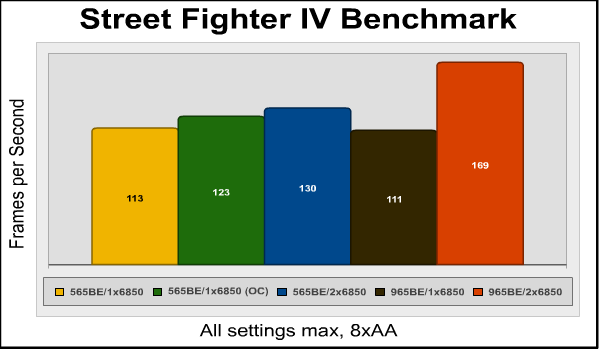
With all visual settings at their maximums, the Street Fighter IV benchmark returned 113 frames per second. Overclocking and CrossFireX added a few percentage points, and going to a four-core processor actually slowed things down fractionally. However, CrossFireX proved synergistic with the Phenom II 975 processor, and frame rates shot up by over 50%. This phenomenon is something I'd see repeated in other tests.
Testing and Results, Continued
We've gotten some pretty good DirectX 10 results, but how will the Fast Enough Computer handle DX11 games? Let's start by looking at the results from Aliens vs. Predator.
DX11: Aliens vs. Predator
This game uses the Asura game engine developed by the publisher, Rebellion. Rebellion provides a stand-alone benchmarking tool for this game (I love stand-along benchmarking tools) which I used for testing. So how does our test system handle it?
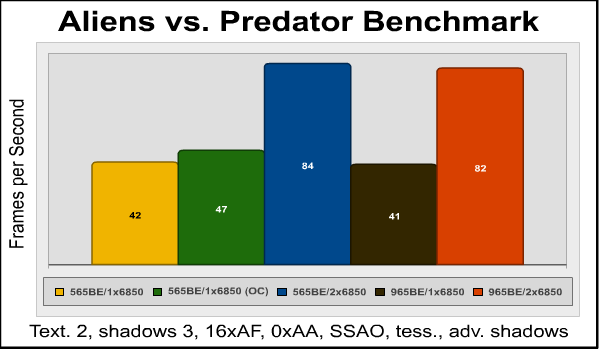
And the answer is "Pretty well!" The only thing I had to compromise on to get decent frame rates was anti-aliasing; turning it on dropped the frame rates for the stock, single-card configuration below 30fps average. Other advanced visual features like sub-surface ambient occlusion (SSAO) and tesselation add to the visual appeal of the game with a minimal effect on the frame rate, and so I left them on. Overclocking the CPU and video card brought frame rates up about 12 percent, to 47fps, but adding a couple more processor cores actually dropped the frame rate very slightly.
While AvP doesn't make any real use of additional processor cores, it absolutely loves CrossFireX, with perfect 100% scaling (a doubling of frame rates) when another Radeon 6850 is added to the system. In a CrossFireX system, turning on 4xAA still drops the average frame rates significantly, to 57-58 frames per second, but that's still plenty fast enough for a very smooth visual experience.
DX11: Battlefield: Bad Company 2
I am not a big fan of FPS war games, but Battlefield: Bad Company 2 is good enough to suck me into its world. Although not a "pure" DX11 title (the main rendering is performed in DX10, but some DX11 visual features are added), it still offers highly detailed environments that contain a lot of destructible elements, which adds a lot to a battle game. Throw in a variety of combat locations and scenarios and decent A.I. for your squad mates and you have something that's become one of my favorite FPS games.
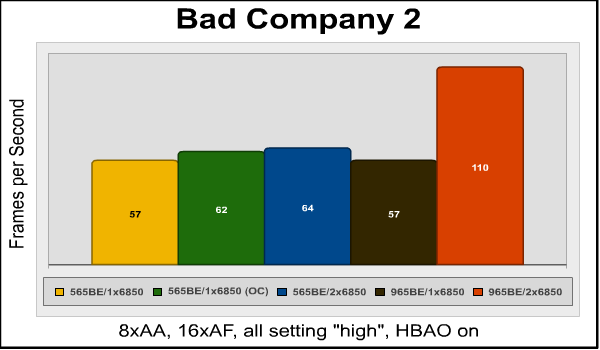
I expected this game to be problematic, at least on the base configuration, but a solid 57 frames per second average with 8xAA, horizon-based ambient occlusion (HBAO), and all settings on "high" proved me wrong. What's interesting here is that overclocking the CPU and video card didn't help much, nor did CrossFireX on the dual-core system, or a quad-core processor with a single Radeon 6850. But the combination of quad-core and two HD6850s? Wow! Frame rates virtually doubled. Apparently, the dual-core Phenom II 565BE can't process enough data to keep a CrossFireX system fed in this game. Granted, frame rates still increased a touch over 12% (57 to 64fps) on the dual-core system when moving to CrossFireX, but it's obvious that this game needs multiple cores and multiple video cards for best performance.
DX11: BattleForge
BattleForge has a handy built-in benchmark test so you can discover the best settings for your system. With 8x anti-aliasing and all other settings set to "high", the average frame rate was 40fps on the base system. BattleForge has an "auto multithreading" option that I left turned on, but as you can see it made no difference in frame rates, at least in this test.
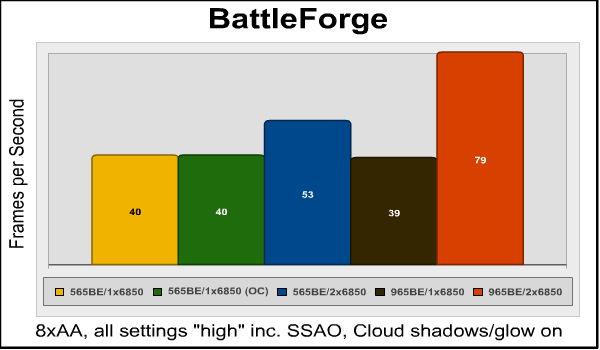
This was the only game that was completely unaffected by overclocking - note that the frame rates are identical between the stock and overclocked systems. Although just doubling the number of processor cores has no effect on BattleForge performance, it does make more effective use of multiple video cards in CrossFireX. With the dual-core 565 Black Edition CPU, adding another HD6850 video card increases frame rates by just over 32%, but when paired with a quad-core processor (which by itself has no effect on performance), frame rates double, duplicating the 100% scaling we saw previously with the Aliens vs. Predator benchmark.
Final Thoughts
I think I've proved my premise: you can build a pretty decent gaming machine with a lot of headroom for expansion without spending a lot of money. With the exception of Crysis Warhead, all games produced smooth, playable frame rates even on the base, non-overclocked system.
When I wrote the original "Fast Enough Computer" piece, the Steam hardware survey reported that the most common gaming resolution (for Steam games, anyway) was 1680x1050. At the conclusion of the testing I performed for this follow-up article, though, I noticed that 1680x1050 has been edged out by 1920x1080 as the most common resolution: 1920x1080 screens represent 18.86% of the total as compared to 18.25% for 1680x1050...so I may want to revisit this system and test with the higher resolution at some point.
Looking at the test results, a few things stand out:
-
Overclocking the processor and single video card system didn't add much performance. The maximum gain in average frames per second was only 11%, the minimum was 0%.
-
Starting with the "stock" system with the Phenom II X2 565BE CPU and one HD6850 video card, the next upgrade you should make to increase gaming performance is to add another HD6850. Doing so increased average frame rates from 15% to 100%, with two out of five games showing perfect 100% scaling. In contrast, going to a quad-core 965 Black Edition CPU didn't increase performance with any of the games tested with a single video card, indicating that the CPU is not bottlenecking performance in this configuration.
-
If you plan to run more than one video card, you'll need more than two cores in your CPU to make the best use of them. For years the conventional wisdom was that multi-core processors didn't do much for games since so few games were multi-threaded. While most games still aren't well-threaded, the value of more cores for multi-card systems is obvious in these results: three of the five games showed huge frame rate increases for CrossFireX when the 565 CPU was replaced with the 975 CPU; only Aliens vs. Predator showed no CrossFireX improvement with the quad-core CPU. This might also mean that the 565 also couldn't take full advantage of a single, more powerful video card like the Radeon 6970, or it could just be that AMD's CrossFireX drivers can make better use of multiple cores. Although the Fast Enough Computer is built with AMD components, I suspect this "you need more cores to feed more video cards" phenomenon would also hold true to Intel-based systems. Would a Hyper-Threaded dual-core processor do better with multiple video cards than a non-Hyper-Threaded proc? Would an inexpensive Athlon quad-core CPU be better for gaming than the dual-core Phenom II 565? There are many questions left to answer...
Building and testing this system was a real learning experience, and we hope you've found this article useful. We invite you to leave your remarks in our Discussion Forum.
Reader comments from the original article
44 comments were posted before commenting closed. They are preserved as written. Original avatars no longer resolve and are shown as a placeholder.
RE: The Fast-Enough Budget Computer: Built and Tested Robert17 Permalink:
Glad you did this, David. Nice follow up to your op-ed. Please tell me that the picture on page one ISN'T the build (/snarc).
RE: The Fast-Enough Budget Computer: Built and Tested David Ramsey Permalink:
Nah, that's Olin providing some editorial commentary on my lack of hardware photos...
RE: RE: The Fast-Enough Budget Computer: Built and Tested Olin Coles Permalink:
Someone has to do it. The article looked so naked!
RE: RE: RE: The Fast-Enough Budget Computer: Built and Tested Robert17 Permalink:
So, did you airbrush out the dust bunnies before posting the photo?
RE: The Fast-Enough Budget Computer: Built and Tested David Ramsey Permalink:
The Commodre Amiga is perhaps appropriate in a metaphysical way, since it was probably the first computer with a discrete graphics system. (not the model pictured, of course, but the original Amiga). I actually worked at Commodore in the pre-Amiga days.
RE: The Fast-Enough Budget Computer: Built and Tested Farnsworth Worthington Permalink:
Sounds like your budget build would have done better if you'd used one of the ~100$ Athlon quad-cores. Being a limited budget user myself, this sort of information is very useful to see, so thank you. Honestly though, I can't believe you wanted 3.4GHz x2 more than 3.0-3.2GHz x4. You even brought up in your review that the AMDs max out around ~4GHz! All their iterations with .1GHz stepping are pretty redundant once you get close enough to start nearing that barrier while overclocking.
RE: RE: The Fast-Enough Budget Computer: Built and Tested David Ramsey Permalink:
The only quad-cores cheaper than the 565X2 would be the Athlon series, which have much smaller caches than the Phenom II series. Still, based on these results, something like the Athllon II X4 645 might well outperform the 565, and be a few dollars cheaper as well.
RE: RE: RE: The Fast-Enough Budget Computer: Built and Tested Farnsworth Worthington Permalink:
I guess you could always try unlocking the 3rd and 4th cores on the Phenom x2 and turning it into a quad (if that mobo supports it). A 20-30$ tower heatsink should be able to handle the extra voltage that might require, and you could buy an older Phenom x2 like the 555 (3.2GHz) to help make up some of the price difference. Hmm... Actually I'm starting to like the gambler aspect of your original cpu choice. Ha!
RE: RE: RE: RE: The Fast-Enough Budget Computer: Built and Tested David Ramsey Permalink:
The motherboard I used didn't have a core unluckier feature, and my understanding is that very few X2 procs can be turned into X3/X4 procs. I might try it on my 890FX mobo, though...
RE: RE: RE: RE: RE: The Fast-Enough Budget Computer: Built and Tested Frank Permalink:
Actually the Phenom II x2 CPUs have a very good unlock rate because they are mostly Phenom x4's with disabled cores (some defective some not) Athlon II x2's are much rarer to unlock because a good portion of them are 'true' dual cores and there is nothing to unlock. Every once in a while though some people still get quads that have been disabled to create an x2. Athlon II x3's also have a good unlock rate because they are all quads with a disabled 4th core.
Go cheaper! Olle P Permalink:
I also think that an Athlon II X4 is a better choice, for two reasons: 1. It?s cheaper, and this article is all about building cheap! 2. The extra cores do add extra performance, and I think that would be most visible in the Crysis test. On top of that there are a couple of
RE: Go cheaper! Olle P Permalink:
(Forgot that this comments engine doesn't like the "more than" and "less than" signs.) ... On top of that there are a couple of sub $50 quality PSUs that will handle this rig just as well, shaving quite a bit off the total cost. As for the system settings for the evaluation I think adding a second graphics card is way off topic. It would be much more interesting to see if the 6850 really is the cheapest option at the chosen resolution. A comparison to a slightly cheaper GTX 550Ti and a considerably cheaper 5770 would show if you got the right pick. (I think the cheaper cards are sufficient for 1680x1050.) The evaluation method with looking at average framerates in benchmarks really doesn?t cut it at this level. The only useful method is to actually play the games and see what graphic quality settings can be used to provide the best experience with each system.
RE: RE: Go cheaper! David Ramsey Permalink:
How is adding a second graphics card "way off topic"? Upgradeability is an important aspect of this build. A slightly cheaper system that offers similar single-card performance but can't be expanded to a dual-card system just means that you'll have to spend more money to upgrade later. This is why I didn't test with any NVIDIA cards, since modern AMD platforms don't support SLI. The 5770 is a nice card, but the 6850 is significantly faster, and even it was marginal in Crysis Warhead. Of course, everyone will have their own balance of price and performance.
RE: RE: RE: Go cheaper! Olle P Permalink:
"A slightly cheaper system that offers similar single-card performance but can't be expanded to a dual-card system just means that you'll have to spend more money to upgrade later." I disagree, sort of. It all boils down to the definition of "later". Buying a second 6850 two years from now will probably provide less of a performance raise than buying a same cost latest generation card at that time. Even if I had the option last summer I didn't spend USD 250 on a second GeForce7800GT to improve my graphics, but went for a USD 200 HD5770 instead. Secondly one can argue that ability to upgrade isn't a defined part of the objective, but rather simply getting sufficient performance right now at the least possible starting cost.
Upgradeability. Olle P Permalink:
I correct myself here. You do state that upgrades is a secondary objective. Still, it's my personal opinion that adding a second graphics card is rarely the most cost effective upgrade path, unless it's done in a very short time span. (Then the extra card should really be added to the system cost. Not buying it directly is simply a form of credit.)
RE: Upgradeability. David Ramsey Permalink:
What would be a more effective upgrade path than a second graphics card? As my results showed, it's much kore significant than upgrading the processor (for this build).
RE: RE: Upgradeability. Olle P Permalink:
What's the more effective upgrade path depends on the development of things. Adding a card not supporting DX9 half a year after DX9 was released would have been a very poor option. With the HD6790 hitting the shelves in a week I expect 5770 to become a rarity in a few months, so buying myself a second card once the single card becomes insufficient (in a year or so) might become problematic unless I go for a used card. My main complain about using CF in the test though is that it doesn't show the single 6850 to be the ultimate option for the initial build.
RE: RE: RE: RE: Go cheaper! Avro Arrow Permalink:
I have to disagree with what you're saying for a couple of reasons: 1.) The GeForce 7800GT is a 4 or 5 year old card, not a 2 year old card so your 2-year comparison is invalid. 2.) Just last summer I added an HD 4870 1GB to the one I already had. It only cost me $100 from newegg. With the 2 HD 4870s underfoot, I now have performance in HD 5870 territory because 2 separate HD 4870s are more powerful than a single HD 4870x2. There was approximately a 2 year gap between GPU purchases. Do you honestly think that I could have gotten a better deal than $100 to completely catch up? I don't think so and believe me, I don't care about DX11 AT ALL at this point because it's still a rarity. Most games are still DX10 and most (if not all) online games are still DX9. The horsepower of these cards means that I CAN play Crysis Warhead at 1920x1080 at max settings (full AA, full AF) and have a buttery-smooth experience all the way through. ATi just keeps making CrossfireX better so the results with the HD 6xxx series should be even better than mine.
RE: RE: RE: RE: RE: Go cheaper! Olle P Permalink:
"1.) The GeForce 7800GT is a 4 or 5 year old card, not a 2 year old card so your 2-year comparison is invalid." The 2-year limit is my arbitrary minimum expected usage span of a graphics solution before upgrading. In this case I felt no need to upgrade the graphics until considerably later because, as you note, DX9 kept up as the ultimate technical requirement. In the end I just needed a faster card, with some added features that I will be able to make use of once I also upgrade the OS. "2. ... Do you honestly think that I could have gotten a better deal than $100 to completely catch up? I don't think so and believe me, I don't care about DX11 AT ALL ..." Just as I was lucky in the development of games not needing any upgrade at all you're lucky that DX11 hasn't caught on as fast as DX9 did over DX8.1. The two reasons being that many gamers stick to Windows XP and consoles don't support DX10/11. I, for one, don't expect this sluggish development to last. "... the results with the HD 6xxx series should be even better than mine." With the 7000-series expected to hit the shelves in time for X-mas I wonder how long one can wait before finding 6850 at reasonable prices out of stock. I think my main point is that if you need to upgrade the graphics soon you either picked a too slow card to start with or there's a new feature around that isn't supported by the card you have. If you need to upgrade later it's a bit of a gamble whether a second similar card is a good option or not.
RE: The Fast-Enough Budget Computer: Built and Tested Athlonite Permalink:
My 2x HIS HD5770 1GB cards and Phenom II x4 940 @ 3.41GHz on an asus M3A32MVP-Deluxe mobo with 4x 1GB Corsair dominator DDR2-1066 play Crysis warhead just fine at 1920x1080 no slow downs at all
RE: RE: The Fast-Enough Budget Computer: Built and Tested David Ramsey Permalink:
Really? That surprises me since I noticed slowdowns with faster graphics cards and a faster processor. Could you run the HOC Crysis Warhead benchmark tool at the settings I used and report the results?
RE: The Fast-Enough Budget Computer: Built and Tested Athlonite Permalink:
Resolution: 1920×1080 (HD WideScreen) Result(1): Minimum= 28 FPS Average= 36 FPS Max= 61 FPS and there yee go
RE: RE: The Fast-Enough Budget Computer: Built and Tested David Ramsey Permalink:
And you achieved these results using the same benchmark tool I did at the same settings (listed at the bottom of the chart)?
RE: RE: RE: The Fast-Enough Budget Computer: Built and Tested Athlonite Permalink:
yes I did 4xaa 16xaniso evan had MLAA turned on
RE: The Fast-Enough Budget Computer: Built and Tested Athlonite Permalink:
I use 2 x HD5770's simply because it was cheaper than buying an single HD6850 at the time of purchase $404.95 compared to $465 for the HD6850
I like the Website but this was a Waste of Time James Smith Permalink:
When you do a 500$ build ,you don't include stuff that you have "lying around",that doesn't make sense , You buy 500$ worth of New Items and See what you can get , It's like I'm building a $5000 project car but I have a Dodge Viper V-10 engine and a NASCAR body and frame lying around , It's not really a 5000$ car then , Please do a "Do-Over" ,this was CRAP (I suggest a 955be ,best cpu for the $ ,BTW)
RE: I like the Website but this was a Waste of Time David Ramsey Permalink:
James, please explain why I should spend money to buy special hard and optical drives for this build when neither one would have made any difference at all in frame rates, which were the whole point of the article.
RE: I like the Website but this was a Waste of Time Com-Tek Chris Permalink:
And then the trolls come out. Hey James, how bout you race your Viper around the track and gives us your times, I'm sure you have one lying around and I'm sure you have the time to do it. I think your missing the point here. Build a "Decent" gaming machine on a budget (Around/Under $500)and adding a 955be adds approx $50 to your build. I am not saying that the 955 is a bad processor, I have a system with a 955 and another running the 965, great processors, but when you consider an additional $50 here $30 there and then..................eventually your $500 build goes to over $700. Now I build for a living and I tell most of clientele that a mid-gaming machine (my sale price) starts at $995, and that's with a 4 core proc Black Edition AM3 565/ 4gig DDR3 mem-performance/ 500gig HDD WD Blue Series / 650watt Thermaltake PSU / Nvidia 560ti GPU / $50-$60 Case / Optical drive / ASUS M4A89GTD PRO-USB3 / Win 7 Home Prem 64bit. So I give my hats off to these guys for going out and taking the time to put such a DIY system together. As for coming on here and slamming the writer/writers, you need to take a class on etiquette and behavior.
Re:Com-Tek Chris James Smith Permalink:
1. I am no Troll 2. I also build computers 3. I actually own a Corvette and also dabble in building cars/trucks for fun (I just put a 502 GM Crate in a 99 Sierra) 4. I do not Kiss anybody Ass ,as I said I like the website but don't care for the article and I'm sure who ever wrote it is a fine upstanding member of the community!
RE: Re:Com-Tek Chris Olin Coles Permalink:
James, you've got to admit that what you said about this article was seasoned with some troll salt. You can dislike someone's work, but please be more respectful when you voice an opinion.
RE: I like the Website but this was a Waste of Time Quanah S. Harjo Permalink:
I guess it could be pointed out that the Fast-Enough isn't a $500 build, it's a sub-$800 build if you actually read the base article. The fact that you can reduce it from $800 with on-hand parts just adds to the appeal. Me, I'd be stuck with the $800 because I my computer is ancient with IDE and AGP :P
RE: The Fast-Enough Budget Computer: Built and Tested Computer Ed Permalink:
David welcome to the church of the real world gamer, I have been preaching from this pulpit for YEARS! You could have used the Phenom II 840 for a little less money and gotten the same results at least plus been using a quad core. The crossfire upgrade is a solid option but your test proves a point hat people overlook, only some games get a true benefit from multi-card video. Moving up to a bigger single card can cost nearly the same and will give across the board increases. With that in mind the budget for the system could be further reduced by using a single card GPU and using an 870 based board. The performance is the same and the cost is lower. Finally on the PSU, you can buy solid units for under $100 like the Antec Green series. Overall a solid article with a premise that has been true for some time, luxury parts are not needed for a great gaming experience.
RE: The Fast-Enough Budget Computer: Built and Tested Pinakio Permalink:
It's very pleasing to see you guys spending time n effort to pursue the idea of fast-enough pc. Having spent a lot of my time in these fascinating world of computer hardware I've come to admire the superiority of GTX580s and i7 990Xs but at the same time also learned to appreciate the value of HD5670s and x2 555BEs. And on that consideration this is true enthusiast stuff! Thanks David, and how about doing one on the 'sweet-spot' build? One that reaches a few outer orbits(faster cpu/gpu) while still being constrained to reasonable budget. It sure will be interesting to see how many fps one can get without robbing a bank!
Nice article but... Succellus Permalink:
That feels, smell biased and look biased, where the intel / Nvidia counterpart? Shouldn t it have a fast enought for the other side of the fence too ? I couldn t care much because i m way above minimum. But in the matter of justice, this sounds like a payed article, propaganda for one brand, a one sided eye, what happened to the other eye ?
You sound stupid but... Olin Coles Permalink:
Let's pretend for a second that Intel, AMD, or NVIDIA pay anyone to write anything positive for them. In this fairytale dreamland, reviewers ride to work on Unicorns and despite atrociously high writer turnover rates the industry has managed to keep this scheme a total secret. Never mind that there are literally hundreds of review websites out there, with hundreds more writers to pay off and keep to secret. But then you wake up, and realize that writers here at Benchmark Reviews are not paid at all, and write these articles for the love of their hobby and for the benefit of our readership. Well, that is, everyone except for ignorant helmet-wearing trolls like you who make us wish we had never spent the time to help give you an edge over the marketing hype. Crawl back into the cave you came out of somewhere in Rio De Janeiro, Brazil.
Fat Chance.....Fanboi BruceBruce Permalink:
I make 6 figures at my day job - after six hours spent on an article, I'm cheating myself, even with the most expensive components we review. Oh, wait a second, I spend more like 30-40 hours per article and they just sit around my house, taking up space. I guess I didn't gain much anyway. Like Olin said, we do this for the fun of it, and none of us give a rat's sss about whether the Green Team or the Red team has the faster product this month. We just report what we find....
RE: Nice article but... David Ramsey Permalink:
As I thought I'd clearly explained in the article, I went with AMD because Intel's P55/P67 chipsets don't have very many PCI-E lanes. If you think you can build a "fast enough" system from Intel/NVIDIA parts that as fast, inexpensive, and upgradeable as my AMD/ATI system, please do so!
RE: The Fast-Enough Budget Computer: Built and Tested Kyle Permalink:
Lets say that I got the a single 6850 and then got another in one or two months. Would that be a smart idea. I think it would since the time span would not be long enough for much change.
RE: RE: The Fast-Enough Budget Computer: Built and Tested Olin Coles Permalink:
One 6850 would be enough for most games depending on your resolution, but two will allow you to crank up the settings and play games a few years out. As it stands, many of the latest games are going backwards and publishing DX9 titles instead of DX11. Think Crysis 2, CoD: Black Ops, and Mafia II.
Fast-Enough - Exactly what I was looking for Ed Permalink:
I would like to thank the author and (most of) those leaving follow up comments. I find myself with a dead Dell XPS 710 and with a small budget to replace (they wanted $500 for a refurb mobo with a 90 day warranty). I tried to spec out a new gamer but being away from the diy world for so long I am lost in the woods. This article cut right to the chase and is exactly what I've been looking for in terms of a middle-of-the-road system that should be good enough now and upgradable later. One thing I'd like to throw out there is that I have a perfectly good Nvidia 9800 GTX+ card from BFG (too bad they're gone). Understanding the GPU is considered a bottleneck to the entire gaming experience, would this card still be considered sufficient or should I just pony up the cash and make the move to the Radeon as suggested in the article? Cheers!
RE: Fast-Enough - Exactly what I was looking for David Ramsey Permalink:
The 9800 was NVIDIA's top of the line card in its day, and still should be able to play a lot of games at reasonable resolutions. If you don't need DX11 support, it might be just fine...but I'm only guessing since I've never tested or used a 9800. Try it and see; you can replace it if its performance isn't good enough for you.
yup alex Permalink:
When my mb burned out, minus the power supply that I already had, I put a 555Be, 4gb ram, and decent mobo with decent onboard for $200. Granted I hate the onboard but for a quick fix until I can afford a graphics card and better processor I couldn't be happier. Got it up to 4ghz on stock air with no problems(except when apartment forgot to turn off heat and ambient temp was above 90f in my apartment-normally 65f). Not the ideal situation but I can live with low-med until finances are better.
RE: The Fast-Enough Budget Computer: Built and Tested Steven Permalink:
I had built my own budget gaming rig back in Feb 2011 just to see what one could do. I started picking the parts in October, and finished assembly and testing towards the 20th of February. I used a $80 Athlon II X3 435 overclocked at 3.4GHz with the stock cooler on an ASUS M4A89TD Pro mainboard, 8GB of ram, Win7 Home Premium 64-Bit, and a $170 XFX Double Dissipation Radeon HD 6850. I had intended to use a 5850 originally with plans to crossfire so I'd bought a Corsair TX850 before deciding on the 6850 when prices dropped. I threw it all into a spare Antec 300 case I had lying around. That little system ran just about every game I owned at the time in 1080p. Even with Crysis being the decisive heavyweight, it managed to crank an average of 40FPS in Crysis with my minimums being @27FPS. V-SYNC limited my highs to 60FPS. I don't know if my getting such better frame rates was an issue of the extra core, overclocking the mainboard to get the CPU up to 3.4 GHz, the way my XFX card handled it, or (most likely) some combination of them all. Crossfire ran no problem with that motherboard, and it's taken a Bulldozer chip without issues. The system worked out so well that I had even built some similar builds for some friends who wanted budget builds at the time. Your build idea certainly had merit, as proven by us both, but I think you overly focused on the Black Edition's unlocked multiplier and should have focused on cores. You could have bought an Athlon II X4 at the same prices you paid for the Black Edition Phenom II X2.
RE: RE: The Fast-Enough Budget Computer: Built and Tested David Ramsey Permalink:
I would certainly go for a four or six core AMD CPU today, since prices have dropped so much. Actually an Intel i3 or i5 might be in reach, too. ffffc