
Sapphire Radeon HD 4870 X2 Atomic ST-6026
Sapphire Atomic 4870 X2
Featuring a closed-loop liquid cooled system, the Sapphire Radeon HD 4870 X2 Atomic ST-6026 brings workstation class cooling to the PC, enabling faster clock speeds and quieter operation - and delivering the fastest graphics performance ever seen in a single card-slot solution. Both GPU's in the Sapphire Atomic ST-6026 are clocked at 800MHz and each has 1GB of DDR5 memory clocked at 1000MHz, making a total of 2GB of video frame buffer. The streamlined single-slot liquid-cooler assembly on the graphics card evenly cools both RV770 GPU's and their associated memories - enabling this dual graphics system to run with a high level of stability even when delivering the highest levels of performance.
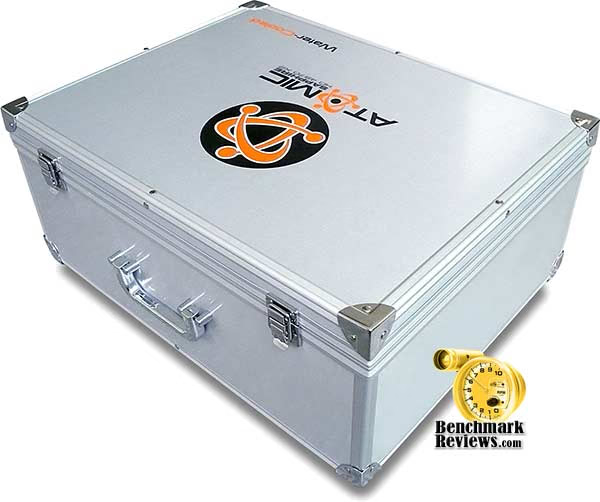
The Sapphire Radeon HD 4870 X2 Atomic ST-6026 is a limited edition product, and comes packaged in a stylish aluminum case with a host of accessories aimed at the gaming enthusiast, The list of included tools include an HDMI adapter, 3-meter HDMI cable, CCL UV lamp, two Sapphire USB flash drives, as well as driver and utilities software and benchmarking tools. In this article, Benchmark Reviews tests Sapphire's fastest Radeon HD 4870 X2 video card against the best graphics products available. Visit the Sapphire Atomic website for additional details on their line of limited-edition products.

The Sapphire Atomic ST-6026 kit incorporates the latest ATI Avivo HD Technology for enhanced Video display and features a second generation built in UVD (Unified Video decoder) for the hardware accelerated decoding of Blu-ray and HD-DVD content for both VC-1 and H.264 codecs, as well as mpeg files, reducing CPU loading to a minimum. The Sapphire Radeon HD 4870 X2 is HDCP ready and is compatible with the latest High Definition displays. Like other HD 4800 series products it also supports HDMI over the DVI interface with the correct HDMI Adapter.
About the company: Sapphire Technology
Pioneers in a new era of how data is displayed and games are played, Sapphire shepherds the performance oriented with ground-breaking solutions to an environment that remains in a constant state of flux and ultimate evolution. For over ten years Sapphire has held true to its unwavering commitment, the commitment to deliver the most feature rich and soundly engineered products. Because of Sapphire's firm position on achieving excellence with each product that leaves our ISO9001 and ISO14001 certified factories, you can rest assured that your customers will recognize YOUR commitment to selling only the highest of quality components.
"Sapphire is ATI's largest and best performing partner World Wide" Dave Orton, CEO ATI
Since ATI announced its manufacturing & distribution relationships with ODMs and AiBs in June of 2001, SAPPHIRE has been THE key ATI Graphics Boards Supplier worldwide and now stands poised and ready to capture the mainboard audience of those who seek a stable platform for their mission critical operations.
Captured within the circuitry of each of SAPPHIRE's graphic cards and mainboards can be found the collective feedback from generations of enthusiasts in every market niche. Brought to life through performance oriented innovation and an emphasis on quality control, SAPPHIRE designs, manufactures and distributes the most complete range of ATI video boards and mainboards--from the mainstream products that afford the casual user the opportunity to enjoy enriched graphics and affordable platform solutions to the state-of-the-art technological marvels that drive fantasies to before unattainable thresholds of realism, and offer the pinnacle of stability and performance! SAPPHIRE refuses to compromise quality by cutting corners at the expense of its customers experience with their products. All ATI board designs undergo a stringent layout inspection by our staff of engineers to guarantee that they represent the usual high-quality image of ATI original boards. We also enjoy the resources of a highly innovative technical department that layout complex designs to accommodate different market niches as they arise. SAPPHIRE ATI video boards have long been the reliable choice for a great number of OEMs and large System Integrators in Europe, North America, Asia and Latin America based largely on our ability to meet a fast paced technical markets advancements as well as our means to produce large quantities of product.
All SAPPHIRE ATI video boards are manufactured under 100% ATI production criteria including QC and outgoing system. Our monthly video board production capacity can reach a lofty 1.8 million and often topples this landmark figure. Our factory has always been the major manufacturer on ATI boards for most of the top ten tier 1 OEMs worldwide. With this background, you should undoubtedly be guaranteed of the impeccable quality, production capacity and product reliability of all ATI video boards and mainboards from SAPPHIRE. Be they business oriented or something just off center of the crosshairs, Sapphire has a solution for you and we look forward to an exciting and prosperous relationship with you!
Radeon HD 4870 X2 Features
All of SAPPHIRE's current graphics cards are Microsoft Windows Vista certified and supported by the ATI Catalyst suite of software, ensuring customers have easy and ongoing access to software updates for performance, stability and added features.
-
2 GB of GDDR5 memory with 2x 256-bit memory interface
-
2.4 teraFLOPS of GPU power
-
1600 stream processing units
-
DirectX 10.1 Support
-
24x custom filter anti-aliasing (CFAA) and high performance anisotropic filtering
-
Dual mode ATI CrossFireX multi-GPU support for highly scalable performance
-
Use up to four discrete cards with an AMD 790FX based motherboard
-
PCI Express 2.0 support
-
Dynamic geometry acceleration
-
Game physics processing capability
-
ATI Avivo HD video and display technology
-
Unified Video Decoder 2 (UVD) for Blu-ray and HD Video
-
Built-in HDMI with 7.1 surround sound supports on-chip HDCP
-
ATI PowerPlay technology
-
TeraScale Graphics Engine
The powerful new TeraScale graphics engine features deliver high resolutions and fast frame rates. -
Enhanced Anti-Aliasing & Anisotropic Filtering
High performance anisotropic filtering and 24x custom filter anti-aliasing (CFAA) smooth jagged edges and create true-to-life graphics, for everything from grass to facial features. -
DirectX 10.1
Play today while preparing for tomorrow with state-of-the-art DirectX 10.1 graphics capabilities. -
ATI CrossFireX Technology
ATI CrossFireX technology with up to quad GPU support offers superior scalability so your system is ready to level up when you are. -
PCI Express 2.0
Support for PCI Express 2.0 will prepare you for bandwidth-hungry games and 3D applications. -
Power to Spare
This GPU has the brute processing power needed for physics, artificial intelligence, stream computing and ray tracing calculations.
-
Unified Video Decoder 2
Unified Video Decoder 2 frees up your CPU for other tasks so you get The Ultimate Visual Experience for even the most processing-intensive content, including VC-1, H.264 and now MPEG-2. Also, take full advantage of Blu-ray functionality with dual-stream, picture in picture (PIP) capabilities. -
Upscale Beyond 1080p
Watch the hottest Blu-ray movies or other HD content at full 1080p display resolution and beyond. -
On-chip HDCP
On-chip HDCP (High-Bandwidth Digital Content Protection) makes life easier by allowing you to playback HDCP protected content. -
HDMI
Enjoy the latest audio technologies using HDMI with 7.1 digital surround sound support. Also, xvYCC support allows the user to enjoy a wider range of color when connected to a capable HDTV.
-
ATI PowerPlay Technology
ATI PowerPlay Technology delivers high performance when needed and conserves power when the demand on the graphics processor is low. -
Energy Efficient Manufacturing Process
Second generation 55nm chip uses the industry's most energy efficient manufacturing process.
Atomic ST-6026 Specifications
Bringing the highest levels of graphics and gaming performance ever seen in the PC, SAPPHIRE Technology - the leading innovator of ATI-based graphics solutions - is now introducing the amazing single slot, liquid cooled ATOMIC Edition of its HD 4870 X2.
-
1.912 billion transistors total (956 million transistors per GPU on 55nm fabrication process)
-
Display Output: Dual DL-DVI-I+HDTV
-
RV770 Core Clock: 800 MHz (x2)
-
Memory Clock: 1000MHz, 4000 MHz DDR Data Rate.
-
PCI Express 2.0 x16 bus interface
-
2048MB /256bit GDDR5 memory interface
-
Single-Slot Active Water-Cooler
-
HDMI compliant via dongle
-
7.1 Audio Channel Support
-
Microsoft DirectX 10.1 support
-
Shader Model 4.1 support
-
Product SKU: ST-6026
|
Series |
ATI Radeon HD 4870 | ATI Radeon HD 4850 |
ATI Radeon HD 4850 X2 |
ATI Radeon HD 4870 X2 | Sapphire Atomic 4870 X2 |
|---|---|---|---|---|---|
| Stream Processors | 800 | 800 |
800x2 |
800x2 | 800x2 |
| Texture Units | 40 | 40 |
40x2 |
40x2 | 40x2 |
| ROPs | 16 | 16 |
16x2 |
16x2 | 16x2 |
| Core Clock | 750MHz | 625MHz |
625MHz |
750MHz | 800MHz |
| Memory Clock | 900MHz (3600MHz data rate) GDDR5 | 993MHz (1986MHz data rate) GDDR3 |
993MHz (1986MHz data rate) GDDR3 |
900MHz (3600MHz data rate) GDDR5 | 1000MHz (4000MHz data rate) GDDR5 |
| Memory Bus Width | 256-bit | 256-bit |
2x256-bit |
2x256-bit | 2x256-bit |
| Frame Buffer | 512MB/1GB | 512MB |
2x1GB |
2x1GB | 2x1GB |
| Transistor Count | 956M | 956M |
2x514M |
2x956M | 2x956M |
| Manufacturing Process | TSMC 55nm | TSMC 55nm |
TSMC 55nm |
TSMC 55nm | TSMC 55nm |
Unified Superscalar Shader Architecture
-
1600 stream processing units

-
Dynamic load balancing and resource allocation for vertex, geometry, and pixel shaders
-
Common instruction set and texture unit access supported for all types of shaders
-
Dedicated branch execution units and texture address processors
-
-
128-bit floating point precision for all operations
-
Command processor for reduced CPU overhead
-
Shader instruction and constant caches
-
Up to 320 texture fetches per clock cycle
-
Up to 128 textures per pixel
-
Fully associative multi-level texture cache design
-
DXTC and 3Dc+ texture compression
-
High resolution texture support (up to 8192 x 8192)
-
Fully associative texture Z/stencil cache designs
-
Double-sided hierarchical Z/stencil buffer
-
Early Z test and Fast Z Clear
-
Lossless Z & stencil compression (up to 128:1)
-
Lossless color compression (up to 8:1)
-
8 render targets (MRTs) with anti-aliasing support
-
Physics processing support
Anti-Aliasing Features
-
Multi-sample anti-aliasing (2, 4 or 8 samples per pixel)
-
Up to 24x Custom Filter Anti-Aliasing (CFAA) for superior quality
-
Adaptive super-sampling and multi-sampling
-
Gamma correct
-
Super AA (ATI CrossFireX configurations only)
-
All anti-aliasing features compatible with HDR rendering
Texture Filtering Features
-
2x/4x/8x/16x high quality adaptive anisotropic filtering modes (up to 128 taps per pixel)
-
128-bit floating point HDR texture filtering
-
sRGB filtering (gamma/degamma)
-
Percentage Closer Filtering (PCF)
-
Depth & stencil texture (DST) format support
-
Shared exponent HDR (RGBE 9:9:9:5) texture format support
First Look: Sapphire Atomic
When I first held Sapphire's Radeon HD 4870 X2 several months back, it seems like the card was abnormally long and heavy. Perhaps the problem with the Radeon HD 4870 X2 design was that it really is abnormally long and the thermal management components made it very heavy. Sapphire improves cooling performance while reducing overall dimensions with their Radeon HD 4870 X2 Atomic. The single board layout of the Sapphire Radeon HD 4870 X2 Atomic with its single slot cooler brings the fastest solution yet available to performance users with only a single PCI-Express expansion slot. This is better than the mess two Radeon HD 4870's can make inside a cramped computer case.
The Sapphire Radeon HD 4870 X2 Atomic comprises two complete HD 4870 graphics systems on a single PCI-Express card connected by an integrated PEX 8647 PCI-Express 2.0 switch from PLX Technology, which adds features like Dual Cast and Read Pacing over previous generations. Each GPU has 800 stream processors and is equipped with 1MB of GDDR5 memory, making a total of 1600 stream processors and 2GB of memory on-board. Two Dual Link DVI outputs are provided as well as TV-Out. 3D applications such as games use both on-board GPU's together in CrossFire mode to deliver a single accelerated output on the Primary display.

Liquid coolant in the Sapphire Radeon HD 4870 X2 Atomic is circulated through the graphics card cooler and a chassis mounted Asetek radiator by a pump assembly which fixes onto the standard system CPU mountings (both AMD AM2 and Intel LGA775 mounts supplied). The graphics cooler, CPU cooler and radiator are connected in a closed loop by high quality flexible yet tough Teflon tubing and attachéd to each module with interference fit barbed joints that are sealed for life. This arrangement is easy to install, and efficiently cools the system CPU even in enthusiast systems where it is common to raise CPU speeds. The pump and sealed joints have been independently tested to 50,000 hours MTBF.
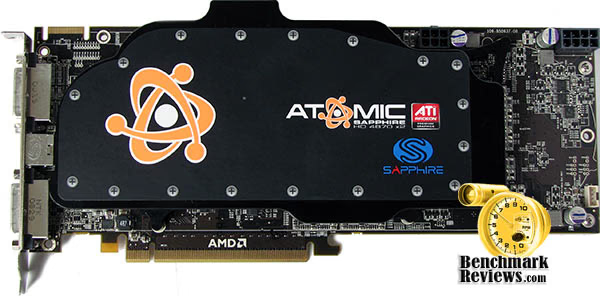
While the Sapphire HD 4870 X2 Atomic utilizes a full-length reference AMD/ATI printed circuit board (PCB), the custom water-cooling unit keeps the twin AMD RV770 GPUs well below the reference operating specifications. A custom-designed water block unit seals itself to the GPU and surface components very well, and the single expansion card slot requirement gives the Radeon HD 4870 X2 a more functional design.
Cooling was one of the weakest point of contention for many enthusiasts when discussing the original 4870 X2 design; but the topic is put to rest with Sapphire's unique liquid-based thermal management system. With two AMD RV770 GPUs working side-by-side inside the HD 4870 X2, you can never really have too much cooling. Each GPU has a 256 mm² footprint, and although they are made using the 55 nm process the collection of 956 million transistors has been proven to raise the room temperature a few degrees if not kept in check.
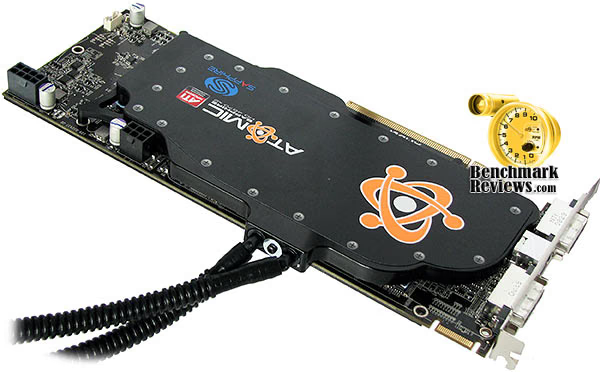
Air flow through the radiator is provided by a low noise 120mm 7-blade fan which delivers up to 60 cfm at full speed and is illuminated by blue LEDs. The fan and radiator can be mounted on the rear panel or in the top of the PC enclosure. The fan can be connected directly to the system power supply, to a motherboard connector, or to a fan speed controller which allows user controlled fan speeds and even lower noise when the PC is used for less demanding applications. Note that the ST-6026 system has only one fan and one pump cooling both CPU and dual graphics, considerably reducing overall system noise.

After taking a good look over the Atomic ST-6026 kit, it becomes clear that this is a premium product designed for hardcore hardware enthusiasts with a higher understanding of computer components and liquid cooling. I wasn't totally thrilled with the CPU cooling unit, which only includes AM2 and LGA775 mounting kits, so it could not be attachéd to the Intel Core i7-920 Processor running on the LGA1366-based Gigabyte GA-EX58-EXTREME X58 Motherboard we use for testing. Since the pump unit (built into the CPU water block) is no larger than a tennis ball, it can be positioned anywhere else inside the computer case or rest against the PCB on the Atomic 4870 X2 video card. With a little extra engineering, I think that Sapphire could have turned these components into a multi-purpose cooler for warm-running Northbridge chipsets.
In our next section we detail our methodology for testing video cards. Following this we offer a cadre of benchmarks to show where the Sapphire Radeon HD 4870 X2 Atomic ST-6026 stands against the Radeon 4870, GeForce 9800 GX2, a pair of Radeon HD 4850's in CrossFireX, along with a GTX 260 and GTX 280 put in for good measure... so please read on!
Video Card Testing Methodology
At the start of all tests, the previous display adapter driver is uninstalled and trace components are removed using Driver Cleaner Pro. We then restart the computer system to establish our display settings and define the monitor. Once the hardware is prepared, we begin our testing. The synthetic benchmark tests in 3DMark06 will utilize shader models 2.0 and 3.0, while the video games will use their own proprietary game engine. For lower-end VGA products we test at 1024x768 (15-17" standard LCD), 1280x1024 (17-19" standard LCD), and 1680x1050 (22-24" widescreen LCD). In our higher-end VGA product tests we conduct add the 1920x1200 (24-28" widescreen LCD) resolution. In some tests we utilized widescreen monitor resolutions, since more users are beginning to feature these products for their own computing.
Each benchmark test program begins after a system restart, and the very first result for every test will be ignored since it often only caches the test. This process proved extremely important in the World in Conflict and Supreme Commander benchmarks, as the first run served to cache maps allowing subsequent tests to perform much better than the first. Each test is completed five times, with the average results displayed in our article.
Our site polls and statistics indicate that the vast majority of visitors use their PC for playing video games, and practically every one of you are using a screen resolutions mentioned above. Since all of the benchmarks we use for testing represent different game engine technology and graphic rendering processes, I feel that this battery of tests will provide a diverse range of results for you to gauge performance on your own computer system. Since most gamers and enthusiasts are still using Windows XP, it was decided that DirectX 9 would be used for all tests until demand and software support improve for Windows Vista.
Test System
- Motherboard: Gigabyte GA-EX58-EXTREME (Intel X58/ICH10R Chipset) with F4e BIOS
- Processor: Intel Core i7-920 Nehalem 2.66 GHz (BX80601920)
- System Memory: 6GB Corsair Dominator PC3-12800 Triple-Channel DDR3 (TR3X6G1600C8D)
- Disk Drive: Patriot Warp v2 SATA 128GB SSD PE128GS25SSDR
- Graphics: ZOTAC GeForce GTX 280 AMP! Edition Video Card (Forceware v180.48)
- Monitor: SOYO 26-Inch Widescreen LCD Monitor DYLM26E6 (1920x1200)
- PSU: ePower Technology EP-1200P10 xScale 1200W PSU
- Operating System: Windows XP Professional SP-3 (optimized to 16 processes at idle)
Benchmark Applications
-
3DMark06 v1.1.0 (8x Anti Aliasing & 16x Anisotropic Filtering)
-
Call of Duty 4: Modern Warfare v1.7.568 (4x AA/16x Trilinear AF using FRAPS)
-
Crysis v1.21 Benchmark (High Settings, 0x and 4x Anti-Aliasing)
-
Devil May Cry 4 (Ultra Quality, 8x MSAA)
-
World in Conflict v1.0.0.9 Performance Test (Very High Setting: 4x AA/4x AF)
Video Card Test Products
| Product Series | AMD/ATI Radeon HD 4870 Reference Design | NVIDIA GeForce 9800 GX2 Reference Design | Sapphire Radeon HD 4850 X2 11139-00-40R | ZOTAC GeForce GTX 280 AMP! Edition ZT-X28E3LA-FCP | Sapphire Radeon HD 4870 X2 Atomic ST-6026 |
|---|---|---|---|---|---|
| Stream Processors | 800 | 128 (x2) | 800 (x2) | 240 | 1600 |
| Core Clock (MHz) | 750 | 600 | 625 | 700 | 800 |
| Shader Clock (MHz) | N/A | 1500 | N/A | 1400 | N/A |
| Memory Clock (MHz) | 900 | 1000 | 993 | 1150 | 1000 |
| Memory Amount |
512 MB GDDR5 |
512MB (x2) GDDR3 | 512MB (x2) GDDR3 | 1024 MB GDDR3 | 1024MB (x2) GDDR5 |
| Memory Interface | 256-bit | 256-bit | 256-bit | 512-bit | 256-bit |
-
AMD/ATI Radeon HD 4870 Reference Design (750 MHz GPU/900 MHz RAM - Catalyst 8.12)
-
NVIDIA GeForce 9800 GX2 Reference Design (600 MHz GPU x2/1500 Shader/1000 RAM - Forceware 180.48)
-
Sapphire Radeon HD 4850 X2 11139-00-40R (625 MHz GPU x2/993 MHz RAM - Sapphire Catalyst 8.12)
-
ZOTAC GeForce GTX 280 AMP! Edition ZT-X28E3LA-FCP (700 MHz GPU/1400 MHz Shader/1150 MHz RAM - Forceware 180.48)
-
Sapphire Radeon HD 4870 X2 Atomic ST-6026 (800 MHz GPU x2/100 MHz RAM - Catalyst 8.12)
Now we're ready to begin testing video game performance these video cards, so please continue to the next page as we start with the 3DMark06 results.
3DMark06 Test Results
3DMark is a computer benchmark by Futuremark (formerly named Mad Onion) to determine the DirectX 9 performance of 3D game performance with graphics cards. 3DMark06 uses advanced real-time 3D game workloads to measure PC performance using a suite of DirectX 9 3D graphics tests, CPU tests, and 3D feature tests.
3DMark06 tests include all new HDR/SM3.0 graphics tests, SM2.0 graphics tests, AI and physics driven single and multiple cores or processor CPU tests and a collection of comprehensive feature tests to reliably measure next generation gaming performance today. Some enthusiasts may note that Benchmark Reviews does not include CPU-bound tests in our benchmark battery, and that only graphic-bound tests are included.
Here at Benchmark Reviews, we believe that synthetic benchmark tools are just as valuable as video games, but only so long as you're comparing apples to apples. Since the same test is applied in the same controlled method with each test run, I believe 3DMark is a very reliable tool for comparing graphic cards against one-another.
Shader Model 2.0
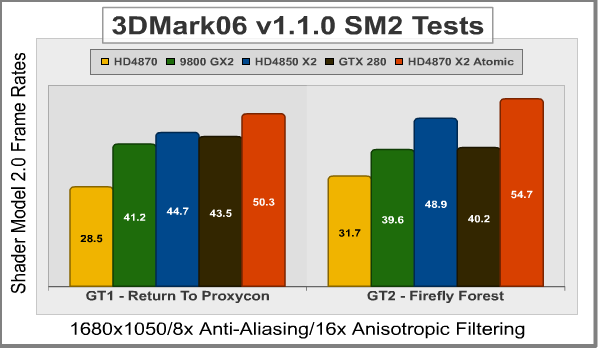
Our first series of synthetic tests are performed at 1680x1050, and demands only 1.764 megapixels from the graphics card. Beginning with Shader Model 2.0 tests, Return to Proxycon and Firefly Forest are two fast-paced fast-moving scenes that put strain on the GPU's efficiency by calling for large amounts of low-demand graphics in need of high-speed output. Shader Model 2.0 tests have historically performed at slower frame rates when compared to Shader Model 3.0; at least this is the case on newer, more complex, video cards with larger overhead.

Shader Model 3.0 / HDR
The Shader Model 3.0 and HDR (High Dynamic Range) test series in 3dMark06 includes the Canyon Flight and Deep Freeze. Both of these test scenes demand intense graphical computations from the GPU, and when paired with newer (AMD Phenom or Intel Nehalem) processors can actually produce better frame rates than Shader Model 2.0 scenes with the same hardware (and overhead). At 1920x1200 the graphics card is called-on to produce 2.3 megapixels, which is enough to separate the weak from the strong.
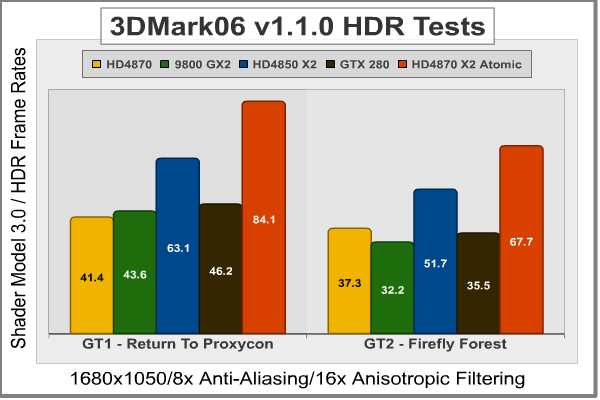

While these results speak for themselves, I will add a bit of commentary. The Radeon HD 4870 is really outclassed by the dual-GPU products in this series, although it does nearly match performance to the GeForce 9800 GX2 and GTX 280 in the Shader Model 3.0/HDR tests. SM2 Tests resulted in the 9800 GX2, 4850 X2, and GTX 280 all being about the same; but the Sapphire Radeon HD 4850 X2 turned up the heat in SM3/HDR testing. The real show-stopper was Sapphire 4870 X2 Atomic, which scored 6299 points in 3dMark06 SM2, compared to the ZOTAC GeForce GTX 280 AMP! Edition which scored only 5023. After SM3/HDR testing was complete, the Sapphire 4870 X2 Atomic scored 6911 points while the overclocked GTX 280 struggled to reach 3662.
| Product Series | AMD/ATI Radeon HD 4870 Reference Design | NVIDIA GeForce 9800 GX2 Reference Design | Sapphire Radeon HD 4850 X2 11139-00-40R | ZOTAC GeForce GTX 280 AMP! Edition ZT-X28E3LA-FCP | Sapphire Radeon HD 4870 X2 Atomic ST-6026 |
|---|---|---|---|---|---|
| Stream Processors | 800 | 128 (x2) | 800 (x2) | 240 | 1600 |
| Core Clock (MHz) | 750 | 600 | 625 | 700 | 800 |
| Shader Clock (MHz) | N/A | 1500 | N/A | 1400 | N/A |
| Memory Clock (MHz) | 900 | 1000 | 993 | 1150 | 1000 |
| Memory Amount |
512 MB GDDR5 |
512MB (x2) GDDR3 | 512MB (x2) GDDR3 | 1024 MB GDDR3 | 1024MB (x2) GDDR5 |
| Memory Interface | 256-bit | 256-bit | 256-bit | 512-bit | 256-bit |
Take the 3DMark06 tests at face value (as you should any synthetic benchmark), because in our next section we begin real-world testing on a cadre of popular video games known for taxing the graphics processor, and the performance curve is expected change. Our first up is Call of Duty 4, so please continue on...
Call of Duty 4 Benchmarks
Call of Duty 4: Modern Warfare runs on a proprietary game engine that Infinity Ward based off of the tried-and-true Q3 structure. This engine offers features such as true world-dynamic lighting, HDR lighting effects, dynamic shadows and depth of field. "Bullet Penetration" is calculated by the Infinity Ward COD4 game engine, taking into account things such as surface type and entity thickness. Certain objects, such as cars, and some buildings are destructible. This makes distinguishing cover from concealment important, as the meager protection provided by things such as wooden fences and thin walls does not fully shield players from harm as it does in many other games released during the same time period. Bullet speed and stopping power are decreased after penetrating an object, and this decrease is calculated realistically depending on the thickness and surface of the object penetrated.
This version of the game also makes use of a dynamic physics engine, a feature which was not implemented in previous Call of Duty titles for Windows PC's. The new in-game death animations are a combination of pre-set static animations combined with ragdoll physics. Infinity Ward's use of the well-debugged Quake 3 engine along with new dynamic physics implementation allows Call of Duty 4 to be playable by a wide range of computer hardware systems. The performance may be scaled for low-end graphic cards up to 4x Anti-Aliasing and 16x Tri-linear anisotropic texture filtering.
Before I discuss the results, I would like to take a moment to mention my general opinion on Fraps software when it comes to game performance benchmarking. If you're not familiar with the software, Fraps (derived from Frames per second) is a benchmarking, screen capture, and real-time video capture utility for DirectX and OpenGL applications. Some reviewers use this software to measure video game performance on their Windows system, as well as record gaming footage. My opinion is that it offers a valid third-party non-bias alternative to in-game benchmarking tools; but there is one caveat: it's not perfect. Because the user must manually begin the test, the starting point may vary from position to position and therefore skew the results.
In my testing with Fraps v2.9.4 build 7039, I used the cut-scene intro to the coup d'etat scene when Al Asad takes over control. First I allowed the level to load and let the scene begin for a few moments, then I would use the escape key to bring up the menu and choose the restart level option, I would immediately press F11 to begin recording the benchmark data. This scene is nearly four minutes long, but I configured Fraps to record the first 180 seconds of it to remain consistent. Once the scene would end, I would repeat the restart process for a total of five tests. So within a 2 millisecond starting point margin, all benchmark results are comparable which is probably as accurate as it can possibly get with this tool.

In our frame rate results, all five of the collected test scores were within 0.5 FPS of one-another and then averaged for the chart you see above. Because the products we are testing compete for the high-end segment of discrete graphics, the frame rates in Call of Duty 4 all share similar results with only small degrees of difference between 1680x1050 and 1920x1200 resolutions.
Because of the shear muscle the Sapphire ST-6026 packs, the video cards we've tested on CoD4 fall into one of two categories: those that aren't the Sapphire Radeon 4870 X2 Atomic, and those that are. At 1680x1050, everything except the Atomic produced frame rates between 101-109 FPS. The Atomic 4870 X2 on the other hand, produced 150 FPS and yawned at the boredom. At 1920x1280 the results weren't much different, with the competition sweating out 85-95 FPS while the Sapphire Atomic 4870 X2 burned through 130 FPS. Quite impressive.
| Product Series | AMD/ATI Radeon HD 4870 Reference Design | NVIDIA GeForce 9800 GX2 Reference Design | Sapphire Radeon HD 4850 X2 11139-00-40R | ZOTAC GeForce GTX 280 AMP! Edition ZT-X28E3LA-FCP | Sapphire Radeon HD 4870 X2 Atomic ST-6026 |
|---|---|---|---|---|---|
| Stream Processors | 800 | 128 (x2) | 800 (x2) | 240 | 1600 |
| Core Clock (MHz) | 750 | 600 | 625 | 700 | 800 |
| Shader Clock (MHz) | N/A | 1500 | N/A | 1400 | N/A |
| Memory Clock (MHz) | 900 | 1000 | 993 | 1150 | 1000 |
| Memory Amount |
512 MB GDDR5 |
512MB (x2) GDDR3 | 512MB (x2) GDDR3 | 1024 MB GDDR3 | 1024MB (x2) GDDR5 |
| Memory Interface | 256-bit | 256-bit | 256-bit | 512-bit | 256-bit |
In our next section, we shall see if the performance-demanding video game Crysis will help strengthen this position.
Crysis Benchmark Results
Crysis uses a new graphics engine: the CryENGINE2, which is the successor to Far Cry's CryENGINE. CryENGINE2 is among the first engines to use the Direct3D 10 (DirectX10) framework of Windows Vista, but can also run using DirectX9, both on Vista and Windows XP.
Roy Taylor, Vice President of Content Relations at NVIDIA, has spoken on the subject of the engine's complexity, stating that Crysis has over a million lines of code, 1GB of texture data, and 85,000 shaders. To get the most out of modern multicore processor architectures, CPU intensive subsystems of CryENGINE 2 such as physics, networking and sound, have been re-written to support multi-threading.
Crysis offers an in-game benchmark tool, which is similar to World in Conflict. This short test does place some high amounts of stress on a graphics card, since there are so many landscape features rendered. For benchmarking purposes, Crysis can mean trouble as it places a high demand on both GPU and CPU resources. Benchmark Reviews uses the Crysis Benchmark Tool by Mad Boris to test frame rates in batches, which allows the results of many tests to be averaged.
The very first thing we discovered during our 1680x1050 resolution tests was how well NVIDIA products performed compared to the seemingly more-impressive Sapphire Radeon HD 4850 X2 and 4870 X2 Atomic ST-6026. Test results like these begin to raise the question of how unbiased games like Crysis are when they proudly proclaim "NVIDIA: The way it was meant to be played". I don't consider this to be coincidence, but at the same time it's probably also not coincidence that Crysis demands more GPU power than any other product, which was perfect for a time when AMD/ATI couldn't build a decent VGA product to save their lives (literally).
Analyzing the chart below illustrates two distinct trends. The first is that the Radeon HD 4870 and 4850 X2 are virtually identical to the GeForce 9800 GX2. The second trend tries to convince us that an outragously overclocked GeForce GTX 280 can beat or match the performance of an overclocked 4870 X2. I suppose that some of readers, those famous for skipping to this (Crysis) test and the conclusion, will fall for the punch line. The rest of us have seen the test results from the previous two sections, and already know the joke.
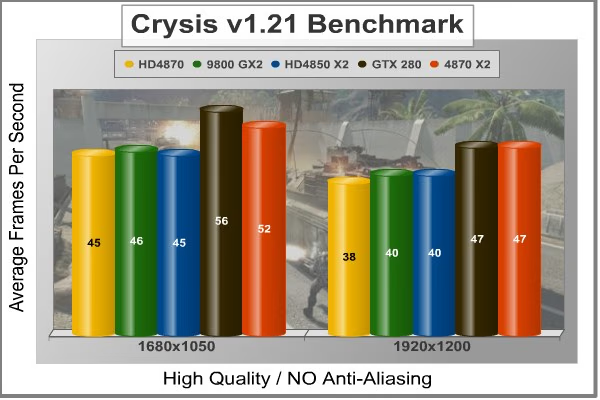
With only a small dose of anti-aliasing added to Crysis, there are very few products that would make for playable frame rates. Our Island time-demo mixes a some beach and water views, so it's going to be on the high side of frame rates when compared to actual game play. The results shown in the chart below illustrate (more distinctly) how well NVIDIA products scale with anti-aliasing enabled.
It would be easy to accuse NVIDIA of some level of wrong-doing, but there is one glaring piece of evidence in their defense: AMD/ATI graphic cards stop at 8x AA, while modern GeForce products reach 16x Q AA before calling it quits. So with this being an undisputed fact among our test products, it makes more sense to see the GTX 280 outperform the Sapphire Radeon HD 4870 X2 Atomic ST-6026.

At the end of our Crysis testing, it was apparent that heavy post-processing effects are still an obstacle that Radeon HD video cards have yet to clear. The products used in this review have been used in others, and also tested at-length on our X48 benchmark system, and the results have been comparible throughout.
| Product Series | AMD/ATI Radeon HD 4870 Reference Design | NVIDIA GeForce 9800 GX2 Reference Design | Sapphire Radeon HD 4850 X2 11139-00-40R | ZOTAC GeForce GTX 280 AMP! Edition ZT-X28E3LA-FCP | Sapphire Radeon HD 4870 X2 Atomic ST-6026 |
|---|---|---|---|---|---|
| Stream Processors | 800 | 128 (x2) | 800 (x2) | 240 | 1600 |
| Core Clock (MHz) | 750 | 600 | 625 | 700 | 800 |
| Shader Clock (MHz) | N/A | 1500 | N/A | 1400 | N/A |
| Memory Clock (MHz) | 900 | 1000 | 993 | 1150 | 1000 |
| Memory Amount |
512 MB GDDR5 |
512MB (x2) GDDR3 | 512MB (x2) GDDR3 | 1024 MB GDDR3 | 1024MB (x2) GDDR5 |
| Memory Interface | 256-bit | 256-bit | 256-bit | 512-bit | 256-bit |
In our next section, Benchmark Reviews tests with Devil May Cry 4 Benchmark. Read on to see how a blended high-demand GPU test with low video frame buffer demand will impact our test products.
Devil May Cry 4 Benchmark
Devil May Cry 4 was released on PC in early 2007 as the fourth installment to the Devil May Cry video game series. DMC4 is a direct port from the PC platform to console versions, which operate at the native 720P game resolution with no other platform restrictions. Devil May Cry 4 uses the refined MT Framework game engine, which has been used for many popular Capcom game titles over the past several years.
MT Framework is an exclusive seventh generation game engine built to be used with games developed for the PlayStation 3 and Xbox 360, and PC ports. MT stands for "Multi-Thread", "Meta Tools" and "Multi-Target". Originally meant to be an outside engine, but none matched their specific requirements in performance and flexibility. Games using the MT Framework are originally developed on the PC and then ported to the other two console platforms.
On the PC version a special bonus called Turbo Mode is featured, giving the game a slightly faster speed, and a new difficulty called Legendary Dark Knight Mode is implemented. The PC version also has both DirectX 9 and DirectX 10 mode for Microsoft Windows XP and Vista Operating Systems.
It's always nice to be able to compare the results we receive here at Benchmark Reviews with the results you test for on your own computer system. Usually this isn't possible, since settings and configurations make it nearly difficult to match one system to the next; plus you have to own the game or benchmark tool we used.
Devil May Cry 4 fixes this, and offers a free benchmark tool available for download. Because the DMC4 MT Framework game engine is rather low-demand for today's cutting edge multi-GPU video cards, Benchmark Reviews uses the 1920x1200 resolution to test with 8x AA (highest AA setting available to Radeon HD video cards) and 16x AF. The benchmark runs through four test scenes, but scene #2 and #4 are the ones that usually offer a challenge. Displayed below is our result for the test.

Judging from the results charted above, it appears that the Capcom MT Framework game engine isn't particular about which brand you use for gaming. The other obvious result is how much more powerful the Sapphire Radeon HD 4850 X2 11139-00-40R and Atomic 4870 X2 are when compared to the GTX 280 and dual-GPU 9800 GX2.
In test scene #2 the GTX 280 performed at 88 FPS and is trailed by the 9800 GX2 which earns 87 FPS. On the other side of the fence is Sapphire's Radeon HD 4850 X2, which scores 112 FPS and falls well behind the Sapphire 4870 X2 Atomics' 155 FPS. Scene #4 follows suit, with performance nearly identical to the previous test. DMC4 was intended to replace our UT3 test, which commonly offered results as high as 180 FPS, but the search for high-demand graphics tests is getting tough. Feel free to write us with your suggestions.
| Product Series | AMD/ATI Radeon HD 4870 Reference Design | NVIDIA GeForce 9800 GX2 Reference Design | Sapphire Radeon HD 4850 X2 11139-00-40R | ZOTAC GeForce GTX 280 AMP! Edition ZT-X28E3LA-FCP | Sapphire Radeon HD 4870 X2 Atomic ST-6026 |
|---|---|---|---|---|---|
| Stream Processors | 800 | 128 (x2) | 800 (x2) | 240 | 1600 |
| Core Clock (MHz) | 750 | 600 | 625 | 700 | 800 |
| Shader Clock (MHz) | N/A | 1500 | N/A | 1400 | N/A |
| Memory Clock (MHz) | 900 | 1000 | 993 | 1150 | 1000 |
| Memory Amount |
512 MB GDDR5 |
512MB (x2) GDDR3 | 512MB (x2) GDDR3 | 1024 MB GDDR3 | 1024MB (x2) GDDR5 |
| Memory Interface | 256-bit | 256-bit | 256-bit | 512-bit | 256-bit |
Our last benchmark of the series is coming next, which puts our collection of video cards against some very demanding graphics with World in Conflict.
World in Conflict Results
The latest version of Massive's proprietary Masstech engine utilizes DX10 technology and features advanced lighting and physics effects, and allows for a full 360 degree range of camera control. Massive's MassTech engine scales down to accommodate a wide range of PC specifications, if you've played a modern PC game within the last two years, you'll be able to play World in Conflict.
World in Conflict's FPS-like control scheme and 360-degree camera make its action-strategy game play accessible to strategy fans and fans of other genres... if you love strategy, you'll love World in Conflict. If you've never played strategy, World in Conflict is the strategy game to try.
World in Conflict offers an in-game benchmark; which records the minimum, average, and maximum frame rates during the test. Very recently another hardware review website made the assertion that these tests are worthless, but we couldn't disagree more. When used to compare video cards which are dependant on the same driver and use the same GPU architecture, the in-game benchmark works very well and comparisons are apples-to-apples.
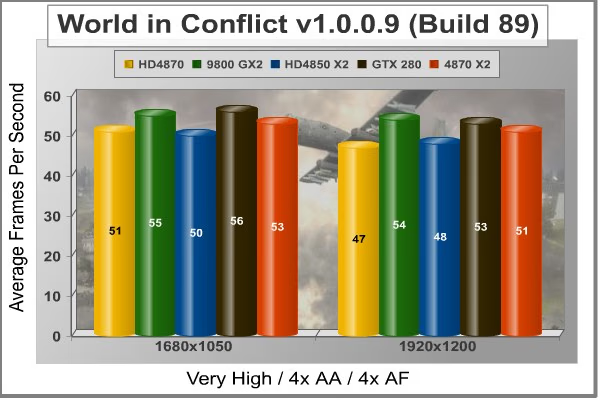
World in Conflict plays well on most modern graphics cards, but our high-end cadre of video cards may be too much for this test. With a balanced demand for CPU and GPU power, World in Conflict just begins to place demands on the graphics processor at the 1920x1280 resolution. I was expecting more results along the same line I've seen so far, and that is pretty much exactly what I got, only in much smaller differences.
The performance decay had its hardest impact on the lower high-level Radeon HD 4870 video card, which for all intents an purposes performed extremely well in our WiC testing. The GeForce 9800 GX2 didn't even blink at the change in resolutions, nor did the Sapphire 4850 X2. As a result of higher overhead (larger frame buffer), the Sapphire Radeon HD 4870 X2 Atomic ST-6026 actually suffered from the fast-paced calls of WiC. This is another game that proves that bigger isn't always better.
| Product Series | AMD/ATI Radeon HD 4870 Reference Design | NVIDIA GeForce 9800 GX2 Reference Design | Sapphire Radeon HD 4850 X2 11139-00-40R | ZOTAC GeForce GTX 280 AMP! Edition ZT-X28E3LA-FCP | Sapphire Radeon HD 4870 X2 Atomic ST-6026 |
|---|---|---|---|---|---|
| Stream Processors | 800 | 128 (x2) | 800 (x2) | 240 | 1600 |
| Core Clock (MHz) | 750 | 600 | 625 | 700 | 800 |
| Shader Clock (MHz) | N/A | 1500 | N/A | 1400 | N/A |
| Memory Clock (MHz) | 900 | 1000 | 993 | 1150 | 1000 |
| Memory Amount |
512 MB GDDR5 |
512MB (x2) GDDR3 | 512MB (x2) GDDR3 | 1024 MB GDDR3 | 1024MB (x2) GDDR5 |
| Memory Interface | 256-bit | 256-bit | 256-bit | 512-bit | 256-bit |
In our next section, we discuss electrical power consumption and learn how well (or poorly) each video card will impact your utility bill...
VGA Power Consumption
Life is not as affordable as it used to be, and items such as gasoline, natural gas, and electricity all top the list of resources which have exploded in price over the past few years. Add to this the limit of non-renewable resources compared to current demands, and you can see that the prices are only going to get worse. Planet Earth is needs our help, and needs it badly. With forests becoming barren of vegetation and snow capped poles quickly turning brown, the technology industry has a new attitude towards suddenly becoming "green". I'll spare you the powerful marketing hype that I get from various manufacturers every day, and get right to the point: your computer hasn't been doing much to help save energy... at least up until now.
To measure isolated video card power consumption, Benchmark Reviews uses the Kill-A-Watt EZ (model P4460) power meter made by P3 International. A baseline test is taken without a video card installed inside our computer system, which is allowed to boot into Windows and rest idle at the login screen before power consumption is recorded. Once the baseline reading has been taken, the graphics card is installed and the system is again booted into Windows and left idle at the login screen. Our final loaded power consumption reading is taken with the video card running a stress test using FurMark. Below is a chart with the isolated video card power consumption (not system total) displayed in Watts for each specified test product:
VGA Product Description(sorted by combined total power) |
Idle Power |
Loaded Power |
|---|---|---|
NVIDIA GeForce GTX 480 SLI Set |
82 W |
655 W |
NVIDIA GeForce GTX 590 Reference Design |
53 W |
396 W |
ATI Radeon HD 4870 X2 Reference Design |
100 W |
320 W |
AMD Radeon HD 6990 Reference Design |
46 W |
350 W |
NVIDIA GeForce GTX 295 Reference Design |
74 W |
302 W |
ASUS GeForce GTX 480 Reference Design |
39 W |
315 W |
ATI Radeon HD 5970 Reference Design |
48 W |
299 W |
NVIDIA GeForce GTX 690 Reference Design |
25 W |
321 W |
ATI Radeon HD 4850 CrossFireX Set |
123 W |
210 W |
ATI Radeon HD 4890 Reference Design |
65 W |
268 W |
AMD Radeon HD 7970 Reference Design |
21 W |
311 W |
NVIDIA GeForce GTX 470 Reference Design |
42 W |
278 W |
NVIDIA GeForce GTX 580 Reference Design |
31 W |
246 W |
NVIDIA GeForce GTX 570 Reference Design |
31 W |
241 W |
ATI Radeon HD 5870 Reference Design |
25 W |
240 W |
ATI Radeon HD 6970 Reference Design |
24 W |
233 W |
NVIDIA GeForce GTX 465 Reference Design |
36 W |
219 W |
NVIDIA GeForce GTX 680 Reference Design |
14 W |
243 W |
Sapphire Radeon HD 4850 X2 11139-00-40R |
73 W |
180 W |
NVIDIA GeForce 9800 GX2 Reference Design |
85 W |
186 W |
NVIDIA GeForce GTX 780 Reference Design |
10 W |
275 W |
NVIDIA GeForce GTX 770 Reference Design |
9 W |
256 W |
NVIDIA GeForce GTX 280 Reference Design |
35 W |
225 W |
NVIDIA GeForce GTX 260 (216) Reference Design |
42 W |
203 W |
ATI Radeon HD 4870 Reference Design |
58 W |
166 W |
NVIDIA GeForce GTX 560 Ti Reference Design |
17 W |
199 W |
NVIDIA GeForce GTX 460 Reference Design |
18 W |
167 W |
AMD Radeon HD 6870 Reference Design |
20 W |
162 W |
NVIDIA GeForce GTX 670 Reference Design |
14 W |
167 W |
ATI Radeon HD 5850 Reference Design |
24 W |
157 W |
NVIDIA GeForce GTX 650 Ti BOOST Reference Design |
8 W |
164 W |
AMD Radeon HD 6850 Reference Design |
20 W |
139 W |
NVIDIA GeForce 8800 GT Reference Design |
31 W |
133 W |
ATI Radeon HD 4770 RV740 GDDR5 Reference Design |
37 W |
120 W |
ATI Radeon HD 5770 Reference Design |
16 W |
122 W |
NVIDIA GeForce GTS 450 Reference Design |
22 W |
115 W |
NVIDIA GeForce GTX 650 Ti Reference Design |
12 W |
112 W |
ATI Radeon HD 4670 Reference Design |
9 W |
70 W |
The Radeon HD 4870 X2 is already no stranger to high power bills, based on the fact that it tops our chart for power consumption under load. Sapphire actually improves efficiency over the reference design, primarily as a result of lower operating temperature. This seems odd when you consider how the Atomic 4870 X2 requires an 8- and 6-pin power source, compared to the reference Radeon HD 4870 X2 that requires (only) two six-pin PCI-Express power connections. This may leave some middle-market enthusiasts and lower-end gamers in search of a new power supply feed this Atomic reactor the 256 W it consumes under load.
Most enthusiasts make the mistake of associating a smaller die process with an improved power efficiency. Clearly, the downside to the 55 nm RV770 GPU is it's lack of energy efficient operation. Putting two together on the same PCB doesn't double the consumption of a single Radeon HD 4870, but it sure does try. The power consumption measured under full load doesn't match the performance, but it certainly matched heat output. The idle power draw is extremely high, which is uncommon since emphasis is usually placed on idle/standby mode efficiency and conservation.
Taken as a whole the idle stand-by power consumption is pretty unforgivable, especially since this the condition your equipment will be in the majority of the time. While loaded power consumption actually less than the overclocked GeForce GTX 280, the price paid to your utility company for gaming will end up being about the same as any other video card. With this in mind, it would really make sense for AMD/ATI to design one of these dual-GPUs to power-down in 2D and low-3D modes. Once upon a time, the computer and gaming consoles seemed like an inexpensive alternative to arcade gaming... but that was before energy costs soared through the roof.
Atomic 4870 X2 Heat Output
Asetek liquid cooling delivers exceptional thermal control, enabling the Sapphire Radeon HD 4870 X2 Atomic ST-6026 to deliver top-end performance at all the noise. For once, you can hear the sound effects of your favorite game instead of your cooling fans. The low-velocity air flow gently passed through the coolant radiator at a mere 30dB(a), the equivalent of someone whispering.
For this review, the CPU/pump unit was not attachéd to the Core i7 processor. This was primarily because Sapphire did not bother to design an LGA1366 mounting clip for the Nehalem processor which launched on November 2nd; six weeks ago.
Keeping the ambient room temperature steady at exactly 17.0°C and the inner-case temperature around 28°C, the testing begins. I used GPU-Z to record temperatures at idle and then switched to Furmark for high-power 3D mode.

At idle the Sapphire Radeon HD 4870 X2 Atomic recorded an extremely cool 43°C (compared to 76°C for the reference design). Once I began to use 3D mode (which asks for another 185 W) for roughly twenty minutes, the Sapphire ST-6026 slowly raised its operating temperature. At full load, the twin RV770's produced an impressively low operating temperature of 60°C (compared to the reference design that produced 92°C). Liquid-cooling enthusiasts should rejoice, as this is all the evidence needed to prove how superior it can be.
Please continue to the review conclusion in the next section, where I share my final thoughts on the RV770 graphics processor and give my opinion of the new Radeon HD 4800-series product offerings.
Radeon 4800-Series Final Thoughts
There's a lot to like about the new Radeon HD 4800 series of products. To begin with, 800 cores is nothing to scoff at; even if they aren't nearly as efficient as they sound. CrossFireX scales performance very well, and for the first time actually makes multi-card setups worth the money. The most likable part is pricing: As of April 2009 the Radeon HD 4850 currently sells for $99 after rebate, which forces NVIDIA to drop the price of their GeForce GTS 250 (re-labeled 9800 GTX+) to meet with the competition. When ATI launched the Radeon HD 4870 at $300, NVIDIA had to answer back by dropping the GTX 260 to a more affordable price. The Radeon HD 4870 now sells for as low as $134.99 after rebate, making it difficult for the GTX 285. But that's where everything becomes unclear, and the value of ATI's latest product comes into question.
Here's why clarifying how the value has become so tricky is difficult to define. The initial interest in a product like the Radeon HD 4850 lies in the fact that it competes head-on with the GeForce GTS 250 (9800 GTX). But now that they are both priced roughly the same, value takes on a new dimension. In each and every test I conducted, the Radeon HD 4850 kept up with the GeForce 9800 GTX but never outperformed it (until 4x AA was added to Crysis). This would be the main reason why I see value becoming more of an issue outside of video game performance. The GeForce 9800 GTX+ offers HDMI, and so does the Radeon HD 4850. Both offer essentially the same exact sub-features down the line, except for when it comes to multi-card configurations; which is where the CrossFireX configuration really comes to shine.

I am very much aware that NVIDIA offers SLI just like ATI offers CrossFireX, but what I'm talking about is multi-card compatibility with motherboards. AMD Didn't exactly impress the world with Phenom, and thus the world hasn't jumped onboard to use their processors. Instead, Intel scooped up a large share of the consumer base with their P35/X38/P45/X48 chipsets (all launched within about ten minutes from each other). But here's my point: ATI still wins. All of these Intel motherboards, along with all of the AMD motherboards, offer CrossFire support exclusively. NVIDIA is left holding their own hand, because only select few Intel X58-based motherboards are expected to combine AMD's CrossFire technology with NVIDIA's SLI.
I'm not entirely sold on everything that the chipmakers would like for us to believe. I think it's sometimes worth questioning the wisdom, and in this regard I find that AMD is trying to pull one over on consumers by describing their RV770 to have 800 scalar processors. The reality is that ATI's 800 stream processor cores do not compare 1:1 against the competition, especially since the GeForce 9800 GTX can outperform the Radeon HF 4850 with only 128 shader cores. So despite what ATI would like to market, scalar processors they are not as they function exactly like vector processors would. With 800 processor cores residing in five bank location, each series of 5 processor cores process only one vector unit at a time - even if that vector doesn't need to use all five processor cores. 800 Cores are there, but they are far from the efficiency level seen by the competition.
My final thoughts on the 4800-series is where the Radeon 4850 and 4870 come up short. They're both great products just so that we're clear, but for a 55 nm process there's a lot missing from the RV770's arsenal that really should be there. I consider efficiency at the very start of this list, and even though my first lesson on the relationship between die process size and energy efficiency came from Mr. Jen-Hsun Huang, President of NVIDIA, I later researched this through my own testing and discoved that he was correct: reduced die process does not equal increased energy efficiency. Obviously this phenomenon holds up very well against the power consumption results I've tested for this review.
ATI's memory bus architecture also has me questioning their efforts. NVIDIA can produce a 512-bit memory bus making a 1:1 ratio of memory to interface (512MB @ 512-bit), so it's just a little disappointing that ATI did not do the same for their Radeon HD 4870/4890 (which both use GDDR5). Perhaps if I lower my expectations on improvements towards technology, I could accept a 256-bit Radeon HD 4850, but if you're going to make GDDR5 your marketing headline then perhaps you should also do something to match the technical achievements found in competing products. Notwithstanding, memory bandwidth is far from being saturated by today's gaming software (and hardware interface limits), and so my complaint is really more of a moot point, but it still stands to reason that AMD missed an opportunity here.
Sapphire ST-6026 Conclusion
Benchmark Reviews begins our conclusions with a summary rating of different product categories. The first is product presentation, which includes the level or information offered and the interest generated by the product packaging. In regards to this limited-edition Atomic graphics product which has historically been relegated to ultra-elite gaming enthusiasts, the Radeon HD 4870 X2 Atomic foregoes marketing hype and bullet-point specifications in exchange for an ultra-exclusive secret agent aluminum attaché case. This isn't a product destined for store shelves, so the lack of consumer information displayed on the packaging is more forgivable.
Looking different usually works against most products, unless of course it's a result of fashion giving way to function. Such is the case with Sapphire's ST-6026 kit. Teflon hoses connecting to a clean layout really help the 4870 X2 Atomic stand out. As if this product needs it, the radiator fan also lights with a blue LED.
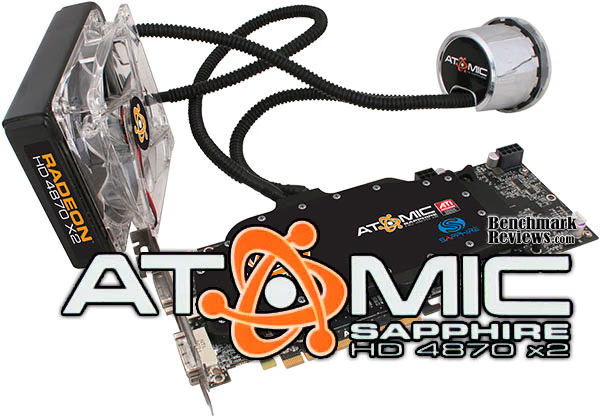
Construction is solid, but when you produce a top-shelf limited edition product there will always be some level of concern. I wasn't particularly happy that Sapphire ignored the LGA1366 mounting bracket; after all, enthusiasts wanting the ST-6026 kit will be the same hardcore gamers with the latest system hardware. The swiveling hose barbs are very nice, and allow a range of motion that rubber hose with clamps cannot attain. Asetek has done an excellent job integrating an entire liquid cooling system into the Atomic video card, and it's impressive that they managed to keep the profile to only a single slot design.
In terms of performance, the Sapphire Radeon HD 4870 X2 Atomic is our undisputed champion. Of course, the competition is already rolling out the next heir to the performance throne, so keep this in perspective. Throughout our benchmark testing, the Atomic 4870 X2 performed so far ahead of any other video card that it redefined the high-end of graphics performance. Based on the unbiased 3dMark06 and Devil May Cry 4 benchmarks, the 4870 X2 usually performed around 60% better than the overclocked GTX 280. There were even a few points where 100% improvement over the competition existed. However, when 4x AA was added into the post-processing effects, performance did actually favor the latest GeForce product line. As a graphics processor, the combined RV770's performed incredibly well; and coupled with the high-performance cooling solution and GDDR5 video RAM there's still a little more speed to be squeezed from this unit for the adventurous overclocker. Gaming performance aside, Sapphire has once again delivered features that nobody else has. But as it stands now, there's only a handful of games that make use of more than 512MB worth of video frame buffer, which makes the 2048MB video frame buffer create a large overhead. 32-bit Windows XP was cut down to a maximum available system memory map of 2GB, which might not be a problem for anyone already using only 2GB of RAM, but 64-bit users will see the perks of having a much larger memory space.
Value is always relative to whatever retailers think they can get consumers to pay for a product at any particular time. Although the Radeon HD 4870 X2 launched back in early August (2008), this is Sapphire's ultra-exclusive limited edition kit for the top-end gamer. Although the Sapphire ST-6026 SKU has yet to be discovered on sale anywhere in North America as of December 2008, NewEgg offers other their most affordable 4870 X2 models for $489.99. Using the Benchmark Reviews price comparison tool I discovered some slightly better deals, so it's a good idea to do some price shopping before you buy. Sapphire expect the Radeon HD 4870 X2 Atomic liquid-cooling kit to retail for around $700.
In conclusion, there's a special place reserved for the Sapphire Radeon HD 4870 X2 Atomic video card, but it's only going to find a limited number of homes for an elite few who can afford it. The Sapphire ST-6026 graphics kit combines a very effective Asetek water-cooling kit that can be used to cool the processor as well. The fact Sapphire has kept the 4870 X2 Atomic contained in a single expansion card slot is impressive, but moot, as you can't exactly run two kits together without major reconstructive surgery. The kit packs a lot of extra's, such as 3dMark Vantage and licensed versions of the CyberLink PowerDVD BD suite, but there are no games to be found inside this expensive set. I won't try to pretend this is the product for everyone, not with the price tag is carries, but for the gamer who wants it all: this is it.
Pros:
+ Outstanding performance for higher-end games
+ Supports DirectX 10 and Shader Model 4.1
+ Twin 800 MHz RV770 GPUs / 2 GB of 1000 MHz GDDR5 vRAM
+ Self-contained liquid-cooling solution
+ 1080p Native HDMI Audio and Video supported for HDCP output
+ Whisper-quiet cooling fan under loaded operation
+ Combines CPU cooling into GPU cooling circuit
+ Attractive aluminum attaché case and limited edition badge
+ Supports CrossFireX functionality
+ Extremely low operating temperatures under load
+ Single expansion slot graphics solution
+ Kit includes two CrossFireX bridge components
Cons:
- Very expensive limited edition top-performance product
- Maximum post-processing Anti Aliasing is limited to 8x
- High power consumption at idle and load
- Lacks available Intel LGA1366 mounting bracket
- Heat exchanger could have more threaded mounting points
Ratings:
-
Presentation: 9.75
-
Appearance: 9.5
-
Construction: 9.75
-
Functionality: 10.0
-
Value: 6.00
Final Score: 9.0 out of 10.
Quality Recognition: Benchmark Reviews Silver Tachometer Award.
Questions? Comments? Benchmark Reviews really wants your feedback. We invite you to leave your remarks in our Discussion Forum.