
SteelSeries Simraceway SRW-S1 Wheel
SteelSeries Simraceway SRW-S1 Steering Wheel
Manufacturer: SteelSeries
Product Name: Simraceway SRW-S1 Gaming Steering Wheel
Model Number: SRW-S1
Price As Tested: $119.99 (Amazon)
Full Disclosure: The product sample used in this article has been provided by SteelSeries.
Hardcore PC racing simulator enthusiasts would argue that there is no alternative to a force feedback wheel and pedals, and they might be right, but not everybody has $300+ to fork out on an expensive setup. At the same time not everyone is content either being a keyboard racer or having to make do with a sub-par wheel or console style game controller. This is where SteelSeries and Ignite Game Technologies come into play. Together they have developed the SteelSeries Simraceway SRW-S1 motion sensitive steering wheel. A wheel that bridges the gap between console style game controllers and high end wheel/pedal setups, and it is available now from the SteelSeries web shop for $119.99 MSRP.
Out of the box the SteelSeries SRW-S1 wheel is set up to work with Ignite's 'Simraceway' online racing simulator for the PC, but SteelSeries state that it will work with just about any racing game released on the PC. Here at Benchmark Reviews we take marketing claims at face value and we always leave our judgment to real world testing, but if looks are anything to go by then we are in for one hell of a treat.
In this review we will take a good look at the SteelSeries SRW-S1 and its features, and put it through its paces in a range of popular racings sims and driving games. The SRW-S1 caters to a niche market but the possibility to serve a wider audience is there waiting to be discovered, It is very accurate and responsive but it does have its caveats. Please read on to find out more.
Closer Look: SteelSeries Simraceway SRW-S1
In this section we take a good look at the SteelSeries SRW-S1 steering wheel and talk about some of its features.

The SRW-S1 steering wheel ships in a pretty basic package but gives a really nice view of the product inside. The information is basic but so is the wheel (regardless of all of the buttons). This is one of those ideas that makes you wonder why it took this long for someone to come up with it, but motion control has never been too accurate on consoles so maybe that is the reason why it hasn't been tried before now.

The rear of the box has some information pertaining to the game that this wheel was designed for - Simraceway. I don't know who approached who but the wheel far exceeds the game in terms of build quality and visuals and playability. I will go into a little more detail later, but for now let's just say there are better racing sims available.
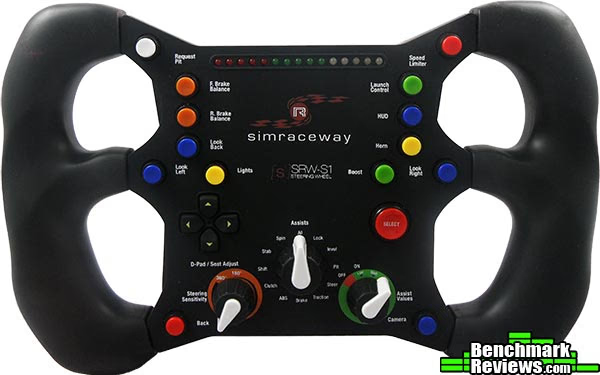
The SRW-S1 steering wheel has a really authentic looking F1 theme and plenty of buttons to map to, covering all of the common features found in all racing sims. The buttons have a positive tactile feedback when pressed and are also cleverly color coded to their specific functions, for example the blue buttons all relate to changing your view and the orange buttons are for brake bias control etc.

Accelerating, braking and gear changes are dealt with by these four paddles on the rear of the wheel. The top two paddles are for changing gear and give an audible and tactile click, the bottom left paddle is your accelerator and the bottom right paddle is your brake. Both the brake and the accelerator are spring loaded and pressure sensitive giving you very responsive control in game, the short travel distance of these paddles makes the SRW-S1 hard to use to begin with but as you progress it becomes a blessing in disguise.

The moulded hand grips fit your hand nicely but after extended use feel very dry and powdery. This is not such a bad thing and might be considered a bonus as I have not had any issues with sweaty hands during use. The strip of LED's atop the SRW-S1 only works if supported by the game you are playing and could be considered too bright, the only game that currently has full support for the SRW-S1 is Ignites 'Simraceway' racing simulator. The SRW-S1 steering wheel has quite a small profile, and compared to a full wheel/pedal setup, won't take up very much room at all. My main gripe is that it is constantly tethered to its 2.4m long USB cable which makes packing it away somewhat of a chore. It would be nice if the USB cable were detachable for storage/transport.
Simraceway SRW-S1 Detailed Features
In this section we will get a closer look at the detailed features of the SteelSeries SRW-S1 steering wheel.

As you can see there are plenty of control options available with the SRW-S1 steering wheel, many of which are simple to bind in your game of choice. The driving assist dials (middle and right) only work with Simraceway at this point but the steering sensitivity works regardless of which game you are playing. Having these dials available on the fly is great but they are all options that are customizable in the in-game menus. Of all three dials the one I found most useful was the steering sensitivity dial, not that it made it easier to control the vehicle per se, but just so I could match up precisely the movement of the SRW-S1 to the on screen wheel in the car thus making the whole experience more authentic.
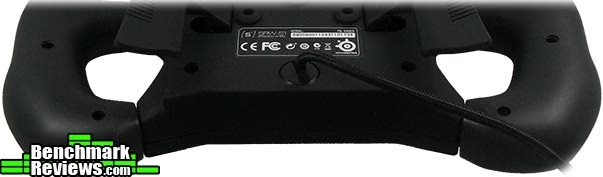
The SRW-S1 is tethered to a SteelSeries signature 2.4m braided USB cable, while this adds to the quality look and feel of the product it is quite unnecessary. A simple bog standard detachable 1.5m USB cable would have been quite sufficient and could have possibly brought down production costs.

A close-up here of the accelerator paddle, the SRW-S1 is constructed from hard plastics but the whole unit has been finished with a soft rubber feel urethane coating. This gives the wheel a nice (difficult to put into words) feeling when you hold it in your hands possibly best demonstrated by actually holding one for yourself. All of the paddles have grooves moulded into them to prevent your fingers from sliding off during extended use.

The small but informative manual confirmed exactly what I thought when I saw these mounting holes, an optional detachable desk stand/mount. The word from SteelSeries is that the R&D team are working on something at the moment but our contact doesn't know if or when such a mount might be made available. It is in my nature to modify things or try to makeshift something so with this in mind I set out to attach the SRW-S1 to my trusty camera tripod. It was a simple case of finding a different size bolt to attach the camera quick release bracket to the wheel and attaching it onto the tripod, I slid the pan lock off to allow the wheel to move while keeping the tripod still and that was that. I had a semi stable platform for my wheel, there wasn't a lot of difference in game but for comfort purposes it made a big difference. I can only imagine that a properly fixed stand might make all the difference.
 SteelSeries Simraceway Features
- Portability and Authenticity - Unique hybrid design brings a true-to-life racing experience to your laptop or desktop computer without the set-up, storage or transportation hassles of a wheel-and-pedal set.
- Full Range Acceleration and Braking - A patent-pending, hand-controlled paddle system on the rear of the wheel produces full-range acceleration and braking, providing drivers with the same subtlety of control as high-end wheel sets and real-world cars.
- Optimized Design - Over 20 on-wheel buttons and dials, each one optimized for easy access, and two ergonomically-designed rubberized grips ensure drivers stay in complete control.
- Plug-and-Play with Simraceway - No complicated configuration required when used with Simraceway. No device drivers to load, no bamboozling set-up process to follow, simply plug-and-race.
- Compatible with PC Racing Games - Can be used with most PC racing games although some features, including the assists dials and the shift indicator LEDs, may not be compatible with certain titles.
- Complete Customizability - Many of the SRW-S1 Steering Wheel's controls can be customized to suit the driving and gaming preferences of individual players.
SteelSeries SRW-S1 Specifications
| Ready. Set. Race. - The Simraceway S1 Steering Wheel is a high-performance, handheld PC racing wheel co-designed by SteelSeries and Ignite Technologies. The portable, motion-sensor wheel features a patented throttle and brake lever system that offers a fully simulated racing experience within hands reach. We've collaborated with and tested the SRW-S1 Wheel with top ranked Indy 500 race car drivers and Simracing World Champions. |
| Stay in Control - Everything you need, from brake balance controls to assist setting dials, are always in reach. No other wheel on the market combines this level of customization and functionality. |
| In Your Hands - The wheel's unique design means you can take it everywhere and use it anywhere. There are no pedal sets or bulky seats. The Simraceway S1 is a handheld joypad and wheel combined that brings a true-to-life race set-up to your laptop or desktop computer. |
| Full Range - You can experience full-range acceleration and braking on the back of the S1 Wheel. The right paddle - for acceleration/throttle - allows you the ability to vary the amount of throttle input, from feathering to fully depressing it for maximum acceleration. The paddle on the left - for braking/stopping - allows you the ability to vary the amount of braking input, from feathering to fully depressing for full braking force. |
| Brake Balance Control - Brake balance control (aka "brake bias") allows you to change the brake balance to the front or rear of the vehicle. If a driver were to hit the brakes with a rear brake bias, he is more likely to spin out of control. However, if a driver were to hit the brakes with a front brake bias, his is more likely losing his ability to steer into a corner. A balance must be found. We have a button for that. |
| Plug-and-Race - Plug it in. Choose your game. Play. Sure, you can customize every button, but only if you want to. There is no complicated configuration required when used with Simraceway and most PC racing games. |
| What's Your Style? - The SRW-S1 wheel adapts to your driving style based on the way you steer. You're going to do it in 1 of 3 ways: Over-steer, under-steer and neutral. OVER-STEER Drivers who prefer over-steer like to have the rear of the car loose and the front dialed in. This allows drivers to use the throttle to correct their driving line or to use it to aid in steering. It also means there is more risk of losing control. UNDER-STEER Drivers who prefer under-steer like to have the rear of the car dialed in and the front loose. While it becomes harder to make a turn at higher speeds, it does provide stability and reduces the chances of losing control. NEUTRAL Drivers who prefer a neutral setup like to have both the rear and the front of the vehicle dialed in. This allows drivers to compromise between over-steer and under-steer. |
| Where to? - Everywhere. The Simraceway S1 Steering Wheel can be used with all PC racing games including: iRacing Need For Speed Simraceway GTR Live for Speed + Any other PC racing game on the market. (Some features, including the Assists dials and the shift indicator LEDs, may not be compatible with certain titles). |
| Get a Grip - The rubberized wheel grips have an ergonomic shape that allows you to keep a comfortable grasp to steer as you move around the controller to brake, accelerate, shift, look back, request a pit stop and everything else in order to drive and win. |
| Total Flexibility - While the wheel comes preconfigured to operate seamlessly with Simraceway, many of its controls can be customized, so you can program them to match your driving - and gaming - preferences. Find out more about the simulated racing experience at www.simraceway.com. |
| Used by the Pros - The SRW-S1 Steering Wheel has been tested and approved by professional racing drivers including four-time IndyCar Series winner, Dario Franchitti and double Indy 500 Champion, the late, great and much missed Dan Wheldon. As well as SimRacing stars, David Greco and Bruno Marques. |
Source: Features and Specifications taken from SteelSeries.com and SteelSeries Press Release.
Testing & Results
Testing Methodology
Testing a peripheral of this nature is pretty much self explanatory, and because this is a new product there is not wide support with all of the current games. Thankfully though, nearly all games have the ability to customise controls or configure a custom game controller. The only game that makes full use of the SRW-S1 steering wheel's functions is Ignites 'Simraceway' racing simulator. While Simraceway might not be on the top of the pile as racing sims go it certainly isn't all bad. It's just a shame that there are better racing sims out there and that this wheel won't realise its full potential unless there is wider support along the same lines as Logitech, Thrustmaster and Fanatec.
I don't currently own a force feedback wheel that I can directly compare the SRW-S1 to, although even if I did it wouldn't be a very fair comparison. SteelSeries are not trying to compete at that level with the SRW-S1, think of it more as a stepping stone or something for those that want a more authentic experience but can't afford a high end setup. I can however compare the SRW-S1 to using a Mad Catz 360 style PC controller and also to using the keyboard/mouse, and that is exactly what I intend to do.
Test System
- Motherboard: ASUS P8Z68-V Pro
- System Memory: 8GB Corsair LP 1600MHz
- Processor: Core i7 2600K @ 4.50GHz
- Video: MSI N560GTX-Ti HAWK
- Disk Drive 1: OCZ Vertex 2 60GB
- Disk Drive 2: Seagate Barracuda 7200.12 1TB
- Enclosure: Lancool PC-K63
- PSU: Corsair HX750W 750 watt Modular
- Monitor: HKC 22" Widescreen (1920x1080)
- Operating System: Windows 7 Ultimate x64 (SP1)
 Test Software
- Simraceway
- pCars build 0106 Pre-Alpha
- Race 07
- rFactor Special Edition 2008
- GTR: Evolution
- GTR: 2
- Race Room: The Game
- Dirt 3
Results
When you talk about motion control and gaming in the same context your mind is instantly drawn to consoles, and if you have tried the various types of motion control options available then I'm sure you will agree that the experience is not all that impressive. The worst problem generally encountered is input lag and next is accuracy, but thankfully neither of these problems are present with the SteelSeries SRW-S1 steering wheel. The worst problem with the SRW-S1 is inherent to its portable design, and that is that you have to hold it in the air. Not only does that introduce extra fatigue during use but it also means that you are not likely to stay in one position for any period of time. You will also find yourself excessively leaning into corners and over dramatising every movement until you become accustomed to the wheel, these are all things that will obviously have an effect on your in game performance.
Don't give up on it yet though, because after only a short period of time you will become used to how the SRW-S1 wheel feels and handles (your mileage will vary) and you will be very grateful for how sensitive to movement it is. I had never really cared too much for sim racing games until now, instead I had preferred the more arcade style of driving. But since I have had the pleasure of testing the SRW-S1 wheel I have found an new level of control for simulated driving. It still can't ever compare to the real thing but it does mean I get to drive insanely fast without putting my life in danger. The gear shift paddles will at first interfere with accelerating and braking but their close proximity to the accelerator and brake pedals means that you won't have to contort your hands to reach the other controls. The Accelerator and brake paddles are spring loaded and pressure sensitive but don't have a great amount of travel, at first this meant I was constantly at max revs and losing control but as with all other aspects of sim racing the key is to make precise movements and once I was used to it I soon found that the limited travel was an advantage when it came to driving as fast I could.
There are many control options for driving games/simulators on the PC and the SteelSeries SRW-S1 steering wheel has to factor somewhere, so to put it into context I have placed in order the levels of control and where I think the SRW-S1 fits in from best (1) to worst (5). Of course you might draw up that list a little differently but that is my personal opinion. The SRW-S1 wheel (without a fixed stand) cannot even begin to compare to a full wheel/pedal setup but absolutely dominates the rest of the field.
-
Force feedback / fixed wheel (with or without pedals)
-
SteelSeries SRW-S1 motion control wheel
-
Console style game controller
-
Mouse steering
-
Keyboard control
Sure it takes some getting used to but when you have found a good racing simulator on which to use it the rest is just history. Which brings me on to my next point, not all racing sims are created equal. Many of thee racing sims I tested the SRW-S1 on were based on the SIMBIN engine, which uses laser scanned tracks for added authenticity but the movement of the vehicle is somewhat far from realistic. Other racing sims I tried may not have had laser scanned tracks but had a more realistic driving experience. The one common thing about all but one of the racing simulators I tried was poor graphics, ranging from outdated engine (DX9) to blocky models to poor shadows. It seemed as though the better looking games had a less realistic driving experience and vice versa. That was of course until I stumbled across Project C.A.R.S (Community Assisted Racing Simulator). Considering that this game is in its pre-Alpha stages and it literally wipes the floor on every other title I played with regards to dynamics, physics and graphics (DX11 vs. DX9) I thought it needed a special mention here. See below for Project CARS gameplay using the SteelSeries SRW-S1 Steering Wheel.
Steering Wheel Final Thoughts
The SteelSeries SRW-S1 steering wheel has filled a gap that existed in the current marketplace, whether that gap needed filling or not is down to you the consumer. Are you happy enough playing on the keyboard or with a controller? Do you think that $119.99 is a reasonable price for this steering wheel? Or do you think this is just a gimmick? I have an advantage here, I get to test the wheel without committing any cash but in return I must write this review. I am in no way inclined to make out this is a good product when it isn't, and I wouldn't do that anyway.
With that being said, at first I wasn't convinced that the SRW-S1 was going to be able to cut it but after extended use on some good racing sims I became accustomed to it and was able to do really well. Sure it won't ever compare to a fully fledged wheel and pedal set but it isn't aimed at that sector. It is quite difficult to think who might actually want the SteelSeries SRW-S1 steering wheel because without a stand you won't be able to use it for a real extended period of time, and I can't see many people laying down $120 for a 'casual' wheel. I really hope that SteelSeries will work on an optional desk stand or even an adapter to attach this wheel to currently available wheel bases on the market (Logitech, Fanatec, Thrustmaster)

SteelSeries Simraceway SRW-S1 Conclusion
In this section I am going to write a brief five point summary on the following categories; Performance, Appearance, Construction, Functionality and Value. These views are my own and help me to give the SteelSeries SRW-S1 Steering Wheel a rating out of 10. A high score does not necessarily mean that it is better than a similar steering wheel set, which has been reviewed by another writer here at Benchmark Reviews that may have got a lower score. It is however a good indicator of whether the SRW-S1 steering wheel is good or not. I would strongly urge you to read the entire review, if you have not already, so that you can make an educated decision for yourself.
The SteelSeries SRW-S1 Steering wheel performs really well considering it a brand new concept unlike anything else currently available. The one thing that would possibly make it better is a fixed stand. I often find myself resting my arms on my computer chairs' arm rests while driving which restricts movement somewhat.
Appearance is usually a tough one to call because there are so many different tastes to cater for. But I'm pretty sure there will be a unanimous feeling towards the SteelSeries SRW-S1, and that is that it looks extremely professional and authentic indeed. It is styled on and F1 steering wheel and does the job really well, it is really clean looking too. The buttons initially look like a random rainbow assortment but the colors actually correlate to the functions to make them easier to remember.
Construction is second to none, and so it should be for $120. The entire unit is constructed form really lightweight but extremely strong and rigid plastic which is then coated with a rubber like soft feel urethane finish. The hand grips are perfectly sculpted for a really comfortable hold, the material used on these grips feels really dry and powdery after extended use but that is good in a way because that means your hands stay dry under the pressure.
Functionality is very good in Simraceway but in other games it is somewhat limited, the assist dials and shift LED's will not work in any unsupported games (which is everything but Simraceway). This just means that these options can't be adjusted on the fly in other racing sims but that doesn't stop you adjusting these settings in the in-game menus. For a motion sensitive controller I was initially sceptical, but after a period of use I was really quite impressed by the accuracy that the SRW-S1 has. The gear shift paddles have a nice audible and tactile click to let you know you have actuated the controls. The brake and accelerator paddles are spring loaded and pressure sensitive and allow for very precise control in trained hands. The close proximity of the rear paddles means you won't find yourself contorting your hands or searching for the various controls.
The SteelSeries SRW-S1 Steering Wheel is available right now for $119.99 (Amazon) or directly from the SteelSeries web store. At this price point there are some contenders but nothing with this level of customization. I personally think the price is just a little too high and $100 might be a better price point.
Pros:
+ Very sensitive to movement
+ Good tactile response from buttons and gear shift paddles
+ Brake and accelerator are pressure sensitive
+ Very authentic looking
+ Very comfortable to hold
+ Excellent build quality and finish
+ Adequately weighted (not to heavy or light)
Cons:
- Only fully functional in Simraceway
- Free floating design increases fatigue
- Steep learning curve
- Shift LED's are extremely bright
- Not something you could really use for an extended period of time
Ratings:
-
Performance: 8.50
-
Appearance: 9.00
-
Construction: 9.50
-
Functionality: 8.00
-
Value: 7.00
Final Score: 8.40 out of 10.
Benchmark Reviews invites you to leave constructive feedback below, or ask questions in our Discussion Forum.
Reader comments from the original article
24 comments were posted before commenting closed. They are preserved as written. Original avatars no longer resolve and are shown as a placeholder.
RE: SteelSeries Simraceway SRW-S1 Wheel Doug Dallam Permalink:
That was a cool review and the video hit the spot. After playing RAGE with it's speedway option, I was impressed with racing. It was quite fun, but of course I was using mouse / keyboard, which was not fun. Did you try pressing your elbows just forward of your ribcage, for stability, and using it like that?
RE: RE: SteelSeries Simraceway SRW-S1 Wheel Steven Iglesias-Hearst Permalink:
I tried many things for stability, but to avoid rambling in the review I only wrote about what made a difference eg. using my chairs armrests and mounting the wheel on my tripod. I for one hope there is a mount made as it will turn this fun wheel into a serious bit of kit. Thank you.
RE: SteelSeries Simraceway SRW-S1 Wheel Sun Down Permalink:
Nice gear. I still find the button placements to be overly chaotic though. Frankly I'm more interested in the race sims mentioned here. I miss the GTR series. I hope one day all sims (IL-2 Sturmovik, GTR, etc...) adopt the graphical enhancements of DX11. One shouldn't ignore the effect that graphics give out to the 'driver'.
SRW-S1 Mount on G25 Piero Permalink:
##youtube.com/watch?v=6KfEF0Pcz7g
Meh Mergatroid Permalink:
I bought a $60 non FFB wheel a few years ago. It was fun, but my scores actually went down compared to using a joystick. You just cannot move a wheel from one side to the other through it's full range as fast as you can a joystick. So, I sold it and continued to use my joysticks. Just this year a buddy moved in and he owned a nice Logitech FFB wheel. He was enjoying himself so much I decided to purchase one. Again, my scores went down. I got the Logitech Force GT for about $160. I have to admit it's more fun to play with this steering wheel than with a joystick, and if both of us are using our wheels we have a great time. However, if one of us pulls out a stick so will the other. Sticks are just superior for racing because of the movement times involved. This Steel Series controller is something I have considered but I passed it by. For that price you can still get a pretty good wheel, and I would prefer a wheel over that...controller...any day if I'm playing for fun. If we're competing against each other, out comes the joysticks. Of course, a big advantage to the Force GT is that you can use it on the PS3 as well. I think your score was very generous.
RE: SteelSeries Simraceway SRW-S1 Wheel Steven Iglesias-Hearst Permalink:
I wouldn't say my score was very generous, in fact other review sites have actually given this wheel an award (which I felt it didn't deserve here). I too have played driving games using an XBOX 360 style pc controller and found it only works better in games that are designed for consoles. Just out of curiosity, what games are you playing where you are better with analogue sticks than with a wheel? And how can you knock this wheel without at least giving it a go.
I just read the review Mergatroid Permalink:
After reading the review, I can certainly agree with the problem of not having a shaft and having to hold the wheel up all the time thus creating fatigue (which was one of the reasons I passed it by in the first place), not to mention there's no pedals. That's enough for me. As for which game I can play better with a joystick, name one. NFS, Dirt, Test Drive, Blur. It's in the reaction time, and that's better with a stick, (I'm not referring to the little stick on a console type controller, but a real PC joystick). It's simple enough just to time how long it takes to move a joystick from one side to the other and compare that to how long it takes to move a wheel from one side of its full turn radius all the way to the other side. Joystick wins every time.
RE: I just read the review Steven Iglesias-Hearst Permalink:
"NFS, Dirt, Test Drive, Blur" My point exactly, they are the sort of driving games I have always loved to play, with a controller. When it comes to racing sims though it's a different story bud. The SRW-S1 and your Joystick are at different ends of the spectrum to each other with regards to realistic and arcade style driving.
Sure, for fun Mergatroid Permalink:
Yeah. Controllers like steering wheels are more fun, but I'd bet on a joystick any day for scores.
spoon grammatonfeather Permalink:
The better scores with joystick simply illustrates that a wheel is not the most efficient controller for a vehicle (even a real vehicle). I guess if you fitted a real car with a sidestick and side throttle (HOTAS) then you'd have more responsive driving. I used my Saitek X52 pro recently on some driving games but it feels awkward and not enjoyable. I have this Simraceway controller since yesterday. Doing ok on simraceway and shift 2 but some of the arcade racers like dirt 2 or GRID I am finding much harder than with my fixed force feedback wheel. Maybe I just need to get used to having the throttle and brake on the unit.
RE: spoon David Ramsey Permalink:
They've tried real joysticks in cars many times over the years (starting in the 50s), and it just doesn't work. Having the front wheels go from full left to full right in a 90 degree tilt of a joystick makes for a car that's virtually impossible to drive in the real world.
That's odd... Mergatroid Permalink:
That's very strange because plenty of vehicles, especially electric vehicles, shop vehicles, golf carts etc. use joysticks. Even remote controlled cars with proportional steering use joysticks. I had a remote dune buggy with proportional steering that worked fine with a joystick. I would wonder if the cars you tried had modified steering made for a joystick of if someone just stuck a joystick in a car that had a classic car steering assembly made for a wheel? When you say "full left to full right" I also wonder if the stick was analogue or digital. A digital stick would be like using a d-pad and would really suck badly. An analogue stick with proportional steering would work on a real car, but it would likely take more skill to use. Come to think of it, doesn't Myth Busters use remote joysticks to control real cars? So even with stock steering it works.
RE: That's odd... David Ramsey Permalink:
Really? I have never seen a real-world vehicle that uses a joystick (other than some airplanes). Even the RC car controllers use a little steering wheel. Could you provide an example of a full-size vehicle that does? I have seen tillers, but those aren't joysticks...
Myth Busters Mergatroid Permalink:
You haven't watched Myth Busters? They usually jury rig the steering wheel and use a remote control, I believe it has joysticks on it. Look in the toy section of any store that sells RC and you will see duel joystick controllers. The more expensive ones ($200 and up) use proportional steering and the remotes are available both with little wheels and joysticks. The cheaper ones usually don't have proportional steering, and if they use a wheel it's just left or right, no in between (like a d-pad). Here's some remotes (both types): hobbyking.com/hobbyking/store/__82__190__Tx_Rx_Systems_Pa rts-Complete_systems.html Here's a cheap toy with just sticks: toysrus.ca/product/index.jsp?productId=11361547 When I was a kid all our remote controlled cars were using joysticks. I remember being surprised the first time I saw a wheel. Besides, in this type of control system, wheel or joystick really doesn't matter. They're both just variable resistors or coils anyway, what difference does the shape make?
You tube video Mergatroid Permalink:
youtube.com/watch?v=vfvX7jKqoqU Here is a real car being controlled by a joystick
RE: You tube video David Ramsey Permalink:
Interesting, but it's a one-off prototype or concept of some sort. I maintain that you can't buy a joystick-controlled human-drivable car/golf cart/etc. today. The problem is that the range of steering which even in Ferraris will require more than 720 degrees of rotation is compressed to a very small arc in the joystick. This, combined with the lack of feedback you get with a wheel mechanically connected to the wheels, makes fine control very difficult for most people.
OK Mergatroid Permalink:
Never really said you could purchase a car that was controlled by joystick. But I have seen a fair number of joystick controlled vehicles. And, personally, I don't think compressing an arc of movement to the size of a joystick is a problem. As I said, there are lots of RC vehicles out there that use joysticks. I had no trouble at all controlling the digital proportional steering on my RC toys when I was a kid, and I highly doubt their arc for steering is any different than that of a real vehicle. Here's another one: #ntho.posterous.com/future-mercedes-concept-car-wi-1 Here's one using an xbox controller: youtube.com/watch?v=7-39URz4vL8 You can get vehicles today that use a joystick: vti.se/en/publications/pdf/joystick-controlled-cars-for-drivers-with-severe-disabilities.pdf Although it is likely custom modified by a speciality shop. I guess if a disabled guy can drive a car with a joystick, you and I could too. Here's a wiki article on it: #en.wikipedia.org/wiki/Drive_by_wire I think all this proves you can control a real car with a joystick.
RE: SteelSeries Simraceway SRW-S1 Wheel grammatonfeather Permalink:
Well my SRW-S1 is DEAD after 2 days! Switched PC on this morning and the SRW-S1 lights were on (usually they are off unless you are in Simracing). The device is no longer detected in windows. The lights stay on, the device is screwed! It worked very well in simracing and surprisingly F1 2011 was very easy to drive with it, however, the wheel has now died after 2 days so it is being sent back and I will purchase a Logi G27.
RE: RE: SteelSeries Simraceway SRW-S1 Wheel Steven Iglesias-Hearst Permalink:
Surely it would be better to contact SteelSeries support and try to resolve this issue rather than going on a web rampage trying to give this wheel a bad name. I'm sure that if it is a known issue SteelSeries will resolve your problem. Good luck with the G27, choose a different USB port, you may have a faulty hub.
That's too bad Mergatroid Permalink:
I don't think leaving a message saying he had problems with his controller amounts to a "web rampage". However, I always exchange once before considering a different product. Nothing's perfect and all electronics are bound to have a few defective units here and there. Oh well, I hope you enjoy your Logitech. I have no complaints with mine.
RE: That's too bad Steven Iglesias-Hearst Permalink:
This isn't the only place he has left that message.
Complaints of Fatigue are Frivolous Cyberdactyl Permalink:
I've now had the SRW-S1 for several months. I've read many reviews one of the perceived drawbacks is its main positive attribute, and that being you have to hold it up since it is unmounted. The argument is, your arms will fatigue over time. True... IF that is the way you hold it the entire time driving. Add to that, many gamers are 'no-exercise couch potatoes', I can understand the comments. But you will quickly find you can rest it on your lap, and even better yet, lay back in a recliner, get comfortable, rest it on your lap and race for literally hours. However there is an advantage that NO mounted wheel can hope to achieve, and something that no one has addressed. Since the wheel relies on an artificial horizon for its orientation, you can move the wheel laterally in small sweeps or jerks as you rotate to add an extra layer of control. So to me, being unmounted, is now the way to go. Yes there are drawbacks, no force feedback, must have control if it at all times during a race, but if you can live with these small quibbles, I highly recommend it.
RE: SteelSeries Simraceway SRW-S1 Wheel Davis Permalink:
What was the size and thread of the bolt/screw that used to mount it on a tripod? I was going to do the same thing, but I couldn't find a bolt that I owned that fit.
RE: RE: SteelSeries Simraceway SRW-S1 Wheel Steven Iglesias-Hearst Permalink:
It was the screw already on the tripod. Standard size is 1/4" diameter, 20 threads per inch. Hope this helps.