
SilverStone SST-GD06B HTPC Chassis Enclosure
SilverStone SST-GD06B HTPC Enclosure Review
Manufacturer: SilverStone Technology Co., Ltd.
Product Name: GD06
Model Number: SST-GD06B
Price As Tested:$129.99 at NewEgg or $122.00 at Amazon
Full Disclosure: The product sample used in this article has been provided by SilverStone
In this article Benchmark Reviews gets to evaluate a HTPC case from SilverStone's Grandia line; the GD06. With these smaller cases, space is always an issue. This is becoming increasingly critical as high definition content becomes ubiquitous. Not only do we want to view our new content in more pixels than our brain can even process, but we want to upscale the old content, or view it in 3D, and do it upside down, right side up and inside out. While you're at it give me dish, cable, recording, streaming, email, gaming and the kitchen sink. Oh...and it needs to fit in a single box on my entertainment system. Well, SilverStone is at least trying to provide the box, the rest is up to you. They've expanded on past models to fit even more powerful toys inside your HTPC. Read on to see how model SST-GD06B crams the performance you demand and puts it on your shelf.
When I build an HTPC I'm usually facing one big choice: Either go for performance at the cost of size, or go for space at the cost of performance. If Sure, you could probably fit a lot of stuff in an HTPC case if you bought nothing but custom products. Slim cards, small power supplies, high-capacity SSDs, etc. This approach may help keep things small, but it will cost you big bucks and the small size will still limit your performance, especially when it comes to video processing. So if you're looking to use readily available parts and not spend a premium, then you're back to the choice, space or performance.
I've done builds going both routes. Sometimes the shelf-space is the main design factor because I've got the TV, I've got the shelves, and I've got to stick a case on that shelf. I can always do it by going with slim and half-height components, but that puts a cap on performance due to limited selection. Some other builds I have to design around a particular function, say 3D Blu-Ray. So I start with the parts then try to find the smallest case that will fit. Then I've got my mini suitcase HTPC and I'm trying to find the least obtrusive spot in my living room to place this beast.

Well, Silverstone's GD06 is meant to address this exact problem. Fit full-performance, standard parts into the smallest space imaginable. They did a decent job with the GD05 allowing three hard drives, a full size video card and 4 + 1 expansion slots. Well, they went a step further with the GD06 to keep you on the leading edge of technology in your living room. Check out the features and specifications in the next section to see what they've done, then read on to take a closer look. We'll evaluate the performance of the GD06 based on the ease of build, included features, appearance, the performance provided, and the overall value.
SilverStone GD06 Features
- Three silent 120mm fans included
- Positive air pressure design for excellent cooling/quietness and dust-prevention
- Incredible 340mm depth to fit comfortably inside home theater cabinet
- Two front-accessible hot-swap hard drive bays
- Designed with cable routing for easy installation
- Support 4 x 3.5” hard drives and 2.5” hard drive or SSD
- Support expansion cards up to 11 inches
- Includes two front USB 3.0 ports
- Front door lock
- Supports Kensington Lock
HTPC Chassis Specifications
| Material |
Front Door: Aluminum |
|---|---|
| Motherboard | Micro-ATX DTX Mini-ITX |
| Drive Bays |
External: 1x 5.25" |
| Cooling |
Rear: 2x 80mm (optional) |
| Expansion Slots |
4 + 1 |
| Front I/O Ports |
2x USB 3.0 |
| Power Supply |
Standard ATX (up to 5.9" deep) |
| Graphics Card |
Up to 11" |
| CPU Cooler |
2.75" with ODD 4.75" without ODD |
| Net Weight |
12.3 lbs |
| Dimensions | 17.3" (W) x 5.9" (H) x 13.4" (D) |
Closer Look: Exterior
I've often heard it said that big things come in small packages. From my experience that's very true of SilverStone's GD06. However, when it comes to packaging the reverse is really true. This rather small thing came in a big package. It was a heavy, well-protected box.
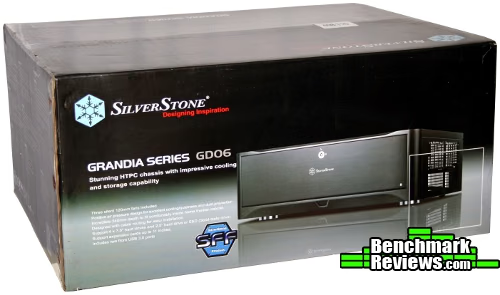
And it's heavy because the case is heavy, not because of the box or the packaging. And to me that's a good thing. The HTPC is not a computer you ever carry from place to place. It's not a gaming rig or a party machine; it usually sits on a shelf for years. But with all the stuff you can fit inside I suppose you could use it for any of those purposes. But more on that later. The point is that the case is solid; made of steel. It's very high quality.
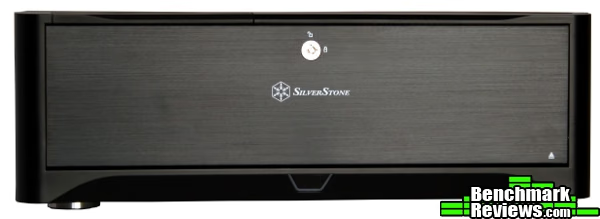
I live in a house with kids, and I often worry about stuff I buy that is made cheaply, made of plastic. I've got a giant acrylic sheet on my TV to protect it from flying toys and rough children. So for a gadget that the kids will probably use frequently, I feel secure letting it sit in an accessible location. So this case can go down low where it's easy for everyone to reach. But having it in the open means it's gotta look nice. Well, the GD06 looks nice. With the aluminum door on the front it looks very nice. The door hides away the unseemly ports.

So as you may have noticed from the specs, the GD06 comes with three 120 mm fans. Two of them are input fans running on the right side, and the other is an input fan on the left side. All three fans are covered with large, steel mesh cut into the side of the case. On the right side of the case they consume almost the entire real-estate leaving little room for any other features or styling. While there are three fans included with the case, more can be installed.
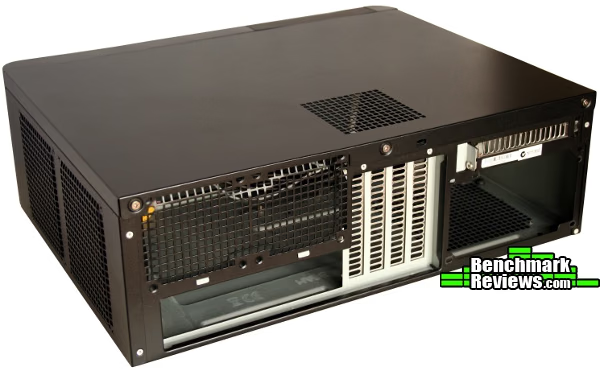
The back of the GD06 has space above the motherboard I/O for two 80 mm fans. These are protected by the same large grating as the side fans. Chances are that most setups won't require these two fans since the three included fans do a decent job of flowing air through the case. Of course, if you have top-end parts and fill every available space in the case you'll generate lots of heat, and there will be less space for air to flow easily through the case. In that circumstance you may find the extra fan mounts very helpful.
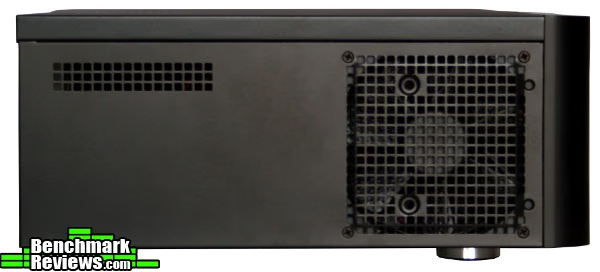
With all three fans blowing in, the case is setup as a positive pressure case. I'm a big fan of this setup since it means higher pressure inside the case, and higher pressure means better heat transfer. Since all the fans focus on blowing air into the case it also means that the fans can run at lower RPMs to reduce the noise. The fans are arranged so the right-side dual fans pump air into the case along with the PSU fan if present. Any excess pressure buildup is relieved by gratings occupying a small section on the left side, one on the back, the empty PCI slots, and the empty fan mounts. The motherboard is positioned next to the two input fans so the CPU gets the coolest air.
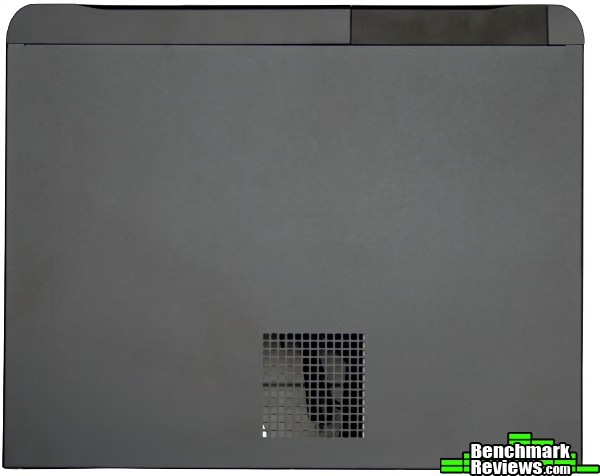
The expansion slots, including video cards, are oriented almost exactly in the middle of the case. Looking at the top of the case there is a grating oriented exactly above the expansion slots. In fact, the grating is perfectly located as an input grating above the primary PCI-E slot. Depending on the amount of empty space for air to escape, this vent could serve as an input or an output.

Detailed Exterior Features
Now lets take a little better look at the outside of the GD06. After looking at the main outside of a new case I like to look at the goodies kit to see what's included. SilverStone threw in a basic screws kit, keys to the front door, a manual, and some reusable tie-downs. As usual, the screws come in several different varieties of pitch and shape. They are all Phillips, so we won't be getting any tool-less love from the GD06. As for the reusable tie-downs, I love them. These are my favorite kind. They are strong, flexible, and REUSABLE. I don't have to have a bunch of extra tie-downs sitting around to replace every time I cut an old one off.
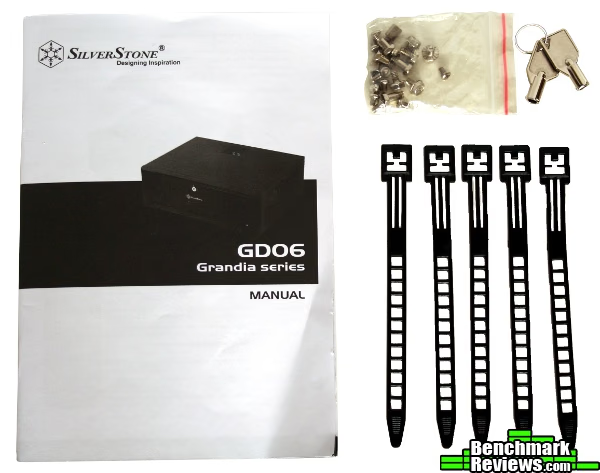
Now for the manual. These days, case manuals are a joke. More often than not they tell you how to do obvious things in a hundred different languages. Some manufacturers do a good job by just using pictures, so you don't have to search through a hundred pages to fin your own language. Well, SilverStone included a beefy 36-page manual in ten different languages with pictures and text. It's not perfect, but it's good. The GD06 chassis is complex enough that I found many times where I had to refer to the manual. They crammed so many things in such a tight space that I had to read-up on how to install all the hard drives. Also, they included lots of critical dimensions for cramming parts into the case. Like what is the space between the bottom and the top, the bottom and the ODD bracket, and even the amount of space inside the front door. All useful and necessary information. It's available online, and I suggest looking through it before buying all your components so you can choose a fit the meets your needs.

Now on to the front door. It's made of aluminum and feels fairly strong, but the hinges are at least partially plastic, so it won't take tons of abuse. Since the door is somewhat weighty it feels like the hinges are spring supported so the door doesn't slam open. The lock on the front is metal and can be locked using the keys provided. Inside the front door you have access to two USB 3.0 ports, standard audio ports, the power button and two hard drive bays. You'll have to open the front door every time you need to swap a disc, but with the number of drives you can mount, you may as well rip all your discs to the hard drives. Sadly, the front door opens too stiffly to be pushed open by the force of an ejecting ODD tray.

The hard drive doors are spring loaded and unlatched by a quick slide of the switch. The bays are big enough to admit a standard 3.5" SATA hard drive. Anything larger won't fit, and anything smaller will take too much fussing to be worth the effort. SilverStone says these are hot-swap drive bays. That's true from an accessibility standpoint, but it's only as true as your motherboard allows. I'm slightly disappointed by the doors here. The blank installed on the ODD has a nice brushed appearance that matches the GD06's exterior. But this is the one part that nearly everyone is going to remove. And then the drive doors are just plain, boring, black plastic. It looks worse than the rest of the front which is just a nice matte. At least they could have given it the brush finish like the ODD blank or a glossy plastic like the bezel. Oh well, the front door will be mostly closed anyways.
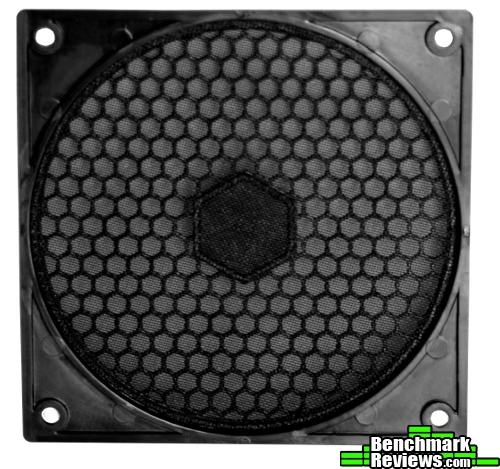
Here's a quick look at the filter that covers the PSU intake. It's an ABS plastic cover that removes with four screws, and it holds a fine-quality mesh filter. Again, it would be nice if the HTPC cases could follow suit with gaming and build cases and go too-less. Would be easier to push a tab and slide this thing out than to get out the screw-driver.

It's interesting that the hot-swap drives have LEDs on their covers. The LEDs turn on whenever power is supplied to the case regardless of whether the bay contains a drive or not. Plus, the door will be closed most of the time, so it's not like they add a ton of styling. There is also an LED on the reset switch. It seems odd to me that the power switch is inside the front cover while the reset switch is on the outside. I use the power switch far more often. I suppose that if I want them switched I can just swap the pins around, but...that means getting out the screw-driver. Read on to see exactly what that entails.
Closer Look: Interior
Ok, it's time to talk about the inside of SilverStone's GD06. Before I start, let me just say that this is an HTPC case. A form-factor case. A small case. For some reason, the rules with these things are different. I don't know if they require more engineering, or cost more to make, or design, or what...but for the same price, you get less physical material, fewer "real" features for the same price as other cases. Maybe someone can fill me in on the reason.
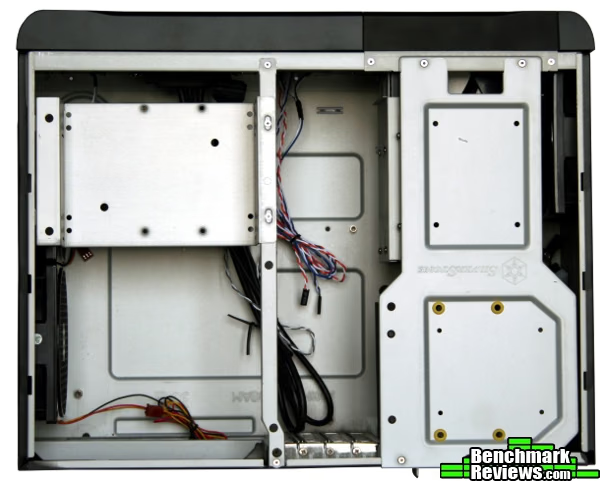

In order to perform a full install you basically have to remove everything in the case save the fans. The hot-swap assembly must come off. Before taking it off you need to open both hot-swap drive doors. With them open you can see inside that there are no alignment rails, no screw holes, just the SATA ports at the back. You can see that the SATA ports have a data cables and four power wires coming out from each connector. We'll show these later. With the doors open you remove four screws that keep the assembly attached to the frame. These screws are different sizes, so you need to keep track.
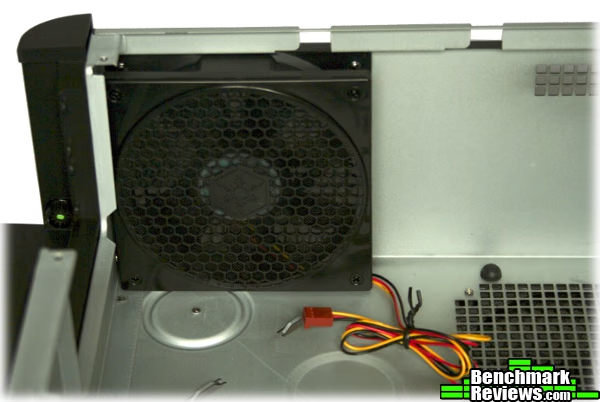
Remove the ODD tray (4 more screws) to get nearly full access to the case. With everything removed we can take a closer look at the fans. Above is a shot of the left fan. All the fans come with decent lengths of power cable and filters similar to the one on the PSU intake. You can also see the PSU mounting area butts up against the left fan. Don't worry, it'll accept the standard length ATX power supply.

The right side fans are exactly the same as the one on the left, but they consume the entire side of the case. With three fans included by default it would have been nice if SilverStone could have included an adapter to have them all connected. A small thing that makes things more convenient.

If you want the entire case to be open then you'll need to remove the cross-bar that braces the front and back panels. That takes another two screws. So that's 10 screws for a comfortable build, and make sure to keep track of where they go. The GD06 has four expansion slots to fit a micro-ATX case plus one additional slot oriented horizontally above the PSU. Like the PSU, any card in this slot is limited to 5.9". This space I called the miscellaneous space since it can house a PCI bracket/card, a hard drive, or both. The next section will discuss how.
Next we'll get slightly more intimate with the inside of the GD06 including a simple build.
Detailed Interior Features
Interior features make all the difference when it comes to a build. Most of the cases we review here at Benchmark Reviews deal with the ease of the initial build, swapping out parts, and features for making it go quickly and convenient. HTPC cases are a different beast since the demands on space and shape are so high. But is it impossible to squeeze things and still have an easy build? Well, considering what SilverStone has managed to fit inside the GD06 I can't complain too much.

Most of the features revolve around the hot-swap assembly. The assembly itself holds two 3.5" hard drives easy to access from the front. But to get to the rest of the drives you have to remove the assembly with four screws of two different styles. The hot-swap drives have a SATA cable and four-pin Molex connector coming from each drive. While I find the combination unusual it shouldn't cause too much of a problem with current PSU designs. The tail-end of the assembly sits above the PSU and can serve multiple purposes. There are four grommet-lined holes on which a 3.5" or 2.5" hard drive can be mounted (shown later). This space is also shared with the fifth PCI slot in one is installed. As long as the expansion card is small then a small 2.5" drive could be installed simultaneously.
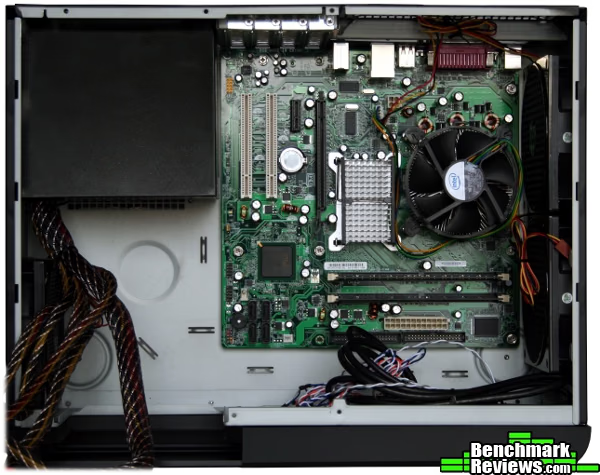
With the hard drive assembly removed the PSU and motherboard can easily be dropped in place. In the picture above you can see the rat's-nest of cables coming from the back of the PSU. SilverStone left space bounded by the hot-swap bays, the left fan and the PSU open so that there would be at least some area to hide away extra cable lengths. There is also significant room between the front panel and the motherboard for tying down more. To make this job easier the GD06 has many anchor points for tie-downs.
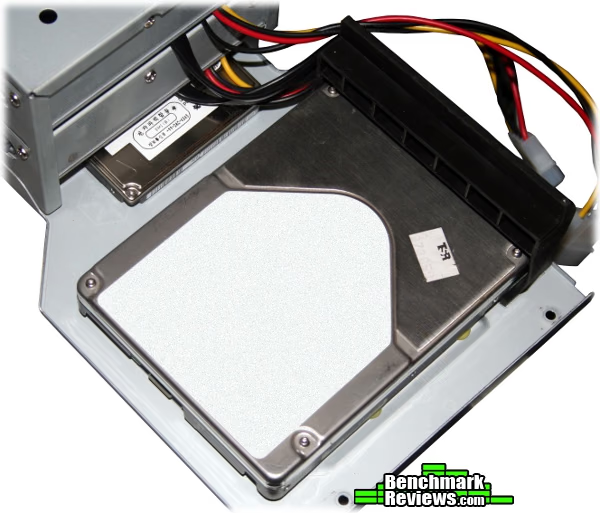
With the motherboard and PSU installed we can put the hard drive assembly back in place. But before doing so, now is the time to attach any extra hard drives. The picture above shows a 3.5" drive mounted in the designated area and supported by a rubber bracket on one side. Also, a 2.5" drive can be stealthily tucked away above the hot-swap bays. It's easiest to mount by sticking it through the front of the top bay and screw it on. So if you're counting, that's four hard drives installed so far.
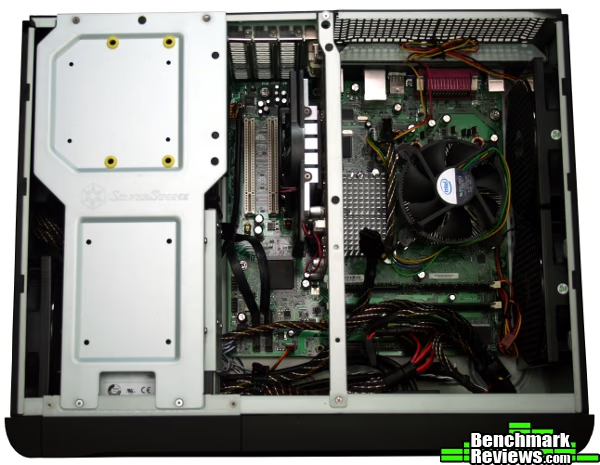
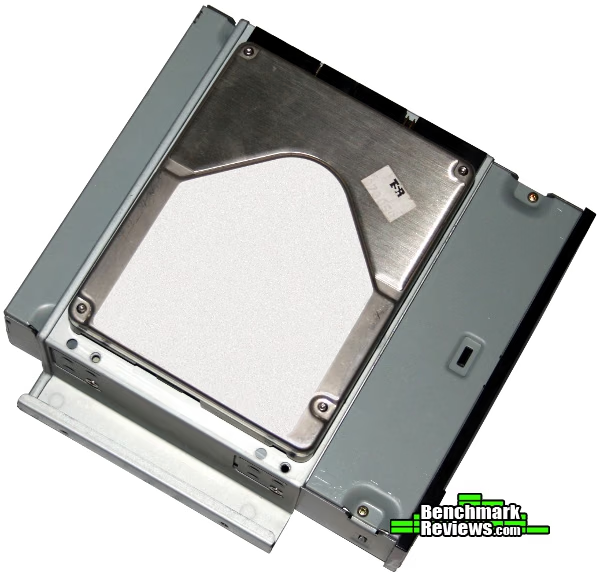
At this point you'll want to finish running, connecting and tying down cables for a clean, finished look before installing the ODD. The ODD tray also requires screw assembly. This is also where SilverStone hid the last HDD mount. Before installing the ODD just slap a hard drive on the bottom side. Screw in the ODD then four more screws to attach the ODD tray back to the frame.
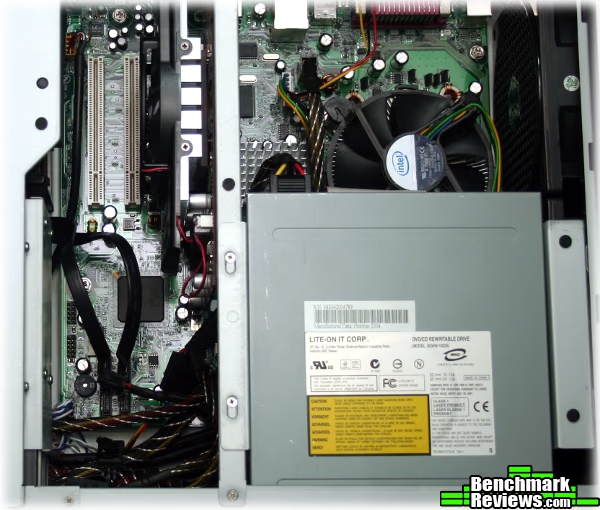
As you can see in the image above, a standard 5.25" external ODD hangs over the CPU when installed. This makes it impossible to install any kind of standard CPU cooler. The distance from the CPU to the ODD is 70 mm and the distance to the top of the case is 120 mm. If you need the extra cooling you'll want to buy either a low-profile CPU cooler or a shorter DVD drive. SilverStone, of course, sells both. Last thing to note from the above picture is the available space for expansion cards. You can fit a video card up to 11" in the GD06.
Building the GD06 wasn't convenient or fast, but everything fit, it looked nice, and there was room to spare. Given my experiences with other HTPC builds I'd have to say it was better than par.
HTPC Chassis Final Thoughts
I did say I wanted the kitchen sink on my HTPC right? But to get a case that's affordable, not everything will fit. On the GD06 SilverStone managed to fit a framework for performance. To me that seems to be the main theme for our readers. Performance and cost, though I know for some the cost is less of a factor and performance is more important. That's why the GD06 is a good fit at Benchmark Reviews. But in keeping costs down you'll miss out on some of the finer aspects of HTPCs like digital displays, external controls, IR and the like.
One interesting note on HTPC cases, they are difficult to find with shallow depths. Actually, that's true for all cases. In order to fit everything in you always have to stack two components. You may not think about it often, but it always works that way. Standard ATX cases stack the motherboard behind the hard drive cages. A lot of the innovation we've seen in the last couple of years has been by modifying the hard drive cages to better utilize the space. If you think top to bottom in a standard case, the PSU is on top or below the motherboard. But things don't have to be stacked that way. It's just a shape that's fairly regular shape. Not a perfect cube, not a long skinny box, just normal. But HTPC's fall under a different rule. The depth dimension is often the critical dimension when I help people build an HTPC. This is one area that SilverStone has done well versus others. They stack the hard drives in front of the PSU as their depth dimension. They could get another couple inches if they stood the PSU up on end.
SilverStone GD06 Conclusion
When it comes to performance, it's somewhat difficult to give a rating for the GD06. On the one hand it held lots of stuff really well, but on the other hand it was a real pain to build. But compared to other HTPC cases the build could have gone much worse. Still, everything requires a screwdriver, the screws are different sizes and threads, and there were a ton of screws. It made me wish even just for thumb screws on the top panel at least. Despite the inconvenience, everything fit together nicely. There just wasn't anything else to complain about.
The appearance of the GD06 is a step above past cases from the Grandia series. The GD06 is very similar to the GD05 but hides the front ports behind a nice-looking front panel. In most ways this improves the look. But the front of the case is now so plain that it can make it look like some kind of mystery device on the entertainment center. It's missing all of the classic signs of an HTPC or other media device typically found in living rooms which may leave guests wondering, "what is that thing?" Underneath the front panel the finish is drab and boring, so you'll want to leave the door shut by default.
It's a really solid, sturdy case. The steel construction makes the case heavy for its size. But it's the kind of case that I wouldn't mind leaving within reach of clumsy hands. The kids can put in a DVD and I'm not worried about them breaking anything. There's a lock on the front and on the back (Kensington style) so the case is actually a great fit for leaving out in the open, say for a store display. Rubber feet on the bottom provide added traction. There are filters on every fan so the interior will be kept cleaner. Tolerances and screw fittings on the case were all well-designed.
The GD06 can hold up to five hard drives, two of which can be hot-swappable. It can also hold up to five full-size expansion cards, with a video card up to 11" long. The front I/O has two USB 3.0 ports in anticipation of the future. Three 120 mm input fans run silently and provide fresh air to critical areas in the case. With the ODD tray mounted above the CPU there are options for installing a short DVD drive and larger CPU cooler. Aside from these fundamentals there's not a lot of flashy or advanced features common to HTPCs.
As of January 2012, you can find the GD06 for $129.99 at NewEgg or $122.00 at Amazon. This puts it into the upper-middle range for price. In this range you don't typically see any of the advanced or fancy features like digital displays and support for IR. The style of cases in this range is fairly standard, so layout and component compatibility are left to set the cases apart. The GD06 does very well at holding a lot of standard hardware, but a couple other cases provide good competition like Lian Li's PC-C50B. Many of SilverStone's other cases fall into this same range like the standard ATX Lascala series. Bump down in price and you get some cheaper cases that hold fewer parts with cheaper construction. Bump up in price and you can get fancier features. But for quality build, lots of standard parts in a small form factor there are really only a few choices, and most of them are SilverStone. There's not a ton about the GD06 to make it stand out above the GD05 except USB 3.0, hot-swap drive bays and an extra hard drive.
Pros:
+ Small Form Factor
+ Compatible with standard parts
+ Large video card support
+ Front door hides I/O ports
+ Sturdy construction
+ Three 120 mm fans included
+ Hot-swappable, front-access HDDs
+ Space provided for cables
Cons:
- Multiple tools required
- Too many screws
- Different sizes of screws
- No IR support
- Ambiguous appearance
Ratings:
- Performance: 7.50
- Appearance: 7.50
- Construction: 9.00
- Functionality: 8.25
- Value: 8.00
Final Score: 8.05 out of 10.
Benchmark Reviews invites you to leave constructive feedback below, or ask questions in our Discussion Forum.
Reader comments from the original article
6 comments were posted before commenting closed. They are preserved as written. Original avatars no longer resolve and are shown as a placeholder.
RE: SilverStone SST-GD06B HTPC Chassis Enclosure barry Permalink:
not a bad case, but a few things wrong with it. The 2 front hotswap bays don't operate easily. Had a problem with a Joel @ silverstone as both my hotswap bays were defective. He asked that I send him a copy of my invoice as well as the s/n from the case. That was done last October. After numerous emails to him, he said that they sent out 2 different parcels via post to my house. I never received any of them, making me suspect that he sent anything at all. I've received post mail from Hong Kong with better results, so they've lost my business. Won't be buying anything with the Silverstone name on it in the furure!
Recent SST-GD06B Build Brad Permalink:
I recently built a HTPC using this case and Silverstone's recommended PSU for this case. Only problem was, I couldn't fit the PSU with the fan facing down because the hot swappable bays prevented it. I had to flip the PSU upside down but now the fan blows up instead of down creating heat within the case. Emailed Silverstone and no response. I'm curious as to the PSU that was used by the author as I thought a modular PSU would be the way to go. Not so. Besides all that, the case is very quiet and love the hot swappable bays. Plus, I like the clean look of the front. It has a very high WAF.
RE: Recent SST-GD06B Build Daniel Ferguson Permalink:
I installed a Rosewill RD400-2SB. It's flipped so the intake fan pulls air in from the bottom of the case and spits it out the back. The PSU enclosure is sealed well enough that the air flow doesn't mix with the case.
Have this case H Permalink:
I bought this case for my current HTPC build. For the price I consider it a ok buy. Couple of things that detracted from the case: 1. If you buy the modular 500w Strider PC that Silverstone sells you HAVE to mount the PSU fan up. Checking at the install pics the reviewer was able to put his PSU fan down where there is a vent. With the modular Strider the location of the power cables made that impossible. 2. Screws. Little screws. No thumbscrews for case. Just screws. Totally agree with reviewer on this. 3. Mount for hard drive/SSD is lame. I ended up sticking my main drive into one of the two hot-swap bays. 4. I actually did not install a DVD drive as I rarely use one and have a stand-alone Blu-Ray player on my entertainment center. This allows you to install up to 120mm height cooler. Not enough for a Hyper212+ or the other tower-style heatsinks, but a Gemini 2 fits fine. I have an external DVD drive if I ever need to use one.
Looks OK Mergatroid Permalink:
I see a lot of HTPC builds at overclock.net. Many of them use full sized HD6950 or 6970 cards. It's amazing what you can squeeze into some of these things. I've even seen tiny little cases with an H50 or H60 installed along with a video card. I always find it funny when I see a case that uses the same cheap $2.59 filters I used on some of my 120mm fans in my current builds. I only used those filters because there was nothing else handy, I wonder what SilverStone's excuse is?
RE: SilverStone SST-GD06B HTPC Chassis Enclosure Felix Permalink:
This case is a no-go. Too many problems. In addition to what reviewer and other commenter said, my take: 1) No place to put a card reader. Surely, a card reader is essential for HTPC. 2) The front door is unnecessary and a liability. Better to have easy access like AV receivers. A big problem is door blocks the USB ports, where one port will most likely be used to plug in a wireless keyboard/mouse transceiver. Such a transceiver must face the front in order to have adequate range. So why have a door block it? 3) Why a need to have hot-swap trays for HD? Who asked for such a thing in a HTPC? It is better to have 2 5" openings for 2 optical drives. 4) One must be able to install a standard size PS of any design. I have seen better HTPC case design of the same size.