
Samsung SyncMaster 245BW Widescreen LCD Monitor
SAMSUNG 245BW LCD Monitor
We have spent a lot of time at Benchmark Reviews talking about video cards recently - and with good reason. The discrete graphics segment of the market is currently afire with many outstanding price-to-performance options. When we looked at the offerings from the two biggest players, the NVIDIA GeForce 9800 GTX and ATI/AMD HD 3870, we saw that game performance even when scaled to high resolution was simply outstanding. This begs the question; why with such low-cost entrance into owning cards capable of "high-rez" gaming, most users are still running a display of 19" or less? Monitors are arguably the most important component for users, getting more usage than any other component of a PC. The only reasonable answer would have to be cost, as until recently displays above the 19" mark have been prohibitively expensive. That's where the SAMSUNG SyncMaster 245BW enters the scene as very attractively priced 24" widescreen LCD monitor.
Seeing a demand in the market for a display without USB ports, card readers, or tin can speakers SAMSUNG has introduced the 245BW; a first in affordable big-screen monitors. The 245BW is a stripped down "no frills" display; however, the lack of options doesn't mean this is any less of a monitor. The SAMSUNG SyncMaster 245BW sports a native resolution of 1900x1200 pixels, advertises an impressive 5ms refresh time, 400 cd/m2 brightness, and a 1000:1 contrast ratio (3000:1 Dynamic). On paper these specs sound great, however, as hardware enthusiasts Benchmark Reviews is never quite content with what looks good on paper. As per usual we put this 24" LCD through its paces to see just how well this affordable big-screen display performs.

The SAMSUNG 245BW 24-Inch LCD Monitor is designed with intentional appeal toward a wide range of customers, from first time buyers to gaming enthusiasts and serious photographers offering a sharp ultra-widescreen image with 16:10 aspect ratio. An advertised 1,000:1 (3,000:1 dynamic) contrast ratio with 1920x1200 pixel resolution that goes beyond the standard full HD resolution of (1920x)1080p. A display ideal for Blu-Ray and HD-DVD films, games and comfortable for all types of office use such as web browsing, spreadsheets, etc - a sized that's especially well suited for photo editing. 160º viewing angle and 4-way adjustable stand accommodate for easy viewing set-up. There is also the nice hidden feature in the stand that re-enables pivoting the display allowing for portrait and landscape-oriented documents in full-screen, without the need for scrolling.
The 245BW features a double interface, which handles both a standard D-Sub 15-pin, and fast DVI connection to handle multiple input devices (i.e. PC and Laptop PC). An impressive 5ms response time reduces the "blur" effect common of slower displays, coupled with the vivid clarity of 16.77 million colors makes the 245BW an ideal monitor for rendering video and graphics, enjoying photos, movies, or gaming.
About the company: SAMSUNG Electronics Co., Ltd.

Samsung Electronics was founded in 1969 in Daegu, South Korea as Samsung Electric Industries originally manufacturing electronic appliances such as TVs, calculators, refrigerators, air conditioners and washers. By 1981, the company had manufactured over 10 million black and white TVs. In 1988, it merged with Samsung Semiconductor & Communications.
Samsung Electronics is the world's largest electronics and information technology company, headquartered in Seocho Samsung Town in Seoul, South Korea. Samsung Electronics is the flagship subsidiary of the Samsung Group, South Korea's largest conglomerate, and is the global market leader in more than 60 products, including Semiconductors such as DRAM, SDRAM, Flash Memory and Hard Drives, Digital Displays such as LCD Displays, Plasma Displays and OLED Displays, Home Electronics such as TVs, DVD Players, Blu-ray Players, Home Cinema Systems, Set-Top Boxes and Projectors, Mobile Devices such as Mobile Phones, MP3 Players, Digital Cameras and Camcorders, Computing Products such as Monitors, Laptops, UMPCs, CD and DVD Drives, Laser Printers, Fax Machines and Home Appliances such as Refrigerators, Washing Machines, Microwaves, Ovens, Vacuum Cleaners and Air Conditioners.
Features & Specifications: SAMSUNG 245BW
Built with Twisted Nematic (TN) LCD panels the 245BW is among the top displays in SAMSUNG's lineup utilizing their made in house panels. TN panels have been with us awhile now, and while they are inexpensive to manufacture there are certain performance characteristics that some dislike; specifically their reduced viewing angles. However, sitting directly in front of a TN display the loss of contrast is not be as apparent as when viewed off axis by a few degrees. Needless to say TN panels are not ideal for multi-person viewing. PVA (Patterned Vertical Alignment) and IPS (In-Plane Switching) are two of the other competing standards. Though these panel types offer a greater viewing angle and better color reproduction, they also suffer their own issues. Namely; reduced refresh rates, input lag, and due to lower volume production higher cost.
Without getting into too much detail - TN based displays ability to accurately reproduce colors, like all LCD displays, relies on the ability of the individual Liquid Crystal (LC) pixels to transition between different states of transparency (shades of grey), and to a lesser extent the light source coming through those liquid crystals. We measure these shades of grey as steps. 256 steps of grey per pixel gives us a display capable of 8-bit color (2x2x2x2x2x2x2x2), and having an 8-bit pixel for each Red, Green, and Blue gives us 16.77 million color possibilities (256x256x256).
Unfortunately, most TN panels cannot achieve "true" 8-bit (which is to say, the liquid crystals do not have 255 unique states). However, there are different methods to make a 6-bit panel look like it's an 8-bit one. The most common method is FRC (frame-rate control), where a pixel is rapidly switched between two adjacent colors to produce the desired color; also referred to as dithering. If implemented well, it is difficult to tell the difference between a 6-bit display using this and a true 8-bit display. If not implemented well, it produces artifacts like flickering on certain colors (the eye detect the pixels flip-flopping between states). LG-Philips based TN panels use FRC, and I have yet to hear anyone detect the flickering effect (although I have not had the opportunity to check out their latest panels yet). I cannot find out anything about how Samsung gets 8-bit out of their TN panels. On some of their 1st-generation PVA panels, they used what they called "Hi-FRC," which I assume means hi-rate FRC. Since Samsung is usually quite good at qualifying their LCD panel stats (especially if you go to the Samsung semiconductor website and look at the brochures they give other companies who buy their panels), I would guess they also do some sort of hi-rate FRC for TN. But I don't know for sure. Certainly, the consensus seems to be that colors look better and are more accurate on their 8-bit PVA panels than their TN panels. Samsung term their 16.7 million color TN panels "6-bit+ Hi FRC", but they still use FRC technologies rather than true 8-bit color depth.
Benchmark Reviews is currently piecing together an article that will take a more in-depth look at these different LCD technologies. For now the best indicator of what panel type is best suited for who should be decided by what the intended use will be: Gamers and Movie buffs will appreciate TN's fast refresh rate and lack of input lag, while Graphic Designers will likely look elsewhere as they typically need accurate color reproduction and expanded viewing angles to maintain consistent contrast across the display. Ultimately though, price seems to be the major deciding factor for most users - an area where other panel technologies can't compete due to TN's mature production process.
|
Specifications |
SAMSUNG SyncMaster 245BW |
|---|---|
|
Display |
LTM240CT01 |
|
Size |
24" wide |
|
Resolution |
1920×1200 |
|
Technology |
a-si TFT/TN |
|
Response (rise and fall) |
5 ms? |
|
Response (gray-to-gray) |
5 ms? |
|
Input Lag |
? |
|
Backlight |
cold cathode fluorescent lamp (CCFL) |
|
Contrast |
1,000:1 |
|
Dynamic Contrast |
3,000:1 |
|
Brightness |
400 cd/m2 |
|
Pixel Pitch |
0.270 x 0.270 mm |
|
Color Depth |
16.7 Million (6-bit+Hi-FRC) |
|
Color Gamut |
72 % NTSC |
|
Viewing Angles (C/R 10:1) |
|
|
Viewing Angles (C/R 5:1) |
160/160° |
|
Pivot |
Yes* |
|
Swivel |
350° |
|
Tilt |
-3/+25° |
|
Height Adjustment |
100 mm |
|
Picture in Picture |
No |
|
HDCP |
Yes |
|
HDMI |
No |
|
DVI-D |
Yes |
|
D-Sub |
Yes |
|
Composite |
No |
|
Component |
No |
|
S-Video |
No |
|
DisplayPort |
No |
|
D-Terminal |
No |
|
HD/SD SDI |
No |
|
USB |
No |
|
Speakers |
No |
|
Horizontal Frequency |
30-81 kHz |
|
Vertical Frequency |
56-75 Hz |
|
Power Supply |
Internal |
|
Power (Max) |
100W |
|
Power (Typical) |
100W |
|
Power (Idle) |
<2W (DPMS mode) |
|
Dimensions (W×H×D) |
560×444.5×250 mm |
|
Dimensions (Base) |
560×368.5×83 mm |
|
Weight |
8.4 kg |
|
VESA |
200×100 mm |
|
Kensington lock |
Yes |
|
TCO |
TCO'03 |
|
Windows Vista Logo |
Certified for Windows Vista |
|
Warranty |
3 years P/L |
|
Pixel Defects (ISO 13406-2) |
Class II |
|
Features |
DVI support, Narrow bezel, Optional integrated speakers, Mechanical S/W DVI (HDCP) |
*Pivot feature requires removal of mounting stand lock screw
-
Widescreen Format: A 24" monitor with a 16:10 widescreen aspect ratio and 1920 x 1200 resolution for easy and efficient multi-window exploits.
-
Certified for Windows VistaTM Operating System: Premium certification is reserved only for products proven to take full advantage of everything the Microsoft Windows Vista operating system offers.
-
MagicSpeedTM 5ms Response Time: Fast pixel response means fast action with virtually no blurring or ghosting.
-
MagicTuneTM with Asset Management: Monitor adjustments are made quickly and easily via the mouse, for a sleeker monitor with fewer buttons.
-
MagicBright 3TM: Seven easily selectable brightness modes include Text, Internet, Game, Sports, Movie, 3,000:1 Dynamic Contrast and Customized modes.
-
Four-Way Adjustable Stand: Tilting, swiveling, height-adjustable, and unnofiacally - pivoting.
SyncMaster 245BW Package and Contents
Most of us take for granted a products packaging, that is till the day we receive something that's been damaged in transit due to lack of, or improper packaging. Equally important to protection is proper labeling. For these reasons Benchmark Reviews is always critical of how companies pack their product. Making sure the item well labeled, informative and secured enough to make the punishing journey through shipping. As such, we will always spend some time in reviews on what most people will probably throw away without a second thought.

The retail package is what you'd expect from a typical consumer brand. A box without any "bells and whistles", using a basic double-walled carton design that houses the SAMSUNG 245BW snugly between double foam inserts in a polyethylene dust bag. SAMSUNG uses similar packaging for all of their displays, making it a little difficult to distinguish between their products - with only model numbers and feature lists to set them apart. There are handholds at either end of the carton intended to aid in moving it, the box is not overly heavy at ~20lbs, but it's big and would be awkward to carry without them.

Though not a very extensive bundle, SAMSUNG does provide everything needed to get started. Included are both a D-SUB analog cable and DVI digital cable, appropriate as the 245BW has both inputs. There is no paper manual provided, instead it's found digitally on the support CD. This is a plug and play (PnP) monitor and should be detected using Windows standard PnP drivers. However, it's always nice to have a reference at hand should there be any issue preventing the display from functioning. As a bonus SAMSUNG has included a micro-fiber cleaning cloth to help keep the high-gloss cabinet free from fingerprints and dust.

Included with the 245BW:
-
Quick Setup Guide
-
Warranty Card and Safety & Handling Documentation
-
Cleaning Cloth and Care Instructions
-
Support CD with User's Guide, Monitor Driver, Natural Color, and MagicTuneTM Software
-
D-sub Cable
-
Standard Power Cord
-
DVI Cable
SyncMaster 245BW: Closer Look
SAMSUNG denotes its different monitor's features by model number. For example: the 24 in the model name refers to the 24" diagonally measured screen. The 5 is in reference to the stand and its adjustments. The BW refers to the panel type and grade.

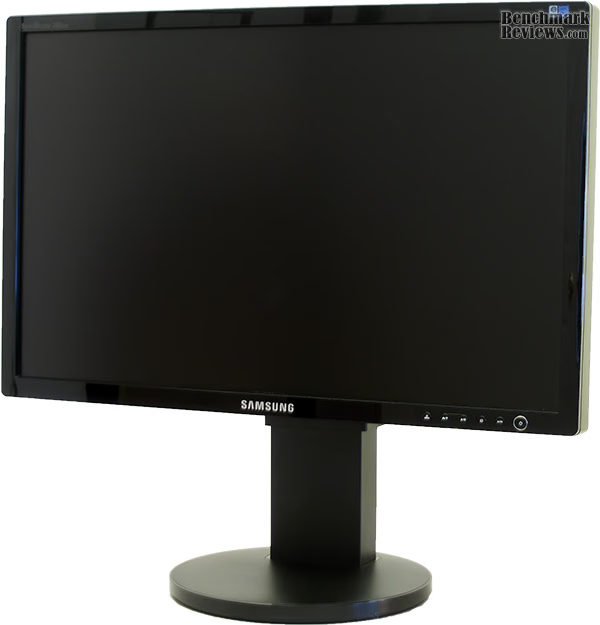
SAMSUNG has used their familiar cabinet to house the 245BW, with the only noted difference between this model and others in the 24" SyncMaster series being the high-gloss piano-black finish on the 16mm bezel surrounding the display. Attractive though it is, the high-gloss finish creates a problem other than fingerprints, by reflecting the image on the screen around the inner edge of the bezel - a minor flaw that creates a sometimes distracting effect.

Turning things around shows the design used on the rear of the display is near identical to the rest SAMSUNGS displays in the SyncMaster series. Utilizing matte black plastic accented with a lot of vent grills. The excessive venting is defiantly needed as surface temperatures measured in excess of 110°F (43°C).
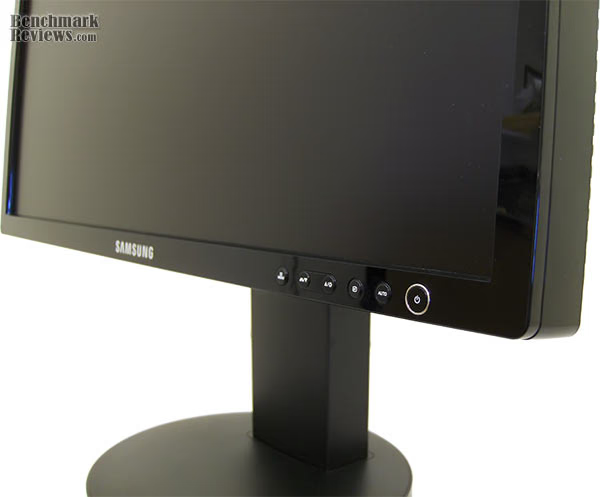
The control buttons are placed in the bottom left of the front panel and labeled with clear white icons. Quick access is provided to the MagicBright modes, to the brightness setting, to switching the inputs and to the auto-adjustment feature. The controls on the 245BW are intentionally minimal as SAMSUNG has bundled their MagicTune Software with the display. MagicTune employs an advanced display technology, called the DDC/CI (Display Data Channel Command Interface) protocol, to control all monitor settings from within Windows. By connecting the signal cable, and by moving and clicking your mouse it is possible to set the optimum display settings without accessing the 245BW's built in OSD (On Screen Display) menu. This is a great aid in changing display settings that gives access to these controls to the not so savvy and/or physically impaired users. There is one drawback to the MagicTuneTM software; it's not compatible with all hardware set-ups.


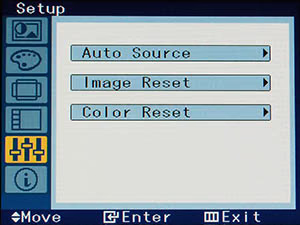

Here are shown the different menus of the 245BW's OSD. Each of the OSD controls are accessible from within Windows via SAMSUNGS's MagicTuneTM software.

The Power button is designed with a nice atheistic. It's large and has a thin shiny chrome outline that contrasts with the piano-black of the case. The middle of the button is highlighted with blue LED. It is mild enough not to distract, but it begins to blink in sleep mode, irritating to some for sure. The blue LED cannot be disabled on the 245BW as this option is only available on a few newest models of Samsung monitors although it has become a standard feature of other brands like NEC or LG.
Detailed Features
As the consumer electronics industry moves toward protected high definition video content HDMI connections have become more widely used. As a result is we are now seeing a lot of computer displays equipped with HDMI ports in the market. First, to clear away one element that can be confusing: DVI and HDMI are exactly the same as one another, image-quality-wise. The principal differences is that HDMI carries audio signals as well as video, and uses a different type of connector, however both use the same encoding scheme, and that's why a DVI source can be connected to an HDMI monitor, and vice versa, with a DVI/HDMI cable. Most computer users will not use the audio options afforded by their monitor and the inclusion of HDMI connectivity seems redundant at best.
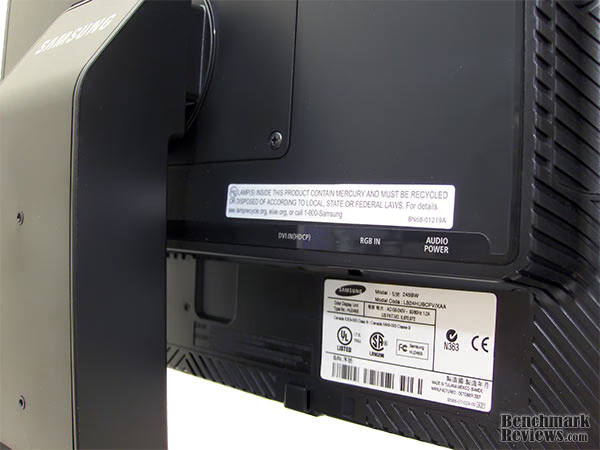
Regarding inputs; the SAMSUNG 245BW offers an HDCP compliant DVI port and an analogue D-SUB but no HDMI port. The 245BW is marketed as a computer display, and its video-processor lacks 1:1 pixel mapping. This means that any external high definition source you connect, such as a Blu-ray DVD player or PlayStation 3 will be scaled to the full 1920x1200 resolution stretching the image. For HD content from using the 245BW as a computer display this won't be a problem as NVIDIA and ATI/AMD (as of Catalyst release 8.3) drivers support Image scaling that is performed by the GPU.
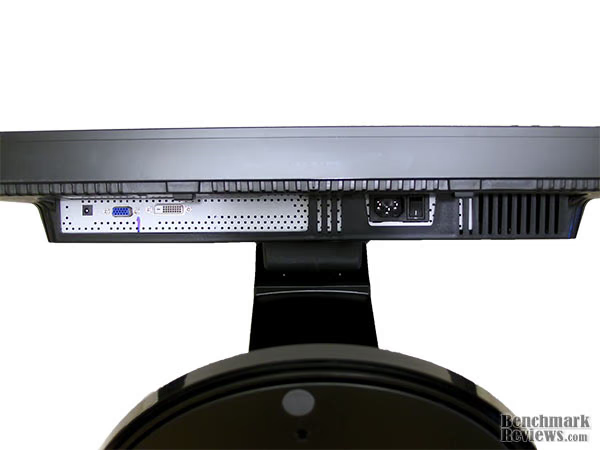
In addition to the video inputs there is also an integrated power adapter for optional speakers, a standard power port, and a toggle switch for the built in power supply.
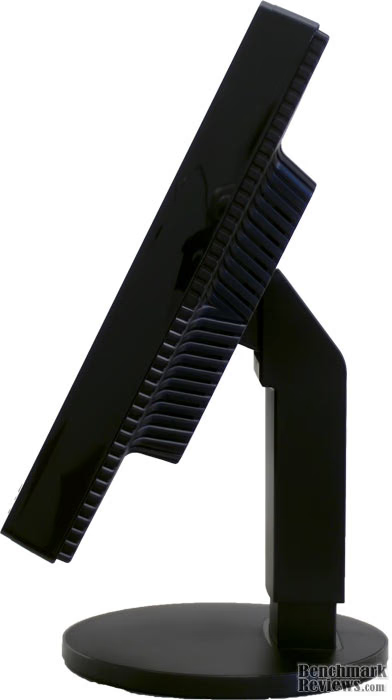
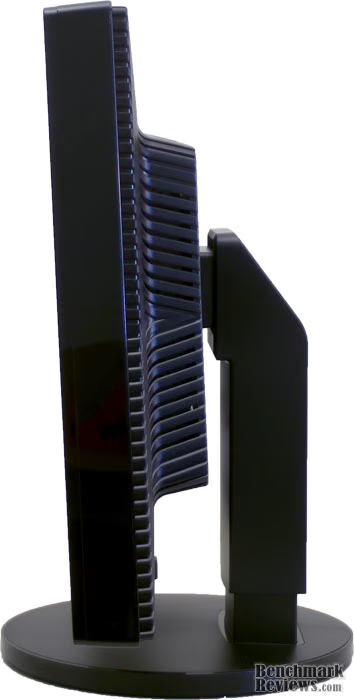
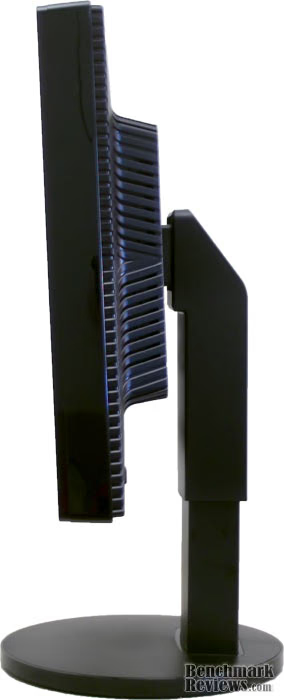
As for the functionality of the 245BW's stand; it allows adjustments to tilt 3° forward and up to 25° back as well as the height of the screen. The stand also rotates 350° smoothly around the vertical axis via the bottom of the base's rotating platform.

Portrait mode for the 245BW had been disabled, likely due to the poor viewing angles of the TN matrix. It's interesting that it has been disabled since most instances of using portrait mode are for viewing documents and loss in contrasts won't affect the usefulness of this feature. To enable the pivot feature all that's required is the removal of the locking screw from the stand.
SyncMaster 245BW: Testing & Results
Benchmark Applications
-
LCD Test v.02
-
ColorVision Spyder2PRO 2.3.5
Test Setup:
-
Motherboard: ASUS P5K3 Deluxe Wi-Fi-AP Intel P35 Chipset (BIOS 810)
-
Processor: Intel E6600 Core 2 Duo 2.44GHz ~1.3v (9x333MHz FSB) 3.0Ghz
-
Cooling: Zalman CNPS8700 LED
-
Memory: 2 GB (1,024 MB x2 modules) Patriot PC3-15000 DDR3@ 1333Mhz
-
Video: Diamond Multimedia VIPER HD 3870 512MB @ Stock w/ ATI Catalyst v8.4
-
Audio: Sound Blaster X-Fi
-
Hard Disk: 2xWD RAPTOR 74GB 16MB Cache Raid 0 10,000rpm, 1x WDC WD4000AAJS-00YFA0 (372 GB, IDE)
-
Optical Drive: SONY DVD RW DRU-830A SCSI Cd-Rom Device, HL-DT-ST DVD-ROM GDRH10N (16x/48x DVD-ROM)
-
PSU: Ultra X3 1000 watt modular cables
-
Operating System: Windows XP Professional Service Pack 3, v.3264 with IE7 (OS Version 5.1.2600 WinXP Retail)
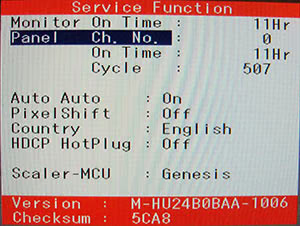
Using the hidden service function built into the 245BW's firmware (accessible by setting contrast and brightness to zero then holding both the menu and input buttons) we can verify the internal specifications for the display. SAMSUNG has removed the panel information from this menu likely due to the recent controversy surrounding their 226BW display "lottery". However, SAMSUNG has said that they now only use their own in-house panels for all their displays - though there is no way to confirm this short of dismantling the display.
Results:
Viewing angles are one of the key areas that set TN based displays apart from other panel technologies. The problem, as most already know, is when viewed off axis LCD displays exhibit a reduction in contrast that skews colors and brightness.
The established standard for measuring the maximum viewable angle is at a point when loss in contrast ratio is no more than 10:1. Unfortunately, some manufacturers now measure the maximum viewing angle at a contrast ratio of 5:1. And that is how SAMSUNG has arrived at their 160° viewable angle for the 245BW.
We don't like that companies change the standard to make their products appear to have better specs, and always caution buyers to do a little research before making the sale. The up-side to this viewing angle issue is that it won't affect the vast majority of buyers as this display and most like it are intended for single person viewing.
To show the effect on contrast from different viewing angles on the 245BW, images are taken from 36" (91.44cm) at 30° off axis from above, below, left and from right with a centered shot for comparison.
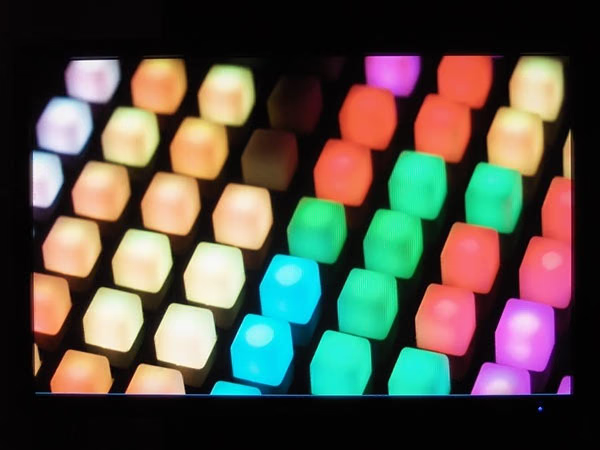

0° and 30° Left
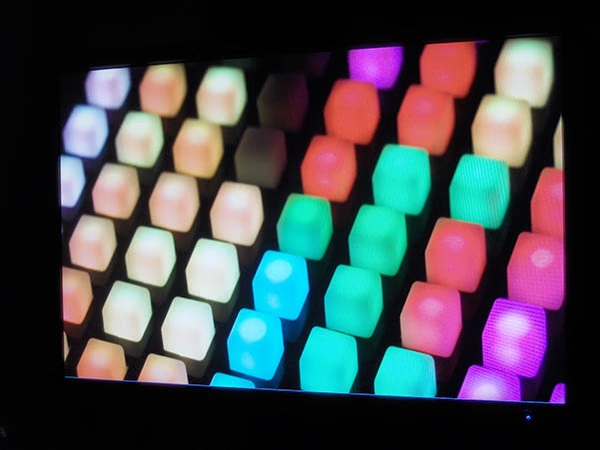
0° and 30° Right

0° and 30° Above
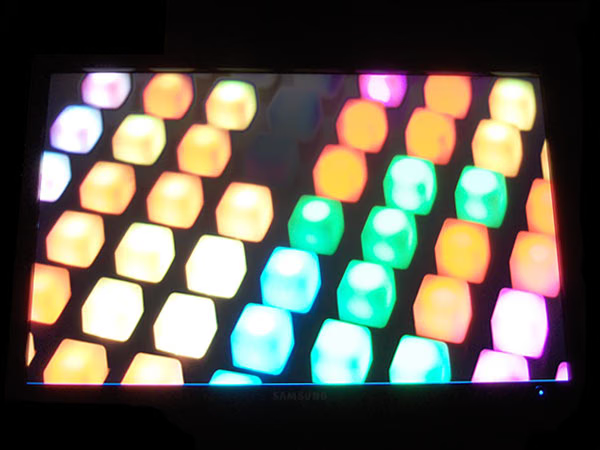
0° and 30° Below
True to form this is a TN panel, easily apparent by its less than stellar viewing angles. Though loss of contrast isn't as noticeable when shifting view from side to side as it is vertically, it's still enough to make this display unacceptable for critical color work. However, most gamers and serious photographers will have no problem taking advantage of such a large screen, and viewing angle will always be a non-issue for office applications.
Fast pixel response is especially important is in motion video, such as gaming and movies, where every pixel needs to quickly change its color at every screen refresh. Displays with a lower pixel response time are able to return to their static state faster to, ready to deliver the next image. Because motion video is always shifting a display with a lower pixel response speed is going to reproduce a more natural looking image. On the other hand, a display with a slower pixel response time will result in artifacts such as blurring and ghosting of moving images. The measured of Response Time is the amount of time it takes for each pixel transition from one state of on to another state. The smaller the response rates of a display the more artifact free a moving image will appear on the screen. To add confusion to the whole thing there are different measurements taken for response times. The first is measured in time to Rise-and-Fall, the time it takes a pixel to transition from black (on) to white (off) and back to black (on). The other measurement is known as Grey-to-Grey (GTG), the time it takes a pixel to transition from one state of "on" to another. Since most motion images tend to transition in GTG and not on-off-on, GTG is the preferable measurement of response time.
SyncMaster 245BW: Response Time Tests
To show response times, we use LCD Test v.02 set to 5ms (200Hz) and our camera set to 1/80s shutter speed and a 2.8 F-stop at ISO-100. LCDs run at a refresh rate of 60 Hz, and we use a shutter speed of 1/80s, this simulates image retention on the retina (persistence of image) rather than an individual pixel transition, giving a more real-world result. This is by no means a perfect way to discern response time, rather it is meant to give an idea of the ghosting effect if any that will be present on a display.

The SyncMaster 245BW advertises a response time of 5 millionths of a second, whether it is grey-to-grey or rise-and-fall is not stated in any documentation we could find. This of course is standard marketing practice. When the rise-and-fall numbers are the best, they're quoted. When grey-to-grey is better, those numbers are used. As such we deduce that this is a 5ms rise-and-fall time (G-t-G times are favorable and would be stated). Judging from the test image above it's plain to see two frames. Taking into consideration shutter speed and pixel lag, the realistic pixel response time ranges somewhere from 10-16ms. That may seem like a lot, however, for small brightness changes even 16ms won't matter much, as you can't easily see the difference anyway. But for medium changes it can be very noticeable. That's why a mouse cursor waved around on a grey background has noticeably more ghosting on an LCD, than when it's waved around on a solid black or white background.
Luminance Results
To measure brightness, contrast, and color accuracy, we use a hardware colorimeter and accompanying software to test the display. For this we use ColorVision's Spyder 2 Pro Colorimeter and ColorVision Spyder2 Pro 2.3.5 software.
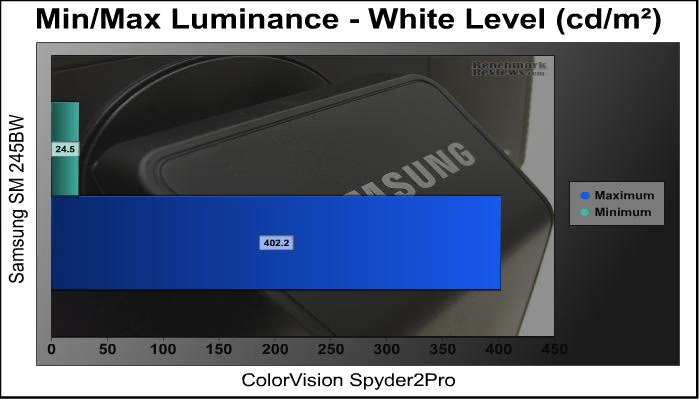


Display Color and Tuning
While adjusting just the brightness level of the 245BW we recorded peak white lumens at just over 400 nits - right in line with its advertised number. With a minimum recorded white luminance of around 25 nits. Keep in mind that even in a well lit room anything over 300 nits is equivalent to staring at a 100w florescent light and will cause severe eye strain and fatigue when doing office work. Such a high luminance level would only be needed in the brightest environments or when playing games/watching movies as they are typically darker. The SAMSUNG 245BW advertises a static contrast ratio of 1,000:1, this number is derived from internal testing done with the panel and doesn't reflect real-world numbers and should be relegated to no more than marketing hype. By adjusting the brightness level alone we measured a real contrast ratio that ranged from 550:1 to 620:1. Though it is possibly to tune colors and contrast to get a better rate most users will not have the feedback provided by a colorimeter to do this with any accuracy. The Dynamic Contrast ratio also falls short of the advertised 3,000:1 coming in at just under 2,700:1. Dynamic Contrast, popular in LCD TVs, achieves its greater contrast by using a little trick with the backlighting. When the image displayed on the screen is mostly black the video-processing chip inside the display adjusts the frequency of the CCFL backlighting in turn darkening the screen. This effect is not instantaneous on the 245BW, but rather gradual and noticeable. Needless to say, until the technology improves, or the industry moved to LED backlighting, Dynamic Contrast should be avoided and it's advertised figured disregarded in favor of static contrast ratio.

Something that is often talked about in web forums and with end users, but sadly omitted in most reviews is a trait of LCD displays known as "backlight bleed" or "halos". The entire surface of an LCD is backlit from behind by a light source (CCFL light in most cases) and the LCD screen blocks out the light that is not needed. Backlight bleeding occurs when this light is not 100% blocked around the bezel allowing some light to "bleed" through the edge of the LCD causing spots of lighter areas on a dark or black background. Unfortunately, almost all LCDs suffer at least a small amount of backlight bleed because the opacity of LCD panels is not enough to block all light, though it only causes problems if it can be easily detected by the human eye. The above image shows the SAMSUNG 245BW's level of backlight bleed, as you can see the sides and bottom edge are lighter in color than the center of the display. Though only noticeable when a dark image is displayed the level of backlight bleed is not visible on anything but a pure black image and goes undetected in the majority of use.
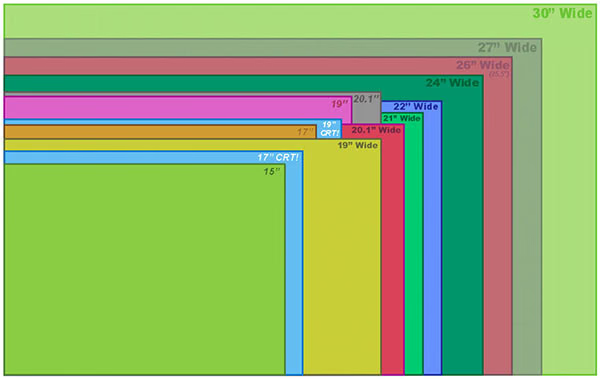
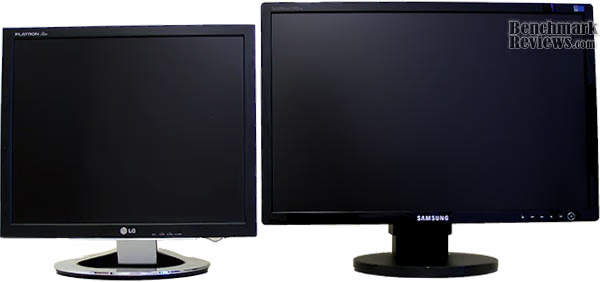
As most users are still running displays under the 19" mark, here is an idea of how much more screen area is afforded by moving to a 24". For Comparison we have shown a 19" LG L1980Q with an aspect ratio of 5:4. Vertically there isn't much improvement over 19" screens, where 24" displays really wins out is in the horizontal viewing area, allowing multiple applications and windows to be open at once. Upgrading to a 24"displays offers about 50% more screen area than a 19" model with the added caveat of keeping the older monitor as a second display.
|
Screen |
Active Display Area |
Percentage |
Native Resolution |
Percentage |
|---|---|---|---|---|
|
19" |
1131.7 cm2 |
100 % |
1280 x 1024 SXGA |
100 % |
|
20"W |
1176.1 cm2 |
104 % |
1680 x 1050 WSXGA |
135 % |
|
20" |
1248.5 cm2 |
110 % |
1600 x 1200 UXGA |
146 % |
|
22"W |
1403,0 cm2 |
124 % |
1680 x 1050 WSXGA |
135 % |
|
24"W |
1678,3 cm2 |
148% |
1920 x 1200 WUXGA |
176% |
|
26"W |
1892.0 cm2 |
167% |
1920 x 1200 WUXGA |
176% |
Comparison of Popular Displays by Screen Size
Final Thoughts: SynchMaster Widescreen
The choice is fairly simple in the 24" display segment at the moment. Those with tight budgets will put up with the relatively poor viewing angles, mediocre contrast and colors that TN panels classically suffer from, likely without notice. Those who need it will want a more vibrant but not necessarily more accurate PVA model, or something based on the latest IPS panel technology that offer a little more color accuracy. But unless needed for graphics or media professionals that demand seriously tight color control, odds are the SAMSUNG 245BW with its attractive price point will suit the vast majority of users.
For those that don't want or need all the "extras" that manufacturers like to include with their monitors (i.e. webcams, speakers, and USB ports) and just want a monitor for its intended use, the SAMSUNG 245BW is a solid choice in big-screen displays.
SAMSUNG 245BW Monitor Conclusion
The retail package is typical for a consumer brand, and is little more than a box that displays minimal content or images of the product within and could easily be confused with other SAMSUNG products. The included MagicBright and MagicTuneTM software make out of the box calibration simple, and gives end-users an easy to use interface controlled from within Windows.
The piano-black finish on the bezel surrounding the display gives the otherwise plain cabinet a little aesthetic appeal. The high-gloss is attractive, and aside from the inevitable fingerprint or two it does cause a glare effect that reflects what's on the screen.
SAMSUNG uses their standard cabinet design on the 245BW, and the 4-way adjustable stand, accommodate for easy viewing set-up, with the added feature of pivoting the display. There were zero dead/stuck pixels on the sample we reviewed, and from the research we've done this seems to be the norm rather than the exception of the 245BW. We must mention the backlight bleed problem, though it is apparent on a black screen, has little impact on images during normal use.
The advertised contrast ratios of the 245BW don't fall that close to real-world numbers; however, uncelebrated color accuracy is superb with an average Delta E of 2.24. And during subjective evaluation between other 24" TN monitors the 245BW appeared to have the best color in the group.
Value is where the 245BW really shines. SAMSUNG has given the 245BW an MSRP of $499, a little too steep for a no-frills display; even with a 24" screen. However, with a little price searching it's possible to find better deals on the 245BW, and with better deals to be had at local brick-and-mortar stores. Presently, NewEgg is offering the Samsung 245BW for $299.99 shipped after rebate.
Considering the price point there's not much to dislike about the SAMSUNG 245BW that isn't forgivable. Built with TN panel technology the 245BW doesn't bring any real advancement as much as it sets a precedent in the current market - a 24" screen that sell for less than $500. This is impressive, as buyers can now afford a big-screen display for a price close to that of most 22" screens.
Pros:
+ Affordable 24" Widescreen
+ MagicTuneTM and MagicBright Software allow calibration control within Windows
+ Accurate Colors
+ 4-way Adjustable Stand (5-way including disabled pivot feature)
+ No-Frills
+ Attractive Cabinet & Stand
+ Zero Dead Pixels
+ 3-year Manufacturer's Warranty 
Cons:
- Inaccurate Advertised Contrast Ratio
- High-Gloss Finish Reflects Images
- Backlight Bleed
- Inaccurate/Poor Viewing Angles
- Pivot Feature is Disabled
Ratings:
-
Presentation: 8.5
-
Appearance: 9.25
-
Construction: 9.25
-
Functionality: 9.0
-
Value: 9.25
Final Score: 9.05 out of 10.
Excellence Achievement: Benchmark Reviews Golden Tachometer Award.
Questions? Comments? Benchmark Reviews really wants your feedback. We invite you to leave your remarks in our Discussion Forum.
Reader comments from the original article
1 comment were posted before commenting closed. They are preserved as written. Original avatars no longer resolve and are shown as a placeholder.
mobile george Permalink:
i have mobile samsung galaxy s just i want the instruction book in english or arabic best regards