
Microsoft LifeCam VX-5000 WebCam
Microsoft LifeCam VX-5000
Digital video and digital photography have become inextricably entangled in the lives of people in the 21st century. Cameras are being inserted into everyday life wherever you turn. Since the point and shoot digital camera was introduced and disseminated into popular culture, we've seen a veritable explosion of camera usage in all facets of life. YouTube was the main catalyst that brought amateur video to the forefront of popular culture. Though, despite the sudden increased popularity of consumer photos and videos, only the cheapest digital cameras are finally selling for less than $100 and camcorders are still expensive.
Enter the webcam. Its low price point and easy interface make it a prime candidate for the amateur video maker. Webcams have been around and filled the sub-$100 digicam realm for many years already. However, earlier cameras were hampered by poor video quality, poor transfer rates (USB 1.1) and a lack of compatibility or support. Though, nowadays, all facets have improved.
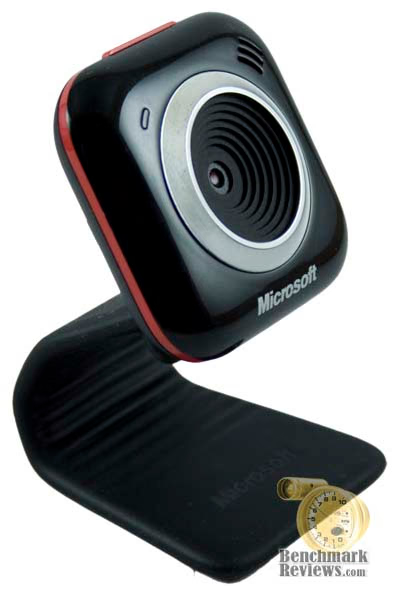
The Microsoft LifeCam VX-5000 is the next step in the line of Microsoft webcams. With each new webcam product released, you'll be hard pressed to find new features, per se (though the VX-5000 certainly has a couple novel features). Rather, each new entry is more a refinement of previous cameras with better video quality, better audio quality, higher resolutions, better colors, etc. As such, the VX-5000 attempts to improve upon the formula by offering high resolution photos, VGA resolution video, a noise-canceling microphone among other features.
The LifeCam's performance should appeal to all but the most hardcore and its price of $49.95 MSRP won't break the bank either. Its design also offers an interesting new take on a camera base that makes it easy to place in most places and tilt at most angles. At Benchmark Reviews, we'll provide the scoop on this camera and how well it performs.
About the company: Microsoft
Microsoft Hardware was formed in 1982 to develop a device that would help people use the company's new word processing program. The device was a mouse and the application was called Word, laying the foundation for a future of delivering hardware that helps people better and more easily use software.

In the quarter century since, Microsoft Hardware has continually raised the bar, designing revolutionary peripherals that deliver groundbreaking performance, comfort and design.
From the original "green-eyed mouse" to groundbreaking products like the LifeCam NX-6000 and Wireless Entertainment Desktop 8000, Microsoft Hardware has delivered exceptional mice, keyboards, communication products, and gaming gear that has changed the way the world works, plays, and connects.
Microsoft LifeCam VX-5000 Features
The LifeCam VX-5000 features the typical assortment of webcam devices: A video camera and a microphone. It interfaces with the computer using USB 2.0. The microphone, positioned on the top right side of the webcam's face, is unidirectional, pointing in the same direction as the camera and features both noise cancellation and echo cancellation. However, the features don't stop there. The camera is also capable of taking photos at 1.3 mega pixels at a resolution of 1280x960. The webcam features a blue light on the top left hand side of the webcam's face that turns on whenever the camera is in use. There's also a button on the top of the LifeCam's face that, when pressed, starts Windows Live Messenger for you. If you're already signed into Windows Live Messenger, it pops up your contacts list so that you can make a video call right from there.
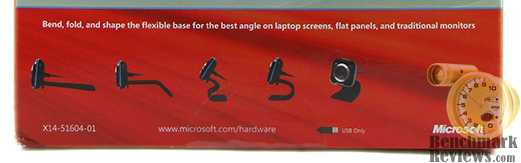
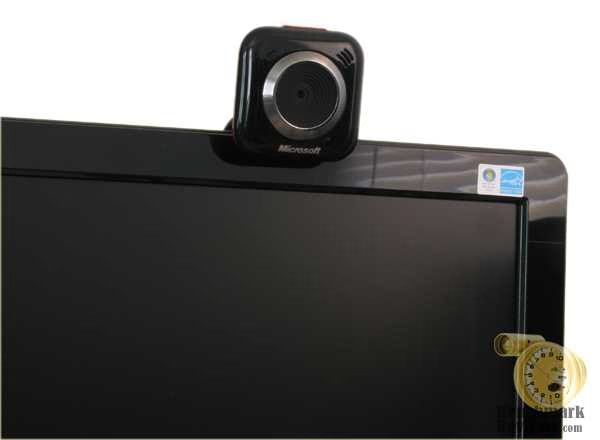
The last and probably most important feature of the camera is its base. The base is made of a flexible, rubber-coated and hard material. The base can be shaped to accommodate many different positions and directions. It can sit on your desk, sit on your monitor, or be molded around a round object sitting on your desk. The base also has a nub that is perpendicular to the area on which it rests near the webcam head that can rest against the monitor's face so that it won't slide off. The camera also features a slight swivel where the base meets the webcam so that you can position the camera wherever and still easily point it toward yourself.
LifeCam VX-5000 Software Specifications
Video is recording at the following resolutions, frame rates and bitrates in WMV video with 160kbps WMA audio.
|
Resolution |
Frame Rate |
Bit Rate |
|---|---|---|
| 640x480 |
15 fps |
1900 kbps |
| 320x240 |
30 fps |
900 kbps |
| 160x120 |
30 fps |
675 kbps |
Images are take at 1280x960, 640x480, 320x240 and 160x120 in jpeg format. Audio is recorded in WMA at 48 kbps, mono.
Closer Look: LifeCam VX-5000
The LifeCam VX-5000 has a very stylish look. The face is made with a glossy black plastic and the lens is accentuated by a chromed ring and matte black plastic.
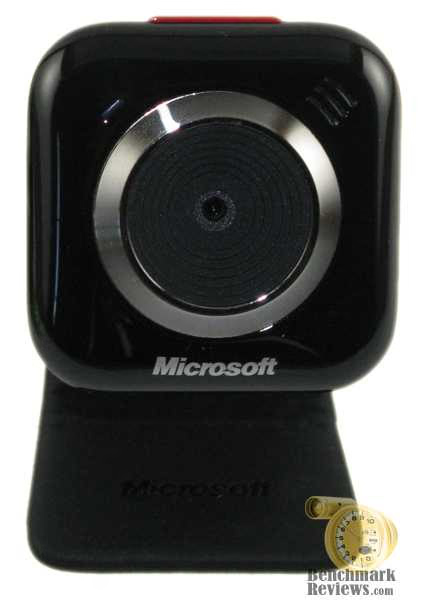
The camera features a colored ring that goes all the around the face. This ring comes in red, blue and green. A blue LED is placed in the upper left hand corner of the face that turns on when the camera is in use. It's actually quite dim, which is a good thing. It's bright enough so that someone can figure out that the camera is on or active, but not bright enough to affect your shots or color your face (especially in low-light shots). The USB cable peeks out the center of the back of the webcam.
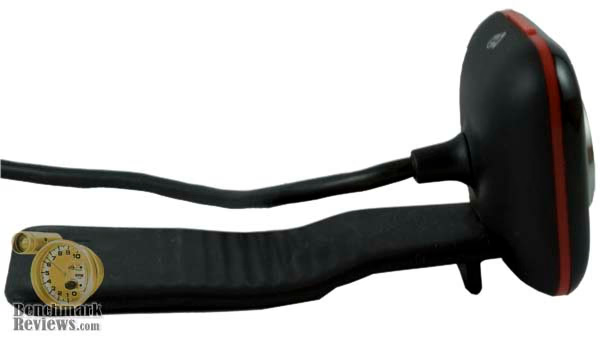
Microsoft's LifeCam VX-5000 is very compact. The face is only a little larger than a postage stamp and the foot print varies depending on how clever you are at placing it. While resting on top of my monitor, all I have to deal with is how to route the USB cable. The cable itself is 6 feet long which should accommodate most computer desks and workstations.
Contents of the Package
The LifeCam VX-5000 retail box came packaged with the camera shown prominently through a clear plastic box peeking through the cardboard in the upper right hand corner. This certainly does a great job of showing how small the camera is (and thus, how unobtrusive), though I can't say I feel 100% sure that some joker didn't manhandle the camera before I got it into my hot little hands.
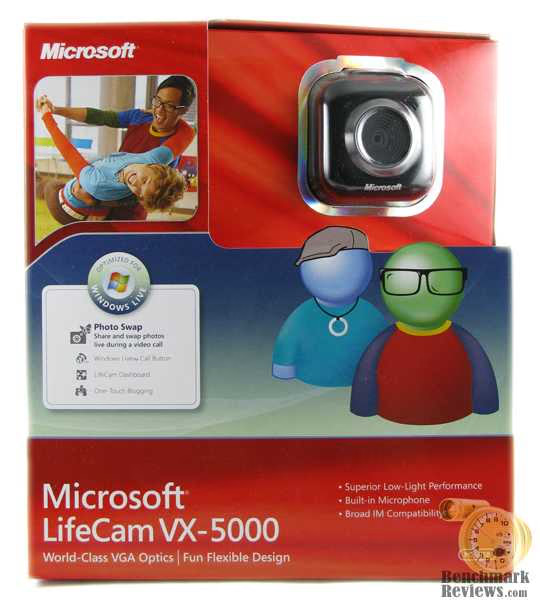
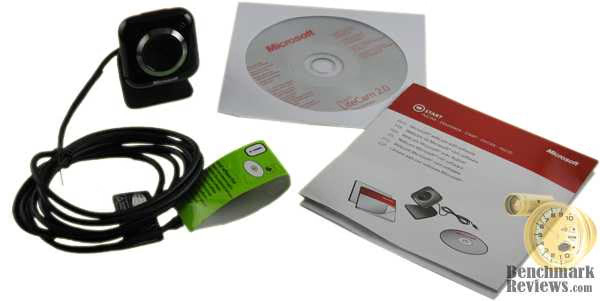
Suffice it to say, my LifeCam VX-5000 came in fine, so I guess that may be a non-issue. The contents of the box are rather Spartan (despite the size of the box) containing the camera itself, an instruction booklet, a safety information booklet and a CD with drivers.
LifeCam VX-5000 Installation and Software
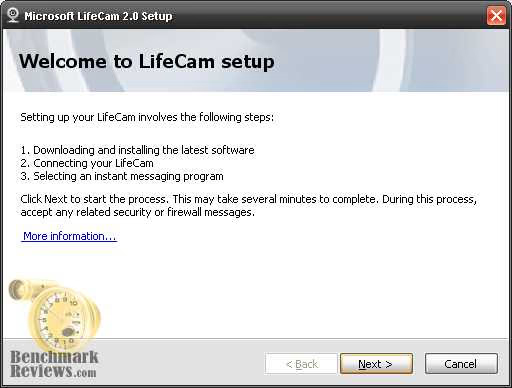
The LifeCam's installation suite came with drivers and the LifeCam software. Installation went along rather smooth, though was a little lengthy because it downloaded the latest software. After the installation of the LifeCam drivers and software, I opted to install the latest version of Windows Live Messenger, which installed rather easily.
The main component of the LifeCam software is a simple program for recording video, audio and photos. At the press of a button you can record video, audio and take a photo. Camera settings are accessed through only a couple clicks. You have the option for recording both video and photos at 160x120, 320x240 and 640x480. You also have the option to record videos at 640x480 and take photos at 1.3 mega pixels (1280x960). An option to record at 320x240 with 1.3 mega pixel pictures would have been nice. For video resolutions smaller than 640x480, you can pan and zoom the video to focus on a single area.
The software comes with a set of effects. Unfortunately "effects" simply means "picture overlaid on your video". The effects are non-interactive and don't change. Some of the effects will animate (and, admittedly, I do really like the animated electricity effect), but by and large, they're just clip art resting on top of the video.
Unfortunately, the LifeCam 2.0 software comes with little configuration. I cannot change the directory to which the images, audio or video is saved. I cannot change the quality levels, bitrate or format of the audio and video. Also, when I press the button to make an image, it makes a sound, which I'd rather turn off.
Windows Live Messenger is, pretty much, the same as it has been for a while now. The video conferencing is very nicely implemented though. Calls (as they're called in messenger) can be made via video or audio-only so that you can communicate both parties.
Testing and Results
Testing Methodology
Images and videos were created of various typical circumstances (sitting in front of the LifeCam VX-5000) as well more atypical imagery that would stress video and image compression (fine patterns, rapid movement, etc). The images were compared to images taken with a higher quality camera to note color differences. Both the videos and images were then analyzed to look for various compression artifacts (artifacts being losses and distortions caused by image compression), such as macroblocking.
Test System
-
Motherboard: Gigabyte GA-P35-DS3L
-
System Memory: 4GB OCZ "SLI-Ready" DDR2-800
-
Processor: Intel Core 2 Duo E8400 @ 3Ghz
-
Video: EVGA GeForce 9600GT
-
Disk Drive 1: Maxtor 320 GB, SATA
-
Optical Drive: Samsung (TSST) SH-S203B, SATA
-
PSU: Corsair VX550w
-
Monitor: Samsung 2220WM-HAS
-
Operating System: Windows XP Professional Service Pack 3
Results
The most important factor of a webcam is its video and picture quality. The difference between a poor camera and a good camera is how well it can capture the video and photos, its color accuracy, the amount of artifacts, the amount of noise, contrast, saturation, brightness, etc. In order to avoid the complexity of a photographic review, I'll try to make this succinct: The VX-5000 performs very well in most situations, but can perform poorly in other (albeit atypical) situations.
The camera produces very good picture for video chats. During my own video chat tests, I found that the picture this camera produced was detailed, with a
fair amount of smoothness. There was little to no grain in the video. Though, it's important to note that the video quality in messenger is at somewhere around 8-10 fps at about 320x240.

The LifeCam allows you to change various picture quality settings, such as brightness, contrast, sharpness, saturation, white balance, etc. While small tweaks in these settings may yield a slightly better picture, I've found it best to, essentially, leave the settings at their default levels.
The still quality and video quality are not up to par with digicams or video camcorders. However, considering the main use of the camera and especially considering the price point, I think it's fair to say that the video quality is "relatively good".
At 1.3 mega pixels (1280x960), the photo quality can range from pretty good to disastrous. Unfortunately, the LifeCam software seems to adapt the compression to fit a specific file size (around 370 kb or so). So, the complexity of the image is the main factor in how good the image looks. A fine pattern, which can be difficult to compress, ended up looking unuseable. However, when I was positioned in front of the camera in my chair as though I were in a web chat, the picture quality was very good.
The video quality is far less hit or miss. At all 3 specifications, the video looks fairly compressed, but very useable. Compression artifacts are readily apparent in backgrounds with very fine detail. Faces show up very well in recordings. Video grain appears to be smoothed over in post-processing or recording and is not particularly apparent. The compression did not lessen if you decreased resolution. However, the increased frame rate of 320x240 made the video much more "natural" looking. The 15 fps video at 640x480 produced a stilted looking video (in the early 20th century, people found that at ~24fps, video stopped looking stilted).
Audio quality had no real problems. The echo and noise cancellation did a good job of removing latent and background noise. In a room with 2 fans going, I didn't hear either. Conversely, my voice volume also tended to be a little quieter. While in video chat, I'd either have to sit closer to the camera or speak up.
However, the LifeCam 2.0 software should not be considered the only software available. Many different pieces of software exist in both freeware and paid versions that allow you to record or photograph using the LifeCam. Each piece of software had their own caveats and pluses. The fact of the matter is that the LifeCam software is simple and easy to use. The quality isn't very high on the resulting photos or videos, but it's easy to make them and great for novices and for people who want to dive right into making their own videos right away. As such, I give the software credit where it's due. The lack of configuration is tempered by the simplicity of use.
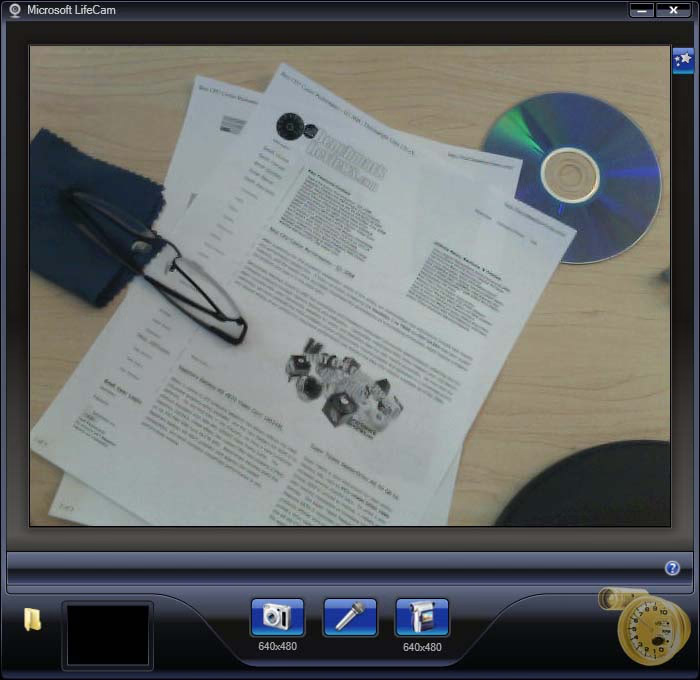
All in all, the LifeCam VX-5000 succeeds where it's meant to. It's an inexpensive option compared to Digicams and Camcorders and is very easy to use. The software works well for what it's meant to do and the camera provides very good picture quality in video chat.
LifeCam Final Thoughts
Webcams of yesteryear certainly left a lot to be desired, but it's no wonder that current day webcams are increasing their quality by leaps and bounds. The increased popularity of sharing avenues is staggering as an ever increasing amount of people are sharing their photos on Flickr or recording themselves talking through YouTube. The webcam's popularity has certainly increased by a large amount considering the propensity for webcams to even be included in lower end laptops. At $49.95, the camera will not break the bank. This price point lands it slightly higher than the median price of webcams offered on Newegg.com.
The LifeCam VX-5000 is a very nice camera. In video chat it shines the best with clear picture quality, low grain and little compression noise and artifacts. The image and video quality with the packed in software does leave a bit to be desired. The video is great for making one's YouTube video blog, but not so great for many other things. The camera is so-so, but a slightly more expensive digicam would probably do better. However, as mentioned above, the software's simplicity makes up for that allowing even the most computer illiterate to make videos very easily.
However, the best feature, in my mind, is still the moldable base. This single feature makes it about 10 times easier to position the camera in the best possible spot. Other cameras will have a fixed base or a base meant to go on top of the monitor, but the VX-5000 allows you to put it wherever you'd like without having to fuss with anything external. Of course, in an age where ease in consumer products is paramount, this makes things that much easier.
LifeCam VX-5000 Conclusion
The LifeCam's packaging was very nice but came with a rather spartan accompany of materials. However, Microsoft's software support was particularly good and the appropriate software, drivers and chat program were all terribly easy to find, install and easy.
The LifeCam VX-5000 itself looks great. The size of the camera is very compact, which makes it very easy to place the camera wherever I'd need, making it unobtrusive. The base is where this webcam shines allowing it to be placed on top of most surfaces without much fuss.
The webcam's build is very high quality like most Microsoft products. The glossy black plastic looks great, feels great and feels tight and solid, albeit quite small.
Microsofts LifeCam VX-5000 web chat functionality is top notch and has great color representation with little noise or artifacts. The packed software's picture quality is not as high as it could be, with lots of artifacts and heavy compression, but makes up for it in simplicity of use.
At the time of this writing, there were more than a few different online retailers listing the Micrososft LifeCam RKA00014 SKU for as low as $25.99. This price for the VX-5000 falls within the lower range of webcam prices. However, the video chat quality, moldable base and small footprint make this camera a great buy anyone.
Pros:
+ Small Size
+ Moldable base that can be placed almost anywhere on a desk
+ 1.3 Mega Pixel camera and VGA (640x480) video recording
+ Excellent picture quality and color accuracy in video chat
+ Low video and image noise in all areas
+ Simple to use LifeCam software
Cons:
- Highly compressed photos at 1.3 mega pixels and fairly compressed video
- 640x480 video runs at 15fps
- LifeCam software wasn't particularly configurable
Ratings:
-
Presentation: 9.00
-
Appearance: 9.50
-
Construction: 9.25
-
Functionality: 8.25
-
Value: 9.00
Final Score: 9.0 out of 10.
Excellence Achievement: Benchmark Reviews Golden Tachometer Award.
Questions? Comments? Benchmark Reviews really wants your feedback. We invite you to leave your remarks in our Discussion Forum.
Reader comments from the original article
1 comment were posted before commenting closed. They are preserved as written. Original avatars no longer resolve and are shown as a placeholder.
## ## Best Buy Barbie Doll Collection piranzamate Permalink:
i just seen Save:CDN$ 29.96 (50%) for Microsoft LifeCam HD-5000 Webcam (Black) AT #bit.ly/dd1FJt