
Microsoft LifeCam VX-5500 Webcam E4C-00001
Microsoft LifeCam VX-5500 Review
The LifeCam VX-5500 sits near the top of Microsoft's web cam offerings yet the E4C-00001 kit checks in at a very reasonable price point. It has some great features including noise cancelling, echo cancelling, 1.3MP HD picture quality, and auto-adjustment for low light conditions -all in a compact package clearly directed toward the mobile user. Benchmark Reviews took a look at the VX-5000 a few months ago, now we'll check out the VX-5500 and see if it performs as well as this mobile warrior hopes.
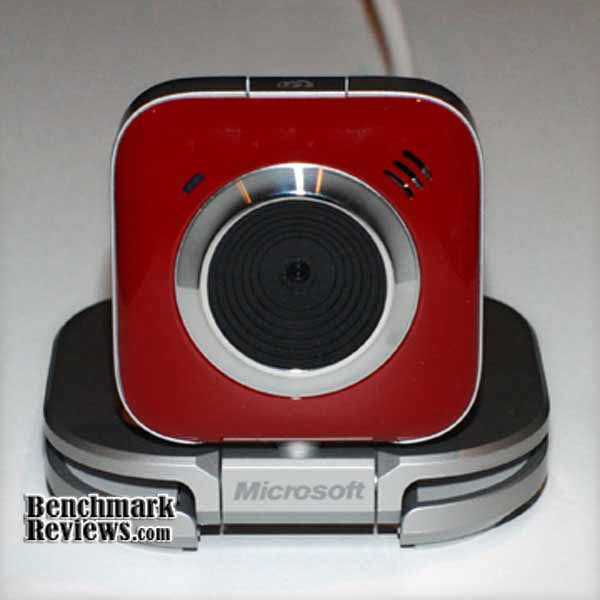
While I have had the opportunity to use a number of web cams over the years, my biggest issue was that none of them seemed to be particularly well suited to spending time in my briefcase. The most current web cam to occupy that space was a Logitech QuickCam Pro 9000. While it offers great optics, the sound is mediocre and it didn't stand up well to daily travel. The privacy screen popped off almost daily until it final broke and the rubberized coating on the base seemed to catch on the inside of my briefcase better than the back of my screen. After seeing the VX-5500, I have high hopes for a new travel companion.
About Microsoft Corporation
Microsoft Hardware was formed in 1982 to develop a device that would help people use the company's new word processing program.
The device was a mouse and the application was called Word, laying the foundation for a future of delivering hardware that helps people better and more easily use software.
In the quarter century since, Microsoft Hardware has continually raised the bar, designing revolutionary peripherals that deliver groundbreaking performance, comfort and design.
From the original "green-eyed mouse" to groundbreaking products like the LifeCam NX-6000 and Wireless Entertainment Desktop 8000, Microsoft Hardware has delivered exceptional mice, keyboards, communication products, and gaming gear that has changed the way the world works, plays, and connects.
Lifecam VX 5500 Features
In addition to the features you would expect to be incorporated into any webcam, the VX 5500 boasts many with an obvious focus on simplifying your use and enjoyment of it. Notably that list includes:
-
Interchangeable faceplates
-
World Class VGA Optics
-
Optimized for Windows Live
-
Photo Swap
-
LifeCam Dashboard
-
Noise Cancelling Microphone
-
One Touch Video Calls
-
One Touch Blogging To Live Spaces
In case you weren't paying attention, that list is dominated by the words "One Touch" and references to Microsofts "Live" suite. While this webcam can be used by any software that recognizes webcams, Microsoft has gone to great lengths to tightly integrate it with their Live suite of products offering maximum efficiency and ease of use for that platform. Surprisingly the feature that most differentiates this product is somewhat under-played in their marketing materials - "Versatility & Mobility - Compatible with both PC or laptop; imminently mobile-folds flat to go with you whenever, and wherever, you want to use it-carrying case included." We'll see if that assessment holds true or if it was understated for a reason.
E4C-00001 Specifications
While exchangeable faceplates and imminent mobility may be nice to have, they don't help you have a stutter free video conference or clearer audio, so let's take a look at the product specs to see how things stack up.
|
Sensor |
VGA CMOS sensor technology |
|
Resolution |
|
|
Field of View |
55° diagonal field of view |
|
Imaging Features |
|
|
Product Feature Performance |
|
|
Audio Features |
Integrated microphone and noise cancellation |
|
Microphone technology |
Unidirectional noise cancelling microphone |
|
Mounting Features |
Desktop display mounting hardware |
|
Storage Temperature & Humidity |
-40 °F (-40 °C) to 140 °F (60 °C) at <5% to 65% relative humidity (non-condensing) |
|
Operating Temperature & Humidity |
32° F (0° C) to 104 °F (40 °C) at <5% to 80% relative humidity (non-condensing) |
Let's be clear this web cam offers fairly run of the mill specs. Where I hope it shines is in the packaging (no I don't mean the box it came in) and useability in the form of extremely tight integration with LiveMessenger.
Closer Look: Lifecam VX 5500
The first thing I noticed while removing the VX 5500 from the E4C-00001 kit was that it occupies a surprisingly small space when folded up for storage. As I opened it up and set it on my desk for the first time I couldn't help but think there was something very familiar about it. After a couple of hours of working with it I started thinking "Star Wars" creature, then quickly realized I was in the right universe but had the wrong movie - it was clearly a Decepticon from "Transformers" starring Megan Foxx - I mean Shia LaBeouf. The picture below sums it up - a "friendly" Decepticon, moveable and flexible in a multitude of ways, it seems ready to spring to life.

The Microsoft LifeCam VX 5500 has an extremely flexible stand with a rubber inlay which allows for slip free desktop or monitor mounting. In addition, the rotating head allows for offset monitor mounting and easy frame adjustment.

Packaging and Contents

The shelf packaging was attractive and despite the use of a plastic enclosure to house and protect the webcam Microsoft did us all a favor by not hermetically sealing it in the clamshell as many others do. The features and functionality were clearly reflected on the back and sides of the box ensuring the buyer knows what they have in their hands.
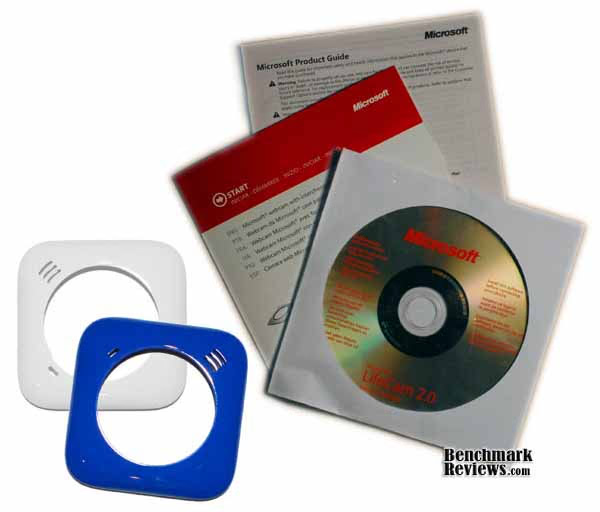
Package contents were about what you'd expect - a quick start guide, install CD and the inter-changeable faceplates. One item missing or no longer inlcuded is the carrying pouch mentioned in the online marketing - to be fair the product packaging made no mention of it so I'm not sure if it is no longer being included or was pulled before final product launch and someone missed that edit on Microsoft's website.
Lifecam VX 5500 Detailed Features
As is typical with every webcam I have used, you are required to install the drivers and software before plugging the camera in. The installation CD checks for updated software before installing to ensure you have the most recent version. I was able to test the camera on machines running VISTA X32 and X64, Windows 7 RC1 x32 and Windows 7 RTM x32 and x64. In every case the software reached out and downloaded a more recent version of the software than what was available on the CD. The download was quick and the software installed not only current drivers, but also the LifeCam Dashboard - a tool for taking snapshots and recording video without requiring the use of third party application.

The picture shown above is actually a screen capture taken while the Dashboard was rendering video. Even so, the picture is bright, clear and shows not artifacts, ghosting or blurring. This was taken minutes after plugging in the camera before any manual tweaking or adjusting - a great start right out of the box. In spite of great default settings , the Dashboard allows for fine tuning nearly any video setting you could desire. My initial testing yield such good results across a range of environments that I decided to leave things alone for normal operation.

The basic settings screen allows for setting both the snap shot and video resolutions. The native CCD resolution is 640 x 480 - but snap shots can be digitally enhanced to provide up to 1.3 MP equivalent. Also worth noting is that Live Messenger seems to be limited to 320x240 resolution at roughly 10-12 fps, and the Pan and Zoom features only work when the resolution is below the native resolution of 640 x 480.

The Video Processing Panel allows for pretty granular control over how the video is handled and the inclusion of the Powerline frequency setting is a nice touch - it reduces or removes the flickering that is apparent if you have video screens included in what the web cam is capturing.

The Pan, Zoom and Tilt functions are accessible from the main Configuration screen so I'm not sure they were repeated here, but the Low Light Compensation and Exposure on would expect to have to adjust occasionally.

The Microsoft LifeCam VX 5500 Dashboard also allows for real-time video effects, while this isn't particularly important for my typical usage, the feature has become de rigueur for mid-priced webcams and its inclusion is therefore expected.

So, how important will that web-call / one-touch button be in setting this webcam apart? We'll find out as we dig deeper into this webcam and it's use.
Testing & Results
Testing Methodology
While I am a bit of a video and camera junkie and I'm used to seeing specs and comparison that discuss fairly advanced subjects such as color temperature, aliasing and Moire patterns. It seems unrealistic to judge webcams on that basis as their price point, intended use and target market clearly makes them subject to all the "undesirable" characteristics of digital still and video cameras that use the same technologies. Instead I have taken the approach of a more subjective comparison focused on addressing whether the camera meets the following criteria:
-
Picture Quality (Still and Video)
-
Stutter Free Video
-
Ability to Address Backlighting
-
Ability To Address Low Light
-
-
Audio Quality
-
Stutter Free / Echo Free Audio
-
Dynamic Range
-
While these are somewhat subjective in nature, they address what users care about most - the user's experience. Most don't know or care what a Moire pattern is and why should they? They want to know that they can see and hear their peers on a video conference call or their grand children that live across the country. With this in mind, let's get on with the testing and results.
Test Systems
Laptop: Dell Precision M6300
-
Motherboard: Dell 0JM680
-
Processor: Intel Core 2 Duo T7500 @ 2200
-
System Memory: 2 - 2GB DDR2-SDRAM (Dell)
-
Video: NVIDIA Quadro FX 1600M
-
Monitor: 17" UXGA Screen (1920x1200)
-
Disk Drive 1: OCZ Vertex 128GB
-
Optical Drive: TEAC DVD-ROM
-
Audio: Onboard
-
Operating System: Windows 7 x32 RC1 / Windows 7 x32 RTM
-
Win 7 Experience RatingYs (Overall): 5.4
-
Processor: 5.4
-
Memory: 5.4
-
Graphics: 5.9
-
Gaming Graphics: 5.4
-
Primary HD: 7.3
-
Desktop: Custom
-
Enclosure: Antec P182
-
PSU: Antec True Power Trio TP3-650
-
Motherboard: MSI K9A2 Platinum
-
Processor: AMD Phenom II 940 BE
-
System Memory: 4 - 2GB OCZ DDR2 PC2-8500 (Matched Pairs)
-
Video: NVidia 9600 GT
-
Monitor: Dual Dell 2001FP Monitors
-
Disk Drive 1: WD10EACS - 1TB drive
-
Optical Drive: Plextor PX-716A
-
Audio: Onboard
-
Operating System: Windows 7 x64 RC1 / Windows 7 x64 RTM / Windows Vista X64 SP2
-
Win 7 Experience Ratings (Overall): 5.9
-
Processor: 7.3
-
Memory: 7.4
-
Graphics: 5.9
-
Gaming Graphics: 5.9
-
Primary HD: 5.9
-
Results
The Microsoft LifeCam VX 5500 test results were compiled over a period of nearly three weeks across two hardware platforms and 5 O/S environments. While I didn't begin with the intention of covering such a broad O/S list, the timing of the release of Win 7 RTM facilitated this broad view of OS compatibility. While at first blush this may not seem overly important, webcams are one of those devices that people universally expect to be plug-and-play no questions asked. The VX-5500 didn't disappoint on this front.
The second expectation is that the video quality will be respectable - and again the VX-5500 measures up. The camera works well out of the box without any user configuration or intervention, while allowing curious users to tweak and fiddle to their hearts content. I found that in chat (regardless of client application) video detail was average, but light handling and smoothness (no stuttering) were above average - achieving one of my goals solid stutter free performance. Over the entire testing period which involved nearly 16 hours of video conferences I had only 3 periods of video stuttering which lasted in total less than 30 seconds. In addition, in every case where stuttering occurred there was a competing system demand that likely caused the issue (e.g. launched Visual Studio and loaded a large project). My biggest complaint was that I couldn't find a way to conference at 640x480 which seems to be a limitation imposed by Live Messenger not the webcam. In an effort to evaluate the unfettered video capture quality, I recorded several video messages which I sent to colleagues as a test. These were much better quality (resolution) than the video conferences and came much closer to the native recordings of my Logitech QuickCam Pro in spite of having a fraction of the native resolution. Having said that, the one fly in the ointment is the fact that at 640 x 480 the max fps is 15 - half what typical video is recorded at. Having said that, the other point worth mentioning is that 15fps is still higher than the apparent 10-12 fps Live Messenger allows. Certainly this kind of frame rate is problematic if your moving around a lot, fortunately most video recorded by webcam wouldn't involve rapid motions and movement. Also, given that the fps limit seems hard encoded in live messenger, I don't see how anyone else could be getting a better experience even with much better hardware. I would also point out that one of the selling points of the QuickCam Pro 9000 is it's exceptional low light recording - the VX-5500 performed at least as well if not better (and without the Carl Zeiss lens). If you're thinking you don't record in low-light, think again. When was the last time you took pictures indoors without using a flash? Ambient room light in most cases is "low-light" for a camera, so this feature is actually very important. Another important issue for me is backlighting - this is when there is significant light coming from behind the subject. This is an issue if you have a window in the field of view of the webcam or if you ever video conference outdoors (I don't do that as much as I'd like ;) ). My experience in that regard was also remarkably good as I had numerous sessions situated right next to my office window causing both back-lighting and side-lighting. The VX-5500 performed beyond my expectations in that regard. No camera (at this price point) can completely mitigate large variances in lighting, but the software did a remarkable job of ensuring that the subject was appropriately lit while "turning down" the overexposure from extreme light sources.
Audio quality falls only a half step behind video when discussing product performance and the built in microphone did surprisingly well. Interestingly, audio quality can significantly impact a users perception of a video product because most people discern the byproducts of heavy audio compression more easily (loss of dynamic range, tinny or flat voice quality, etc) and that's before you begin factoring in things like audio stuttering or synchronization issues. While the VX-5500 certainly exhibits some of these characteristics, the overall sound quality is at or above your typical conference room speaker phone mic (which has a price tag of several hundred to several thousand dollars). I had several opportunities where there were multiple participants on my end of the call and the remote participants had no trouble distinguishing who was talking and the mic sensitivity was good enough to pic up all voices without a bunch of shifting around. Over entire testing period there were no stuttering issues and the only audio synchronization problems occurred during the three periods of video stuttering when the audio kept on un-interrupted.
The final measure for me as it relates to this product in particular, is how well did it stand up to traveling nearly every day and being connected, disconnected, setup and folded up. From that perspective, the VX-5500 totally lived up to the expectation set by the marketing statement of being "eminently* mobile". The camera was compact when folded up and slide easily into a pocket in my briefcase. When in use, it's stylish design garnered a couple of second looks from my peers while easily sitting directly on the desk or mounting snugly on my screen.
To sum it all up, the VX-5500 is the best "mobile" webcam I have used. While the technical specs aren't particularly exciting Microsoft has done an exceptional job of software auto-tuning and enhancement to provide video, still shots and audio that exceed expectations. The tight integration to Live Suite for audio & video calls as well as blogging shows that Microsoft still has it's eye on the spot where the rubber hits the road and in this case they made sure there was plenty of traction. For a mid-priced webcam the VX-5500 gets my vote, particularly if you're a mobile user.
*While the Marketing Materials on Microsoft's website used the word imminent, that was a mis-use, and I just couldn't let it slide.
Webcam Final Thoughts
I have watched webcams move from a power-toy for the elitists to a mainstream tool that families use to get "face time" when they aren't in the same place. As a self-professed technologist, the adoption is gratifying as I truly see this a life enriching technology. I am still underwhelmed in general by the specs of the existing product offerings though - when you consider that you can purchase an 8MP point and shoot digital camera for $55 on NewEgg one would think the typical web cam could manage to put out better specs. Certainly this is not a ding on Microsoft or VX-5500 specifically, but of the market segment in general. Hopefully the advent of higher resolution webcams like Microsoft's LifeCam Show, VX-7000, NX-6000 and the recently announced LifeCam Cinema all of which offer 2MP video quality will drive the specs for the "average" webcam a little higher while still maintaining the "average" pricing.

LifeCam VX-5500 Conclusion
The OOBE (Out Of Box Experience) with this product is really phenomenal and I think it delivers where most people need it to: above average video and audio quality for only a slight price premium, auto settings that work so well they make manual tweaking and configuration a thing of the past, and tight software integration to Microsoft's product suite while offering seamless interfacing to every other application anyone could expect.
The package contents were pretty utilitarian, the webcam, install CD and Quickstart guide didn't come close to filling up the box. In addition, the installation CD seemed pretty much a throw-away as it's only purpose seemed to be to launch the download of updated software and drivers.
As I noted early on in the review, the LifeCam VX-5500 itself is stylish and definitely has a "techie" bent to it. It drew a few looks - not the "Are you kidding me?" kind, but the "Hey that looks cool, let me check it out" kind.
Once again, let me point out that the shining example demonstrated by this product is the use of auto-tuning and tight software integration to ensure that any user will be able to get a positive experience immediately upon plugging the web camera in.
For the average desktop user, this camera will certainly work well. For mobile users that need an external webcam, with a $45 average price for the E4C-00001 kit this represents the best value for the money. The best price we found for the VX-5500 was $32, but Benchmark Reviews price comparison tool discovered several sellers so it's best to shop around.
Pros:
+ "Eminently Mobile"
+ Flexible base offering 360 degree camera rotation
+ Highly Integrated To The "Live Suite" of products
+ Easy To Use
+ Above Average Chat Picture and Audio Quality
Cons:
- Hardware Specs Are Mediocre
- 15 FPS Cap At Full Resolution
Ratings:
-
Presentation: 9.00
-
Appearance: 9.75
-
Construction: 9.50
-
Functionality: 9.00
-
Value: 8.75
Final Score: 9.2 out of 10.
Excellence Achievement: Benchmark Reviews Golden Tachometer Award.
Questions? Comments? Benchmark Reviews really wants your feedback. We invite you to leave your remarks in our Discussion Forum.