
Lian-Li LanCool Dragon Lord PC-K56W-B Case
Lian-Li LanCool PC-K56W-B Case
Computer cases with enough features and cooling to please any gamer are rapidly dropping in price. Manufacturers are noticing the demand for affordable gaming rigs and reacting accordingly. In this article Benchmark Reviews tests the LanCool PC-K56W-B Mid-Tower Computer Case. It is part of the recent LanCool Dragon Lord series that helps bring economic relief to gamers searching for the best case for the best price. LanCool is the gaming division of Lian Li, a very well known name in the computer case industry. Benchmark Reviews is here to pit the PC-K56W-B against other recent additions to the "performance-case-at-a-low-price" arena. Recently, we brought you articles about NZXT's line of such cases. Will LanCool be able to keep up with features such as their tool-free design? Follow along as we find out.
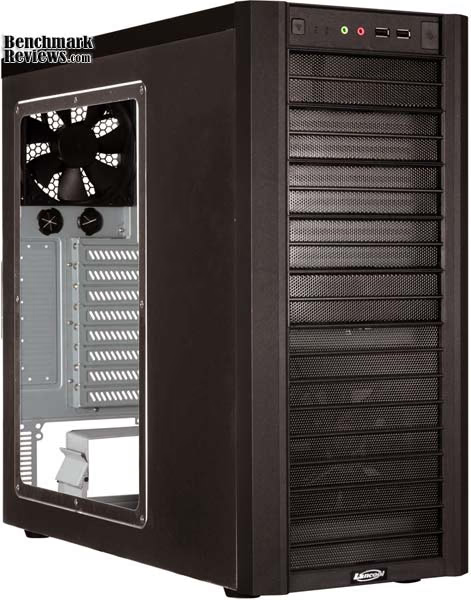
LanCool recently released their Dragon Lord series of cases which tout a remarkably tool-less design. Four case styles were introduced, three of which come with an optional windowed version. The case Benchmark Reviews is bringing to you today is the PC-K56W, a black, mid-tower case with a windowed side panel. The cases are designed for easy fiddling as well as excellent cooling for enthusiast users. At the same time, the Dragon Lord series strives to keep a low price point to enable any computer fan to start off their new build the right way.
With so many new entries in the inexpensive computer chassis environment, its hard to decide which one is right for you. At Benchmark Reviews, we always strive to bring you the cold, hard facts about the products we test and review. This will enable each user, regardless of their skill level or the depth of their pockets to make an informed decision about the components they will use.
Dragon Lord Series Features
-
Completely Tool-Free Design
-
2 x 120mm Fans Included
-
Transparent Side Window
-
No Clumsy Front Door
-
Cable Management System
-
Rear Motherboard Access for CPU Cooler
-
Bottom Mounted PSU
-
Slots for Water Cooling Tubes
LanCool PC-K56W-B Specifications
| Model | PC-K56W-B |
|---|---|
| Case Type | Advance Mid Tower |
| Dimensions | 210mm x 460mm x 490 mm (W, H, D) |
| Front bezel Material | Plastic |
| Color | Black |
| Side Panel | CECC Steel Side panel with Transparents Window |
| Body Material | CECC Steel |
| Net Weight | 8.62kg |
| 5.25" drive bay (External) | 5 |
| 3.5" drive bay (External) | 0 |
| 3.5" drive bay (Internal) | 4 |
| Expansion Slot | 8 |
| Motherboard | ATX / M-ATX |
| System Fan (Front) | 120mm Fan x 1 (1200RPM) |
| System Fan (Top) | |
| System Fan (Rear) | 120mm Fan x 1 (1500RPM) |
| I/O Ports | USB2.0 x 2 / HD+AC97 Audio |
About LanCool (Lian-Li Industrial)
LanCool was founded with the target of providing products with a better thermal solution, with more style, and that are more user-friendly. LanCool headquarters is located in Taiwan. We provide high quality products and services that are designed and manufactured in Taiwan. Our business philosophy encompasses quality, innovation, speed, and service.
Quality: Quality is the most key element of our products. We put a lot of effort into the details to ensure that our finished products meet a high quality standard.
Innovation: LanCool's ID and R&D teams spend a lot of time designing and creating new features for our products using the latest technologies. This way we can be sure that our products are the most up-to-date.
Speed: Speed is LanCool's advantage. Our in-house ID and R&D teams work with our professional factories to turn concepts into reality in a very short time.
Service: Customer satisfaction is very important to us. To achieve that, LanCool with respond to customer requests within one working day and provide a solution in no more than three working days.
Closer Look: LanCool Exterior
To begin, let's take a close look at the exterior of the LanCool PC-K56W case. The case is made of almost completely of steel, with is a plastic front face plate. The plate is easily removed to give the user access to the features located on the outside of the case, but under the front face plate. One of the things that LanCool removed with the DragonLord series is the use of a door on the front of the case. While the hinged door provided a way to lock the case and a nice place for cool designs, it also hindered access to the external I/O ports and the optical drives. Removing the door also very likely aided LanCool in their quest to lower prices on their cases while protecting other important features.
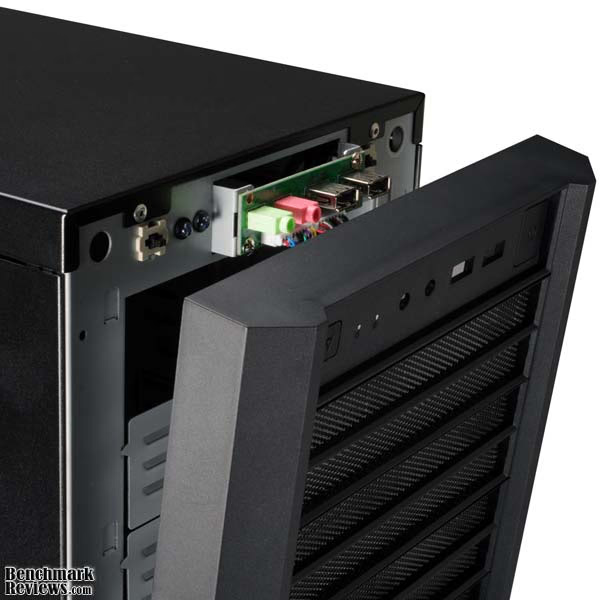
The external I/O port on the PC-K56W case is pretty simple. The top of the face plate contains the panel which includes two USB ports place side by side and HD Audio ports for headphones/speakers and a microphone. The power button and the reset button are also located along the top of the front panel, the power button being the larger of the two (obviously), located on the right side of the panel. The front panel is rather easy to remove, and you have to do so to pop out one of the vents for an optical drive as well.

At the bottom of the front panel of the PC-K56W, LanCool has placed their logo. It is really the only purely aesthetic feature of the front panel. There is a blue LED power light at the top of the panel, near the reset switch, but other than that, there are no lights, no other logos, nothing. The appearance of the case from the front is very plain. This could appeal to an office environment, or someplace that flashy lights and looks just wouldn't fit in. The case does appeal to the more visually minded with the windowed side panel, however. The PC-K56W doesn't have a side panel fan, or LEDs on the window, but the motherboard lighting shines through it and gives the case a nice gaming feel.

At the back of the PC-K56W, where you would expect the PSU to be mounted in most mid-tower cases, is another 120mm fan. The fan doesn't have a filter affixed to it, just pushes the air through the meshed metal backing of the case. That's not a huge deal, however, considering this fan is intended to push air out of the case rather than bring it in. The placement of the fan is very nice; it fits in near the CPU fan, and will help expel the hot air coming off the motherboard.

Just looking at the outside of the PC-K56W we can see that it provides a lot of features for its relatively low price. I really enjoy the bottom mounting of the PSU, which appears to be an increasingly more common feature. Also, the PC-K56W comes with two 120mm fans while many mid-tower cases come with only one, or none at all. Of course, the two fans that the PC-K56W comes with are the only two that the case can use. There is no further expansion for fans, which may cause cooling issues for an overclocker.
Detailed Exterior Features
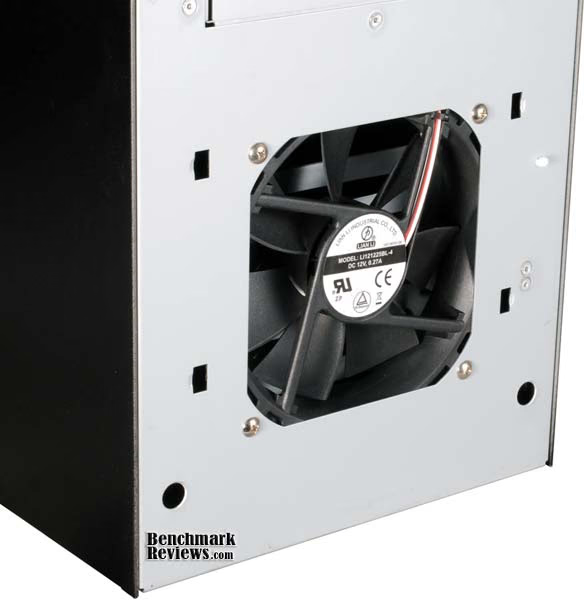
At the bottom of the PC-K56W, under the front panel, there is a 120mm fan. The entire front panel is vented just like the optical drive bay panels, allowing for an even, uninterrupted look all across the front of the case. The PC-K56W may not be the flashy case to look at, but it definitely has a certain appeal. The plain look of the front of the PC-K56W makes it quite unimposing. I think LanCool made a good choice when they opted away from the alien-like front door over the panel, and even by choosing to avoid any flashy lights or designs on the front panel.
There are no 3.5" external drive bays on the PC-K56W. This is becoming a new trend with computer cases, and especially with gaming and enthusiast cases. In reality, a 3.5" drive bay is pretty useless. Floppy drives are out, USB drives are in. Even the few items that do come fit for a 3.5" external drive bay, such as card readers, are very often supplied with a 5.25" conversion kit. I am happy to see the 3.5" bays disappear, making room for more cooling and much better looking case designs.

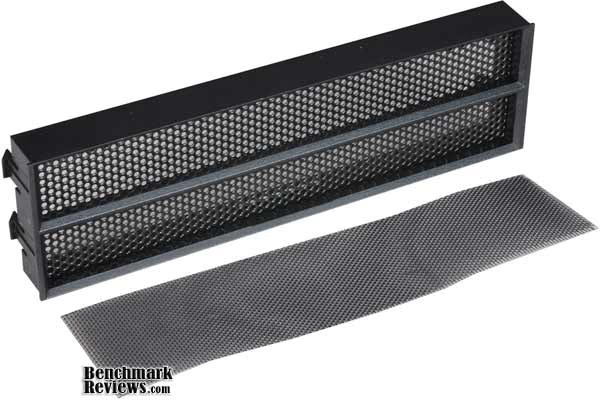
To supplement that better cooling, LanCool has fitted each of the 5.25" external drive bays on the PC-K56W with a perforated plastic cover with an air filter. Behind the cover and filter, each drive bay is made of slotted metal to allow air to freely enter the case and cool the components. The filters help keep out the dust and debris.
Just under the rear fan, LanCool has added a very thoughtful feature to the PC-K56W; a pair of water cooler tube ports. The two holes are covered by rubber washers that will protect the tubes from the sharp metal of the case. Water cooling is rapidly becoming a more viable solution to the matter of keeping your system cool, and a lot of cases are offering water cooling expansion options such as the ones found here on the PC-K56W. The one thing missing is a place to mount the water cooling radiator. You will have to figure that one out on your own.

The expansion slots on the back of the PC-K56W are all meshed with perforations, adding to the air flow of the case. Due to the lack of a side panel fan, this extra exhaust is really a must. Cooling the components inside the PC-K56W shouldn't be an issue, and I have not experienced any problems in that area as yet, but with only two fans, and no side panel exhaust, I must admit that I am a bit worried.
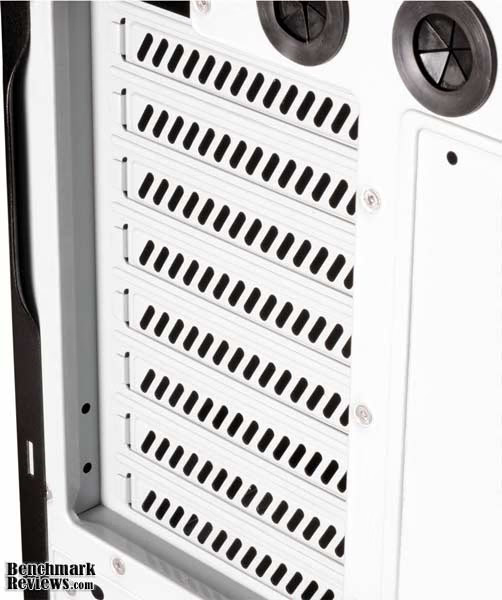
From the outside, the PC-K56W is quite a sight, exemplifying the effort that LanCool has put into making high quality products. The tool-free design shines through, as I didn't have to touch my tool kit even once when dealing with the outside of the case. I was quite impressed by the thought that was put into cooling the PC-K56W; however, I was disappointed that there were only two locations on which to fit fans. Follow me now as we take a look inside.
Closer Look: PC-K56W Interior
The PC-K56W has quite a spacious and polished interior. There are 5 internal 5.25" drive bays; enough to fit the needs of even the most diversified user. There are also 4 internal 3.5" drive bays. This, perhaps, could have been supplemented with a little bit more. Even with the fan blowing directly on the 3.5" drive bays, I still prefer to leave a space between my drives, thereby limiting myself to 2 drives there. I could always get a conversion kit and use the spare 5.25" bays though. Also, there is no place in this case to mount a 2.5" drive directly. With the recent popularity of SSDs, there needs to be a place to mount at least one without having to opt for a conversion kit.
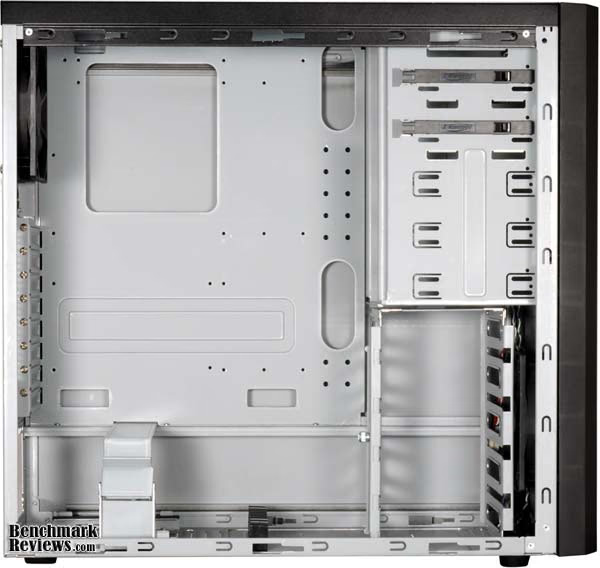
The interior of the PC-K56W is made completely of steel, and it looks very nice. It was LanCool's intention to make the interior ever bit and tool-free as the exterior, so they provided clips for the 5.25" devices and thumbscrews for the 3.5" devices. I ran into a few snags with the tool-free design while working inside the case, and I will discuss those in more detail in the Detailed Interior Features portion. For the most part, however, the PC-K56W was very easy to work with.
One feature I liked particularly was the internal 3.5" drive bays that were turned at a 90 degree angle. This allow for much easier access to your hard drives after the rest of your components are installed. If you have a long video card, which is pretty common now, you undoubtedly have had trouble removing or adding a hard drive after your system has been completely put together. LanCool address this issue with the PC-K56W in two ways. First, the 3.5" bays are turned sideways, allowing for easy access at any time. Second, the complete drive bay cage is removable.

I did run into a couple of issues while dealing with the 3.5" drive bays and removeable cage on the PC-K56W. I may be somewhat slower than the average bear, but I could not figure out how to put in a hard drive here with or without tools. It was apparent that there was some sort of a slide system in place. The thumbscrew on the cage itself is unscrewed to remove a small metal plate. This is obviously to keep the drives in place. After searching the manual, I discovered that thumbscrews, padded with rubber washers, needed to be screwed onto the drive prior to inserting it into the cage. Then, after the drive was slid into place, the metal plate is replaced and the drives are secured. Unfortunately, the drives can only be put in one way, with the cabling facing the open, windowed side panel. This isn't very convenient for cabling, as the cables have to then be run under the drives or left out in the open. The drive cage can be turned to face the front of the cage, but this lessens the amount of room for a video card, as well as causing difficulties for removing drives after the rest of the system is installed.
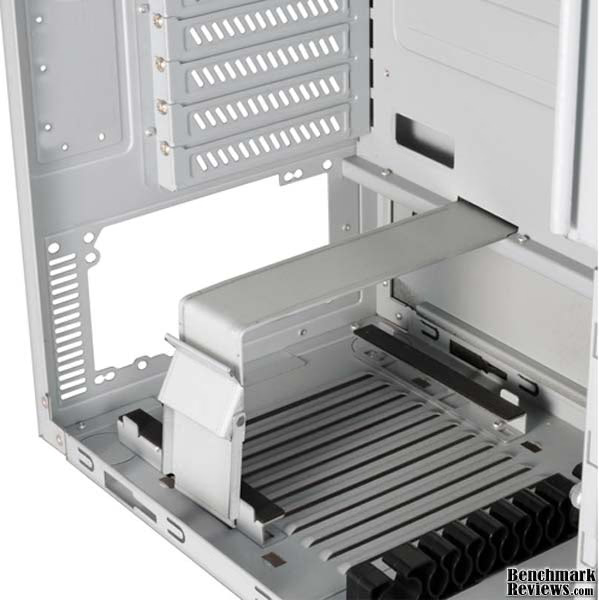
Another truly amazing feature of the PC-K56W is the tool-free PSU compartment. This is the first time I have seen anything like this on a computer case. I haven't worked with many high-end expensive cases, but I have worked with a lot of mid-range and low-end cases, and this is certainly the first with this feature. I absolutely love it. The power supply can be easily mounted on the bottom of the case (where I believe it belongs) and without the hassle of screws. There are, of course, screw holes in the event that you will be moving the case and want to make sure that the PSU is securely fastened.

A great example of the thoughtfulness of LanCool when designing the PC-K56W is the cable management systems available on the case. More detail will be provided, but the routing of cables behind the motherboard provides a clean look to the case after installation is complete. The 8 expansions slots offered by the PC-K56W are covered with perforated slot covers. This will help to provide an escape for the air coming in from the front and being heated by all the computer components.
Detailed Interior Features
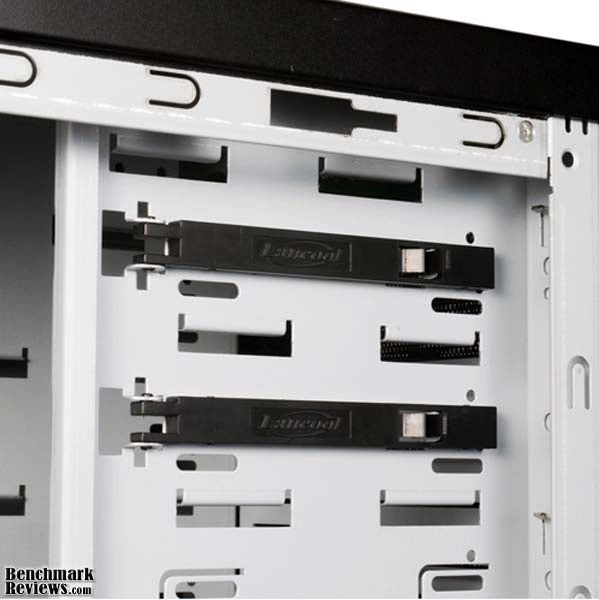
Let's take a detailed look at some of the features inside the PC-K56W. We'll start with the 5.25" drive bays. The tool-free design of the case provides small plastic clips that attach to one side of the 5.25" drive bays. There are two of these clips that come with the case, even though there are 5 drive bays. I suppose if you are planning on adding a couple more 5.25" devices, then you will have to use tools. Screws are provided. The clips are opened by thumbing the protruding piece of plastic. Then the optical drives are slid into place and the clip is pushed back into place, securing the drive. It's very convenient.

The PSU slot is one of my favorite features of the PC-K56W. I talked about the latch design earlier, but I want to talk about placement a little now. The drive is placed on the bottom of the case, as it should be, in my opinion. I always wondered why a power supply unit, with an intake fan on the bottom, should be mounted above the CPU. That's the hottest piece of equipment in the case in many situations. No, it should certainly be situated at the bottom of the case.

Slits are cut into the bottom of the PC-K56W under where the power supply is seated. This is to allow for fresh, cold airflow to the intake fan on the PSU. One thing that is unfortunately missing from the intake slits is an air filter. Also, the clearance from the ground provided by the feet on the PC-K56W is only about half an inch. You had better be looking to put this case on a hard, solid surface rather than carpet if you expect to get any air to the PSU. The feet could be a little taller.

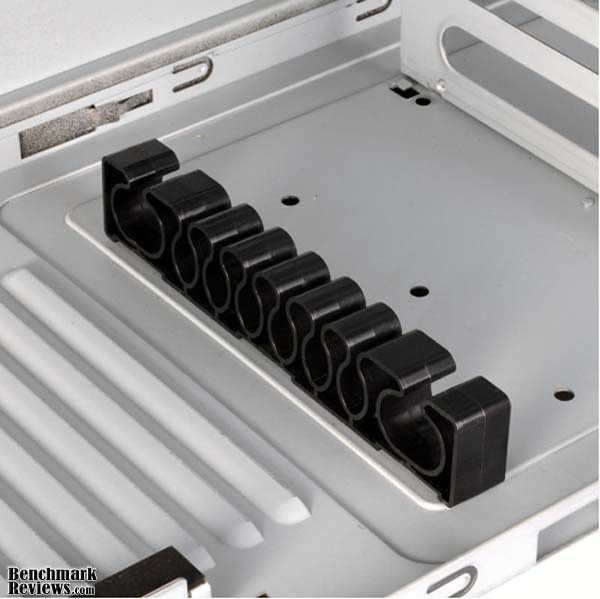
The cable management system on the PC-K56W is really top notch. There are two small plastic cable management pieces (the larger of the two is pictured below) included with the case. Behind the PSU slot and on the motherboard plate near the 3.5" drive cage are small holes to place the two pieces. This gives you the option of putting them wherever you'd like. Also, the motherboard plate has plenty of holes in it to guide your cables through, keeping them out of the way and allowing you to store them behind the motherboard plate and out of sight. The only cabling I didn't like was the hard drive cabling, as I mentioned above.
Installing the motherboard in the PC-K56W is the part that confused me the most. I didn't even get out a screwdriver to install the system in the case, because it touted the tool-free design, but I couldn't find a way to install the motherboard. The thumbscrews that were provided were of a size to fit hard drives, and certainly didn't fit the motherboard feet. I thought maybe there were other feet that I was missing, but I couldn't find any. I searched the manual, only to find that it was indeed thumbscrews that were used for installing the board. When I was ready to give up, I found the picture below on LanCool's website. I searched for the thumbscrews that looked like that, but there weren't any. Finally, I just installed the motherboard the old fashioned way. The motherboard plate does have an opening in the back for easily replacing a rear mounted CPU cooler, however.

With a few exceptions, the inside of LanCool's PC-K56W hold up to the standard set by the exterior. Overall, the tool-free design worked out very well. I hope that the lack of motherboard thumbscrews in the case I got was simply a one time mistake and that the other cases have them. The cable management on the PC-K56W is top notch, and really makes for a clean looking interior when all is said and done.
Dragon Lord Final Thoughts
Overall, I was pretty impressed with the PC-K56W Mid-Tower Case. It is readily apparent that LanCool put a lot of thought into what its customers would want. The case is very sturdy and well put together. LanCool's new tool-less design that was integrated into all of the 2009 Dragon Lord series cases proved to be worthy of the name, if all the screws are included. Some of the features are a little hard to work with, like the 3.5" drive bay cage. It really should be engineered so it can fit in the other way around. I also had trouble at first when putting in the power supply. I used an older 550W PSU first, and the motherboard power cables didn't reach. I changed it out for an 800W newer PSU and they fit just fine. That, I suppose, is one of the problems associated with putting the PSU slot at the bottom.
A worry that I have for the case, oddly enough, is the cooling. There are plenty of vents, perforations, and otherwise that should let air into the case, but there are only two fan slots. A lot of the air intake locations don't have air filters, either, which makes dust and debris somewhat of a concern. Of course, the PC-K56W does come with slots for water cooling tubes, so if you are really worried about the cooling, that is always an option.

The PC-K56W has plenty of room inside for almost any peripheral. With the 3.5" bay turned as it is in the picture above, you can fit a 12" video card in easily. Even up to 12.5" should fit ok, according to the dimensions provided by LanCool, but my measurements show it would be a tight fit. I know for a certainty that a GTX285 fits just fine. For your CPU cooler, anything up to just over 7.5 inches will fit; taller than that and you may be asking for trouble. The ground clearance, as I mentioned, is only about half an inch, which is much too short to use the case on carpet.
LanCool PC-K56W Conclusion
The LanCool PC-K56W was built to perform as a mid-tower gaming chassis. Beside some possible cooling issues due to only 2 fan slots, it really performs its function quite well. The PC-K56W was also made as part of the Dragon Lord case series with a new tool-less design. For the most part, this held true and the PC-K56W was indeed tool-free. I hope that LanCool ships the remainder of these cases with the thumbscrews for the motherboard. Otherwise, like I did, you might have to find a screwdriver to finish installing your system.
LanCool has taken a step in the right direction with the Dragon Lord series and specifically with the PC-K56W when it comes to appearance. They have gotten rid of the outdated and quite useless front door that was so popular a while ago. The front panel of PC-K56W is rather plain looking, but that's exactly what holds the appeal. There are no flashy lights or logos, making the case perfect for almost any environment. And to top it all off, the side panel has a transparent window, allowing the case to have a certain amount of zing. It's not all plain!
Made almost completely of steel, the PC-K56W is a little on the heavy side. But I prefer heavy steel to light duty aluminum that is bound to dent or bend. I don't see any of that happening to the PC-K56W. It is sturdy enough to withstand quite a lot of punishment while protecting the important components on the inside.
The PC-K56W is built fairly well for its purpose. With five 5.25" bays and four 3.5" bays, there is plenty of room for anything you need. If only there was a 2.5" drive bay somewhere. The 3.5" drive bay cage should be able to turn and face the opposite way, and there needs to be more tool-free clips on the 5.25" drive bay slots. The PC-K56W would benefit from some more fans as well, and needs to have a higher ground clearance to really take advantage of the bottom mounted PSU. It does have plenty of ventilation and comes ready for water cooling kits. It's certainly functional, but improvements could be made.
At the start of 2010 NewEgg lists the LanCool PC-K56W-B case for only $49.99 before shipping. At that price, this case is an excellent value. A steel case with a completely tool-less design, bottom mounted PSU, windowed side panel, filtered front panel, water-cooler ready case that comes with two 120mm fans for under $50 is a steal any way you look at it. Of course, there is starting to be more and more competition in this price range and the PC-K56W could use some changes.
The LanCool PC-K56W really is a very good case, and an excellent buy at its current price. I think, with some work, LanCool could really turn the PC-K56W into a market stealer, and bring it from good to great. Even with its few flaws, however, the PC-K56W offers a lot of very nice features and is a great choice for any type of user.
Pros:
+ Filtered Front Panel
+ Holes for Water Cooling Tubes
+ Comes with 2 Fans
+ Tool-Less Design
+ Bottom Mounted PSU
+ Windowed Side Panel
+ Great Cable Management
+ Rear Mounted CPU Cooler Access
+ Fits Long Video Cards
Cons:
- Didn't come with enough thumb-screws
- Low ground clearance
- 3.5" Drive cage should be turned
- Only two fan slots available
- No filter on PSU fan intake
- No 2.5" Drive Bay/Slot available
Ratings:
-
Performance: 7.75
-
Appearance: 8.00
-
Construction: 8.75
-
Functionality: 8.50
-
Value: 9.00
Final Score: 8.4 out of 10.
Questions? Comments? Benchmark Reviews really wants your feedback. We invite you to leave your remarks in our Discussion Forum.