
EVGA GeForce GTX560Ti FTW 448-Core
EVGA GeForce GTX560Ti FTW 448-Cores Review
Manufacturer:
EVGAProduct Name: EVGA GeForce GTX 560 Ti 448 Cores FTW
Model Number: 012-P3-2066
Price As Tested: $289.99 (Newegg)
Full Disclosure: The product sample used in this article has been provided by EVGA.
This holiday season is gearing up to be a big one for computer gamers. A lot of big titles have been or will soon be released. Battlefield 3, Batman: Arkham City, Star Wars: The Old Republic, Modern Warfare 3, and Elder Scrolls V: Skyrim are a few. Diablo 3 is expected early in 2012 as well. While this is great news for gamers, we don't have any expected releases of new GPU platforms. That's not terribly disheartening, as the current top-of-the-line GPUs will play even the most demanding of these titles. The problem is, those top end GPUs also cost an arm and a leg. NVIDIA is setting out to combat this problem for the holiday season 2011 by releasing a new and improved version of the GTX 560 Ti, the GTX 560 Ti 448 Cores. In this article, Benchmark Reviews is bringing you details on the EVGA GeForce GTX 560 Ti 448 Cores FTW.
When the GTX 560 Ti Video Card was released in January 2011, it improved upon the existing architecture of the GF104 GPU. The GTX 460 was the first video card that sported the GF104, but it only used 7 Streaming Multiprocessors and sported only 336 CUDA Cores. Still, in its day, the GTX 460 was quite formidable. When the GTX 560 Ti came out, it used the GF114 GPU, identical to the GF104 but with the full 8 streaming processors enabled and an upped CUDA Core count of 384. The GTX 560 Ti boosted graphics performance significantly, beating out the AMD HD 6870 and coming extremely close to the performance of the Radeon HD 5870, even edging it out in some benchmarks. With no new architecture arriving for the 2011 Holiday Season, NVIDIA is revamping the GTX 560 Ti by boosting the number of CUDA Cores.
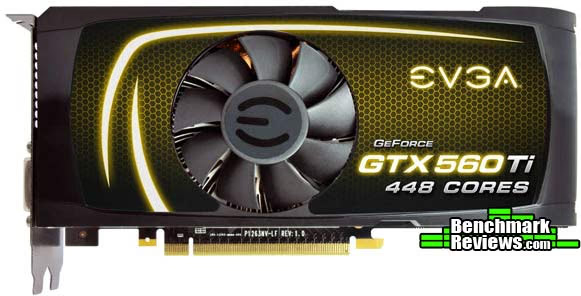
In the current NVIDIA GPU structure, the GTX 560 Ti takes the place of the GTX 470 and fits nicely between the GTX 460 and GTX 570. That being said, there is still quite a gap between the GTX 560 Ti and the GTX 570. Bumping up the CUDA Cores to 448 as opposed to 384 should improve performance to the point where the GTX 560 Ti 448 sits in that gap. In fact, a lot of the specifications of the GTX 560 Ti start to look a little more like the GTX 570. The Streaming Multiprocessor count, of course, remains the same at 8 since the GTX 560 Ti 448 is still built off the GF114 GPU. As I mentioned before, the CUDA Core count is increased on the GTX 560 Ti 448 from 384 to, obviously, 448. This number matches the number of CUDA Cores found on the GTX 470. The GTX 470, however, has 14 Streaming Multiprocessors from which the Cores come, for 32 Cores per SM.
With only 8 Streaming Multiprocessors, the GTX 560 Ti 448 touts 56 Cores per SM. Video RAM size is increased on the GTX 560 Ti 448 as well, up to 1280MB from 1024MB. With the increase in memory and CUDA Core amounts, however, comes a decrease in clock speed that now matches the GTX 570. The Graphics clock speed on the GTX 560 Ti 448 is 732MHz and the Processor clock speed is double that at 1464MHz. This is down a little from the 822/1644MHz speeds on the original GTX 560 Ti. The Memory clock on the GTX 560 Ti 448 is knocked down to a 950MHz clock rate and 3800MHz data rate from the 1001/4008MHz speeds on the original GTX 560 Ti.
With the current specifications of the GTX 560 Ti 448 sitting right between the GTX 560 Ti and the GTX 570, it only makes sense that the price would as well. The GTX 560 Ti 448 is set to be released with an MSRP of $289. GTX 560 Ti Video Cards are averaging around $249 right now and GTX 570 cards are around $329. This puts the GTX 560 Ti 448 right in the middle. The real question is, will its performance occupy that same slot? Let's move along and take a closer look at the GTX 560 Ti 448.
Closer Look: EVGA GTX 560 Ti 448 Cores FTW
The EVGA GeForce GTX 560 Ti 448 Cores FTW came in a green box that highlighted the features of the GPU and had some fancy logos. I like the look of the box and I think it stands out pretty well. The FTW designation, for those who may now know, stands for "For the Win". It's a gamer term usually associated with something that allows a gamer to achieve victory. If I use a knife to kill someone in Battlefield 3, I might say something like, "Knife kill FTW!" Anyway, the GTX 560 Ti 448 Cores FTW is one of two versions of the 448 Core GTX 560 Ti that EVGA is releasing. The other is the GTX 560 Ti 448 Cores Classified, which will be even more limited in its distribution than the FTW version.

Speaking of limited distribution, the GTX 560 Ti 448 Cores video cards from every manufacturer are going to be limited. NVIDIA is only releasing a certain amount of the GTX 560 Ti 448 Cores GPUs and they will only be available for a limited time. NVIDIA, it seems, is just trying to capitalize on a gap in the market segment for the holiday season 2011 and the associate game releases. While we discussed the stock specifications of the GTX 560 Ti 448 Cores, EVGA has made some adjustments for the GTX 560 Ti 448 Cores FTW video card.

Those specifications include a 797MHz core graphics clock speed and a memory clock of 3900MHz compared to a stock graphics clock speed of 732MHz and a stock memory clock speed of 3800MHz. The CUDA Cores are, therefore, clocked at double the core graphics clock, which is 1464MHz stock and 1594MHz on the EVGA FTW card. EVGA hasn't messed around with memory amounts on the FTW version of the GTX 560 Ti 448 Cores. There is still 1280MB of GDDR5 memory with a bit width of 320 bits.

The EVGA GeForce GTX 560 Ti 448 Cores FTW doesn't look much different from the EVGA GTX 560 Ti cards. The video card is completely shrouded with the fan in the middle. Because of that shroud, the GTX 560 Ti 448 Cores FTW takes up two PCI slots, but that is normal for any GTX 560 or better card. The I/O panel is perforated at the top to allow warm air an escape from within your systems enclosure. The top and bottom of the GTX 560 Ti 448 Cores FTW are not perforated, however. The EVGA GeForce GTX 560 Ti 448 FTW requires two six-pin PCI-E power connectors, also normal for GTX 560 video cards.

The I/O capabilities on the GTX 560 Ti 448 Cores FTW are also very standard in comparison to most of the recent video card selections. There are two Dual-Link DVI-I HDCP capable connectors. Because they are both Dual-Link, either one will support a 3D monitor. This is not always the case. There is also a single HDMI 1.4a connector and a single DisplayPort 1.1a connector. The accessories that came with the EVGA GeForce GTX 560 Ti 448 Cores FTW include a driver and software disc, a DVI to VGA adapter, two six-pin PCI-E power cable adapters, and the user's guide. I am again disappointed to find no DisplayPort adapter of any kind. I am hoping that someday, the DVI to VGA adapters will finally be replaced with some DisplayPort to DVI adapters. Although, with an NVIDIA card like the GTX 560 Ti 448 Cores FTW, it doesn't really matter that much. I am limited to a two monitor configuration anyway, and that can be accomplished through the use of both DVI ports or one DVI and one HDMI connection. Oh yeah, the GTX 560 Ti 448 Cores FTW also came with a full-sized poster. Awesome. EVGA poster FTW!

One of the more interesting things I thought I would mention about the GTX 560 Ti 448 Cores is that you can't pair them in an SLI configuration with a traditional GTX 560 Ti. While this makes sense, I thought I'd mention it in case you were planning on adding this bad boy to your current rig by connecting it to your video card in SLI. The reason it won't connect is because it is, essentially, a different card. It could be called the GTX 565 or, more appropriately, the GTX 568, since it is really closer in performance to the GTX 570 than the GTX 560 Ti. With a different core count and a different frame buffer size, the GTX 560 Ti 448 Cores couldn't be paired with a GTX 560 Ti. That being said, the GTX 560 Ti 448 Cores does support both two-way and three-way SLI configurations with other GTX 560 Ti 448 Cores video cards.

As far as size matters, the EVGA GeForce GTX 560 Ti 448 Cores FTW measures 4.376 inches in height, 9 inches in length, and weighs 2 lbs. And oh, did I mention it came with a poster?

Now, before we get into the testing, let's take a look at the specifications of the EVGA GTX 560 Ti 448 Cores FTW.
Key Features
- Microsoft DirectX 11 Support
- NVIDIA CUDA Technology with CUDA C/C++ DirectCompute 5.0 and OpenCL Support
- NVIDIA PhysX Technology
- NVIDIA PureVideo HD Technology
- NVIDIA 2-way and 3-way SLI Ready
- NVIDIA 3D Vision Surround Ready
- PCI Express 2.0 Support
- Two Dual-Link DVI-I HDCP Capable Connectors
- One HDMI 1.4a Connector
- One DisplayPort 1.1a Connector
- OpenGL 4.2 Support
GTX 560 Ti 448 Cores FTW Specifications
- Core Clock: 797 Mhz
- Memory Clock: 3900 Mhz Effective
- Shader Clock: 1594 Mhz
- CUDA Cores: 448
- Bus Type: PCI-E 2.0
- Memory Detail: 1280MB GDDR5
- Memory Bit Width: 320 Bit
- Memory Speed: 0.5 ns
- Memory Bandwidth: 156 GB/sec
- Texture Fill Rate: 44.6 GT/s
VGA Testing Methodology
With the widespread adoption of Windows7 in the marketplace, and given the prolonged and extensive pre-release testing that occurred on a global scale, there are compelling reasons to switch all testing to this highly anticipated, operating system. Overall performance levels of Windows 7 are favorable compared to Windows XP, and there is solid support for the 64-bit version, something enthusiasts have anxiously awaited for years. After almost a year of product testing with Win7-64, I can vouch for its stability and performance; I can't think of any reasons why I would want to switch back to XP. 
Our site polls and statistics indicate that the over 90% of our visitors use their PC for playing video games, and practically every one of you are using a screen resolutions mentioned below. Since all of the benchmarks we use for testing represent different game engine technology and graphic rendering processes, this battery of tests will provide a diverse range of results for you to gauge performance on your own computer system. All of the benchmark applications are capable of utilizing DirectX 10 or DirectX 11, and that is how they were tested. Some of these benchmarks have been used widely for DirectX 9 testing in the XP environment, and it is critically important to differentiate between results obtained with different versions. Each game behaves differently in DX9 and DX10 formats. Crysis is an extreme example, with frame rates in DirectX 10 only about half what was available in DirectX 9.
At the start of all tests, the previous display adapter driver is uninstalled and trace components are removed using Driver Cleaner Pro. We then restart the computer system to establish our display settings and define the monitor. Once the hardware is prepared, we begin our testing. According to the Steam Hardware Survey published at the time of Windows 7 launch, the most popular gaming resolution is 1280x1024 (17-19" standard LCD monitors) closely followed by 1024x768 (15-17" standard LCD). However, because these resolutions are considered 'low' by most standards, our benchmark performance tests concentrate on the up-and-coming higher-demand resolutions: 1680x1050 (22-24" widescreen LCD) and 1920x1080 (24-28" widescreen LCD monitors).
Each benchmark test program begins after a system restart, and the very first result for every test will be ignored since it often only caches the test. This process proved extremely important in several benchmarks, as the first run served to cache maps allowing subsequent tests to perform much better than the first. Each test is completed five times, the high and low results are discarded, and the average of the three remaining results is displayed in our article.
A combination of synthetic and video game benchmark tests have been used in this article to illustrate relative performance among graphics solutions. Our benchmark frame rate results are not intended to represent real-world graphics performance, as this experience would change based on supporting hardware and the perception of individuals playing the video game.
Intel P67 Test System
- Motherboard: ASUS P67 Sabertooth
- Processor: Intel Core i5-2500K 3.3GHz
- System Memory: GSkill Ripjaws X Series 1600MHz (9-9-9-24)
- Primary Drive: Filemate SolidGO 60GB SSD
- Power Supply Unit: Corsair TX850W 850W 80+ Bronze Certified
DirectX-9 Benchmark Applications
- Mafia II
- Extreme Settings: (Antialiasing, 16x AF, High Shadow Quality, High Detail, High Geometry, Ambient Occlusion)
DirectX-10 Benchmark Application
- 3DMark Vantage v1.02
- Extreme Settings: (Extreme Quality, 8x Multisample Anti-Aliasing, 16x Anisotropic Filtering, 1:2 Scale)
DirectX-11 Benchmark Applications
- DIRT 2 DEMO Benchmark
- Extreme Settings: (High Quality, 8x AA, 16x AF, High DirectX 11 Features
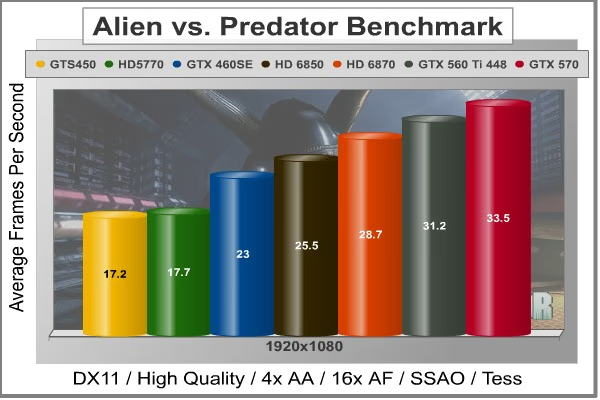
- Aliens vs Predator
- Extreme Settings: (High Quality, 4x AA, 16x AF, SSAO, Tessellation, Advanced Shadows)
- BattleField: Bad Company 2
- Extreme Settings: (Highest Quality, HBAO, 4x AA, 16x AF, 180s Fraps Single-Player Intro Scene)
- Lost Planet 2
- Extreme Settings: (4x MSAA, High Shadow Detail, High Texture, High Render, High DirectX 11 Features)
- Unigine Heaven Benchmark 2.5
- Extreme Settings: (High Quality, Normal Tessellation, 8x AF, 4x AA)
Video Card Test Products
- MSI GeForce GTS 450 N450GTS Cyclone (850 MHz GPU/1700 MHz Shader/1000 MHz vRAM - Forceware 285.62)
- PowerColor Radeon HD 5770 PCS+ (875 MHz GPU/1225 MHz vRAM - ATI Catalyst Driver 11.10)
- EVGA GeForce GTX 460 SE 1GB (648MHz GPU/1296 MHz Shader/850 MHz vRAM - Forceware 285.62)
- MSI R6850 Radeon HD 6850 (775 MHz GPU/1000MHz vRAM - ATI Catalyst Driver 11.10)
- VisionTek 900339 Radeon HD 6850 (775MHz GPU/1000MHz vRAM - ATI Catalyst Driver 11.10)
- MSI R6870 Hawk Radeon HD 6870 (930 MHz GPU/1050MHz vRAM - ATI Catalyst Driver 11.10)
- PNY GTX 570 1280MB VCGGTX570XPB (732MHz GPU/1464MHz Shader/950MHz vRAM - Forceware 285.62)
- EVGA GTX 560 Ti 448 Cores FTW (797MHz GPU/1594MHz Shader/975MHz vRAM - Forceware 285.88)
DX10: 3DMark Vantage
3DMark Vantage is a PC benchmark suite designed to test the DirectX10 graphics card performance. FutureMark 3DMark Vantage is the latest addition the 3DMark benchmark series built by FutureMark corporation. Although 3DMark Vantage requires NVIDIA PhysX to be installed for program operation, only the CPU/Physics test relies on this technology.
3DMark Vantage offers benchmark tests focusing on GPU, CPU, and Physics performance. Benchmark Reviews uses the two GPU-specific tests for grading video card performance: Jane Nash and New Calico. These tests isolate graphical performance, and remove processor dependence from the benchmark results.
- 3DMark Vantage v1.02
- Extreme Settings: (Extreme Quality, 8x Multisample Anti-Aliasing, 16x Anisotropic Filtering, 1:2 Scale)
3DMark Vantage GPU Test: Jane Nash
Of the two GPU tests 3DMark Vantage offers, the Jane Nash performance benchmark is slightly less demanding. In a short video scene the special agent escapes a secret lair by water, nearly losing her shirt in the process. Benchmark Reviews tests this DirectX-10 scene at 1680x1050 and 1920x1200 resolutions, and uses Extreme quality settings with 8x anti-aliasing and 16x anisotropic filtering. The 1:2 scale is utilized, and is the highest this test allows. By maximizing the processing levels of this test, the scene creates the highest level of graphical demand possible and sorts the strong from the weak.

3DMark Vantage GPU Test: New Calico
New Calico is the second GPU test in the 3DMark Vantage test suite. Of the two GPU tests, New Calico is the most demanding. In a short video scene featuring a galactic battleground, there is a massive display of busy objects across the screen. Benchmark Reviews tests this DirectX-10 scene at 1680x1050 and 1920x1200 resolutions, and uses Extreme quality settings with 8x anti-aliasing and 16x anisotropic filtering. The 1:2 scale is utilized, and is the highest this test allows. Using the highest graphics processing level available allows our test products to separate themselves and stand out (if possible).

Mafia II DX9+SSAO Benchmark Results
Mafia II is a single-player third-person action shooter developed by 2K Czech for 2K Games, and is the sequel to Mafia: The City of Lost Heaven released in 2002. Players assumAe the life of World War II veteran Vito Scaletta, the son of small Sicilian family who immigrates to Empire Bay. Growing up in the slums of Empire Bay teaches Vito about crime, and he's forced to join the Army in lieu of jail time. After sustaining wounds in the war, Vito returns home and quickly finds trouble as he again partners with his childhood friend and accomplice Joe Barbaro. Vito and Joe combine their passion for fame and riches to take on the city, and work their way to the top in Mafia II.
Mafia II is a DirectX 9 PC video game built on 2K Czech's proprietary Illusion game engine, which succeeds the LS3D game engine used in Mafia: The City of Lost Heaven. In our Mafia-II Video Game Performance article, Benchmark Reviews explored characters and gameplay while illustrating how well this game delivers APEX PhysX features on both AMD and NVIDIA products. Thanks to APEX PhysX extensions that can be processed by the system's CPU, Mafia II offers gamers equal access to high-detail physics regardless of video card manufacturer. Equal access is not the same thing as equal performance, though.
With PhysX technology turned off, both AMD and NVIDIA are on a level playing field in this test. In contrast to many gaming scenes, where other-worldly characters and environments allow the designers to amp up the detail, Mafia II uses human beings wearing ordinary period-correct clothes and natural scenery. Just like how high end audio equipment is easiest to judge using that most familiar of sounds - the human voice, graphics hardware is really put to the test when rendering things that we have real experience with. The drape of a woolen overcoat is a deceptively simple construct; easy to understand and implement, but very difficult to get perfect.

Aliens vs. Predator Test Results
Rebellion, SEGA and Twentieth Century FOX have released the Aliens vs. Predator DirectX 11 Benchmark to the public. As with many of the already released DirectX 11 benchmarks, the Aliens vs. Predator DirectX 11 benchmark leverages your DirectX 11 hardware to provide an immersive game play experience through the use of DirectX 11 Tessellation and DirectX 11 Advanced Shadow features.
In Aliens vs. Predator, DirectX 11 Geometry Tessellation is applied in an effective manner to enhance and more accurately depict HR Giger's famous Alien design. Through the use of a variety of adaptive schemes, applying tessellation when and where it is necessary, the perfect blend of performance and visual fidelity is achieved with at most a 4% change in performance.
DirectX 11 hardware also allows for higher quality, smoother and more natural looking shadows as well. DirectX 11 Advanced Shadows allow for the rendering of high-quality shadows, with smoother, artifact-free penumbra regions, which otherwise could not be realized, again providing for a higher quality, more immersive gaming experience.
In our next section, Benchmark Reviews looks at one of the newest and most popular games, Battlefield: Bad Company 2. The game lacks a dedicated benchmarking tool, so we'll be using FRAPS to measure frame rates within portions of the game itself.
Battlefield: Bad Company 2 Test Results
The Battlefield franchise has been known to demand a lot from PC graphics hardware. DICE (Digital Illusions CE) has incorporated their Frostbite-1.5 game engine with Destruction-2.0 feature set with Battlefield: Bad Company 2. Battlefield: Bad Company 2 features destructible environments using Frostbit Destruction-2.0, and adds gravitational bullet drop effects for projectiles shot from weapons at a long distance. The Frostbite-1.5 game engine used on Battlefield: Bad Company 2 consists of DirectX-10 primary graphics, with improved performance and softened dynamic shadows added for DirectX-11 users. At the time Battlefield: Bad Company 2 was published, DICE was also working on the Frostbite-2.0 game engine. This upcoming engine will include native support for DirectX-10.1 and DirectX-11, as well as parallelized processing support for 2-8 parallel threads. This will improve performance for users with an Intel Core-i7 processor.
In our benchmark tests of Battlefield: Bad Company 2, the first three minutes of action in the single-player raft night scene are captured with FRAPS. Relative to the online multiplayer action, these frame rate results are nearly identical to daytime maps with the same video settings.

DiRT-2 Demo DX11 Benchmark Results
DiRT-2 features a roster of contemporary off-road events, taking players to diverse and challenging real-world environments. This World Tour has players competing in aggressive multi-car, and intense solo races at extraordinary new locations. Everything from canyon racing and jungle trails to city stadium-based events. Span the globe as players unlock tours in stunning locations spread across the face of the world. USA, Japan, Malaysia, Baja Mexico, Croatia, London, and more venues await, as players climb to the pinnacle of modern competitive off-road racing.
Multiple disciplines are featured; encompassing the very best that modern off-roading has to offer. Powered by the third generation of the EGOTM Engine's award-winning racing game technology, DiRT-2 benefits from tuned-up car-handling physics and new damaged engine effects. It showcases a spectacular new level of visual fidelity, with cars and tracks twice as detailed as those seen in GRID. The DiRT-2 garage houses a collection of officially licensed rally cars and off-road vehicles, specifically selected to deliver aggressive and fast paced racing. Covering seven vehicle classes, players are given the keys to powerful vehicles right away. In DiRT-2 the opening drive is the Group N Subaru, essentially making the ultimate car from the original game the starting point in the sequel, and the rides just get even more impressive as you rack up points.
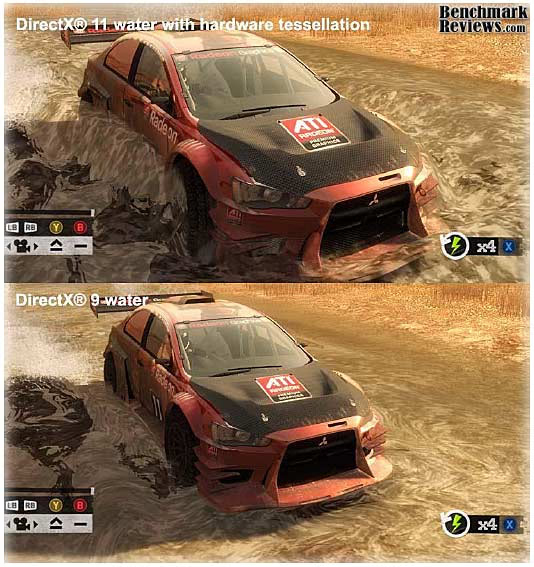
The primary contribution that DirectX-11 makes to the DiRT-2 Demo benchmark is in the way water is displayed when a car is passing through it, and in the way cloth items are rendered. The water graphics are pretty obvious, and there are several places in the Moroccan race scene where cars are plowing through large and small puddles. Each one is unique, and they are all believable, especially when more than one car is in the scene. The cloth effects are not as obvious, except in the slower-moving menu screens; when there is a race on, there's precious little time to notice the realistic furls in a course-side flag. I should also note that the flags are much more noticeable in the actual game than in the demo, so they do add a little more to the realism there, that is absent from the benchmark.

Lost Planet 2 DX11 Benchmark Results
A decade has passed since the first game, and the face of E.D.N. III has changed dramatically. Terra forming efforts have been successful and the ice has begun to melt, giving way to lush tropical jungles and harsh unforgiving deserts. Players will enter this new environment and follow the exploits of their own customized snow pirate on their quest to seize control of the changing planet.
- 4-player co-op action: Team up to battle the giant Akrid in explosive 4 player co-operative play. Teamwork is the player's key to victory as the team is dependent on each to succeed and survive.
- Single-player game evolves based on players decisions and actions
- Deep level of character customization: Players will have hundreds of different ways to customize their look to truly help them define their character on the battlefield both on- and offline. Certain weapons can also be customized to suit individual player style.
- Beautiful massive environments: Capcom's advanced graphics engine, MT Framework 2.0, will bring the game to life with the next step in 3D fidelity and performance.
- Massive scale of enemies: Players skill on the battlefield and work as a team will be tested like never before against the giant Akrid. Players will utilize teamwork tactics, new weapons and a variety of vital suits (VS) to fight these larger-than-life bosses.
- Rewards System- Players will receive rewards for assisting teammates and contributing to the team's success
- Multiplayer modes and online ranking system
- Exciting new VS features- Based on fan feedback, the team has implemented an unbelievable variety of Vital Suits and new ways to combat VS overall. The new VS sytem will have a powerful impact on the way the player takes to the war zone in Lost Planet 2
Test A:
The primary purpose of Test A is to give an indication of typical game play performance of the PC running Lost Planet 2 (i.e. if you can run Mode A smoothly, the game will be playable at a similar condition). In this test, the character's motion is randomized to give a slightly different outcome each time.
Test B:
The primary purpose of Test B is to push the PC to its limits and to evaluate the maximum performance of the PC. It utilizes many functions of Direct X11 resulting in a very performance-orientated, very demanding benchmark mode.

Unigine Heaven 2.5 Benchmark Results
The Unigine "Heaven 2.2" benchmark is a free, publicly available, tool that grants the power to unleash the graphics capabilities in DirectX 11 for Windows 7 or updated Vista Operating Systems. It reveals the enchanting magic of floating islands with a tiny village hidden in the cloudy skies. With the interactive mode, emerging experience of exploring the intricate world is within reach. Through its advanced renderer, Unigine is one of the first to set precedence in showcasing the art assets with tessellation, bringing compelling visual finesse, utilizing the technology to the full extend and exhibiting the possibilities of enriching 3D gaming.
The distinguishing feature in the Unigine Heaven benchmark is a hardware tessellation that is a scalable technology aimed for automatic subdivision of polygons into smaller and finer pieces, so that developers can gain a more detailed look of their games almost free of charge in terms of performance. Thanks to this procedure, the elaboration of the rendered image finally approaches the boundary of veridical visual perception. The "Heaven" benchmark excels at the following key features:
- Native support of OpenGL, DirectX 9, DirectX-10 and DirectX-11
- Comprehensive use of tessellation technology
- Advanced SSAO (screen-space ambient occlusion)
- Volumetric cumulonimbus clouds generated by a physically accurate algorithm
- Dynamic simulation of changing environment with high physical fidelity
- Interactive experience with fly/walk-through modes
- ATI Eyefinity support

EVGA GeForce GTX 560 Ti 448 Cores FTW Conclusion
IMPORTANT: Although the rating and final score mentioned in this conclusion are made to be as objective as possible, please be advised that every author perceives these factors differently at various points in time. While we each do our best to ensure that all aspects of the product are considered, there are often times unforeseen market conditions and manufacturer changes which occur after publication that could render our rating obsolete. Please do not base any purchase solely on our conclusion, as it represents our product rating specifically for the product tested which may differ from future versions. Benchmark Reviews begins our conclusion with a short summary for each of the areas that we rate.
Unfortunately, I didn't get a lot of time with the EVGA GTX 560 Ti 448 Cores FTW. I was unable to find out the overclockability of the card before release. One of the software packages that came with the GTX 560 Ti 448 Cores FTW was EVGA's Precision Tuning Utility, however, so I intend on finding out just how much headroom there is in this limited edition video card.
I really can't complain at all about the performance of the GTX 560 Ti 448 Cores FTW. NVIDIA says that the GTX 560 Ti 448 Cores should run about 5% slower than the GTX 570, thus filling the gap between the GTX 560 Ti and the GTX 570. This is almost exactly the case in the tests I have run with the EVGA GTX 560 Ti 448 Cores FTW. I think there was only one test where the difference was 6% or more. The rest were either 5% or below. That's likely due to the fact that the EVGA GTX 560 Ti 448 Cores FTW outclocks the stock GTX 560 Ti 448 Cores. With performance that close, it is probably a good bet that, when overclocked, the EVGA GTX 560 Ti 448 Cores FTW will do very well.
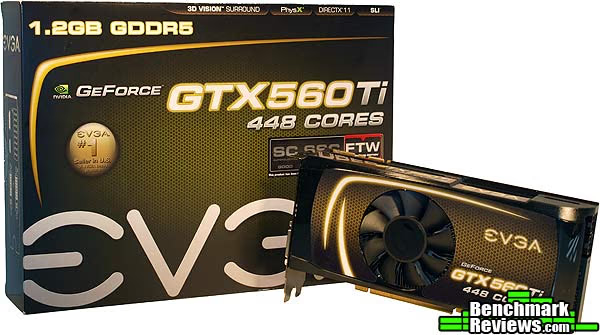
In my opinion, the EVGA GTX 560 Ti 448 Cores FTW is quite visually appealing, both on the box and the card itself. While I have experienced some disagreement with my assessment of appearance in the past, I like a card that shows itself off while still maintaining a decent amount of modesty. The card touts the EVGA logo, the model of the card, and a green and black background accented by yellow flashes. I certainly wouldn't overlook this card while walking through the store, but I wouldn't be annoyed with it like I am with some cards that tout half-naked, muscular elf women and burly barbarians wielding giant two-handed axes.
The construction of the EVGA GTX 560 Ti 448 Cores FTW appears to be very solid. The card is put together firmly and I didn't notice any weak parts. The fact that EVGA was able to factory overclock the GPU speaks to the construction of the GTX 560 Ti 448 Cores GPU itself.
The GTX 560 Ti 448 Cores FTW is functionally similar to any other GTX 560 or higher GPU. NVIDIA offers some nice features with its GPUs, including PhysX support and NVIDIA 3D Vision Surround support. Obviously, the GTX 560 Ti 448 Cores FTW supports these functions as well. One of the things I would like to see NVIDIA start adding support for is triple-monitor NVIDIA surround from a single video card. Any card with the now-standard two DVI, one HDMI, and one DisplayPort connectors should be capable of this, if it were supported by NVIDIA drivers. However, only the dual-GPU GTX 590 can actually do it.
The stock version of the GTX 560 Ti 448 Cores video cards sells for $289.99 (Newegg) . That puts it right about the same price as some of the higher-end Radeon HD 6950s and a little higher than the GTX 560 Ti cards and Radeon HD 6870s. It's also, however, quite a bit less expensive than most of the GTX 570 video cards. Seeing that we were able to come very close to the performance of the GTX 570 in our tests with the GTX 560 Ti 448 Cores FTW, it will be well worth $290. That price is a good one, and with the distribution of the GTX 560 Ti 448 Cores limited to only a few markets and a smaller amount of GPUs, this might be your choice if you were looking at the GTX 570 before.Pros:
+ Performs close to a GTX 570, but for potentially less cash
Cons:
- No 3 Monitor NVIDIA Surround Support
Ratings:
- Performance: 9.50
- Appearance: 9.00
- Construction: 9.00
- Functionality: 9.00
- Value: 9.50
Reader comments from the original article
8 comments were posted before commenting closed. They are preserved as written. Original avatars no longer resolve and are shown as a placeholder.
What, no HD 6950? Jeff Permalink:
I guess I can extrapolate from other reviews over the past six months that its a hair faster than the HD 6950. Would have been nice to have its natural competition in the review (which is excellent otherwise).
RE: What, no HD 6950? Hank Permalink:
Sorry about that Jeff. I literally had one day to test the GTX 560 Ti 448 Cores FTW before release and no HD 6950 on hand. Otherwise, it would have been in there. -Hank
RE: EVGA GeForce GTX560Ti FTW 448-Core Chris Permalink:
Hank - any idea how well Nvidia will support this product? The problem is that this new 448 core product has a limited production run. That means that only a few people are going to have it, which means that good drivers for this product may not be the priority that it is for the more popular cards ... like the 560Ti 384 core edition. Even with a marginally better performance the 384 core version, it seems like a risk. It may be better to just swallow the $30 or so dollars and pay up for a 570. On the plus side, this will probably force retailers to offer people a reason to buy a 570, so it may actually bring the 570 and AMD's 6950 down in price a bit.
RE: RE: EVGA GeForce GTX560Ti FTW 448-Core Olin Coles Permalink:
So far as I can tell, this is a permanent change and going forward 448 cores will be the standard 560Ti. Driver support will be identical to other products of the 5xx family, so no worries there. The only risk is price, which I think is competitive to other models.
RE: RE: EVGA GeForce GTX560Ti FTW 448-Core Hank Permalink:
NVIDIA did say that this is a limited release, but since all NVIDIA 500 series card use the same drivers, I think it's a safe bet that this card will receive as much driver support as any other. Most of the changes to drivers are for the benefit of many cards rather than just one anyway. Also, NVIDIA recommended using a newer version than what is currently available for the GTX 560 Ti 448 Cores. As you can see on the testing page, the most recent drivers are 285.62, while the GTX 560 Ti 448 Cores came with 285.88. Looks like the are already updating in support of this card. -Hank
RE: RE: RE: EVGA GeForce GTX560Ti FTW 448-Core Chris Permalink:
Okay - thanks. The reason why I asked was because a friend of mine is looking for a replacement GPU for his old HD 4870. I'm at a bit of a conflict on what advice to give him. A 580 or 6970 is probably out of his budget, barring a major Christmas discount. I myself own the 560TI Hawk, and if I were to get a card today, it'd be another one. The other variable is that the new generation of cards is around the corner, which makes things a bit more debatable. I told him to see if he could get a good Christmas deal - else, wait it out if he could.
RE: RE: RE: RE: EVGA GeForce GTX560Ti FTW 448-Core Helping dude whose too bored Permalink:
Well... bit-tech did release a review so I am going to refer to that. Essentially what they are saying that you will get a similar performance to a stock clocked GTX 570. So i guess it is better buying for now. Since mid-range nVidia cards will take at least 6 months for them to come out. So, there is not much point in waiting for those. Link for bit-tech review: ##bit-tech.net/hardware/graphics/2011/11/29/zotac-geforce-gtx-560-ti-448-cores-review/1 Image of nVidia roadmap: #assets.vr-zone.net/14067/005.jpg
560 TI 448 classified nate dogg Permalink:
wanted to hop on here since there was no classified benchmark review and say that although this card and the classified are close to the same, the extra fan and better cooling of the classified is well worth the extra $15 plus there is an awesome light on the side that says EVGA that really adds to the look of your PC. This card freakin ROCKS!! i put it in a kinda old system that was getting a best score of 7706 from 3DMark06 to a 10110 score with only one of these cards compared to my old SLi set up! mine currently OCs to a very stable 950 core 1900 shader and 2010 memory speed and stayed below 55 deg Cel with fans @ 60% durring 3DMark06 benchmark. Can't wait to see my score once i get a 2nd card in SLi and my new Asus MoBo and i5 2500k CPU in a couple weeks! i will post on here and give an update once i do.