
ASUS GeForce GT 430 Overclocking Performance
Benchmark Reviews tests the overclocking performance on the ASUS ENGT430 video card
Change comes quickly when it comes to computers. Anyone with a computer a year or two old can tell you that. The last year has been all about DX11. Microsoft DirectX-11 has made video games for the PC look the best they ever have. For a while, there was quite a lull between video card capability and software to take advantage of it. It seemed like even the 2nd or 3rd best cards could play all the games at the highest settings. DX11 was certainly a game-changer. But DX11 has been around for a while now in computer age. The chipset manufacturers are chasing down a new squirrel now.

3D is starting to show up everywhere. It's not just for the movies anymore. 3D TVs with 3D Blu-Ray players and their 3D glasses can be found at almost any electronics store. 120 Hz computer monitors capable of 3D playback can be paired with more than a couple of manufacturers glasses and software to play 3D games. But 3D isn't just for games and movies anymore. YouTube offers a 3D site now, and other major video sites will soon follow suit. NVIDIA has started a site where users can upload their own 3D videos and pictures. 3D media is coming on strong, and the major players in the video card market are banking on it.
The ASUS ENGT430 offers HTPC and media PC users an inexpensive way to upgrade their media experience by making it 3D capable. Users will have to ensure that the rest of their hardware is compatible, but if they are already enjoying 3D movies at home, they likely won't run into many issues. The ENGT430 is a DirectX-11 video card that brings 3D capabilities along for the ride. This article expands on our original review of the ASUS GeForce GT 430.

The ASUS ENGT430 is a small video card. The overall length is about 6.3 inches. That includes the heatsink that extends out past the PCB a little. The PCB itself is 5.75 inches long. The ASUS ENGT430 comes with a full sized faceplate or the option for two short faceplates, one for the HDMI and DVI ports and one for the VGA port. This will cause the ENGT430 to take up two PCI slots in your case, but in all actuality, it will do that anyway. While the ASUS ENGT430 is low profile, the heatsink and fan combination makes it large enough to take up the neighboring PCI slot anyway. If you have an HTPC case that requires short cards, the ASUS ENGT430 has you covered.

One thing that is important to note about the ASUS ENGT430 is that it doesn't cool the same as most of the other Fermi based cards. There is no plastic covering forcing air out the back of the case. The fan and heatsink will keep the ENGT430 cool, but any heat that is generated will be circulated back into your case. This normally wouldn't be of much concern because low profile and low-end cards such as the ENGT430 don't generate a lot of heat. However, seeing that the ASUS ENGT430 will most likely find a home in a HTPC, the smaller case size may get hotter faster. It's unlikely that there will be any problems, especially after looking at our temperatures section, but make sure you have plenty of ventilation and airflow in your case just to be safe.

As with most GeForce video cards, the ENGT430 offers two output signals so you can connect up to two monitors. This is one area that NVIDIA still lags behind AMD. Many ATI Radeon HD cards now offer connectivity for up to three monitors. The ASUS ENGT430 has a DVI port, a VGA port, and an HDMI port that supports HD Audio throughput, another relatively common feature, but one that is especially necessary for HTPC use. The ASUS ENGT430 HDMI port supports both Dolby True HD and DTS-HD Master Audio.
You'll notice that the ASUS ENGT430 does not have a power supply input. One isn't necessary as the ENGT430 doesn't use much power. NVIDIA recommends using at least a 300 Watt power supply that puts out 18 amps on the +12v rail but the GT 430 could probably be run on less. Another lacking feature we don't find on the ASUS ENGT430 is an SLI connector. In fact, you won't find an SLI connector on any GT 430 card because the GT 430 series doesn't support SLI at all.

The memory used on the ASUS ENGT430 is another difference that you'll notice between the GT 430 and the other Fermi based cards. Rather than using DDR5 memory, the ASUS ENGT430 uses hynix DDR3 memory modules. There are eight 128 MB modules total. The part number on the modules is H5TQ1G63BFR-12C. NVIDIA states the specs of the GT 430 cards as having memory with speeds at 900 MHz. This isn't true for the ASUS ENGT430 as the hynix DDR3 memory is only rated for 800 MHz. Maybe some of the other AIB partners will use 900 MHz memory. This presents a minor concern for overclocking. With the GTX 460 and GTS 450 cards using memory clocked under its rated speed of 1 GHz, overclocking the memory didn't actually put it above its rated speed. When we overclock the ASUS ENGT430, we will have to push the memory above its rated speed, which could cause us to run into some problems.
Manufacturer: ASUSTek Computer, Inc.
Product Name: ENGT430 GeForce GT 430 1GB
Model Number: ASUS ENGT430/DI/1GD3(LP)
Price As Tested:$79.99 at NewEgg
Full Disclosure: The product sample used in this article has been provided by ASUS.
GeForce GT 430 Overclocking
NVIDIA's recent GF104 and GF106 graphics processors proved themselves capable of serious overclocking, so it's obvious that we'd expect great things out of the GF108 as well. Of course, the GT430 series cards come with a distinct disadvantage in the area of cooling, so I didn't expect quite as much head room as we have seen from the other GPUs. Even so, the ENGT430 proved to be quite impressive when overclocked. The ASUS ENGT430 comes stock with a clock speed of 700/1400MHz. Not bad at all considering the GTX 460 is at 675/1350. The GT430 does run a little slower than the GTS 450 at 783/1566, however. The other difference is in the memory. The GT430 doesn't have the Samsung DDR5 memory that the other Fermi GPUs sport. The DDR3 chips on the ENGT430 do come clocked at 800MHz, though. This is somewhat slower than the memory speeds of the other Fermi GPUs. NVIDIA says that the memory for the GT 430 can be 900MHz DDR3, so some other manufacturers might include faster memory.
My goal with overclocking the ASUS ENGT430 was to push both the core clock and the memory clock to the fastest speeds possible without raising the voltage at all. Since the ENGT430 doesn't have an input from the PSU, raising the voltage wasn't much of a possibility anyway. Besides, the fan and heatsink combo on the ENGT430 aren't conducive to pushing more voltage.
Software Overclocking Tools
Our Executive Editor here at Benchmark Reviews released an article a few years back with detailed information on hwo to overclock your video card. Since then, a lot has changed. Software overclocking tools have become readily available with many video card manufacturers offering their own solutions. EVGA Precision, MSI Afterburner, and ASUS SmartDoctor are a few, and NVIDIA even offers their own solution through their System Tools suite. All of these programs are very similar and are extremely easy to use, just be careful not to overdo it.
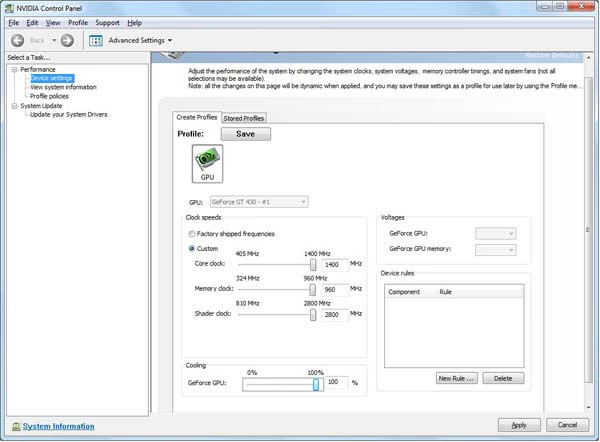
NVIDIA System Tools
I started off the overclocking of the ASUS ENGT430 by using NVIDIA System Tools. While very easy to use, the suite didn't allow me to adjust the core clock speed of the video card at all. I was able to increase the memory speed up to 960 MHz. While that is nice, it's not what I am looking for. So I moved on to ASUS's tool, SmartDoctor. The ASUS SmartDoctor interface is very easy to use as well. When it comes up, it does a quick scan of your GPU, though I'm not entirely sure what it's checking for. Overclocking your video card with SmartDoctor is as easy as dragging the bars. The GPU core and shader clocks are locked and move together. With the ASUS ENGT430, the SmartDoctor utility only allowed me increase the GPU core clock speed at 100 MHz intervals. A 200 MHz increase is a bit of a stretch, and I didn't want to jump that far so soon. I overclocked the ENGT430 to 800/1600 MHz and it was solid as a rock. But the SmartDoctor utility left me wondering if there was more left in the ENGT430.

ASUS SmartDoctor Utility
So I decided to try the EVGA Precision software out on the ASUS ENGT430. Turns out, while I was limited to a max overclock of 950 MHz, I was able to actually type in the clock speed that I wanted. Since there is no way the ENGT430 was going to get to 950 MHz, it doesn't really matter that that was the limit. Since I knew the ENGT430 was solid at 800 MHz, I increased the clock speed incrementally from there by 10 MHz at a time. At each interval, I would run FurMark for 12 hours at max load to make sure the ENGT430 could handle it. At 870 MHz, the ENGT430 failed after an hour or so. I then clocked the ENGT430 back to 860 MHz, stressed it again, then started running the benchmarks. After getting through all of the DX10 benchmarks, I loaded up Unigine Heaven DX11 and started the benchmark. About halfway through the DX11 benchmark, my system froze for a few minutes. Then the Heaven benchmark quit out to the desktop and gave me an error about not having DX11 compatible hardware. I wiped the drivers and reinstalled, restarted the system and tried again. I got the same error. I went back to the EVGA Precision software and clocked the GPU down to 850 MHz and gave it another go. This time the benchmark completed all the way through, all five times.
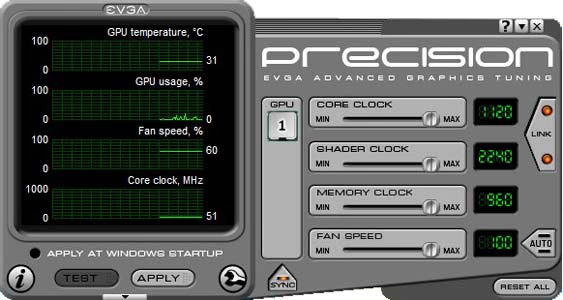
EVGA Precision Overclocking Utility (v2.0.0)
So I settled at 850 MHz. That's 150 MHz faster than the 700 MHz that it came at stock, an increase of over 21%. I kept the memory at 900 MHz. I ran through most of the benchmarks to find out how much that 150 MHz helped out. Here are the results:
Overclocking Results
| Video Game | Standard | Overclocked | Improvement |
|---|---|---|---|
| 3D Mark New Calico DX10 | 9.62 | 11.63 | 21% |
| 3D Mark Jane Nash DX10 | 9.16 | 11.27 | 23% |
| Alien vs Predator DX11 | 11.8 | 14.2 | 20% |
| Heaven DX11 | 13.7 | 15.4 | 12% |
| Lost Planet 2 DX11 | 15.6 | 18.7 | 20% |
| Far Cry 2 DX10 | 32.1 | 38.8 | 21% |
Excluding the Unigine Heaven DX11, the average performance increase was 21%, right in line with the 21% increase in clock speed. The Unigine benchmark posted a 12% increase in performance. If you recall from the previous article, the settings I used in the benchmarks weren't the highest settings available, but they were still very high for the ENGT430, as you can see from the original FPS results. Overclocked, the ENGT430 performs much better, but the settings would still need to be lowered to make these games playable.
A 21% increase in clock speed, matched by a 21% increase in performance is an amazing achievement for the ENGT430. On top of that, there wasn't any increase in temperature output at all. I'll admit that I was under-impressed by the 64 degree high temperature of the ENGT430, but maintaining just 64 degrees after a 21% increase in clock speed is a lot better.
Fermi GF108 Temperatures
Benchmark tests are always nice, so long as you care about comparing one product to another. But when you're an overclocker, gamer, or merely a PC hardware enthusiast who likes to tweak things on occasion, there's no substitute for good information. Benchmark Reviews has a very popular guide written on Overclocking Video Cards, which gives detailed instruction on how to tweak a graphics cards for better performance. Of course, not every video card has overclocking head room. Some products run so hot that they can't suffer any higher temperatures than they already do. This is why we measure the operating temperature of the video card products we test.
The FurMark application has the ability to push the a graphics processor to higher strains than any video game can. Doing so generates maximum thermal load for a GPU. This makes FurMark an excellent program to use to find out just how hot a video card has the potential to get inside of your computer. Now, the fact that FurMark pushes a GPU to extreme highs means that the likelihood of a video card reaching the temperatures that we are representing as the high here is very unlikely. The numbers we put here are a representation of the maximum thermal output of a video card and don't reflect normal, real-world performance.
To measure the temperatures of a video card, I first measure the idle temperature using GPU-Z. Then I use FurMark to push the GPU temperature to the very limit. The ambient temperature of test environment stays at a stable 20°C. After I am certain that the video card has reached its thermal potential, I close FurMark and measure the highest temperature recorded by GPU-Z during the process. I do this because it has often been speculated that FurMark records higher-than-actual temperatures. It is interesting to note, however, that both FurMark and GPU-Z came up with the same temperatures for ASUS ENGT430 video card.

ASUS ENGT430 GeForce GT 430 1GB Video Card Temperatures
With the GF108 graphics processor being intended for use in a media PC environment, we would hope that the GT430 video cards would operate at relatively low temperatures. The ASUS ENGT430 is a low-profile video card and has only a small fan and heatsink cooling it. This works great for saving space in a small mini-ITX case, and it looks like it works pretty well for cooling this minimal card as well.
The ASUS ENGT430 is an interesting new card with an interesting purpose. Being low-profile and meant for a media environment, it is our hope that the ENGT430 doesn't put out a lot of heat. Most tightly enclosed HTPC cases aren't great at expelling excess heat. The ASUS ENGT430 can certainly be said to run at cold temperatures, but the results are less than surprising. Both the GF104 and the GF104 based cards run very cool as well. In fact, the NVIDIA reference GTS 450 tested here at Benchmark Reviews had nearly identical operating temperatures as the ASUS ENGT430. The ENGT430 runs idle at 30°C and undiscernable noise with an ambient room temperature of 20°C. After about 10 minutes of running FurMark's stress test, the ASUS ENGT430 was just as quiet and ran at 65°C. The fact that the ASUS ENGT430, at nearly have the GPU power, is running at the same temperature as a GTS 450 isn't all that difficult to understand. The low profile card has very little cooling going on. The ASUS ENGT430 has only a tiny fan and a small heatsink to help keep heat off the chip. There is no covering to focus the heat in a certain direction, nor are there any heatpipes to help take the heat toward the fan.
VGA Power Consumption
Life is not as affordable as it used to be, and items such as gasoline, natural gas, and electricity all top the list of resources which have exploded in price over the past few years. Add to this the limit of non-renewable resources compared to current demands, and you can see that the prices are only going to get worse. Planet Earth is needs our help, and needs it badly. With forests becoming barren of vegetation and snow capped poles quickly turning brown, the technology industry has a new attitude towards turning "green". I'll spare you the powerful marketing hype that gets sent from various manufacturers every day, and get right to the point: your computer hasn't been doing much to help save energy... at least up until now.
For power consumption tests, Benchmark Reviews utilizes the 80-PLUS GOLD certified Corsair 850W PSU, model TX850W. According to Corsair, this PSU provides 80% efficiency, however our results are not adjusted for consistency. To measure video card power consumption, Benchmark Reviews uses the Kill-A-Watt EZ (model P4460) power meter made by P3 International.
Normally, we would like to take a baseline test without a video card installed in the test system. However, in this test system, the on-board Radeon HD 4290 will auto-enable, even if previously disabled, if there is no other video card present. This poses a problem to getting a baseline for power consumption, so for this article, we will only be showing the power consumption of the system with the video card at idle, and at load. This should let us know how much power the video card can consume. Remember that this test is relative, since more power is consumed by other system components during the FurMark stress test as well. It should show us, however, a good idea of how much total power could be consumed in a media style PC under the harshest of circumstances.

ASUS ENGT430 GeForce GT 430 Video Card Power Consumption
The idle test results are taken while the system rests idle at the Windows 7 login screen. Then we load up FurMark and run the stress test and record the load power consumption after the test has been running for about 10 minutes.
The ASUS ENGT430 does not require any power connection from the PSU. This alone seriously limits the ENGT430's capacity for power consumption. Without any extra power, the max load of the ASUS ENGT430 is 75W. When are test system was running at idle, it consumed 68W of power. That's not much. With FurMark stressing the ASUS ENGT430 to the max, the system drew 147W of power. Remember that these numbers are full system power. While that isn't the maximum amount of power that we can expect this system to draw, due to the fact that FurMark stresses mainly the GPU, it will certainly be on the higher end of the system. This is good news for HTPC users. Many of the PSUs that come with, or fit in, mini-ITX cases are around 200-300W. Some are even less. With an entire system running only 147W of power during GPU stressing, it appears that the ENGT430 is a good choice for an HTPC and it is well suited for anyone watching their power consumption.
ASUS ENGT430 GeForce GT 430 Conclusion
The ASUS ENGT430 is an interesting video card, as I pointed out in my original review article. The ENGT430 comes in at the low-end of the video card price segment for $79.99 at NewEgg. It also provides features such as DX11 and PhysX support. With DX11 bringing gaming and graphics back to a point where innovations in hardware have to keep up with software, this is a necessary feature on any new video card. But the thing that NVIDIA is marketing the new GF108 enabled GT 430 video cards for something that doesn't necessarily require DX11.
3D is the new word in computer and home theater entertainment. The home theater and media PC market is growing very rapidly and is already a much larger market than PC gaming. 3D media doesn't require as much graphics power as DX11 gaming, and certainly not as much as 3D gaming. But it does require special and capable hardware. The ASUS ENGT430 provides a key part of the hardware necessary for 3D media playback. Not long ago, NVIDIA was the clear leader in 3D capable GPUs. The release of the 6800 series and new drivers for the 5000 series, AMD is battling back to claim their share of the 3D explosion.
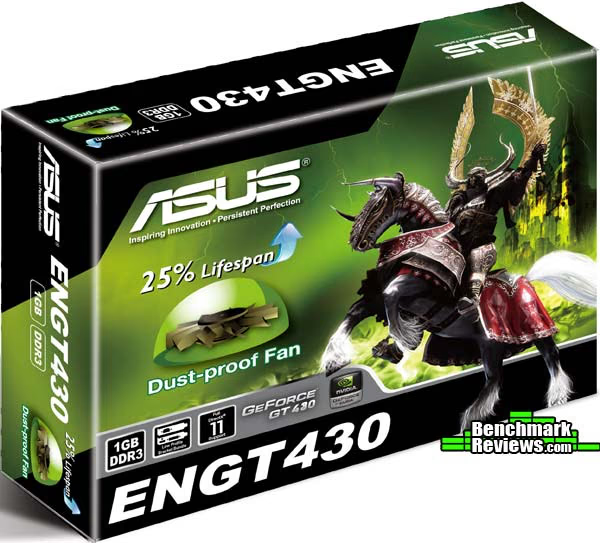
The ASUS ENGT430 won't play 3D-intensive video games. The ENGT430 won't play DX11 games without seriously lowering the settings. The ENGT430 won't even play a lot of DX10 games without lowering the settings by quite a bit. But that wasn't the purpose of the ASUS ENGT430. The purpose was to provide an inexpensive video card for HTPC and media PC users that supports DX11 and 3D media playback. The ASUS ENGT430 certainly works for that purpose.
We have seen in this article some of the features that are quite important where HTPCs and media PCs are concerned. The temperatures of the ASUS ENGT430 remain relatively low despite the lack of cooling provided with the card. The small fan and heatsink help the low-profile ENGT430 take up less space in a crowded case. If you have another full-sized PCI slot next to the ASUS ENGT430, however, it will cover it up. The ENGT430 uses minimal power. Our entire test system with the ASUS ENGT430 would be able to run on they type of power supply generally found in an HTPC case. Additionally, the ASUS ENGT430, like the other Fermi-based cards we have tested here at Benchmark Reviews, is a great overclocker. We were able to get 21% more speed out of the ENGT430 wihtout going overboard trying take it to the limit. There is likely at least a little more headroom in there.
For media PC users, or potential users, the ASUS ENGT430 provides a great option for maintaining the newest technology for your PC and TV all in one package. 3D media will be playable using the ENGT430. If you have an HTPC and want to keep it while still being able to watch 3D movies and videos, the ENGT430 will let you do that. Like I mentioned earlier, however, things change fast in the PC hardware industry. A lot is happening, especially in the 3D segment. Keep an eye out, because 3D is coming on fast and I'll bet we will be seeing a lot of changes and advancement in the near future.
Questions? Comments? Benchmark Reviews really wants your feedback. We invite you to leave your remarks in our Discussion Forum.
Reader comments from the original article
6 comments were posted before commenting closed. They are preserved as written. Original avatars no longer resolve and are shown as a placeholder.
Not worth it BernardP Permalink:
The GT 430 seems to be an unbalanced design, with too few ROPs. It's not worth the effort to overclock it. My year-old GT240 performs better in games (except for DX11) and has the same multimedia performance. NVidia needs to come up with something better in that price segment. An OEM version of the GT240 is already available and looks more promising: ##nvidia.com/object/product-geforce-gt-440-oem-us.html I'm betting the GT430 will be short-lived.
. killerbee Permalink:
BernardP: your gt 240 has not the same multimedia performance. GT240 doesn't have hdmi 1.4a interface, 3D content playback capability, dts true hd etc. etc...
Why ?! LEGndARY Permalink:
Hi, Guys I think this card was meant to be a good choice for HTPCs .. and for that why didn't you test it with some DVD's and Blue-Rays to see how it performs in termas of image quality and hardware acceleration ??!!
RE: Why ?! Olin Coles Permalink:
You do realize this isn't the full review, right? The original review was linked at the beginning, middle, and end of this article. Please leave a comment on that article. Thanks.
RE: RE: Why ?! LEGndARY Permalink:
Yep .. now I get it :p I was directed to this review
works good Dane_795 Permalink:
It was a good write up so I decided that I'd give this a try. I installed EVGA Precision X and changed it to 842MHz/840MHz/85% fan speed. Results: only slightly louder, much better performance, about the same temps. It's worth it unless you never play games.