
MacWorld Expo 2011 Show Coverage
MacWorld Expo, the annual gathering of the Apple faithful, has been a regular event since the first San Francisco show in January, 1985. As a Mac programmer, I attended that show, and every one since then up through the early 2000s. After I transitioned to Java and Web development, the computer I used became less important, and the 2003 show was the last I attended until this year. The 27th annual MacWorld Expo was dramatically different from what I remembered.
Honey, I Shrank the Show
In its heyday, MacWorld Expo was so big that there were two per year: a winter/spring show in San Francisco and a late summer show in Boston. There was even MacWorld Tokyo starting in 1991, and MacWorld NYC in 1999. These shows were huge: I recall taking shuttle buses between the two venues in Boston in the late 1980s, and the San Francisco show quickly overflowed the original Moscone Center and had to spread to the new Moscone hall across the street. With hundreds of exhibitors, including big names like Apple, Adobe, Microsoft, Hewlett-Packard, as well as many of the small, independent shops that often had the most interesting products, MacWorld was a fascinating experience if you had the patience and stamina to push through the 100,000 or more people who typically attended. Nearby hotels were sold out months in advance and savvy attendees brought protein bars and bottled water, since nearby eateries would be swamped and the show food would be very expensive.
But several things happened, the most significant of which was the rise of the Internet. Suddenly, it was easy for companies to put complete information on their products online for anyone to find. I've worked for several companies that had MacWorld exhibits and know first-hand that attending a trade show is very expensive: there's travel and lodging for everyone attending, the costs of shipping all the booth hardware and equipment, and the cost of paying union workers to set it all up (at least in the 90s, you could literally not even set up your own computers and plug them in; your contract with IDG required you to use union labor). As it became harder to make an economic case for attending a trade show, many companies cut back drastically on their attendance.

The San Francisco-New York-Tokyo annual shows continued through 2003, after which the New York and Boston shows were cancelled by the show sponsor International Data Group (IDG). Apple continued exhibiting through 2009, although most of the other big exhibitors had dropped out earlier. My trip to the 2011 MacWorld Expo revealed a drastically shrunken show, with 230 claimed exhibitors (although counting the booths on the show map reveals fewer than 200) at a single, tiny hall at Moscone Center West. About 25,000 attendees are expected this year.

Whereas previous MacWorld Expos required days to see most exhibits, I was able to walk every aisle of the 2011 show in less than three hours.
It Should Probably Be Called "iOS World"
The big Apple event of the year used to be Steve Jobs' MacWorld Keynote address. There is no keynote any longer, although there were sessions you could attend, such as "Learning from Science Fiction Interfaces" and "TechGirlz: Women in Technology". I didn't attend any of the conferences, but stepping inside, I was briefly transported back to those heady days of yore: lots of exhibits! Crowds to push through!

But the nostalgia faded quickly. To be blunt, there's not a lot of Macintosh stuff at MacWorld Expo. Although I didn't count, I'd guess that about 2/3 of the exhibits were for iPhone/iPad/iPod-related items. As I feared, there were endless displays of iPhone and iPad cases, stands, and screen protectors...

There were some Mac items, which I'll get to, but the real development work these days is in iOS devices. Here are some of the more interesting...and silly...things I saw.
TV Hat
Hanging from the inside front of the bill of this extended baseball cap is a clear plastic sleeve into which you slip your iPhone or iPod Touch. A magnifying lens adjusts back and forth on a ratcheted track to enlarge the image, while flaps on the side of the bill block annoying outside light from interfering with your viewing experience. I tried one out:

I am forced to admit that it does in fact work, although I cannot imagine wearing one in public "at the airport or beach". Normally $29.95 (plus $7.95 shipping and handling), they were selling briskly at the show price of $20.00.
RokStand
Rokform's CNC-machined, solid aerospace aluminum ratchet-adjustable "RockStand" iPhone stand looks great just sitting on your desk, empty:

It looks great with your iPhone or iPod in it, too, and is available in a variety of anodized colors. When handling the stand, you get the impression of a high-quality solid chunk of metal: nothing's loose or flimsy, and the action of the ratcheting adjustment lever is sublime. Which it should be for the retail price of $170. However, show special: free shipping!
iDevices iGrill
I am puzzled as to how Western civilization has survived until now without a Bluetooth-enabled meat thermometer.

This $100 device detects temperatures from 32 to 400 degrees Fahrenheit, and supports two probes for tracking multiple items. Android support coming soon!
iFusion SmartStation
If you'd ever wished that your iPhone was a desk phone, iFusion has you covered.

Basically a Bluetooth cradle for your iPhone, the iFusion provides both a desktop handset and amplified speaker phone. A USB pass-through cable means that your iPhone can sync and charge while in the iFusion, and you can even plug in external speakers. For only $149, your iPhone can replace a corded desktop phone you could probably get from a friend's closet for free.
Hypershop HyperDrive
I'm not actually sure what I'd use a hard drive for on my iPad; it would have to be something pretty cool to compensate for the hassle of carrying around a somewhat chunky battery-powered external hard drive.

Apparently I lack imagination, because this was one of the larger booths at the show and it was quite crowded. Judging from the product sheet I picked up, the Hyperdrive's main use is to enable you to view photos and media on the Hyperdrive on the iPad (note that the image shows memory cards inserted into the Hyperdrive). However, you can't actually transfer media files from the drive to the iPad, so its allure escapes me. Real old-timers might remember the original General Computer Corp. Hyperdrive for the 512K Mac, which was a 10 megabyte (i.e. one hundredth of a gigabyte) internal hard drive that had to be spliced directly into the Mac's electronics, since this pre-data SATA and even IDE.
FrogPad Half Keyboard
OK, I can actually see some (admittedly limited) use for this Bluetooth-enabled one-handed keyboard:

The keyboard uses "chorded" keystrokes: in other words, you hold down the green or orange keys while pressing another key to get the green or orange symbol...analogous to using the Shift key on a standard keyboard to get upper-case letters. The demonstrator used it to enter text on an iPad and was impressively fast. Apparently some of their customers are graphics artists who don't like to move their hands from their mouse or tablet and keep one hand on this and the other on the input device. Both right- and left-handed versions are available in either white or black, but at $140, it's not for the casual user.
Motion Portraits Horror Apps
Many of the "booths" at MacWorld were tiny, circular stands with about 3 square feet of display space and a circular sign above. Without any chairs, staffers must stand all day to answer questions about their products. The folks at Motion Portraits were happy to demonstrate their "Horror Apps" available in the App Store.
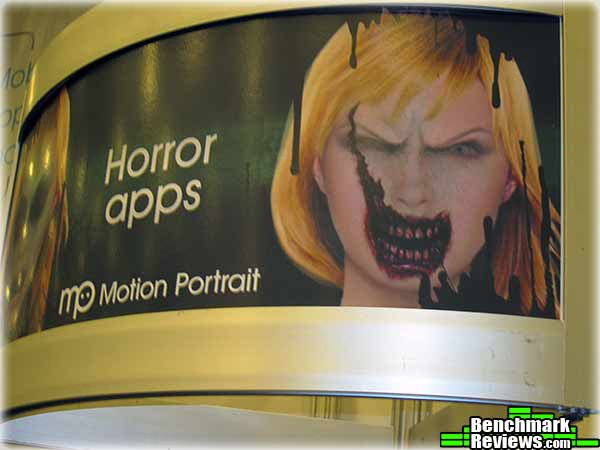
You take a picture with your iPhone camera, then the app analyzes it and can turn you into a ghoul, zombie, or other horrible creature. Other apps can artifically age you, vary your weight, or turn you into an alien. This is precisely the kind of small operation that iOS development makes possible. We'd never see this kind of innovation on a desktop platform!
Mac Stuff
There was some Mac stuff, although after 27 years of development, there's little really new. However, refinements of existing things can still be impressive.
NeatCo Neat Scanner
When I worked on the OmniPage OCR program at the long-defunct Caere Corporation, the cheapest duplex scanner (scans both sides of a page at once) we had was a huge Ricoh model that cost almost $5,000. Neat Company's Neat Desk scanner handles business cards, receipts, and regular paper (up to 22" long), performs OCR on the scanned image, and intelligently arranges the data for retrieval in the Neat Desk application. Everything you scan in is indexed and filed automatically. The sheet feeder will handle up to 10 sheets of paper, or 50 sheets if you remove the plastic business card/receipts guide. And yes, it works with Windows, too.

The idea of being able to toss everything into this scanner and have it all recognized and filed automatically is very attractive. Perhaps they will send us one to review.
Kensington
Long-time Mac supporter Kensington was at the show:

Most of their products were chargers, cases, and stands for iPhones and iPads; the only Mac products they were showing were some trackballs and a laptop locking system.
Code Weavers Impersonator
This was probably the most interesting product I saw at the show. Code Weavers has implemented a large subset of the Windows API under OS X. What this means in real-world terms is that you can run Windows programs under OS X without having a copy of Windows.

"Impersonator" is not a new product; rather, it's the latest iteration of the Crossover Mac system. (Code Weavers helpfully explains that "Impersonator" denotes this specific version, akin to the whimsical names Ubuntu gives their Linux releases). A free 30 day trial of the product is available on the Code Weavers web site, and I've used it to install Internet Explorer 7 on my MacBook Air. It does work, although the (much more expensive) combination of Parallels Desktop and Windows 7 seems to offer better performance.
Rhythm Touch
There were a fair number of vendors who seem to have wandered into the wrong show. To be fair, though, I've seen stuff like this at every computer show I've ever attended, including the National Computer Conference in the late 1970s, COMDEX in the 80s and 90s, and the Consumer Electronics Show last year.

Macworld Expo Conclusion
It was nostalgic and fun to attend MacWorld 2011, but the visceral thrill of the show is gone, I'm afraid. Part of this is due to the Mac's maturity as a platform (has it really been 27 years?): there's just very little that hasn't been done on the Mac, and these days, the Internet provides all the information on any product you need. While nothing can replace the "hands on" experience for hardware items, the time and expense of attending a trade show has driven most companies out. According to IDG figures, 53% of the companies exhibiting this year are attending MacWorld for the first time, and I'd expect similar figures for MacWorld 2012.
The one thing I took away from this show is that iOS development is the future of Apple. While the Mac as a platform is not going away, the real growth and excitement is in the iOS market. iOS-type features like the App Store are working their way into OS X, and the forthcoming OS X "Lion" version will adopt some iOS human interface conventions. Even Mac hardware such as the new MacBook Air computers are becoming more like iOS devices. And while I might mock products like iGrill and iFusion, similarly silly products were available for the Mac back in the day (I remember a computer-controlled sewing machine that would stitch any MacPaint drawing into cloth). With CES remaining as the only large computer show still around, I suspect we won't see many more MacWorlds.
What did you think of our Macworld Expo show coverage? Leave a comment below or start a discussion in our Forum.
Reader comments from the original article
3 comments were posted before commenting closed. They are preserved as written. Original avatars no longer resolve and are shown as a placeholder.
Apple fan Alex Permalink:
I was at Macworld and I have to say that I did find an amazing iPad Case Called the ZooGue iPad Case and it's amazingly functional, and I will never use my other 3 cases again.
RE: Apple fan Adam Permalink:
You have 4 iPad cases... Huh, there I was thinking I'd seen it all from Apple fans.
Couldn't Justify Being There Lynn Fredricks Permalink:
I used to regularly attend both the SF and Tokyo show. At its largest, the Tokyo show had over 400,000 visitors one year. Although we carry a great 3D application for the Mac (##mirye.net), we couldn't justify spending the ever increasing price of attending MacWorld.