
Patriot Gauntlet PCGT25S USB3 Drive Enclosure
Patriot Gauntlet PCGT25S Drive Enclosure Review
Patriot is best known for their memory products, especially their enthusiast memory products. Their memory product line comprises desktop and laptop computer memory, USB memory keys, and even SSDs. However, they also have a line of peripherals, including memory coolers, hard drive enclosures, NAS systems, and even media players.
Many enthusiasts have spare hard drives laying around, and USB hard drive enclosures have become a popular way to make use of these spares for backup or transportable storage. The problem has been that while USB 2.0's 480 million bits per second sounds fast, it's actually pretty slow by modern standards, and so moving lots of data to or from a USB 2.0-connected drive can take quite a while.
USB 3.0, aka "SuperSpeed USB", addresses this problem with 10 times the transfer rate of USB 2.0, which at 4.8 Gb/s is much faster even than the 3.0Gb/s of a standard SATA port. The Patriot Gauntlet SuperSpeed USB Edition PCGT25S enclosure's use of USB 3.0 would seem to make the hard drive throughput, rather than USB throughput, the limiting factor.

To reveal the full advantage the Patriot Gauntlet PCGT25S has over USB 2.0 enclosures, Benchmark Reviews will test this unit with an OCZ Vertex Turbo 120G SSD.
Manufacturer: Patriot Memory
Product Name: Gauntlet SuperSpeed USB Edition
Model Number: PCGT25S
Price As Tested: $29.99
Full Disclosure: The product sample used in this article has been provided by Patriot Memory.
Patriot Gauntlet SuperSpeed Features
-
Maximum transfer rate up to 4.8Gb/s
-
Backwards compatible with USB 2.0 and 1.1
-
Supports all SATA I/II 2.5" Hard Disk Drives or Solid State Drives up to 9.5mm height
-
Hot-swappable Plug & Play connectivity
-
LED activity light
-
Compliant with Universal Serial Bus 3.0 Specification
-
Supports HDD and SSD up to 500GB capacity
-
Supports USB Mass Storage Class Bulk-Only Transport, Revision 1.0
-
SATA I/II interface
-
All Aluminum Design
Patriot PCGT25S Specifications
| Product Name | Gauntlet |
|---|---|
| Patriot Part # | PCGT25S |
| Description | USB 3.0 2.5" HDD enclosure |
| Certifications/Safety | CE / FC / RoHS |
| Product Warranty | 2 Year Warranty |
| Unit Dimensions |
5.1"(D) x 3.3"(W) x 0.72"(H) |
| Unit UPC | 0879699009898 |
| Packaging Type | Retail Box |
| Packing Dimensions |
9.1" (D) x 5.4" (W) X 1.7" (H) |
| Net Weight | 0.33lbs / 151gm |
| Gross Weight | 0.75lbs / 340gm |
| Units per Master Carton | 20 |
Closer Look: Patriot Gauntlet
The Patriot Gauntlet SuperSpeed USB Edition 2.5" drive enclosure is a small aluminum box barely larger than the drives it contains. Unlike a 3.5" drive enclosure, no power supply is needed, since 2.5" devices can get all the power they need from a USB 2.0 or USB 3.0 connection (Patriot supplies a USB power cable for those stuck with USB 1.1 connections, but these connections are so slow that it would be silly to use them for mass storage devices). The nicely machined enclosure is solid black, with a matte finish on the sides and a brushed finish on the top and bottom. The front of the Gauntlet is blank except for a silk-screened Patriot logo; the activity light is on the back of the unit. While the enclosure is very well made, the absence of any rubber or plastic feet on the bottom is odd.

The back panel contains the USB 3.0 connection, and activity LED, a 5V power connection for the aforementioned USB 1.1 users, and a small button that will activate the included backup software.

The rear panel is secured with two screws. Removing them allows the panel to be pulled out.
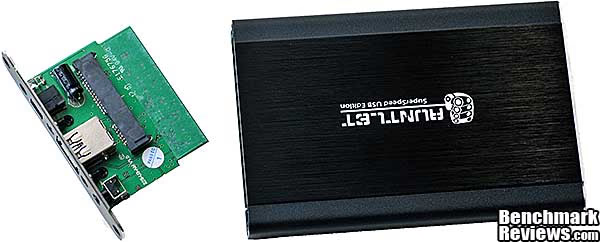
A small circuit board contains the SATA power and interface connectors to plug your drive or SSD into. There are no other screws or mounting mechanisms to secure the drive; when you slide the drive and rear panel into the enclosure, the drive will be snug against the front and supported by internal rails.

The underside of the circuit board contains the ASMedia Technology ASM1051 USB/SATA bridge chip. This chip handles the protocol and signal conversion between the external USB interface and the internal SATA interface.

The enclosure body is a single piece of extruded aluminum. Two internal rails support whatever drive you install.

In the next section, we'll see how well an OCZ Vertex Turbo 120G SSD performs in this enclosure.
Testing & Results
Testing Methodology
USB 3.0, aka "SuperSpeed USB", was introduced at the 2010 Consumer Electronics Show in Las Vegas. At almost 5 Mb/s, its raw data rate is ten times that of USB 2.0, which should result in much faster transfers of data...as long as you're connected to a USB 3.0 device. The Patriot Gauntlet SuperSpeed USB Edition comes with a USB 3.0 cable; while this cable is physically and electrically different from a USB 2.0 cable, it's been designed so that it will plug into USB 2.0 connections, although this will obviously result in the connected device running at USB 2.0 speeds.
USB 2.0 was plenty fast when it was introduced in late 2001, since flash memory, laptop drives, and the like were all much slower than they are today. But newer drives and devices easily overwhelm the bandwidth available to USB 2.0 and can really benefit from SuperSpeed USB's faster data rate. For this review I installed an OCZ Vertex Turbo SSD into the Gauntlet and ran benchmarks comparing the USB 2.0 and USB 3.0 rates with native SATA.
Test System
-
Motherboard: ASUS Rampage III Extreme
-
System Memory: 12G Corsair Dominator RAM
-
Processor: Intel Core i7-980X
- Operating System: Windows 7 Ultimate 64-bit
Like most USB 3.0-supporting Intel X58 motherboards, the Rampage III Extreme uses NEC's ubiquitous D720200F1 USB 3.0 controller to enable its two USB 3.0 ports. Different benchmarks reveal different things, and I tested the Patriot PCGT25S with the ATTO Disk Benchmark, CrystalDiskMark, AS SSD, and the disk benchmark built into Everest Ultimate Edition v5.50. The results were...interesting.
Results
The ATTO Disk Benchmark is a free tool that, while old, still offers a good look into basic storage system performance. It measures interface transfer rates at various intervals for a user-specified length and then reports read and write speeds for these spot-tests. Our benchmarks are conducted with a queue depth of 4, overlapped I/O, and transfer sizes from 0.5 to 8192K with a total length of 256MB.

As you can see, USB 3.0 offers a tremendous increase in performance over USB 2.0, with reads that are 5.8 times faster than USB 2.0, and writes that are 6 times faster. However, it's still not as fast as native SATA, which turns in scores that are 28% better for reads than USB 3.0, and writes that are 9.7% better.
The disk benchmark built into Everest Ultimate is different from the ATTO program: it performs straight linear reads and writes across the entire disk, ignoring any partitions or formatting on the device being tested (which means the write test will wipe your disk, so be cognizant of this). Benchmark Reviews sets the block size to 1MB for this test.

The performance different between USB 2.0 and USB 3.0 as reported by Everest are similar to the ATTO results, with USB 3.0 providing reads that are 5.8 and writes that are 6.3 times faster than USB 2.0, but native SATA still turns in performance that's 23% better than USB 3.0 for reads and a substantial 35% better for writes.
But storage system performance isn't just about raw read and write speeds, it's also about how rapidly the system can respond to multiple disparate I/O requests, and this is measured in "IOPS", or "input/output operations per second." This is an important aspect of storage subsystem performance that even many enthusiasts overlook; although it's not obvious, in a modern system there may be a dozen or more background processes accessing the disk at any one time. SSDs typically perform much better than hard disks in this regard since they don't have to contend with rotational and head-movement latency.
CrystalDiskMark 3.0 is a file transfer and operational bandwidth benchmark tool from Crystal Dew World that offers performance transfer speed results using sequential, 512KB random, and 4KB random samples. For our test results chart below, the 4KB 32-Queue Depth read and write performance was measured using a 1000MB space. Rather than measuring simple read and write bandwidth, this test stresses the attached storage system with multiple small I/O requests.

USB 3.0 turns in reads that are 180% faster than USB 2.0, but still only a fraction of what SATA can provide. The performance difference between USB 3.0 and SATA is much larger than we saw in the previous tests.
The last test is Alex Schepeljanski's AS SSD Senchmark. The AS SSD Benchmark tests sequential read and write speeds, input/output operational performance, and response times. Because this software receives frequent updates, Benchmark Reviews recommends that you compare results only within the same version family. I used the 4K-64 thread test to compare IOPS performance.

The results are quite similar to those reported by CrystalDiskMark: USB 3.0 performs better than USB 2.0, but both are dwarfed by the performance of a native SATA connection.
Patriot Gauntlet PCGT25S Final Thoughts
External USB drive enclosures have been around for many years, and offer a good way to make use of a spare drive. The slow transfer rates of USB 2.0 limited the utility of these drives somewhat, although they were still useful for backup. But as our tests demonstrated, a huge increase in performance is possible with the new SuperSpeed USB interface...provided you have a storage device fast enough to take advantage of it.
You might wonder why SATA is faster in linear transfer speeds and much faster in IOPS, given that its raw data rate is only 3Gb/s, as opposed to USB 3.0's 4.8Gb/s. The increase in transfer speeds is because the SATA protocol is optimized for storage devices; it has little overhead as well as supporting features like Native Command Queueing (assuming the drive is run in AHCI mode) that can make the best use of the drive; USB is a more general protocol, used for everything from keyboards to scanners to cameras to...well, you get the idea. Also, I suspect that there's a significant amount of overhead involved in the protocol conversion between USB and SATA; this would explain the dramatically higher scores SATA achieves in IOPS tests. So while you're not going to want to keep your MySQL database on a drive in this enclosure, you'll still get great performance in the tasks products of this type are generally used for: backup and file transfer. Although Benchmark Reviews used an SSD for this testing, you'll see significant advantages over USB 2.0 with higher-end 2.5" hard drives as well.
The price, at about $30, is reasonable. The extruded aluminum enclosure is a quality piece of work. Still, you can see where Patriot shaved the pennies: the lack of rubber feet (how much would that have cost, really?) and the placement of the activity light and backup switch on the back of the drive (so they wouldn't have to run wires to the front of the case) don't impress. There's no documentation other than a small multi-lingual sheet showing how to install the drive, but the product is simple enough that documentation really isn't needed.
Patriot includes a backup program, PC Clone EX Light, with the unit. I haven't covered it in this review simply because it's extremely basic software, with an inelegant interface and mediocre performance to boot. Also, it locked up my test system on one occasion, requiring a reboot, which makes it hard to recommend. While it can do differential backups (i.e. only backing up changed files), since it lacks the ability to perform backups automatically at defined times or intervals (although it can be easily invoked with the button on the back of the Gauntlet), most people would be better served by Windows 7's built-in backup software or free backup software like CrashPlan.

Gauntlet SuperSpeed USB Edition Conclusion
The performance of the enclosure in USB 3.0 mode was excellent, approaching that of native SATA in linear read/write benchmarks. However, the performance was much lower than SATA in IOPS measurements, probably due to the overhead of protocol coversion. This is likely a protocol conversion issue that Patriot can't do anything about.
The enclosure has an appealing appearance, with contrasting textures of black anodized metal set off by polished edges.
The construction was very high quality: the extruded aluminum casing and its front and back panels fit together perfectly. The lack of rubber feet and the placement of indicators and controls on the back of the unit are a minus, though.
Functionally, the enclosure works very well, connecting to both USB 3.0 and USB 2.0 ports. The inclusion of the USB power cable means it would work on USB 1.1 ports as well, but the performance would be so slow (1/40th that of USB 2.0) that it would be useless. I'd prefer that Patriot ditch the power cable and use the money saved to add rubber feet and a front panel activity light.
At about $30 at Newegg, the Gauntlet SuperSpeed USB Edition is a little more expensive than its competition, but the quality of construction helps offset this difference.
Pros:
+ High-quality appearance and construction
+ Includes USB 3.0 cable and USB power cable
+ Very easy to install drive
+ Excellent USB 3.0 performance in most scenarios
Cons:
- No rubber feet
- Backup button and activity light on back of the unit rather than the front
- Included backup software is very weak.
Ratings:
- Performance: 8.5
- Appearance: 9.5
- Construction: 9.5
- Functionality: 8.0
- Value: 8.0
Final Score: 8.7 out of 10.
Recommended: Benchmark Reviews Seal of Approval.
Questions? Comments? Benchmark Reviews really wants your feedback. We invite you to leave your remarks in our Discussion Forum.
Reader comments from the original article
7 comments were posted before commenting closed. They are preserved as written. Original avatars no longer resolve and are shown as a placeholder.
Patriot Gauntlet PCGT25S USB3 Drive kainen Permalink:
USB 3.0 is getting more mainstream and its great to see it. I was an early adopter and what was out there was limited and expensive, but most new technologies are. I don?t think many average consumers need that much space and the link to the product page is in the specs section, the name is highlighted Overall, considering the cost, very good value. New Gadgets : ##gizmos360.com/
Not all bridges are equal Stan Permalink:
I would not blame USB 3.0 protocol overhead that in this tests SATA connection was significantly faster. Not all USB-SATA bridges are equal. Would preffer to see more testing in comparison with other vendors bridge chips - that may allow to find the best (so far) bridge chip.
RE: Patriot Gauntlet PCGT25S USB3 Drive Enclosure David Ramsey Permalink:
Stan, a number of other companies (Fujitsu, LucidPort, Micron, etc.) make USB 3.0-SATA bridge chips, and it will be interesting to see how similar products using these chips perform compared to the ASMedia chip. However, I suspect we won't see that much difference, especially in IOPS.
RE: RE: Patriot Gauntlet PCGT25S USB3 Drive Enclosure Stan Permalink:
Would not be so sure, David Just try to find comparison data for AMD/nVidia/Intel southbridges SATA II ports - in theory should be more or less in par, but even some PCI chips worked better than nvidia chipset ports and close to that of AMD. So, chip implementation is a great deal. Well, suraly that IOPS and read/write speed will be slower in all implementations, but good design may make it about 3-5%
power connector? shant Permalink:
does this thing work without the power connector? only with usb? i have a WD 2.5 passport thats usb 2.0 and it works only with usb, no power cable needed, so if i replace my enclosure with this one it should work without power cable right? plz reply me at shant1993 hotmail.com
RE: power connector? Olin Coles Permalink:
We already took the time to answer these questions in the article. So read the review because it clearly states what this product can and cannot do.
RE: Patriot Gauntlet PCGT25S USB3 Drive Enclosure sirtrancelot Permalink:
0.72" is not 5.1cm, it's 1.84cm