
CM Storm Sentinel Advance II Gaming Mouse
CM Storm Sentinel Advance II Laser Mouse Review
Model Number: SGM-6010-KLLW1
Price As Tested: $59.99 MSRP
Full Disclosure: The product sample used in this article has been provided by Cooler Master.
Back in September 2009, CM Storm released the Sentinel Advance Laser Gaming Mouse. It sported a 5600 DPI laser sensor, which was the top-of-the-line at the time. 5600 DPI is still very high for a gaming mouse. Now Cooler Master is releasing the next evolution of this gaming mouse, the CM Storm Sentinel Advance II Laser Gaming Mouse SGM-6010-KLLW1. Sporting an Avago ADNS-9800 laser sensor, the Sentinel Advance II has the capability to scale up to 8200 DPI and all the way down to 200 DPI. In this article, Benchmark Reviews examines the CM Storm Sentinel Advance II Laser Gaming Mouse SGM-6010-KLLW1.
As a gamer, I've come to recognize just how important it is to have a good gaming mouse. One of the most important aspects that I have come to rely on is on-the-fly DPI switching. One of my favorite mice of all time is the Microsoft 5-button laser mouse. I really enjoyed the fit of the mouse and the fact that I could comfortably maneuver between the buttons without accidently hitting the wrong one. Even though I had looked at a lot of other mice, I kept reverting back to that mouse. I'd even tried mice with the ability to switch the DPI settings on-the-fly. It actually wasn't until the original CM Storm Sentinel Advance that I finally put away the Microsoft mouse and started using a new one. I'm excited to look at the Sentinel Advance II and see what has changed and improved.

I'm really looking forward to the versatility of DPI range from 200 to 8200. I switch DPI back and forth constantly, so the customizable profiles are great. Right now I have an MMO up on one monitor, Photoshop up on another, and this article up on a third. Each of those tasks requires a different DPI setting for me. I want a relatively high DPI setting for the game, a very low DPI for Photoshop, and somewhere comfortably in-between for other tasks like browsing the internet. So let's get to it.
CM Storm Sentinel Advance II Features and Specifications
- Model SGM-6010-KLLW1
- Available Color Gray
- Form Factor Right Hand Ergonomic
- Sensor Avago ADNS-9800 Laser Sensor
- Programmable Buttons 8
- Onboard Memory 128 KB
- Polling Rate 1000 Hz /1 ms
- Velocity Up to 150 ips
- Acceleration 30 g
- Dimension 3.3(L)x5.3(W)x1.6(H) inch
83.6(L)x135(W)x40(H) mm - Weight 139 g / 0.31 lbs
- Warranty 2 years
- UPC Code 884102015366
- 200 - 8200 DPI tracking resolution
- 128 KB Sentinel-X Memory for profiles and macros
- On the fly DPI adjustments (+/- 200 DPI)
- As little as 1.5 mm lift-off distance
- Up to 150 IPS - 3.8 m/s
- 125 Hz - 1000 Hz USB rate fine-tuning
- 5 profiles with 4 DPI setting each
- 8 programmable buttons
- 9 virtual buttons via button combinations
- Right-hand Ergonomic Design
- Customizable OLED logo
- Customizable multi color LED light system
- 5 x 4.5g weight fine-tuning system
Closer Look: CM Storm Sentinel Advance II
The CM Storm Sentinel Advance II looks very similar, unsurprisingly, to the CM Storm Sentinel Advance. The Sentinel Advance II is a dark grey matte color. It contrasts well with the buttons, which are black. The area above the two main buttons in the center of the Sentinel Advance II has a display showing the DPI settings on each axis and small logo. Surrounding this is a perforated area with LEDs under it to light up the mouse with one of six colors. The color is matched by two LEDs just under the two main buttons.

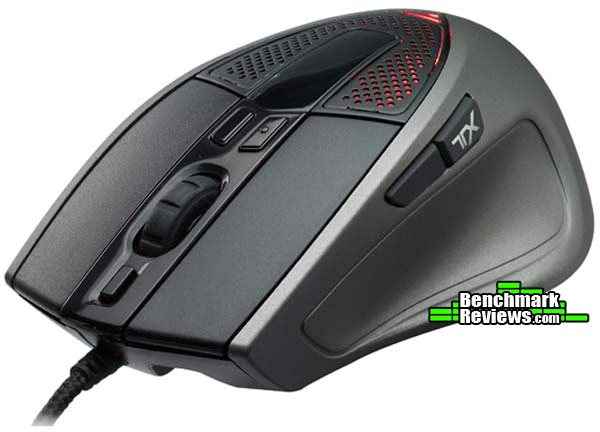
In appearance, the differences between the Sentinel Advance II and the Sentinel Advance are few. The Sentinel Advance II comes with the words CM Storm emblazoned on the right side. I think this feature was also found on later versions of the original Sentinel Advance, but it isn't on the one I got for review. There is also a TX on the rear thumb button that isn't found on the original. Other than that, the two are virtually identical in appearance.

The CM Storm Sentinel Advance II has a total of eight programmable buttons. That isn't a lot when it comes to gaming mice these days. Some mice have more than that just under your thumb. What I have come to realize, however, is that it's less about how many buttons there are and more about where they are located. If the buttons are in areas where they get pushed accidentally, I'll end up programming them to be nothing anyway. If the buttons are too difficult to get to while I trying to pwn some newb, they aren't going to get used either. If I'm playing an MMO, I'm probably holding down the right mouse button 90% of the time anyway. That means any buttons I have to push with my middle or extremely inflexible ring finger are probably out too.
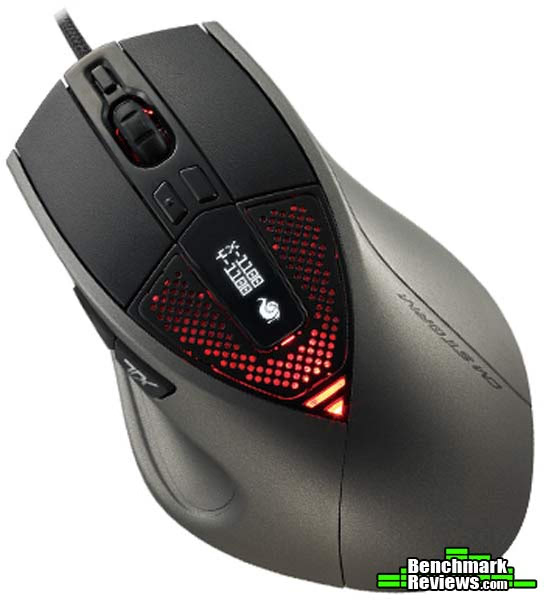
Like I said before, I was a huge fan of the Microsoft 5-button mouse. I think the eight buttons on the Sentinel Advance II are pretty well placed and don't get in the way. The two thumb buttons take some getting used to if you haven't used a mouse with them before.

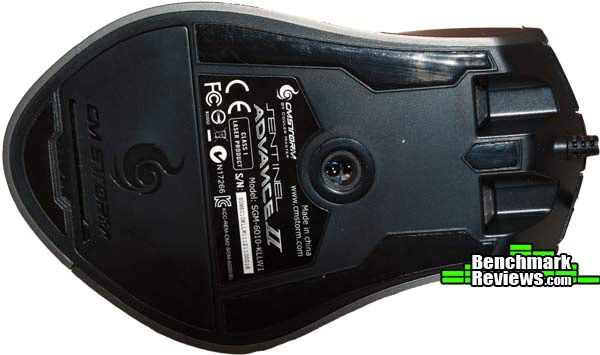
On the bottom of the Sentinel Advance II you can see the non-slip rubber bumpers that give enough for the mouse to glide smoothly, but also don't let it slip around. You can also see the Avago ADNS-9800 laser sensor that allows the mouse to be tuned up to 8200 DPI. Down near the bottom is the chamber for the weights. You can adjust the weight on the Sentinel Advance II in 4.5 gram increments up to 23.5 grams. It actually makes a significant difference. Personally, I like to have all of the weights in.
The CM Storm Sentinel Advance II Laser Gaming Mouse, like the Sentinel Advance, came with a Battle Pad, called the RX Pad. The pad is was produced by CM Storm with gaming in mind. The pad measures 15.9 x 11.2 x 0.20 inches. It's huge. You certainly won't have to worry about picking up your mouse because you've run out of mouse pad space. Although 8200 DPI should help with that too!

While the base is coated in an anti-slip grip, for better grip and stability from vibration, the top is made of solid black synthetic mesh of nano fibers that was allegedly engineered for pin-point precision and highly responsive tracking. The RX Pad is supposed to work equally as well with optical and laser sensor based mice. It's 5mm thick to help cushion your hand and reduce fatigue. I've been using a CM Storm Battle Pad for over two years now, and I don't think I could go back.
Sentinel Advance II Detailed Features
The CM Storm Sentinel Advance II has a couple a really interesting features that I would be remiss if I didn't explore. Right above the display of the DPI settings is a 32 x 32 area for your own logo. You can put your clan's logo or pretty much anything else you want (as long as it's 32 x 32 pixels) up there. The image has to be in .bmp format and has to be black and white. It can't be grayscale. The downside is that it sits right under your hand, so you won't see it much while you are playing.

Those two small buttons right above the mouse wheel on the CM Storm Sentinel Advance II come set to increase and decrease the DPI settings. The button on the left has a small bump on it so you can recognize it on the fly. The button below the mouse wheel is set to change the color scheme. All of these buttons can, of course, be set to something else in the software manager.

If you haven't used a mouse with changeable DPI settings before, you might want to look into it a little. DPI (dots per inch) is a representation of the actual pixel count per inch. So the DPI settings for the Sentinel Advance II and any other mouse are really telling you how many pixels the mouse cursor will move per each inch that you move the mouse across the pad. Therefore, when the Sentinel Advance II Gaming Mouse is set to 8200 DPI, the mouse cursor will move 8200 pixels across the screen for every inch you move the mouse across the pad.

You can estimate what DPI settings you will need based off your resolution. If you are playing a first person based game at a resolution of 1024 X 768, then a complete 360 degree turn for your character will encompass about 1024 * 4 pixels, or 4096. Therefore, if you have set the Sentinel Advance II to 8200 DPI, it will take about half an inch of movement on the mouse pad to turn your character 360 degrees. For gaming purposes, CM Storm suggests using a multiplier of 2.5 to determine your DPI settings. A resolution of 1024 X 768 would then need a DPI setting for the Sentinel Advance II of about 2600. With a resolution of 2560 X 1600, then a 5600 DPI setting would make sense. To make it even more accurate, you can adjust the DPI settings for the Sentinel Advance II individually for the X and Y axis, allowing your mouse precision to be that much more accurate.
When using high DPI settings (above about 4000), you really need to be aware of your surface as well. A soft surface provided by the most common mouse pads, and even 100% rubber pads such as the CM Storm Battle Pad can react unpredictably to vibrations. With your DPI settings high, this can cause undesired results. Metal and alloy surfaces are recommended when using high DPI settings for the Sentinel Advance Laser Gaming Mouse. I've experienced this first hand with the Sentinel Advance II while playing an FPS game where the bass rumbling caused the mouse to move around slightly, interrupting my pwnage. Lame.
CM Storm Sentinel Software
The GUI that comes with the software for the CM Storm Sentinel Advance II Gaming Mouse is very helpful for managing the mouse settings. CM Storm recommends turning off the mouse controls in the windows control panel, such as "enhanced pointer precision", "snap to", and "mouse acceleration", and using the GUI only. I agree with this whole-heartedly. The sensitivity settings are much easier to fine tune in the GUI and although the pointer precision and snap to may be somewhat useful in Office or Windows based applications (it's arbitrary), they are useless in games.

The GUI also allows you to change profile settings, button functions, color schemes, and DPI settings. You can have up to 5 different profiles set up in the Sentinel Advance II at any time. This becomes very useful when switching between programs. Though you may enjoy that high DPI setting for games, when using Office programs or even Photoshop, the high DPI settings can cause difficulties when trying to pinpoint a location on the screen. Switching to a different profile quickly alleviates that issue. You can also adjust the DPI without changing the profile by using the 6th and 7th buttons located above the scroll wheel as was mentioned earlier. Any changes you make outside the GUI will not be saved to your profile.
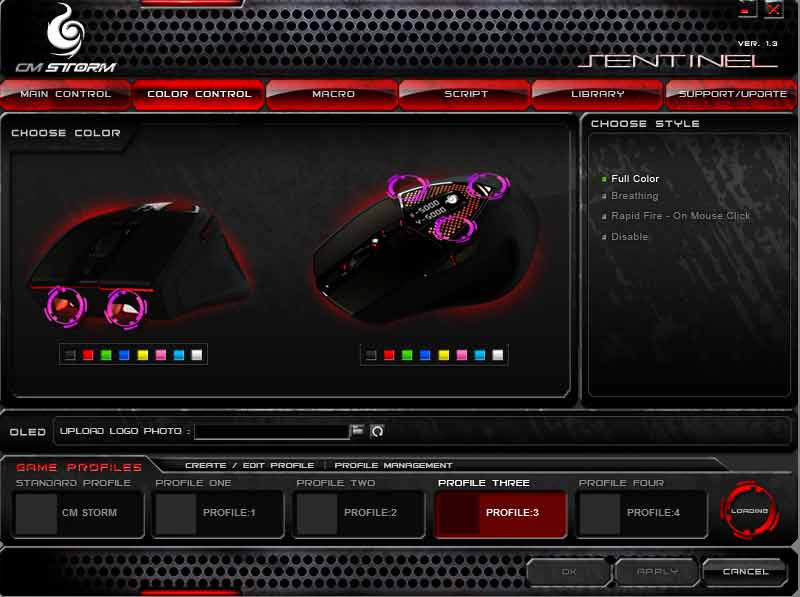
The profiles also house the color schemes and the OLED settings. Seven different color schemes are avialable, or the OLED color can be disabled completely for a black-out operation.

One final note on the GUI is that it provides you the opportunity to change the button presets any way you see fit. Don't like firing with your left mouse button? You don't have to. You can also set a button to rapid fire and have the color scheme blink like a disco light while you destroy your enemies. You can even build macros or complex key strings and assign them to the click of a button. I like to use alt+tab a lot while gaming or even just while multi-tasking. Using the CM Storm Sentinel Advance Laser Gaming Mouse, I can program one of the 8 buttons to alt+tab for me.

I can program the buttons to work with iTunes or RealPlayer as play, stop, next, previous, anything I want. The customizability offered by the CM Storm Sentinel Advance is nearly limitless. You can even customize the report rate on the USB input, from 100hz all the way up to 1000hz. You certainly won't have to worry about mouse lag again. I had my younger brother down for a visit not too long ago and he was fascinated that the macro program in the Sentinel Advance GUI would allow him to perform complex strings of keyboard and mouse commands with the click of a single button. His WoW dual-boxing days just got a lot easier.
Gaming Mouse Final Thoughts
I am on the computer a lot and I know I'm not alone in that. I need a mouse that is comfortable and versatile. I finally moved away from my Microsoft 5-button IR mouse when I reviewed the original CM Storm Sentinel Advance mouse over two years ago. The CM Storm Sentinel Advance II will now take over for me. It has everything I need. The eight buttons are perfect for me. Any more and I don't think I'd know what to do with them. Lots of buttons are great for some people, but I don't need that money. The downloadable software offers great control and customization.

Another thing I like about the Sentinel Advance II is the color schemes. They don't really do anything, but they look cool. Also, the additional weights on the bottom let you choose how you like it. I also really enjoy the battle pad. It comes highly recommended in my book.
One of the best improvements in my book from the original to the Sentinel Advance II is the force required to push down the mouse wheel button. That was one of the things I had complained about in my review of the Sentinel Advance and I am very glad to see the change.
As far as complaints or suggestions, I do have a few, but not many. First, instead of two thumb buttons, which took some getting used to for me, I would have preferred a button on the right side of the mouse. That's a minor issue, however, as I have gotten used to using the two thumb buttons over the last couple of years. There is something else I've noticed over the last couple of years too, however. The metallic perforated area that sits under your palm and puts out the colored light has an issue. As I said, I've used the Sentinel Advance for over two years now and I live in Southern Arizona where it's hot most of the year. That area is now nearly white from oxidization crystals forming on the metal from the sweat off my hand. Embarrassing, I know, but don't say I didn't warn you.Sentinel Advance II Conclusion
The CM Storm Sentinel Advance II looks awesome in my opinion. The LEDs on top and under the buttons and the ergonomic styling looks really nice. The fact that you can change the color scheme to something that fits your style, or even your mood, is an added bonus. The box isn't too flashy, but it stands out and touts the features of the mouse. Overall, I'd rate the appearance pretty highly.
CM Storm improved some things with the Sentinel Advance II, including increasing the DPI settings, but they left a lot the same. That includes the tough durability and high-end construction of the Sentinel Advance. As a driverless mouse, you can take the Sentinel Advance II with you wherever you go. The Sentinel Advance II is also protected by nylon on top of plastic, meaning that it is less likely to wrinkle, kink, bend, or tear, and a drop or a fall won't hurt it much.
Functionally, the CM Storm Sentinel Advance II Laser Gaming Mouse is at the top of its class as well. With eight programmable buttons and nine virtual buttons via button combinations, it balances function with realistic usability. Two years ago, I touted the GUI as the best of its kind. Two years later a lot of mice come with interfaces that are similar, but I think CM Storm's is still extremely well-suited to the task. The CM Storm Sentinel Advance II, with customizable profiles, individually settable X and Y axis DPI settings, macros, and media functions, the CM Storm Sentinel Advance II is still one of the top mice available in terms of functionality.
The CM Storm Sentinel Advance Laser Mouse is set to launch at an MSRP of $59.99. That's ten dollars less than the original Sentinel Advance started for and I think it's a great price point for this mouse. This is about the middle of the road for gaming mice and with all the construction and functionality the Sentinel Advance II offers, it's a great deal. The RX Pad is set for an MSRP of $19.99 and I would highly recommend that as well.
+ 8 Programmable Buttons and 9 virtual buttons
+ Multi-Color LED Customizations
+ OLED Display for DPI and Personal Logo
+ Customizable Weight from 139 to 161.5 grams
+ Up to 5 Different Profiles
+ Macro Editor for Complete Control of Functions
+ Keyboard and Multi-Media Built-In Functions
+ 128kb Memory Bank for Driverless Use
Cons:
- 4th and 5th buttons are too close together
Ratings:
- Performance: 9.50
- Appearance: 9.50
- Construction: 9.50
- Functionality: 10.00
- Value: 9.50
Final Score: 9.6 out of 10.
Excellence Achievement: Benchmark Reviews Golden Tachometer Award.
Benchmark Reviews invites you to leave constructive feedback below, or ask questions in our Discussion Forum.
Reader comments from the original article
5 comments were posted before commenting closed. They are preserved as written. Original avatars no longer resolve and are shown as a placeholder.
Why bother... JustComputers Permalink:
Never understood why you would want a gaming mouse, when you have decent bluetrack devices that work better, than this old Laser tech. To me its a waste of space! I have a 4 button wireless mouse, with blue track, to be honest, its the best I have had, works faster than my old laser and on nearly any surface... Laser is old, and you don't need that when gaming!
RE: Why bother... claydough Permalink:
bluetrack can be a gaming mouse as well? Microsoft's sidewinder gaming line has the Sidewinder x8 mouse that uses blue track. I love the feel and fit of the microsoft sidewinder x6 I just wish they would fix the r ghost and change to mech ( Azio makes an x6 MECH clone with detachable num pad but they tossed the low profile keys sadly and changed from the hexa sexy stealth design to an immature chunky industrial look.. :-( ) And Blue track would have been a nice companion however tactile fit trumps any consideration as a mouse is your extension into the screen. If any mouse can match the customisation of my R.A.T. 9 I will give it a chance if it is as lag free wireless ( the blue track x8 was lag free as well ). Saitek made an MMO R.A.T. with more buttons but sadly they switched from the cool stealth matt black and added steam punk bronzish accents and did not make a wireless version! Beside more buttons I wish these new wave of mice would include levels of pressure sensitivity... I prefer drawing with my mouse given that customized fit and the comfort is not lost when using button combinations. Which I lose when trying to manage control with my wacom's pen. If not built into the mouse then maybe pressure sensitivity built into a foot pedal in the same way I use my wah pedal with my guitar? But then any pressure senitivity would have to support Photoshop, Zbrush, Maya etc... 8000 dpi sounds nice ( particularly for use with nvidia surround and amd eyefinity ). On the other hand, I find that I have to dial in the right control @ my mouse's max dpi ( 5600 on the R.A.T. the Sidewinder's blue track only went up as high as 4000 dpi? don't know if that was a limitation of bluetrack or if that has improved any ) using the Window's mouse control panels "Speed option". However, I wonder if by doing this I am dialing back that resolution? In theory I imagine that the speed just slows down the mouse at the given resolution still giving me the benefit of the greater resolution's precision. No way of knowing for sure though other than what "feels best". Otherwise if there is no other way to control the speed at higher resolutions... I can not imagine that the CM storms 8000 DPI could be useful unless 9000p monitors are dur out any time soon...
RE: CM Storm Sentinel Advance II Laser Gaming Mouse claydough Permalink:
Nice job on the review! Beautiful design custom weight lot of work went into the gui AMAZING price! I can't imagine switching mice( RATs ) any time soon. Or giving up on wireless now that the tech is virtually lag free. But at this pricepoint CoolerMaster provides enough competition and has the cred to bring prices down for the rest of us. ( certainly have my eye on their mech boards as well ) And if other manufacturers do not follow suit it is nice to have that alternative! ( even with the ripple warning johnny guru still gave a rare recommend to Coolermasters gold rated silentProGold 1200. Where PSU prices are insane I am happy with their quality over the past 2 years given the cheaper price )
Automatic profile switching? Drewstre Permalink:
Hello- Nice review. One question: I'm currently using a Logitech G9x gaming mouse. One of the cool things about the Logitech software is that it can automatically detect which application is in focus, and apply a profile I've set up for that application. In your example, running a game, Photoshop, and a web browser all at the same time, the Logitech software would detect which app is in front, and change the mouse buttons, DPI, etc. for that application automatically, no buttons to push. Does the software for this mouse do that? Apologies if this was covered in the review and I missed it. Thanks
You're too kind Mergatroid Permalink:
Although I do like this mouse, and would be willing to try it, IMO you guys in general are far too kind in your reviews of mice. As you mentioned, there are not all that many buttons on this mouse. Consider that personally I would not be reprogramming any of the three buttons around the mouse wheel (DPI and Color), so now you're at 5 buttons. That's pretty average. There is no tilt on the wheel. Many of us have gotten used to tilt (or some other means of horizontal scrolling). Also, now that it's appearing on so many other mice, I would also like a sniper button of some kind. Those are some of the things I noticed. Another thing I would ask about is how it is for a palm grip and a claw grip. I use a claw grip most of the time. 9.6 is an awfully high score. I think there needs to be some type of score chart for features, movement, feel, shape, and anything else you can come up with that would more standardize the scores. I'm also using a RAT, and it's my favorite mouse right now, but I would only give it maybe a 7 or 8 out of 10 score even when it was new. Too bad we can't just give a company our own design for a custom mouse and have it built for us.