
Belkin N1 Vision Wireless N Router F5D8232-4
Belkin N1 Vision Router
If you're in the market for a new router, you will find you have a lot of choices to pick from. There are literally dozens of manufacturers producing and selling them, and they nearly all look alike too. So when shopping for a new router how does one company go about differentiating their router from a sea of others that all look alike? Well, first of all, they stand it upright, give it a sleek black glossy finish and add an LCD screen on it. Had I not seen the word "router" next to the picture of the Belkin N1 Vision (and maybe the antennas) when I first saw it, I probably would not have known what it was. It was certainly intriguing as it instantly captured my attention. Here at Benchmark Reviews we have on hand the Belkin N1 Vision wireless N router for review.
If the looks of the Belkin N1 Vision router are not enough to persuade you then maybe what lies underneath it's beautiful skin will. It uses the still yet to be ratified 802.11n draft 2.0 technology which is capable of speeds up to 300 Mbps and farther reaching than the 802.11g and 802.11b devices. It also has 1 wired Gigabit WAN and 4 Gigabit LAN ports and on the back so that wired devices can run at top speeds to avoid any potential lag.
The most intriguing part though is the LCD screen which is not just a gimmicky add on to help sell it. Although it doesn't hurt it for sure. It contains some very useful information such as who's all connected to your network, how much bandwidth each user has consumed, separate speedometers to measure upload and download throughput speeds, and even the date and time.
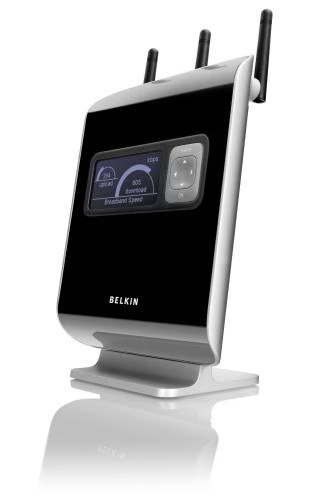
About the company: Belkin
Belkin offers a diverse product mix that provides people with seamless electronics integration in their homes, cars, and on the go. Belkin, a privately held company founded in California in 1983, is the recognized global leader in connectivity solutions. Since our inception, Belkin has experienced an amazing 20-plus consecutive years of dramatic growth.
Our product mix includes award-winning innovations for easy-to-set-up networking solutions, accessories for iPod players and XM player devices, and the first CableFree USB Hub. Our PureAV brand, a line of cables, power, and digital wireless accessories, extracts the full performance potential from high-end home theater equipment, while offering elegant designs and advanced features.
Belkin's U.S. presence includes headquarters in Los Angeles, a distribution center in Indianapolis, and an R&D facility in Rochester, New York. With major facilities in the United Kingdom and the Netherlands, our reach extends to offices throughout Europe and to our Pacific Rim sites: Australia and New Zealand and, most recently, Singapore and Shanghai.
Belkin has come a long way to become the market leader across its product lines in just over two decades. From a garage in Hawthorne, California, with two employees and sales of $100,000 for the year, Belkin has become one of the fastest growing companies in the world, with over 1,000 employees and sales topping $1 billion. In addition to earning Inc. magazine's 2003 Hall of Fame award, Belkin has been listed twice in its list of "500 Fastest-Growing Privately Held Companies in the U.S.", the "Inner City Top 100" list for six consecutive years, and the Los Angeles Business Journal's "Fastest Growing Private Companies" list for five years.
More information is available on the Belkin website.
N1 Vision Features
-
Interactive Status Display shows your network's broadband speed, computer bandwidth usage,the status of connected network devices, and more.
-
Plug-and-Play CD-less setup
-
Easy Security Setup with support for Wi-Fi Protected SetupTM and Multiple SSID
-
802.11n draft 2.0 compatible - 3x3 radio design provides excellent speeds and complete wireless coverage
-
4 Gigabit Ports
F5D8232-4 Specifications
| Browser Based Management | Browser Based Management |
|---|---|
| Link Rate | Up to 300 Mbps in 20/40MHz Channel Mode |
| Maximum Users | 253 (LAN), 16 (WLAN) |
| Patent Pending LCD | Connected Devices , Download/Upload Speedometer , Guest Access Network , Network Display , Usage |
| Plug and Play Setup | Plug and Play Setup |
| Ports | WAN-- 1 Gigabit Port LAN-- 4 Gigabit Ports |
| Range | Up to 1,600ft* |
| Security | Wi-Fi Protected Setup; WPA, WPA2-Personal, 64-bit/128-bit encryption, Multiple SSID |
| Specifications Standards | IEEE 802.11b , IEEE 802.11g , IEEE 802.11n draft* , IEEE 802.3ab |
| VPN Support | IPSec pass-through , PPTP |
Closer Look: N1 Vision
The N1 Vision wireless router (F5D8232-4) offers an easy way for you to view your network's broadband speed, computer bandwidth usage, and the status of your connected devices - all from an easy-to-read display.
Packaged in a new sleek and sophisticated design, N1 Vision offers the best in networking performance with its wireless 802.11n* 3x3 radio design and wired gigabit ports. The N1 Vision wireless router continues Belkin's commitment in providing the best user experience in the home market through its Plug-and-Play "CD-less" installation and simple network security setup.
Interactive Status Display shows your network's broadband speed, computer bandwidth usage,the status of connected network devices, and more.
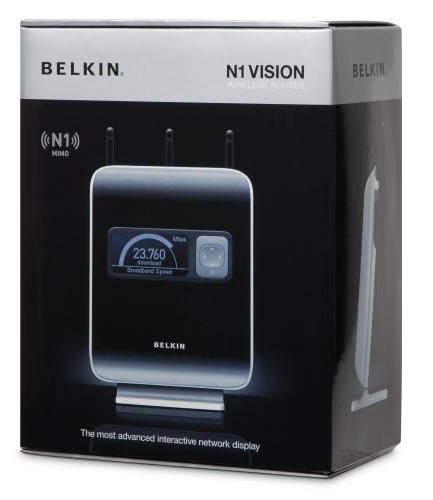
The Belkin N1 Vision router arrived in a very attractive high gloss box with images and specifications plastered all over it. Of course anything less would be undeserving of such a high quality product.
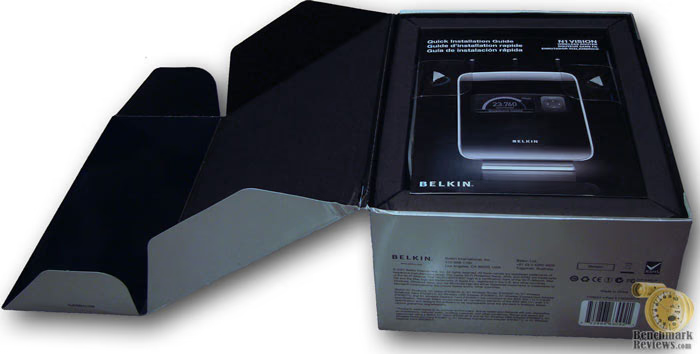
Instead of being buried inside heaps of Styrofoam, you'll find everything neatly packed with the installation guide being the first thing you see when you open up the box. Everything else sits directly below it and is well protected. You can tell a lot of thought went into the packaging and presentation of the product.
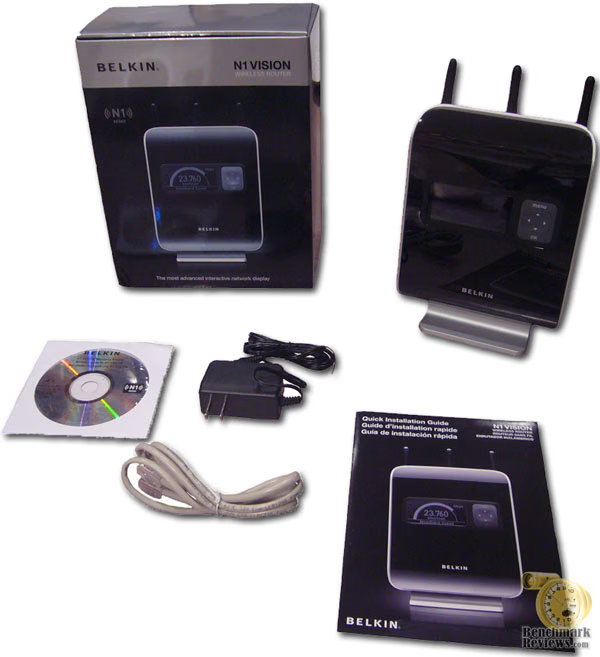
Also included is cat 5e patch cable, power adapter, and CD setup disk. However, the disk is not even needed for setup as you can simple configure it from any web browser. More on that later though.
N1 Vision Details
Since the N1 Vision is 802.11n draft 2.0 compatible, the 3x3 radio design provides excellent speeds and complete wireless coverage across long-distance ranges.
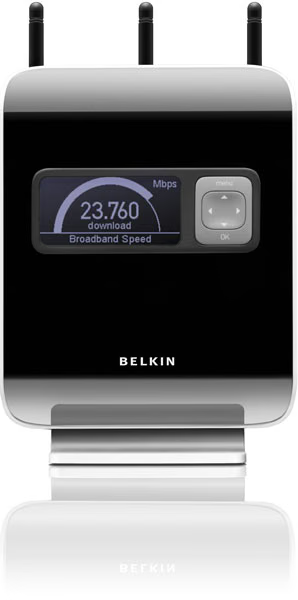
The buttons on the front of the router have a high quality textured feel to them that produces an audible click when pushed but they require you to get a grip of the router's backside before pushing any of it's buttons. Otherwise the router itself will tip over. I personally would've liked to have seen some extra sensitive buttons or even possibly a touch screen to avoid this just because my router is in a hard to reach place. Either way, they still work just fine.
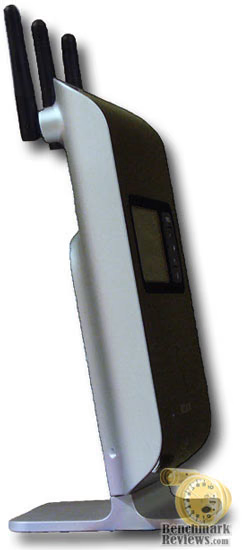
At first I wasn't sure where I was going to place this router because of it's unusual stance. This was going to replace my existing router that sat on top of my PC but it wouldn't fit since it wouldn't clear a desk drawer above it. Since it is a vertical style router, it really doesn't take up as much space as most traditional flat style routers do so I was able to find a place for it on my desk with no problems.
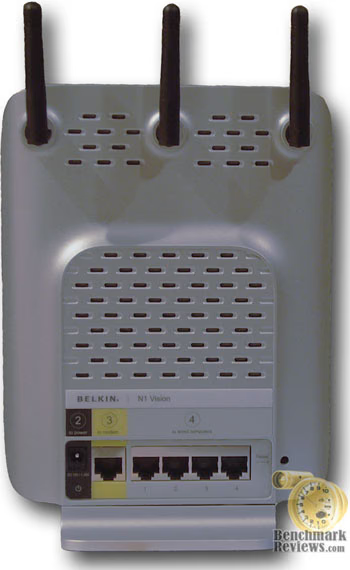
The WAN port and all four LAN ports on the back side are of the Gigabit variety and support 10/100/1000 Mbps auto switching capability. There is also a small recessed hole that contains a reset button on the far right should you need to reset the router.
N1 Vision Setup
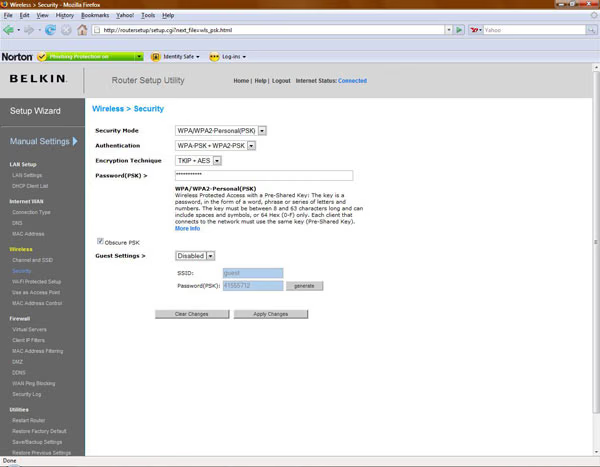
I remember from years ago how painful it was to setup and configure routers. It's definitely a lot easier and consumer friendly now. The whole setup process could not be easier. For example, Belkin has eliminated the need to enter the IP address of the router in the web browser address bar. Instead all you need to do is type "routersetup" in the address bar and off you go. If you can't remember IP addresses (or even misplaced the setup CD) then this is certainly much easier. Here are a couple of screen shots of the manual installation screens to illustrate the settings you can change.
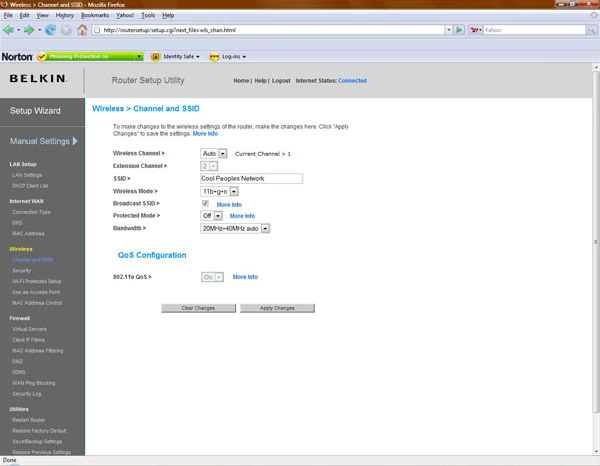
When you first run the setup you're offered one of two installation types, automatic or manual. If you're replacing an existing router or you want to specify domain names and encryption types then the manual install is definitely what you want but if you're uncomfortable with tweaking these settings or just want a quick and easy install then the auto install requires no input from you at all. It's that easy.
Once the setup is complete you're up and running. Now the fun begins with exploring all of it's various features on it's LCD display.
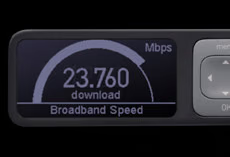
The Belkin N1 Vision router's most obvious feature is it's bright LCD screen which contains a host of (somewhat) useful information.
LCD Interface Menu
By simply pushing down on left or right arrow keys on the front of the router, you can scroll through several screens that will show you your download and upload connection speeds, total number of PC's connected, total speed of each PC currently connected, and how much bandwidth each PC has consumed in addition to a special guest access feature.

The guest access feature is truly unique and can be quite beneficial to have. This allows you to create sort of a sub network so that you can have people access your Internet connection but not be able to see or access any of your other computers on your network. Your guests would have a separate username and password from yours to ensure security of your network. You can change the username and password yourself or have it auto generate one for you.
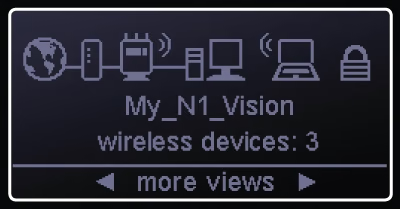
Another useful feature that is easily accessed through the LCD screen is the WPS feature (Wireless Protected Setup) or aka Push Button Security. It's a new easy to use security method that is compatible with many new Belkin wireless adapters and some new Wi-Fi phones and cameras. You push a button on the router and another on your device (or it's software) and the two become linked up.
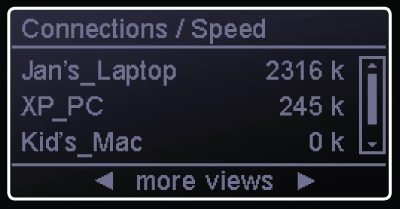
The menu also allows you to have the router enter a powersave mode which essentially powers off the LCD screen. The screen itself is not too bright as to offend anyone even in full darkness so I'm not completely sure how useful this feature may be other than saving a few watts of power.
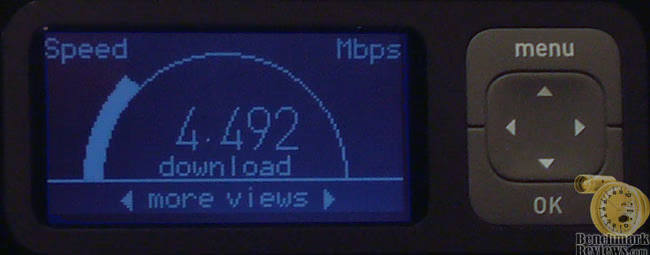
The first four images on this page are taken directly from Belkin and I wanted to include an image of my own so that you can see the differences between how they portray it versus how it really looks. As you can see, the edges of the fonts and graphics are not quite as refined as their images would have you believe. The backlighting is also much bluer than those images.
Belkin N1 Vision Testing
Testing of the Belkin N1 Vision router was conducted inside of a fairly large but standard wood frame construction home so I expect my results to be fairly typical of what most network users should expect. I used three separate computers to test it's wireless capabilities. Two of which are desktops and one is a laptop. I'll refer to them as simply desktop #2, desktop #3, and laptop. Desktop #1 is hard wired to the router so I didn't include that one. The router and desktop #1 are located near the northwest corner of my house. It's not the ideal location but it's where my broadband cable connection resides. My laptop tests were conducted at a distance of twelve feet from the router in the same room with a direct line of sight to the router. Desktop #2 is located on the far southeast corner of my house on the same floor and desktop #3 is located directly downstairs and about 30 feet off to the northeast side.
The laptop test I ran with both the internal wireless G adapter and an external USB Belkin N wireless adapter. I also used the same Belkin N wireless adapter on the downstairs PC, desktop #3. Each test was conducted three times using SiSoftware Sandra and I simply averaged the results. I suppose I could have simply used the speedometer on the LCD screen but I wanted recordable results to post here. I also have a PS3 downstairs that I connected as well but I didn't run any speed tests on it.
Test System Hardware
-
Desktop #1: AMD 4200 X2 CPU, 2 GB RAM, 8600GT PNY video card, 250 GB Western Digital hard drive, 600 watt Xion PSU, Silverstone KL02 case, Windows XP 32 bit Home Edition SP-3
-
Desktop #2: AMD 3000 CPU, 1 GB RAM, ATI 800XL video card, 100 GB Maxtor hard drive, 500 watt Antec PSU, Antec Sonata II case, Windows XP 32 bit Home Edition SP-3
-
Desktop #3: Intel E8400 CPU, 2 GB RAM, EVGA GTX 260 video card, 500 GB Western Digital hard drive, 1000 watt Thermaltake Toughpower PSU, Silverstone KL03 case, Windows Vista 64 bit Premium Home Edition
-
Laptop: Compaq Presario F756NR Notebook PC.
Testing Results
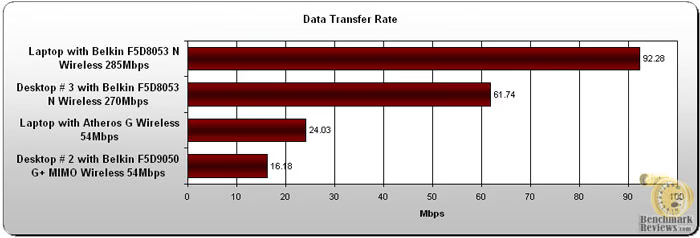
The test results were indeed impressive. I couldn't connect faster than 285 Mbps on the laptop at 12 feet away from the router and 270 Mbps on the downstairs PC (desktop #3). Considering there is flooring, appliances, plumbing, electrical, and even air ducts between the router and downstairs PC, I was still impressed.
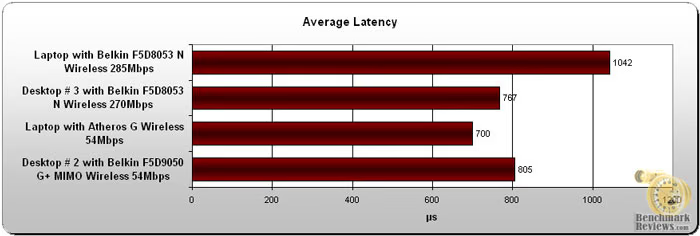
I didn't really understand why the latency was so high on the laptop considering it was the closest PC at only 12 feet away using the Belkin N USB wireless adapter and yet it scored the best with it's own internal wireless G adapter.
N1 Vision Final Thoughts
The upright design of the router could be a good or bad thing depending on where you plan on putting it. My old router sat on top of PC which sits under my desk and the N1 Vision router just wouldn't fit there because of the desk but if you place your router on your desk it could be a space saver since it doesn't take up as much desktop real estate as a traditional flat style router.
Initially, I was shipped the original version 1000 of the Belkin N1 Vision router and that version suffers miserably due mainly to the overheating issue I experienced. Nothing I tried could help remedy that. The overheating caused the router to constantly drop it's wireless connections and sometimes the router itself would just lock up. It also had horrible menu buttons that lacked responsiveness when pushed. After visiting various e-tailer websites and reading their customer reviews of this product, it became apparent to me that they had also received the version 1000. I can assure you though that version 2000 has corrected all these issues and it works like a charm now.
Belkin N1 Vision Conclusion
From the first moment I laid eyes on the retail box of this I was certainly intrigued. With it's sleek black glossy photo finish and informative specifications printed on it, it's definitely an attractive design. The contents were also laid out inside right on top of the Styrofoam blocks which just adds to the presentation appeal and therefore it's presentation rating.
The router itself with it's high gloss finish and upright stance creates an appearance like no other router currently does. The LCD screen is also very eye catching as well as people who stop by often ask me "What's that thing?" So it's certainly a conversation piece and earns high marks for it's attractive appearance and construction ratings.
The LCD screen is quite handy if you want to see who's all connected to your network, how much bandwidth they're using, how fast your upload and download speeds are, etc. Although this feature is cool and useful to have, the price premium may cause you to at least pause to think about it's added value. Having gigabit ports is also nice but then again that's becoming standard flair anymore. The whole setup process is also very quick and easy. The transfer rate speeds were impressive too which is more than enough to support high definition video transmission. The signal was also very strong in every single corner and floor of my house. Much stronger than my older Belkin G+ MIMO router it replaces.
Based on the revisions Belkin has made to version 2000 with the N1 Vision router, I highly recommended it. I would not have said that with the original version 1000. It had too many flaws. The new version of this router is nearly perfect and it proved to be quite hard to find any flaws with it. The price of this router has been dropping fast recently. Newegg.com currently lists the F5D8232-4 SKU for $119.99 so it's still a bit on the high side, although several other retailers list the N1 Vision for much more. With all the added benefits of the LCD screen, it becomes a matter of personal preference.
Pros:
+ Easy CD less setup
+ Interactive LCD screen with useful network status information
+ 4 Gigabit Ethernet ports
+ Guest access feature
+ Fast data transmission
+ Strong signal strength
Cons:
- Cost
- Desktop placement may or may not be a concern
Ratings:
-
Presentation: 9.50
-
Appearance: 9.50
-
Construction: 9.00
-
Functionality: 9.00
-
Value: 8.00
Final Score: 9.0 out of 10.
Excellence Achievement: Benchmark Reviews Golden Tachometer Award.
Questions? Comments? Benchmark Reviews really wants your feedback. We invite you to leave your remarks in our Discussion Forum.