
ASUS RT-N66U Dual Band Wireless-N900 Gigabit Router
ASUS RT-N66U Wi-Fi Gigabit Router Review
Manufacturer: ASUSTeK Computer Inc.
Product Name: Dark Knight Dual Band Wireless-N900 Gigabit Router
Model Number: RT-N66U
Price As Tested: $179.99 (NewEgg and Amazon)
Full Disclosure: The product sample used in this article has been provided by ASUS.
Building on the success of the RT-N56, ASUS has been hard at work trying to create the next 'next-best' wireless router. Today, Benchmark Reviews brings you the ASUS RT-N66U Dual Band Wireless-N900 Gigabit Router. As you will see in the images that follow, the ASUS RT-N66U certainly looks the part and is different in that way from 99% of routers on offer today.
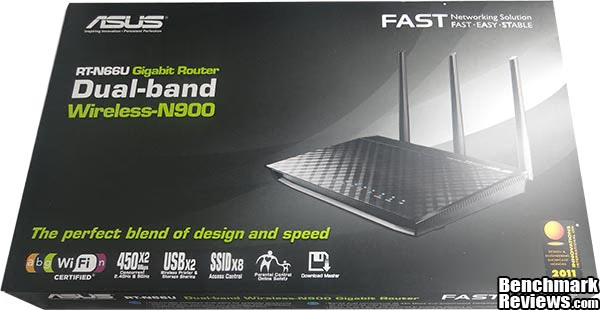
The RT-N66U has three high power external antenna to allow simultaneous 2.4GHz and 5GHz signals to run at up to 450Mb/s concurrently, this allows you to stream HD content to your media devices (5GHz) while you enjoy uninterrupted wireless internet (2.4GHz). On the box ASUS claim that the RT-N66U has "Leading giga-level throughput over 900Mb/s" but as with most claims this doesn't always come true, our testing threw out some good numbers but nowhere near ASUS' claims. The ASUS RT-N66U has two built in USB 2.0 ports that allow you to share printers and USB storage over LAN and WAN, and also allows you to share a 3G/4G internet connection.
Before we get to the testing we will have a good look at the RT-N66U and its features, so without further hesitation let's move on.
ASUS RT-N66U Features
| Incredible Performance with Incredible Control |
| The ASUS RT-N66U dual-band wireless-N900 gigabit router delivers incredible performance and coverage range. With new ASUSWRT UI, quickly setup your network, customize user access, and monitor signal strength. Following the award-winning RT-N56U, the RT-N66U increases Wi-Fi speed for both 5 GHz and 2.4 GHz transmission by 50% up to 900Mbps that makes it ideal for bandwidth demanding tasks such as 3D HD video steaming, multiplayer gaming, USB hard drive file sharing, and USB connected printer sharing. Built-in Wi-Fi amplifiers make the RT-N66U the perfect wireless router for larger, multi-level homes and buildings with signal range that reaches virtually any area.
Whether you're a tech-savvy enthusiast or a first-time user, the RT-N66U is exceptional easy to use with CD-free, Quick Installation Setup (QIS) that lets you plug-n-surf right out of the box and connect PCs, smartphones, tablets, and other wireless devices quickly. Thanks to its refined interface tools, you get control like never before, letting you monitor signal strength, setup parental settings, and other useful functions in a robust yet intuitive way. |
| Designed for Class-Leading Speed and Range |
| Designed with the latest in networking technology, the RT-N66U delivers exceptionally fast wired and wireless connectivity. What's more, it comes with a powerful detachable Wi-Fi antenna to further extend wireless range. |
|
Dual-Band Connectivity for Lag-Free Entertainment |
|
Delivering both 2.4 GHz and 5 GHz concurrent bands up to 450Mbps and 450Mbps respectively, the RT-N66U has a total speed of up to 900Mbps connectivity to provide speed with stability. Perform basic internet tasks like Web browsing and file downloading under the 2.4 GHz band, while also simultaneously streaming 3D HD content and other demanding applications smoothly on the 5 GHz band. |
| Optimized and Reliable Wireless Coverage via Ai Radar |
|
ASUS Ai Radar intelligently strengthens connections to wireless devices. With high-powered amplification and beam package, it provides optimized signals in any direction with better coverage to improve data throughput |
| Powerful functions, easiest management |
|
With the ASUSWRT Dashboard UI, setup, monitor, and control network applications all in one intuitive area. The whole new dashboard interface lets you manage all clients and settings on a single graphical interface and provides 1-click updates. |
| Optimize Your Network for You |
|
Do you game a lot, or spend most of your time streaming videos? Whatever your planned use is, the RT-N66U has a Quality of Service (QoS) that lets you select how much bandwidth is prioritized for virtually any task. Plus, the traffic monitor allows you to check your Web usage in a clear and graphical interface. |
| Two Multi-Functional Built-in USB ports |
|
Featuring connectivity to devices, FTPs, SAMBA, UPnP AV servers, and DLNA support, the RT-N66U makes sharing and networking easier with two built-in USB ports. Download HTTP, FTP, and P2P files to a router-connected USB storage device all day without the need of PC. Additionally, the twin USB ports allow network printer and file server connections, so you perform multiple tasks at once. |
| Download and Stream From Anywhere |
|
Download Master and DLNA server lets you download and play multimedia files stored on a router-attached USB storage device on DLNA-compatible devices such as PC, tablet, PS3, XBOX, and Internet TV. Download Master can also download files while a PC is turned off, and allows you to manage and monitor download status remotely. Support for a massive data pipeline of up to 300,000 data sessions means the RT-N66U has around 20 times the networking capacity of other conventional routers for exceptionally smooth performance. |
| Separate and Secure Wi-Fi Network via Guest Network Access |
|
The RT-N66U supports up to three wireless networks over the 2.4 GHz band and three over the 5 GHz band, so it can protect computers from any unauthorized access, hacking and virus attacks. The parental control allows you to set up your kids' computer access times. |
| VPN Server Enabled |
|
Easily set up a VPN server to surf the Web and access data-no matter where you are. Featuring MPPE encryption, your data transmission will be secure and confidential. |
Source: asus.com
ASUS RT-N66U Specifications
| Network Standard | IEEE 802.11a, IEEE 802.11b, IEEE 802.11g, IEEE 802.11n, IPv4, IPv6 | |
|---|---|---|
| Ports | 4 x RJ45 for 10/100/1000/Gigabits BaseT for LAN, 1 x RJ45 for 10/100/1000/Gigabits BaseT for WAN, Support Ethernet and 802.3 with max. bit rate 10/100/1000/Gigabits Mbps and auto cross-over function(MDI-X) USB 2.0 x 2 |
|
| Antenna | Detachable antenna x 3 | |
| Power Supply | AC input: 100V-240V (50-60HZ) DC output: 19V max 1.58A |
|
| Dimensions | 207 x 148.8 x 35.5 mm (WxDxH) | |
| Weight | 450g | |
| Operating Frequency | 2.4G~2.4835GHz /5.1~5.8GHz | |
| Data Rate | 802.11n: up to 450Mbps 802.11a/g: up to 54Mbps 802.11b: up to 11Mbps |
|
| Encryption | 64-bit WEP, 128-bit WEP, WPA2-PSK, WPA-PSK, WPA-Enterprise, WPA2-Enterprise, WPS support | |
| Management | UPnP, DLNA, DNS Proxy, DHCP, NTP Client, DDNS, Port Trigger, Virtual Server, DMZ | |
| Network Protocol | Internet connection type : Automatic IP, Static IP, PPPoE(MPPE supported), PPTP, L2TP Dual Link support Multicast Proxy support |
|
| Security | Firewall: SPI intrusion detection, DoS protection Access control: Parental control, Network service filter, URL filter, Port filter |
|
| VPN Support | IPSec Pass-Through PPTP Pass-Through L2TP Pass-Through |
|
| Utilities |
Download master:
Media server:
QoS:
Guest Network: 2.4GHz guest network x 3, 5GHz guest network x 3 |
Source: asus.com
Closer Look: Closer Look: ASUS RT-N66U Wireless-N Router
In this section we will be looking at the RT-N66U hardware, it seems these days that manufacturers are trying to win us over with looks. It is a proven fact that when faced with buying something we know little about, it is in our nature to buy what looks the best, even though it might not necessarily be the best. Hopefully, by the end of this review you will have a better understanding of the RT-N66U, enabling you to make a more educated decision.
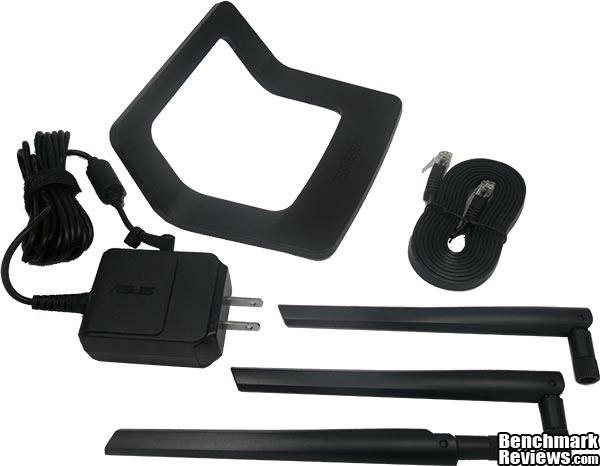
Bundled accessories include three external antenna, an AC adapter, a removable desk stand and a 1.5m flat RJ-45 cable.

The diamond design on the face of the RT-N66U is unique to ASUS, but thankfully it has a matte finish rather than the glossy finish of its predecessor the RT-N56U. A lot of effort has gone into making the RT-N66u one of the best looking and aesthetically pleasing routers out there. The side vents look serious and for good reason, there is a 600MHz Broadcom 470 processor working away inside the unit.

The RT-N66U will lay flat or stand up (with the additional stand) or can even be wall mounted. The wedge shape of the RT-N66U makes it look deceptively smaller than it really is when laid flat, my personal preference is to have it stood up but when positioned like this your wires will be less visible.

To keep the ASUS RT-N66U stood up you need to attach the additional stand. The stand does not permanently clip on, but still manages to hold the router quite secure. Due to a clever design the main unit leans against the stand and the stand stops it leaning back too far and intersects only where the wall mount points are. Here we can also see lots more ventilation holes.

Right in the middle is some important information for those who don't like to bother with instruction manuals (me) unless we have to. The RT-N66U requires 19V which is quite high for a consumer router and will certainly generate more heat.

Round at the back are the I/O ports. From left to right we have; Antenna connection 1, Power input, Power button, 2x USB 2.0 ports, a reset button, 1 Gigabit WAN port, Antenna connection 2, 4x Gigabit LAN ports, a WPS button and finally, Antenna connection 3.

The three additional antennas are really huge (measuring 17cm unfolded) and dwarf the main body of the RT-N66U. Although not shown here, each icon seen in the bottom right corner has a blue activity LED, they can be quite bright to look at directly but are not too bright when viewed at an angle.
ASUS RT-N66U Detailed Features
So now we have had the grand tour of the RT-N66U router itself, it is time now to look at the software side of things. Setup is very simple indeed as there are no drivers etc to install, simply connect your modem to the WAN port and connect your PC to a LAN port. The configuration of the RT-N66U is browser based so open your chosen web browser and you will be greeted with the Quick Internet setup screen, follow the steps and you will be up and running in no time.
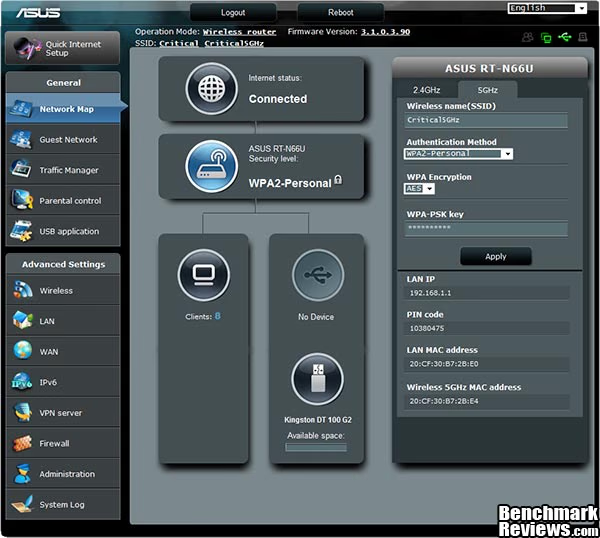
During the setup process your internet connection type is detected and after that you are prompted to enter wireless security settings and then you are done. When you next login to the router you are greeted by the network map shown above. All sorts information and shortcuts to various functions can be found here, each of the boxes in the middle of the screen can be clicked and information/options relating to it will be displayed in the right hand pane.
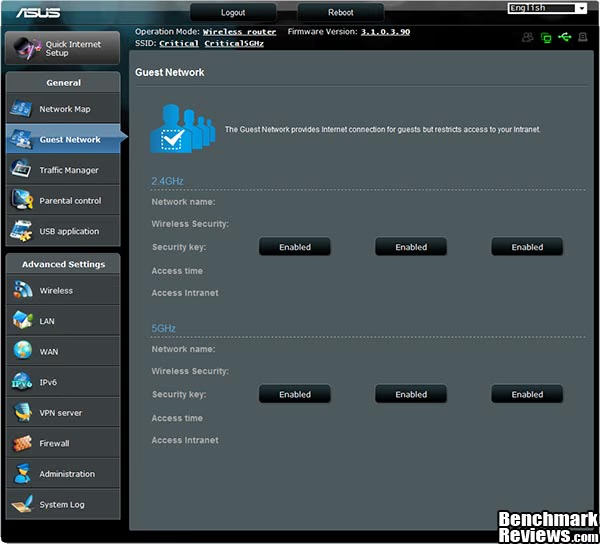
You can have up to six guest networks active (3x 2.4GHz/3x 5GHz) to provide internet access to guests. There are further options available in the form of a walkthrough to assist you setting up and configuring guest networks.

Next up is the Traffic Manager tab which has options for QoS. There are two modes, automatic and user define, which are selected using the drop down box in the top right corner. The text in the image above talks about auto mode and user define mode goes into much more detailed and tailored settings (too much to squeeze into a 600px image). Also in the Traffic Manager section is a Traffic Monitor which helps you to monitor the following types of network traffic: Internet: All Internet traffic. Wired: Network traffic from wired to wireless network and to the Internet. Wireless: Network traffic from wireless to wired network and to the Internet.

The parental control screen shown above allows you to control internet time limits for connected devices.

Next up is the USB application screen, each mode is described in the above image. From here on in are the advanced settings of the RT-N66U but we must draw this section to an end otherwise we would be here all day. It is important to note that the RT-N66U is a very powerful router that is simple to set up and has lots of advanced configuration settings for power users too.
Testing & Results
Testing Methodology
To test the ASUS RT-N66U Router we are using the Passmark Performance v7.0 Advanced Network Test. This test measures throughput between two clients connected to the router to be tested. In order for this test to work one PC must be set up as 'Client' and the other must be set up as the 'Server'. Each test is run five times with the highest and lowest result omitted and the remaining three results averaged to give a final result.
At Benchmark Reviews we like to be comprehensive so you will find results here for many different configurations such as LAN to LAN (100Mb/s), LAN to LAN (1000MB/s), WLAN to LAN using integrated laptop WiFi (Wireless G 54Mb/s), WLAN to LAN using ASUS USB-N53 (Wireless N 300Mb/s) and WLAN to LAN using ASUS EA-N66 Ethernet adapter (Wireless N450). To eliminate any variables Test System 1 was always set to 'Server' and results were monitored and recorded on the 'Client' systems. The ASUS RT-N66U shipped out with firmware v3.1.0.3.90 and tests were conducted under this firmware.

Test System 1
- Motherboard: ASUS P8Z68-V Pro
- Network: Intel 82579 Gigabit LAN
- System Memory: 8GB Corsair LP CL9 1600MHz
- Processor: Core i7 2600K @ 4.2GHz
- Disk Drive 1: OCZ Vertex 2 60GB
- Disk Drive 2: Seagate Barracuda 7200.12 1TB
- Enclosure: Lancool PC-K63
- PSU: Corsair HX750W 750 watt Modular
- Monitor: HKC 22" Widescreen (1920x1080)
- Operating System: Windows 7 Ultimate x64 (SP1)
Test System 2
- Model: Acer Aspire T180-R97Z
- Network 1: Marvel Yukon 88E8056 PCI-E Gigabit Ethernet controller
- Network 2: ASUS EA-N66 3-in-1 Ethernet Adapter via Gigabit LAN port
- System Memory: 1GB DDR2
- Processor: AMD Semperon 3500+
- Disk Drive: 500GB Seagate Barracuda 7200 SATA
- Operating System: Windows 7 SP1 (x86)
Test System 3
- Laptop Model: Compaq Presario CQ61-110SA
- Network Adapter 1: Integrated Atheros AR5007 802.11b/g
- Network Adapter 2: RealTek 10/100 integrated Ethernet controller
- Network Adapter 3: ASUS USB-N53 N300 USB Network Adapter
- Network Adapter 4: ASUS EA-N66 3-in-1 Ethernet Adapter via Ethernet port
- System Memory: 3GB DDR2 PC2-6400
- Processor: Pentium Dual Core T4200 @ 2.0Ghz
- Disk Drive: WD Scorpio Blue 160 GB SATA
- Operating System: Windows 7 SP1 (x86)
Results
The first test was conducted at a distance of 1 meter, which I would consider to be 'Wired' range. These tests were conducted using the method detailed above.

Not all results are at their max theoretical limit but this may or may not be due to the router itself, it is quite possible that the network adapters themselves are not capable of maxing out their theoretical limit. In an ideal scenario we would have identical network adapters at either end but these results show 'Real-World' throughput. We see a very good result for 100Mb/s LAN, in this case the network adapters are making full use of the available bandwidth with only a small overhead. When we look at the Gigabit LAN result we start to see that throughput is not meeting its maximum potential, still ~545 Mb/s is nothing to be disappointed with (results peaked at 575Mb/s during testing). Home internet connections are nowhere near as fast as this yet but this should be plenty fast for streaming etc.
Wireless G speeds and wireless N speeds are also somewhat lower than maximum potential, but the EA-N66 Ethernet adapter connected to a Gigabit LAN port really makes good use of the available bandwidth during the UDP tests (results peaking at 401Mb/s). Equally important as speed is range when looking at wireless internet, sure you get faster speed with wires but you also lose portability. The next two tests look at wireless G 54Mb/s and Wireless N 300Mb/s speed and range. Points 1~4 are downstairs rooms and points 5~8 are upstairs rooms. This gives a good idea of what sort of coverage we can expect in a fairly sized three bedroom house.

The wireless G test is very promising indeed, the ASUS RT-N66U was able to deliver a consistent speed at all test points. Test point 8 is the furthest away from the router so the slightly lower score is somewhat expected.

When we tested throughput with the ASUS USB-N53 Wireless N300 USB Adapter the results were good but not as close to 300Mb/s as I was expecting, the ASUS configuration utility and the windows connection status dialog showed that the USB-N53 was indeed connected at 300Mb/s but actual throughput was much lower. Wireless N300 throughput was not as consistent as the Wireless G throughput in all of the locations. As we see it here, the downstairs results remain consistent, but the further away you get the worse the throughput is.
Gigabit Router Final Thoughts
When it comes to networking products looks tend to be somewhat of an afterthought, with the ASUS RT-N66U this simply isn't the case. I'm sure many of you will agree that first and foremost on your list of priorities when buying a router is the price, next would be performance and then looks come last. After all you can easily hide a router out of sight, or you may not even have room on your desk to display your router, so looks need not be so important.
A non-tech savvy individual might look at the ASUS RT-N66U and think "what is that?" since this router doesn't fit the normal design brief. I myself am a sucker for good looking gear and I find the need to have things that fit into a certain scheme, whether it be a color scheme or purely a design scheme, I don't like things that don't fit in very well. The main quality I look for is performance, I always find myself looking for the best performance for the money I have available. When I can find looks and performance in one package then I don't hesitate, that's where reviews are handy.
ASUS RT-N66U Conclusion
Important: In this section I am going to write a brief five point summary on the following categories; Performance, Appearance, Construction, Functionality and Value. These views are my own and help me to give the ASUS RT-N66U Dual Band Wireless-N Gigabit Router a rating out of 10. A high or low score does not necessarily mean that it is better or worse than a similar router that has been reviewed by another writer here at Benchmark Reviews, which may have got a higher or lower score. It is however a good indicator of whether the ASUS RT-N66U router is good or not. I would strongly urge you to read the entire review, if you have not already, so that you can make an educated decision for yourself.
The performance of the ASUS RT-N66U is very respectable indeed, on a Wireless G 54Mb/s connection the router maintained an average 19.80Mb/s UDP throughput on all test points. The Wireless N 300 USB adapter throughput tapered off with distance but this is to be expected anyway. The hard wired LAN to LAN throughput tests presented some very interesting numbers and are not to be shrugged off. All in all these are very good results for a home user router.
The ASUS RT-N66U appearance will score very highly. I have already stated that I am a sucker for good looks and that is exactly what the RT-N66U has, as I'm sure you will agree. It is certainly different from 99% of the routers available on the market today and will set a new 'bar' for competing manufacturers to aim for. I am glad that ASUS went with a matte finish instead of glossy like the RT-N56U before it, the glossy finish was nice but it was easily spoiled.
The construction of the ASUS RT-N66U is very good indeed. The unit is very compact for a router with this sort of feature set, but the super long external antenna means it will appear much bigger. It has been built very well with no obvious screws holding it together, and has plenty of ventilation to deal with any heat that builds up.
Functionality of the ASUS RT-N66U also gets top marks. The two USB 2.0 ports add a whole new dimension of functionality and the implemented uses mean that you can use the RT-N66U almost like a dedicated NAS, downloading and streaming content while your PC is off or if you prefer you can attach a 3G dongle via the USB ports to the router for internet sharing. The automatic QoS settings are quick and simple as is the setup and navigation through the routers settings. There is some broken English in the menus but I consider them Easter eggs and you get a little smile when you find them. The 2.4GHz and 5GHz bands both run concurrently meaning you can download and stream at the same time without maxing out on bandwidth.
The ASUS RT-N66U is available for $179.99 (NewEgg and Amazon). There are not many wireless routers at this price point and the ASUS RT-N66U fits into the top end of the price range for many routers that have a similar feature set. With this in mind, I would say the ASUS RT-N66U offers reasonable value for money, but may be considered quite high for those who need only need a simple router for home use.
If you are looking for a stylish, feature packed and great performing router then you should definitely consider the ASUS RT-N66U as one to put on the shortlist.
Pros:
+ Great performance
+ Very unique stylish looks
+ Good throughput
+ Range is good for home use
+ Simultaneous Dual-Band (2.4/5GHz) operation
+ 3x External Antenna
+ 2x USB 2.0 ports for printers and storage and 3G Internet
+ Easy effortless setup
+ Intuitive and well laid out menus
+ Gigabit LAN and WAN ports
+ Lightweight but sturdy construction
Cons:
- Protruding wires ruin the look
- Price quite high for most home users
- Didn't beat its predecessor on performance
Ratings:
- Performance: 8.75
- Appearance: 9.75
- Construction: 9.75
- Functionality: 9.50
- Value: 8.00
Final Score: 9.15 out of 10.
Excellence Achievement: Benchmark Reviews Golden Tachometer Award.
Benchmark Reviews invites you to leave constructive feedback below, or ask questions in our Discussion Forum.
Reader comments from the original article
41 comments were posted before commenting closed. They are preserved as written. Original avatars no longer resolve and are shown as a placeholder.
RE: ASUS RT-N66U Dual Band Wireless-N900 Gigabit Router bobobobo Permalink:
The maximum transfer speed is 450Mbps. 450Mbps in 2.4Ghz and 450Mbps in 5Ghz. You can't put them together and say 900Mbps. That's where I quit reading your review btw.
RE: RE: ASUS RT-N66U Dual Band Wireless-N900 Gigabit Router Olin Coles Permalink:
I'm not sure you ever started reading the review, because N900 is the model number and the specifications are supplied by ASUS.
RE: RE: ASUS RT-N66U Dual Band Wireless-N900 Gigabit Router Jay Permalink:
If you would have read it correctly, you will notice he was posting Asus specs, not "real world" performance. Take your time in the future. It's obvious speed reading is not your thing.
RE: RE: ASUS RT-N66U Dual Band Wireless-N900 Gigabit Router Steven Iglesias-Hearst Permalink:
That's like saying you can't make bleach from salt water, it sounds preposterous I know, but that is exactly is happening.
Works as stated Glock41 Permalink:
great router. No need to use the printer sharing..my Epson 615 has that already. Range is great. Updated the firmware and is still a lil buggy, but I would recommend this router.
RE: RE: ASUS RT-N66U Dual Band Wireless-N900 Gigabit Router tomBMV Permalink:
well, technically, when you are having two computers running file transfer from the network shared hard-drive (on a regular router,) the speed will split half no matter what, on behalf of this new tech router, i ran two different laptops for copying couples files from two shared hard-drives and their speed come closed to 450....nbps gotta test it yourself to reallize the different
450Mbps loverbull Permalink:
the 450mbps is per band, to access 2 bands you need 2 wifi card with 2 adapters built in, i've just ordered one.. :-)
RE: ASUS RT-N66U Dual Band Wireless-N900 Gigabit Router Doug Dallam Permalink:
Steven, I was wondering if you did any testing at 2.4Ghz, since 2.4Ghz has better penetration of solid objects, and can have better performance in some situations (walls and distance). This review was ironically timed because I just installed an ASUS(PCE-N15) PCI card in my main machine (Mortal online uses a strange PVP prediction system that seems to give advantages to wireless lag in Melee situations (acts like a lag switch), for some reason). But it only supports connections in the 2.4Ghz band. My router is a dual band router. Although my internet connection is maximum 8 Mbps, and the router is only 3' from the main machine, I'm wondering if I should return the PCI version and get the USB version you reviewed. At this time I'm getting identical ping and transfer rates from my ISP as I do when I'm 100% wired. Any suggestions?
RE: ASUS RT-N66U Dual Band Wireless-N900 Gigabit Router Steven Iglesias-Hearst Permalink:
The Wireless G test was 2.4GHz (5GHz is wireless N only), and I think you should stick with the PCE-N15 PCI card or go wired if you are only 3' away from your router.
RE: RE: ASUS RT-N66U Dual Band Wireless-N900 Gigabit Router Doug Dallam Permalink:
What do you mean when you say 5Ghz is wireless N only? My card is wireless N but only uses the 2.4Ghz band. I was wondering how the N adapter would perform on the 2.4Ghz band.
RE: RE: RE: ASUS RT-N66U Dual Band Wireless-N900 Gigabit Router Steven Iglesias-Hearst Permalink:
I will run some tests for you ;)
RE: RE: RE: RE: ASUS RT-N66U Dual Band Wireless-N900 Gigabit Router Doug Dallam Permalink:
Sweet! I live alone and don't have any need for wide bandwidth. The 2.4Ghz spectrum should be fine, even if it can only produce 150Mbs, which is much higher than anything I'll have need for. I have read you can about double that will taking around 86% of the 2.4 space, but I'm not clear how that works or if the router/adapter does it automatically. I'm thinking that my setup is going to deliver no less speed than using the 5Ghz spectrum. Again, I'm not transferring information between any LAN.
RE: RE: RE: RE: RE: ASUS RT-N66U Dual Band Wireless-N900 Gigabit Router Steven Iglesias-Hearst Permalink:
Speeds are slightly slower on the 2.4GHz band. The 5GHz band has a stronger and faster connection.
RE: RE: RE: RE: RE: RE: ASUS RT-N66U Dual Band Wireless-N900 Gigabit Router Doug Dallam Permalink:
Looks like I'll stick with the card I have then. My internet connection isn't going to get anywhere near even 56Mbps anytime soon anyway, and is now maximum 8Mbps. Thanks.
Where did you find an EA-N66? Dhave Permalink:
I thought the ASUS EA-N66 had not been released yet (as of 8 march 2012). I'm talking about this beauty: #news.softpedia.com/news/CES-2012-ASUS-Reveals-EA-N66-Ethernet-to-Wi-Fi-bridge-246497.shtml Has anyone located a source for these yet?
RE: Where did you find an EA-N66? Steven Iglesias-Hearst Permalink:
You would be right there Dhave, it hasn't been released yet. I have one and I am currently running some tests, and yes she is a beauty. As for release dates and sources, we still haven't had the official word from ASUS yet. ##facebook.com/photo.php?fbid=10150712472221414&set=pu.125555631413&type=1&theater
PulTab Warren Allely Permalink:
The one I ordered from Newegg is out for delivery today.
RE: PulTab Dhave Permalink:
I don't see the EA-N66 listed on the Newegg site.
RE: RE: PulTab Warren Allely Permalink:
The RT-N66U is available for pre-order on the Newegg website which is what I did. Took two days before it was shipped. Sorry I didn't notice the "EA-N66" part.
RE: RE: RE: PulTab Dhave Permalink:
O.K., thanks. Enjoy your new router. It's spiffy.
4g sharing ? Dan Permalink:
I noticed that you wrote that it would be possible to share 4g as well as 3g connection. Is this confirmed ? I would really love that since the only thing that is keeping me from ordering one of these is that I need to be able to share a 4g connection, and I can't seem to get an confirmation that this will work. This quote gives me hope :) "The ASUS RT-N66U has two built in USB 2.0 ports that allow you to share printers and USB storage over LAN and WAN, and also allows you to share a 3G/4G internet connection.!
RE: 4g sharing ? Steven Iglesias-Hearst Permalink:
4G - Referred to as WiMax - is supported by the RTN66U. It is a little hard to see in the router settings screen capture on the Detailed Features page: /index.php?option=com_content&task=view&id=876&Itemid=70&limit=1&limitstart=3 (last one) Here is a zoomed in screen capture: #i945.photobucket.com/albums/ad297/hatchet_2009/ASUS_RT-N66U_3G-4G_WiMax.jpg
RE: RE: 4g sharing ? Dan Permalink:
Thanks for the answer, it's really good news :) Feel a bit silly for not realizing that WiMax was the same thing as 4g, but you learn something every day.
RE: RE: RE: 4g sharing ? Jimmy Jazz Permalink:
Don't feel bad, WiMax and 4G aren't necessarily interchangeable terms, there is also the competing 4G LTE. I don't think you'll be able to share a Verizon 4G connection with this thing, for example.
RE: ASUS RT-N66U Dual Band Wireless-N900 Gigabit Router david Permalink:
I own this router and it is simply amazing. The new firmware doubles the transmit power i believe from 40mw to 80mw (someone correct me if i'm wrong). I nearly have double the signal strength compared to the netgear wndr3800 and other reviews i have read say that its thoroughput is better than the wndr4500. You get what you pay for and its worth every penny as this router is loaded with features. I recommend it 110 %!
VPN support? Todd Permalink:
Does this support VPN? The ASUS RT-N56 doesn't apparently and I do about 25-30 hours work from home per week, and need to upgrade from my old DLINK wireless router. And having the VPN support is a MUST for me. Thanks in advance!!
RE: VPN support? Steven Iglesias-Hearst Permalink:
Yes, it's detailed in the features and specifications. :D
Shared Printer support david Permalink:
Just wanted to chime in about the Print server in Windows 7 will not work unless the firmware is upgraded to the latest version. It had bewildered me for a week until I checked the firmware release notes.
Over heating issue K-Man Permalink:
The Asus N900 get very hot. Is that an issue that will cause it to not work?
Mr. Rahul Jawale Permalink:
Just use a USB Fan. :) I can see a small bit of performance increase after adding active cooling.
RE: ASUS RT-N66U Dual Band Wireless-N900 Gigabit Router Steven Iglesias-Hearst Permalink:
Haven't noticed any temperature issues.
Question About 3G Capable Asus RT-N6 U Charles Permalink:
Does the discussion here mean the N66U can connect to the Internet using a 3G USB thumb modern from a ISP provider? I live in a rural area and want to use the router to also connect my smartphone and Internet radio, along with my computer, to the Internet. Sorry I'm not smart enough to make myself more clear.
RE: Question About 3G Capable Asus RT-N6 U Steven Iglesias-Hearst Permalink:
Yes that is the case according to the ASUS specifications, although I am not able to test it as I don't have a 3G dongle.
Thank you, Steven! Charles Permalink:
Much appreciation for taking your time to help me. Best wishes.
Actual Maxima Distance James Wang Permalink:
I was wondering, how many meters the RT-N66U wireless distance it can cover. Because I want to use it in my home that have 3 floor.
RE: ASUS RT-N66U Dual Band Wireless-N900 Gigabit Router Steven Iglesias-Hearst Permalink:
Line of sight distance and multi storey distance will produce different results because of physical obstacles that may degrade or block the signal. As I don't have a 3 floors on which to test I can't really offer you a true answer. You would do much better to contact ASUS support, or check Youtube for the video reviews JJ from ASUS did for the RT-N66U.
Parental Controls Page Failure Jay Permalink:
Recently purchased the RT-N66U and I have been impressed with the performance and features. However, there is still an issue with parental controls UI. After adding 5 devices the ASP code hung up and the page no longer displays properly. The only way to return to a working page is to re-apply the most recent firmware. Still waiting for reply from Asus on a resolution if one exists. Overall though it is an excellent router.
Easy out of the box Kawabunga18 Permalink:
I went ahead and picked up a N66U from the local big box store I must say set-up was a breeze. I'm having some issues getting the VPN going with my dynamic WAN IP but I must be doing something wrong. It seems the new price tag is below $170 everyone is selling it at the price well worth the money from what I can see so far based on its performance. I still get 6 meg d/l on my WiFi in the basement with the N66U two stories up on the top floor.
RE: ASUS RT-N66U Dual Band Wireless-N900 Gigabit Router David Permalink:
I don't understand why reviews for this product consistently refer to the "parental controls" as a means to "allow you to control internet time limits." That is NOT what this feature does. What it does is control what hours of the day the device can access the internet. You can only seat a LIMIT if you also specify the EXACT times the internet can be accessed as well. So, for example, if you wanted to limit access to 20 hours a week, you have to also specify the exact hours of access. If the device is not used every minute of those times, then the "limit" is a lower number. There is no way to allow 20 hours a week (or 4 hours a day), and let the user have a say in when they can use it.
RE: RE: ASUS RT-N66U Dual Band Wireless-N900 Gigabit Router Steven Iglesias-Hearst Permalink:
Your comment is a little pedantic don't you think, David. I can limit my children to 2 hours internet per day in more ways than one. Sure one way is to tell them that they can have only two hours and allow them to choose when to use the time. I can also specify that time for them, and whether they choose to use the entire sum of their allotted is completely irrelevant. Time is limited when control lies with another, no matter how you choose to look at it.
So you are going to get some latest 5S new line shoes Goavarath Permalink:
A peek at the good new trail shoes of the 2013 fall Outdoor Retailer spotlight. Producer janne kyttanen has produce a line of 3D printed high-heeled shoes for cubify, that can be downloaded for free and printed. ##shoesworldly.com These can be broken up into many sections: runners, walkers, cross-trainers, hikers, and tennis shoes. . Get Running Shoes for Comfort, Not Pronation there is a reason for their unusual design and sleek look. What do you consider? Do you desire it? I love these shoes so feminine and noticeable. Saints HC Sean Payton Makes A Halftime Adjustment On His Shoes.