
AZZA Solano 1000R Full-Tower Computer Case
AZZA Solano 1000R Case Review
We test a lot of cases here at Benchmark Reviews, many manufacturers seem to follow the same pattern, thankfully some deviate and create some great works of art. AZZA have taken a few steps away from what is considered conventional with the Solano 1000R (model: CSAZ-1000R) and gave it an extreme bright red interior. The AZZA Solano also boasts "maximum thermal management with fans installed everywhere" to keep your high end hardware cool.
A 230mm red LED fan is mounted on the top for main ventilation, a second 230mm red LED fan is built-in on the side panel, Two additional 140mm red LED fans are installed in the front panel to boost air intake and the cooling of HDD cage, and a 120mm fan is mounted in the back panel to vent to the outside. In sum, a total of two 230mm fans, two 140mm fans and one 120mm fan work in harmony to provide you maximum airflow. This full tower case supports E-ATX, ATX, and Micro ATX motherboards and the thumb screw design allows for easy installation of seven PCI expansion cards. A plethora of drive bays, including up to ten 5.25" and eight 3.5" bays, allow you to grow your system over time. All the bays have a thumb screw design for easy assembly as well. Are you looking for a new case? Join Benchmark Reviews as we examine the Solano 1000R ATX full-tower ATX case.

The AZZA Solano 1000R is built with high-quality Japanese steel, solid and sturdy yet not too heavy. With its bright red interior and a cool black exterior, this is one case that is sure to stand out from the rest.
AZZA Solano Features
| Ultra-efficiency Cooling System: | 1 x 230mm top fan (exhaust) with 3-speed switch control |
|---|---|
| 1 x 230mm side fan (intake) | |
| 2 x 140mm front fans (intake) | |
| 1 x 120mm rear fan (exhaust) | |
| Bottom-mounted Power Supply: | Power supply is bottom-mounted, can be installed facing either up or down. |
| Pre-drilled holes located at bottom, allowing efficient air flow when power | |
| supply is installed facing downward | |
| Cable Management: | Cable is organized behind the pre-drilled motherboard tray, allowing better |
| cable routing and internal air flow | |
| Easy Assembling: | Thumb screw design for easy assembling of optical drive and HDD; |
| Thumb screw design also for the side panel | |
| Maximum Compatibility: | Compatible with E-ATX, ATX, Micro ATX and all kinds of Nvidia, ATI long |
| graphic card, and most water cooling systems | |
| Server-like HDD cage can accommodate up to 8 HDD, equipped with 2 x 140mm | |
| front fans for overheat prevention | |
| USB & Audio Ports Located on Top: | USB & E-SATA & audio ports located on the top panel, allowing for easy access |
CSAZ-1000R Specifications
| Model Name: | Solano 1000R |
|---|---|
| Model Number: | CSAZ-1000R |
| Type: | ATX Full Tower |
| Color: | Black/Red (Interior Chassis) |
| Material: | Japanese SECC Steel/Metal mesh in front |
| With Side Panel Window: | Yes |
| With Power Supply: | No |
| Motherboard Compatibility: | ATX, Micro-ATX, E-ATX(12"x10.3") |
| Expansion | |
| External 5.25" Drive Bay: | 10 |
| External 3.5" Drive Bay: | 1 |
| Internal 3.5" Drive Bay: | 8 |
| Expansion: | 7 |
| Front Ports | |
| Front Ports | 3 x USB, E-SATA, Audio, Mic |
| Cooling System | |
| 230mm Fan: | 1 x 230mm red LED silent fan (24DBA) on top |
| 1 x 230mm red LED silent fan (24DBA) on the side | |
| 140mm Fan: | 2 x 140mm red LED silent fans (19DBA) in front |
| 120mm Fan: | 1x120mm fan in rear |
| Physical Spec | |
| Dimensions (H x W x D): | 19.7" (500mm) x 8.1" (213mm) x 21.5" (545mm) |
About the company: AZZA
AZZA's Mission is simple: Your satisfaction is our success!
Jumpstarted with the vision to build a premier corporate company that consistently exceeds the managed expectations of our customers, team members and partners, AZZA is driven by the Mission to provide the highest quality products of unmatched value, along with exemplary customer support. We do this via the efforts of a highly dedicated, professional, productive and experienced workforce who shares a commitment to the long-term growth and success of the company.
Closer Look: AZZA Solano Exterior
Lets see now if AZZA can live up to their mission statement and deliver a great performing, functional case for a price you are willing to pay. The theme for this full ATX case is red, although you wouldn't think it when looking at the box below.

The Solano 1000R is a revision of the original Solano 1000, in case you haven't guessed already, the 'R' stands for red, and it seems that AZZA have just used the same box. The only reference to this new revision is a tiny little picture in the bottom right corner and on the side panel. It would have been nice if it had its own box or maybe a picture of the 1000R version on the reverse of the box, so that the box can be displayed to show which revision is inside.

I was impressed by the size of this case when I got it out of the box, it's a full ATX case and is a real handful to carry, but that's what I like in a case. I want room to put in what I choose - no matter what the size of the particular piece of hardware might be. The Solano 1000R is a classic design with a modern twist, I like how the side panel deviates from the path of 'normal' square window cases, and that red 230mm fan looks like it could cool my car radiator, let alone my hardware.

A view of the Solano 1000R from the front here shows ten 5.25" bays, which are all usable should you ever find the need to. You can truly personalise your desktop PC the way you want to - Imagine your DVD/BD-R combi drive in the bottom slot - for those amongst us who like their case to sit on top of the desk (like me). If you don't like where AZZA have put their logo then you can simply pop it out and move it to where you like or even do away with it altogether. A little sneak peek of whats to come here too, is that something red I see hiding behind the mesh bay covers?
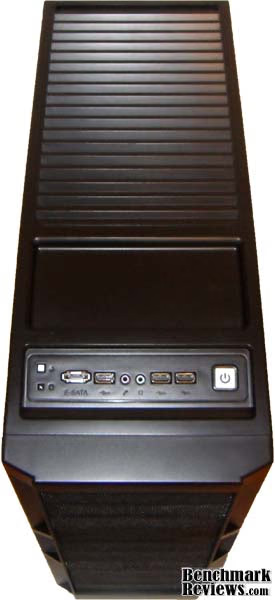
Looking down on the top of the case here you can see that AZZA have decided to place the I/O panel, power and reset buttons on top of the case. Behind them is a coin tray style area that is built into the top panel, this is also a handy docking area for when you are transferring data to a device or charging via a USB cable. Then behind that is all vented area, whats underneath will come later in the review.

A side view here gives some indication to the overwhelming size of this case, funny thing is that this actually overlaps my desk. It measures 20" wide x 21.5" tall at its highest point and that curved top gives the case a nice finish. I can't help but notice a symbol in the red fan LED's that reminds me of my WW2 gaming days (which I'm sure is not intended). And that interior just jumps right out at you too. There is a handle built into the fan bezel which assists in the removal of the side panel, which I must add, was not stiff or difficult to remove right from the start.
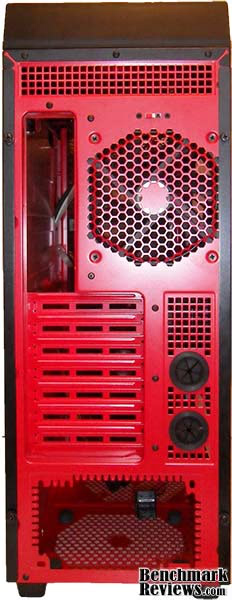
The Red paint-job found it's way round to the back too which is a nice touch - some of the best looking cases have the rear left untouched. AZZA really went all out here, and looking at the rear of this case you can tell it has the enthusiast in mind, there are vents everywhere possible - even in the expansion bay covers. A bottom mounted PSU seems to be the norm nowadays along with the water cooling ports
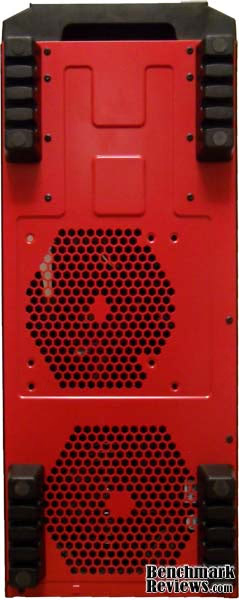
A bottom view here shows more airflow capability, the bottom vent being for the PSU intake and the one above that is for case fans, with the option to install either 140mm or 120mm there (on the interior). Four massive feet keep the Solano 1000R standing in the intended orientation - more on these when we look closer.
Detailed Exterior Features
Now the fun starts, I like to tear down products to see whats going on inside and get an idea of the sort of craftsmanship that went into its making, a lot can be learnt about the durability of the product by doing this too.
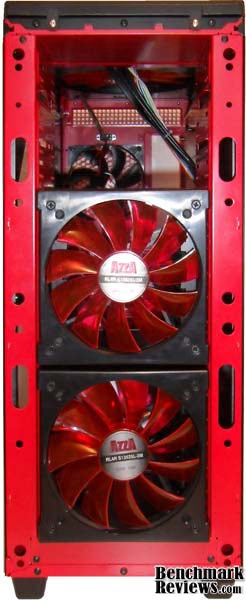
The face removes fully and is held in place by six cheap plastic friction plugs (for want of a better description) You have to pull quite hard to remove the front and this always makes me think I might break something. I personally prefer when the front face is a swing door - this is really simple to implement and only requires a hinge one side and a magnet or simple quick lock mechanism on the other to keep the door closed. Those two 140mm red LED fans are actually installed into the removable hard drive cages which, and just like the 5.25" bay covers, can be placed at any level you prefer. At the top of the case there are two silver screws, which when removed allow you to remove the top panel.
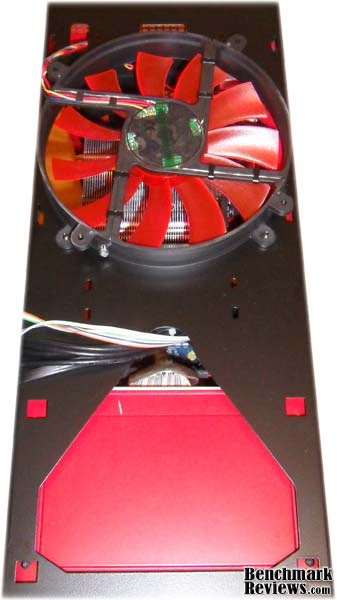
Removing the top cover shows that AZZA is very committed to airflow with this case. Yes that's another 230mm red LED super fan, this time used for exhaust. The speed of this fan can be controlled by a switch on the rear of the case that gives you three settings - low, medium and high. This fan is 1.25 inches thick and the top panel has 1.5 inches of headroom, this could be removed and re-installed on the inside of the case (using the same mounting points) and it could give way to a water cooling radiator, although there doesn't appear to be any way to mount anything other than this fan.

A closer look at the I/O panel here From left to right is the reset button above the status LED, an E-SATA port, one USB 2.0 port, microphone and headphone ports, another two USB 2.0 ports and then an illuminated power button, which for some reason they decided to illuminate blue, at least that ties my blue LED fan controller to the case.
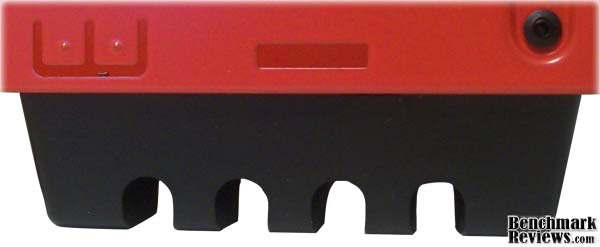
Big feet means big hardware right, or is that shoes? lame joke, I know, but these just needed an introduction all of their own. Measuring in at 1" tall x 3.5" wide x 1.25" thick, they definitely should keep this case upright and give it real ground clearance that so many other cases seem to lack. They look like they are made of rubber but they are made from some sort of plastic and have two rubber pads built into their base (feet with feet).
Closer Look: CSAZ-1000R Interior
Now we get to show of the true assets of this case as we look inside, The rich red paint job is nothing short of a work of art, a fully painted interior is becoming popular these days as manufacturers look for new ways to draw our attention towards their products. I personally think the Solano 1000R looks better with the side panel removed, I just can't stop staring at it.

I have to admit that I have fell head over heels for this case, even the best photos in the world really can't do this case justice. If you like red and you want to do a red themed build, then this is the case for you. I can already see this case on million-dollar-pc with some top level hardware inside, red braided cables maybe some black accents here and there, and as I pointed out earlier, you could always remove that 5.25 bay cover that has the AZZA logo and truly personalize this case - much like many car modders do by removing the manufacturers badges.
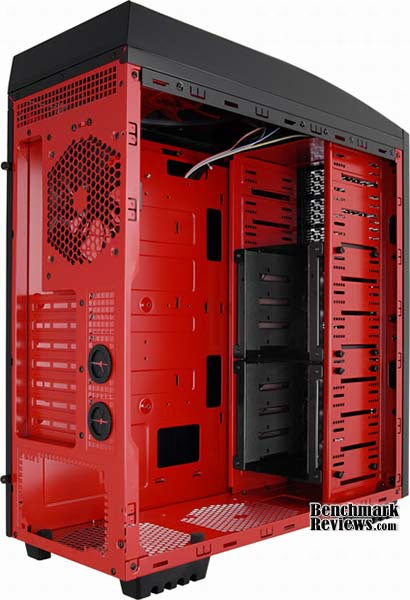
Now we can really appreciate just how much room there is inside this case, inside dimensions are as follows; 18.5" tall x 12" wide x 7" deep. The black hard drive cages install like 5.25" devices, and come pre-installed with eight thumbscrews holding each in place. The major flaw here is that to install a hard drive into the cage you need to first remove it, which involves taking off both side panels and the front face, then undo eight screws and pull the cage out the front. But don't forget to disconnect the installed fans power cable which is a 4-pin molex plug. As you can guess this is quite a process just for installing a hard drive.

The Solano 1000R full atx case has support for E-ATX, ATX, and Micro ATX motherboards. There are plenty of cut outs for cable management, but no CPU backplate window which is a feature found on many cases released lately. I don't think this is a big issue though, this is a feature that is only just starting to show up, not one that has been around forever and it won't really be missed. AZZA are playing it safe here by not including any fiddly plastic so called 'tool free' solutions (unless you count thumbscrews as tool free). Screws have been around for a long time now and they are so simple to use, it seems silly to use anything else.

A very basic package of accessories here, they all come packed in a small white box which also includes a little bag of screws. Here we see mounting hardware to convert from 5.25" to 3.5" which is a little strange as there are already eight 3.5" bays provided by the HDD cages. All those who still use floppy or flash memory card readers will be happy because AZZA hasn't forgot about you, personally I don't think I will find much use for the faceplate adaptor though. The cable ties are definitely useful though, as they are re-usable. Last but not least, another little diagnostic speaker to add to my collection. A nice addition here would have been 2.5" SSD mounting hardware.
Detailed Interior Features
Lets take a closer look at what the AZZA Solano 1000R has to offer us, after all a case cannot be judged solely on looks. There are other equally important factors such as functionality, practicality and performance to take into consideration.
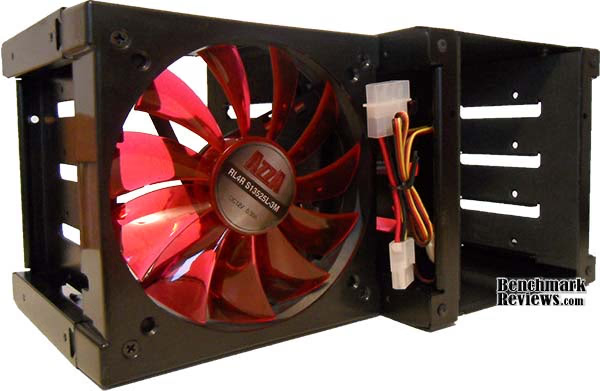
While the HDD cages might be a bit of a pain to remove, they certainly make up for this flaw by combining functionality and performance. The interior of each cage is lined with foam which is there to serve in reducing HDD vibration. They also serve as a fan holder which means that the HDD's in your system will receive much needed airflow.
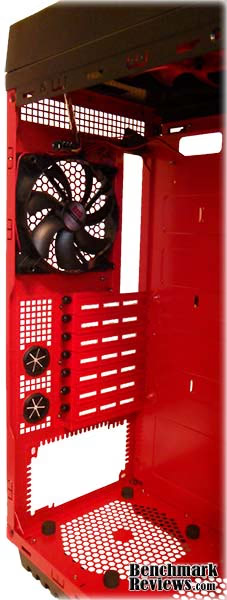
No space is wasted on the rear of the case, in many other cases the only ventilation holes seen are where the fan is installed. AZZA provide a black 120mm fan here, this one doesn't need to be an LED fan as you won't see it when the side door is on anyway. The pre-installed water cooling holes are handy as this means you won't need to get out your rotary tool and mess up your nice new case. In the bottom you can see four black stand-off's these support the PSU during installation and reduce vibration once it is installed, they also provide that little bit more clearance to get loads of cool air in your PSU.

A second 230mm red LED super fan is built-in on the side panel which AZZA claim is to support CPU cooling, I guess the fact that it also covers the chipsets, graphics card and RAM is just an added bonus. This fan is the same as the one installed in the top, which might I remind you is 1.25" thick, and it will interfere with a tall CPU cooler like the HDT S1283 installed below.
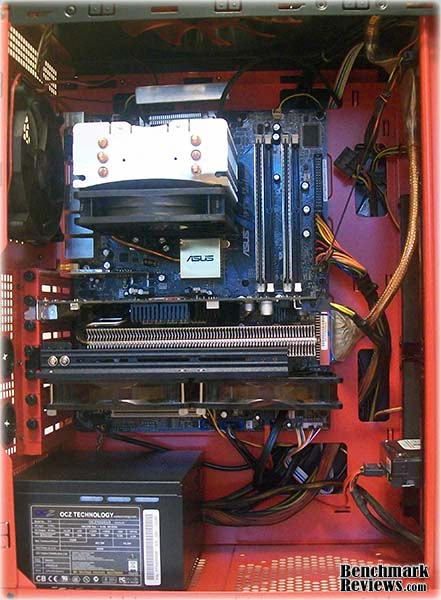
You may notice that I have the CPU cooler installed facing up, this was necessary in order to get the side panel on, as the built in fan conflicted slightly on the edge of the cooler when it was installed facing the rear (and still does slightly as you can see on the right side bottom corner of the CPU cooler). As you can see, the cable routing cut out's serve their purpose keeping the tangled mess of wires hidden in the back and not out front restricting airflow. The only problem with a bottom mounted PSU is that they are not always designed to be installed there and you can have issues with cable length, mainly with the CPU power cable as it has to travel the entire length of the case, and you might find yourself needing an extension.
AZZA Solano Final Thoughts
The AZZA Solano case fans are quiet but not silent, I currently have eight fans installed inside this case; the five already mentioned in this review, plus two 120mm fans on my VGA cooler and one 120mm fan on my CPU cooler. I could go now and reach into my spare part bin and pull out one Antec 120mm high airflow fan that would produce more noise than all of these combined. The temperatures below are idle temps with all fans running 100% speed.
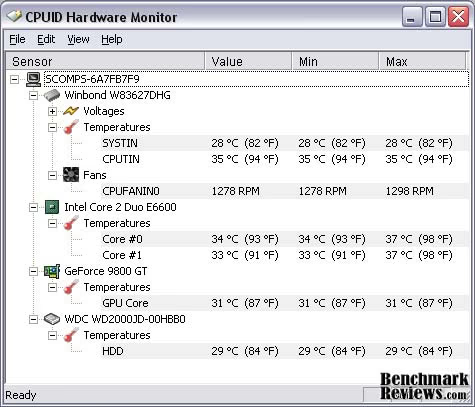
The AZZA Solano is very spacious and it was an absolute pleasure to work with, the only real issue was with the side panel fan conflicting with my CPU cooler, which was rectified by rotating the CPU cooler 90 degrees. The side panels slide on and off seamlessly which makes a big difference when you are in and out of your case as much as I am. The lack of tool free solutions wasn't a problem to me as I prefer to work with thumb screws anyway, they are a simple solution that has worked very well for years.
This is a chassis designed for enthusiasts without a doubt, It has a nice looking side window to show of your hardware, and a great combination of fans that also double to illuminate the interior. It has the most awesome red paint job that I have seen on the inside of a chassis, which is perfectly offset by the black exterior. You have support for water cooling and you have the all important bottom mounted PSU and cable management cut out's. I don't know if there is anything else you could really need from a chassis that the Solano 1000R doesn't provide, apart from 2.5" SSD support obviously and possibly some filters for the fans to stop all the dust getting in.
CSAZ-1000R Conclusion
Performance is a difficult area to test when reviewing PC cases as they need something to be compared to. I am lucky enough to have owned several different aftermarket cases so I know the difference between the norm and something special. The Solano is something special as it managed to reduce my temps by a few degrees, this is made possible by the five fans that come pre-installed with the case. The motherboard tray cut out's for cable routing can also share the credit here as they keep the cables hidden and allow the airflow to flow freely throughout the case. The lower temps mean you get more overclocking headroom.
The construction of the AZZA Solano 1000R is very good, the chassis is made from Japanese steel which makes it solid and sturdy while at the same time not too heavy, although when all your hardware is installed you definitely notice the weight. Don't expect this beast to fall over though as it has some of the biggest feet I've ever seen on a case. Sharp edges on aftermarket cases are thankfully a thing of the past now with modern PC chassis designs, and the Solano 1000R is no exception.
Appearance ratings are very particular to our own particular taste. I am definitely blown away by the red interior, which I just can't stop staring at, and it is made more obvious by the black exterior. I have noticed a hairline gap where the side panel and front face meet (or should meet), which is made more visible thanks to the red interior paint job. Thankfully enough though, my attention is drawn elsewhere by the illuminated interior provided by those two massive 230mm fans. The two front 140mm fans are also visible through the front panel drive bays thanks to their red LED's which is overall a very nice effect that is much more visible in the dark than in daylight.
Functionality isn't the strongest point of the Solano 1000R. The fact that you need to completely take your case apart just to install a new hard drive is a big downside, add to that the fact that 2.5" SSD's are not catered for. There is potential support for water cooling, but there isn't dedicated installation space with dedicated mounting points for radiators and such. There is however support for big graphics cards and motherboards, and the cable management cut outs on the motherboard tray are a big plus.
Is this case value for money? That depends how you look at it. Are you after something that just looks good (like the level 10 for instance) or do you value performance and functionality over looks? Thankfully the model CSAZ-1000R case provides us with looks, performance and functionality all at the same time. The AZZA Solano 1000R is available for $129.99 ($99.99 after $30 mail-in rebate) at NewEgg or other online retailers. When all is considered I believe the Solano 1000R is definitely value for money before, and even more so after rebate.
The AZZA Solano has a few downsides that are by far out weighed by the positives. There isn't really anything that I would change about this case, it's not perfect but it comes pretty close. Maybe AZZA could have made it from aluminium but that would have almost certainly doubled the price.
Pros:
+ Big airflow and superior cooling provided by five fans
+ Great cable management
+ Stunning red paint job
+ Support for big hardware
+ Strong and sturdy construction
+ Illuminated interior - although better in dark than day
+ Potential for water cooling
+ Big feet give lots of ground clearance
+ Bottom PSU installation
+ Top exhaust fan has speed control
+ Great value for money (even better after rebate)
Cons:
- No 2.5" drive support
- Case needs to be deconstructed to install a HDD
- Side panel fan can conflict with tall CPU coolers
- No CPU backplate window
- No filters included for intake fans
Ratings:
-
Performance: 9.75
-
Appearance: 9.75
-
Construction: 9
-
Functionality: 8.5
-
Value: 8.5
Final Score: 9.1 out of 10.
Questions? Comments? Benchmark Reviews really wants your feedback. We invite you to leave your remarks in our Discussion Forum.
Reader comments from the original article
5 comments were posted before commenting closed. They are preserved as written. Original avatars no longer resolve and are shown as a placeholder.
Azza CSAZ-1000R vs Nox CoolBay HX Frank Permalink:
Hi, isn`t this the same as a Nox Coobla HX with red painted (just like their coolbay red devil edition)? Just a thought Frank
RE: AZZA Solano 1000R Full-Tower Computer Case Laurentio Permalink:
well, i think this case is very identical to the NOX coolbay HX.. i had it once and when i saw nox coolbay, it's almost exactly the same.. the difference lies on the front fans.. azza solano has 2 front fans while nox coolbay hx only has one.. the rest remains exactly the same.. i really wonder if these two cases have any relations to each other..
This is 90% Antec 900 10% Azza Bdubs Permalink:
Show some LED lit pictures. The fan layout (two front, 1 back, and a large top exhaust fan is all Antec 900). Even the beveled slope to the front end is. Azza added a large side case fan that the Antec only provided a place to attack a fan to (much smaller fan as well). The 1" feet and venting holes on the bottom of the case are a nice customization to the Antec case... The addition of Esata on the front panel and a lighted button are nice (albeit PITA if you need to change it out to RED). Things they didn't improve & made more difficult are the HD cages & mounting new Harddrives. Takes less than 30-60 seconds to undo and remove the HD cages to change drives around. These were $69.99 AR & Free shipping and Newegg this past summer but who knows if those prices will come back.
Can you add some pictures showing it illuminated at night or in a dark room? Bdubs Permalink:
First thanks for the review. Would have been nice if you had shown some night time or dark room pictures showing the LED & lighting. I also have built a read themed case but unlike you I felt (from the pictures on Newegg) that the RED paint was just a little bit overwhelming. I wanted the lighting to be the focus and a nice contrast with the black or silver of most cases.
Mr. Dennis Permalink:
What's the biggest motherboard you can fit in this thing?