
QNAP NVR-1012 Wireless Network Surveillance Kit
QNAP NVR-1012 Surveillance Kit
The age old saying of "Love thy Neighbor" may still be heard on any given Sunday and will likely receive a positive reception. However, if the saying happened to be "Trust thy Neighbor" the response would most likely be a little different. Gone are the days where one can feel comfortable leaving their house or cars unlocked, trusting that your employees are honest, or even that the babysitter is not mistreating your child. It is rare that you walk into a store nowadays without being watched by electronic eyes. While to some that may be troubling, the fact of the matter is, it is becoming more and more a necessity. In the past, those high tech security systems were reserved for the business that was forced to justify the expense or the rich guy that could afford the rather large expense of not only purchasing the system but having it professionally installed.
Today Benchmark Reviews will be taking a look at a new product that hopes to reduce not only the cost barrier of the home/small office security system, but also virtually eliminate the installation hassle, the NVR-1012 from QNAP.
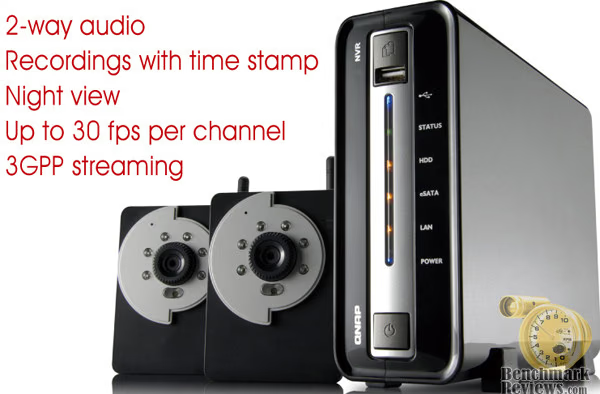
I recently reviewed the TS-409Pro NAS server from QNAP and was very impressed, so when given the opportunity to review their newest security system I was very excited. QNAP is no stranger to surveillance products, although I believe this may be one of their first ventures into the consumer's home with their cameras.
While some might feel that designing a security system for the home would be easier than one for a large business, the opposite just might be true. The large business customer will usually hire a professional to take care of the entire security needs. This not only includes installing the product, but most likely includes deciding on which product to purchase, setting up the software, aiming and focusing the cameras, and configuring the storage requirements to archive the recordings. Basically the typical business is looking for a turnkey installation where they are told it will cost X amount of Dollars, and when the security Pro leaves they have a product up and running. They don't need to really know much else about it other than it works.
The home or small office user on the other hand usually doesn't have the budget to hire the Pros to handle everything. They are looking for a simple product that they can do themselves in an effort to try and fit it in their budget.
So let's think about the added requirements to design a product for the SOHO consumer. First it needs to be affordable, second, it needs to be easy to install, third it needs to be easy to operate, forth, it needs to be reliable, and fifth, the quality has to be acceptable. While the home user may be willing to make some compromises in quality in an effort to save money, the need for security is much more "personal" for the home user. It may very well be the consumer's children that they are seeking to secure, and as any parent will most likely agree, that is not an area where compromises are welcome.
QNAP's marketing spin
TAIWAN, April 23, 2008 - The NVR-101 is an instant surveillance system providing professional grade live video recording and real-time remote monitoring/playback service. The complete system is built-on the Linux OS for its proven superb performance yet power-saving feature. In order to bring users more convenience and extra benefits in setting up a network surveillance system, QNAP has considerately selected two value-plus IP cameras for the NVR-1012 kit. The kit can be set up instantly in a few simple steps. All the system configuration and recording/monitoring functions of the NVR are carried out through Internet Explorer and absolutely no complicated software installation is ever required.
Besides the built-in Ethernet connection the cameras also provide a great alternative for home users to connect wirelessly. The state-of-the-art 2-way communication system supports synchronized video and audio monitoring and recording. Users can speak directly for the instant conversation or even use the camera to perform voice-broadcast. The real-time remote monitoring service that is viewable on IE browser can now even stream the live video to any 3GPP-enabled handset.
According to Mr. Peace Kuo, Senior Product Manager from QNAP, "The NVR-1012 kit is an ideal solution to provide day & night protection to your home and office. The unique infrared designed on the camera included in the kit is enabled automatically during the night time to ensure continuous recording and monitoring. We also provided motion detection feature that if a moving object is detected, direct recording is triggered, and an alert email is sent to notify the users. Moreover, precious timestamp is embedded on every single recording for easy video navigation and playback, and even an evidence for police investigation. Such powerful and high-end surveillance combination is rarely available from other surveillance providers. QNAP has taken a major step forward in the home use surveillance market."
The NVR-1012 supports high resolution MPEG-4 and MJPEG recording of up to 4 channels simultaneously. The server supports up to 1TB internal SATA hard drive. The storage capacity can be expanded to 2TB at maximum via eSATA connection to an external hard drive for long-term recording. The energy-saving design of NVR-101 enables non-stop system operation 24x7 at the power consumption of less than 18W, which is more power-saving than an energy-saving bulb. The NVR-101 is also equipped with a low-noise fan for quiet operation. The NVR-1012 is the new generation digital surveillance solution which provides immediate effective protection yet affordable and it is perfect for home and office.
About the company: QNAP Systems, Inc.
QNAP Systems, Inc. is professional digital and network surveillance solutions provider. With the solid expertise in the Linux-embedded platform and video encoding and decoding technology, QNAP has developed various high quality security solutions over the past 6 years, including Motion JPEG, MPEG4 digital video recorders, modularized multi-channel DVR server, and centralized remote monitoring software. One of our success stories is the Asia's largest multi-functional shopping complex, the Dream Mall, where QNAP VioGate series and VioServers are installed with hundreds of cameras (expandable to 2,000) for complete security monitoring. Currently, QNAP is promoting the new generation surveillance technology. We have successfully launched the world's first Linux-embedded network video recording system, VioStor, in 2006. The VioStor series supports a wide range of IP cameras such as Axis, Panasonic, Canon, Sony, Arecont, and Vivotek etc.
QNAP Surveillance Kit Features
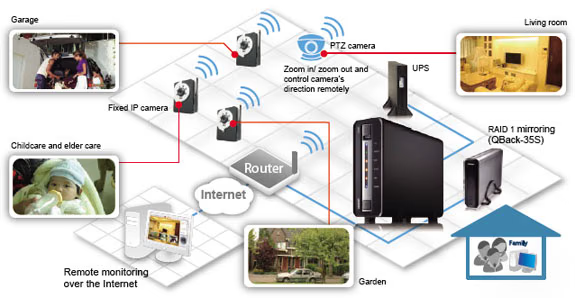
The feature list for the QNAP NVR-1012 Wireless Network Surveillance Kit is quite impressive given that this is intended as an affordable system for the home or small office.
-
Live real-time monitoring
-
Variety live video monitoring: Single-channel, multi-channel (max. 4 channels), and picture-in-picture monitoring modes are supported for flexible and key-location monitoring.
-
Live 2-way audio: Real-time audio and video monitoring, voice broadcasting.
-
Instant Alarm: An alarm signal will appear on the monitoring screen to alert users.
-
Alert Emails: Alert e-mails will be sent to administrator immediately when a system error or emergent event takes place.
-
Motion Detection: Recording is triggered when a moving object is detected by the camera.
-
Alarm schedule recording: Different recording modes can be defined for different time periods, e.g. alarm recording at daytime and continuous recording at night time.
-
UPS Support: UPS (Uninterruptible Power Supply) supported for continuous services against interruption or risk of data crash caused by power outage.
-
Backup: Video data can be exported to an external storage device via the one-touch copy button for ease of archiving. *It is suggested to use USB backup devices, e.g. QBack-25S, QBack-35S.
-
Automatic recovery after power loss: When the power resumes after a power outage, PC-based recording solution will not be started up automatically and recording is stopped. QNAP NVR supports automatic system startup and recording is enabled immediately after power resumes. The system maintenance cost is largely reduced.
-
RAID: Supports advanced RAID1 mirroring for ultra secure data protection by connecting to an external eSATA device, e.g. QBack-35S.
-
Continuous/ Schedule/ Manual recording
-
Alarm schedule recording (by motion detected or sensor triggered)
-
Synchronized audio recording
-
With scheduled recording, users can set different recording schedules for different cameras. Up to 15 schedules are supported for each camera. Manual recording allows users to activate recording in any necessary conditions. The NVR-101 also provides alarm recording that starts automatically when motion detection or camera sensor is triggered.
-
Standard video recording format with Time Stamp: The recordings are saved in AVI format (codec provided) for easy playing by Windows Media Player. Time stamp on the video is provided for convenient data search and can be used as legal evidence.
-
Flexible adjustment of the length of recording files: User can adjust the length of the recording files flexibly (1-15 minutes).
-
Easy 6-step setup: Quick installation wizard is provided for users to finish system setup in 6 steps within 5 minutes. Intuitive web-based interface is provided for easy configuration.
-
Manage and access recordings remotely: Recording data can be retrieved securely and remotely via web, FTP, and My Network Places with login access control.
-
Low Power Consumption: The normal power consumption of the NVR in operation is less than 18W (less than the power
consumption of an energy-saving light bulb). -
Smart PTZ camera control by direct clicking on the control panel: You can zoom in/ zoom out and control camera's direction by the "click and go" intuitive control panel. Preset positions can be easily and precisely controlled. (Note this does not work with the included cameras)
-
Sensor-triggered alarm: The NVR can receive any alarm signals from the cameras specified by the users, e.g., when a door or window is opened, or smoke is detected, recording will be activated automatically. (Note this does not work with the included cameras)
QNAP NVR-1012 Specifications
NVR-101
| HDD | Support 1 x 3.5" SATA I/II HDD, up to 1GB or above, expandable to 2TB via eSATA (the HDD is not included) |
|---|---|
| LAN Port | 1 x Gigabit RJ-45 Ethernet port |
| LED Indicators | Power, USB, status, LAN, hard disk |
| USB | 3 x USB; for USB storage device (one touch auto-video backup) and UPS device |
| Buttons | USB auto-video backup button, power button, reset button |
| Form Factor | Portable desktop |
| Hardware Dimensions | 218.4(D) x 60(W) x 165.5(H) mm |
| Weight | Hardware net weight: 0.71Kg (without HDD) Color box shipping weight: 1.57 Kg (without HDD) |
| Temperature | 0~35°C |
| Humidity | 0%~85% R.H. |
| Power Supply | External power adapter, 36W, 100~240V |
| Energy saving Design | Low power consumption & low noise design |
| Secure Design | K-Lock security slot for theft prevention |
ICS-1013 Wireless Camera
| Image Sensor | 1/4" color CMOS sensor |
|---|---|
| Day Vision | Minimum illumination 0.5 lux |
| Night Vision | IR LED with light sensor control night vision 0 lux within 5 meters with built-in 6 infrared LEDs on |
| Image Setting | Brightness/ sharpness/ saturation |
| Upside Down and Mirror | Yes |
| Digital Zoom | 3x |
| Compression Ratio Setting | 5 levels |
| Lens Type | Board lens |
| Aperture (F/No.) | 2.8 |
| Focus Length | 4.5mm |
| View Angle(Diagonal) | 54 degrees |
| LED Control | Normal / Off |
| Power LED | Orange |
| Link/ act. LED | Green |
| Reset Button | Press over 5 sec to reset to factory default |
| USB Dismount Button | Press over 4 sec to dismount USB device |
Closer Look: QNAP NVR-1012 Surveillance Kit
The QNAP NVR-1012 kit arrived in one of the most informative boxes I have ever seen. QNAP went to great trouble to cover just about every square inch of the box with specific details about the product. Their box provides more details than quite a few of the reviews I read. On a side note, someone at QNAP has an ornery since of humor. My review box arrived double packed in a larger cardboard box. Upon opening the larger box I immediately spotted a retail 1TB Hitachi Hard drive box. I was quite happy to say the least, as it is uncommon for manufacturers to provide hard drives in their review units. My joy was short-lived however, the box was empty and had simply been used for extra padding. Nice one QNAP. You could have at least had the heart to pack it with an empty 80GB drive box rather than a 1TB box.

Upon opening the box, I was greeted with a rather nice looking single drive NAS box. The main unit itself is pretty typical in size for a single drive unit. The finish is a glossy black and rather sleek looking. It does require an inline power brick, but the brick is quite small and I would much rather have it in the middle of the cord rather than a huge brick blocking the other outlets in the power strip.
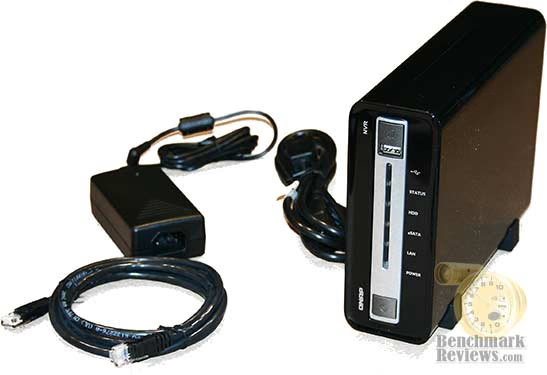
Separately boxed inside the main box are the two wireless infrared cameras. Two mounting stands and the required hardware to connect everything. The power cord for each camera is a little short at around 6ft and has a small power brick at the plug end. The cameras themselves are very small and light and the weight of the cord has a tendency to present difficulty when placing the cameras.
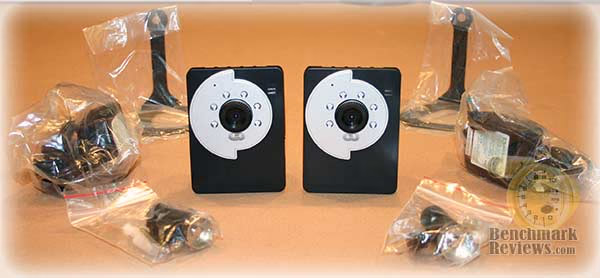
The front of the NVR-101 unit has six very small but quite bright led lights. While the blue power and USB lights are fine, the HDD and the LAN light are reminiscent of a 70's disco party. The little orange LAN light seems to blink in the neighborhood of 10 times a second and is very bright. A USB 2.0 port, power button and one touch copy button round out the front of the unit.

The cameras included with the QNAP NVR-1012 kit are actually quite small and very light. They are a flat black with a flat silver front ring. While there is nothing really wrong with the looks of the little cameras, they just really don't look like they are in the same league of build quality with the main NVR-101 unit.

So far, the QNAP NVR-1012 Surveillance Kit's initial impression has left me feeling confident with the exterior appearance of the main NVR-101 unit which seems in line with QNAP's usually high quality NAS units and a little concerned about the cameras.
QNAP NVR-1012 Surveillance Kit Detailed Features
The heart of the QNAP NVR-1012 Surveillance Kit is a basically a standard single drive QNAP NAS unit. Keep in mind, that given we are looking at a QNAP unit, that is a very good thing. QNAP NAS units are usually well constructed, nicely finished and performance is usually very impressive. The front of the unit is clearly labeled and for the most part self explanatory. You have your power button, an USB 2.0 port, and a one touch copy button to backup your data to an external USB drive. As I mentioned earlier, there are also 6 multicolored LED lights to monitor the activity of the main unit. These lights are quite bright and will catch attention.

The back of the unit is also simply configured. You will find a small port for the power jack, Kensington lock connector, a standard Ethernet port, two USB ports, and a welcome addition of an eSATA port. There is also a small exhaust fan to keep the drive cool.

The unit arrives empty so you will need to install your own hard drive. A list of tested drives can be found on QNAP's website and it lists up to a 1TB drive as supported. This is most likely not the upper limit, it's just that currently 1TB is the largest drive available. The top of the case will simply slide off allowing you access to the mounting bay for your hard drive. While mounting the drive will require four small screws that have been supplied by QNAP, the process is very simple and given that we are dealing with a SATA drive, all that is required is simply to make sure the drive's power and data ports are lined up and gently push. Tighten the four screws and close the cover and your done.

The QNAP NVR-1012 Surveillance Kit is basically two products boxed together. First you have a standard QNAP NVR-101 main unit plus QNAP has added two wireless network surveillance cameras. The supplied cameras are quite small but would not be considered micro cameras. These are not going to be cameras you hide in the stuffed animal's eyes, or sit inconspicuously on the shelf. At a little larger than a folded Dollar bill, and with 6 glowing infrared LED lights you will notice these cameras. The front of the camera has focus ring that allows for manually focusing on your covered area. The six infrared lights will kick in when it gets dark and glow red.
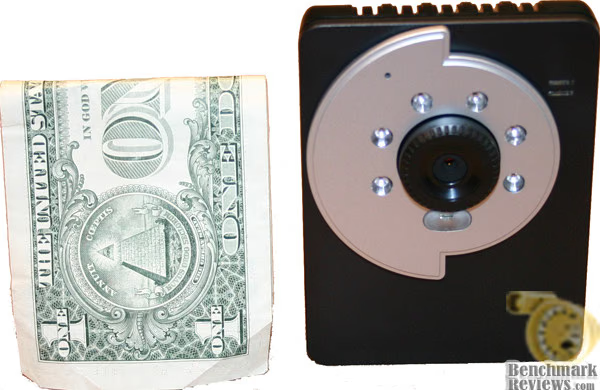
The back of the camera consists of a power jack, network jack, and an external antennae port. A small external antennae is supplied and easily attaches to the camera allowing it to work with any 802.11b/g wireless network.

After close inspection of the QNAP NVR-1012 Surveillance Kit I was left feeling confident with the build quality of the main NVR-101 unit and very skeptical with the build quality of the cameras. They just feel cheap. Trying to get them to stay aimed at the location I want covered with the weight of the power cord pulling on them was very difficult to accomplish. Once the cord was plugged in, even if the cord was flat on the same surface as the camera, it would still cause the camera to twist. My temporary solution was to place a heavier object on the cord and use the stiffness of the cord to keep the camera aimed at the target location. This problem disappears when you use the supplied mounting attachments for the camera, but that adds to the footprint of the camera.
Testing Process
Since this is the first surveillance system that Benchmark Reviews has had the opportunity to review I decided my focus would be more on function for the intended consumer for this product rather than a typical product comparison. My focus would be on multiple factors. First, how easy the system was to setup, second, how easy the system was to operate, and third how well the system performed in real world use. Given that this product is intended for the home user or the SOHO user I tried to approach all three of these factors from a vantage point of the typical user.
The first step involved testing the main NVR-101 unit. I ran the entire setup procedure three times through and tried them on two separate browsers. The second step involved setting up the cameras. Both wired and wireless were tested and both Internet Explorer and Firefox were tested. The cameras were tested in multiple locations under varying light conditions and tested at multiple distances from the wireless router. The third step involved testing how the cameras and the main unit operated together. Finally the fourth step involved testing the software from both local access and remote access.
Please realize that testing a unit like the QNAP NVR-1012 Wireless Network Surveillance Kit is a very subjective process. Unlike a video card test or a hard drive benchmark or even a NAS review, there are really no benchmarks to run where you can look at an end number and say "that is a good number" or "that really sucked". Reviews on items such as the NVR-1012 can vary significantly from one reviewer to the next and both may be accurate and honest. It really depends on the perspective of the individual performing the review as to what is "good" and what is "bad". I will try to give you at least an idea of what I deemed important going into this review and factors that I took into considerations when making my determinations.
-
Given that this product may list at close to $1,000 and I don't view that amount as pocket change, I have fairly high expectations as far as quality goes.
-
I'm making the assumption that this product would typically be installed in a home or small office.
-
I am trying to approach the installation and the operation from a vantage point of the typical end user. Any complications to either will be a rather large negative strike against the score.
-
Given that the cameras have been preselected by QNAP for this package I would expect them to perform properly with the NVR-101 unit without issues.
-
I will probably hold the cameras to a slightly higher degree of scrutiny in all aspects given that the end user is essentially relying on QNAP's expertise in picking the perfect camera for the package at this price.
-
To me, probably one of the most important functions of a security systems occurs after an incident. It may be your only source of proof as to who did what. The quality of the recording may be crucial in proving the guilt of the perpetrator. A blurry image most likely would mean no conviction and no recovery. Image quality must be acceptable.
-
While extra features might be nice, I'm more concerned about the functionality of the main features than I am the extras.
Testing Methodology
Although the QNAP NVR-101 technically does support RAID by combining the internal hard drive with an external eSATA drive, we have always tested NAS devices using a single drive configuration.
Test System Hardware
-
Motherboard: ASUS P5K-E
-
Processor: Intel E8400 Core 2 Duo 4.00GHz
-
Video: 8800GTX
-
O/S Hard Disk: Western Digital 150GB 10,000 RPM SATA
-
Browsers: Internet Explorer 7 and Firefox 3
-
Router: Linksys WRT54GL w/ DD-WRT v24. Transmit power at 70
-
NAS Hard Drive: Western Digital WD1600JD
-
Operating System: Windows XP Professional SP-3
Testing Results
I will break the testing results into four sections: NVR-101, Cameras, Software, Performance. Each section will mention both the strong points, weak points and my personal opinion.
NVR-101
The main unit of the NVR-1012 is the NVR-101 which QNAP sells by itself for around $600. As mentioned earlier, this unit is a very solid single drive NAS style device. QNAP has an excellent track record when it comes to NAS devices and the NVR-101 is no exception. It's loaded with all the standard features you would expect such as gigabit Ethernet, USB 2.0 ports and an eSATA port. Don't expect standard NAS software however, QNAP has chosen to strip the NVR-101 bare as far as NAS software features are concerned.
Setup on the NVR-101 went smooth for the most part, with one exception which I will get to later. The actual hard drive installation is extremely easy and even a complete novice should have the device assembled in no time. The configuration for the device is handled by a very simple piece of software that "finds" all QNAP storage devices on your network and by clicking on the NVR-101, which in my case was listed as "NVRACCB0C", you will start the step by step wizard. The questions are very simple and straight forward and in a series of steps you will be asked for the name you would like for your server, password, date and time format, whether you would like to use DHCP or if you would like to enter your IP manually, and it will have you configure your hard drives. For the most part this wizard goes very smoothly until you get to the camera selection. The manual for the QNAP NVR-101 simply tells you to select your cameras from the drop down list of camera models and add them to the server. The problem is that I couldn't find a name on the drop down camera list that matched anything listed in the camera manual or on the cameras themselves. It was only through trial and error that I eventually discovered that the supplied cameras are listed as "iPUX ICS 10x3". I think this is a fairly large oversight on QNAP's part to not have the quick configurations steps for the NVR-1012 kit that will always come with the exact same cameras not mention in specific detail which camera you should choose.
One thing I should note is that you are required to first configure the cameras prior to adding them to the NVR-101. The main unit will need to know the IP address, user name, and password of each camera and that requires complete configuration of each camera. This order requirement is understandable but may have you jumping back and forth between configurations. Needless to say my second run though setting up the NVR-101 went much smoother than the first, given that I knew what cameras to select and that the cameras were already preconfigured.
After I finally figured out which camera models to select (and after I configured the cameras) I was instructed to wait while the NVR-101 formatted the hard drive and rebooted itself. From this point on, you will control the NVR-101 from your browser. This is where I ran into my second frustration, while the NVR-101 can be configured in Firefox, the main viewing panel for the cameras refused to work as it requires ActiveX. I was required to load Internet Explorer in order to view the camera streams.
This gets me to third problem I ran into. Once I figured out that I was required to load the video control panel in Internet Explorer I was greeted with two black images with permission errors. I double checked the camera settings a checked the camera stream by using the camera software which I had already installed while configuring the cameras and everything seemed to be working fine with the cameras but was still getting the permission error. I made a second read through both the NVR-101 manual and the camera manual and found nothing that explained why I was getting this error. Again through trial and error I was able to solve the issue and the solution is of course one that makes you go "makes sense". While you are requested to enter the user name and password when selecting your cameras from the drop down list, which I did, you are also required to enter a "user" for the NVR-101 that matches the "user" name of the camera and the password associated with that camera. Again, this makes perfect sense, however it was never mentioned in either the NVR-101 manual nor the camera manual. I have set up numerous NAS boxes and Linux servers and completely overlooked this requirement, especially given that I had already been asked the user name and password for the cameras by the setup wizard. I can only imagine how a typical first time user would struggle with this issue. Again, I have a big problem that QNAP has left this out of a quick install manual given that this step will be an essential step in configuring the supplied wireless cameras with the NVR-101.
Once the camera "user" was added to the NVR-101 everything was finally up and running.
Cameras
Setting up the supplied wireless cameras is actually quite easy. Configuration did require me to use a wired Ethernet cable as my wireless is security enabled. The cameras will try and default to a standard IP address of 192.168.0.30. The install cd has two pieces of software, one is an IPFinder similar to the one used for the NVR-101 and the other is a camera control software called Ultraview. After installing the IPFinder software I was able to locate the camera and open the browser controlled configuration page. Again you are greeted with a fairly straight forward setup wizard that allows you to name the camera and describe the location you will be placing the camera, give it a user name and password and set the IP address if desired. Once the wizard is complete the camera will reboot and it's ready to run. Simply repeat the steps for the second camera and your in business. Extremely easy setup and everything seemed to go smooth without any problems.
Each can be controlled and viewed by entering the IP address in a standard browser. No ActiveX here so Firefox worked fine. The basic page allows you to see a "Live View" or adjust the camera configuration settings, such as network, video, audio, motion detection. Most settings are pretty straight forward and for the most part should be easy for the average user to manage.
The camera manual is actually pretty informative and will walk you through the simple steps of configuring the camera and getting the camera to work with the supplied camera software "Ultraview". Please keep in mind that I said "Ultraview". This has nothing to do with the QNAP software which your NVR-101 will be using.
I was a little surprised to learn that the cameras actually support two way audio. I don't know how often this feature would actually get used, but I guess for those that do need to talk to someone in the covered area it might be nice. As far as the sound recording goes, the microphones do an adequate job of picking things up.
Each camera has six infrared lights on the front to allow for nighttime recordings. These work ok for letting you know that something is moving around in the room at night. You will be able to make some details about the object moving around but don't expect much. These are very limited range of focused view cameras to begin with and nighttime only makes matters worse. As with any infrared, they actually work best in total darkness. Having a single light on may render the night time view useless. And of course you can't view through a window with nighttime view on. Some of these issues are the camera's fault and some are not. Infrared has it's limitations and even the very expensive cameras are going to be bound by some of these limitations.
Wireless configuration was also very easy. Simply enter your wireless security settings for your router and reboot the cameras. Worked without a hitch and bandwidth never seemed to be an issue on the recordings. Given that we are dealing with VGA resolution at best this should not be a surprise running on an 802.11g wireless network. While the ease of setup for the wireless was impressive, the range was not. I'm using a modified Linksys router that has the transmit power boosted. My home is around 5,700sqft I have I have no problems getting a good signal throughout the house with every notebook or wireless device I try. This was not the case with the wireless camera reception however. The problem with a wireless network is that it is only as good as its weakest link. While my router may have an extremely strong signal going out, the usable range for the camera relies more on the transmit power of the camera's wireless power output, which in this case was not very strong. My router is located on a lower level approximately 20ft from one end of the house and 80+ feet from the other end of the house through a floor and many walls. When placing the camera in the distant locations, the camera would register a connection but would not transmit a stream. This may not be an issue for you if the area you are wanting to cover is closer to your router or if have less obstructions between it and the cameras. Can't really fault the cameras here too much given that they are limited by both the wireless technology and the transmit power restrictions, but still may be an issue for you to consider given that you are essentially paying for wireless technology that you may not be able to use.
rTesting Results Continued
Once I had the cameras setup and placed them in various locations, I started playing around with some of the configuration settings offered. One of these that is that is a very important feature is the motion detection. What this allows is for you to configure two separate motion "boxes" that the camera will monitor for motion. You can adjust the sensitivity for each box separately. When the camera detects movement that exceeds the sensitivity setting you selected it will save the recording. You select how long it will record after it detects movement. It also has the option to email you a notice of the triggered event. Great feature and when used with the Ultraview software it works great. However, this is another issue that caused me hours of grief. As I will cover later, the software for the NVR-101 also includes some very advanced motion detection features, one of which is to not only record the motion but it will allow you to select to record the video for a user selected number of seconds before the motion occurred. I guess this would be comparable to how a TIVO allows your to rewind and then start the recording. So, if something triggered the motion sensors on your cameras, the recorded video would start at least 30 seconds before the event that triggered it, record the entire event during the motion, and record a set number of seconds after the motion stops. Sounds like a great feature doesn't it. I can tell you I wasted hours trying to get this feature to work. I read the manual for both the NVR-101 and the camera for a third time, and a forth time, and maybe more trying to figure out why nothing would ever record on the server when motion occurred. It wasn't until I read the detailed features on the QNAP website for the cameras included with the NVR-1012 kit that it mentions that the included cameras are not compatible with the NVR-101 for motion detection.
So basically while both the camera and the NVR-101 support motion detection, and it is arguably one of the most useful features of both, you will not be able to use it under the NVR-101 software. You might be able to configure a work around using SAMBA sharing under the camera configuration and by having the Ultraview software running on one of your PC's but doesn't this defeat the entire purpose of buying the NVR-101? I was extremely disappointed when I discovered this incompatibility. I personally think this is entirely unacceptable for QNAP to select cameras that will not work with what I feel is one of the most important features of the NVR-101. Let me explain why I feel this way. A security system like this one, aimed at possibly a home user is for the most part going to be monitoring areas with no movement. If something happens that someone wants to review with the motion detection option they can simply review the video of the captured motion. Without the motion detection option, they are required to review all the recordings that took place after a point in time that they know occurred prior to the event they want to view. This may mean they review a days worth of video, so maybe 8 hours, but if the event happened say during a vacation, they may have 7 days worth of video with no idea of when the event they want to see happened. Not to mention that recording constant video streams on multiple cameras really eats up the storage space.
Software
The main software that comes with the NVR-101 is very simple yet packed full of advanced features. Once you finish with the setup wizard and the NVR-101 reboots, you can then open your Internet Explorer browser windows to the http address of NVR-101. The main page lets you view the live image of your connected cameras. You can view them all at once, you can view them one at a time, you can view them in a basic PiP format where you select stream to set as the large image and have smaller windows displaying the other streams, you can view them in a windows or in full screen, or you can have it display a sort of slide show of the different streams. If you camera supports it, which the supplied camera do not, you can even control the pan and zoom of your individual cameras. The main page has a very simply pie graph displaying your amount of storage space available on your hard drive. You can take a snapshot image of any selected camera and can monitor the sound from any of your selected cameras.
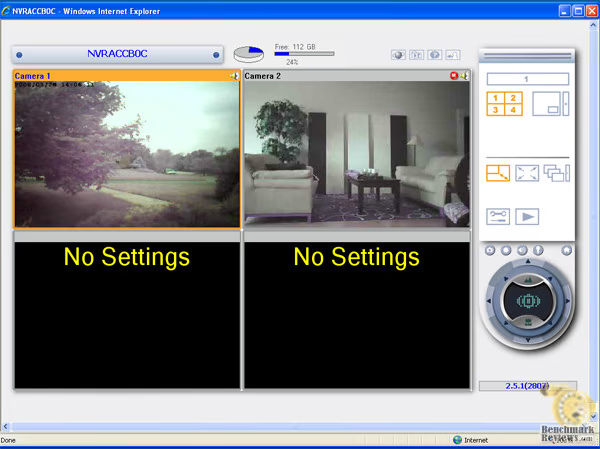
Pushing the small play button takes you to the search page for your saved recordings. This may be a little confusing at first given that upon pushing the play button you will be taken to an list containing no recordings. This is actually a search page. You will need to enter a start time, end time, select the desired camera, and then click the magnifying glass in order to display the results.
Once you have selected your search criteria, you will be presented with a multi-page list of results. Each recording is labeled based on the time the recording was made. You are given the option in the configuration page of the NVR-101 to select the default length of each recording segment. So if you set it to 1 minute you will have 1,440 individual recordings available for view for any given day, if you set it to 10 minutes, you will only have 144. As I pointed out earlier this can be a huge pain to sort through trying to find the recorded event you are looking for.
Viewing the recorded event is very simple and can easily be performed right from the web browser after you complete your search. Simply click the "play" icon next to the corresponding recording that you want to watch it and it will stream to the small windows in your browser. Keep in mind that this will require a buffer and while a 10 minute recording setting might be easier to manage for searching it makes streaming over the Internet for remote view much more difficult with the standard DSL or cable modem connection, one minute recordings work fine remotely though.

Moving a little deeper in the NVR-101 software takes us to the configuration pages. Here you can add users, cameras, hard drives, and configure your recording options. With the cameras supplied with the NVR-1012 kit you are pretty much limited to full time recording only. You can set schedules for record times say to only record during hours your at work, or at night, but for the most part you are going to be generating a lot of small recordings.
As I mentioned earlier, one of the most useful features of the NVR-101 is the Alarm setting recording options. Here you can configure your server to monitor your cameras for any movement. Upon detecting movement the server will save a recording of the movement, plus 30 seconds before the movement and 30 seconds after the movement has stopped. You can adjust the amount of time to record before and after the movement up to 999 seconds, however, the default 30 seconds seems pretty reasonable. Of course due to QNAP choosing to package the NVR-1012 kit with cameras that are not compatible with this feature you will have to purchase more cameras in order to take advantage of this. Again, I feel this is unacceptable.
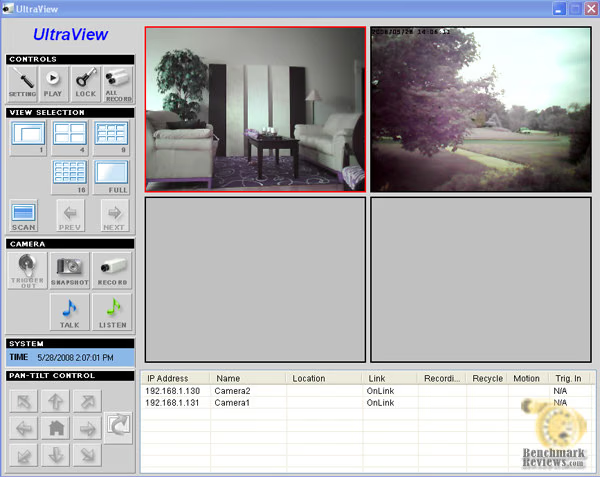
Next I took a look at the software included with the camera called UltraView. UltraView is actually a pretty slick piece of software. Similar to the software built-in to the NVR-101, UltraView allows you to monitor multiple cameras at once, allows you to take snapshots, listen or talk to the camera, and make manual recordings. It looks like the software also supports pan-tilt control however the supplied kit cameras do offer this feature. With the UltraView software running, the motion detection features that I enabled earlier on my cameras are now working, however they will only save to the directory listed in UltraView. While it may very well be possible to map the recording path to a samba share on the NVR-101 server, that seems to be defeating the primary purpose of paying $600 for the NVR-101. One, it requires you to have your computer running, and two, there are much cheaper options than $600 for a single drive NAS storage unit. While the software does support emailing you a notification of a motion alarm recording, it does not give you an easy way to remotely access that recording.
So while the UltraView software may be slick looking and a nice option for monitoring your cameras while you are home, it has limited functionality for full time monitoring.
QNAP NVR-1012 Performance
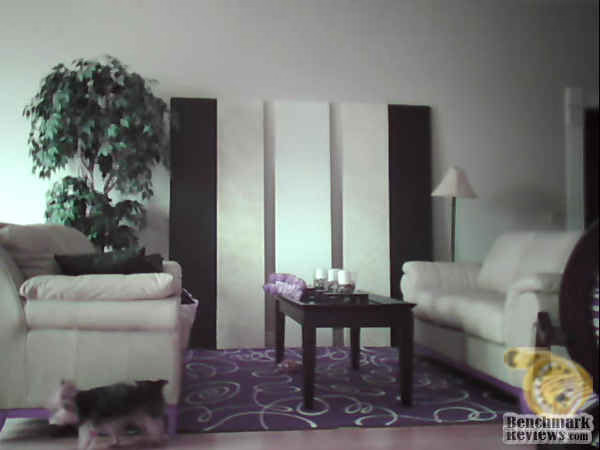
Finally, I wanted to take a look at the quality of images you can expect from the NVR-1012 kit. The first image I have included is probably what could be considered best case scenario. I brightly naturally lit room. The colors are far from accurate when you consider the rug in the picture is actually black and white. Focus on still objects seems to be ok, but if you look in the bottom left hand corner of the screen you will see my dog slowly walking across the room and which causes her to appear out of focus. Acceptable, but not good by any means, even under the best case scenario. Unfortunately, things go downhill from here.
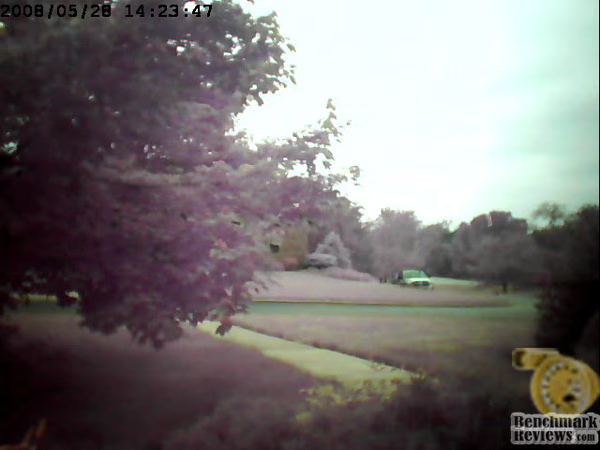
The next picture is of my front walk. Colors are very washed out during a bright day. Useful to see images, but detail might be hard to make out. Since this camera location views through a window, it is entirely useless at night. The infrared will reflect off the glass windows and all you see is a bright glare. Keep in mind that these cameras are considered 5 meter cameras so they are not intended to focus on items more than 15ft away. In my opinion, this is not an acceptable result for a $1,000 unit.
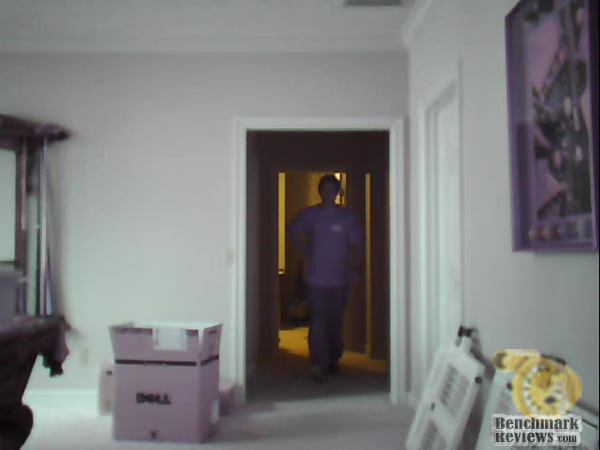
The final image is the one that really disturbs me. This is shot during the day in my basement. The room was adequately lit with natural light, not bright, but definitely not dark. The subject in the picture is approximately 18ft away in the picture. Keeping in mind that these truly are 5m focus cameras you can see that this would create a problem trying to prove the identity of someone in your house. While it is obvious an individual is there, and while you might be able to make out that the individual may have dark hair, you can't tell much more about them, even whether they are male or female. (Actual color of the shirt they were wearing is dark blue, not purple) Good luck getting a successful prosecution using this snapshot.
While the cameras included in the kit may have some nice features, even though those features are not fully compatible with the NVR-101, the image quality is not much better than my generic $40 infrared wireless baby monitors. When you consider that these cameras retail for over $200 each, I am far from impressed.
Surveillance Kit Final Thoughts
I ended up with very mixed feeling about the QNAP NVR-1012 surveillance kit. The main NVR-101 unit seems to be a very nice product with some useful features, it is well constructed and simple to use. The cameras supplied were very easy to setup and also offered some nice features. However, there were numerous problems. While the NVR-101 has some very nice features as a surveillance server, I feel let down that QNAP decided to leave out almost all of their standard NAS utilities. Given that this is marketed towards the home user, it would be nice if the NVR-101 could pull double duty as not only a surveillance server but also as a standard NAS server. Sure you could add some extra folders in the default shared directories, but given how nice the standard QNAP NAS software is this is a huge letdown. A standard QNAP TS-109 Pro II NAS box runs around $330, the NVR-101 runs around $600. There should be no reason that the NVR-101 doesn't have at least the standard NAS features built in.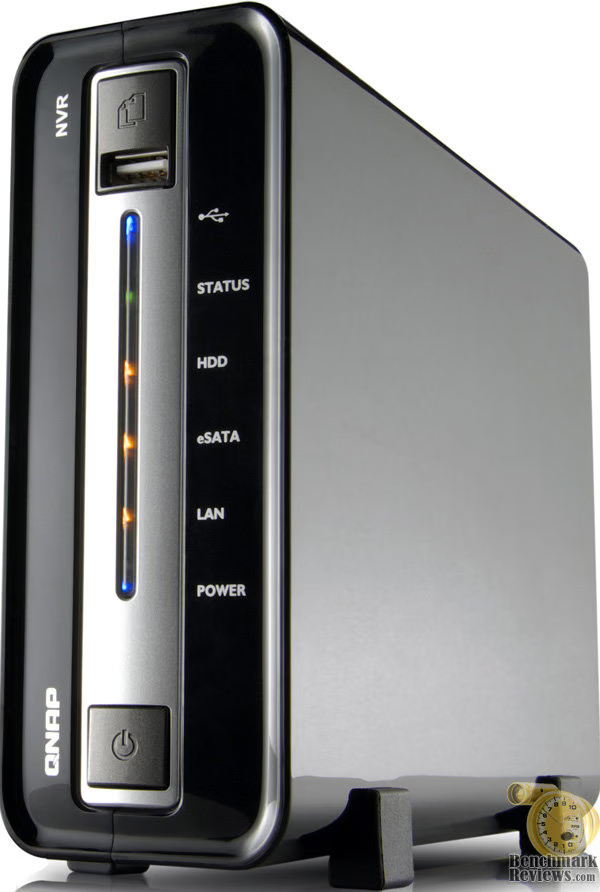
Then we get to the problems with the cameras. While they may have some cool features, at the end of the day I was very let down by not only the incompatibility of the motion activated recording features, but also by the recording quality. I realize that the cameras are only rated as 5 meter focus cameras and to knock them down because they don't offer a clear image of subjects further away may be unfair, but, it defeats the purpose of having a security system if the recordings can't be used as evidence to adequately identify the subject. Bottom line is that these cameras are fine for baby monitors, or monitoring your pets, or to some extent might be fine as a nanny cam, but for overall security monitoring I would highly recommend purchasing better cameras.
One of the main reasons of buying a bundled package is that the consumer is relying on the manufacturer's expertise in choosing the cameras. To put this in perspective, if a corporate customer hired a professional to install a security system, and it was that professional's responsibility to not only install the system but to choose the best products for the job, what do you think the customer's reaction would be when they were informed that the main unit chosen had some really advanced motion activated recording features, and the cameras chosen had some really advanced motion activated recording features, but unfortunately, they would not be able to use these features due to an incompatibility? Something tells me that this wouldn't go over very well.
QNAP NVR-1012 Conclusion
Our rating of the overall packaging and presentation is somewhat high, as QNAP has done an excellent job of educating consumers with plenty of box-top information so they can make an informed purchase. It might result in a little information overload but I would rather have to many specifications listed than not enough.
Rating the appearance of the NVR-1012 kit is a little difficult in that there is essentially two products involved. The main NVR-101 unit rates very high in appearance. It is a sleek looking little box with a nice finish. I could do without the flashing lights blinding me, but in all other respects very nice. The cameras failed to impress me. They are extremely light weight and basically look cheap to me.
Construction of the NVR-1012 kit is similar to the appearance rating. The main NVR-101 unit seems to be a solid little unit. The hard drive mounts securely, a fan keeps the drive cool, no complaints at all. The cameras are very lightweight and without using the mounting attachments, they are virtually impossible to position without them moving around on you.
The functionality rating is where the NVR-1012 kit falls a little short. Both the NVR-101 unit and the cameras offer some really nice features individually, but the incompatibilities between the two are inexcusable given that QNAP chose to put these two products together. I also feel a little let down that the NVR-101 unit lacks the great QNAP's NAS features. And if that weren't bad enough, we still have to consider the short focus distance of the cameras.
While the NVR-101 by itself is not a bad value, it could be a much better value if QNAP would unlock the standard NAS features. However, the product being reviewed here is not just the NVR-101 but the NVR-1012 kit. Adding an extra $300 to $400 to the price of the NVR-101 gets you two lightweight, not fully compatible, extremely short focus ranged cameras. Presently you can find a few online retailers listing the QNAP NVR-1012 for around $949. Not the best buy in my book.
I commend QNAP on realizing the need for a complete security kit. There is a growing demand for home security systems, and with the overload of products on the market it is quite a daunting task for the typical consumer try to piece together a security system from individual parts, install them, and hope everything works well together. I do feel that QNAP may not quite be there yet with this current kit. I would much rather a kit be a little overpriced but include the "best" choice for the consumer rather than package a nice server with a couple of budget cameras and still charge almost $1,000. The typical home, SOHO consumer doesn't have the budget the larger corporate customer does. I would imagine that while a $1,000 security system for a large business of course would be a joke, the typical home consumer sees this as a fairly large expenditure. I personally would be very disappointed with the quality of the cameras if I dropped close to $1,000 on this kit.
Pros:
+ Qnap quality NVR-101 main unit.
+ Easy to configure both the cameras and the main unit individually.
+ Easy to configure the wireless and it works well over short ranges.
+ NVR-101 software is easy to use and allows for some pretty advanced monitoring.
+ Remote streaming works well.
+ Ability to have the unit email you in the event of a motion recording event.
Cons:
- Incompatibilities between the camera and the main unit prevent the use of motion activated recordings.
- Severely crippled NAS features.
- Documentation does not address conflicts between cameras and main unit, can be difficult to configure main unit to handle cameras.
- Recording quality is poor in all but the best case scenario.
- Wireless range is very limited.
Ratings:
-
Presentation: 9.25
-
Appearance: 8.50
-
Construction: 8.50
-
Functionality: 7.50
-
Value: 7.50
Final Score: 8.25 out of 10.
Questions? Comments? Benchmark Reviews really wants your feedback. We invite you to leave your remarks in our Discussion Forum.